


Agent Harness: What It Is and How to Build One
A frontier model can reason, but it cannot run a task on its own. It has no memory between calls, no way to execute the code it writes, no record of what it tried five steps ago, and no mechanism to check whether it succeeded. The agent harness is the layer that supplies all of that, turning a stateless model into something that can work a multi-step job to completion. As agents move from demos to production in 2026, the harness, not the model, is increasingly where reliability is won or lost. This guide covers what a harness is, its core components, why long-running agents fail without one, the data layer that feeds them, and how to design your own.
What is an agent harness?
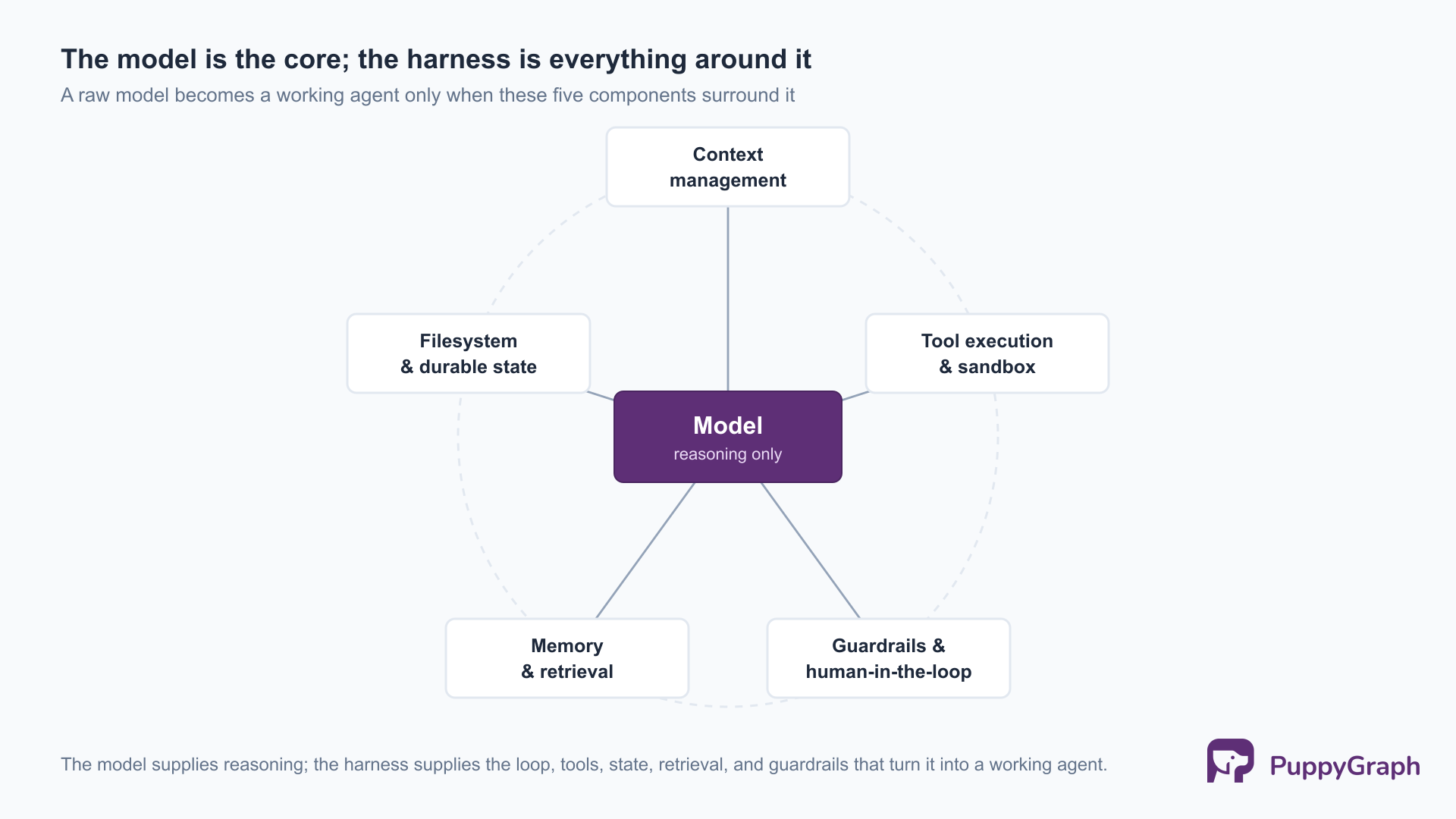
An agent harness is the software layer around a large language model that turns it into a working agent: the orchestration loop, tool execution, context and memory management, persistent state, and guardrails. The model supplies reasoning; the harness supplies everything the model needs to act on that reasoning, observe the results, and keep going, a division LangChain lays out in The Anatomy of an Agent Harness.
The split matters because the two parts improve on different clocks. The model is a fixed artifact you call over an API; the harness is code you own, where you decide what the model can see, what it can do, what happens when it is wrong, and when it should stop. A capable model inside a thin harness behaves like a brilliant contractor with no tools and no notes; inside a well-built harness the same model can sustain a long task, because the harness carries everything it cannot hold by itself.
Agent vs. harness vs. framework vs. SDK
These four terms get used interchangeably and are not the same thing. They nest, each wrapping the one before it.
Read from the inside out, the relationship is clean. The SDK is a thin client over the model endpoint. A harness wraps that SDK with a loop, tool execution, and state, which is what actually produces agentic behavior. A framework is an optional toolkit for building a harness, not a requirement: you can build one directly on an SDK with no framework at all. The practical takeaway is that “build an agent” almost always means “build a harness,” and whether you assemble that harness from a framework or from scratch is a separate, downstream choice.
Core components of an agent harness
Every harness, whether hand-rolled or built on a framework, converges on the same five components. Each one covers a failure that the others do not, and the interesting engineering is in how they interact over a long task.
Context management (and battling context rot)
The context window is the model’s working memory, and it is finite. Every tool result, every prior turn, and every retrieved document competes for the same budget. As a session grows, two things degrade: the window fills and older information is evicted, and model attention thins across very long inputs so relevant tokens get crowded out by accumulated noise. Practitioners call the second effect context rot. A harness manages it actively, through compaction (summarizing old turns into a compact record), scoping (loading only what the current step needs), and retrieval (pulling context on demand rather than holding all of it in the window). Good context management is the difference between an agent that stays coherent over fifty steps and one that loses the thread by step ten.
Tool execution and sandboxes
Tools are the functions a model can call to affect the world: read a file, run a query, call an API, execute code. The model only emits a structured request to use a tool; the harness actually runs it, captures the result, and feeds it back into the loop. Because tool calls have real side effects, execution usually happens in a sandbox, a container, a virtual machine, or a restricted filesystem that bounds what a single call can touch. Code-executing agents need this most: a model will occasionally generate a destructive or runaway command, and the sandbox keeps that contained to a disposable environment instead of the host.
Filesystem and durable state
A context window cannot hold everything an agent learns over a long task, so the harness gives it external storage, and the simplest durable form is a filesystem. The agent writes intermediate results, notes, and plans to files, then reads them back later, using the filesystem as a scratchpad that outlives any single model call. This is how a coding agent tracks progress across a long job, and how state survives a context compaction or a session restart. Durable state is also what makes a run inspectable and resumable: it can be paused, examined, and picked back up rather than restarted from zero.
Memory and search
Beyond a single session, agents need long-term memory: facts, past decisions, and domain knowledge to retrieve when relevant. This is the retrieval layer, where much of an agent’s production effort goes. The standard approach embeds documents into a vector store and retrieves the chunks most similar to the query, one of several retrieval-augmented generation techniques in common use. Similarity search works well for “find me text about X,” but it is weaker when the agent needs the relationships between facts rather than the facts themselves. Asking “which factories supply the materials in this customer’s delayed orders” returns related-sounding passages without the connective structure that answers the question, a gap important enough to warrant its own section below.
Guardrails, hooks, and human-in-the-loop
The last component governs what the agent is permitted to do. Guardrails validate an action before it runs, so a tool call that would delete data, spend money, or touch a protected resource can be blocked, rewritten, or escalated. Hooks are interception points in the loop where the harness can attach a check, a log, or a transformation around any step. Human-in-the-loop is the strongest guardrail of all: the harness pauses and asks a person to approve a consequential action before continuing. Claude Code’s permission modes and hook system are a concrete instance of this pattern, gating file writes and shell commands behind configurable approval.
These five are not a menu; a working harness needs all of them, because each closes a different failure mode the others do not. What separates a demo from a production agent is how well they hold up not on one call but across a long sequence of them, which is the next section.
Why long-running agents fail without a harness
A single-shot prompt either works or it does not, and you see the result immediately. A long-running agent makes a long sequence of decisions, and the ways it fails are different in kind, not just degree. A harness exists to counter each of them.
Error compounding. A fifty-step agent makes fifty decisions, and an error in step three becomes the input to step four. With no mechanism to catch it, a small early mistake compounds into a confidently wrong final answer. The harness counters this with verification loops: after a consequential step, the agent checks its work against an external signal, a passing test, a query returning rows, a schema validating, before moving on.
State and context loss. Over a long horizon the window fills and gets compacted, and anything not written to durable state is gone. An agent that kept its plan only in context will forget it partway through. Harnesses persist plans and progress to the filesystem or a store, so the task survives compaction.
No access to ground truth. A model will report success whether or not it actually succeeded; it has no privileged view of the world it acts on. The harness supplies ground truth through tools that return real results and verification gates that treat a claim of success as a hypothesis to test, not a fact to accept.
Invisibility. When a long agent run goes wrong, you need to see where, and without instrumentation a failed run is an opaque wall of tokens. Structured traces of every decision, tool call, and result are what make a harness debuggable, and observability for AI systems is becoming its own discipline for exactly this reason.
The common thread is that reliability over a long horizon is a property of the harness, not the model: whether errors get caught, state survives, claims get verified, and the run can be inspected when it breaks. The single largest lever on all four is the quality of the context the agent retrieves, which is where the data layer comes in.
The data layer: why harnesses need connected context
The reliability of an agent is bounded by the quality of the context it can retrieve, and the hardest context to retrieve well is relational. Most questions an enterprise agent needs to answer are multi-hop: traversals over dependencies, permissions, and ownership. The default retrieval stack, embeddings over a vector store, flattens exactly that structure.
Why relationships resist embedding retrieval. A vector store answers “what is similar to this?” It does not answer “what is connected to this, and through what path?” A question like “which factories produce the materials behind this customer’s open orders” is a graph traversal, not a similarity lookup. You can chunk and embed the documents that describe those relationships, but reconstructing a precise multi-hop path from a handful of retrieved passages is exactly the kind of task models hallucinate on. The structure the agent needs is real and it exists in the data, but similarity search is the wrong instrument for reading it.
Knowledge graphs and Graph RAG. The structured alternative is to give the agent a graph: entities as nodes, relationships as edges, queried directly. Retrieval over knowledge graphs returns the actual connective structure rather than passages that happen to mention it. This pattern, Graph RAG architecture, lets the agent issue a query that traverses the relationships and gets back a precise, multi-hop answer it can reason over, instead of inferring the path from prose. (For a deeper treatment of the retrieval pipeline, see our GraphRAG architecture deep dive.) The remaining obstacle is operational: the data an agent needs to traverse already lives in relational stores, and standing up a separate graph database to hold a copy of it means building and maintaining an ETL pipeline.
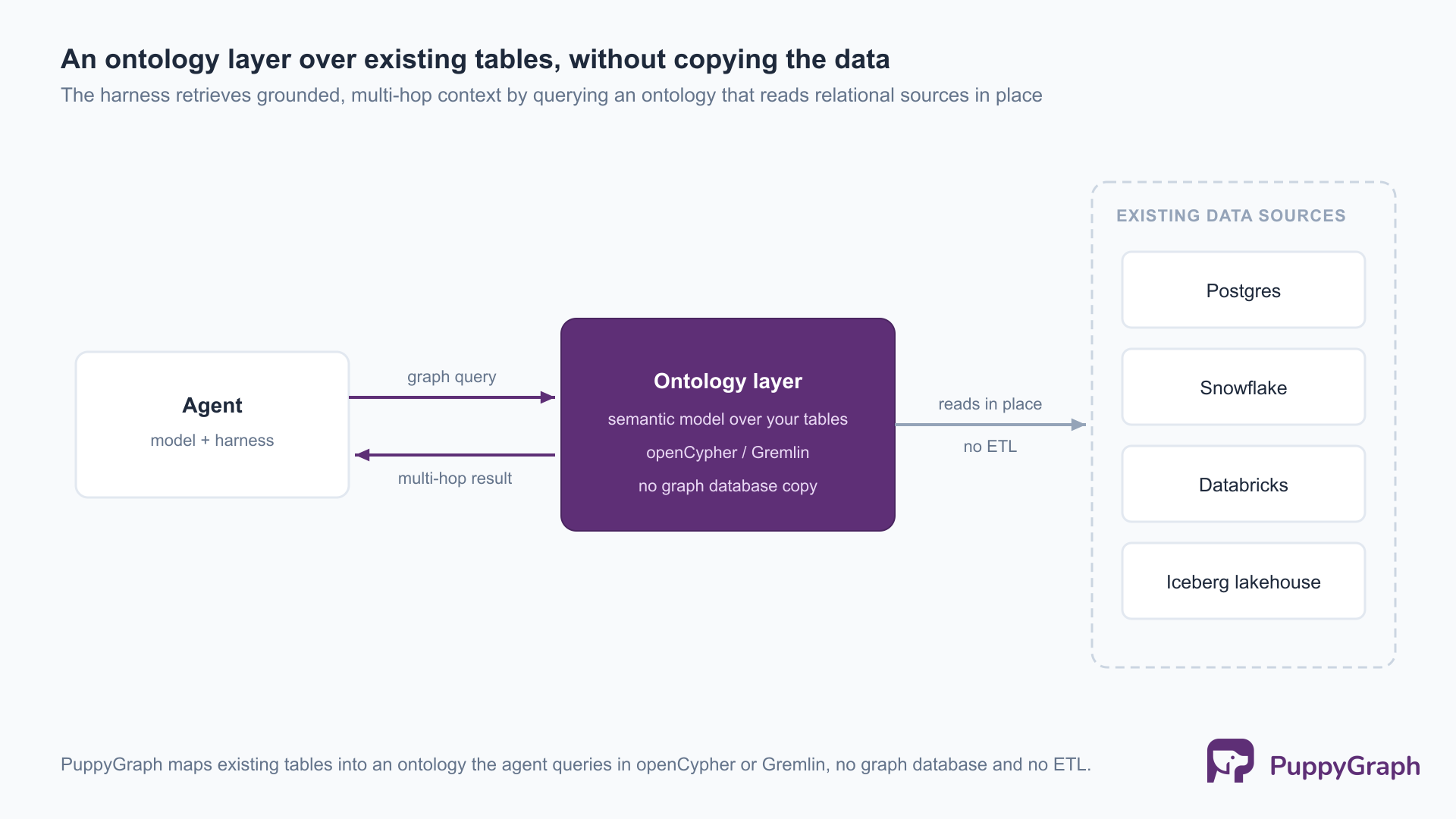
An ontology layer between the data and the agent. This is where PuppyGraph fits into a harness. It sits between existing relational stores and the agent as an ontology layer: you define a semantic model of the entities and relationships that matter, an ontology, over tables you already have in Postgres, Snowflake, Databricks, or an Iceberg lakehouse, and the agent queries that model in openCypher or Gremlin. The ontology is what the agent reasons against, a stable map of the domain rather than a set of raw tables it has to rediscover on every run. The data stays where it lives, so there is no ETL pipeline to build or keep in sync, and the ontology is a live model over the underlying tables, not a copy held in a separate graph database. Underneath, PuppyGraph is a graph query engine: it compiles a traversal into a plan of node and edge operators that execute inside its own engine, rather than translating the query into one large SQL statement pushed down to the source. That is what keeps deep, multi-hop traversals practical instead of leaving their performance bounded by a relational query planner.
A short example of the kind of context an agent would retrieve this way, tracing every factory that produces the materials behind a customer’s open orders:
MATCH (c:Customer {id: $customer_id})-[:PLACED]->(:Order)-[:CONTAINS]->(m:Material)
MATCH (m)-[:PRODUCED_BY]->(f:Factory)
RETURN DISTINCT m.name, f.name
The ontology does double duty for an agent. It is the schema the agent queries against, and it is a grounding contract. Queries are validated against the ontology before they run, so a reference to an entity or relationship that does not exist is rejected with structured, machine-readable feedback rather than returning a plausible but wrong result. That feedback closes a self-correction loop: the agent sees which part of its query was invalid and can repair it, the same gate any harness over an ontology would want for catching queries that are syntactically valid but semantically wrong. PuppyGraph’s built-in AI assistant is a working instance of that loop: you ask in natural language, it generates the graph query, and when a query comes back rejected it reads the structured error and rewrites the query rather than surface a wrong answer.
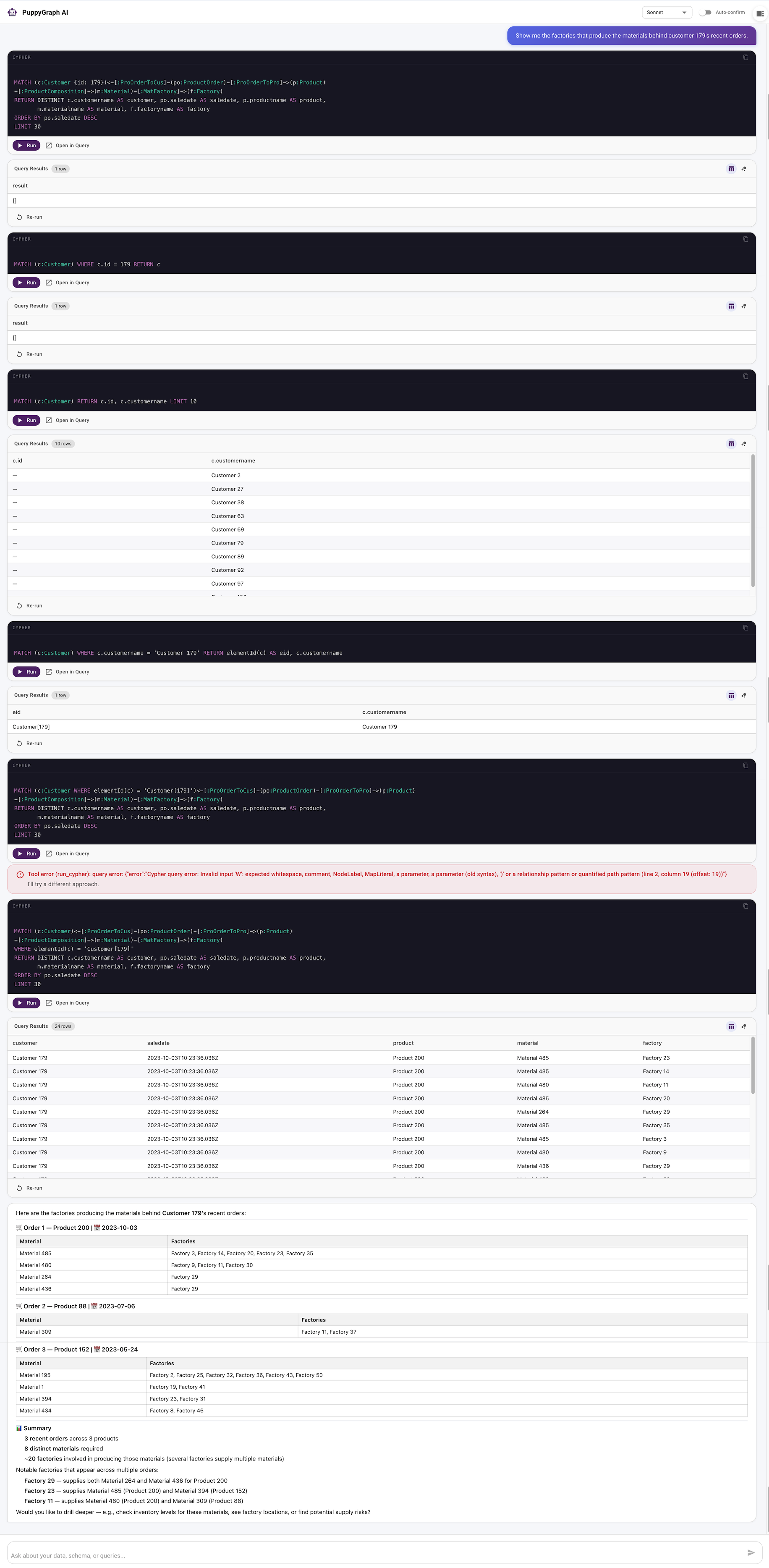
The data layer is not an afterthought; it largely determines the harness’s reliability. Context quality sets the ceiling on how well an agent reasons, and for the relational questions enterprises actually ask, a graph retrieval layer is what raises that ceiling.
Examples of agent harnesses in 2026
The component model above is easiest to internalize by reading real harnesses. A few are worth studying for their structural patterns rather than for copying.
Claude Code is Anthropic’s coding agent harness, shipped as a product. It pairs the model with a tool set (file edits, shell, search), a permission and hook system for guardrails, the filesystem as durable state, and subagents for decomposing work. It is a useful reference for how context management, tools, and human-in-the-loop fit together in something people use daily, though the implementation itself is closed.
Codex CLI is OpenAI’s terminal coding agent, and unlike most shipping vendor products it is open source, under Apache-2.0. That pairing is the reason to study it: you can read the full loop, tool interface, and approval and sandbox model of a production harness end to end, rather than a simplified teaching version.
OpenHands, from All Hands AI (formerly OpenDevin), is the most widely used open-source harness. It runs a complete loop over a shell, a code editor, and a browser through an agent-computer interface, and ships an SDK for building on top of it, so reading it shows how the five components look in a mature, community-maintained codebase.
SWE-agent, from Princeton, is worth reading for one idea in particular: it originated the agent-computer interface, the observation that the tools you design for an agent should not be the same tools you would design for a human. Its companion mini-swe-agent reduces the same idea to a loop of roughly a hundred lines, about the shortest path to reading an entire harness in a single sitting.
AWS Bedrock AgentCore sits at the managed end of the range: the harness offered as a runtime rather than a library. It provides session isolation, durable sessions, and guardrails as platform features, so the same five components are present, but owned by the provider instead of assembled by you.
Across two shipping products, two open-source projects, and a managed runtime, the field has converged not on one implementation but on a shared anatomy, the strongest signal that the component model is the right level to design at.
How to design your own harness
You do not need to start from a framework. You need to start from the behavior you want and work back to the components that produce it.
Working backwards from desired agent behavior
Define the task the agent must complete and the standard for “done,” then derive the rest: what tools it needs to reach that outcome, what context it must retrieve and from where, which steps are consequential enough to verify, and which need a human to approve. Designing forward from a list of components tends to produce capabilities the task never uses and gaps where it matters; designing backward keeps the harness scoped to what the job actually requires.
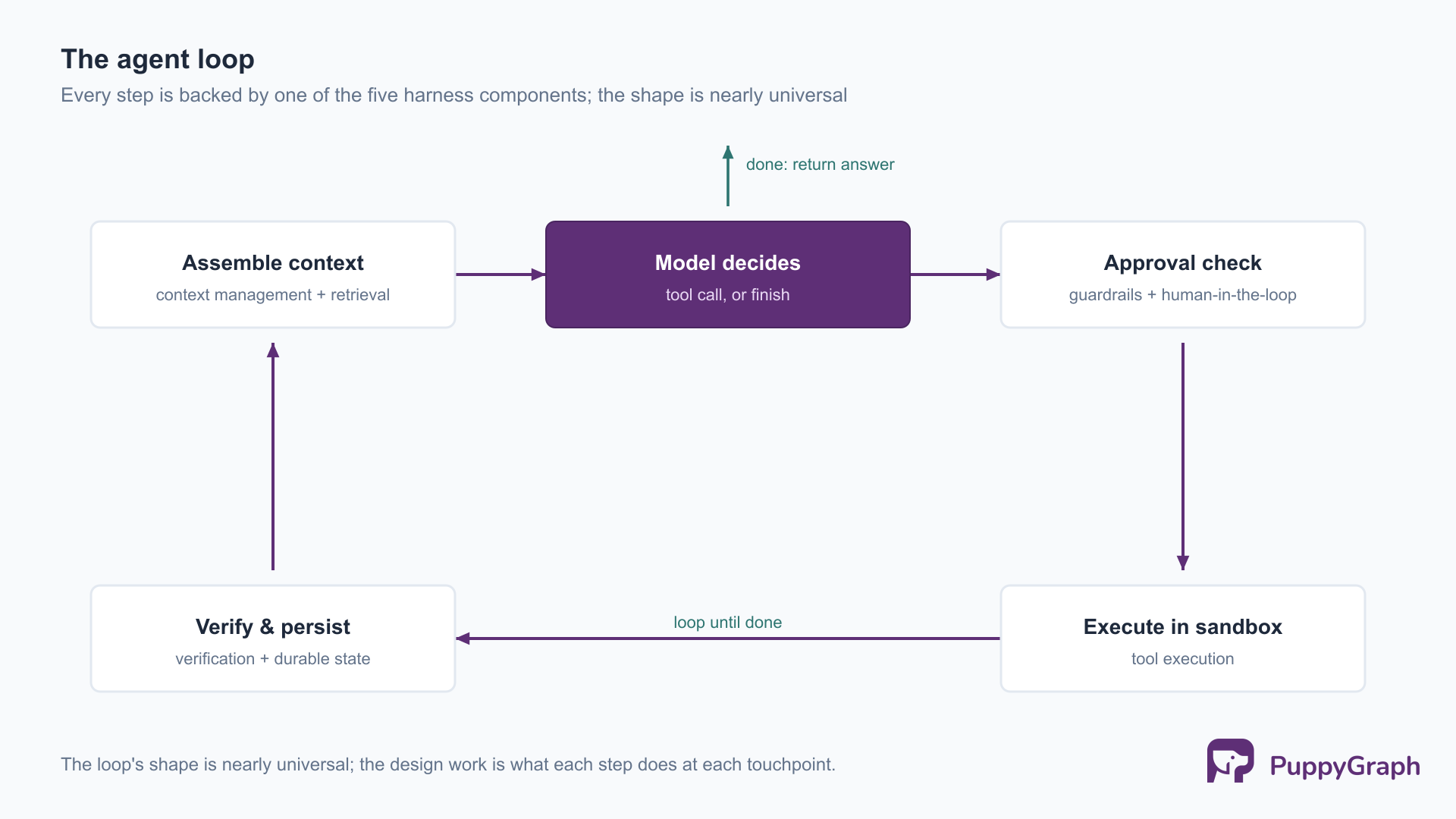
The loop those decisions assemble into is small. In pseudocode:
state = load_durable_state(task)
while not state.done:
    context = assemble_context(state)          # window budget + retrieval
    action  = model.decide(context)            # tool call or final answer
    if action.needs_approval:                  # guardrails / human-in-the-loop
        await human_approval(action)
    result  = sandbox.execute(action)          # tool execution, contained
    state   = verify_and_update(state, result) # verification loop + persist
return state.answer
Every line maps to one of the five components. The design work is not in the loop’s shape, which is nearly universal, but in what each step does: how context is assembled under a token budget, which actions require approval, what counts as verification, and what gets persisted.
Evaluation and verification loops
You cannot improve a harness you cannot measure. Build an evaluation set of representative tasks with checkable outcomes, run the harness against it on every change, and treat regressions as bugs rather than noise. Within a single run, verification loops are the in-flight version of the same idea: the agent checks each consequential step against an external signal, a passing test, a non-empty query result, a successful validation, before it builds on that step. The two reinforce each other: run-time verification keeps a single task on the rails, and the evaluation set tells you whether a change to the harness made the average task better or worse.
FAQ
What is an agent harness? An agent harness is the software layer around a large language model that turns it into a working agent. It supplies the orchestration loop, tool execution, context and memory management, durable state, and guardrails. The model provides reasoning; the harness provides everything the model needs to act, observe results, and continue toward a goal.
Why is it called an agent harness? The name borrows the harness metaphor: a harness channels a powerful but un-steerable force, a horse, a climber, into something usable and safe without weakening it. A capable model is the power; the harness directs and contains it, turning raw capability into reliable, bounded work.
What is the difference between an agent and an agent harness? The agent is the whole working system, a model pursuing a goal through a loop of decisions and actions. The harness is specifically the infrastructure around the model that makes that possible. Loosely, “agent” often refers to the model doing the reasoning, and the harness is everything else surrounding it.
What are examples of agent harnesses? Claude Code and Codex CLI are widely used coding agent harnesses, and OpenHands is an open-source one whose implementation you can read directly. Many production agents are harnesses built on frameworks such as LangChain or LangGraph, or hand-rolled directly on a model provider’s SDK with no framework at all.
Conclusion
The model supplies intelligence; the harness supplies everything else: the loop that drives it, the tools that let it act, the state that lets it remember, the guardrails that keep it safe, and the retrieval layer that feeds it context. As agents take on longer and more consequential work, the engineering that decides whether they succeed has moved into the harness around the model. And within the harness, the quality of the context an agent can retrieve, especially the connected, multi-hop context living in the relationships between data, sets the ceiling on how reliable that agent can be.
Try the forever-free PuppyGraph Developer Edition and book a demo with the team to see how openCypher and Gremlin queries run over warehouse and lakehouse tables, with no graph-specific ETL, give an agent harness the multi-hop, connected context its retrieval layer depends on.

Sa Wang is a Software Engineer with exceptional mathematical ability and strong coding skills. He holds a Bachelor's degree in Computer Science and a Master's degree in Philosophy from Fudan University, where he specialized in Mathematical Logic.

Get started with PuppyGraph!


Developer Edition
- Forever free
- Single noded
- Designed for proving your ideas
- Available via Docker install
Enterprise Edition
- 30-day free trial with full features
- Everything in developer edition & enterprise features
- Designed for production
- Available via AWS AMI & Docker install