


Text to Graph: Turn Text into a Knowledge Graph
Unstructured text, documents, emails, research papers, support tickets contain a wealth of relationships that are invisible to traditional databases. Text-to-graph conversion is the process of extracting entities and relationships from raw text and organizing them as a knowledge graph: a structure where nodes represent things and edges represent how those things connect. If you landed here looking for a tool that turns text into bar charts or pie charts, tools like Piktochart or Canva handle that well. This guide is about something different: transforming prose into a queryable knowledge graph using LLMs.
What Does "Text to Graph" Mean?
In the context of AI and data engineering, text to graph means converting unstructured or semi-structured text into a knowledge graph: a network of entities (people, places, concepts, organizations) and the typed relationships between them (works_at, located_in, caused_by). The output is not a visualization; it's a structured data model built from triples of the form (subject, predicate, object) that capture the semantics of the original text.
This is distinct from chart generation. A knowledge graph derived from text lets you ask questions like "Which researchers collaborated with authors who cited paper X?" or "What supply chain dependencies connect Supplier A to Product B?" These are questions that require traversing relationships, not plotting numbers.
Three terms worth keeping straight: entity extraction is the process of identifying named things in text (people, organizations, locations, concepts); relationship extraction identifies how those entities relate to each other; and a triple, the atomic unit of a knowledge graph, captures one such relationship in the form (Alice, works_at, Acme Corp). A knowledge graph is the structured dataset built from thousands or millions of such triples.
For a deeper primer, see our guide on knowledge graphs.
How Text-to-Graph Conversion Works (LLM Pipeline)
Modern text-to-graph pipelines rely on large language models to replace years of hand-crafted NLP rules. Classical approaches used tools like spaCy or Stanford NER for named entity recognition, then pattern-matching for relationships: brittle, domain-specific, and expensive to maintain. LLMs handle entity and relation extraction in a single prompt, generalize across domains, and produce structured output directly.
Here is the end-to-end pipeline:
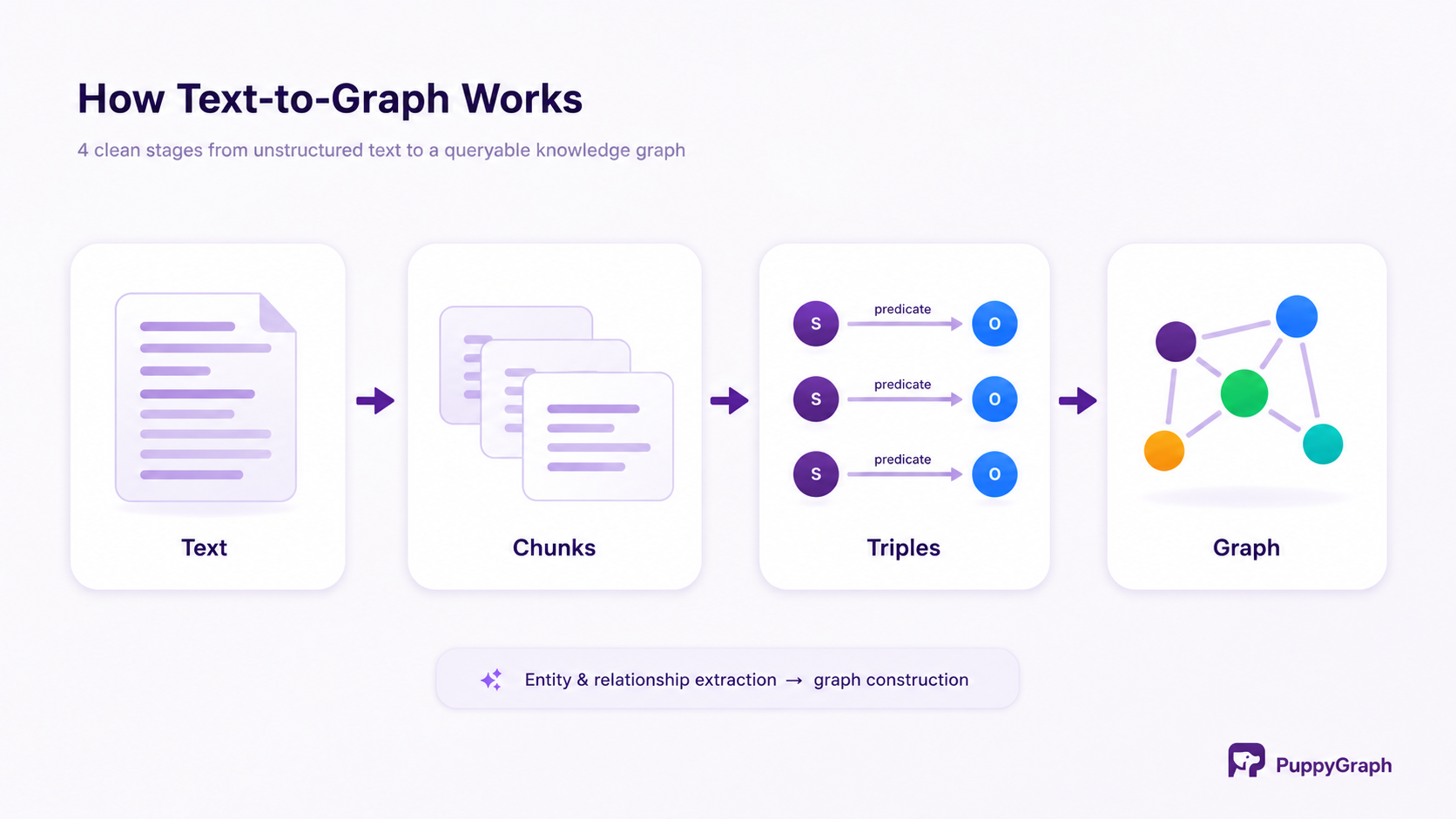
1. Chunking and Preprocessing
Raw documents are split into overlapping chunks, typically 256–512 tokens, small enough for an LLM to process in a single context window, large enough to preserve local context. Preprocessing removes noise: headers, footers, HTML tags, encoding artifacts. For large corpora, this stage runs in parallel across many workers.
Chunk overlap (50–100 tokens shared between adjacent chunks) matters here: entities and relationships that span a chunk boundary are preserved rather than lost.
2. Entity and Relationship Extraction (Triplets)
Each chunk is sent to an LLM with a structured extraction prompt asking it to return triples in the form (entity_1, relationship, entity_2). Given the sentence "OpenAI was founded by Sam Altman and Elon Musk in San Francisco," a well-prompted model extracts three triples: OpenAI founded_by Sam Altman, OpenAI founded_by Elon Musk, and OpenAI headquartered_in San Francisco.
The prompt instructs the model to return only structured JSON, with no explanation, and no markdown, so the output can be parsed directly into a data pipeline. Any capable LLM works here: GPT-4o, Claude, Llama 3, Gemini. The quality of the extraction prompt matters more than the choice of model for most general-domain corpora.
3. Entity Disambiguation and Deduplication
Across thousands of chunks, the same entity will appear under different surface forms: "Sam Altman," "S. Altman," "the OpenAI CEO." Without disambiguation, the graph fragments into disconnected duplicates that undermine query accuracy.
The standard approaches are string normalization (canonical name lookup, lowercasing), embedding-based clustering (group mentions whose vector representations are above a cosine similarity threshold), coreference resolution (map pronouns and noun phrases back to their referents), and entity linking (connect extracted entities to a reference knowledge base like Wikidata or DBpedia). In practice, embedding-based clustering handles the majority of real-world duplication efficiently.
4. Graph Construction and Import
Deduplicated triples are written to a graph store. The three common targets are property graphs (Neo4j, Amazon Neptune, TigerGraph, queried via Cypher or Gremlin), RDF triplestores (Apache Jena, Stardog, queried via SPARQL), and relational tables (a nodes table and an edges table in Postgres, Snowflake, or a data lakehouse).
That last option, storing graph data in relational tables, is increasingly common in modern data stacks. It avoids the operational burden of a dedicated graph database and integrates naturally with existing pipelines. The tradeoff, historically, was that relational stores couldn't execute graph traversals efficiently. As we'll see in the next section, that constraint has been removed.
Text-to-Graph Tools and Libraries
The ecosystem spans open-source libraries, LLM framework integrations, and SaaS tools. Here is a comparison of the most widely used options:
LangChain LLMGraphTransformer is the most actively maintained and production-ready choice for teams already in the LangChain ecosystem. rahulnyk/knowledge_graph is the best starting point for understanding the mechanics without framework overhead. The codebase is short enough to read in an afternoon. text2graphAPI is worth studying if your use case requires W3C-compliant RDF output or OWL ontologies.
From Extracted Graph to Queryable Graph
Extraction is half the problem. Once you have tens of millions of triples derived from a large document corpus, you need to query that graph efficiently, and that is where most pipelines hit friction.
The default approach is to load extracted triples into a dedicated graph database. That requires migrating data out of your existing stores, maintaining a separate system, and replicating data that already lives in Postgres, Snowflake, Iceberg, or Delta Lake. For large-scale pipelines, the ETL overhead is significant and the operational surface area grows considerably.
PuppyGraph solves this differently. Rather than requiring you to move extracted graph data into a graph database, PuppyGraph queries your existing relational or lakehouse tables as a graph, with zero ETL. If your extraction pipeline writes nodes and edges to Postgres tables (or Snowflake, Iceberg, Delta Lake, and others), PuppyGraph maps those tables to a graph schema and exposes them via Gremlin and Cypher without any data migration.
The practical result: a Cypher query asking "find all organizations connected to a given researcher within two hops" runs directly against the underlying Postgres tables. No graph database required, no data duplication, no separate system to maintain.
PuppyGraph's key advantages for text-to-graph pipelines are zero-ETL (extracted nodes and edges stay where they landed), support for both Gremlin and Cypher, and petabyte-scale capacity suited to large-corpus-derived graphs where a traditional graph DB would struggle with import time and memory. It also pairs naturally with the text-to-Cypher pattern: an LLM translates a natural-language question directly into a Cypher query, which PuppyGraph executes against your data, giving non-technical users direct access to the extracted knowledge graph. See our text-to-Cypher guide for that workflow.
For teams already familiar with text-to-SQL with LLMs, the pattern is analogous: LLM generates a structured query, query runs against existing infrastructure, and the result comes back. PuppyGraph extends that pattern to graph traversals.
Text to Graph for RAG and LLM Applications
The most commercially significant application of text-to-graph today is GraphRAG (Graph Retrieval-Augmented Generation). Standard RAG retrieves document chunks by vector similarity. It finds passages semantically similar to the query, but it cannot reason across relationships. A question like "What are the second-order dependencies of Vendor X?" requires multi-hop traversal, not similarity search.
GraphRAG addresses this by first converting the document corpus into a knowledge graph via text-to-graph extraction, then at query time traversing the graph to retrieve a subgraph relevant to the question, and finally serializing that subgraph as context for the LLM to reason over. The result is a retrieval system capable of multi-hop reasoning, following chains of relationships across documents that were never explicitly connected in the source text.
Microsoft's GraphRAG framework (open-source, released 2024) demonstrated this approach at scale, showing meaningful improvements over vector-only RAG on complex, multi-document question answering. PuppyGraph's GraphRAG use case documents how to attach a graph query engine to the retrieval step using extracted graph data stored in any relational backend.
For embedding-first teams, a hybrid approach works well: use vector similarity for initial retrieval, then expand the result set by traversing one or two hops in the knowledge graph. This combines the recall strength of embeddings with the precision of structured graph traversal.
Worked Example: Converting a Document Set into a Knowledge Graph
To make the pipeline concrete, here is a walkthrough of converting a small set of research paper abstracts into a queryable knowledge graph.
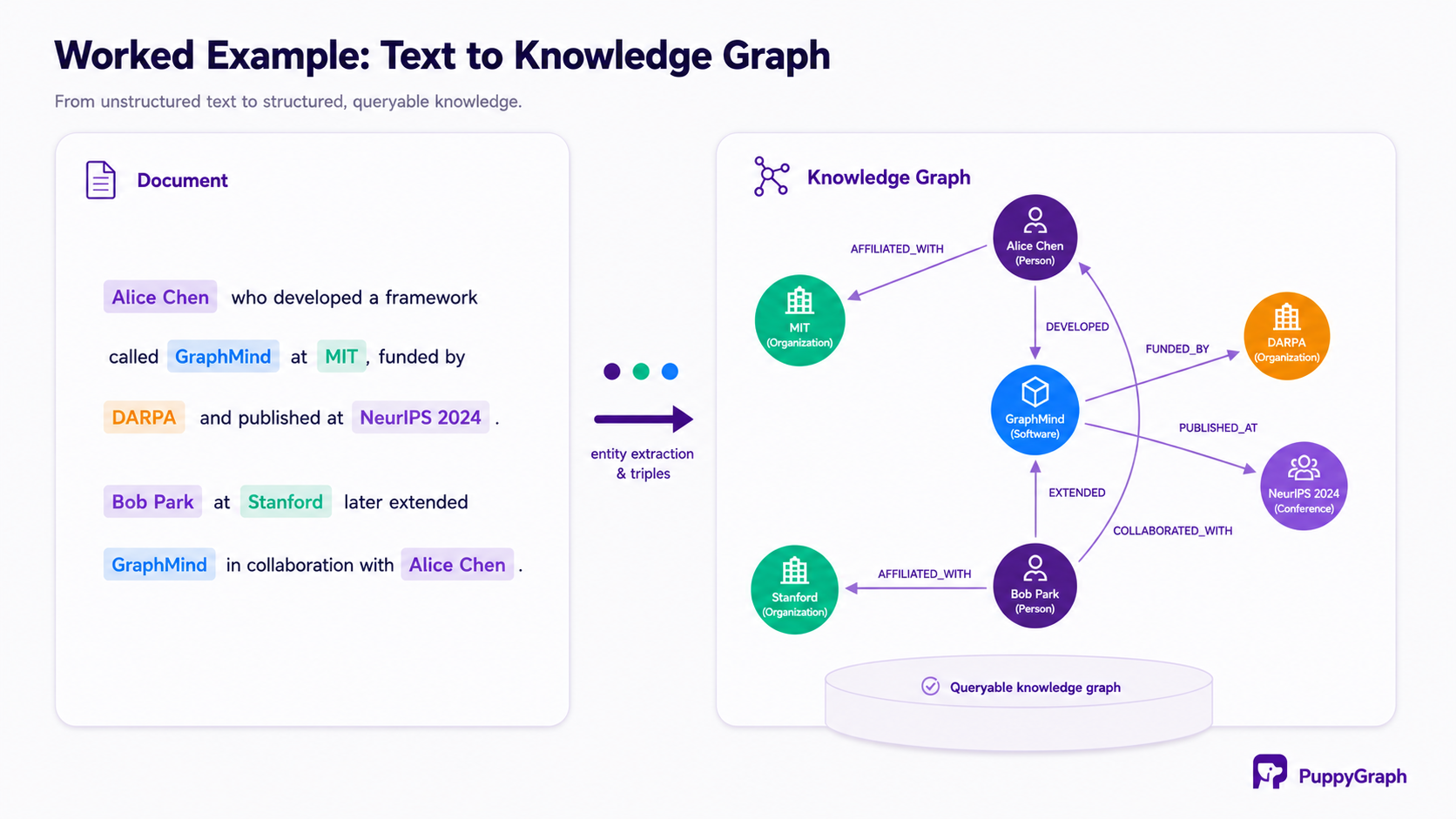
The source material is two short abstracts: one describing a researcher named Alice Chen who developed a framework called GraphMind at MIT, funded by DARPA and published at NeurIPS 2024; the second describing how Bob Park at Stanford later extended GraphMind in collaboration with Alice Chen.
Step 1: Extract Triples
Using LangChain's LLMGraphTransformer, the two abstracts are passed to GPT-4o with an extraction prompt. The model returns seven nodes: Alice Chen (Person), Bob Park (Person), MIT (Organization), Stanford (Organization), GraphMind (Software), DARPA (Organization), NeurIPS 2024 (Conference), and seven typed relationships connecting them: AFFILIATED_WITH, DEVELOPED, FUNDED_BY, PUBLISHED_AT, EXTENDED, COLLABORATED_WITH.
This takes roughly 2–3 seconds and two API calls for this toy example. At scale, the same pattern runs in parallel across thousands of document chunks.
Step 2: Store in Relational Tables
The extracted nodes and relationships are written to two Postgres tables: kg_nodes (columns: id, type, properties) and kg_edges (columns: source_id, target_id, relationship, properties). The properties column is JSONB, allowing arbitrary metadata per entity without schema changes.
This is deliberately unglamorous infrastructure. The power of keeping the data here, rather than importing it into a dedicated graph database, is that it stays in your existing data stack, benefits from your existing backup and access controls, and is joinable with any other relational data you already have.
Step 3: Query via PuppyGraph
PuppyGraph is given a schema configuration that maps kg_nodes to vertex labels and kg_edges to edge labels. No data moves. PuppyGraph reads directly from Postgres at query time.
From here, you can ask graph questions that would be impossible in plain SQL. "Who collaborated with Alice Chen, and what did they work on?" traverses two hops outward from Alice Chen's node, collecting the work artifacts (Software, Paper nodes) connected to her collaborators. "Find all DARPA-funded projects within two hops of NeurIPS 2024" traverses the conference node outward and filters results by their funding relationship.
Both queries run against the Postgres tables with no data migration, no graph database to maintain, and no duplication of the underlying data. Try it yourself with PuppyGraph Developer Edition, free, Docker-based, and running in about 10 minutes.
FAQ
What is the difference between text to graph and text to knowledge graph?
They refer to the same thing in most modern usage. "Knowledge graph" is the more precise term. It implies a typed, semantically meaningful graph with labeled entities and named relationship predicates. "Text to graph" is the broader, more commonly searched phrase. Some older literature uses "text to graph" to mean generating charts from tabular text, which is an entirely different task.
Which LLM is best for text-to-graph extraction?
GPT-4o and Claude Sonnet consistently produce the most accurate and well-structured triples for general domains. Llama 3 70B (open weights) is competitive for structured extraction with well-crafted prompts. For domain-specific corpora, such as biomedical, legal and financial, fine-tuned smaller models often outperform general-purpose large ones while being significantly cheaper to run at scale. The extraction prompt quality matters more than model choice for most use cases.
How do I handle entities that appear differently across documents?
Embedding-based deduplication handles most cases well: embed each entity mention, cluster mentions whose cosine similarity exceeds a threshold (typically ~0.92), and assign a canonical ID to each cluster. For higher precision, add an entity-linking step that maps clusters to a reference knowledge base like Wikidata.
Can I query the extracted graph with natural language?
Yes. This is the text-to-Cypher pattern. An LLM translates a natural-language question into a Cypher or Gremlin query, which is then executed against the graph. PuppyGraph supports both query languages, and our text-to-Cypher guide covers this workflow in detail.
What storage format should I use for extracted triples?
For most production pipelines, nodes and edges tables in a relational database or data lakehouse (Postgres, Snowflake, Iceberg) are the most practical choice. They integrate with existing infrastructure, are easy to update, and support arbitrary properties as JSON columns. Dedicated graph databases (Neo4j, Neptune) offer native graph indexing and are worth considering if your primary workload is real-time graph traversal at low latency. RDF triplestores (Jena, Stardog) are the right choice if W3C standards compliance or SPARQL querying is a requirement.
How accurate is LLM-based extraction?
On well-structured corpora with a clear extraction schema, state-of-the-art LLMs achieve precision and recall in the 80–90% range on standard benchmarks. Accuracy drops on noisy text, ambiguous entity boundaries, and implicit relationships. Iterating on the extraction prompt, adding few-shot examples, and post-processing with deduplication typically push accuracy above 85% for most enterprise use cases.
Conclusion
LLMs have fundamentally changed what is possible with text-to-graph extraction. A pipeline that once required months of domain-specific NLP engineering can now be prototyped in a weekend and productionized in a few weeks. The core pattern is straightforward: chunk your documents, extract triples with an LLM, deduplicate entities, and write nodes and edges to your data store.
The harder problem, and the one most tutorials skip, is making the resulting graph queryable at scale. If your extracted graph lives in relational tables, you need a query layer that understands graph traversal without requiring you to migrate to a dedicated graph database. That is exactly what PuppyGraph provides: zero-ETL graph querying over your existing Postgres, Snowflake, or lakehouse tables, with full Cypher and Gremlin support.
Pair the extraction pipeline in this guide with PuppyGraph's text-to-Cypher workflow, and you have a complete system: natural-language input → structured knowledge graph → natural-language query → answer.
Explore the forever-free PuppyGraph Developer Edition to start building and querying knowledge graphs in minutes, or book a demo to see how PuppyGraph can accelerate graph-powered AI applications on your existing data infrastructure.

Hao Wu is a Software Engineer with a strong foundation in computer science and algorithms. He earned his Bachelor’s degree in Computer Science from Fudan University and a Master’s degree from George Washington University, where he focused on graph databases.

Get started with PuppyGraph!


Developer Edition
- Forever free
- Single noded
- Designed for proving your ideas
- Available via Docker install
Enterprise Edition
- 30-day free trial with full features
- Everything in developer edition & enterprise features
- Designed for production
- Available via AWS AMI & Docker install