

AI Document Processing: Automate Data Extraction & Workflows
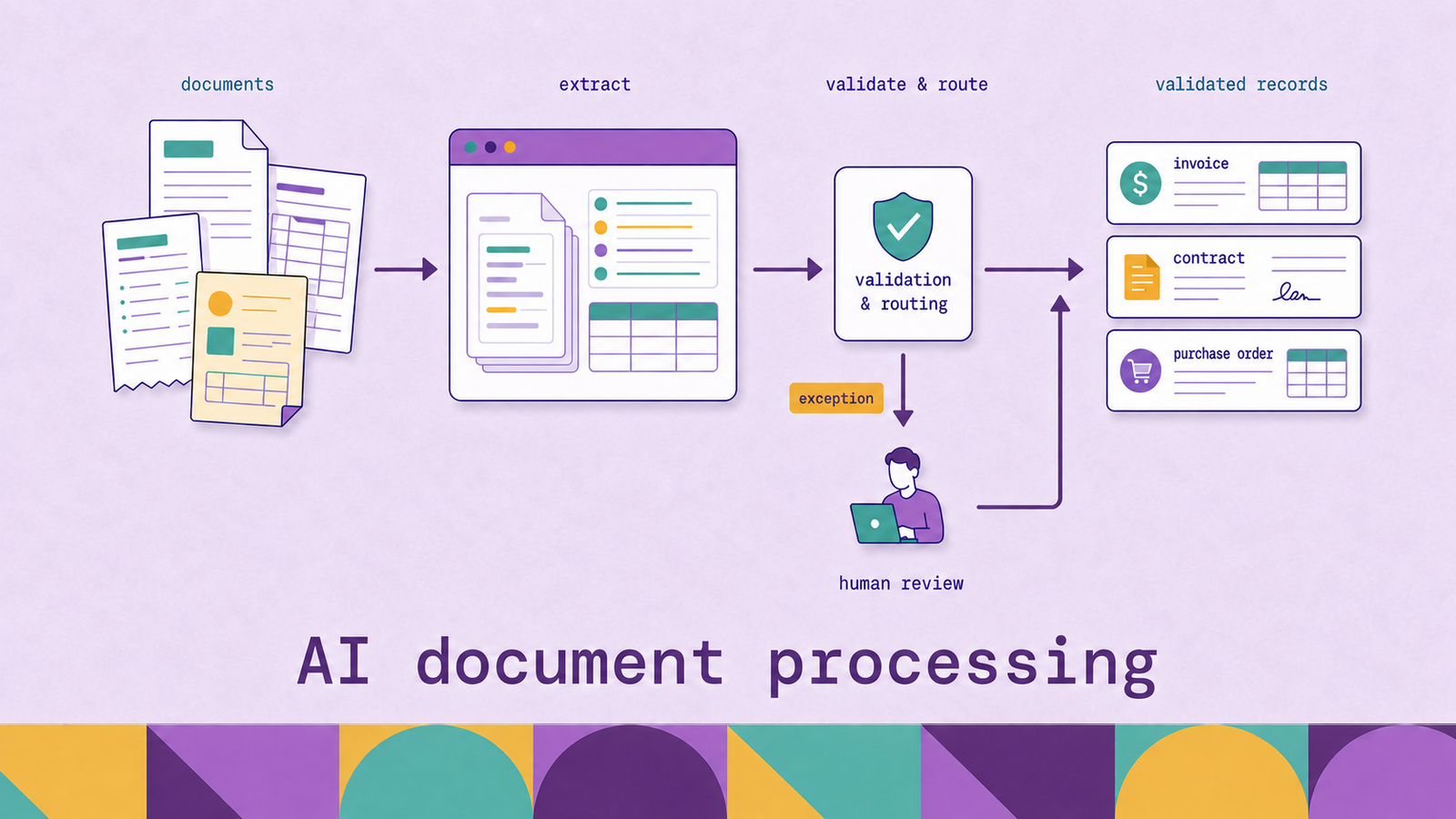
The central challenge in document automation is turning variable input and probabilistic model output into a controlled business action. An invoice can become a draft payable transaction. A claims packet can be separated and routed to the right queue. A contract can become searchable clauses linked to source pages. Each result needs controls appropriate to the cost of an error.
This guide explains how AI document processing works, the technologies behind it, where it differs from traditional optical character recognition (OCR), and how to design a workflow that remains reliable after its first deployment.
What is AI document processing?
AI document processing is the use of OCR, machine learning, natural language processing, rules, and workflow automation to convert document content into validated, structured output. It is also commonly called intelligent document processing (IDP) or document AI.
The input may be structured, semi-structured, or unstructured. A standardized tax form has stable locations for known fields. Supplier invoices contain familiar concepts but vary by layout and vocabulary. Contracts are dominated by narrative text, sections, cross-references, and tables. One processing architecture may handle all three, but it should not assume that the same model or validation policy fits each one.
The output is more than a text transcript. Depending on the use case, it may contain:
- A document class and page boundaries
- Named fields such as invoice number, policy ID, or effective date
- Repeating line items and tables
- Paragraphs, headings, clauses, signatures, and checkboxes
- Confidence or quality signals
- Coordinates that connect each value to its location on the source page
- Validation results, reviewer corrections, and processing history
Modern services expose this distinction directly. Google Cloud Document AI describes processors for digitization, extraction, classification, and splitting, while Azure Document Intelligence returns elements such as text, tables, key-value pairs, and document structure. Completing the surrounding business process remains an application responsibility.
How does AI document processing work?
An AI document processing system combines probabilistic recognition with deterministic controls. The model interprets imperfect or variable input. Rules and workflow state determine whether the interpretation is safe to use.
Consider an invoice and supporting receipts attached to an accounts-payable mailbox. The system checks the file, corrects page orientation, detects each document type, and assigns page ranges. An extractor identifies the supplier, purchase order, dates, totals, and line items. Each value retains a link to its source region.
Validation recomputes the line-item total, checks that the purchase order exists, and matches the supplier to a master record. Passing values proceed automatically. A mismatch or uncertain critical field enters review with its source highlighted. Once approved, the record moves to the accounting system and the event enters an audit log.
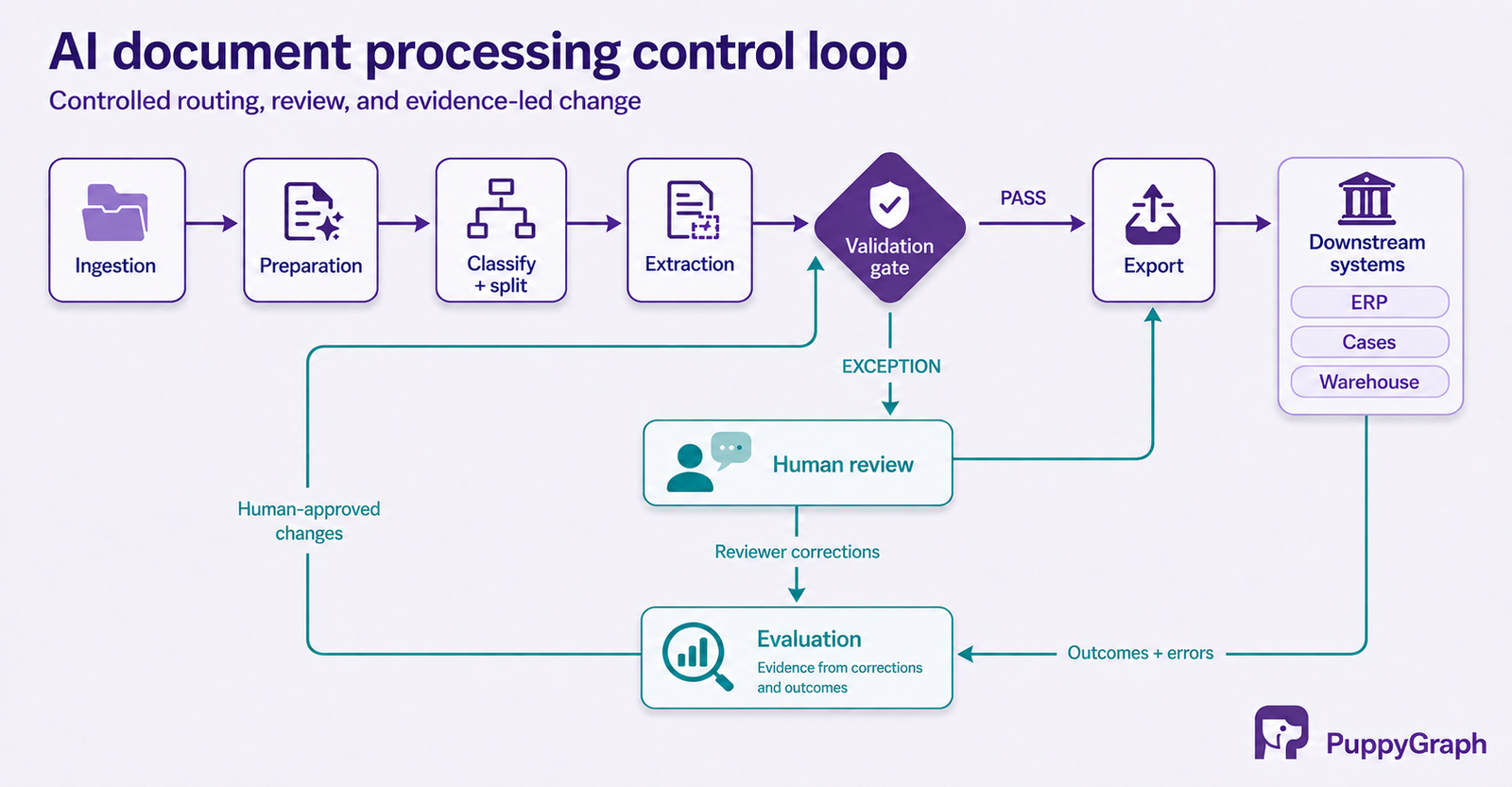
The same pattern applies outside finance. The extraction schema and validation rules change, but the control loop remains: interpret, verify, route, and observe.
Key technologies behind AI document processing
No single model performs the entire job. Production systems combine several technologies, and the boundaries between them vary by product.
Optical character recognition. OCR detects printed or handwritten characters and produces machine-readable text, often with word, line, and page coordinates. Rotation correction, deskewing, and denoising can improve the input before recognition.
OCR is foundational because later models need text and location information. It is not sufficient when the application needs to know that May 6 is an invoice date, that a mark indicates a selected checkbox, or that three adjacent values belong to one table row.
Computer vision and layout analysis. Layout models recover tables, paragraphs, headings, columns, key-value pairs, figures, and selection marks. This preserves relationships that a flat text stream loses. A number in a financial statement, for example, depends on its row label and column heading.
Azure's documented analysis response illustrates this richer representation: supported models can return pages, paragraphs, tables, figures, sections, key-value pairs, and recognized document fields.
Machine learning for classification and extraction. Classifiers route each document type to the appropriate extractor and workflow. Splitters find boundaries inside combined packets. Extraction models map text and layout features to a target schema, such as invoice_total or a repeating set of line items. Teams may use pretrained models, custom models trained on labeled examples, or both.
Natural language processing and language models. Natural language processing identifies entities, clauses, topics, and relationships in narrative documents. Language models can perform schema-guided extraction across variable layouts, answer questions, summarize sections, or classify documents from instructions and examples.
Flexible interpretation does not remove the need for evidence. For fields that drive transactions or eligibility, the output should retain source text and page coordinates, pass schema and business-rule checks, and enter review when the evidence is weak or contradictory. Generated summaries also need a clear separation from extracted facts.
Rules, orchestration, and human review. Rules verify formats, arithmetic, required fields, and matches against systems of record. Orchestration handles queues, retries, approvals, and downstream calls. Human review resolves cases that automation should not accept.
Together, recognition, layout analysis, extraction, language understanding, rules, orchestration, and review form the complete system. Use a confidence score as one routing signal alongside validation results and field risk. Teams should set thresholds using representative documents and measure the actual false-accept and review rates for each important field.
AI document processing vs. traditional OCR
Standalone OCR answers a narrow question: which characters appear on the page, and where are they? An end-to-end AI document processing system can use that result as one input to a larger question: what business information does the document contain, is the result acceptable, and which action should follow?
OCR remains the right tool when searchable text is the full requirement, such as digitizing an archive for keyword retrieval. AI document processing becomes useful when the output must populate a database, drive a decision, or coordinate work. The broader system also has a broader failure surface, so its evaluation must extend beyond character accuracy.
Key features of AI document processing
Some products expose focused analysis APIs. Others include intake channels, reviewer workspaces, workflow designers, and integrations. The following features determine how much application work remains.
Intake and interpretation determine what reaches the models and what they return.
Multichannel ingestion. A system may accept email, storage events, API uploads, scanned batches, and mobile captures. Intake controls include file validation, malware scanning, duplicate detection, and quarantine.
Packet classification and splitting. Submissions often combine several documents. The system should identify unknown classes, preserve order, and provide page boundaries. Google's splitter documentation shows one contract: a class and page references for each detected sub-document.
Schema-based extraction. Extraction should map content to named, typed fields and repeating groups. A schema makes downstream integration explicit and allows required fields, formats, and cardinality to be tested.
Source traceability. Important values should link to their page, text span, and bounding region. Reviewers can verify evidence, while engineers distinguish recognition errors from mapping or rule errors.
Controls and operations determine whether that output can enter a business process.
Configurable validation. Checks can include arithmetic, date ranges, identifier formats, master-data lookup, duplicate detection, and consistency across documents. Critical fields need policies different from descriptive metadata.
Exception management. Review queues need priority, assignment, reason codes, and a view of the extracted value beside its source. Corrections can become evaluation data under appropriate access and retention controls.
Integration and observability. APIs, webhooks, and events move approved data to operational systems. Monitoring covers queue age, errors, field quality, review volume, document class, and source.
Benefits of AI document processing
The benefits come from shortening the path between a document's arrival and a controlled business action.
Operational benefits center on throughput and the allocation of human work.
Less manual transcription. Extracted fields populate cases, transactions, or database records. Review effort shifts toward ambiguous and high-risk cases.
Faster cycle times. Classification, extraction, and routine validation can begin when a document arrives, without waiting for manual triage.
More consistent controls. The same required-field, format, arithmetic, and lookup rules run on every document, with a review path for exceptions.
Quality and adaptability improve when output remains structured, traceable, and observable.
Better search and analysis. Structured fields and layout-aware text support search by entity, clause, date, or status and analysis across a collection.
Stronger traceability. Source coordinates, model versions, validation results, and reviewer actions can record how an output was produced. Test what the implementation retains rather than assuming auditability.
Adaptation to document variation. Learned extraction can handle layout differences that would require many templates. It still needs regression testing when forms or document populations change.
These gains may shift work from data entry into exception handling, evaluation, and integration support. Measure the cost and quality of the complete process.
AI document processing use cases
Invoices and purchase documents. Accounts-payable workflows extract supplier details, purchase order numbers, tax, totals, and line items. Validation can recompute totals, match purchase orders and receipts, and route mismatches for approval.
Contracts and legal documents. Contract processing identifies parties, dates, renewal terms, obligations, and clauses for search or review. Systems should preserve section structure and citations to the original language, especially when an interpretation informs a legal decision.
Claims and case intake. Claims submissions often combine forms, IDs, correspondence, and supporting evidence. Classification and splitting establish the packet structure. The workflow can check completeness, populate a case, and send contradictory information to an examiner without automating the final decision.
Customer and employee onboarding. Onboarding workflows capture forms, identity-document data, tax information, and acknowledgments. They can compare identifiers across documents and open tasks for missing items. Identity verification and access approval remain separate controls.
Mailroom and service operations. An intelligent mailroom classifies correspondence, identifies the related customer or case, and starts a service workflow. Unknown classes and poor scans need a general exception queue.
Document search and knowledge workflows. Layout-aware parsing turns reports, manuals, and policies into sections and tables for indexing. Retrieval applications can return a relevant passage with its document and page reference. The index should preserve provenance and source access controls.
Amazon Textract's documented operations illustrate the range of specialized document tasks available through one service, including forms and tables, expenses, identity documents, and mortgage loan packages. The business workflow around those APIs remains an implementation responsibility.
AI document processing workflow
A production workflow should be designed around its error policy. The following sequence makes ownership and acceptance criteria explicit.
1. Define the outcome and schema. Choose one document population and downstream decision. List the fields, classes, and provenance required by the receiving system. Mark which fields may be absent, block processing, or require confirmation. Version the output contract.
2. Build a representative evaluation set. Sample real documents across layouts, languages, scan quality, handwriting, tables, and known exceptions. Separate training, tuning, and test documents. Report results by class and critical field because an aggregate score can hide a severe error.
3. Configure intake and preparation. Establish authenticated input channels, limits, duplicate handling, malware controls, retention, and failure queues. Preserve the original under an immutable identifier and record transformations so later outputs remain traceable.
4. Classify, split, and extract. Route each class to the appropriate extractor. Return a typed schema with source locations and model identifiers. Route unknown classes to an explicit exception outcome.
5. Validate and route by risk. Apply schema checks and business rules before writing to a system of record. Use field-specific thresholds. An uncertain description may be acceptable for search, while an uncertain bank account should block automatic processing. Route technical failures separately from ambiguous documents.
6. Design the review task. Show the reviewer the original page, highlighted evidence, proposed value, and failure reason. Capture corrections and reason codes. Restrict sensitive documents to authorized queues and apply separation of duties where required.
7. Export with transactional safeguards. Map approved fields to the downstream schema. Use idempotent writes, retries, and reconciliation to prevent duplicate transactions. Store the downstream record identifier with the processing event.
8. Monitor quality and change. Track failures, latency, queue age, straight-through rate, false accepts, corrections, and quality by field, class, model version, and source. Review changes before promotion and keep a rollback path. Send corrections through a governed labeling and evaluation process rather than silently retraining a live model.
Operating an AI system requires ongoing monitoring after launch. The NIST AI Risk Management Framework Playbook recommends evaluating oversight practices and monitoring deployed systems. For document processing, that means watching both model behavior and the workflow decisions built around it.
Once validated records land in SQL databases, data warehouses, or data lakes and lakehouses, relationship analysis may need to connect them with existing suppliers, accounts, claims, devices, or cases. PuppyGraph lets teams define those records as nodes and their known relationships as edges over the existing tables. openCypher and Gremlin queries can then traverse document-derived records alongside other enterprise data without a graph-specific ETL pipeline or a separate graph store. The document system still owns extraction and validation; the graph layer begins with the structured data and relationships that the organization has chosen to persist.
Challenges of AI document processing
Document and model behavior create the first set of challenges.
Input variability. Blurred scans, handwriting, stamps, nested tables, and mixed-language packets can break proof-of-concept assumptions. Quality gates need an explicit reject or review outcome.
Semantic errors. A model can extract from the wrong region, confuse dates, misalign a table, or infer an unsupported field. Schema-valid JSON is not necessarily correct. Source traceability and field-level evaluation expose these failures.
Confidence calibration. Scores differ by model, field, and version. Calibrate field-specific routing against labeled documents and revisit it after changes.
Long and compound documents. Contracts, multipage tables, and repeated forms create boundary and context problems. Splitting can remove needed context, while processing a whole packet can confuse classes. Test complete packets, not isolated pages.
Deployment creates a second set of operational and governance challenges.
Privacy and security. Documents may contain personal, financial, health, or legal data. Establish where content is processed, what the service retains, who can review it, and how deletion works. Retrieval and summaries must inherit source access controls.
Model and workflow drift. Layouts, schemas, APIs, and model versions change. Versioned contracts, repeatable evaluation, staged promotion, and monitoring keep those changes visible.
Integration complexity. Production systems need queues, retries, review state, audit records, permissions, and downstream reconciliation. An analysis API and a full IDP platform leave different amounts of this work to the buyer.
Measuring the wrong outcome. Character accuracy, field accuracy, review time, false accepts, and cycle time answer different questions. Select metrics from business consequences. In payments, a false acceptance on bank details matters more than punctuation errors in an address.
The practical response is selective automation. Automate document classes and decisions with sufficient evidence, and make uncertainty visible everywhere else. The goal is not to eliminate human review. It is to spend review effort where judgment or risk justifies it.
Conclusion
AI document processing combines OCR, layout analysis, classification, extraction, validation, human review, and workflow automation. Its value comes from producing controlled business records and actions from document content. The design should therefore begin with the output schema, error cost, and exception path.
Start with one representative document population and one measurable downstream outcome. Test critical fields separately, retain links to source evidence, and operate every model and rule as a versioned component. That approach makes automation useful even when documents remain variable and some cases still require judgment.
Try the forever-free PuppyGraph Developer Edition and book a demo with the team to see how openCypher and Gremlin queries connect document-derived entities across warehouse and lakehouse tables, with no graph-specific ETL, while the original document workflow remains responsible for extraction, validation, and provenance.

Hao Wu is a Software Engineer with a strong foundation in computer science and algorithms. He earned his Bachelor’s degree in Computer Science from Fudan University and a Master’s degree from George Washington University, where he focused on graph databases.


