

Iceberg Catalog: Architecture, Types & How It Works
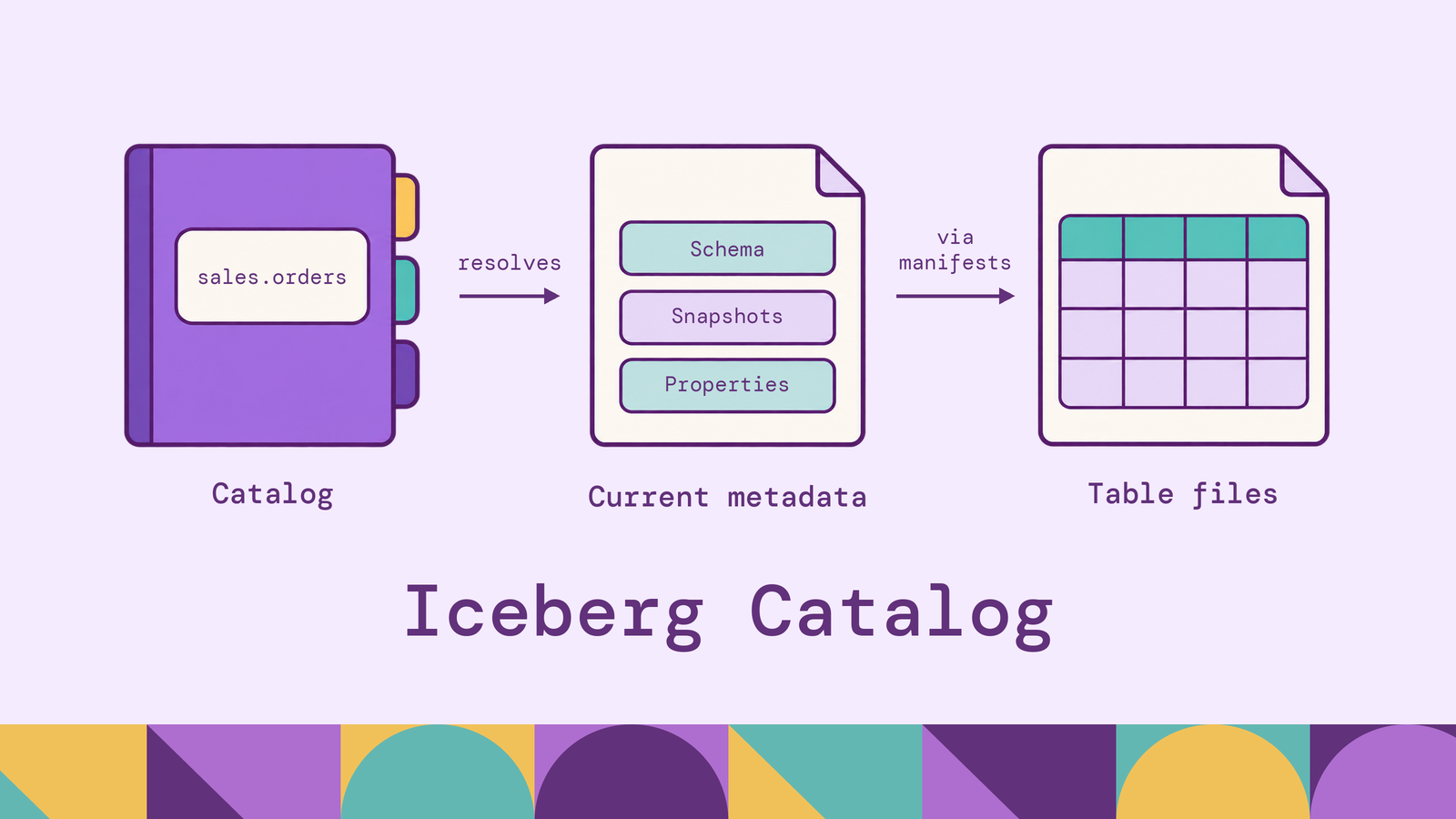
Sharing Iceberg tables across engines requires agreement about which table state is committed. Files alone cannot provide that agreement: a writer may have uploaded new data that readers should not see yet. The catalog participates in the commit that makes a new table state visible, giving engines a common starting point for reading and updating it.
This guide explains how catalog lookup and commits work, how the catalog differs from Iceberg's metadata layer, and where REST catalogs, Hive Metastore, and AWS Glue fit. It also covers table creation and the operational choices behind a shared lakehouse.
What is an Iceberg catalog?
An Iceberg catalog provides named access to Iceberg tables and coordinates the publication of table changes. Its central responsibilities are resolving a table identifier to its current metadata and supporting atomic commits. Iceberg's catalog implementation guide describes these as retrieving the metadata location and updating that location atomically.
For example, in the Spark identifier lakehouse.sales.orders, lakehouse selects a configured catalog, sales is the namespace, and orders is the table. The engine uses the catalog to load that table. The catalog name is an engine configuration choice; another engine can use a different local name for the same catalog service. Iceberg's Spark catalog configuration documents this naming model.
Catalogs also expose operations such as creating, listing, and dropping tables, as well as renaming them where supported. Some add access policies and administrative features. These operational responsibilities differ from a discovery catalog's business glossary or documentation search: an Iceberg catalog sits directly in the table access and commit path.
How does an Apache Iceberg catalog work?
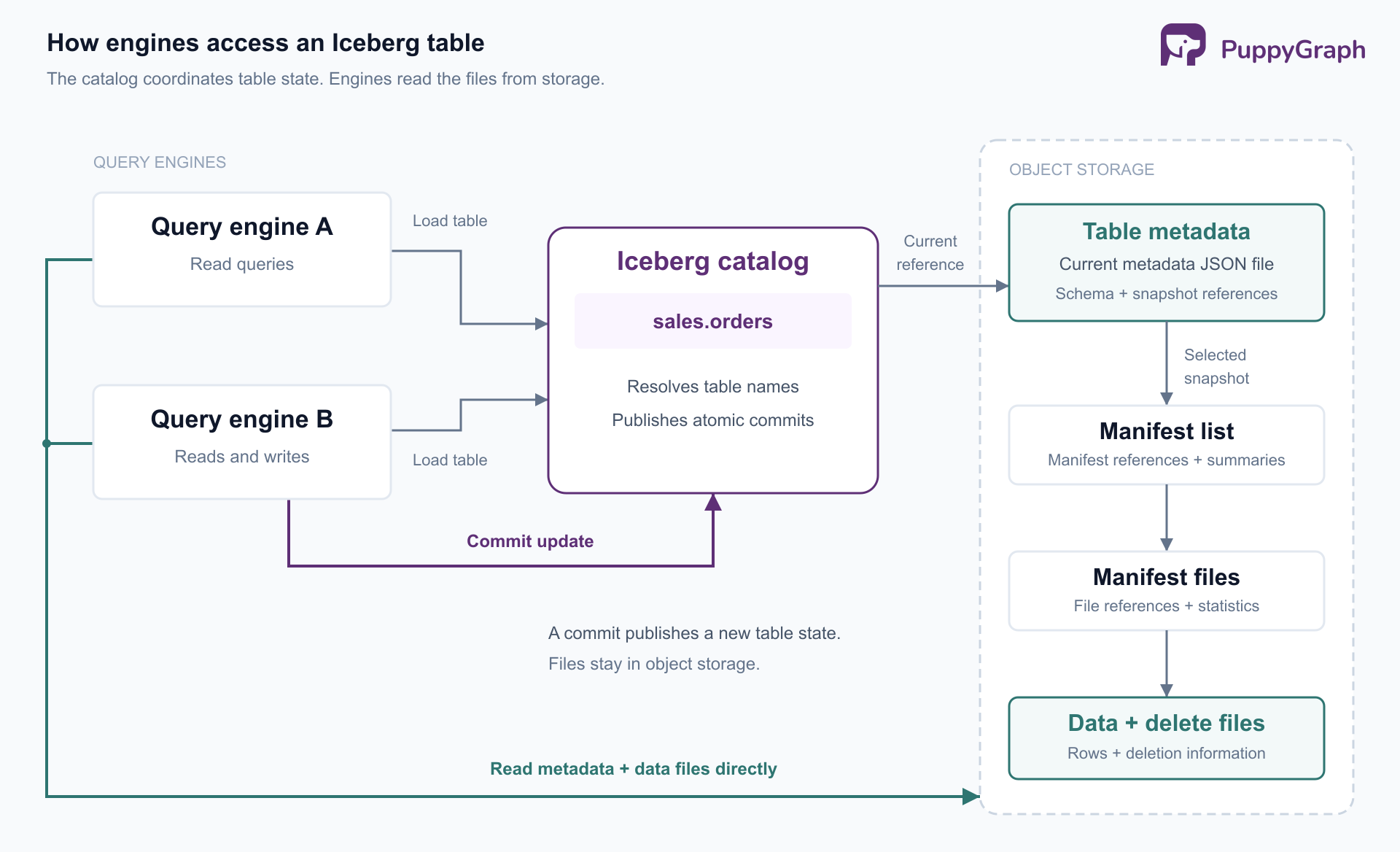
A read starts by resolving a table through its catalog. The engine loads the table metadata, selects a snapshot, and follows its references to the files needed for the query. A query using that snapshot can continue reading a consistent table state while another writer commits changes.
An append to sales.orders illustrates the write path:
- Load the starting state. The writer loads the table and the metadata on which its operation will be based.
- Prepare the additions. It writes new data files and the snapshot metadata describing them. Uploading files alone does not add them to the committed table.
- Attempt the commit. The commit path validates the operation and atomically publishes the new table metadata.
- Handle concurrent changes. If another writer has committed, the operation must be checked against the updated state before it can retry.
This is optimistic concurrency: writers prepare work without exclusively locking the table for the entire job. Compatible appends can often reuse their prepared files during retries. Conflicting changes may need to fail instead of being reapplied.
The division of work depends on the catalog interface. With a REST catalog, the client sends requirements and metadata updates; the server validates them and writes the final table metadata. The client does not simply upload a finished metadata JSON file and ask the server to replace a pointer. This distinction is part of Iceberg's REST commit protocol.
Apache Iceberg catalog architecture
The architecture separates query execution, catalog coordination, and file storage. An engine's Iceberg integration talks to the catalog to load or commit a table. In the usual client-planned read path, it then reads metadata and data files from storage. The catalog service does not carry every row returned by the query.
The metadata hierarchy connects these components:
- Table metadata records the table definition and snapshot references.
- A snapshot's manifest list identifies its manifests and summarizes them.
- Manifest files describe individual data or delete files, including information used for filtering.
- Data and delete files hold the records and applicable row deletion information.
Iceberg's table specification defines this hierarchy. The catalog locates its entry point; the referenced files describe the table state.
This separation also explains query planning. Iceberg can use partition summaries and column statistics to eliminate irrelevant manifests and data files before scanning rows. Those pruning details live in the metadata hierarchy, as described in the scan-planning documentation, rather than requiring a catalog database entry for every data file.
What information does an Iceberg catalog store?
A metastore-backed catalog typically stores the association between a table's namespace and name and its current metadata location. Its backend also holds whatever state its commit mechanism needs, such as a version identifier. Iceberg's Glue integration, for example, represents namespaces as Glue databases and tables as Glue tables, and uses version checks for optimistic locking.
Namespace properties, ownership information, and policy records depend on the implementation. They should not be treated as an identical schema shared by every Iceberg catalog.
The authoritative Iceberg table definition lives in table metadata: schemas, partition specifications, sort orders, properties, and snapshot references. The table metadata specification defines these fields. A catalog may mirror some information or return it through an API without becoming its only physical storage location.
That distinction matters when inspecting a catalog console. Seeing columns or snapshots in the interface does not establish that the catalog's backing database stores all the manifests, statistics, or table history.
Role of the catalog in Iceberg table management
Catalog operations give tables a lifecycle: create an identifier, load it, rename it where supported, and eventually remove it. Iceberg's Java API quickstart demonstrates this through the catalog interface. A stable identifier lets applications address a table without managing its changing metadata filenames themselves.
Schema and partition evolution. Engines commit updated table definitions through the same coordination path used for other changes. Iceberg records these definitions in metadata. For example, changing a partition specification affects subsequent writes while existing files retain their previous layout; the format supports reading both. The catalog publishes the change, while Iceberg's evolution rules govern its meaning.
Retention and maintenance. Compaction, snapshot expiration, and orphan-file cleanup require explicit maintenance operations or a service that schedules them. A catalog registration alone does not arrange that work. Iceberg's maintenance documentation distinguishes snapshot expiration from orphan cleanup and explains when files become eligible for deletion.
Removal. Unregistering a table and deleting its files are separate decisions. In Iceberg's Spark integration, DROP TABLE removes the catalog entry, while DROP TABLE ... PURGE also deletes table contents. Check the engine's DDL behavior before treating a drop as storage cleanup.
The catalog coordinates changes, but table management still needs owners for retention, maintenance jobs, and recovery.
Iceberg catalog vs Iceberg metadata layer
The catalog and metadata layer work together, but answer different questions. The catalog finds the current table state and coordinates its replacement. The metadata layer describes that state in enough detail for an engine to interpret and scan it.
For example, suppose the catalog correctly resolves sales.orders, but a referenced manifest has been deleted. Table discovery can succeed while reading the snapshot fails. Conversely, having files in a bucket does not tell an application which metadata version its configured catalog currently treats as committed.
The operational consequence is to include both layers in recovery planning. Protecting catalog state alone cannot reconstruct deleted table files; preserving files alone does not document catalog registrations, permissions, and service configuration. The relationship follows from Iceberg's separate metadata and catalog responsibilities.
How Iceberg catalogs handle table creation
Assume Spark has an Iceberg SparkCatalog configured as lakehouse, with a writable warehouse location and permission to create namespaces and tables. This example uses Iceberg's documented Spark DDL:
CREATE NAMESPACE IF NOT EXISTS lakehouse.sales;


CREATE TABLE lakehouse.sales.orders (
    order_id BIGINT,
    customer_id BIGINT,
    ordered_at TIMESTAMP,
    amount DECIMAL(18, 2)
)
USING iceberg
PARTITIONED BY (days(ordered_at));
Spark routes the statement to the configured catalog. The creation process establishes a table location, initializes the schema and partition specification, writes initial table metadata, and registers the table identifier. For a REST catalog, the server handles the create request. The REST API specification defines the request and an identifier-conflict response when a table or view already occupies the name.
The initial table can be empty. Creating it does not require data files or a populated snapshot. A later insert produces the first data-bearing snapshot and commits an updated table state.
An explicit LOCATION can select a table's storage location where supported; otherwise, the catalog's location rules supply it. Keep this distinct from the catalog endpoint: the service address tells Spark where to request table operations, while the table location tells the storage integration where files belong.
Iceberg REST catalog and multi-engine interoperability
The Iceberg REST Catalog specification defines an HTTP interface for catalog operations. It lets different engines and language clients use a common protocol instead of implementing a separate integration for every backend. The server can change its underlying persistence mechanism without exposing that implementation to each client.
REST describes the interface, not a particular storage service. AWS Glue, for example, exposes an Iceberg REST endpoint. Choosing REST access can therefore be compatible with choosing Glue as the catalog service.
Interoperability still requires agreement beyond that interface. Engines need compatible table-format support, file-format support, authentication, and storage access. The Trino Iceberg connector requirements, for example, distinguish catalog access from file-system access. For an ingestion-and-BI workflow, test the table after updates and schema changes, not just after its first append.
Some REST implementations support credential vending, returning temporary storage credentials to authorized clients. This can connect catalog authorization to access to table files. It does not by itself guarantee identical row filters or column masks across engines; those depend on the implementation and execution path. Iceberg documents credential vending as a storage access delegation mechanism.
Shared tables can also serve relationship analysis. PuppyGraph connects to Iceberg through supported catalogs, including REST catalogs, AWS Glue, and Hive Metastore, and lets users define a graph schema over existing tables. Its Iceberg connection documentation covers the catalog and storage configuration.
For example, customer, order, and account-link tables can become entities and relationships for investigating connected accounts. PuppyGraph runs openCypher and Gremlin queries over that model without graph-specific ETL into a separate database. The tables remain in the lakehouse, so SQL analysis and graph analysis can use the same underlying data. The Iceberg graph-query tutorial demonstrates defining nodes and edges over cataloged tables.
How to choose the right Iceberg catalog
Start with the engines that must read and write your tables, the storage system, and the team responsible for operations. Then compare the catalog interface and backend separately.
REST catalog services. Consider REST when several engines or languages need a shared interface. Compare implementations on supported operations, authentication, storage credential delegation, and recovery procedures. A common protocol reduces integration work, but it does not make every server's capabilities identical.
Hive Metastore. Iceberg's HiveCatalog uses an existing Hive metastore to track tables. This can fit an organization that already operates HMS and has engines configured to use it. The trade-off is retaining that service's operational requirements and validating its commit configuration. Iceberg documents Hive catalog locking settings; optimistic concurrency at the table level should not be read as a claim that every backend is lock-free.
AWS Glue Data Catalog. Glue is a natural candidate for workloads already organized around AWS identities and analytics services. Its Iceberg integration uses the managed catalog for table tracking and concurrent-update coordination. Evaluate account boundaries, permissions, and the access path supported by each engine, including whether clients use Glue-specific integration or REST.
JDBC catalog. Iceberg's JDBC catalog stores catalog records in a relational database and relies on database transactions for atomic commits. It can suit a team with established database operations and compatible clients. Include database availability, connection management, backups, and client credentials in the ownership decision.
Hadoop catalog. HadoopCatalog uses a filesystem directory structure and requires atomic rename support. It can fit HDFS deployments, but it is not a general-purpose choice for concurrent writes on object storage. Iceberg's Hadoop catalog guidance explicitly warns that concurrent writes are unsafe with this catalog on S3 or a local filesystem.
Before committing to a catalog, run a representative cross-engine exercise: create a table, append concurrently, evolve its schema, refresh a reader, and recover from a failed job. Also test access with the identities that real workloads will use. These checks expose integration assumptions that a successful table listing cannot settle.
Conclusion
An Iceberg catalog gives engines a common way to find tables and publish changes. Iceberg's metadata files describe the committed contents, while storage holds the files those contents require. Choosing a catalog means choosing how your engines coordinate, authenticate, and recover around that shared state.
Try the forever-free PuppyGraph Developer Edition and book a demo with the team to see how openCypher and Gremlin queries explore relationships across warehouse and lakehouse tables, with no graph-specific ETL, using your existing Iceberg catalog and storage.

Hao Wu is a Software Engineer with a strong foundation in computer science and algorithms. He earned his Bachelor’s degree in Computer Science from Fudan University and a Master’s degree from George Washington University, where he focused on graph databases.


