

Apache Iceberg Compaction: Strategies & Best Practices
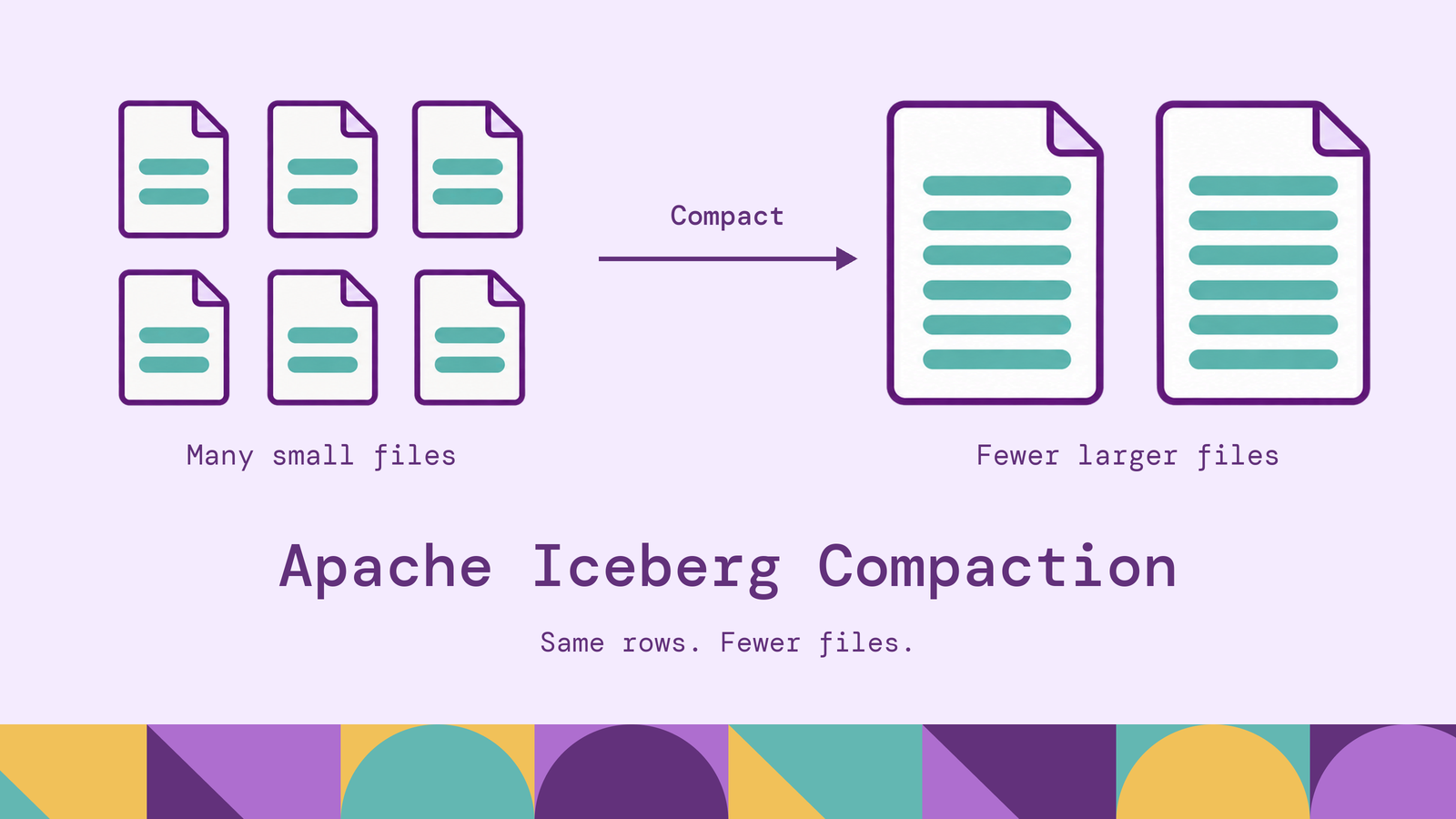
Apache Iceberg compaction is a trade-off between the cost of reorganizing table files and the work those files impose on subsequent queries. Frequent ingestion can leave a table with many small files; updates can add deletion information that readers must reconcile. Maintenance should address the source of that overhead, with a scope and frequency justified by the workload.
This guide explains the rewrite process, compares binpack, sort, and Z-order strategies, and walks through Spark SQL examples. It also covers automation, operational pitfalls, and querying relationships across the same Iceberg tables.
What is Apache Iceberg compaction?
Apache Iceberg compaction rewrites existing table files into a more efficient physical layout while preserving the table's logical records. The common case combines small data files into larger ones. Depending on the rewrite strategy, it can also reorganize rows to improve filtering or apply outstanding deletes to rewritten data.
Iceberg provides the table metadata and commit protocol; a compute engine executes the rewrite. In Spark, the main SQL interface is rewrite_data_files, which accepts a table, strategy, optional filter, and tuning options.
Compaction does not deduplicate business records or correct bad source data. Two identical rows remain two rows unless a separate transformation removes one. Its purpose is to change how valid table contents are stored and accessed.
Why is compaction important in Apache Iceberg?
Small files add overhead. Each data file needs metadata and must be opened when read. Iceberg's maintenance documentation identifies both metadata volume and file-open cost as reasons to compact. A scan over many tiny files can spend substantial effort managing files relative to processing their contents.
Layout affects data skipping. Iceberg uses partition values and column statistics to exclude files that cannot match a predicate. When frequently filtered values are scattered throughout every file, those bounds become less selective. Clustering relevant values can help the planner skip files, as described in its scan-planning documentation.
Deletes can add read work. With merge-on-read changes, readers reconcile data with applicable deletion information. Rewriting affected data files can materialize the surviving rows, reducing the reconciliation needed for those files. AWS's Iceberg compaction guidance distinguishes this work from file-size optimization and clustering.
Measure these problems separately. A table with acceptable file sizes may still have poor clustering, while another may spend most of its time planning scans. File count alone does not establish which maintenance operation will help.
How does Iceberg compaction work?
A rewrite begins from a table snapshot. The engine identifies candidate files, reads their logical contents, and writes replacements. Unaffected files remain part of the table.
Iceberg then publishes the replacement file references through an atomic metadata commit. Readers use a consistent snapshot, so they do not observe a half-published set of replacements. Concurrent changes are validated against the rewrite's assumptions. Iceberg's reliability documentation explains this optimistic concurrency model.
The original files can remain on storage because older snapshots still reference them. Snapshot expiration separately removes eligible historical snapshots and permits deletion of files no longer needed by retained history. Compaction therefore need not reduce storage consumption immediately.
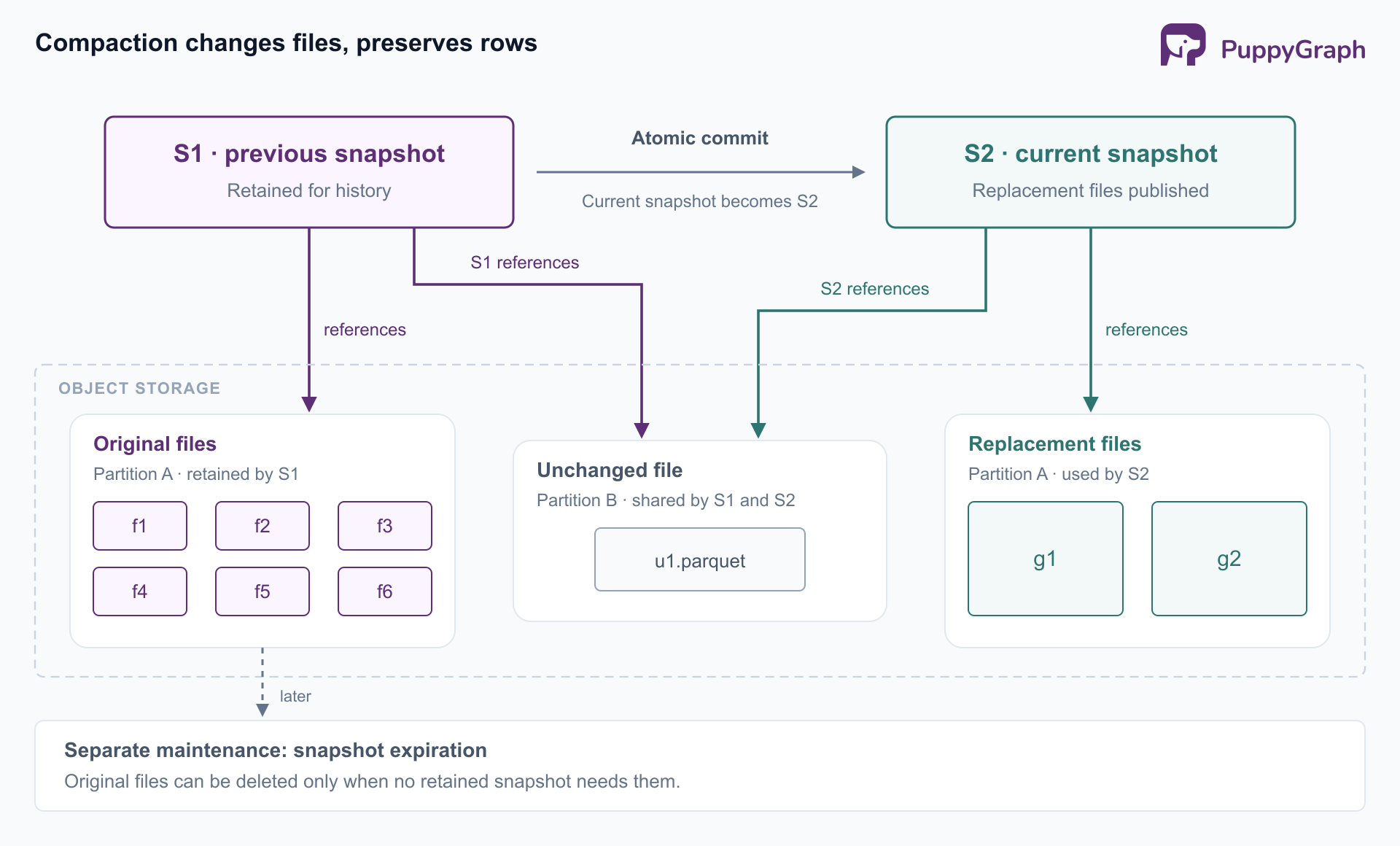
This separation matters operationally: a successful rewrite proves that a new layout was committed. Storage reclamation depends on the retention policy and subsequent maintenance.
Types of compaction in Apache Iceberg
Distinguish operations by the files they change. Several maintenance jobs can improve performance, but they address different bottlenecks.
Data-file compaction. Rewrites data files, commonly combining small files or splitting oversized ones toward a target size. Sorting can be part of the rewrite. Files selected for rewriting are read with their applicable deletes, so the output represents surviving records.
Position-delete compaction. For tables using position delete files, RewritePositionDeleteFiles consolidates deletion records into fewer files and filters references to data files that are no longer live. This reorganizes deletion information; it does not itself rewrite the underlying data files. Do not assume the same operation applies to every deletion representation supported by an engine.
Manifest rewriting. Reorganizes metadata that lists table files, improving scan planning when manifest organization is inefficient. Iceberg's manifest maintenance documentation describes grouping file entries according to partition information. This leaves the data files themselves unchanged.
Snapshot expiration and orphan-file cleanup belong alongside these operations in a maintenance plan, but neither substitutes for compaction. Choose the operation that corresponds to the measured problem: data layout, deletion overhead, metadata planning, or retained storage.
Iceberg compaction strategies: binpack, sort, and Z-order
Binpack focuses on file sizing without requesting a new row sort order. It is a useful starting point when small-file overhead dominates and existing filtering behavior is acceptable.
Sort organizes rewritten rows by an ordered list of columns. For example, sorting by tenant_id, event_ts gives tenant the leading position, then orders events within each tenant. This is a candidate when queries consistently filter by tenant and time. AWS's read-performance guidance explains how sorting and column statistics work together for file pruning.
Z-order clusters values across multiple columns using a space-filling curve. It is worth testing when selective queries use different combinations of columns, such as tenant and device, without one consistently dominant leading key. It adds clustering work, and its value depends on the actual predicates and data distribution.
These are workload choices, not successive levels of optimization. Benchmark representative queries before adopting an expensive layout. In Spark's procedure syntax, Z-order uses strategy => 'sort' with a zorder(...) sort expression; it is not a separate strategy => 'zorder' value.
How to perform Iceberg compaction using Spark
Use a Spark deployment with a compatible Iceberg runtime, a configured catalog, and permission to read and write table files. For Spark 3.x, enable the Iceberg SQL extensions when starting the session:
--conf spark.sql.extensions=org.apache.iceberg.spark.extensions.IcebergSparkSessionExtensionsSpark 4.0 supports stored procedures natively without requiring these extensions, as documented in Iceberg's procedure guide.
The examples assume a configured catalog named lakehouse and an existing analytics.events table, partitioned by a DATE column named event_date. It also contains tenant_id, device_id, and event_ts. Substitute your catalog, table, and columns.
Inspect the current files. Iceberg's files metadata table exposes file sizes, partition information, and content types. Here, content = 0 selects data files:
SELECT
  partition,
  COUNT(*) AS data_files,
  ROUND(AVG(file_size_in_bytes) / 1048576, 1) AS avg_mib,
  SUM(CASE WHEN file_size_in_bytes < 134217728
           THEN 1 ELSE 0 END) AS files_below_128_mib
FROM lakehouse.analytics.events.files
WHERE content = 0
GROUP BY partition;
The size threshold is illustrative. Review the distribution within each partition; a table-wide average can hide a large concentration of tiny files.
Run a scoped binpack rewrite. This example targets the partition from two days ago, with an illustrative output target of 256 MiB and at most two file groups rewritten concurrently:
CALL lakehouse.system.rewrite_data_files(
  table => 'analytics.events',
  strategy => 'binpack',
  where => 'event_date = date_sub(current_date(), 2)',
  options => map(
    'target-file-size-bytes', '268435456',
    'max-concurrent-file-group-rewrites', '2'
  )
);
The RewriteDataFiles API defines the filter as file selection: all rows in selected files are preserved according to table semantics, including rows outside the predicate. It is not a row-deletion filter. Target size is a goal, not a guarantee for every output file.
Choose a layout when needed. The following calls are alternatives to evaluate, not a sequence to run after binpack:
-- Lexicographic sorting
CALL lakehouse.system.rewrite_data_files(
  table => 'analytics.events',
  strategy => 'sort',
  sort_order => 'tenant_id ASC NULLS LAST, event_ts ASC NULLS LAST',
  where => 'event_date = date_sub(current_date(), 2)',
  options => map('rewrite-all', 'true')
);

-- Multidimensional clustering
CALL lakehouse.system.rewrite_data_files(
  table => 'analytics.events',
  strategy => 'sort',
  sort_order => 'zorder(tenant_id, device_id)',
  where => 'event_date = date_sub(current_date(), 2)',
  options => map('rewrite-all', 'true')
);
Here, rewrite-all forces rewriting within the selected scope, including files whose sizes would otherwise be acceptable. Keep the filter when testing a layout change; removing it can turn the operation into a table-wide rewrite.
Validate the result. Review the procedure's rewritten and added file counts, rerun the metadata query, and compare representative query plans and scan metrics. Verify logical results against a stable baseline so concurrent ingestion does not masquerade as a compaction error. A reduced file count is useful evidence, but the workload's read improvement must justify the rewrite cost.
How to automate Apache Iceberg compaction
Start with a scheduled maintenance job that inspects metadata and submits bounded rewrites when a partition exceeds your chosen small-file or deletion thresholds. Iceberg's Structured Streaming guidance recommends maintenance for the small files and frequent commits streaming workloads can create.
A practical controller should record the table, selected partition range, strategy, requested options, completion status, and returned rewrite metrics. Prevent overlapping maintenance runs on the same scope, and keep retries bounded. Repeated conflicts deserve investigation rather than an indefinitely increasing retry count.
Prefer condition-based scheduling over rewriting every partition nightly. Use a periodic check to discover candidates, then prioritize frequently queried partitions with measurable overhead. A quiet historical partition may need no work after its initial compaction; a recently active partition may benefit after the ingestion burst subsides.
Automation can also run within an engine. Iceberg's Flink TableMaintenance API supports maintenance tasks with configurable triggers, including elapsed intervals and file or commit counts. Select the execution model that fits the existing platform, while keeping policy explicit.
Whichever scheduler you use, monitor both maintenance cost and query outcomes. A successful scheduled job that repeatedly rewrites healthy files is still an inefficient policy.
Common Iceberg compaction challenges
Small files return immediately. Investigate ingestion batch sizes, partition granularity, and task distribution. Spark cannot produce a file larger than the data available to its writing task, and files cannot span Iceberg partition boundaries. Compressed output sizes also differ from Spark's in-memory task sizes. The Spark file-sizing documentation explains why increasing the target size alone does not solve this problem.
Rewrites collide with updates. Iceberg can retry compatible metadata commits, but a rewrite cannot safely commit if another operation removes a source file it depends on. Reduce overlapping work by choosing less active partitions or smaller scopes. Distinguish a retryable catalog commit conflict from a failed data validation before deciding how to rerun the job.
Sorting exceeds available resources. Sort and Z-order can require substantial shuffle and spill. Limit concurrent file-group rewrites and use max-file-group-size-bytes to control how much input is planned into each file group. AWS's compaction recommendations discuss sizing compute and handling expensive clustering operations. Test the strategy on a representative partition before expanding its scope.
Storage grows after maintenance. Replacement files coexist with retained history. Align snapshot retention with recovery and audit needs, then run expiration accordingly. Orphan cleanup addresses unreferenced files, including abandoned writes; its age threshold must protect files from jobs still running. These are separate responsibilities in Iceberg's maintenance procedures.
Fewer files do not improve the query. Check whether the bottleneck is scan planning, weak pruning, joins, or downstream computation. Compare bytes scanned and execution time as well as file counts. Avoid repeatedly increasing file size when the workload needs a different clustering key or query plan.
Querying Apache Iceberg tables as a graph
Well-maintained Iceberg tables can support questions about relationships as well as aggregations. An event table might link accounts to devices, while a payment table links those accounts to recipients. Investigating accounts connected through shared devices and transfers requires following relationships across those tables.
PuppyGraph lets users define a graph schema over existing Iceberg tables and query it with openCypher and Gremlin. Its Iceberg graph-query tutorial demonstrates mapping source tables to nodes and edges. The schema provides reusable entity and relationship names while the underlying records remain in Iceberg, without requiring graph-specific ETL into a separate persistent dataset.
PuppyGraph compiles a graph query into a plan of node and edge operators that execute inside its own distributed engine. Representing the query as graph operators lets the engine optimize specifically for multi-hop traversals. The connection requires access to both the Iceberg catalog and the underlying storage, as detailed in the Iceberg connector documentation.
Compaction remains part of maintaining those source tables. Evaluate the file layout against graph queries alongside SQL workloads, since their filters may differ. The practical benefit is a shared lakehouse dataset that supports both forms of analysis without adding a separate graph ingestion pipeline.
Conclusion
Effective Apache Iceberg compaction starts with identifying the overhead: small data files, deletion information, weak clustering, or inefficient manifests. Use binpack for file sizing, evaluate sort and Z-order against real filters, and bound each rewrite to work that earns its cost. Keep storage reclamation and retention policies explicit.
Try the forever-free PuppyGraph Developer Edition and book a demo with the team to see how openCypher and Gremlin queries follow relationships across warehouse and lakehouse tables, with no graph-specific ETL, while your Iceberg maintenance workflow manages the underlying file layout.

Hao Wu is a Software Engineer with a strong foundation in computer science and algorithms. He earned his Bachelor’s degree in Computer Science from Fudan University and a Master’s degree from George Washington University, where he focused on graph databases.


