

Apache Iceberg Metadata: Architecture & Best Practices
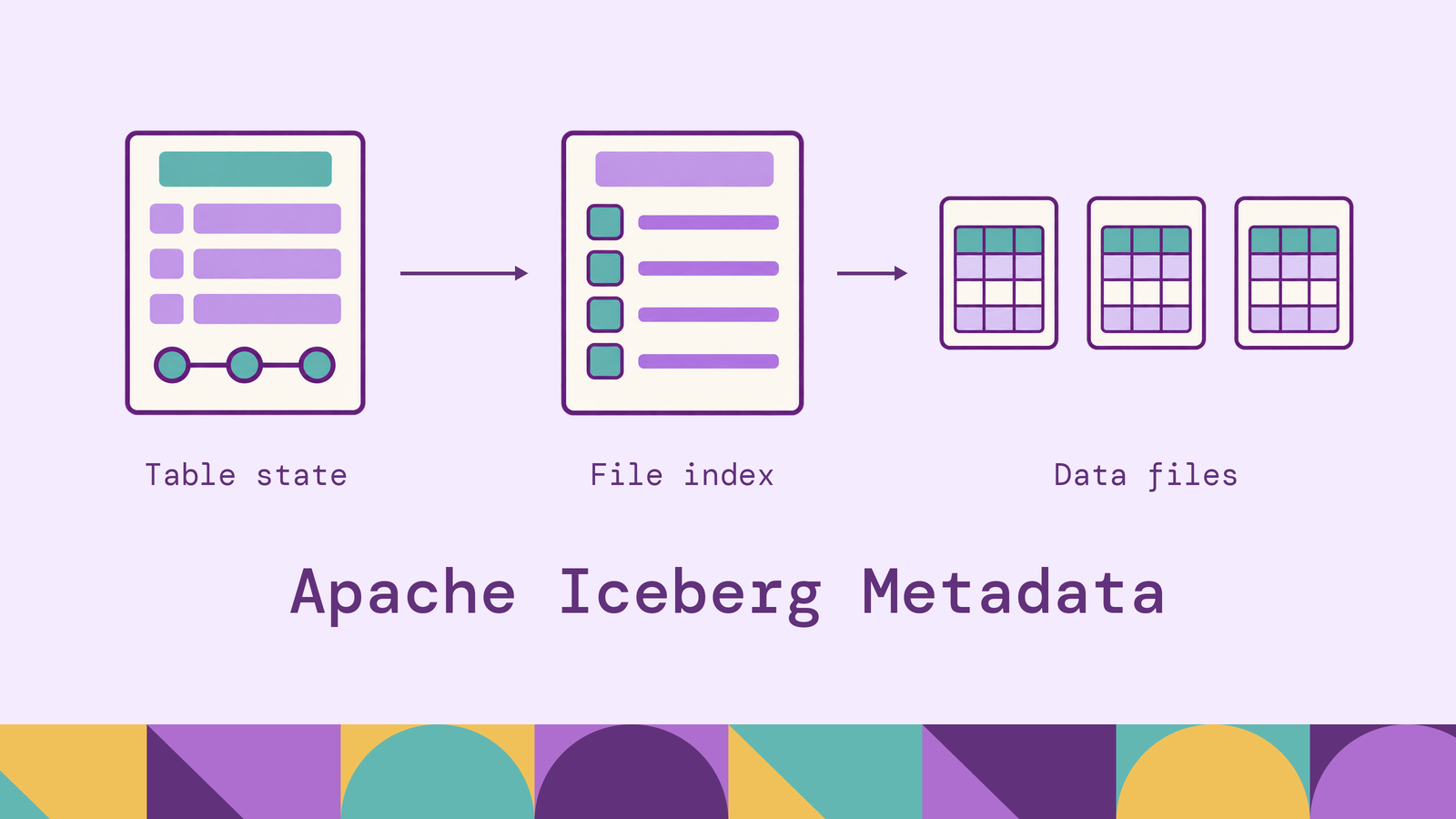
An Iceberg query needs a committed table state before it can decide which files to read. Metadata supplies that state and the information used to narrow the scan. Understanding both responsibilities helps explain why a table can return correct results while spending too much time planning them.
This guide follows metadata through writes and reads, explains the files involved, and shows how to inspect them with Spark SQL. It then connects common symptoms to the maintenance operations that address them.
What is Apache Iceberg metadata?
Apache Iceberg metadata describes a table's structure, its available snapshots, and the files belonging to those snapshots. It also carries partition information and file statistics used during query planning. These records give compatible engines a shared interpretation of the table, supporting the table-level capabilities Iceberg provides, including consistent reads, evolution, and time travel.
Consider an orders table. Its metadata defines columns such as order_id and ordered_at, records the partition specification, and identifies the files needed to read a selected table state. Business records remain in data files; metadata describes how those files participate in the table.
Column identity matters here. Iceberg assigns fields unique IDs, so renaming a column preserves its identity. Supported schema evolution updates metadata without rewriting existing data files. Partition evolution similarly allows older and newer layouts to coexist.
For example, changing from monthly to daily partitioning affects subsequent writes. Existing monthly files retain their original layout, and readers use the appropriate specification for each group. If older data needs the new layout too, a separate data rewrite is required. Updating the partition definition alone does not reorganize stored records.
This makes metadata part of the table's correctness model. A reader needs the table's definitions and file references to interpret stored records correctly.
How does Iceberg metadata work?
An append illustrates how metadata turns newly written files into a visible table update:
- Load the starting state. The writer loads the table metadata on which its operation will depend.
- Write new files. It creates data files for the incoming orders. Their presence in storage does not yet make them part of the committed table.
- Prepare snapshot metadata. The operation records the new file references and can reuse unchanged manifests from earlier snapshots.
- Commit the update. The commit path atomically publishes new table metadata, checking that the operation can safely apply to the table state.
Iceberg uses optimistic concurrency. If another writer commits first, a compatible operation can refresh its starting state and retry. An operation whose assumptions no longer hold must fail. For example, a rewrite cannot safely replace source files that another operation has already removed.
Readers continue using their selected snapshot while subsequent writes commit. They do not observe a partially published append.
A snapshot records a table state through file references, allowing unchanged files to be shared across snapshots. Metadata updates and data snapshots are distinct: renaming a column changes the table definition without requiring a new data snapshot. This distinction prevents a misleading assumption that every new metadata JSON file represents newly written rows.
Apache Iceberg metadata architecture
The hierarchy below describes the manifest-list architecture of Iceberg format versions 2 and 3:
Catalog → table metadata → snapshot → manifest list → manifests → data and deletion information.
The catalog resolves a table name to its committed metadata and supports atomic publication of updates. The metadata hierarchy holds the file inventory. A query engine follows those references to read objects from storage; table rows do not need to flow through the catalog service.
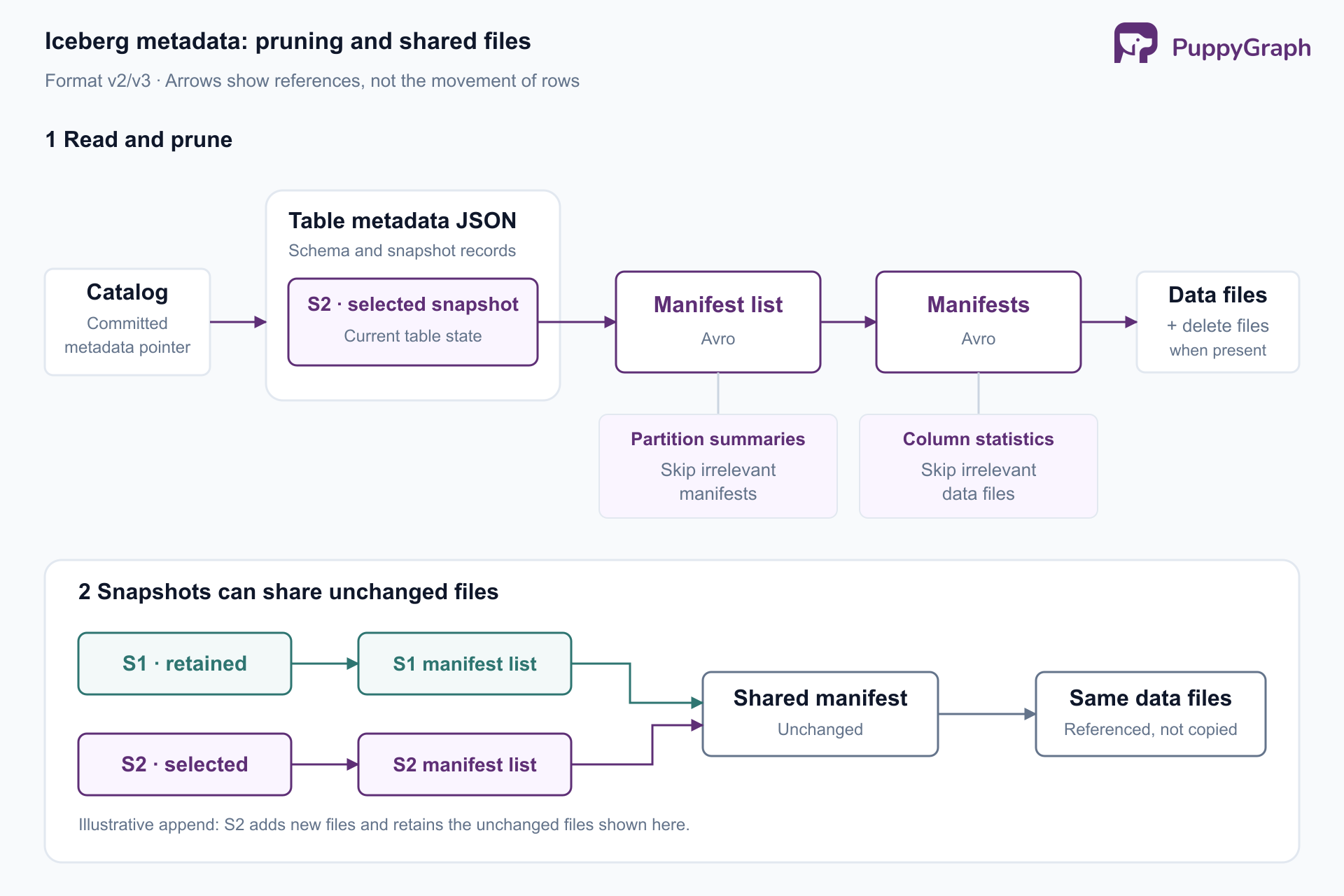
Iceberg's scan planning filters at two metadata levels. Partition summaries in the manifest list can eliminate irrelevant manifests. Within the remaining manifests, partition values and available column statistics can eliminate individual data files.
For a query filtering orders to one day, day-based partition information can exclude other dates. Bounds on another filtered column, such as total_amount, may narrow the remaining files further. A file survives pruning when its metadata cannot rule out a match; survival does not establish that it contains matching rows.
Planning cost and scan cost therefore deserve separate attention. Efficient metadata organization helps locate candidate files. Useful partitioning and clustering help reduce how much data remains to read.
The same separation helps diagnose failures. If a table name resolves but a manifest cannot be read, investigate the referenced object and storage access. If file selection succeeds but the scan is slow, inspect the surviving files and execution metrics. Increasing compute resources will not repair a missing metadata object.
Types of metadata files in Apache Iceberg
The core file types have different scopes within the table specification:
In the v2/v3 architecture described here, a snapshot is a record in table metadata that references a manifest list. It is not a separate copy of the table's rows. Manifests are immutable; changes create replacement metadata rather than editing committed manifests in place.
Some tables also have Puffin files. Puffin stores typed binary payloads, including statistical sketches that can support distinct-value estimates. It can also store deletion vectors describing deleted row positions. A Puffin file's role depends on its payload: optional optimization statistics and deletion information have different correctness implications.
Keep file roles separate when investigating storage growth. Extra JSON versions, fragmented manifests, and accumulated deletion information call for different responses. Counting everything under a metadata directory gives a useful storage total, but it does not identify which maintenance operation will help.
How to query Iceberg metadata tables
Iceberg exposes metadata through queryable tables. The examples below use Spark SQL with an Iceberg catalog configured as lakehouse and an existing table named sales.orders. Metadata-table syntax and supported fields depend on the engine.
The Spark metadata-table interface appends a metadata table name to the original identifier:
Start with recent snapshot activity:
SELECT committed_at, snapshot_id, parent_id, operation
FROM lakehouse.sales.orders.snapshots
ORDER BY committed_at DESC
LIMIT 10;
Then inspect data-file sizes, grouping by partition specification:
SELECT
    spec_id,
    COUNT(*) AS data_file_count,
    ROUND(AVG(file_size_in_bytes) / 1048576.0, 2) AS avg_file_mib,
    MIN(file_size_in_bytes) AS smallest_file_bytes
FROM lakehouse.sales.orders.files
WHERE content = 0
GROUP BY spec_id;
Here, content = 0 selects data files. A low average is a reason to inspect the size distribution and ingestion pattern before choosing compaction settings. Grouping by specification helps separate files written under different partition layouts.
Use the current-snapshot tables for current layout diagnosis. The all_* variants span retained snapshots and can repeat file references, so summing their sizes directly can overcount physical storage. Likewise, file record counts should not be treated as exact live-row counts when separate deletion information applies.
Common Iceberg metadata challenges
Frequent commits accumulate history. Streaming ingestion can create snapshots rapidly. Small batches can also produce many small data files and manifests. Iceberg's streaming maintenance guidance treats commit frequency, snapshot retention, compaction, and manifest rewriting as related operational concerns. Evaluate ingestion freshness alongside the metadata work that each commit creates.
Pruning is weaker than expected. Min/max bounds alone cannot exclude a file when they overlap the requested values. Scattered values can leave many files eligible even for a selective query. Also inspect metrics configuration: missing or truncated bounds may limit the information available to planning. A manifest rewrite cannot repair poorly clustered records inside data files.
Storage persists after a rewrite. Old data files may still belong to retained snapshots. Rewriting current files and reclaiming historical storage are separate operations. A successful compaction can therefore temporarily increase storage rather than immediately reduce it.
Cleanup targets the wrong objects. An old object may still be referenced, while a recent object may belong to an unfinished write. Snapshot expiration and orphan cleanup answer different questions about reachability. Iceberg's maintenance documentation warns that an orphan age threshold shorter than a write's duration can remove files still being prepared for commit.
Treat these symptoms as evidence for a specific investigation. A growing metadata directory alone does not tell you whether the underlying problem is retention, file fragmentation, or planning overhead.
Iceberg metadata best practices
Start with a baseline: snapshot count, commit frequency, current manifest count, file-size distribution, and representative query planning time. Iceberg's metrics reporting includes scan and commit reports that can support this monitoring. Compare changes under similar query conditions so improvements in scan time do not hide worsening planning time.
Set retention around actual consumers. Define the recovery window, reproducibility needs, and maximum duration of readers that may still need older files. Schedule snapshot expiration accordingly. Use tags and their retention policies for selected historical states that must remain available longer. Retention settings need an expiration job or a managed service to apply them.
Expiration removes eligible snapshots from table metadata and permits cleanup of files that retained history no longer needs. Once a snapshot expires, it is unavailable for time travel. Record which reports or recovery procedures depend on historical states before shortening retention; storage savings should follow that decision.
Separate snapshot retention from JSON cleanup. The properties write.metadata.delete-after-commit.enabled and write.metadata.previous-versions-max control cleanup of tracked previous metadata files. They do not define the time-travel window. Enabling deletion also does not retroactively remove metadata files that are already untracked; those require a separate cleanup path.
Check both the number of tracked metadata versions and the objects actually present in storage. They answer different questions: the first describes the metadata log, while the second includes files outside that log.
Choose the rewrite that matches the problem. Use data-file compaction for excessive small files. Use manifest rewriting when metadata organization makes planning expensive. The Spark procedures expose these as separate operations. For example, with Iceberg's Spark SQL extensions enabled:
CALL lakehouse.system.rewrite_manifests(
    table => 'sales.orders'
);
This reorganizes manifests without rewriting the underlying data files. Compare planning time and manifests scanned before and after the operation; a lower manifest count alone is not the workload's objective.
Make orphan cleanup deliberate. Choose an age threshold beyond the longest expected write, including retries. Inspect candidates using remove_orphan_files with dry_run => true before enabling deletion. Confirm that the search location and path handling match the table's storage configuration. Object age by itself is not proof that an object is disposable.
Collect statistics where queries use them. Tune column metrics for frequently filtered fields, then validate pruning against representative predicates. More detailed statistics have a metadata cost. Pair metrics choices with partitioning and clustering decisions, and remeasure after changes to the ingestion pattern.
Maintenance should follow observed behavior. Assign ownership and schedules to the selected operations, then check that their effects match the reason they were introduced.
Conclusion
Apache Iceberg metadata connects table definitions, committed snapshots, and file selection. Understanding those responsibilities makes operational choices more precise: inspect current metadata for layout problems, retain history for known consumers, and choose cleanup or rewrites according to the measured overhead.
For relationship analysis over those tables, PuppyGraph lets users define a graph schema mapping existing records to nodes and edges. Its Iceberg tutorial demonstrates querying that model with openCypher and Gremlin while the source data remains in Iceberg. The connection uses the existing catalog and storage. PuppyGraph compiles a graph query into a plan of node and edge operators that executes in its own distributed engine, allowing optimization specifically for multi-hop traversals. This adds a semantic model for relationships over the maintained lakehouse tables.
Try the forever-free PuppyGraph Developer Edition and book a demo with the team to see how openCypher and Gremlin queries explore relationships across warehouse and lakehouse tables, with no graph-specific ETL, using your existing Iceberg catalog and storage.

Hao Wu is a Software Engineer with a strong foundation in computer science and algorithms. He earned his Bachelor’s degree in Computer Science from Fudan University and a Master’s degree from George Washington University, where he focused on graph databases.


