

Apache Iceberg Schema Evolution: Complete Guide
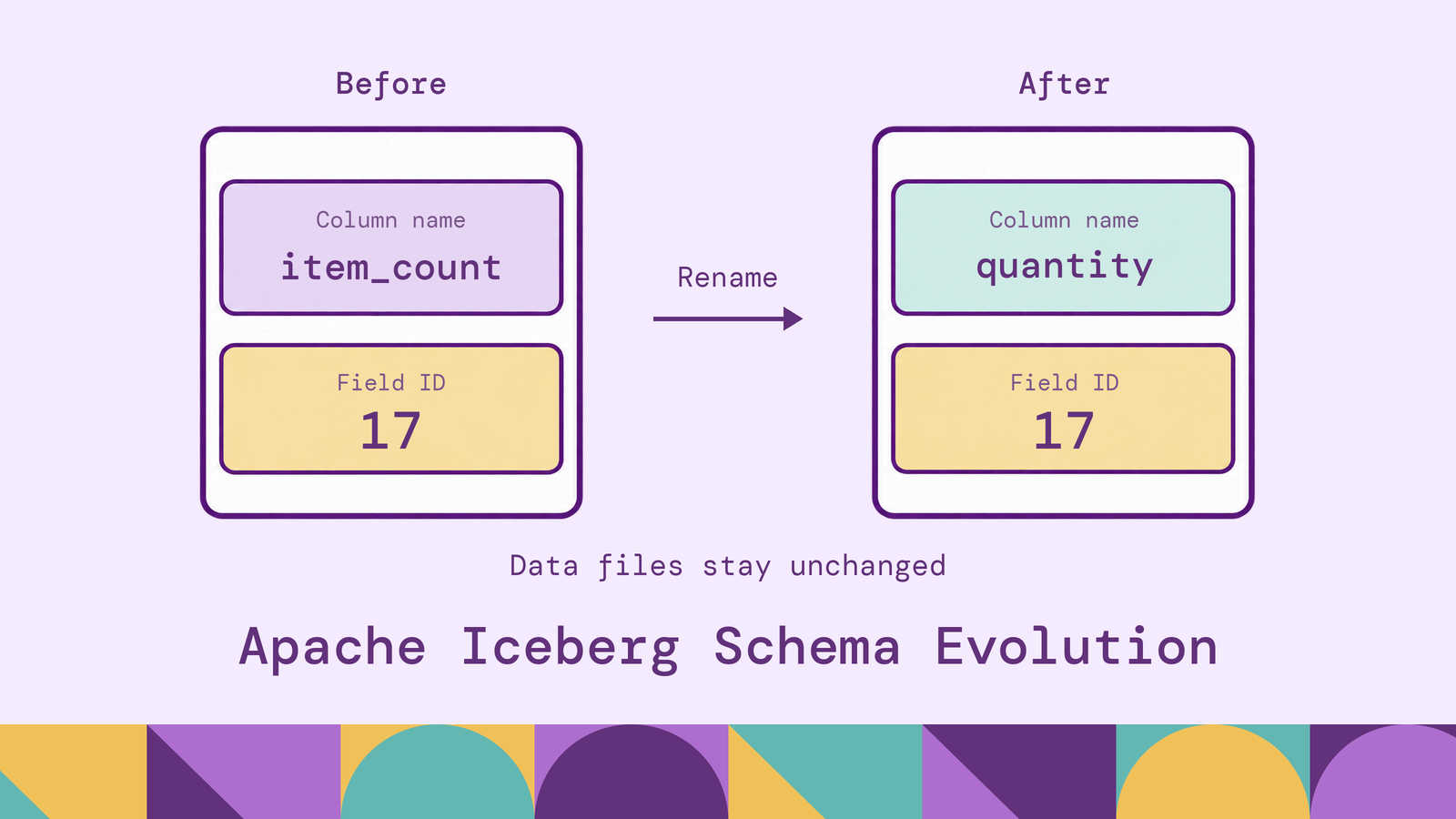
Renaming a column should not require rewriting years of data. Apache Iceberg makes supported schema changes through metadata, preserving the identity of fields across files written at different times. That removes much of the storage work from a migration, while leaving an important engineering responsibility: keeping producers and consumers aligned with the changed table definition.
This guide explains how Iceberg schema evolution works, which operations it supports, and how it differs from partition evolution. The Spark SQL examples follow one table through several changes, then connect those changes to application compatibility and graph queries over evolving Iceberg data.
What is Apache Iceberg schema evolution?
Apache Iceberg schema evolution is the ability to change an existing table's columns and nested fields while retaining access to its existing data. Supported operations include adding, dropping, renaming, reordering, and widening field types. Iceberg's evolution documentation explains that these changes update metadata without rewriting data files.
Consider an orders table that needs a sales channel attribute. Adding that field lets new orders record whether they came from a store, website, or partner. Earlier orders remain readable even though their files were written before the attribute existed. For an optional field added without a default, those earlier records return null for the new field.
This is different from discovering whatever fields happen to appear in incoming records. Iceberg maintains an explicit table schema. A writer must comply with that schema or use a supported mechanism to evolve it.
The distinction matters operationally. A schema change can be valid for stored data while breaking an application's expectations. A renamed column retains its values, but a report that still requests its previous name needs an update.
How does Iceberg schema evolution work?
Field IDs preserve identity. Iceberg assigns fields unique identifiers that are never reused within the table, as described in its schema documentation. Names and positions can change without changing which field a stored value belongs to.
Suppose an orders table has a field named item_count with ID 17. Renaming it to quantity preserves ID 17. An Iceberg reader can associate values written under the earlier name with the renamed field. Moving quantity elsewhere in the schema likewise preserves that association.
Dropping and re-adding item_count would have a different result. The replacement receives a new ID, so it does not inherit the deleted field's values. Use a rename when the business meaning stays the same; use a new field when the meaning changes.
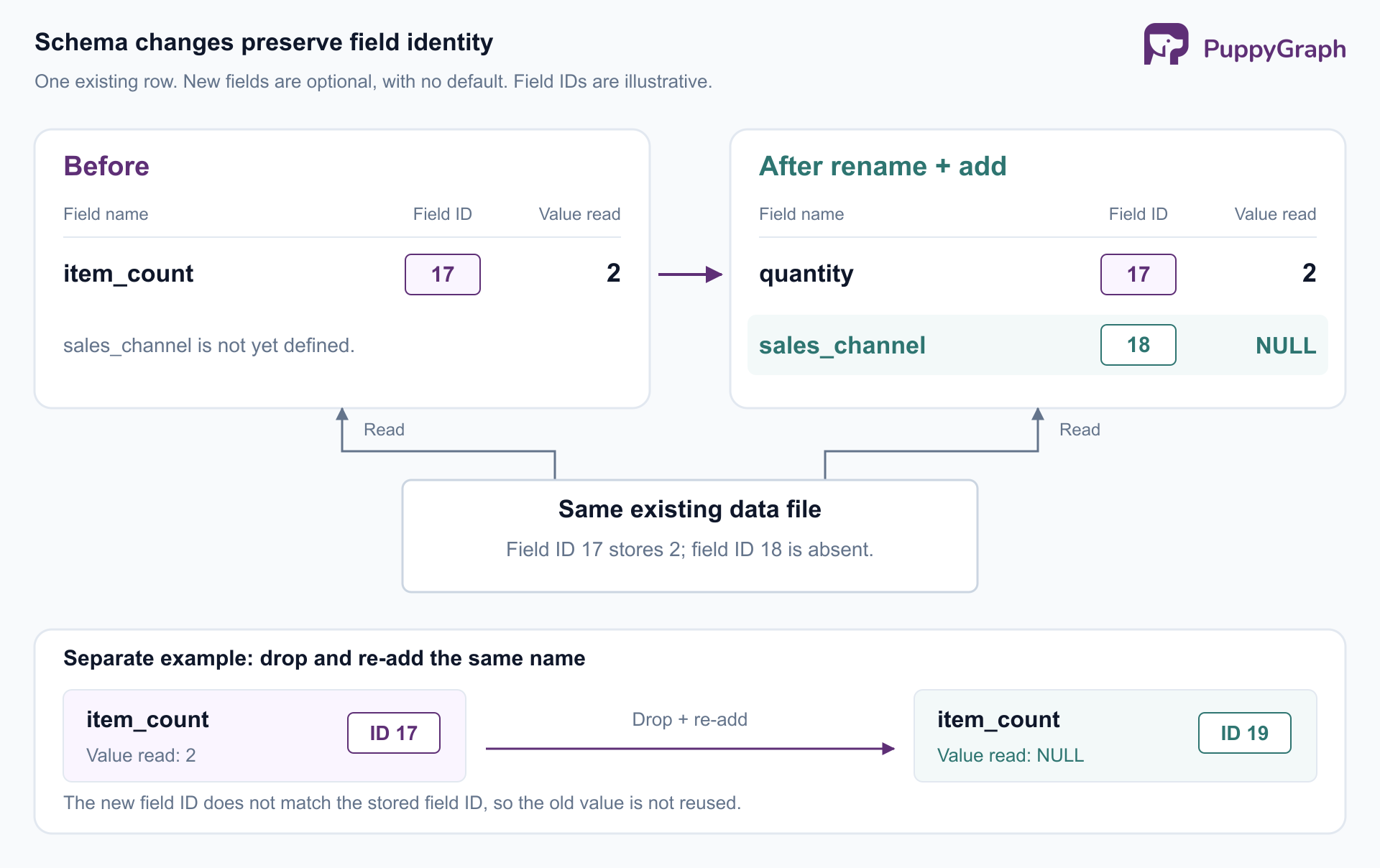
Table metadata records the schema. The Iceberg specification distinguishes individual field IDs from schema IDs. An evolved schema has its own schema ID and becomes the table's current schema. A schema-only update can commit new table metadata without creating a new data snapshot: the set of data files has not changed.
Commits publish a consistent change. Iceberg publishes table updates atomically and uses optimistic concurrency to coordinate writers. Conflicts require validation against the updated table state; some operations can retry, while incompatible changes must fail. The reliability documentation describes this commit model. Atomic publication prevents a partially committed table definition, but it does not coordinate application deployments for you.
Supported schema evolution operations in Apache Iceberg
The main operations address different migration needs. Treat the choice of operation as part of the data contract, especially when existing names are being reused.
Add fields. Add a top-level column or a field inside a nested struct. Optional additions are useful when historical records have no value for a newly captured attribute. Decide whether null means unknown, not applicable, or not yet collected before exposing the field to consumers.
Rename fields. Rename a field when its meaning is unchanged and its current name is misleading. Update queries, transformations, and mappings that address the old name. A rename preserves storage identity; it does not supply an alias for existing SQL.
Drop fields. Remove obsolete fields from the current schema after their consumers have migrated. The metadata operation does not erase the corresponding bytes from existing data files. Treat physical removal as separate work involving file rewrites and retention policies.
Reorder fields. Change their order in the table or a struct without moving stored values between fields. This can improve readability, but exports and integrations that interpret columns positionally still need testing. Explicit column lists make those dependencies easier to review.
Widen types. For the format v2 examples below, the numeric promotions are INT to BIGINT, FLOAT to DOUBLE, and increased decimal precision with unchanged scale. Increasing DECIMAL(12,2) to DECIMAL(18,2) expands the allowed range; changing the scale changes the type's fractional precision and is not the same operation. These rules are documented in Iceberg's type-promotion specification.
Nested evolution has boundaries. In particular, adding or dropping fields in a map key cannot change key equality. Nullability also requires care: Iceberg's Spark integration supports relaxing NOT NULL, but does not support tightening a nullable column with SET NOT NULL. See the Spark DDL reference. Format v3 adds capabilities such as column defaults; confirm both the table format and engine support before using them.
Schema evolution vs. partition evolution in Apache Iceberg
Schema evolution changes the table's logical fields. Partition evolution changes how records are grouped into files for filtering and scan planning. For example, adding sales_channel changes the schema; moving from daily to hourly partitioning of created_at changes the partition specification.
Iceberg retains the information needed to plan scans across old and new partition specifications. Its hidden partitioning also lets queries filter on a source column such as created_at without manually naming a derived partition column.
These operations therefore have different migration consequences. A finer partition layout may help future data without improving pruning for older files. A column rename can preserve every stored value and still require immediate query changes. Assess each change against the workload it is intended to improve.
Apache Iceberg schema evolution examples
These examples use Spark SQL with an Iceberg runtime JAR matching the installed Spark and Scala versions, and an Iceberg SparkCatalog configured as prod. Use a REST catalog with a writable warehouse location and permission to create namespaces and tables. Storage access and credentials must already be configured; the Spark catalog configuration guide covers that setup.
Keep spark.sql.storeAssignmentPolicy=ANSI, the default required for Iceberg SQL inserts. Run the statements in order in a scratch namespace.
Create a table and write an initial row. The table explicitly uses Iceberg format v2. Its fields are nullable unless marked otherwise.
CREATE NAMESPACE IF NOT EXISTS prod.schema_evolution_demo;

CREATE TABLE prod.schema_evolution_demo.orders (
    order_id BIGINT,
    customer_id BIGINT,
    amount DECIMAL(12,2),
    item_count INT,
    shipping STRUCT<country: STRING>,
    coupon_code STRING
)
USING iceberg
TBLPROPERTIES ('format-version' = '2');

INSERT INTO prod.schema_evolution_demo.orders
VALUES (1001, 501, 49.90, 2,
        named_struct('country', 'US'), 'WELCOME');
The initial row is important: a migration should be checked against files written before the change, as well as newly written files.
Add a column and a nested field. Use the full path to address a field inside shipping.
ALTER TABLE prod.schema_evolution_demo.orders
ADD COLUMNS (sales_channel STRING, shipping.postal_code STRING);

SELECT order_id, shipping.country,
       shipping.postal_code, sales_channel
FROM prod.schema_evolution_demo.orders;
For order 1001, shipping.country remains US; both new fields return null. No historical channel or postal code has been inferred. If those values are available elsewhere, populating them requires a separate data update.
Rename and widen existing fields. These statements use the syntax in Iceberg's Spark schema-change documentation.
ALTER TABLE prod.schema_evolution_demo.orders
RENAME COLUMN item_count TO quantity;

ALTER TABLE prod.schema_evolution_demo.orders
ALTER COLUMN quantity TYPE BIGINT;

ALTER TABLE prod.schema_evolution_demo.orders
ALTER COLUMN amount TYPE DECIMAL(18,2);
The original quantity remains 2 and the amount remains 49.90. The widened types allow a larger range for later values. They do not repair earlier overflow errors or recover values that a producer previously truncated.
Reorder and remove fields. Iceberg's Spark DDL reference documents column reordering with FIRST or AFTER. Use a separate DROP COLUMN statement to remove a field.
ALTER TABLE prod.schema_evolution_demo.orders
ALTER COLUMN sales_channel AFTER customer_id;

ALTER TABLE prod.schema_evolution_demo.orders
DROP COLUMN coupon_code;
Subsequent queries against the current schema cannot select coupon_code. Re-adding that name would create a different field, not restore WELCOME. These are separate commits, so applications must also tolerate the intermediate state if they run during the migration.
Write and inspect the new shape. An explicit target column list keeps the insert independent of the reordered table schema.
INSERT INTO prod.schema_evolution_demo.orders
    (order_id, customer_id, amount, quantity, shipping, sales_channel)
VALUES
    (1002, 502, 89.00, 3,
     named_struct('country', 'CA', 'postal_code', 'M5V'), 'web');

SELECT order_id, quantity, shipping.postal_code, sales_channel
FROM prod.schema_evolution_demo.orders
ORDER BY order_id;
The expected result combines both generations of data:
Before adopting the migration, run the same read through each consuming engine and check its returned schema. Include actual reporting or application queries: a successful exploratory SELECT does not establish that every consumer accepts the new names and types.
Benefits of Apache Iceberg schema evolution
Less storage work for routine changes. A rename or optional addition can be deployed without a rewrite job over the existing dataset. This makes the work proportionate to the definition change instead of the table's accumulated history. Backfills remain separate, which lets teams schedule them according to their own cost and completeness requirements.
More deliberate releases. An optional field gives a producer somewhere to write new information while consumers are updated incrementally. For example, an analyst can begin measuring sales channels for recent orders while explicitly excluding the earlier period with missing values. The rollout still needs a plan, but it need not require all historical rows to be enriched first.
Clearer migrations. Preserving field identity gives engineers a concrete distinction between renaming an existing attribute and introducing a replacement. That distinction helps reviews: a new name for the same quantity and a new definition of that quantity should produce different migration plans.
The practical benefit is separating compatible structural changes from transformations that actually require processing data. Teams can spend migration effort on business meaning, dependencies, and validation instead of treating every column change as a table rebuild.
Challenges of Iceberg schema evolution
Consumer compatibility remains a separate contract. Inventory SQL views, dashboards, ingestion jobs, exports, and graph mappings before a rename or drop. Prefer explicit projections to SELECT * in stable interfaces. For a widely used field, introduce a replacement, populate it, migrate consumers, and remove the original only after those dependencies have moved.
Be precise about compatibility direction. Reading old files with the new schema is one requirement; allowing an unchanged application to read new data is another. A newly nullable field can be readable by Iceberg and still violate an application's assumption that a value always exists. Test both existing records and newly permitted values.
Incompatible conversions need a data migration. Converting a string amount to a decimal requires decisions about invalid strings, currency symbols, and rounding. Add a destination column, transform and validate the values, then migrate consumers. Renaming the string field or changing a comment cannot establish the new numeric semantics.
Engine support and automatic merging need boundaries. Check the deployed engine and connector against the intended operation. Hive Metastore configurations, for example, can reject certain reorder and drop operations through their own schema compatibility checks even when Iceberg supports them. The Spark DDL documentation describes that integration limitation.
Automatic schema merging is also an explicit writer configuration. Iceberg's Spark write documentation requires both the table property write.spark.accept-any-schema=true and the writer option mergeSchema=true for that flow. Decide which ingestion jobs may expand a schema. Otherwise, an upstream spelling mistake can become a persistent extra column instead of a rejected input.
Recovery and physical cleanup need planning. Keep migration statements and consumer changes in version control. Do not treat dropping a field as physical erasure: existing files can still contain its bytes, and old snapshots may retain references to those files. Iceberg's maintenance documentation explains why snapshot expiration only removes files that are no longer needed. Plan any required rewrite and cleanup together with retention.
A useful release check compares row counts, preserved values, null rates, and consumer results before and after the change. For additions, define the expected boundary between historical missing values and newly populated records. A DDL statement succeeding is the start of that validation, not its completion.
How graph queries work over evolving Apache Iceberg data
Relationship queries introduce another schema dependency. An orders table may supply order entities, while customer and account tables provide related entities. The graph model must identify the columns that represent entity IDs, relationship endpoints, and properties. Changes to those columns deserve the same review as changes to a reporting interface.
PuppyGraph queries Iceberg tables in place through a graph schema defined over the existing data. Its Iceberg connector configures access to both the catalog and storage. The underlying records remain in Iceberg, without requiring a persistent duplicate dataset in a separate graph store.
The graph schema maps tables to nodes and edges and exposes properties for openCypher and Gremlin queries. This gives consumers a vocabulary of entities and relationships. For an orders model, an analyst could follow customers to orders and related accounts instead of assembling the corresponding joins for each investigation.
Schema evolution still needs deliberate mapping changes. After renaming item_count to quantity, review any graph property mapped to that source column. PuppyGraph's graph management interface supports changing field mappings and attributes. Where the meaning is unchanged, keep the graph property name stable and update its source mapping. Expose a new sales_channel property when it is useful to graph consumers, with historical nulls accounted for in their queries.
PuppyGraph compiles a graph query into a plan of node and edge operators that runs in its own distributed engine. Because the query is represented as graph operators end to end, the engine optimizes specifically for multi-hop traversals. Iceberg manages the evolving table definition; the graph schema supplies the semantic model used to ask relationship questions over those tables.
Conclusion
Iceberg schema evolution makes compatible structural changes possible without rewriting existing data files. Field IDs preserve identity, while table metadata records the changed definition. Successful migrations also preserve the contracts around that definition: names, types, null handling, and business meaning across producers and consumers.
Try the forever-free PuppyGraph Developer Edition and book a demo with the team to see how openCypher and Gremlin queries connect entities across warehouse and lakehouse tables, with no graph-specific ETL, while you manage the graph mappings alongside your Iceberg schema changes.

Hao Wu is a Software Engineer with a strong foundation in computer science and algorithms. He earned his Bachelor’s degree in Computer Science from Fudan University and a Master’s degree from George Washington University, where he focused on graph databases.


