

Unity Catalog Metastore: Architecture & Setup Guide
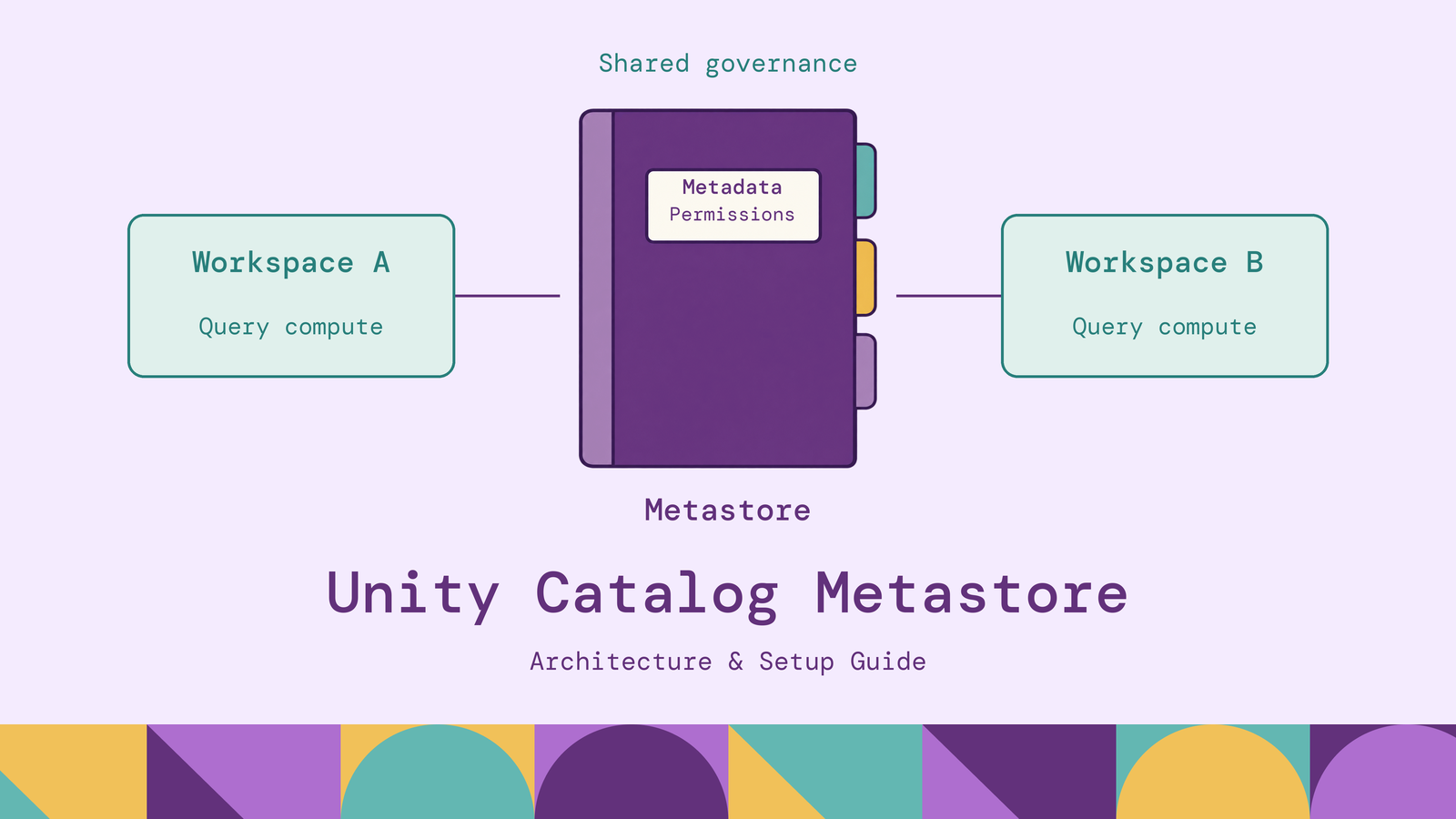
A shared Databricks dataset needs consistent names, ownership, and permissions across the workspaces that use it. A Unity Catalog metastore provides that common governance scope within a cloud region. Setting one up involves several distinct decisions: which workspaces attach to it, how catalogs divide responsibilities, and how compute receives authorized access to storage.
This guide explains the architecture, walks through creation and workspace assignment, and covers migration, troubleshooting, and operating practices. The setup examples use Databricks on AWS; Azure and Google Cloud storage differences are identified where they matter.
What is Unity Catalog metastore?
A Unity Catalog metastore is the top-level container for metadata and permissions in Databricks Unity Catalog. It holds catalogs and other securable objects, including storage credentials and external locations. A securable object is an object on which administrators can grant privileges to users, groups, or service principals. Databricks documents this hierarchy in its securable objects reference.
Within a catalog, schemas contain tables, views, volumes, functions, and models. Table names follow catalog.schema.table: production.finance.transactions, for example. The metastore sits above that namespace; its name is not a fourth component of the SQL table identifier.
Unity Catalog supplies the broader governance capabilities, including access control, discovery, lineage, and auditing. The metastore is the regional container through which objects and permissions are organized. Table files reside in cloud storage, separate from the catalog definitions used to find and govern them.
This article concerns Unity Catalog as managed by Databricks. Its setup instructions do not describe deploying the separate open-source Unity Catalog project.
How does Unity Catalog metastore work?
Consider an analyst querying production.finance.transactions. The workspace must be attached to the appropriate metastore, and the query must run on compatible compute. Databricks then resolves the table and checks the required privileges before allowing the read.
For a direct table read, the analyst needs USE CATALOG on production, USE SCHEMA on production.finance, and SELECT on the table. The privileges reference distinguishes these permissions: access to a parent namespace alone does not authorize reading its tables. Row filters or column masks can further restrict the result.
Assuming the account-level group and table already exist, an authorized owner or administrator could grant:
GRANT USE CATALOG ON CATALOG production TO `finance_readers`;
GRANT USE SCHEMA ON SCHEMA production.finance TO `finance_readers`;
GRANT SELECT ON TABLE production.finance.transactions TO `finance_readers`;
Storage authorization is another part of this path. A storage credential represents a cloud authorization mechanism, such as an AWS IAM role. An external location associates that credential with a storage path. Table readers normally receive privileges on tables rather than credentials for the underlying bucket.
A successful query therefore demonstrates several things together: a resolvable object, an authorized identity, compatible compute, and reachable storage. A failure in any one can look like a general metastore problem.
Unity Catalog metastore architecture
The architecture separates regional governance, logical organization, and physical storage.
Regional scope. Within a Databricks account, the design uses one metastore per cloud region, shared by workspaces in that region. Databricks recommends using catalogs as the primary units of data isolation rather than treating metastores as departmental boundaries. Its metastore best practices describe this regional model.
Catalog and workspace boundaries. A catalog can represent an environment or business domain, with schemas providing finer organization. Workspace-catalog bindings restrict where a catalog can be accessed. A user's table grants do not override a binding that excludes the current workspace. Ordinary catalogs are accessible across attached workspaces by default, subject to privileges; automatically created workspace catalogs are bound to their own workspace by default.
Storage ownership. For managed tables and volumes, Unity Catalog manages the underlying storage lifecycle. For external objects, you retain responsibility for that lifecycle. An external location can support either external objects or catalog-level managed storage; its name does not mean every object beneath it must be an external table.
Managed storage can be configured at the schema, catalog, or metastore level. When a managed object is created, the storage selection rules prefer the schema location, then the catalog location, then the metastore location. Metastore-level storage is optional. Databricks recommends catalog-level managed storage for logical isolation.
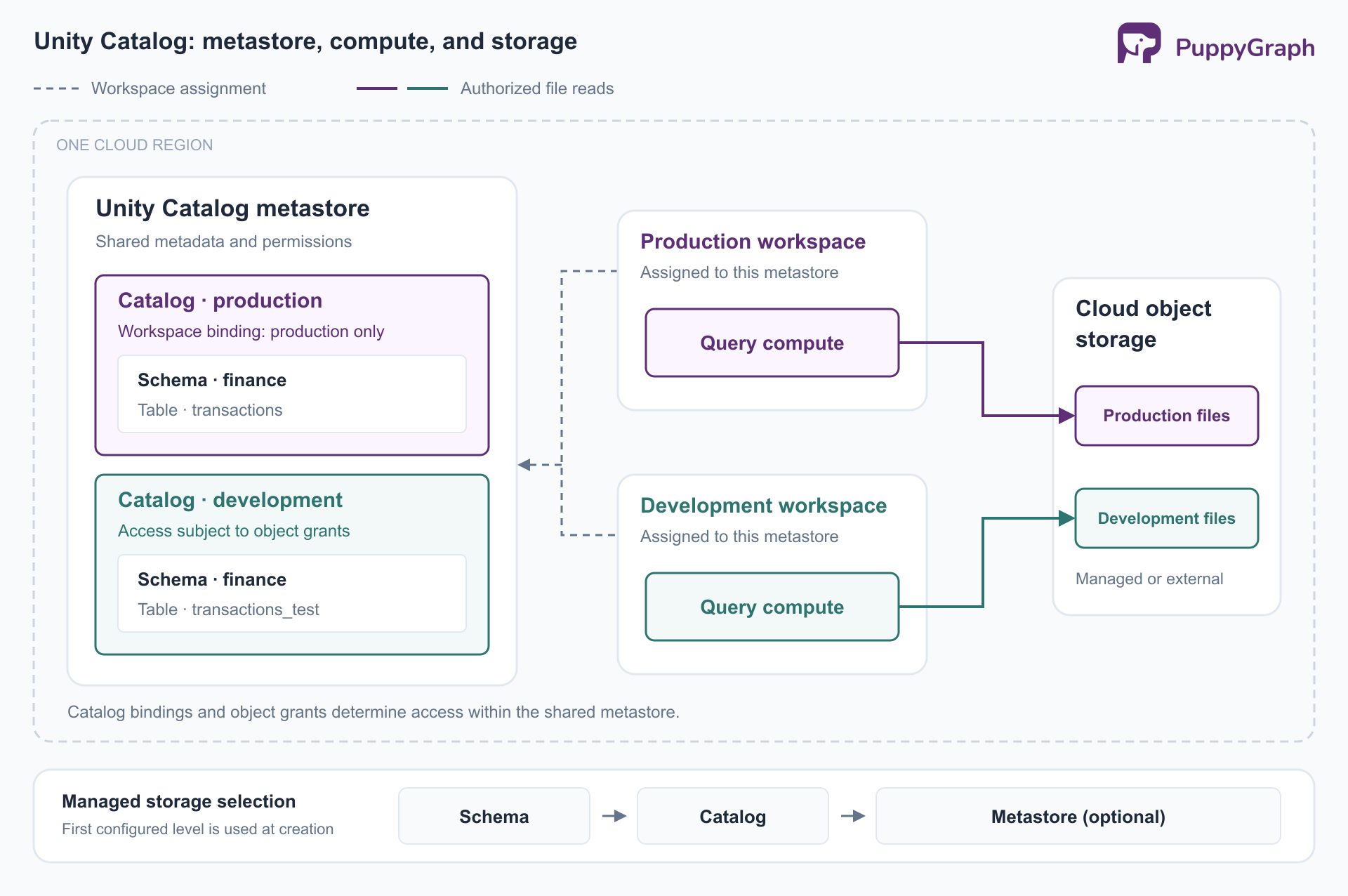
These boundaries serve different purposes. Sharing a metastore creates a common governance scope; catalog privileges and workspace bindings determine which parts each team can use.
How to create a Unity Catalog metastore
1. Check whether creation is necessary. Newer workspaces may already be enabled automatically. In the account console, open Workspaces and inspect the Metastore column. Alternatively, run the following on Unity Catalog-compatible compute, as described in the setup guide:
SELECT CURRENT_METASTORE();If the workspace is already attached, continue with catalog and access configuration. If it is unattached, check whether the account already has a metastore in that region before creating one.
2. Confirm privileges and storage design. The AWS creation procedure requires a Databricks account admin and a Premium-or-higher account. Workspace admin alone is insufficient for this operation. Decide whether to configure an optional metastore storage root or configure managed storage at catalog level later.
For a metastore root, create a dedicated S3 bucket in the workspace region and an IAM role granting access. Follow Databricks' storage credential instructions for the role policy, trust relationship, external ID, and self-assumption requirements. Include access to the encryption key if the bucket uses AWS KMS.
3. Create the regional metastore. In the account console, select Catalog, then Create metastore. Enter its name and region. Supply the bucket path and IAM role details if configuring metastore-level storage, then select Create. The console prompts you to assign workspaces; the next section covers that step.
For optional root storage on Azure, configure Azure Data Lake Storage and an authorized managed identity or service principal. On Google Cloud, when you configure metastore-level storage during creation, Databricks generates a service account to which you grant access to the GCS bucket. Follow the relevant cloud procedure rather than translating AWS IAM settings directly.
4. Establish administration. Manual creation makes the creator the initial metastore admin. Transfer that role to an appropriate group if retaining it. The metastore admin role is optional, and automatically provisioned metastores can operate without an assigned metastore admin.
How to assign a metastore to a Databricks workspace
For an existing workspace that needs enablement, follow the account-console assignment procedure:
- Sign in as an account admin and open Catalog.
- Select the regional metastore and open its Workspaces tab.
- Select Assign to workspace, choose the workspace, and select Assign.
- Review the confirmation and select Enable.
The workspace must be in the metastore's region. Assignment enables identity federation, so review provisioning automation and account-level identities before upgrading a legacy workspace. Databricks documents that enabling Unity Catalog cannot be reversed.
To validate access after assignment, use a SQL warehouse or other compatible compute. Classic clusters require standard or dedicated access mode and a supported runtime. If you need to create a catalog first, follow the catalog creation guide for its storage and privilege prerequisites.
Create or register a test table, apply the intended group grants, and query it as a normal reader. Workspace attachment is complete only as an administrative operation; this reader test establishes that the usable data path is ready.
How to migrate from Hive Metastore to Unity Catalog
Attaching a workspace does not migrate its Hive tables. Begin with an inventory of table formats, locations, owners, grants, views, jobs, and downstream consumers. Distinguish the workspace's built-in Hive metastore from a separately operated Hive Metastore service, because the migration choices differ.
Choose the method according to the desired destination:
Databricks' migration guide documents the direct-upgrade options. For an eligible external table, inspect the result of a SYNC dry run before performing the upgrade:
SYNC TABLE production.finance.transactions
FROM hive_metastore.finance.transactions
DRY RUN;
The destination schema must exist, and the executing identity needs source ownership, destination creation privileges, and the required storage permissions. Remove DRY RUN only after resolving the reported issues. A normal SYNC can write bookkeeping properties to the source; it is not necessarily a read-only metadata inspection.
Hive managed tables in DBFS root cannot use this SYNC path. For an eligible Delta table, a deep clone into managed storage is an alternative. A clone has its own history; historical time travel does not transfer from the source.
Hive metastore federation supports a staged transition. Federated internal Databricks Hive metastores support reads and writes, while external Hive Metastore and AWS Glue foreign catalogs are read-only through Unity Catalog.
Before cutover, compare row counts and business aggregates, recreate grants and dependent views, and exercise jobs with their actual service identities. For copied tables, coordinate a final refresh and writer switch so updates do not continue only on the old table. Retain a rollback plan until downstream workloads pass validation.
Common Unity Catalog metastore issues
Diagnose the failing layer before broadening permissions.
The compute and group requirements explain why legacy clusters and workspace-local groups can fail after assignment. The path rules also prohibit registering tables inside volumes or overlapping external tables with managed storage.
Reproduce the failure with the affected identity and workspace. An administrator's successful query does not establish that a scheduled job or analyst has the same access. Keep the failing object name, compute configuration, and error message together when investigating.
Unity Catalog metastore best practices
Make ownership durable. Assign catalog and schema ownership to accountable groups, grant access through account-level groups, and run production jobs as service principals. These identity practices reduce dependence on individual employees. Review broad grants when teams or responsibilities change.
Design storage and access together. Use catalog boundaries that reflect operational responsibilities and apply workspace bindings where environments must be separated. Keep direct cloud-storage permissions tightly controlled: independent bucket access can bypass Unity Catalog checks and its monitoring, as the cloud storage documentation explains. Test both permitted and denied access paths.
Use operational evidence. Inspect lineage before changing shared tables, and review audit events for unexpected identities or operations. Lineage capture has interface and workload requirements; it should not be treated as automatic observation of every external engine. Make ownership and access reviews recurring operational work.
Validate additional query engines. Include external consumers in compatibility and permission tests. Check the connector's supported table features, authentication identity, and access path before relying on it for a governed workload.
For example, a finance team may want to trace relationships between accounts, transactions, and shared payment instruments. PuppyGraph lets the team define a graph schema over existing tables and query those relationships with openCypher and Gremlin, without graph-specific ETL. Its Delta Lake connector supports Unity Catalog, while table data remains in the lakehouse. Validate the connector identity and required policies as part of that setup; catalog connectivity alone does not establish per-user inheritance of row filters or column masks.
Conclusion
A Unity Catalog metastore establishes a regional foundation for shared metadata and permissions. Effective setup also requires deliberate catalog boundaries, working storage credentials, compatible compute, and grants tested with the identities that will use the data.
Start by checking what Databricks has already provisioned. During migration, choose deliberately between registering existing files, copying data into managed storage, and federating Hive metadata. Validate the resulting workloads before retiring their previous access paths.
Try the forever-free PuppyGraph Developer Edition and book a demo with the team to see how openCypher and Gremlin queries connect entities across warehouse and lakehouse tables, with no graph-specific ETL, as you add relationship analysis to your Unity Catalog environment.

Hao Wu is a Software Engineer with a strong foundation in computer science and algorithms. He earned his Bachelor’s degree in Computer Science from Fudan University and a Master’s degree from George Washington University, where he focused on graph databases.


