

Unity Catalog Row-Level Security: Complete Guide
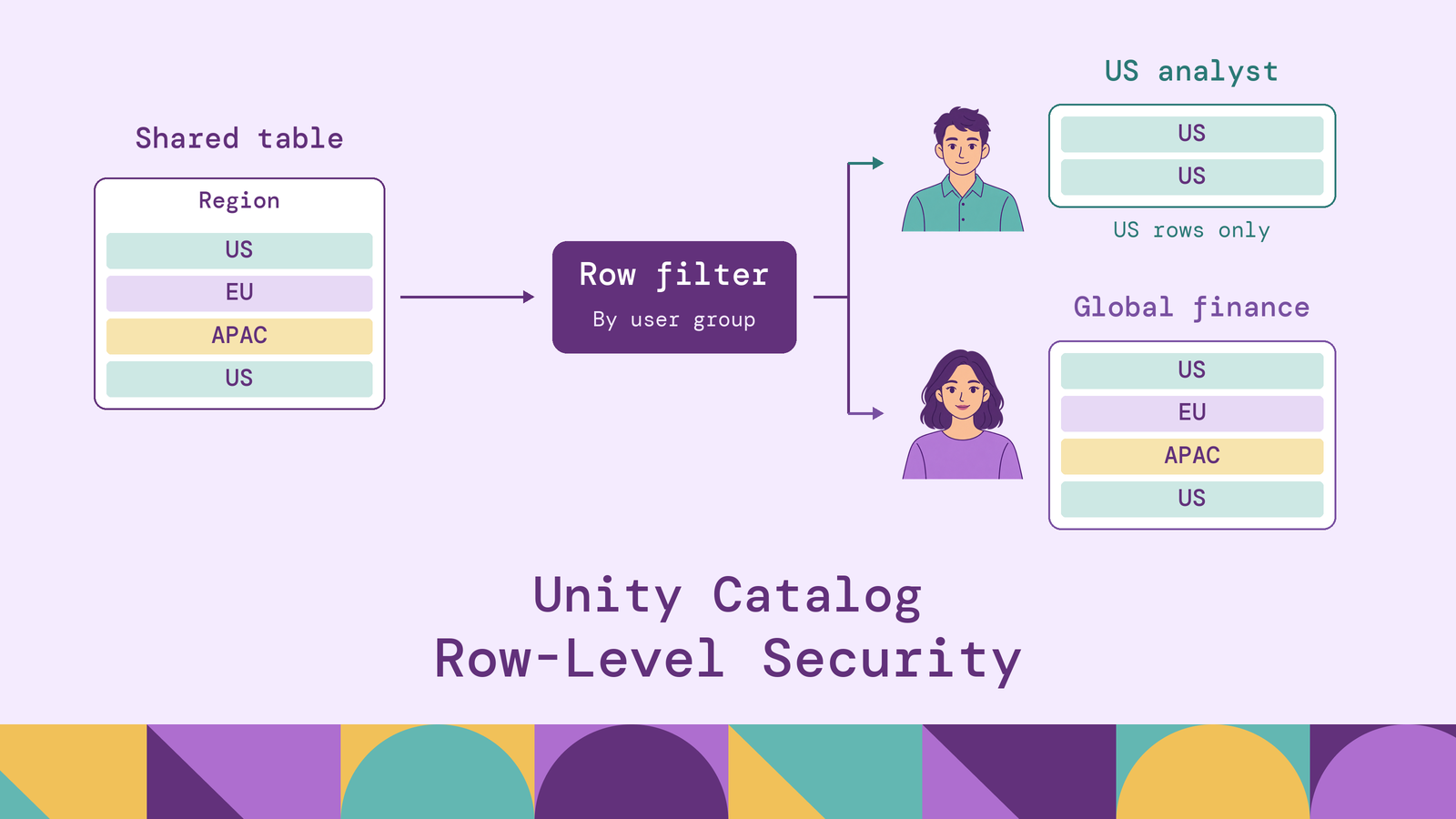
A shared sales table can serve regional analysts and global finance teams without giving everyone the same visibility. The important design decisions are where the access rule lives, which identity it evaluates, and which query paths enforce it. Those decisions determine whether a regional restriction holds beyond a single dashboard.
This guide explains Unity Catalog row-level security in Databricks, compares table-level filters, attribute-based access control (ABAC), and dynamic views, and walks through a SQL implementation. It also covers policy testing, practical use cases, and the limits to check before deployment.
What is Unity Catalog row-level security?
Unity Catalog row-level security restricts which records a user can retrieve from a table. A regional analyst might see only US transactions while an authorized finance group sees transactions across regions. The underlying table can remain shared; the visible result depends on the access rule and the querying identity.
Databricks implements this through row filters, which use SQL user-defined functions (UDFs) to decide whether rows are visible. Filters can be attached directly to a table or applied through ABAC policies. Dynamic views provide another approach by embedding access logic in a view definition.
Row-level security and column masking answer different questions. A row filter determines whether an employee record appears at all. A column mask determines what a visible field contains, such as a redacted salary or email address. A dataset may need both.
Neither a table-level filter nor an ABAC row-filter policy grants permission to read a table. These controls restrict access already granted through object privileges. Granting access and restricting visible rows are separate configuration tasks.
How row-level security works in Unity Catalog
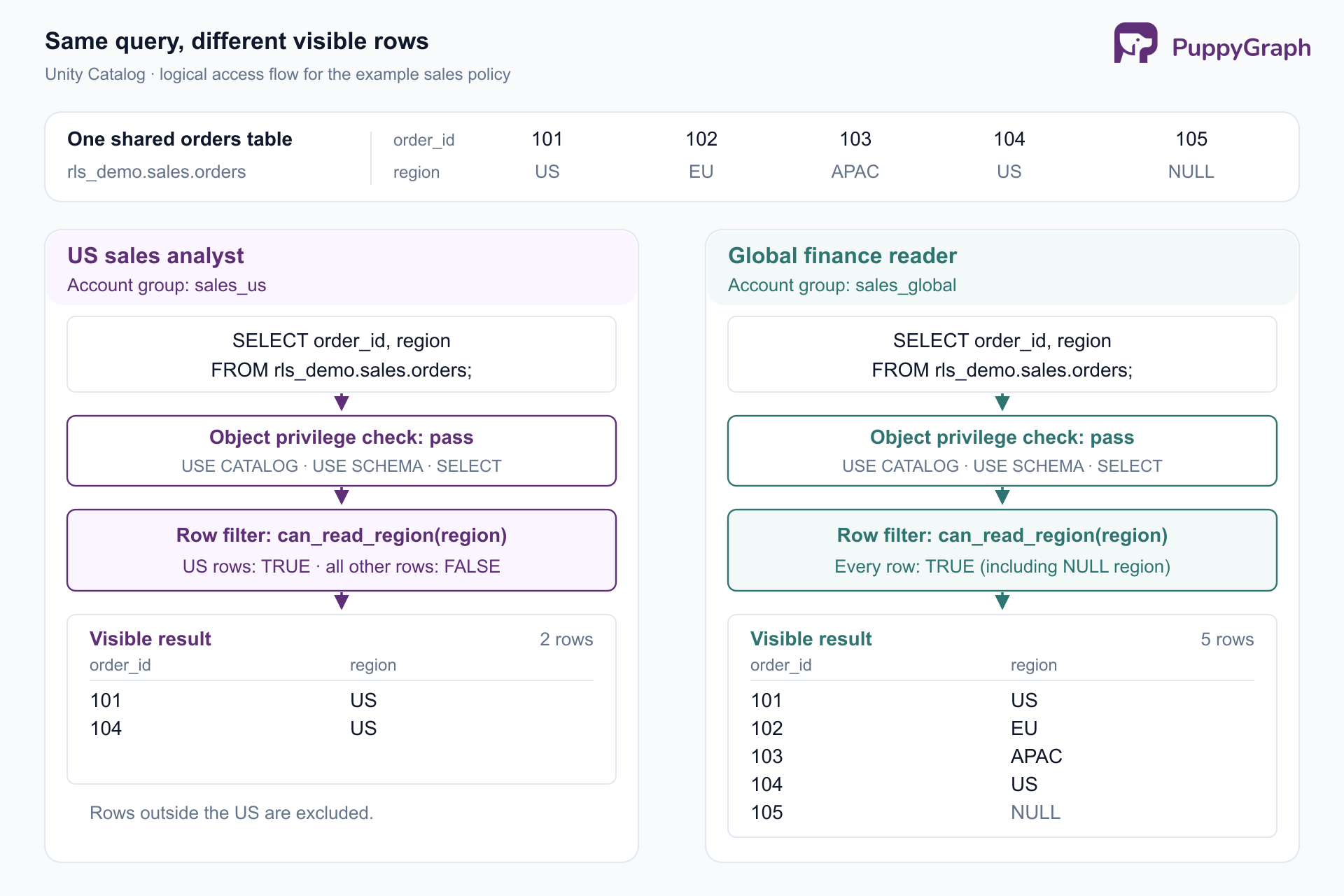
For a direct table query, the reader needs SELECT on the table, USE CATALOG on its catalog, and USE SCHEMA on its schema, as specified in the Unity Catalog privileges reference. The attached row filter then supplies a Boolean condition governing visibility.
The row-filter contract is precise: TRUE permits a row; FALSE or NULL excludes it. Databricks applies the filter as rows are fetched from the source. A reader does not need to remember an extra WHERE clause in every query.
For identity-dependent rules, is_account_group_member() checks the connected user's direct or indirect membership in an account-level group. This supports rules such as allowing a regional sales group to read rows with the corresponding region code.
Identify that connected user in the actual application. If an application submits every request using one service identity, a group check against that connection cannot distinguish its individual viewers. Include the application's authentication path in the policy design.
Why use row-level security in Unity Catalog?
Row-level security is useful when several audiences need the same data model but have different entitlements. A regional dashboard, a finance notebook, and an operational report may all need the same definition of revenue while exposing different transactions.
Keep definitions shared. Regional copies require a plan for synchronizing schema changes, corrections, and metric definitions. Filtering a shared table lets teams maintain one underlying dataset while expressing audience restrictions separately.
Make access rules reviewable. A named policy function gives reviewers a concrete place to inspect the regional-access condition. Reviewers can compare that function with group membership and expected query results instead of searching every report for a matching predicate.
Separate policy management from data ownership. Catalog- or schema-scoped ABAC policies let governance teams define rules that apply to matching tagged objects. This is useful when table owners should manage datasets while a central team controls access policy.
The benefit depends on coverage. Inventory every route by which a consumer reaches the records, including dashboards, notebooks, service accounts, and external engines.
Row filters in Unity Catalog
A table-level row filter binds a SQL UDF to a table and passes selected column values into it. For example, a regional-access function can accept the table's region column. The table keeps its existing name, so consumers continue querying the same object.
ABAC changes how that function is assigned. Governed tags identify the objects a policy targets. A schema-level policy could match a tagged region column across several sales tables and pass it to a reusable filter. The tag selects policy coverage; the UDF evaluates the row. Tags do not individually label every record.
The main choices are:
Databricks' comparison of these approaches recommends choosing by scope and governance needs. A reusable function alone does not automate attachment to new tables.
For dynamic views, grant consumers access to the view and withhold access to underlying objects that would expose restricted data. Use this approach when the published interface itself needs to reshape the data; use table policies when consumers should retain the table interface.
How to create and apply row filters in Unity Catalog
The following example uses a Databricks SQL warehouse and an existing Unity Catalog catalog named rls_demo, with sales and security schemas. Have an administrator provision the account groups sales_us, sales_eu, and sales_global, then assign test users to them.
The setup identity needs the relevant catalog and schema usage privileges, CREATE TABLE in sales, and CREATE FUNCTION in security. To attach a function to an existing table, it needs EXECUTE on the function and either table ownership or both MANAGE and SELECT on the table. Databricks documents these assignment prerequisites.
Create sample data. Use a sandbox without inherited consumer read grants while setting up the policy:
CREATE TABLE rls_demo.sales.orders (
  order_id INT,
  region STRING,
  amount DECIMAL(12, 2)
) USING DELTA;


INSERT INTO rls_demo.sales.orders VALUES
  (101, 'US', 120.00),
  (102, 'EU', 140.00),
  (103, 'APAC', 95.00),
  (104, 'US', 60.00),
  (105, NULL, 80.00);
Define the function. This SQL scalar UDF permits each regional group to read its region. The explicitly authorized global group can read every row:
CREATE FUNCTION rls_demo.security.can_read_region(row_region STRING)
RETURNS BOOLEAN
LANGUAGE SQL
RETURN COALESCE(
  is_account_group_member('sales_global')
  OR (is_account_group_member('sales_us') AND row_region = 'US')
  OR (is_account_group_member('sales_eu') AND row_region = 'EU'),
  FALSE
);
The two regional conditions use OR, so membership in both groups permits both regions. COALESCE makes an unknown result false. A missing region remains visible to the global group because that group's authorization explicitly covers all rows.
Attach the filter, then grant access. The column binding connects orders.region to the function's parameter:
ALTER TABLE rls_demo.sales.orders
SET ROW FILTER rls_demo.security.can_read_region ON (region);
Have an identity authorized to manage privileges on rls_demo and rls_demo.sales issue the catalog and schema grants; the table owner can issue the SELECT grant.
GRANT USE CATALOG ON CATALOG rls_demo TO `sales_us`;
GRANT USE SCHEMA ON SCHEMA rls_demo.sales TO `sales_us`;
GRANT SELECT ON TABLE rls_demo.sales.orders TO `sales_us`;
Repeat those read grants for sales_eu and sales_global. For the negative test, give a separate sandbox tester the same read privileges without membership in any allowed group.
Test through separate authenticated sessions. Run this query as each test user:
SELECT order_id, region, amount
FROM rls_demo.sales.orders
ORDER BY order_id;Also test a user without table read privileges: the query should be denied, which is different from successfully returning zero rows. Repeat the tests after membership changes and through the intended BI or application connection.
Using SQL UDFs for row-level security
A SQL UDF separates the access decision from the table attachment. Reusing the function is useful when several tables express the same business boundary, but the function's inputs must mean the same thing across those tables. A billing region and a shipping region are not interchangeable simply because both are strings.
For more complex entitlements, a mapping table can associate users or groups with permitted business units. A filter can use an EXISTS lookup instead of encoding every assignment in its body. Keep write access to that mapping table tightly controlled: changing an entitlement changes access.
Identity evaluation deserves care. Databricks distinguishes the function owner's privileges from the session identity. Filter functions run with definer rights for data access, while context functions such as session_user() and is_account_group_member() evaluate the invoker. The function owner's access to a lookup table and the reader's identity therefore serve different purposes.
For ABAC, policy creation adds the attachment rules around the UDF: choose the scope, targeted principals, governed-tag conditions, and matched columns passed as arguments. Reuse a function only after checking those bindings and testing each intended principal. A correct function attached to the wrong column still implements the wrong policy.
Row-level security best practices
Test denial cases explicitly. Include unmatched regions, nulls, overlapping memberships, and users with table privileges but no row entitlement. Preserve expected row IDs alongside the policy change so reviewers can check the intended behavior.
Match argument types exactly. Databricks warns that implicit casts in policy inputs can turn invalid values into nulls when ANSI mode is disabled. A filter that permits nulls can then expose unintended rows. Align column and parameter types, and treat schema changes as policy changes requiring tests.
Control tags and policy ownership. Missing or incorrect tags can leave tables outside an ABAC rule's coverage. Follow Databricks' tag-governance guidance: restrict who can change classifications, audit changes, and define restrictive handling for unclassified data. Check new tables before granting consumer access.
Keep functions small and measure actual queries. Prefer straightforward SQL conditions and pass only necessary columns. Databricks' performance guidance explains that complex UDFs and large entitlement lookups can add work, while security boundaries can restrict predicate pushdown. Compare representative joins and aggregates before and after applying a policy.
Plan changes and rollback together. Version function definitions, attachments, and grants. Identify every table using a shared function before changing it. Removing a filter can restore broader visibility for readers who retain table access, so rollback should restore a known restrictive policy rather than leave protection absent.
Common row-level security use cases
Regional sales reporting. Analysts see transactions for assigned territories, while a separately authorized finance group gets a consolidated view. Include reassigned accounts and cross-region staff in the entitlement model.
Tenant-scoped analytics. A shared events table can expose records by tenant entitlement. Map the authenticated querying identity to allowed tenant IDs; a tenant ID supplied in an application's query is not, by itself, proof of authorization.
Departmental workforce analysis. Managers see records for their assigned organizational units. Combine row restrictions with column masking when a manager may see an employee record but should not see every sensitive attribute.
Restricted investigations. Analysts access cases assigned to their investigation team, using an entitlement table when assignments change frequently. Include removal of access when a case closes or an analyst leaves the team.
Each scenario needs an explicit rule for overlapping access, exceptions, and revocation. Writing that rule before the UDF prevents implementation details from silently deciding business policy.
Limitations of Unity Catalog row-level security
Compute and operations have separate requirements. Table-level filters and ABAC policies have different compute support. Dedicated compute can depend on serverless filtering. Check the table-level prerequisites and ABAC requirements against each workload. Successful reads do not establish support for every write, clone, or historical query operation.
For example, time travel is unsupported with table-level filters, while ABAC has time-travel support in Beta with its own table and compute requirements. Verify this before designing workflows that must retrieve historical records.
Independent filters do not automatically compose. Only one distinct row filter may resolve for a given user and table. Conflicting ABAC or table-level filters can block access instead of combining their conditions. Design a combined predicate where necessary and test overlapping policy scopes. See the policy conflict rules.
Dynamic views have a different security boundary. Beyond controlling base-table privileges, consider inference through crafted predicates. Databricks documents probing risks for dynamic views, which lack the filtering barrier used by table policies. Evaluate this difference when consumers can submit arbitrary SQL.
External enforcement requires a supported path. Databricks documents cross-engine fine-grained access control, where serverless compute filters data before returning it to an external engine. This requires a supported connector configuration, managed tables with catalog commits, and the relevant external-access permissions. Catalog discovery or direct storage access alone does not establish that the same policy is enforced.
These constraints make access-path testing part of deployment. Verify the identity, connector, and operations used by every consumer, including services that query on someone else's behalf.
Conclusion
Unity Catalog row-level security works best when the access rule, object grants, and execution path are designed together. Use table-level filters for specific table rules, ABAC for consistent coverage across tagged datasets, and dynamic views for curated interfaces after evaluating their security boundary. Test both permitted and denied results under real consumer identities.
When analysis needs to follow relationships across those datasets, PuppyGraph lets teams define a graph schema over existing tables and query entities and relationships with openCypher and Gremlin, without graph-specific ETL. Its Delta Lake connector supports Unity Catalog, with tables remaining in the lakehouse. Validate the selected connector and identity against your row-policy requirements; catalog connectivity alone does not demonstrate policy propagation.
Try the forever-free PuppyGraph Developer Edition and book a demo with the team to see how openCypher and Gremlin queries connect entities across warehouse and lakehouse tables, with no graph-specific ETL, for relationship analysis alongside your access-control design.

Hao Wu is a Software Engineer with a strong foundation in computer science and algorithms. He earned his Bachelor’s degree in Computer Science from Fudan University and a Master’s degree from George Washington University, where he focused on graph databases.


