

Unity Catalog vs Hive Metastore: Key Differences
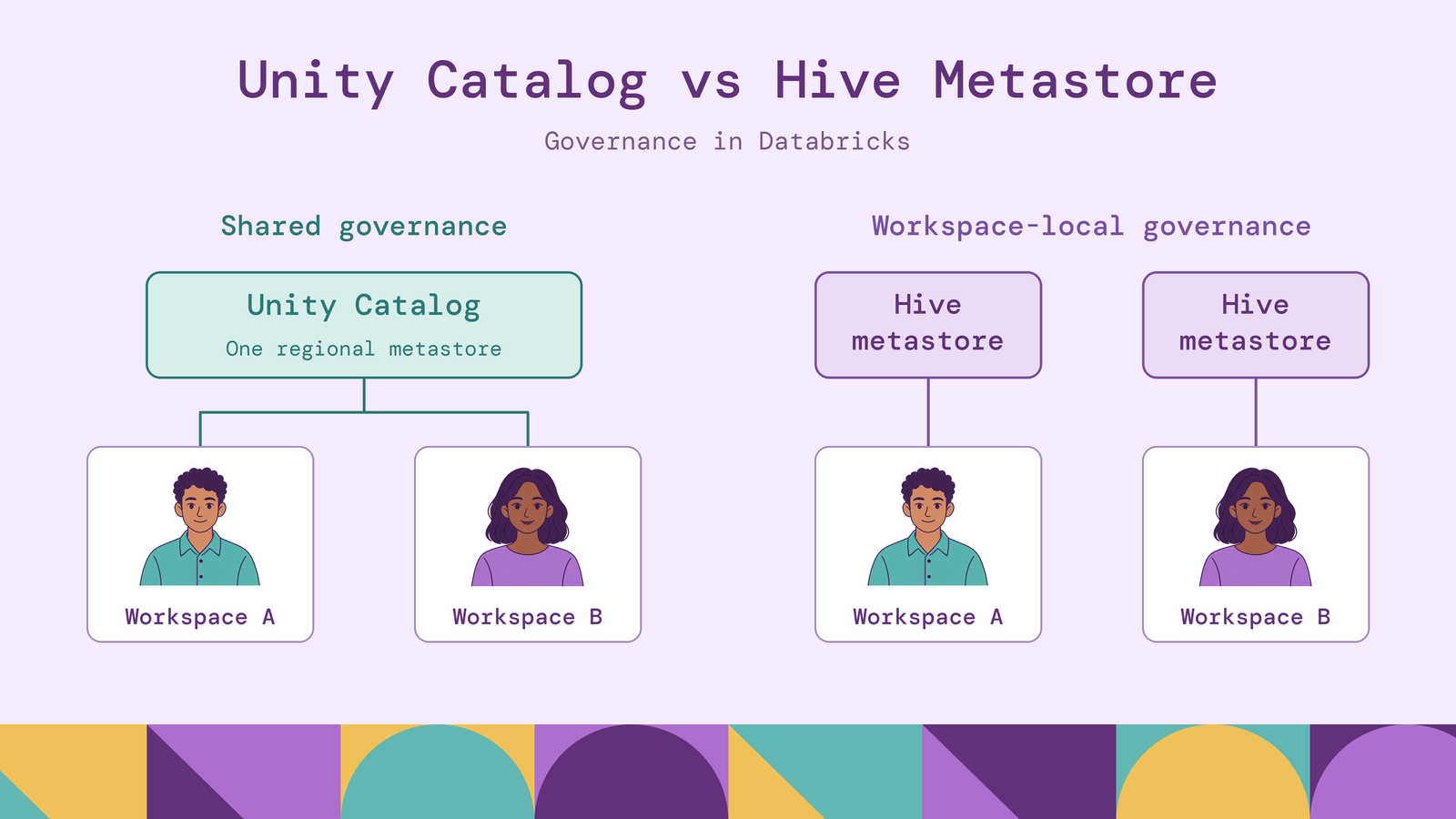
Choosing between Unity Catalog and Hive Metastore changes how teams organize tables, grant access, and trace data use across their analytics environment. In Databricks, the central difference is governance scope: Unity Catalog provides shared governance across workspaces, while the built-in Hive metastore follows a workspace-local model. Databricks treats that built-in metastore as a legacy feature and recommends migration.
This comparison covers architecture, external data, Delta Lake, security, lineage, and migration. It focuses on Unity Catalog in Databricks versus the legacy Databricks Hive metastore, while distinguishing the broader Apache Hive Metastore ecosystem where that distinction affects the decision.
What is Unity Catalog?
Unity Catalog provides governance for data and AI assets in Databricks. It manages permissions and metadata for tables, views, volumes, functions, and models, with integrated discovery, lineage, and auditing. A volume provides a governed location for files that are accessed outside a table abstraction.
Objects use a three-level namespace: catalog.schema.object. For example, production.finance.transactions identifies a table within the finance schema of the production catalog. Catalogs let teams organize domains or environments without making each workspace a separate metadata boundary.
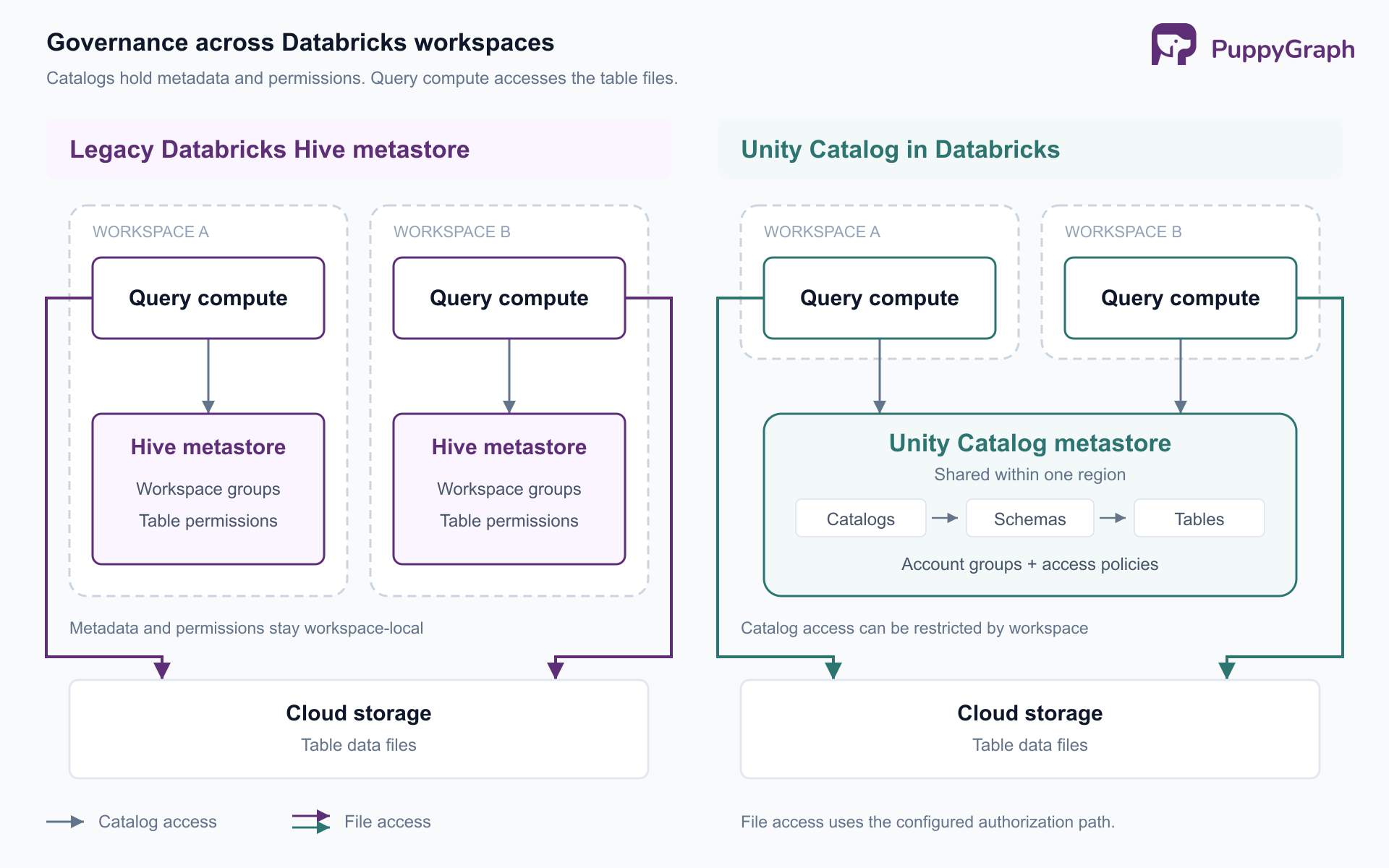
A Unity Catalog metastore contains those catalogs and their permissions. Workspaces attach to a metastore in their region. This allows several workspaces to use shared definitions, although administrators can restrict which workspaces can access particular catalogs. Account-wide governance therefore still requires regional and workspace-access planning.
Unity Catalog also has an open-source implementation. The managed Databricks service and the open-source project should be evaluated separately. The Databricks-integrated governance features discussed here are not a feature-parity claim about a self-hosted installation.
For a platform team, the practical change is having a common place to define ownership and access across engineering, analytics, and machine-learning workloads. The catalog structure becomes part of the organization's governance design.
What is Hive Metastore?
Apache Hive Metastore, often abbreviated HMS, stores definitions that query engines need to interpret data as tables. These include databases, tables, functions, and, depending on configuration, statistics and authorization records. Its administration documentation describes a service backed by a relational database, with remote clients connecting through Thrift.
HMS can run independently of the Hive query engine. For example, Trino's Hive connector uses the metastore and underlying storage without using Hive's query language or execution environment. This separation makes HMS useful in environments where several engines need shared table definitions.
Databricks' built-in Hive metastore is one deployment of that model. It is local to a workspace and appears under hive_metastore, so a table can be addressed as hive_metastore.finance.transactions. That workspace boundary should not be generalized to every standalone HMS installation.
HMS also does not mean an absence of security. Apache Hive documents SQL-standard authorization through HiveServer2 and storage-based authorization for metastore operations. Databricks supplies its own legacy table access controls. The important question is which component enforces a policy and whether every reader passes through it.
HMS supplies shared metadata infrastructure. The surrounding engines, identity systems, storage permissions, and governance services determine the complete operating model.
Unity Catalog vs Hive Metastore (key difference) table
The table compares the two Databricks governance models. It does not describe every possible Apache Hive deployment.
Databricks documents the differences between the access models, including group scope and namespace behavior. The legacy privileges reference also documents dynamic views for row and column restrictions.
The decision is about the consistency and coverage of governance. A permission works only along the paths that enforce it, and both models require attention to direct access to underlying files.
Unity Catalog vs Hive Metastore for external data
An external table references data whose storage lifecycle remains under your control. In Unity Catalog, registering the table brings its metadata and supported access paths under catalog governance. Dropping an external table removes the catalog entry without deleting its underlying files.
Unity Catalog separates the storage connection into two objects. A storage credential represents authorization to cloud storage, such as an IAM role. An external location associates that credential with a storage path. Administrators can then delegate table creation or file access through privileges on those objects.
Suppose a billing pipeline writes Delta data into an existing cloud-storage directory. The team can register that directory as an external table, assign an owner, and grant consumers table access. It should also identify who can read the directory independently. Catalog registration alone does not remove previously issued storage permissions.
In an HMS-based environment, engines likewise need both metadata and permission to reach storage. Databricks' legacy path can use cluster-associated credentials; an independent HMS deployment has its own engine and filesystem configuration. Registering a path in a metastore does not establish a universal authorization boundary around it.
External data and external engines are separate questions. Databricks supports external-engine access through documented APIs, including access to managed tables. An external table is therefore not automatically required just because a consumer runs outside Databricks.
Fine-grained enforcement still depends on the integration. Databricks documents a cross-engine filtering path that uses serverless compute for supported protected tables. Direct file access with independent cloud credentials follows a different boundary. Evaluate the connector, table type, authentication identity, and required policies together.
Unity Catalog vs Hive Metastore for Delta Lake
Both catalogs can register Delta tables. Delta Lake supplies ACID transactions, schema enforcement, and time travel; those capabilities do not appear only after migration to Unity Catalog. A Delta-capable engine can use tables registered in Hive Metastore while retaining the format's transactional behavior.
For conventional Delta tables, the metastore records the table location, while the transaction log supplies authoritative table state. A reader must understand Delta semantics. Treating the directory as an arbitrary collection of Parquet files can produce a different result from reading the Delta table.
There is a relevant architectural extension: catalog-managed Delta tables use the managing catalog to coordinate commits. Those tables require compatible clients and catalog-mediated access. This means the catalog can participate more deeply in table operations than a simple name-to-location lookup, depending on the enabled table features.
Unity Catalog also connects managed tables to Databricks maintenance services. For example, predictive optimization schedules operations such as optimization, statistics collection, and cleanup for Unity Catalog managed tables. The operational benefit comes from automated maintenance.
For a migration, separate three decisions: registering the table in a different catalog, changing its storage or management model, and enabling new Delta features. They have different consequences. Delta's compatibility rules require clients to support each table's applicable reader and writer features. A consumer that works with today's table may need an upgrade after a feature change.
The useful comparison is therefore governance and lifecycle integration around Delta Lake. Basic transactional support is shared; advanced capabilities and interoperability depend on the chosen table configuration and clients.
Unity Catalog vs Hive Metastore: feature comparison
The feature differences become clearer when evaluated against an operational task, such as giving a regional analyst access to billing records or tracing a broken revenue report.
Access control and delegation. Unity Catalog combines object privileges, attribute-based access control, and table-level filtering. Object grants establish access; row filters and column masks restrict the visible data. Tag-based policies help apply common rules across datasets. Workspace bindings add another restriction by controlling where access is available. These mechanisms address different parts of the authorization decision.
For a direct Unity Catalog table read, an analyst needs SELECT plus USE CATALOG and USE SCHEMA on its parents, as documented in the privileges reference. Moving a table without recreating the intended access hierarchy can leave a valid user unable to query it. Legacy Databricks table ACLs use a different privilege model, so migration requires reviewing grants rather than copying names mechanically.
Row and column restrictions. Unity Catalog can attach filtering and masking logic to tables or apply it through centralized policies. The legacy Databricks model supports dynamic views that restrict rows and columns. The difference is how policies are attached, reused, and administered. In a view-based design, review access to the underlying table as carefully as access to the view.
Lineage and impact analysis. Unity Catalog captures lineage for supported Databricks queries, including column-level relationships, and aggregates it across attached workspaces. This helps identify consumers before changing a column or investigate upstream causes of incorrect results. Capture has documented requirements; a catalog should not be assumed to observe every transformation performed by an unrelated external engine. An HMS deployment needs additional integration to assemble comparable end-to-end lineage.
Auditing and investigation. Databricks exposes audit events through the audit log system table, with fields for identity, action, object-related parameters, and response. This creates an investigation surface for governed activity. It does not mean every storage read appears there: Databricks explicitly warns that direct storage access bypasses catalog monitoring. For HMS environments, assess the evidence available from the engine, metastore service, and storage platform together.
These distinctions matter most when teams share datasets. Evaluate whether a policy change reaches every intended consumer and whether investigators can reconstruct the access path. A feature list alone cannot establish either outcome.
When to use Unity Catalog vs Hive Metastore
For new Databricks workloads, Unity Catalog is the natural choice when teams need shared ownership, consistent access controls, and integrated lineage across workspaces. Databricks recommends upgrading legacy tables to this model. Retaining the built-in Hive metastore is mainly a compatibility decision during transition.
Standalone HMS remains a reasonable architectural choice when an existing environment depends on its interfaces, particularly across established Hive-compatible engines or on-premises storage. Evaluate that system as a complete deployment: who operates the service and its backing database, how storage access is restricted, and which tools supply governance beyond table metadata.
Migration can proceed incrementally. Hive metastore federation exposes HMS tables through a foreign catalog in Unity Catalog. It can support a transition or a longer-lived hybrid environment. Support differs by source: federation of the internal Databricks metastore supports reads and writes, while external HMS federation is read-only through the foreign catalog.
For a direct upgrade, Databricks documents different migration methods. SYNC can register eligible existing tables as Unity Catalog external tables. Moving into managed storage can require cloning or copying data. A clone creates a new table history, so do not assume that pre-migration time travel transfers with the data.
Before cutover, inventory table locations, owners, grants, views, jobs, and downstream readers. Test with actual service identities and representative users, including users who should be denied access. Validate both query results and writes. Keep a rollback plan until dependent workloads have been exercised against the new names and permissions. Treat metadata registration, authorization, and workload migration as separate checks.
Include analytical consumers in that inventory. A team investigating shared payment instruments across accounts may need relationship queries over its existing transaction tables. PuppyGraph lets the team define a graph schema over those tables and query entities and relationships with openCypher and Gremlin, without graph-specific ETL. Its Delta Lake connector supports Unity Catalog and Hive Metastore configurations, with data remaining in the lakehouse. That provides a way to add relationship analysis alongside existing table workloads. Validate the connector's table-feature support and access identity during migration; catalog connectivity alone does not establish that each graph user inherits Unity Catalog row filters or masks.
Conclusion
Unity Catalog brings a shared governance model to Databricks, with integrated access control, lineage, and auditing across attached workspaces. Hive Metastore remains useful metadata infrastructure in broader analytics environments, while Databricks' built-in workspace metastore is a legacy path to migrate from.
Choose based on the governance boundary and the engines that must use the data. For Delta Lake, distinguish the table format's guarantees from catalog-specific management features. During migration, verify permissions, table compatibility, and downstream workloads as carefully as the metadata move itself.
Try the forever-free PuppyGraph Developer Edition and book a demo with the team to see how openCypher and Gremlin queries connect entities across warehouse and lakehouse tables, with no graph-specific ETL, as you evaluate relationship analysis alongside your catalog strategy.

Hao Wu is a Software Engineer with a strong foundation in computer science and algorithms. He earned his Bachelor’s degree in Computer Science from Fudan University and a Master’s degree from George Washington University, where he focused on graph databases.


