


Apache Iceberg Time Travel: How It Works?
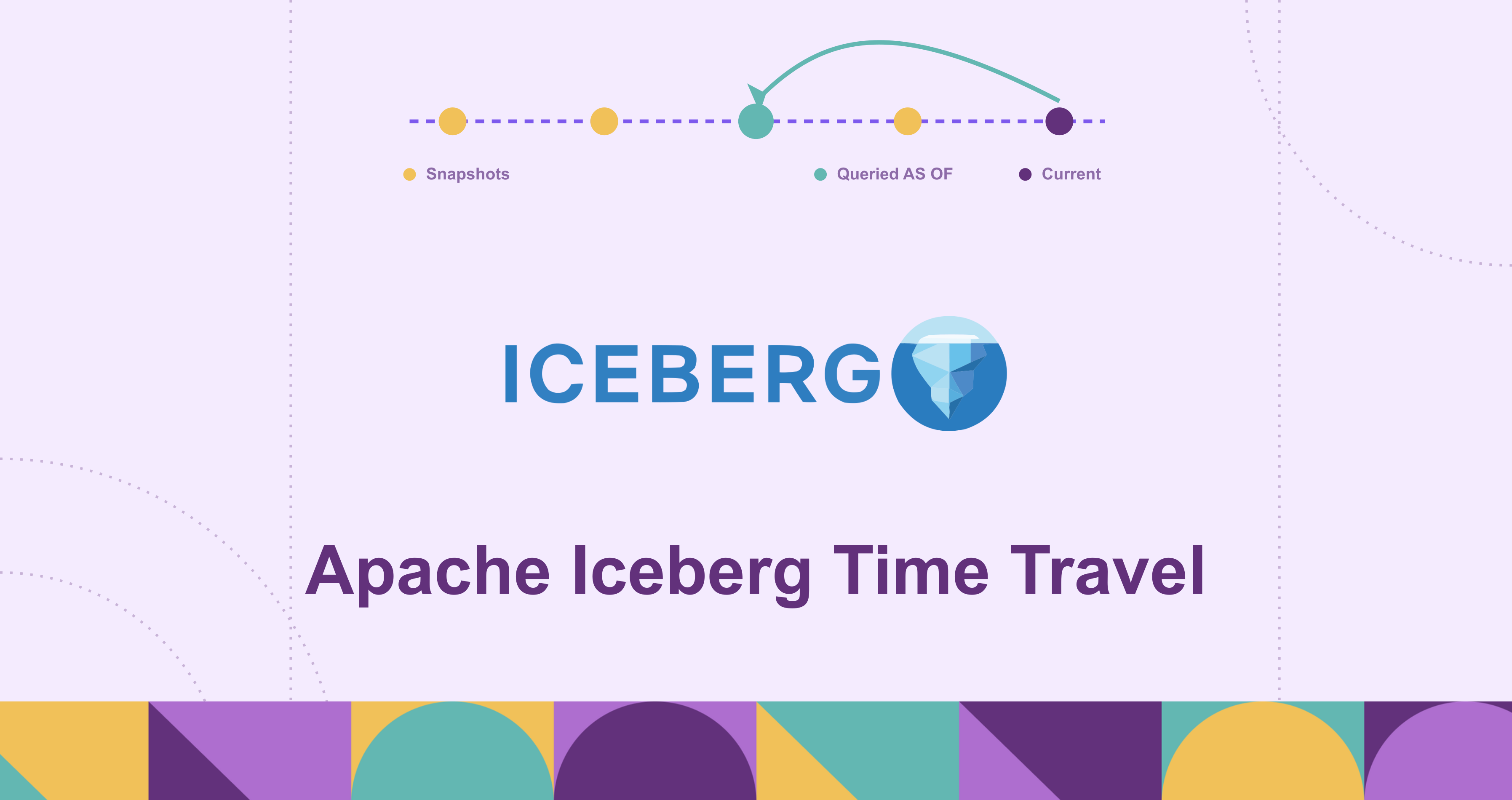
Every write to an Apache Iceberg table creates a snapshot, and Iceberg keeps the old ones around. Time travel is the ability to query any of those snapshots, by ID or by timestamp, as if it were the current table. There is no restore step, no copy of the data, and no separate versioning system to operate: the history is a property of how Iceberg tracks files in metadata, and reading an old version costs the same as reading the current one.
This post explains how that works at the metadata level, walks through the SQL for querying historical data, compares snapshot-ID and timestamp addressing, and covers the use cases where time travel earns its keep, including running graph queries against a historical version of a table.
What is Apache Iceberg time travel?
Apache Iceberg time travel is the capability to run a read query against a previous version of a table. Each version corresponds to a snapshot, the unit of table state in Iceberg, and a query can target a snapshot in two ways: by its unique snapshot ID, or by a timestamp that Iceberg resolves to whichever snapshot was current at that moment.
The feature is best understood by what it is not. It is not a backup: nothing is exported, and history reaches only as far as snapshot retention allows. It is not change data capture: a snapshot is a complete table state, not a stream of row-level changes. And it is not engine magic: the version history lives in the table format itself, defined by the Iceberg spec, so Spark, Trino, Flink, Dremio, and Snowflake all time travel against the same table through their own syntax. The table is the shared substrate; the history travels with it.
Why time travel matters in modern data lakes
Data lakes earned a reputation for being unauditable. A table was a directory of files on object storage, and a write job that rewrote those files destroyed the previous state in place. If a pipeline corrupted Tuesday’s data on Wednesday, the options were restoring a backup, replaying upstream sources, or accepting the loss, and there was no reliable answer to a simpler question: what exactly did this table contain when last month’s report was generated?
Iceberg changed the physics of this. Data files are immutable; a commit produces new files plus new metadata, and the old metadata keeps pointing at the old files. Version history stops being something you build with backup jobs and becomes a side effect of how writes work. That matters now because the lake has become the system of record for analytics, with the auditability expectations that implies; because many engines share one copy of the data and get one shared history for free; and because “what changed between yesterday’s run and today’s” becomes a query instead of an investigation.
How Apache Iceberg time travel works
The mechanism rests on three design decisions, and each is simple on its own.
Immutable data files. Iceberg never updates a data file in place. Inserts write new files; updates and deletes rewrite affected files into new ones or write delete files alongside them. The files belonging to an old version of the table are therefore still sitting in object storage after new writes land; they are simply no longer referenced by the current metadata.
A snapshot per commit. Every successful write produces a snapshot: a record of the complete set of data files that make up the table at that point. The snapshot is a listing, not a copy. Consecutive snapshots reference mostly the same files, so a commit that touches one partition adds a little metadata, not a duplicate of the table.
An atomic metadata pointer. Each commit writes a new metadata file and atomically swaps the table’s metadata pointer to it, mediated by the catalog; concurrent writers proceed optimistically and retry if someone else commits first. The swap is the basis for serializable isolation, and it is what makes time travel coherent: every snapshot is a state that was, at some instant, the table.
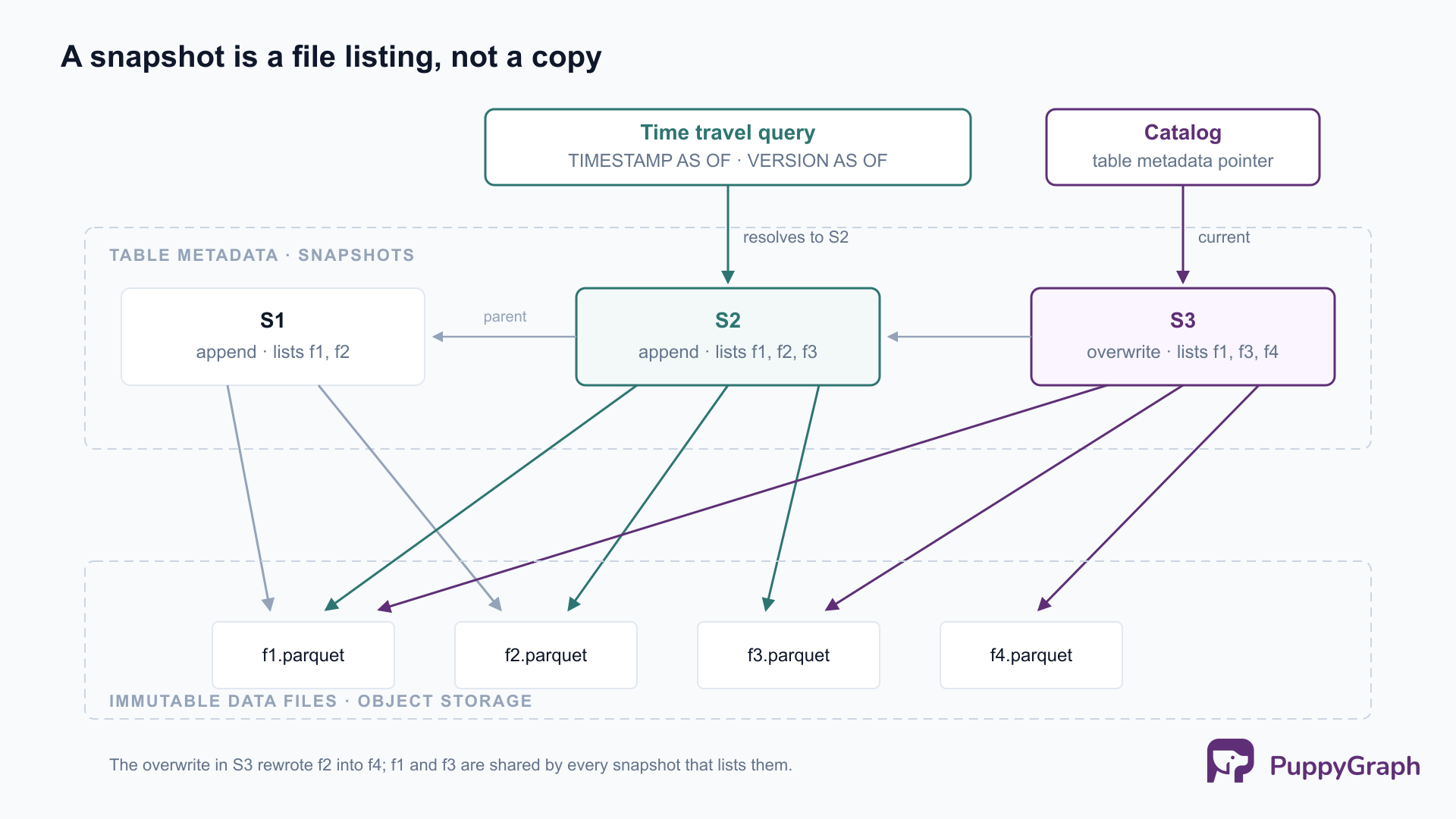
A time travel query, then, does no special work. The engine looks up the requested snapshot in the metadata, reads the file listing that snapshot points to, and plans the scan exactly as it would for the current version, with the same partition pruning and file skipping. Reading history is the same code path as reading the present, pointed at an older file listing.
The one thing that bounds this is retention. Snapshot expiration, a routine maintenance operation, removes old snapshots from metadata and deletes data files nothing references anymore, and an expired snapshot can no longer be time traveled to. The retention bounds are table properties (when expiration runs, the default policy removes snapshots older than 5 days while always keeping at least one), so time travel reaches exactly as far back as the table’s retention policy allows.
Understanding snapshots, metadata, and table versions
Time travel becomes much less mysterious once the metadata hierarchy is laid out. An Iceberg table is tracked through four layers.
The table metadata file (metadata.json) is the root. It holds the table’s schemas, partition specs, properties, the list of valid snapshots, and named references (branches and tags). The catalog stores a pointer to the current metadata file; that pointer is what the atomic commit swaps.
Snapshots are entries in that metadata. Each records its ID, its parent, a timestamp, the operation that produced it (append, overwrite, replace, or delete), the table schema current at the time, and the location of its manifest list.
The manifest list is one file per snapshot, enumerating the manifests that make up that version along with partition-level statistics the planner uses to skip whole manifests.
Manifest files track the actual data files, with per-column bounds for finer-grained pruning. Manifests are shared across snapshots: a commit rewrites only the manifests its changes touch and reuses the rest, which is why a thousand snapshots do not mean a thousand copies of the file listing.
A useful way to read the hierarchy: data files hold the rows, manifests hold the membership (which files are in which version), and the metadata file holds the history (which versions exist). Time travel is a lookup in the history layer that changes which membership entries the scan reads.
Iceberg exposes all of this as queryable metadata tables, which is the natural way to find a snapshot to travel to. In Spark, append .history, .snapshots, or .refs to the table name; in Trino, quote the table name with a $ suffix:
-- Spark
SELECT snapshot_id, committed_at, operation
FROM prod.db.orders.snapshots
ORDER BY committed_at DESC;

-- Trino
SELECT * FROM "orders$history";
One more layer sits on top of snapshots: branches and tags, named references with their own retention lifecycles. A tag is a durable name for one snapshot (ALTER TABLE db.orders CREATE TAG `eoy-2025` AS OF VERSION 42), useful for marking an audited quarter-end or a training-set cut; a branch is a movable reference that writes can advance, which is what write-audit-publish workflows build on. Snapshots still referenced by a branch or tag are not removed by expiration, and the main branch never expires; tagging is how you tell the retention policy that a version is special.
Querying historical data with Apache Iceberg
The syntax varies slightly by engine; the semantics do not. In Spark SQL (3.3 or later, per SPARK-37219), time travel goes directly in the FROM clause, as documented in the Iceberg Spark queries docs:
-- As of a wall-clock moment
SELECT * FROM prod.db.orders TIMESTAMP AS OF '2026-06-01 00:00:00';

-- As of an exact snapshot
SELECT * FROM prod.db.orders VERSION AS OF 10963874102873;

-- VERSION AS OF also accepts a branch or tag name
SELECT * FROM prod.db.orders VERSION AS OF 'eoy-2025';
FOR SYSTEM_TIME AS OF and FOR SYSTEM_VERSION AS OF are equivalent spellings, and TIMESTAMP AS OF also takes a Unix timestamp in seconds. The DataFrame API exposes the same addressing as read options (snapshot-id, as-of-timestamp), with one trap worth knowing: as-of-timestamp takes milliseconds, not seconds.
Trino prefixes the clauses with FOR, per the Trino Iceberg connector docs:
SELECT * FROM orders FOR TIMESTAMP AS OF TIMESTAMP '2026-06-01 00:00:00 UTC';
SELECT * FROM orders FOR VERSION AS OF 10963874102873;
Flink expresses the same thing as SQL hints (/*+ OPTIONS('snapshot-id'='...') */), and Dremio as AT SNAPSHOT; the surface differs, the snapshot being read does not.
Reading history is half the story; the other half is making a historical version current again. Iceberg ships rollback as catalog procedures rather than query syntax:
CALL catalog.system.rollback_to_snapshot('db.orders', 10963874102873);
CALL catalog.system.rollback_to_timestamp('db.orders', TIMESTAMP '2026-06-01 00:00:00');
Rollback moves the table’s current pointer to an ancestor snapshot; it is metadata-only and immediate, which is what makes it the recovery tool of choice after a bad write.
Time travel by snapshot ID vs timestamp
Both forms read the same history; they address it differently, and the differences matter in practice.
The reproducibility row should drive the choice. A timestamp answers a question about wall-clock time, which is what a human debugging an incident is actually asking; a snapshot ID pins an exact table state, which is what a rerunnable job or an audit needs. The pattern that gets the best of both: explore by timestamp, then record the snapshot ID it resolved to in the job config, the audit record, or the experiment log, and promote any ID that must outlive retention to a tag.
Key benefits of Apache Iceberg time travel
Recovery without restores. A bad DELETE or a miscomputed overwrite stops being a restore-from-backup incident: the previous state is one rollback_to_snapshot call away, metadata-only, nothing copied. The recovery window equals the retention window, which turns retention tuning into an explicit recovery-objective decision.
Reproducibility for downstream consumers. Any computation that reads the table (a report, a training run, a quality check) can record the snapshot ID it read and be rerun later against exactly that input. It is the data-side analogue of pinning dependency versions.
Auditability built into the format. Point-in-time questions (what did the table say when the decision was made, what did the quarter close against) are answered by querying, not reconstructing, and the snapshot summary records which kind of operation produced each version.
Safe experimentation against production data. Because old versions stay readable, validation workflows can write first and publish second: stage changes on a branch, audit them with queries, then fast-forward main. Time travel is the read primitive that write-audit-publish patterns build on.
Each of these replaces an operational process (backup jobs, copy-based versioning, manual change tracking) with a metadata lookup against history the table was already keeping.
Common use cases for Apache Iceberg time travel
Rolling back a bad pipeline run. The canonical case: a buggy transform lands garbage in production, the on-call engineer finds the last good snapshot in .history and calls rollback_to_snapshot, and the table is sane again while the root cause gets fixed. The corrupted snapshots remain inspectable for the postmortem.
Point-in-time reporting and regulatory lookback. Financial close, compliance reviews, and dispute resolution all need “the table as it stood on date X,” with proof. Tagging the snapshot each official report ran against makes the lookback durable and self-documenting.
Reproducible ML training sets. Recording the snapshot ID (or a tag per training run) pins the exact dataset behind each model version, which is the difference between suspecting data drift and being able to rerun the experiment.
Change analysis between versions. Two time travel reads and an EXCEPT or a join answer questions that are awkward any other way: how many rows did yesterday’s load actually change, did the deduplication job remove what it was supposed to, when did this record first appear.
Graph queries over historical snapshots
One use case sits a layer above the SQL examples: workloads where the table data is naturally a graph. Security teams model assets, identities, and permissions; fraud teams model accounts, devices, and transfers; increasingly that data lives in Iceberg, because that is where the rest of the analytics stack already is (our Iceberg and Trino walkthrough covers the SQL side). And the questions are temporal as often as they are topological. “Which identities can reach this database” is a traversal; “which identities could reach it before the incident” is a traversal against a historical version. SQL time travel answers the second question one table at a time; what the investigation needs is the graph as of that moment, every vertex and edge table read at one consistent historical point, then traversed.
PuppyGraph supplies the graph half of that combination directly on Iceberg. It is a graph query engine that connects to a table’s catalog (REST catalogs, AWS Glue, and Hive Metastore, among others), maps existing tables to vertices and edges through a user-defined schema, and runs openCypher and Gremlin queries against them in place, with no ETL into a separate graph database. It is the execution engine, not a translation layer: it reads Iceberg’s files and metadata directly, using the format’s columnar layout and statistics, and executes the traversal as graph operators in its own distributed engine rather than compiling Cypher into SQL for some other engine to run. Because the data never leaves Iceberg, the table’s snapshot history stays intact rather than being flattened into a one-time export.
Those two halves, graph traversal and Iceberg’s snapshot history, meet at this post’s central point: a historical snapshot is just an older file listing reached through the same metadata. A graph layer that plans traversals against Iceberg’s current snapshot is reading one entry in that history, with every other retained entry sitting next to it, consistent across all of the vertex and edge tables at once. Pairing graph traversal with Iceberg’s snapshot addressing, a multi-hop query pinned to the same snapshot IDs and timestamps the earlier examples target, is the natural completion of this architecture: the difference between reconstructing the pre-incident graph by hand and simply asking for it.
Conclusion
Iceberg time travel is what falls out of three design choices: immutable data files, a snapshot per commit, and an atomic metadata pointer. Nothing about it is exotic, which is exactly why it is dependable; reading history is the same scan machinery as reading the present, pointed at an older file listing, and it works identically from every engine that speaks the format. The operational habits it rewards are small: tune snapshot retention deliberately, record snapshot IDs in anything that needs to be rerun, and promote the versions that matter to tags before expiration gets them. Get those right and a class of problems that used to mean restores, copies, and reconstruction becomes a query.
Try the forever-free PuppyGraph Developer Edition and book a demo with the team to see how openCypher and Gremlin queries run over warehouse and lakehouse tables, with no graph-specific ETL, with the tables’ Iceberg snapshot history left intact.

Sa Wang is a Software Engineer with exceptional mathematical ability and strong coding skills. He holds a Bachelor's degree in Computer Science and a Master's degree in Philosophy from Fudan University, where he specialized in Mathematical Logic.

Get started with PuppyGraph!


Developer Edition
- Forever free
- Single noded
- Designed for proving your ideas
- Available via Docker install
Enterprise Edition
- 30-day free trial with full features
- Everything in developer edition & enterprise features
- Designed for production
- Available via AWS AMI & Docker install