


What Is Cloud Threat Hunting?
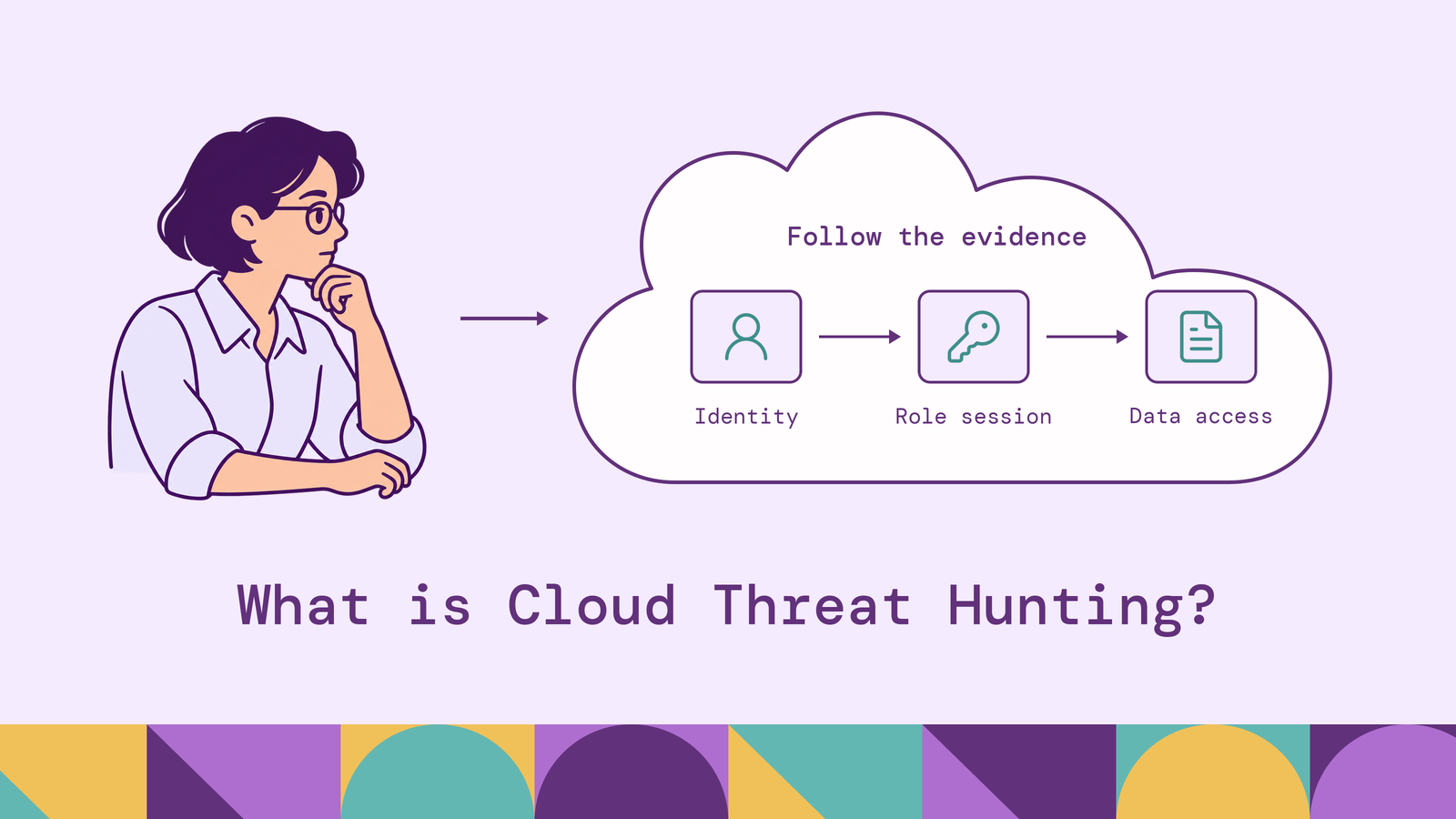
A successful cloud API call can belong to a deployment pipeline, an administrator, or an attacker using stolen credentials. Distinguishing those cases requires context: which identity initiated the session, what permissions it acquired, and which resources it accessed afterward.
Cloud threat hunting investigates those connections. This article explains the evidence hunters need, the behaviors worth investigating, and how to turn a hypothesis into a repeatable investigation that improves detection across cloud environments.
What is cloud threat hunting?
Cloud threat hunting is the proactive investigation of cloud activity to find threats that existing security controls may have missed. Analysts develop a hypothesis, test it against available telemetry, and follow evidence across identities, workloads, and resources. A hunt can start without an alert, although an incident or suspicious finding can motivate one.
Its scope includes infrastructure services, cloud identity providers, SaaS applications, and the workloads organizations operate. The relevant evidence might include API audit events, authentication records, object-access logs, container activity, and application telemetry. The scope of each hunt determines which sources matter.
Routine monitoring evaluates known detection conditions continuously. Hunting explores questions whose answer or detection logic is still uncertain. Incident response takes ownership when the investigation establishes a compromise or meets the organization's escalation criteria. These activities feed one another: a hunt can identify an incident, and a resolved incident can suggest a broader hunt.
A useful result includes the conclusion, supporting records, and limits of the search. Finding a logging gap or ruling out a specific hypothesis within a well-observed scope can improve security even when no attacker is found.
Why is cloud threat hunting important?
Cloud environments make identity central to investigation. An adversary with valid credentials can use administrative interfaces that legitimate operators also use. MITRE's Cloud Accounts sub-technique describes how compromised accounts and excessive permissions can support access, persistence, and movement through cloud environments. Successful authentication alone does not establish legitimate intent.
Relationships also cross administrative boundaries. A workload in one account may assume a role in another; an application identity may access a shared data store. Investigating only the originating account can leave the consequential activity outside the search. Hunters need to follow the identity and its sessions through those boundaries.
Changing infrastructure adds a historical problem. Investigations may begin after a workload has disappeared or its permissions have changed. Preserve enough inventory and configuration history to determine what existed during the suspected activity. Today's asset list cannot explain every event from an earlier deployment.
Hunting also tests whether security assumptions hold. A team might believe sensitive object reads are recorded, then discover its search covers only management operations. Resolving that gap improves both investigations and future detections. The value comes from testing a concrete risk against evidence and feeding the result back into security operations.
How does cloud threat hunting work?
A hunt connects a testable question to telemetry and an investigation method. For example: did a compromised build identity assume a production role and read customer exports outside its normal workflow? Answering that question requires more than a list of unusual sign-ins.
Start with the distinction between the control plane, where resources and permissions are managed, and the data plane, where applications and users access the resources' contents. Logging one does not guarantee visibility into the other.
Identity-provider records help establish the originating user or application. Workload evidence adds another layer: Kubernetes audit logs record requests to the Kubernetes API, while runtime telemetry is needed to investigate activity inside containers. Network records can support a timeline, but a connection alone does not identify which data was accessed.
Normalize enough fields to search across sources while retaining their original meaning. A cloud account, a human user, and a temporary session are different entities. Preserve the provider, account or tenant, resource identifier, operation, outcome, and event reference. Where a source cannot identify the originating human, keep that uncertainty visible instead of assigning ownership from a similar display name.
Three methods work well together. Hypothesis-driven hunting tests a proposed behavior against expected evidence. Intelligence-led hunting adapts reported adversary behaviors or indicators to the local environment. Anomaly-led hunting starts with deviations, such as a service identity accessing an unfamiliar resource, then investigates whether the deviation has a legitimate explanation.
Tools provide different investigation surfaces. Microsoft Sentinel supports hunting with Kusto Query Language, while Amazon Athena can query CloudTrail logs in S3. Choose based on accessible evidence, query capabilities, and the team's workflow. Neither a query engine nor a hunting interface can reconstruct events that were never collected.
Common cloud security threats to hunt for
Prioritize behaviors that could affect your sensitive data, privileged identities, and critical services. The following are starting points for investigation, not automatic verdicts.
Credential misuse and unexpected role access. Look for identities using unfamiliar roles, services, or client contexts. Compare a workload identity with its deployment history and expected execution environment. A new source address can result from infrastructure changes, so combine it with evidence such as an unexpected target role or resource.
Persistence and privilege changes. Investigate new access keys, application credentials, role assignments, and trust-policy changes. MITRE's Additional Cloud Credentials sub-technique describes credential additions that preserve adversary access. Establish who made the change, whether it was approved, and how the resulting access was used. Credential rotation is a plausible benign explanation that must be checked.
Sensitive-data collection and exfiltration. Hunt for unfamiliar principals reading sensitive objects, unusual export activity, or access that exceeds a service's business purpose. MITRE classifies Data from Cloud Storage as collection. An exfiltration conclusion needs evidence supporting unauthorized transfer; bulk access alone may reflect a backup, migration, or legitimate analysis job.
Logging and monitoring changes. Investigate changes to audit collection, log routing, retention, and security-service configuration. Correlate the actor making the change with subsequent activity and approved infrastructure work. A missing stream is an investigation lead, but delivery failures and configuration mistakes must also be considered.
Workload abuse and compute hijacking. Investigate unexplained instance creation, container deployments, or resource consumption alongside the initiating identity and workload behavior. MITRE documents Compute Hijacking, including cryptocurrency mining on cloud and container infrastructure. Unexpected spend can help identify a candidate; workload and activity evidence determine whether the resources were misused.
These behaviors become more informative when connected. A credential addition followed by an unfamiliar role session and sensitive-object reads deserves a different investigation from an isolated, approved key rotation.
Step-by-step cloud threat hunting process
Use a bounded investigation with explicit decision points. The following example is illustrative: a build identity may have been used to access production exports through an assumed role.
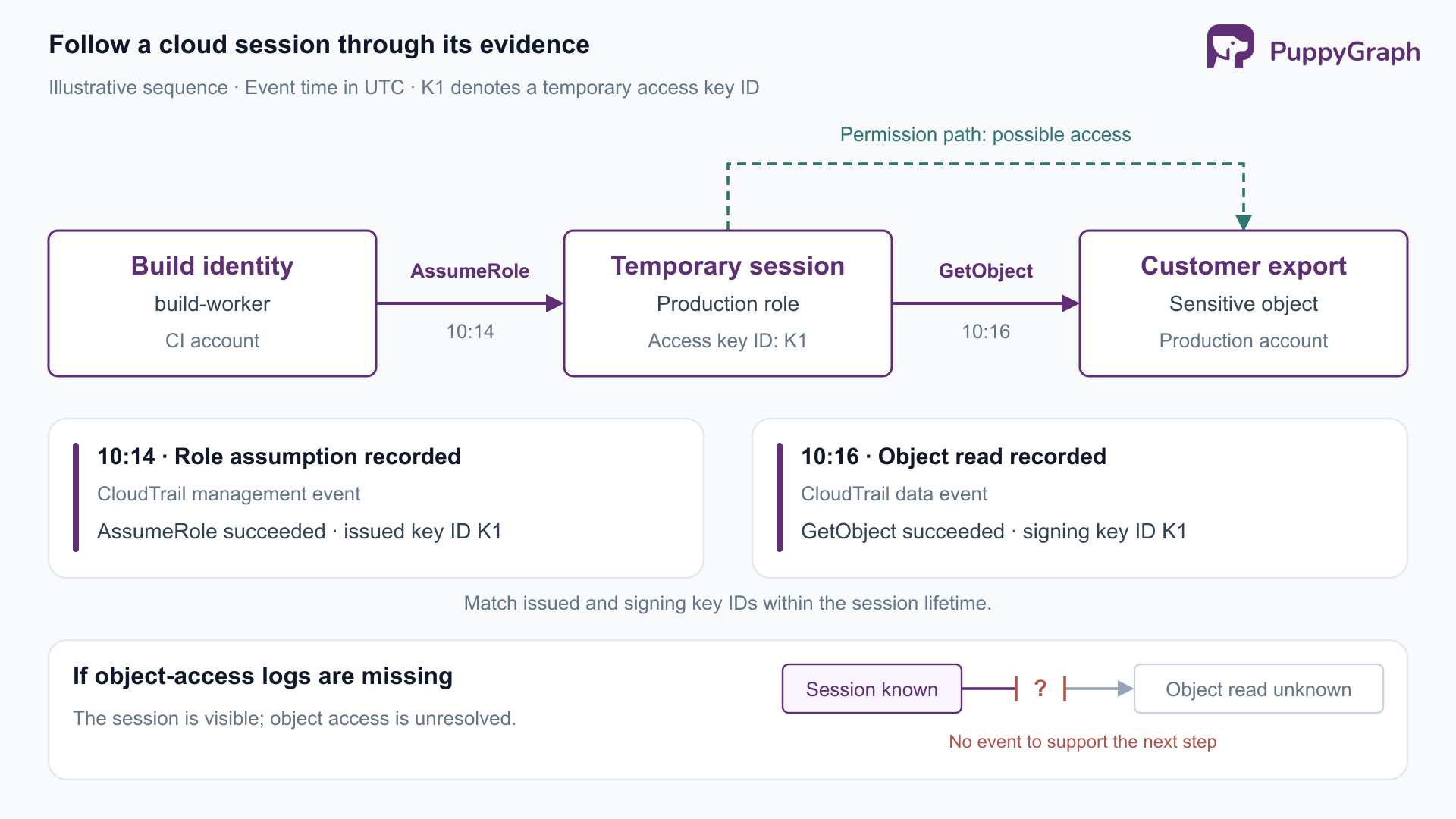
- Define the hypothesis and scope. Name the suspected behavior, affected accounts, relevant identity, and investigation window. For this hunt, ask whether the build identity created production role sessions that accessed export objects outside approved jobs. Specify what would support or weaken that hypothesis. An unfamiliar role session is a starting point; a matching authorized job could explain it.
- Verify evidence availability. Confirm that role-assumption records, relevant object-access events, and build-job history cover the window. Check source delivery, retention, parsing, and the accounts involved. Run a known-event search to confirm that the expected records are queryable. If object reads were not collected, narrow the conclusion to the session activity you can observe and record the unresolved data-access question.
- Establish the expected workflow. Identify the roles the build system normally assumes, approved artifact locations, scheduled jobs, and recent infrastructure changes. Compare similar jobs and identities instead of using every cloud principal as one baseline. Review successful and failed activity: failed requests can add context, but retries and permission mistakes are common in automation.
- Find candidate sessions and follow them. Search for successful
AssumeRoleevents involving the identity and production role. AWS documents the STS response fields recorded in CloudTrail, including the issued credentials' access key ID and assumed-role identity. Where populated, correlate that temporary access key ID with subsequent events'userIdentity.accessKeyId. Keep the account context and session lifetime, and inspect the session issuer and identity fields. A shared role name or IP address alone is insufficient to identify one session. Follow any further role assumptions as separate credential transitions.
- Test competing explanations. Reconstruct the sequence using event timestamps, allowing for delayed delivery. Check whether the object reads succeeded, which resources were involved, and whether build records explain the access. Consult the workload owner with specific event references. A denial of familiarity is useful context, but the investigation still needs evidence. Expand the search if related credentials, sessions, or accounts emerge.
- Escalate and preserve the finding. Hand credible compromise evidence to incident response under the agreed criteria. Preserve source records, query text, time bounds, identifiers, and reasoning so another analyst can reproduce the conclusion. Do not wait to complete every investigative branch before escalating active malicious behavior. Response owners decide containment actions with the service owners and incident commander.
- Convert the result into an improvement. Record whether the hypothesis was supported, unsupported within the observed scope, or inconclusive. Turn repeatable findings into detection candidates and test them against normal activity before enabling alerts. Assign owners to logging gaps and excessive permissions. Retain the hunt query and its assumptions so a later analyst can rerun it after a deployment change.
How to use MITRE ATT&CK for cloud threat hunting
Use ATT&CK to turn adversary behavior into questions your telemetry can answer. The ATT&CK Cloud Matrix covers cloud platforms including identity providers, SaaS, office suites, and infrastructure as a service (IaaS). Select techniques relevant to the systems you operate rather than treating every matrix entry as an immediate hunting requirement.
For each selected technique, write a local hypothesis, identify the required records, and state a plausible benign explanation. The mapping below illustrates that translation.
Tactics describe adversary objectives; techniques describe behaviors used to pursue them. The matrix is not a mandatory chronological sequence. A local investigation may connect several techniques, and the same behavior can serve different objectives.
Track coverage as a set of tested capabilities. Having a log source, a query, and a validated detection are separate states. For a selected technique, record whether you have the necessary telemetry, whether the query finds a controlled example, and whether analysts can distinguish it from expected activity. An ATT&CK label attached to a rule does not establish complete coverage of that technique.
Cloud threat hunting best practices
Validate telemetry before interpreting silence. Monitor collection and parsing health, preserve original records, and test known events. Track event time separately from ingestion time. A zero-result query should prompt a coverage check before it supports a finding that the searched behavior was absent.
Keep identity and resource context explicit. Use stable identifiers scoped to the account or tenant. Preserve credential transitions, role issuers, and resource ownership. Treat a shared IP address or display name as supporting context rather than a reliable identity join. Maintain historical context when ownership or permissions change.
Baseline against the right peers. Compare deployment identities with similar pipelines and human administrators with comparable responsibilities. Include release windows, disaster-recovery exercises, and approved migrations. Record exceptions with an owner and review date so a temporary explanation does not become a permanent blind spot.
Separate potential reach from observed behavior. Permission analysis helps prioritize what a compromised identity could affect. Event analysis establishes what the available records show it did. Label both clearly and evaluate access conditions before treating a permission relationship as effective access. Keep the distinction when briefing responders.
Make hunts reproducible and access controlled. Save query versions, source mappings, time bounds, and the rationale for closing or escalating a lead. Restrict sensitive logs and investigation exports to appropriate roles. Use authorized simulations to validate detection logic and logging coverage, then repeat relevant tests when collection settings or infrastructure change.
These practices make the result easier to trust and reuse. A useful hunt leaves the next analyst with both an answer and a clear account of how that answer was established.
How to build an effective cloud threat hunting strategy
Start with business risk. Identify the data stores, services, and administrative identities whose compromise would cause material harm. Build a backlog of hypotheses around those assets, prioritizing plausible access paths, known exposure, and gaps in existing detection. Assign a hunt owner and a time budget to each investigation.
Set responsibilities across security operations, cloud engineering, identity administration, and incident response. Hunters need access to configuration history and someone who can explain workload behavior. Agree on escalation criteria and evidence handling before a hunt uncovers active compromise.
Budget for the evidence each priority scenario requires. Decide which resource operations need detailed logging, how much history must remain searchable, and how investigators retrieve older records. Validate those decisions against representative hunts. If a sensitive-data scenario cannot be answered with the retained evidence, assign the collection gap an owner before treating that scenario as covered.
Run a recurring cycle that fits the team's capacity. Combine planned investigations with hunts prompted by incidents, architecture changes, or relevant threat intelligence. Measure whether prioritized hypotheses are testable, whether discovered gaps are resolved, and whether resulting detections work in validation exercises. Raw query counts and ATT&CK tags say little about investigation quality.
For hunts that repeatedly cross accounts and services, make identity and resource relationships reusable. Analysts should be able to follow a recorded session to its role and accessed resources while retaining the events supporting each connection.
PuppyGraph is the first and only zero-ETL graph query engine that lets teams query existing relational data as a graph without loading it into a separate graph database. For cloud threat hunting, teams define a graph schema over security tables in supported SQL databases, data warehouses, and data lakes or lakehouses. The model maps cloud identities, role sessions, accounts, and resources into entities and relationships queryable with openCypher and Gremlin.
In the build-identity example, a hunter can follow recorded role assumptions to temporary sessions and then to sensitive-object access events within the investigation window. The same model can support searches for other sessions touching those resources. Teams define the identity mappings, time constraints, and event references that make each path explainable. Permission relationships remain distinct from observed activity, so a possible access path is not presented as proof of compromise.
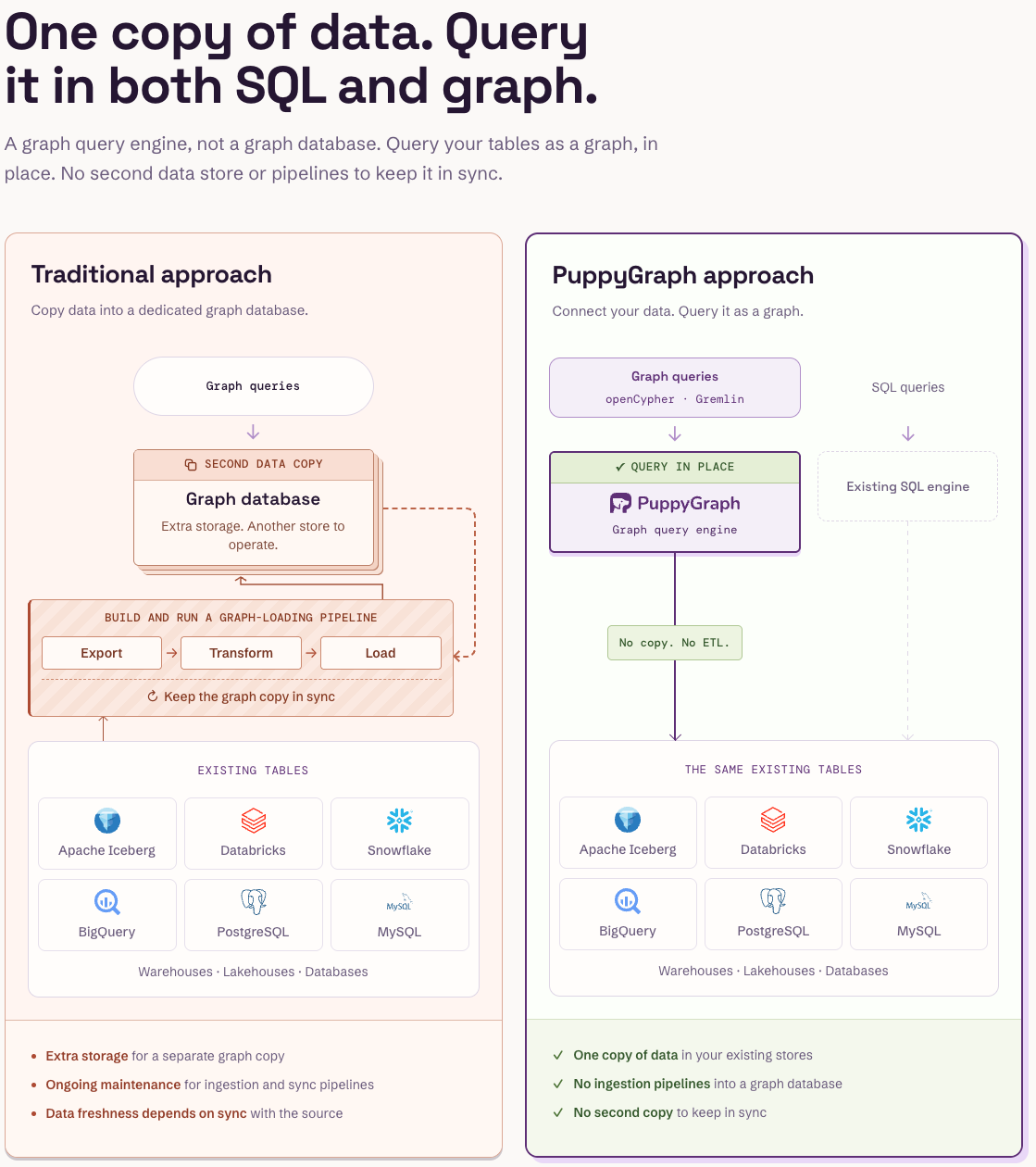
PuppyGraph complements the SIEM and cloud security tools with this relationship analysis. Its default direct-query path requires no persistent duplicate graph dataset. Telemetry collection, normalization, and retention remain part of the security pipeline; PuppyGraph connects to the supported storage holding those records. This gives hunters a reusable graph view of collected cloud evidence while existing tools continue to manage alerts, cases, and response.
Conclusion
Effective cloud threat hunting connects a specific hypothesis to sufficient telemetry and a defensible investigation. Follow identities across sessions and resources, verify coverage before interpreting missing results, and distinguish permissions from recorded actions. Carry each finding into response, detection, or collection improvements so the next investigation starts with better evidence.
Try the forever-free PuppyGraph Developer Edition or book a demo to explore how graph queries connect cloud identities, role sessions, and resource activity across your existing security tables.

Hao Wu is a Software Engineer with a strong foundation in computer science and algorithms. He earned his Bachelor’s degree in Computer Science from Fudan University and a Master’s degree from George Washington University, where he focused on graph databases.

Get started with PuppyGraph!


Developer Edition
- Forever free
- Single noded
- Designed for proving your ideas
- Available via Docker install
Enterprise Edition
- 30-day free trial with full features
- Everything in developer edition & enterprise features
- Designed for production
- Available via AWS AMI & Docker install