


Dgraph vs Neo4j : Key Differences & Comparison

Choosing a graph database often begins with a simple question: which engine best captures the relationships hiding in my data? Neo4j has long been the standard bearer for graph workloads, with rich analytics libraries and a managed service ecosystem. Dgraph emerged later with a different thesis: scale-out writes, automatic sharding, and a GraphQL-first design.
Neither of them solves every problem. So in this article, we will try to discourse on both products. We’ll compare features, performance, and deployment realities, highlight overlooked details like cache sizing and ingestion paths. So you will know when each database fits, or when an alternative like PuppyGraph makes more sense.
What is Dgraph?

Architecture
Dgraph is designed as a distributed, horizontally scalable graph database. Architecturally, it separates responsibilities across two components:
- Zero: manages cluster state, handles predicate-to-shard mapping, and coordinates Raft groups
- Alpha: stores the actual data, runs Raft consensus, and serves queries
Thanks to this split, Dgraph automatically shards by predicate and replicates data across groups for fault tolerance. It can distribute writes across multiple groups, unlike systems where all writes flow through a single leader; it greatly improves throughput under concurrent workloads.
Data Model
Dgraph stores data as RDF-like triples in the form of subject–predicate–object, while having support for JSON as well. You can attach attributes directly to an edge, called facets. For example, a friend edge can carry metadata like since=2018. Facets avoid introducing extra nodes for relationship attributes and keep the model compact.
Dgraph exposes two query layers:
- DQL: its native graph query language
- GraphQL: supported as a first-class interface
Indexing and Querying
Indexes in Dgraph are schema-driven and must be defined in advance. The database supports indexes for equality, range, full-text, trigram, regular expressions, and geolocation data. Explicit indexing makes sure queries remain efficient and predictable, especially filters. Dgraph also provides recursive queries for arbitrary-depth traversals and a built-in keyword for shortest path queries. For advanced use cases, you can extend logic through Lambdas: small JavaScript functions that run alongside the database.
Security and Access Control
Dgraph integrates access rules directly into its GraphQL schema; the @auth directive can enforce authorization policies at the type or field level. This allows for fine-grained control without an external middleware layer. For example, you can restrict access so that users can only query their own records while administrators query everything. Because these rules live in the schema, they remain close to the data model and evolve alongside it.
Operations and Tooling
Dgraph provides two main ingestion paths: the Bulk Loader and the Live Loader. The Bulk Loader is optimized for large imports before a cluster goes live, while the Live Loader supports continuous ingestion into a running system. Bulk Loader offers higher throughput but requires downtime; but you would choose Live Loader to trade speed for availability.
For production monitoring, Dgraph exposes Prometheus metrics by default, so it’s very easy to integrate with common observability stacks. For Kubernetes, there are official Helm charts available to simplify deployments and upgrades in containerized environments.
What is Neo4j?

Architecture
Neo4j Enterprise clusters balance fault tolerance, scalability, and consistency with two server roles: Primaries and Secondaries. Primaries handle reads and writes, replicate data using the Raft protocol, and elect a leader to order transactions. Despite the resulting durability, write throughput is tied to the leader and the size of the Raft quorum.
Secondaries scale out read workloads. They replicate asynchronously from primaries and can answer any read-only query, though with slight lag. Because they don’t participate in consensus, you can add large numbers of secondaries without affecting write performance.
For applications, the cluster behaves like one logical database. Neo4j enforces causal consistency, guaranteeing that clients always see their own writes, even when queries are routed to secondaries. Automatic leader elections and routing keep the cluster available as long as a majority of primaries remain online.
Data Model
Neo4j uses the labeled property graph model. Nodes represent entities and can carry multiple labels, while relationships link nodes and may hold their own properties. So it’s natural to represent edges with context, such as a PURCHASED relationship that records the amount and date.
Neo4j uses the declarative language Cypher. Its syntax directly emphasizes graph patterns to reduce boilerplate and help teams reason about traversals. Cypher is now aligned with the ISO Graph Query Language (GQL) standard, so your learnings in Neo4j can easily transfer across other graph platforms that adopt the same model.
Indexing and Querying
Neo4j relies on schema indexes and constraints applied to labels and properties. These accelerate lookups and enforce data integrity. Performance is sensitive to memory configuration:
- The page cache controls how much of the graph resides in memory
- The JVM heap is used for planning and execution
Cypher queries support advanced operators such as pattern comprehensions, shortest path, and subqueries. These features allow Neo4j to handle both transactional queries and more complex graph analytics without external joins.
Security and Access Control
Neo4j Community supports only basic authentication. In Enterprise edition, security extends to role-based access control (RBAC). It allows administrators to define permissions by label, relationship type, or procedure, providing fine-grained control in multi-tenant or compliance-sensitive environments.
Enterprise deployments also integrate with LDAP, Active Directory, and Kerberos for centralized identity management. Neo4j publishes a Security Benchmark, covering TLS enforcement, endpoint restrictions, and auditing.
Operations and Tooling
Neo4j provides separate tools for initialization and ongoing ingestion. You have the neo4j-admin import utility for high-throughput CSV loads. For continuous updates and smaller datasets, the Cypher command LOAD CSV can provide incremental ingestion without downtime. Each method serves a different phase of the data lifecycle.
Your backups depend on edition. Enterprise edition includes online, differential backups, while Community users must rely on offline methods. Monitoring is supported through JMX and Prometheus exporters, giving visibility into metrics like cache hit rates, query latency, and JVM performance.
Dgraph vs Neo4j: Feature Comparison
The table below summarizes the core differences between Dgraph and Neo4j across data model, queries, indexing, scaling, security, and tooling.
When to Choose Dgraph vs Neo4j
The following points translate each engine’s design into situations where it might fit.
Choose Dgraph
- You need scale-out write throughput without a federation layer
Dgraph shards by predicate and replicates using Raft; different Raft groups can accept writes concurrently, so hot predicates can be spread across groups as the cluster grows. Zero assigns and rebalances predicates to keep groups even. - Your API boundary is GraphQL and you want auth to reside in the schema
Dgraph treats GraphQL as first-class and lets you enforce authorization with the @auth directive. That means row and field-level rules associate with the schema and don’t require an external tool. - Your app leans on text, regex, geolocation filters at scale
Dgraph’s schema-driven indexes include full-text, trigram/regex, and geolocation. You can plan the index set upfront to keep latency predictable. - You want clear ingest modes as you build and deploy your services
You can use the Bulk Loader before the cluster is live for initial high-throughput loads, and Live Loader for continuous updates on a running cluster. This way, you minimize downtime risk during the switch from initial loading to production traffic.
Choose Neo4j
- Your workload is read-heavy and analytics-oriented
Neo4j’s cluster separates Primaries from Secondaries to scale reads broadly; clients can read their own writes using bookmarks through causal consistency. - You need a mature graph analytics stack
The Graph Data Science (GDS) library ships production-grade algorithms and ML pipelines exposed through Cypher. It shortens time-to-insight if your teams are doing centrality, similarity, or community detection. - You value standards and skill portability
Cypher’s syntax aligns with the ISO GQL standard, reducing training cost and vendor lock-in if you already know property-graph patterns. - You need enterprise access control and identity integrations
Neo4j Enterprise adds RBAC and ties into LDAP/AD/Kerberos, which means simplified compliance in regulated environments.
In a nutshell:
- Choose Dgraph when you need write-scalable, GraphQL-first graph storage with powerful indexing
- Choose Neo4j when you need Cypher/GQL ergonomics, read scale, and a first-class analytics stack with strong enterprise controls.
Which One is Right for You?
The most reliable way to pick between graph databases is to map your workload against each system’s strengths and limits. Features might look similar on paper, but the way they interact with your data volume, traffic profile, and team skills will decide the outcome.
Read-Write Ratio
- Heavy write concurrency favors Dgraph, which distributes predicates across Raft groups for horizontal scaling.
- Read-dominant workloads with complex queries fit Neo4j, as it scales out secondaries and offers causal consistency for client reads.
Query Surface
- Teams already trained on Cypher/GQL can leverage existing skills and ecosystem support in Neo4j.
- Teams building APIs around GraphQL benefit from Dgraph’s native GraphQL layer and schema-driven authorization.
Analytics vs. OLTP
- If your roadmap involves graph algorithms or ML integration, Neo4j’s Graph Data Science library can save you a ton of custom work.
- If your graph queries are primarily traversals, filters, or subgraph extractions embedded in applications, Dgraph’s feature set is sufficient.
Operational Envelope
- Dgraph reduces operational overhead by automatically sharding, but schema design strongly influences query fan-out.
- Neo4j requires more tuning (page cache, heap, backups), but it rewards that with stable enterprise-grade tooling and support.
Security and Compliance
- Regulated environments often require Neo4j Enterprise for RBAC and LDAP/AD integration.
- For application-driven access, Dgraph’s GraphQL @auth directive keeps rules close to the schema.
Why Consider PuppyGraph as an Alternative
At its core, both Dgraph and Neo4J are graph databases, requiring a dedicated graph storage and complex ETL pipelines which translates to duplicate storage and brittle pipelines that introduce latency with high upfront and maintenance costs. PuppyGraph is an alternative to Dgraph and Neo4j because it delivers graph analytics without adding a new database.

PuppyGraph is the first and only real time, zero-ETL graph query engine in the market, empowering data teams to query existing relational data stores as a unified graph model that can be deployed in under 10 minutes, bypassing traditional graph databases' cost, latency, and maintenance hurdles.
It seamlessly integrates with data lakes like Apache Iceberg, Apache Hudi, and Delta Lake, as well as databases including MySQL, PostgreSQL, and DuckDB, so you can query across multiple sources simultaneously.

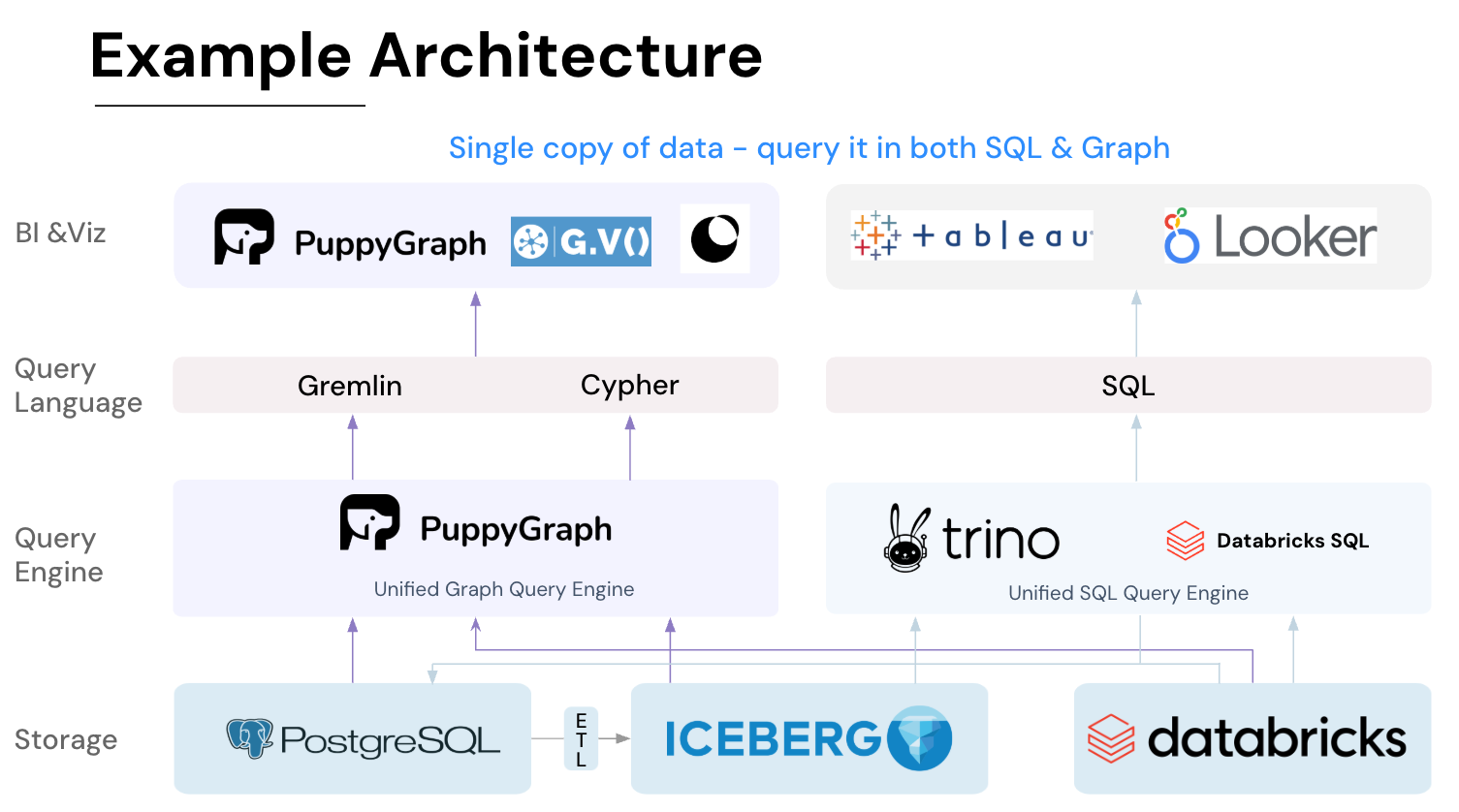
Key PuppyGraph capabilities include:
- Zero ETL: PuppyGraph runs as a query engine on your existing relational databases and lakes. Skip pipeline builds, reduce fragility, and start querying as a graph in minutes.
- No Data Duplication: Query your data in place, eliminating the need to copy large datasets into a separate graph database. This ensures data consistency and leverages existing data access controls.
- Real Time Analysis: By querying live source data, analyses reflect the current state of the environment, mitigating the problem of relying on static, potentially outdated graph snapshots. PuppyGraph users report 6-hop queries across billions of edges in less than 3 seconds.
- Scalable Performance: PuppyGraph’s distributed compute engine scales with your cluster size. Run petabyte-scale workloads and deep traversals like 10-hop neighbors, and get answers back in seconds. This exceptional query performance is achieved through the use of parallel processing and vectorized evaluation technology.
- Best of SQL and Graph: Because PuppyGraph queries your data in place, teams can use their existing SQL engines for tabular workloads and PuppyGraph for relationship-heavy analysis, all on the same source tables. No need to force every use case through a graph database or retrain teams on a new query language.
- Lower Total Cost of Ownership: Graph databases make you pay twice — once for pipelines, duplicated storage, and parallel governance, and again for the high-memory hardware needed to make them fast. PuppyGraph removes both costs by querying your lake directly with zero ETL and no second system to maintain. No massive RAM bills, no duplicated ACLs, and no extra infrastructure to secure.
- Flexible and Iterative Modeling: Using metadata driven schemas allows creating multiple graph views from the same underlying data. Models can be iterated upon quickly without rebuilding data pipelines, supporting agile analysis workflows.
- Standard Querying and Visualization: Support for standard graph query languages (openCypher, Gremlin) and integrated visualization tools helps analysts explore relationships intuitively and effectively.
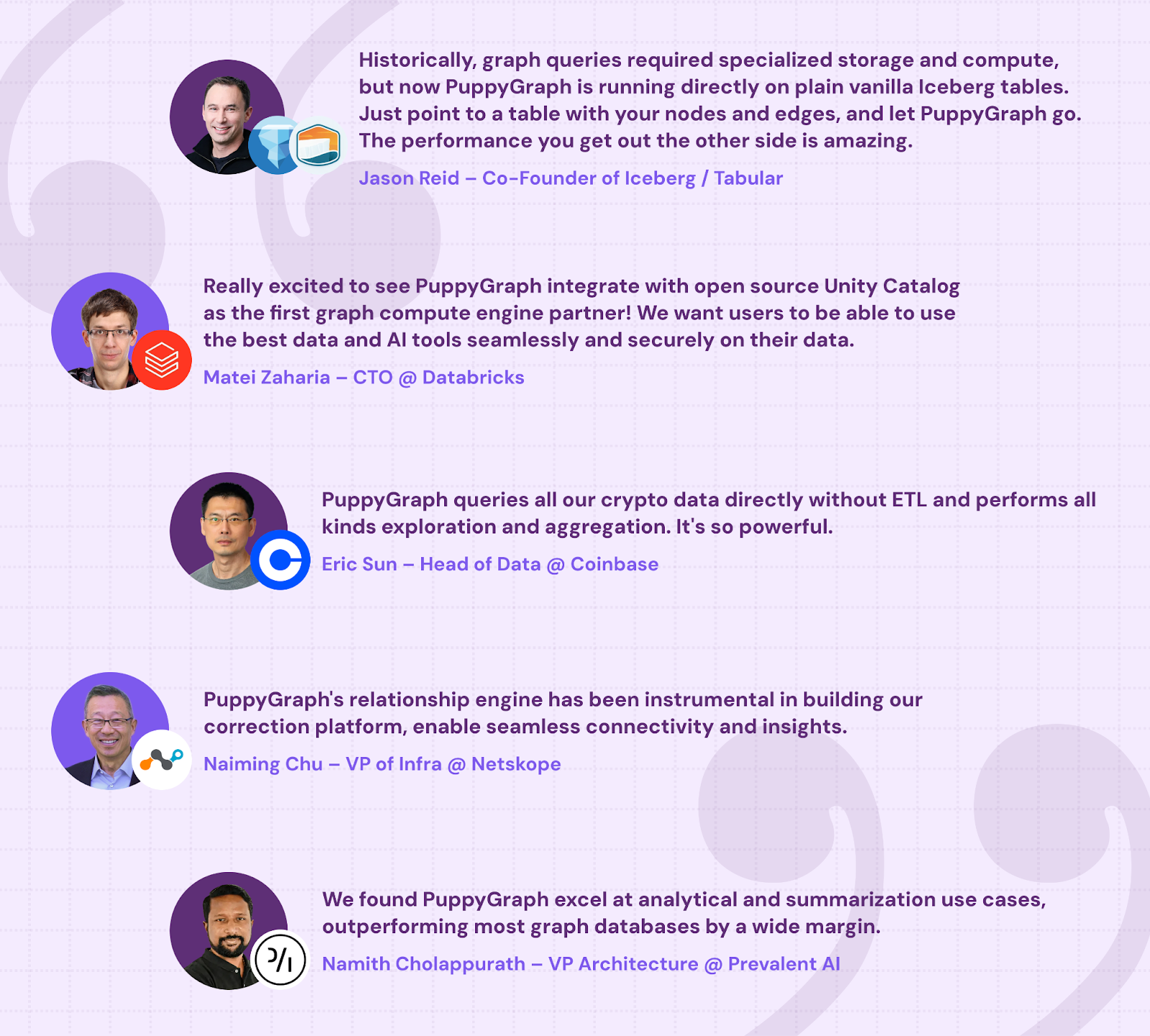
- Proven at Enterprise Scale: PuppyGraph is already used by half of the top 20 cybersecurity companies, as well as engineering-driven enterprises like AMD and Coinbase. Whether it’s multi-hop security reasoning, asset intelligence, or deep relationship queries across massive datasets, these teams trust PuppyGraph to replace slow ETL pipelines and complex graph stacks with a simpler, faster architecture.
As data grows more complex, the most valuable insights often lie in how entities relate. PuppyGraph brings those insights to the surface, whether you’re modeling organizational networks, social introductions, fraud and cybersecurity graphs, or GraphRAG pipelines that trace knowledge provenance.
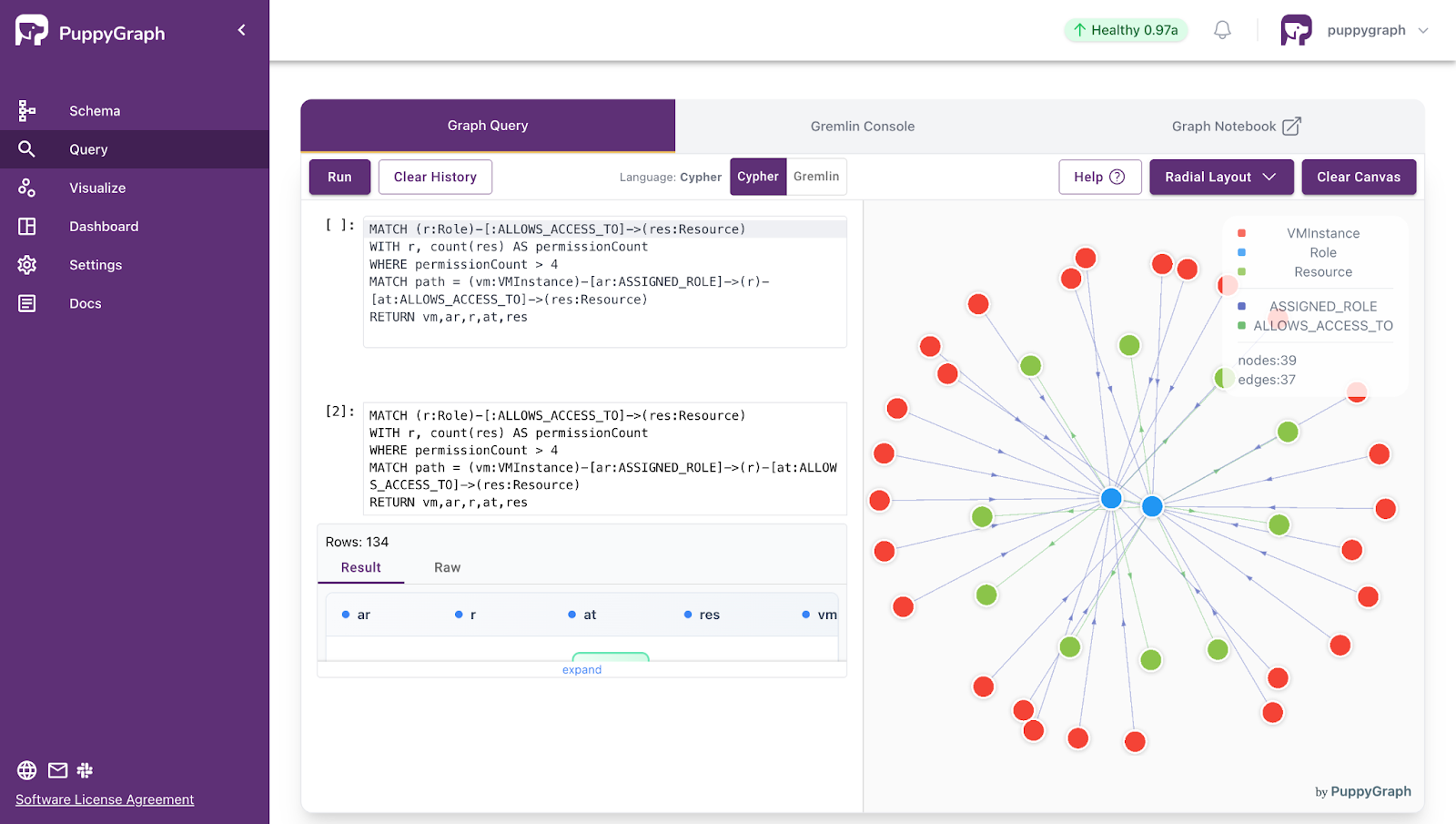
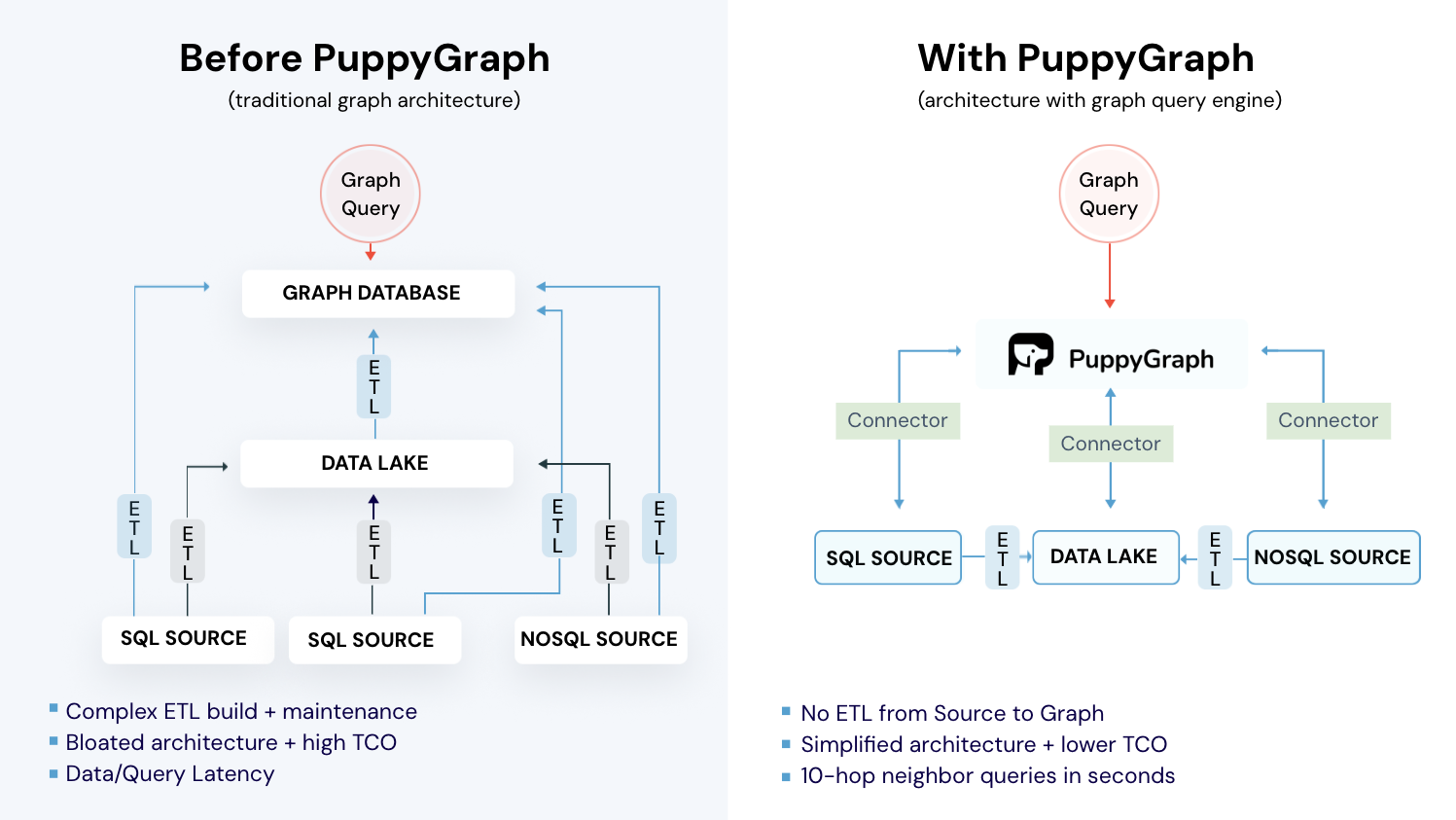
Deployment is simple: download the free Docker image, connect PuppyGraph to your existing data stores, define graph schemas, and start querying. PuppyGraph can be deployed via Docker, AWS AMI, GCP Marketplace, or within a VPC or data center for full data control.
Conclusion
Dgraph and Neo4j offer two very different paths to building graph-powered systems. This article has tried to walk through the various aspects and nuances that shape how each performs in production.
As the next step, you can run a proof-of-concept with your own data and see how each system behaves under load. Testing specific workloads can reveal differences that might not be evident in feature lists.
And if you want to skip the heavy lifting of data migration or sharding altogether, try out PuppyGraph. It lets you query your existing data storages as a unified graph without ETL, giving you graph insights faster while reducing operational risk.
Get started today by downloading the forever free Developer edition, or book a free demo today to talk with our graph experts about your use case.

Matt is a developer at heart with a passion for data, software architecture, and writing technical content. In the past, Matt worked at some of the largest finance and insurance companies in Canada before pivoting to working for fast-growing startups.

Get started with PuppyGraph!


Developer Edition
- Forever free
- Single noded
- Designed for proving your ideas
- Available via Docker install
Enterprise Edition
- 30-day free trial with full features
- Everything in developer edition & enterprise features
- Designed for production
- Available via AWS AMI & Docker install