


What Is Disk Database?
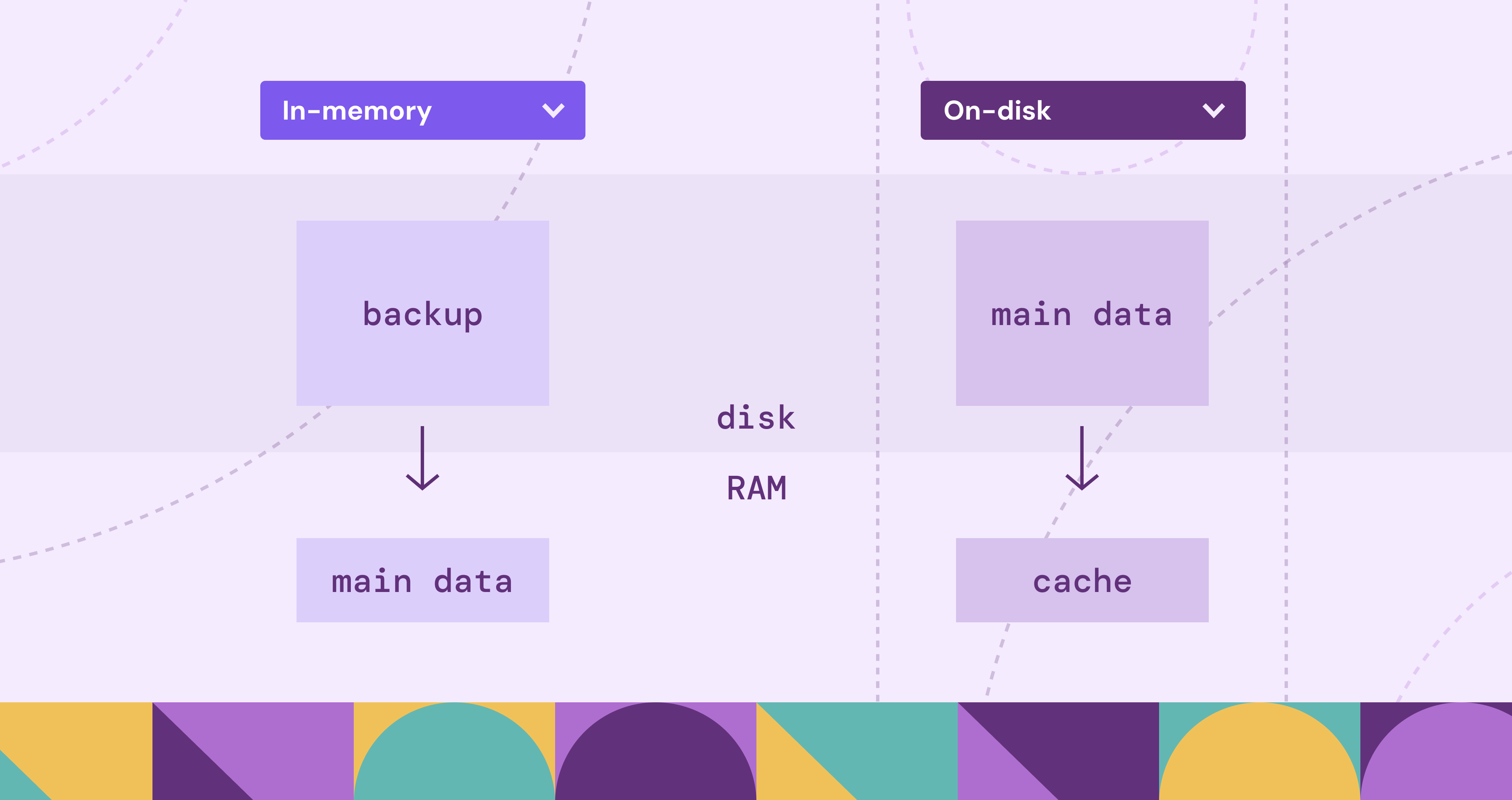
A disk database keeps the durable copy of your data on persistent storage like SSDs or HDDs. Most of the time, your RDBMS makes that feel invisible. You write SQL, you get results, and everything seems straightforward.
That invisibility is a double-edged sword. It’s great for productivity, until performance stops behaving. A query that was fine last week slows down as the dataset grows. Latency spikes show up even though the code didn’t change. When that happens, the database starts to feel like a black box, because the bottleneck often isn’t your SQL alone. It’s also how the system moves data between memory and storage.
This article builds a practical mental model by going one level below the DBMS abstraction. We’ll cover what it means to store data on disk, the durability and scaling trade-offs, and how those constraints shape database software design. While this post uses relational databases as the main example, we’ll also point out how the same storage fundamentals show up in many NoSQL systems.
What Is a Disk Database?
A disk database stores its durable source of truth on non-volatile storage like SSDs or HDDs. As the dataset grows, cache misses become more common, and query time often starts getting dominated by storage reads.
Disk-based systems still use RAM heavily, but mostly as working space and cache. If the pages you need are already in memory, queries can be fast. If they are not, the database has to fetch them from storage, and that jump in latency can manifest as slow queries and worse p95/p99s.
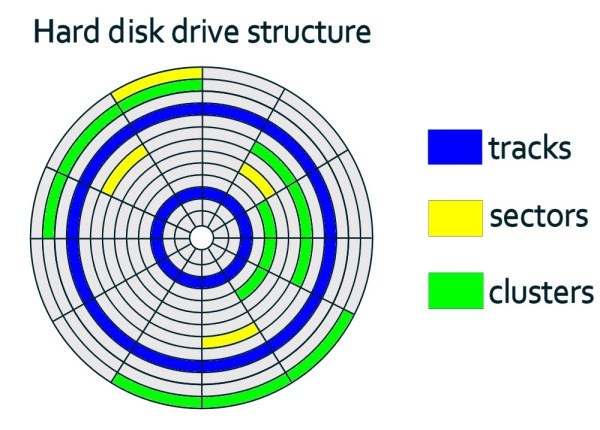
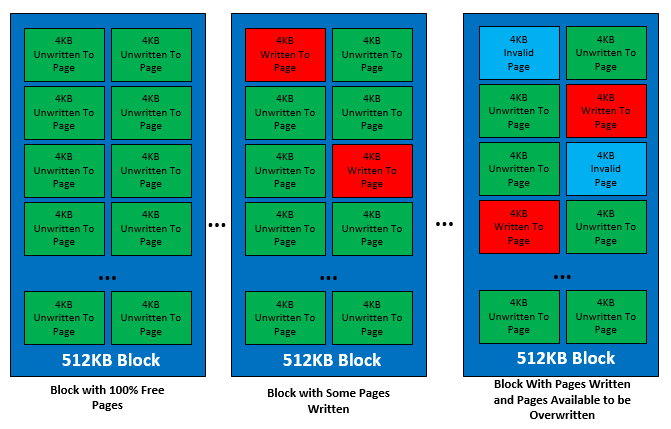
Under the hood, storage is accessed in blocks. Database engines build on that by laying data out as fixed-size pages and reading or writing pages as a unit. That is why the same engine can run on both HDDs and SSDs without changing its core design. HDDs and SSDs both present a block interface to the OS, but their internals differ: HDDs pay mechanical seek costs for random access, while SSDs pay flash-management costs on writes (erase blocks, remapping, garbage collection, wear leveling).
How Disk-Based Databases Work
This section covers the fundamentals of how disk databases work: how they store data in pages, read pages into memory, and write changes safely using logs and background flushing.
Storing Data
A disk-based database doesn’t read and write individual rows directly to storage. It organizes data into fixed-size pages (commonly 4 KB, 8 KB and 16 KB) and stores those pages in files for tables and indexes. When the engine needs data, it reads the page that contains it. When it modifies data, it updates pages in memory and writes them back later. Because I/O happens in page-sized chunks, page size affects both space efficiency and scan performance.
Pages aren’t all laid out the same way. Most DBMSs use pages as the unit of I/O, but the page format depends on the database and storage engine. Page headers can also vary in size because different systems track different metadata. For example, in PostgreSQL heap pages, the page header is 24 bytes long, and the line pointer array (ItemIdData) follows immediately after it. In contrast, SQL Server uses a 96-byte page header on its 8 KB pages, and stores row offsets in a slot array at the end of the page.
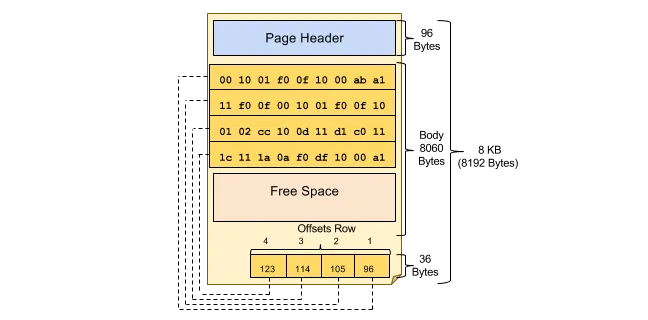
Overall, this page-oriented design is the bridge between database software and hardware: storage exposes block I/O, and the DBMS builds its page abstraction on top so it can control layout, caching, and recovery predictably.
Reading Data (The Read Path)
A disk-based database doesn’t fetch individual rows from storage. It fetches pages, which is why data locality matters: when related rows are stored close together, a single page read can satisfy many row accesses.
The read path can be broken down into the following stages:
1. Client Request & Query Processing
A client sends a query (for example, a SELECT). The DBMS parses it and chooses an execution plan, such as whether to use an index, which join strategy to use, or whether to scan a table.
Indexes matter here because they change the access pattern: instead of scanning many data pages to find matching rows, the engine can traverse index pages to quickly narrow down which data pages to fetch. If an index contains all the columns the query needs, the engine may not need to read the table pages at all.
2. Memory Access (Buffer Pool)
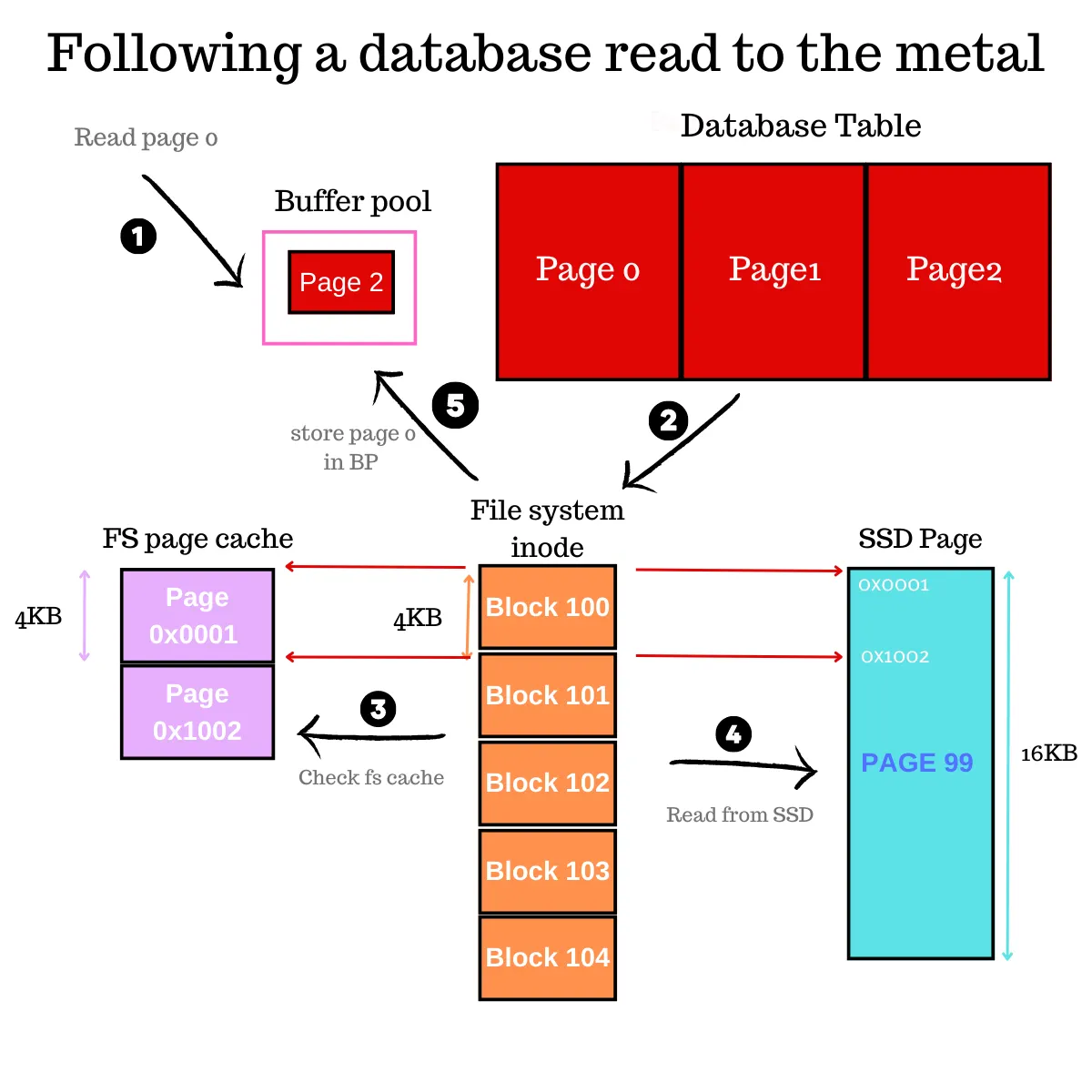
As the plan runs, the engine requests the pages it needs. For each page, the DBMS checks the buffer pool (in-memory page cache). If the page is already cached (a hit), the engine can read from memory directly.
3. Disk Access & Operating System
On a cache miss, the DBMS issues an I/O request. For scans, engines often use pre-fetching to pull in subsequent pages early. Depending on the setup, the OS may serve these from its own cache, though many engines use Direct I/O to bypass the OS entirely. This avoids the potential "double buffering", where the same 8 KB page wastes space by sitting in both the database buffer pool and the OS RAM.
4. Data Retrieval
Once the page arrives, the DBMS caches it and continues execution. It locates the relevant rows within the page, applies filters and projections, and returns results to the client.
As the dataset grows, the working set may stop fitting in memory. Cache misses rise, and more reads end up waiting on storage, which can slow queries down.
Writing Data (The Write Path)
We’ve already seen how much higher storage I/O latency is than memory access. That’s why a disk-based database usually doesn’t write updated rows straight to storage on every statement. Most engines apply changes in memory first, then append to a log to make those changes durable and recoverable. The result is that write behavior often looks sequential (log appends), even when the underlying pages that need updating aren’t adjacent on disk.
The write path can be broken down into the following stages:
1. Client Request & Query Processing
A client issues an INSERT, UPDATE, or DELETE. The DBMS parses the statement, validates it, and chooses an execution plan for how to apply the change (including which indexes must be updated).
2. Memory Update (Dirty Pages)
The engine locates the affected data in memory. If the needed page isn’t cached, it fetches it first, applies the change in memory, and marks the page dirty, meaning it has been modified in RAM but not yet written back to storage. Many engines also keep prior versions of modified records so a transaction can roll back and so concurrent readers can see a consistent snapshot without blocking writers, which is the basis of MVCC.
3. Write-Ahead Logging (WAL)
The engine appends a log record describing the change. The key rule is ordering: the log must be made durable before the corresponding dirty pages are allowed to reach storage, so the system can recover after a crash.
4. Commit & Acknowledgment
On COMMIT, the DBMS ensures the relevant log records are persisted and only then confirms success to the client. Many systems use group commit, batching multiple transactions’ log flushes into a single durable write, which reduces the per-transaction cost of forcing data to storage.
5. Background Flushing & Checkpointing
Separately, background processes flush dirty pages back to the main data and index files. Periodic checkpoints bound recovery time by ensuring the database does not need to replay an unbounded amount of log after restart.
Disk Database vs In-Memory Database
Disk and RAM show up in both designs. The real difference is where the primary copy lives. Disk databases store the durable source of truth on SSDs/HDDs and use RAM for caching and execution. In-memory databases keep the primary copy in RAM and use disk mainly for persistence and recovery.
Memory-Native vs Page-Oriented Layouts
With disk pages, variable-length records often introduce offset tables, overflow storage, and compaction concerns inside pages. In memory, it’s often simpler to represent variable-sized values with references (pointers) and let memory allocators handle placement, which can make certain representations and updates easier.
Speed
Disk databases can be fast when the working set stays in memory, but once pages have to be pulled from storage, latency jumps. In-memory systems avoid most of that because the primary copy is already in RAM.
There’s also the aforementioned design difference. Disk-oriented engines tend to use data structures optimized around page I/O (e.g., B-trees designed to reduce page reads). In-memory systems don’t have to pack everything into page layouts optimized for disk, so they can use representations that are awkward on disk: lots of pointers, variable-sized objects, and direct references that are cheap to follow in memory.
Cost and Scalability
Disk-based systems generally scale to larger datasets more economically because SSD/HDD capacity is far cheaper than RAM. You can keep a small hot set in memory and a large cold set on disk.
In-memory databases scale well for hot, latency-sensitive datasets, but the dataset size is constrained by RAM (plus overhead), so cost becomes the gating factor sooner.
Persistence and Durability
A disk database’s default posture is durable storage with recovery built around logs and checkpoints.
An in-memory database can still be durable, but durability is a separate mechanism layered on top: append-only logging, periodic snapshots, replication, or some combination. The trade-off is that the more you push durability, the more latency you introduce as writes also require I/O access.
Choosing Disk vs In-Memory Database
Choose disk-based when you need large capacity, durability by default, and predictable cost as data grows.
Choose in-memory when your dataset (or working set) fits in RAM and low latency matters more than RAM cost.
Performance Characteristics of Disk Databases
Disk database performance usually comes down to one question: are you hitting memory, or are you pulling pages from storage? When everything you need is already cached, the same query can feel instant. When it isn’t, a few page misses can start to dominate the runtime.
Latency vs Throughput
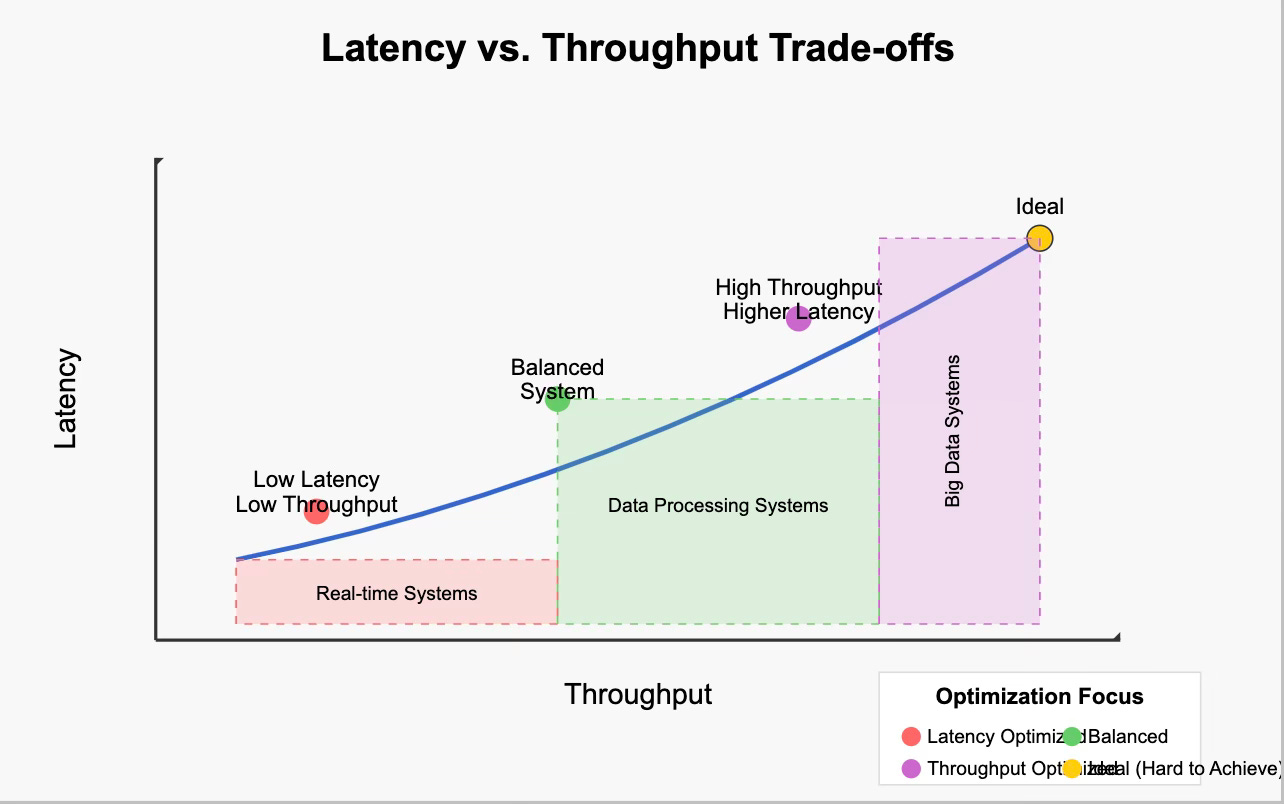
Two metrics matter, but they show up in different kinds of queries:
- Latency: how long it takes to fetch a page that isn’t in memory.
- Throughput: how much data you can move once reads are flowing.
Small, selective queries tend to be latency-bound. Large scans tend to be throughput-bound. Real workloads usually have a mix of both.
Sequential vs Random I/O
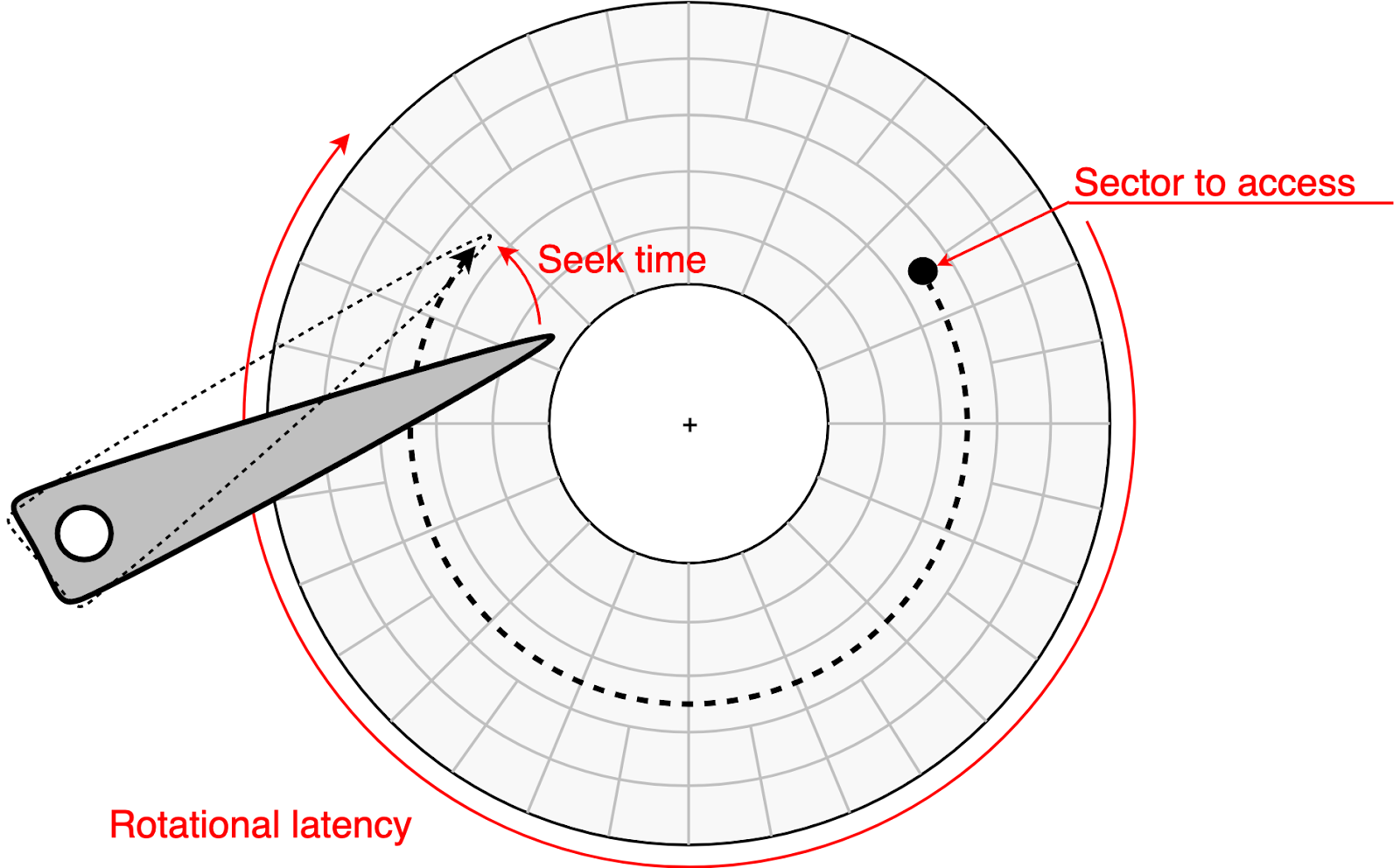
A sequential read is when the engine reads pages that are adjacent (or near-adjacent) on disk, often in order, so the system can fetch them in larger chunks and keep reading forward efficiently. Disk databases try to keep I/O as sequential as possible, but the reason depends on the device.
- On HDDs, sequential access avoids seeks and rotation waits, so the gap between sequential and random is huge.
- On SSDs, sequential access is still more efficient: it lets the DB/OS issue larger reads, makes prefetch/read-ahead effective, and reduces per-request overhead. Random reads are much faster than on HDDs, but lots of small, unpredictable reads can still add latency and reduce throughput.
This is why physical layout and access patterns matter. If related rows sit close together, one page fetch can satisfy many row accesses. If the same query has to bounce across many different pages, it pays more page misses.
Why “Average” Latency Lies
Average latency can look fine while the tail gets ugly. That’s because storage costs don’t show up evenly. They show up when you hit the slow path.
- A few cache misses on a critical request can dominate the whole response time.
- Durability flushes (log syncs) can briefly stall commits when the system has to wait for storage.
- SSD background work (garbage collection and wear leveling) can add jitter under sustained write pressure.
Disk database tuning is often about shaping access patterns: keep the working set in memory, make reads predictable enough for read-ahead, and batch persistence work so writes don’t constantly block on storage.
Advantages of Disk-Based Databases
Disk-based databases are still the default for most organizations. As data volume and variety keep growing, storing the source of truth on durable, cost-effective storage remains the practical choice.
Durability by Default
Disk-based databases are built around persistent storage. The “source of truth” lives on SSDs/HDDs, and recovery is a first-class part of the design (logs, checkpoints, crash recovery). That makes them a natural fit when data loss isn’t acceptable.
Cost-effective Capacity
Disk is still far cheaper per GB than RAM. Disk-based systems let you store large datasets economically while using memory for what it’s best at: caching hot pages and running queries.
Because the full dataset doesn’t have to fit in RAM, disk databases can keep growing as data grows. Even if the working set changes over time, the system can adapt by caching what’s hot rather than requiring you to resize memory to fit everything.
Mature Ecosystem and Operational Tooling
Most production database features and operational patterns were built around disk-backed storage: backups, replication, point-in-time recovery, HA setups, monitoring, indexing strategies, and decades of battle-tested tuning advice.
Flexible Workloads
Disk-based engines can support a wide range of workloads, from OLTP to mixed read/write patterns to large historical datasets. This is because they’re designed to balance memory caching with durable storage underneath.
Common Use Cases of Disk Databases
Disk-based databases tend to dominate wherever two conditions meet: data grows faster than it's practical to keep in RAM, and losing that data isn't an option.
In financial systems, strict audit requirements and durability expectations often pair well with log-first recovery designs. Every transaction needs a recoverable record, and appending changes to a log is an efficient way to make writes durable while keeping recovery straightforward.
In eCommerce and SaaS platforms, the challenge is usually a hot working set sitting on top of a much larger cold dataset. Recent orders and active sessions get cache hits, while historical records sit on disk and are queried less often. Disk databases handle this gracefully because you don’t need to size RAM to the full dataset.
In cybersecurity and telecom, a common pattern is high-volume event ingestion with retention that is often tiered. Recent data stays in the working set and is queried directly, while older data may be archived or stored more cheaply. Many investigations still boil down to time-range queries over historical windows, where sequential I/O, prefetch, and analytics-friendly layouts can help, depending on the engine.
Limitations of Disk Databases
Many of the limitations of disk databases show up when the working set doesn’t fit in memory and the system has to fall back to storage. Compared to in-memory systems, the slow path is unavoidable, and performance depends heavily on access patterns.
Latency and Tail Spikes
Even if average performance looks fine, storage costs often show up in p95/p99 latency. A few cache misses on a critical path can dominate response time. Durability flushes (log syncs) can also introduce brief stalls, and SSD background work like garbage collection can add jitter under write-heavy workloads.
Working Set Limits
As datasets grow, the working set may stop fitting in memory. Cache misses rise, more reads end up waiting on storage, and the same query can slow down sharply. This is one reason performance can look stable at one data size and degrade quickly at another.
Write Overhead for Durability
Disk databases don’t just write table pages. They also write logs and periodically flush dirty pages back to storage. This background work is what makes crash recovery possible, but it also adds I/O and contention under heavy write loads. Techniques like group commit help, but high durability and high write throughput still have real costs.
Fragmentation and Maintenance
Updates and deletes rarely remove bytes from disk immediately. Over time, they can leave dead space, cause page fragmentation, and bloat indexes. Many systems need periodic maintenance (cleanup, compaction, vacuuming, reindexing) to keep storage and performance from drifting. Page-based layouts also make variable-length data harder to manage: values may spill to overflow storage, and pages may need compaction to reclaim space.
Popular Disk-Based Database Examples
Databases come in many forms because applications need different data models and performance trade-offs. Even so, most rely on disks such as SSDs and HDDs because the underlying storage problem is the same: every engine needs a way to move data between persistent storage and memory efficiently, and a way to make sure writes survive a crash.
Where PuppyGraph Fits
Most database systems store durable data on disk, but they do it in different formats that are optimized for their own query patterns. That’s great until you need a new kind of query that your current layout does not serve well.
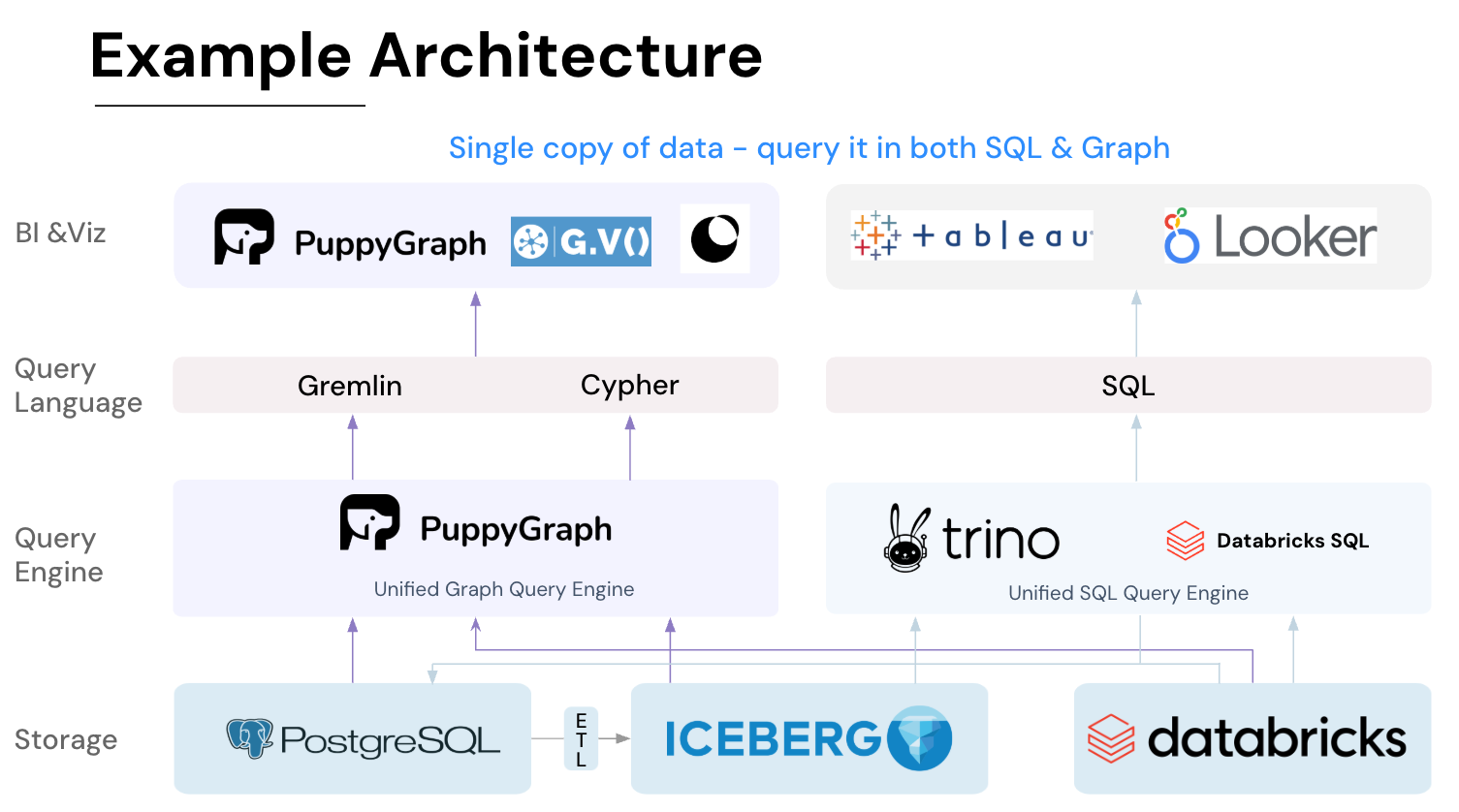
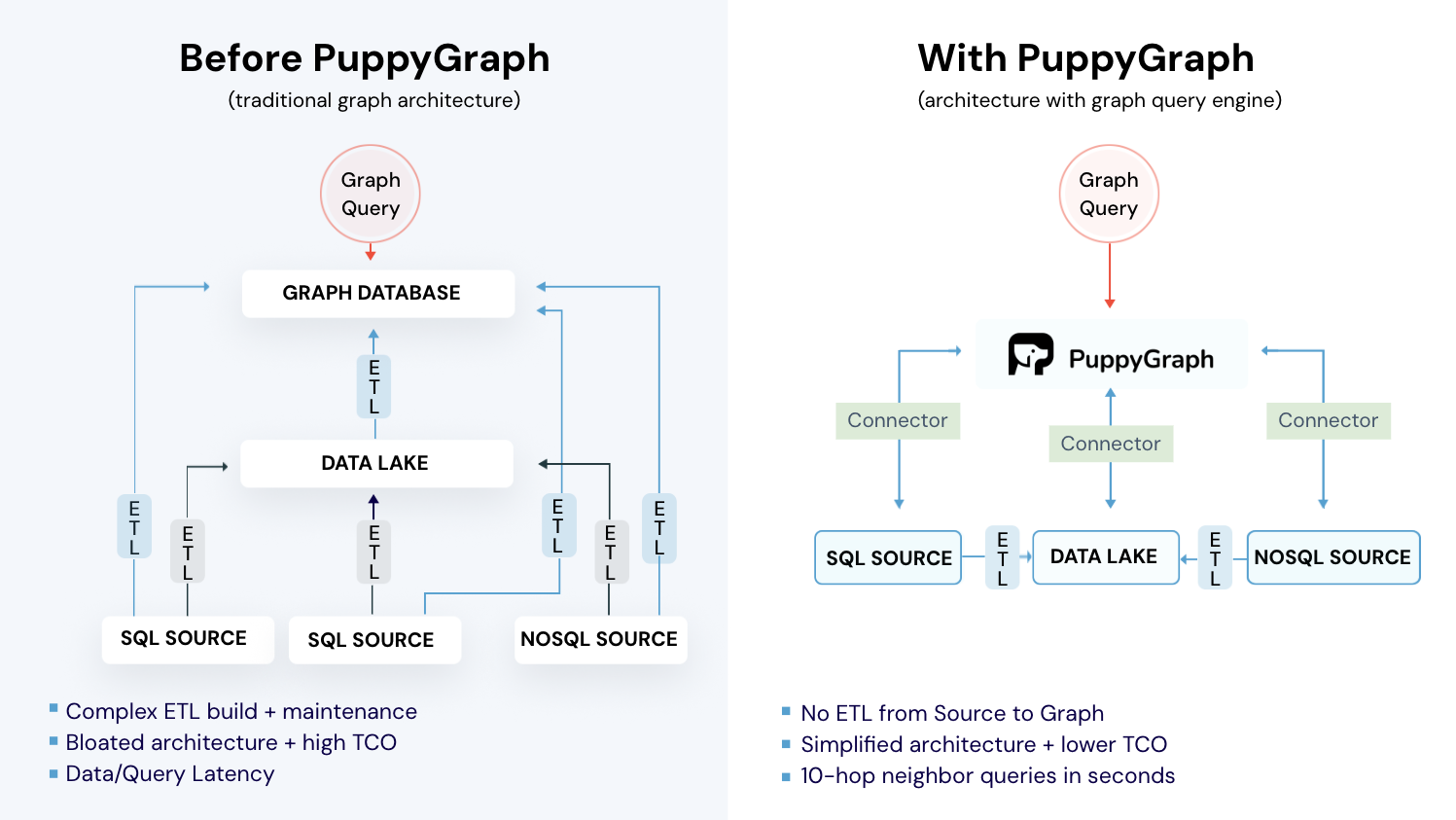
Graph queries are a common example. Many graph databases store nodes and edges in a dedicated graph format. To run graph analytics on data that already lives in relational or lakehouse systems, teams often end up building a separate pipeline to materialize a graph copy, then maintaining sync as data changes. That adds ETL, duplicated storage, and operational overhead. PuppyGraph takes a different approach, letting you run your SQL queries on the same copy of data as your graph queries.

PuppyGraph is the first and only real time, zero-ETL graph query engine in the market, empowering data teams to query existing relational data stores as a unified graph model that can be deployed in under 10 minutes, bypassing traditional graph databases' cost, latency, and maintenance hurdles.
It seamlessly integrates with data lakes like Apache Iceberg, Apache Hudi, and Delta Lake, as well as databases including MySQL, PostgreSQL, and DuckDB, so you can query across multiple sources simultaneously.

Key PuppyGraph capabilities include:
- Zero ETL: PuppyGraph runs as a query engine on your existing relational databases and lakes. Skip pipeline builds, reduce fragility, and start querying as a graph in minutes.
- No Data Duplication: Query your data in place, eliminating the need to copy large datasets into a separate graph database. This ensures data consistency and leverages existing data access controls.
- Real Time Analysis: By querying live source data, analyses reflect the current state of the environment, mitigating the problem of relying on static, potentially outdated graph snapshots. PuppyGraph users report 6-hop queries across billions of edges in less than 3 seconds.
- Scalable Performance: PuppyGraph’s distributed compute engine scales with your cluster size. Run petabyte-scale workloads and deep traversals like 10-hop neighbors, and get answers back in seconds. This exceptional query performance is achieved through the use of parallel processing and vectorized evaluation technology.
- Best of SQL and Graph: Because PuppyGraph queries your data in place, teams can use their existing SQL engines for tabular workloads and PuppyGraph for relationship-heavy analysis, all on the same source tables. No need to force every use case through a graph database or retrain teams on a new query language.
- Lower Total Cost of Ownership: Graph databases make you pay twice — once for pipelines, duplicated storage, and parallel governance, and again for the high-memory hardware needed to make them fast. PuppyGraph removes both costs by querying your lake directly with zero ETL and no second system to maintain. No massive RAM bills, no duplicated ACLs, and no extra infrastructure to secure.
- Flexible and Iterative Modeling: Using metadata driven schemas allows creating multiple graph views from the same underlying data. Models can be iterated upon quickly without rebuilding data pipelines, supporting agile analysis workflows.
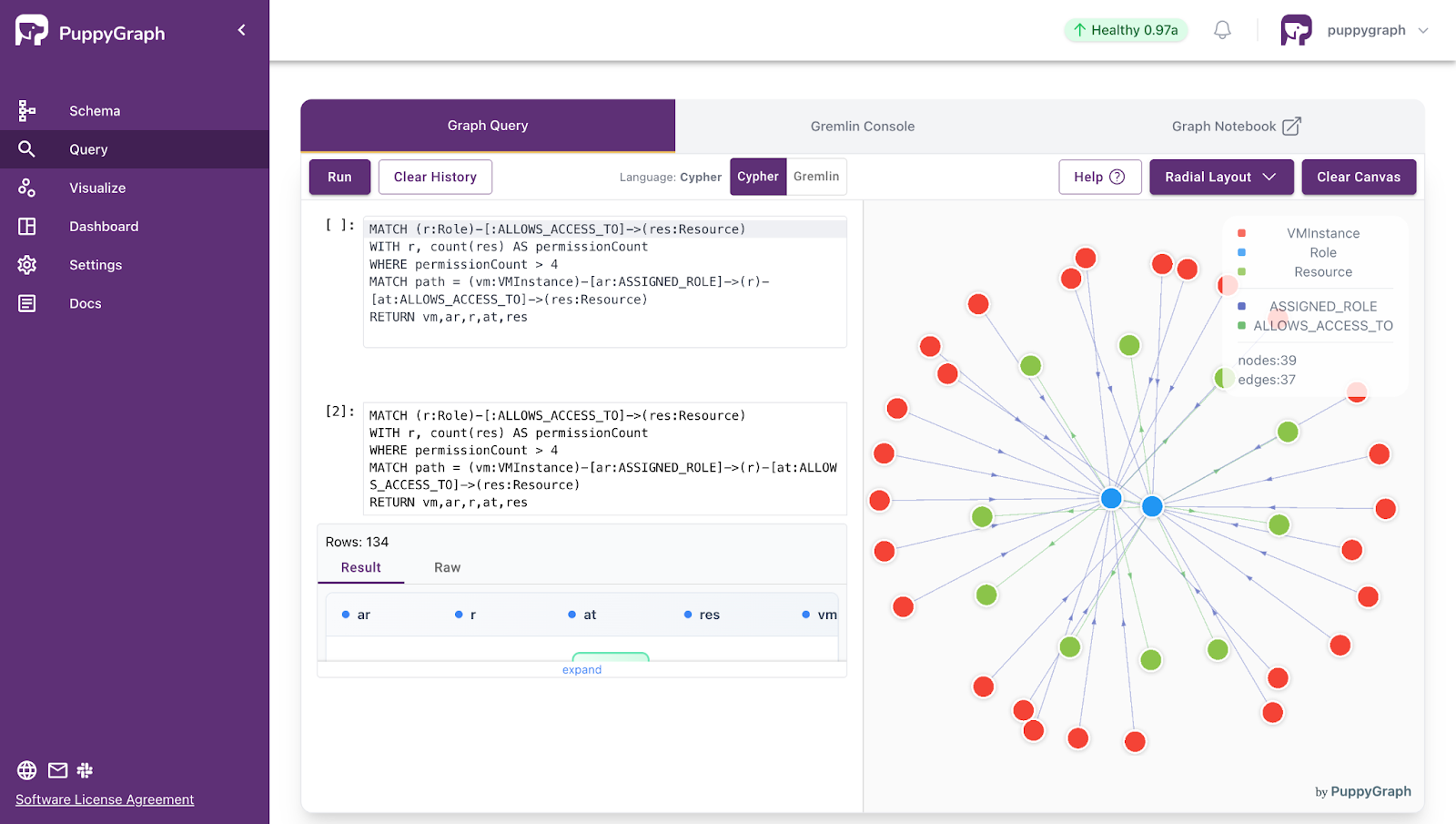
- Standard Querying and Visualization: Support for standard graph query languages (openCypher, Gremlin) and integrated visualization tools helps analysts explore relationships intuitively and effectively.
- Proven at Enterprise Scale: PuppyGraph is already used by half of the top 20 cybersecurity companies, as well as engineering-driven enterprises like AMD and Coinbase. Whether it’s multi-hop security reasoning, asset intelligence, or deep relationship queries across massive datasets, these teams trust PuppyGraph to replace slow ETL pipelines and complex graph stacks with a simpler, faster architecture.

As data grows more complex, the most valuable insights often lie in how entities relate. PuppyGraph brings those insights to the surface, whether you’re modeling organizational networks, social introductions, fraud and cybersecurity graphs, or GraphRAG pipelines that trace knowledge provenance.
Deployment is simple: download the free Docker image, connect PuppyGraph to your existing data stores, define graph schemas, and start querying. PuppyGraph can be deployed via Docker, AWS AMI, GCP Marketplace, or within a VPC or data center for full data control.
Conclusion
Disk databases are still the default because they make durability and scale practical. Once you have a simple model for pages, caching, and access patterns, slow queries stop feeling mysterious and start looking like predictable trade-offs.
Database systems store durable data on disk, but they do it in formats optimized for their own query patterns. That works well until you need a new kind of query that your current layout does not serve well. Graph queries are a common example. Many graph databases store nodes and edges in a dedicated graph format, so teams end up building pipelines to materialize a separate graph copy and keep it in sync as data changes. That adds ETL, duplicated storage, and operational overhead. PuppyGraph takes a different approach by letting you run graph queries directly on top of your existing tables, so your SQL analytics and graph analytics operate on the same underlying data.
Want an easy way to graph? Download PuppyGraph’s forever-free Developer Edition, or book a demo with our graph team to walk through your use case.

Jaz Ku is a Solution Architect with a background in Computer Science and an interest in technical writing. She earned her Bachelor's degree from the University of San Francisco, where she did research involving Rust’s compiler infrastructure. Jaz enjoys the challenge of explaining complex ideas in a clear and straightforward way.

Get started with PuppyGraph!


Developer Edition
- Forever free
- Single noded
- Designed for proving your ideas
- Available via Docker install
Enterprise Edition
- 30-day free trial with full features
- Everything in developer edition & enterprise features
- Designed for production
- Available via AWS AMI & Docker install