


Google Cloud Graph Database: Features & Use Cases
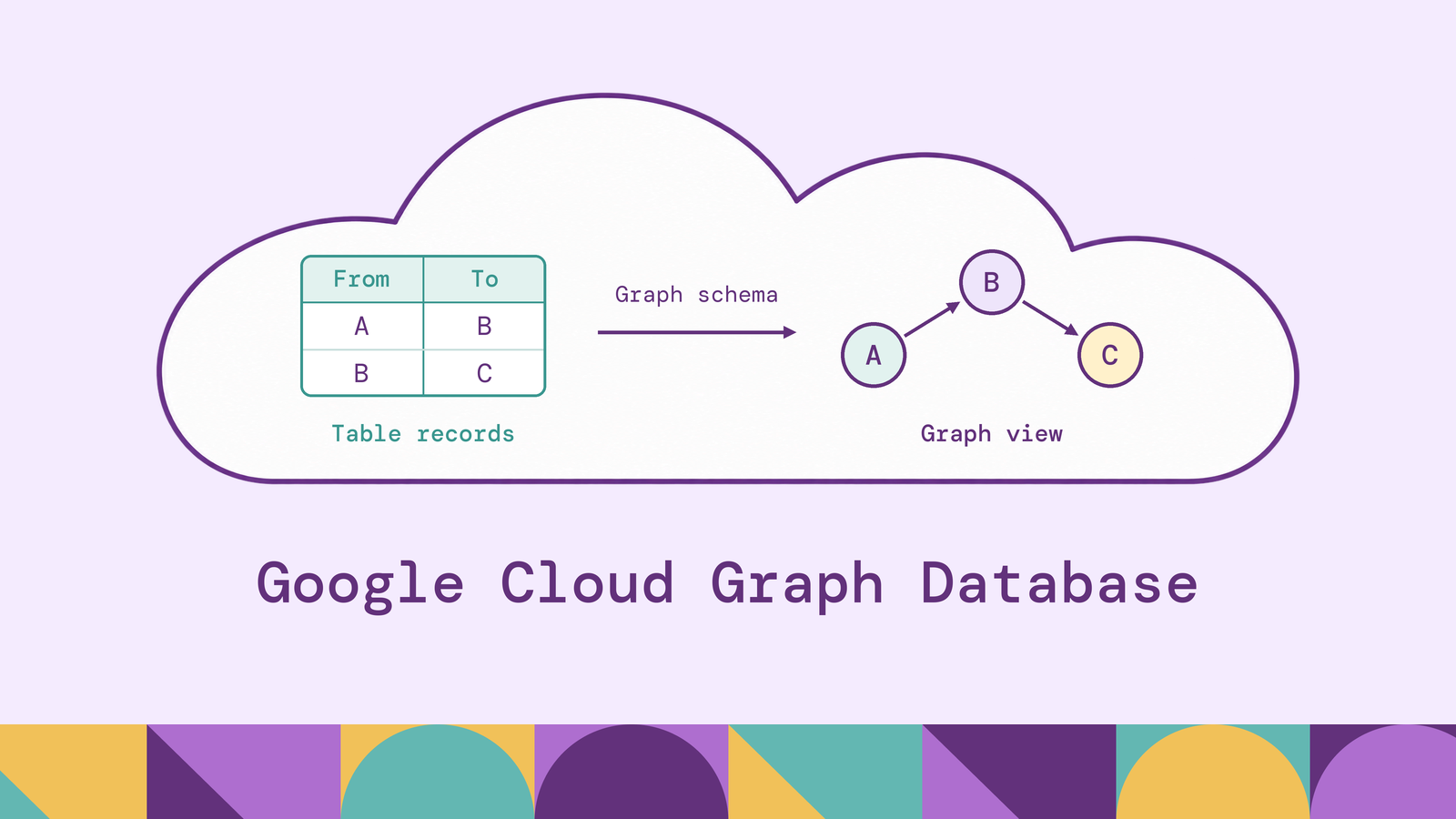
Choosing a Google Cloud graph database starts with two questions: where does the data live, and how will the application use its relationships? Checking connections during a transaction and analyzing patterns across historical records place different demands on storage, consistency, and query execution.
Google Cloud supports both approaches through Spanner Graph and BigQuery Graph, alongside partner products. This guide explains the architecture and features behind those options, walks through creating a small Spanner graph, and shows how Graph Query Language (GQL) expresses relationship queries. It also covers when adding graph queries over existing lakehouse tables fits the workload.
What is Google Cloud graph database?
A Google Cloud graph database is a service or deployment on Google Cloud that models and queries connected data through nodes, edges, and properties. The phrase describes a category; Google's services have distinct product names and operating models.
Spanner Graph adds property graph capabilities to Spanner. It maps relational tables to a graph and exposes a GQL-compatible query interface. BigQuery Graph provides graph analysis through BigQuery, letting teams define graphs over tables or views and query them using GQL.
In a payment graph, accounts are nodes, transfers are directed edges, and transfer amounts are edge properties. A query can follow several transfers to find accounts connected to a flagged account. The relationship pattern is explicit in the query, so readers can understand the path without reconstructing it from a sequence of joins.
The graph model makes connections queryable. The service underneath determines how those connections are stored, updated, and accessed.
How does Google Cloud graph database work?
Consider a dataset containing an Account table and a Transfer table. Each transfer records its source account, destination account, and amount. Those identifiers already encode a relationship, even before a graph is defined.
With Spanner Graph, you declare which tables supply nodes and edges, which keys identify them, and which columns become properties. The graph schema maps rows to graph elements. A transfer's source and destination keys connect its edge to the corresponding account nodes.
A GQL query describes the desired pattern. For example, an application might ask for accounts reachable through two transfers from a particular account. The engine evaluates that pattern against the mapped data and returns the requested properties or graph elements.
Changes to the source rows change the graph data. Spanner's data management documentation directs applications to insert, update, and delete the underlying table rows using SQL DML or mutation APIs. A graph schema therefore adds another way to query those records without creating a separate graph dataset inside another database.
This still requires deliberate modeling. Stable identifiers, meaningful edge direction, and appropriate timestamps determine whether a returned connection answers the business question.
Google Cloud graph database architecture
Spanner Graph combines a logical graph definition with Spanner's distributed database infrastructure. Three parts of that architecture matter when designing an application.
Storage and transactions. The underlying tables hold the records. Spanner provides synchronous replication and transactional consistency as part of its managed database service. Graph access operates on that foundation, so the application can maintain account records and their relationships within the same database.
Graph schema and access paths. The property graph definition describes nodes, edges, labels, and properties. Physical table design still matters. Google's schema design guidance recommends techniques such as interleaving edge rows with source nodes and using secondary indexes for reverse traversal or property filters. A logical graph definition does not eliminate storage-layout decisions.
Query execution and consistency. Queries use the graph definition to navigate the stored relationships. Spanner's default serializable transactions provide external consistency, meaning their observable ordering agrees with real-time ordering. Its TrueTime and consistency documentation explains how transaction timestamps also support consistent reads across the database. That matters when an application needs connected records to reflect a coherent database state.
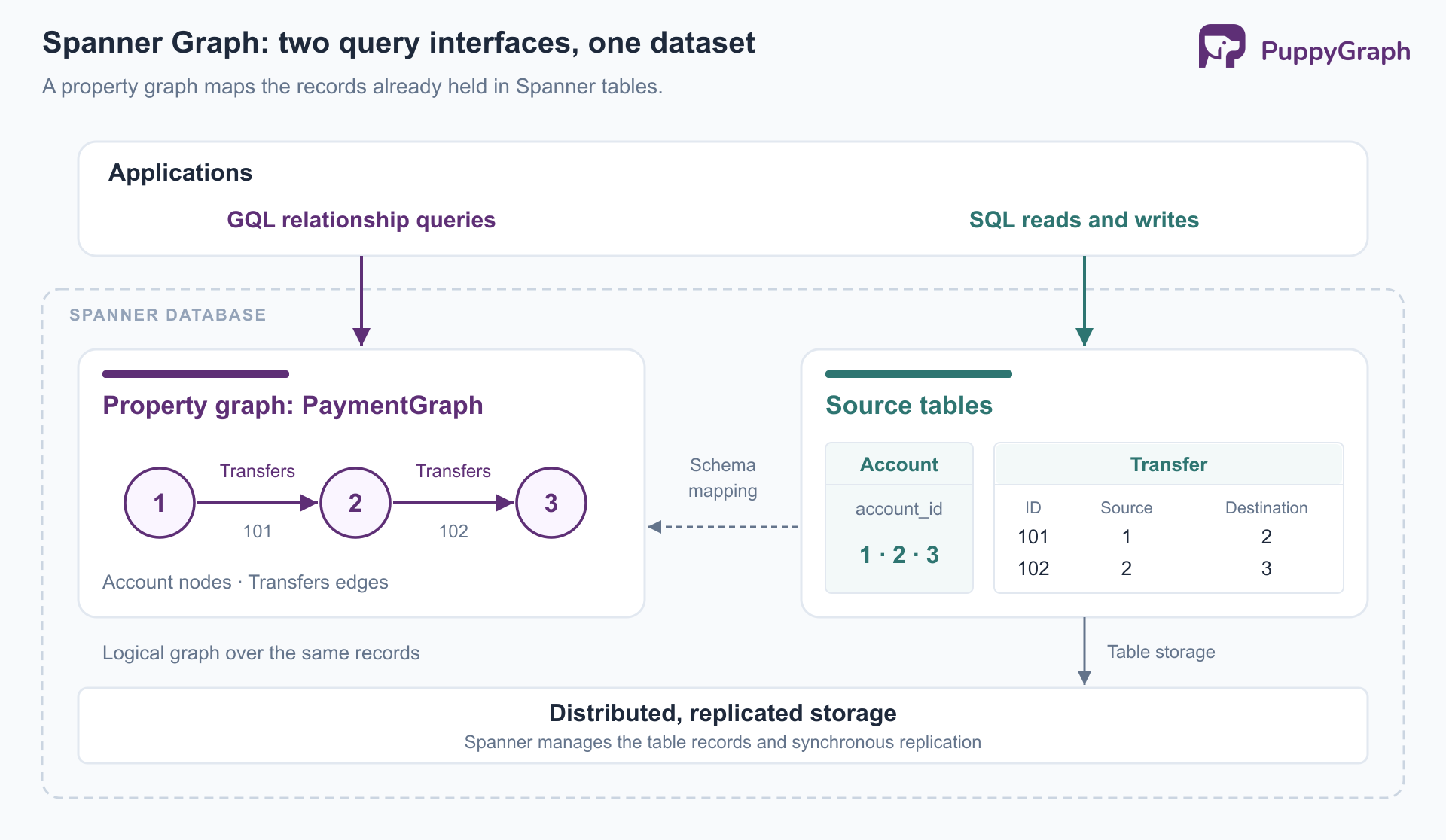
BigQuery Graph uses BigQuery's distributed analytics engine. Its architecture suits analysis across broad datasets, while Spanner is oriented toward operational access. This is a workload distinction, with overlap, rather than a rule that one service can perform only one kind of query.
Key features of Google Cloud graph databases
The most useful features connect graph modeling to the rest of the data platform. Their availability and behavior depend on the selected service.
Declarative pattern matching. GQL describes connected shapes using node and edge patterns. Filters, aggregations, and path expressions let developers ask questions about neighborhoods and chains of relationships. Spanner's query overview documents how these operations compose into graph queries.
SQL interoperability. Graph results can participate in relational queries. In Spanner, the GRAPH_TABLE operator exposes graph query results as a table. A graph pattern can identify relevant accounts, while surrounding SQL joins the results to business attributes or calculates aggregates.
Search combined with relationships. Spanner supports full-text search within graph queries. It also supports combining vector search and graph traversal. An application can find candidate documents by text or similarity, then follow their relationships to products, owners, or supporting records. Search indexes and embeddings require their own setup.
Flexible modeling and exploration. Spanner supports both explicit graph schemas and schemaless designs using dynamic labels and properties. BigQuery supports graph visualization, currently in Preview, for exploring query results. These capabilities address different needs: accommodating changing entity types and making returned relationships easier to inspect.
Choose features around the query workflow. A graph visualization helps investigation, but an application making an automated decision may need only a small, well-defined result table.
Graph database options in Google Cloud
Google Cloud offers native graph capabilities and hosts third-party graph products. Start by comparing the data location and execution model, then evaluate representative queries.
Google's Spanner and BigQuery comparison emphasizes operational graph access for Spanner and large-scale analysis for BigQuery. For new BigQuery Graph deployments, GQL queries require an Enterprise or Enterprise Plus reservation. Neo4j AuraDB provides a managed graph database available on Google Cloud. If the authoritative records live elsewhere, evaluate how they will reach the selected database and how updates will be maintained.
For teams with an existing Google Cloud lakehouse, keeping graph compute separate from table storage offers another option.
PuppyGraph is the first and only zero-ETL graph query engine that lets teams query existing relational data as a graph without loading it into a separate graph database. Its Google Cloud Lakehouse integration reads Iceberg tables in Google Cloud Storage through the lakehouse's Iceberg REST catalog. Teams define a graph schema over those tables and query entities and relationships with openCypher and Gremlin. For a Google Cloud deployment, this adds graph analysis while retaining the existing lakehouse as the data's storage layer.
PuppyGraph compiles a graph query into a plan of node and edge operators that runs in its own distributed engine. Because the query is represented as graph operators end to end, the engine optimizes specifically for multi-hop traversals. When reading SQL stores, it issues simple projection and filter SQL; it can also read supported open table formats directly. This separation lets a team add graph-oriented compute to an established warehouse or lakehouse architecture without requiring a persistent duplicate graph dataset on the default direct-query path.
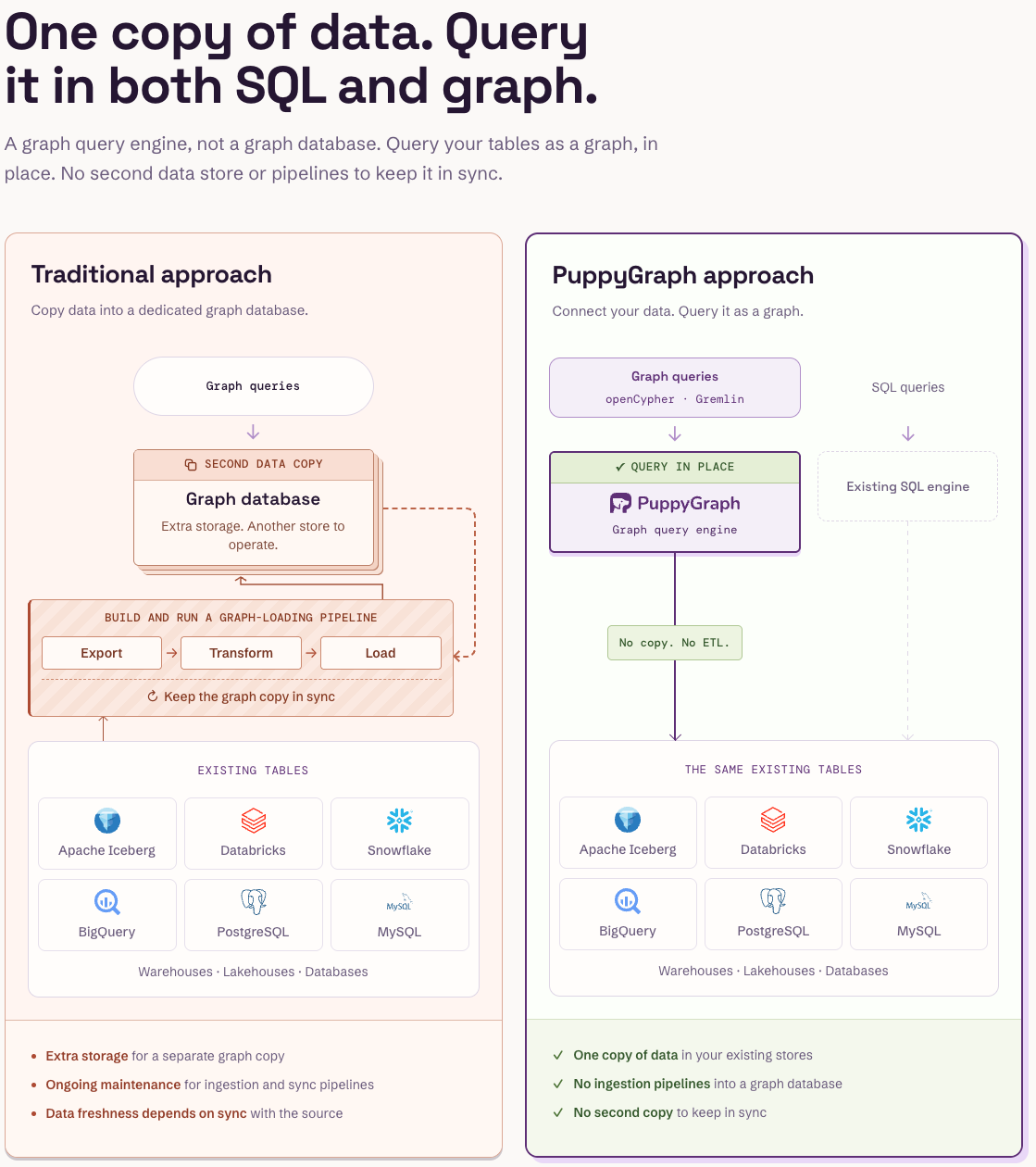
For example, a team can model customers, accounts, and transfers already stored in Iceberg, then investigate connections across those entities. Data collection, identity matching, and graph modeling remain necessary; a separate graph-database loading pipeline is not required. A Google Cloud Marketplace deployment provides a documented starting point. Evaluate this approach when preserving the current table platform and using openCypher or Gremlin are requirements. The Spanner GQL examples below target a different query interface.
Google Cloud Spanner Graph explained
Spanner Graph is particularly relevant when graph queries belong in an application's operational database. A payment service, for example, can maintain account and transfer records in Spanner and query connections among them without exporting those same records to another graph store.
Two setup constraints matter. Spanner Graph requires a GoogleSQL-dialect database; the PostgreSQL interface does not support it. It is available in the Enterprise and Enterprise Plus editions, as documented in the Spanner editions overview. These choices belong in the initial deployment decision.
The graph definition and the data have separate lifecycles. CREATE PROPERTY GRAPH defines the mapping. SQL writes change the mapped rows. Declaring an edge's endpoint references describes the graph relationship; table-level enforced foreign keys are a separate mechanism for enforcing referential integrity.
Existing Spanner tables can supply the graph directly. Data held in another system still needs a supported route into the tables used by this design. The absence of a separate graph copy inside Spanner should not be read as automatic access to every dataset in a Google Cloud project.
How to create a graph database in Google Cloud
The following example creates a small account-transfer graph in Spanner. It uses synthetic records and amounts in cents for one currency. The official setup guide covers console permissions and resource creation.
1. Create the database. Select a Google Cloud project with billing enabled, enable the Spanner API, and use an identity authorized to create the required resources. Create an Enterprise or Enterprise Plus instance, then a GoogleSQL database named graph-demo. Choose a region appropriate for the application and review the instance's ongoing charges.
2. Create the input tables. Apply these DDL statements in the Spanner Studio query editor, waiting for schema updates to complete:
CREATE TABLE Account (
  account_id INT64 NOT NULL,
  account_name STRING(100),
  is_flagged BOOL NOT NULL
) PRIMARY KEY (account_id);

CREATE TABLE Transfer (
  transfer_id INT64 NOT NULL,
  source_id INT64 NOT NULL,
  destination_id INT64 NOT NULL,
  amount_cents INT64 NOT NULL,
  FOREIGN KEY (source_id) REFERENCES Account (account_id),
  FOREIGN KEY (destination_id) REFERENCES Account (account_id)
) PRIMARY KEY (transfer_id);
Each transfer has its own identifier, allowing multiple transfers between the same accounts. Both endpoint columns have foreign keys, so the database enforces that referenced accounts exist.
3. Define the property graph. Apply this additional DDL statement:
CREATE PROPERTY GRAPH PaymentGraph
  NODE TABLES (Account)
  EDGE TABLES (
    Transfer
      SOURCE KEY (source_id) REFERENCES Account (account_id)
      DESTINATION KEY (destination_id) REFERENCES Account (account_id)
      LABEL Transfers
  );
The node label defaults to Account. The explicit Transfers label describes the edge's meaning. Table primary keys identify graph elements, and the default property mapping exposes the input columns.
4. Insert sample records. In Spanner Studio, run each insert separately, starting with the account records. Each execution commits automatically:
INSERT INTO Account (account_id, account_name, is_flagged)
VALUES (1, 'Account A', FALSE),
       (2, 'Account B', FALSE),
       (3, 'Account C', TRUE);

INSERT INTO Transfer
  (transfer_id, source_id, destination_id, amount_cents)
VALUES (101, 1, 2, 15000),
       (102, 2, 3, 14000);
The graph now contains a chain from account 1 through account 2 to account 3. A production model would also need currency, event timestamps, and appropriate access paths. This small schema makes the mapping visible without presenting a complete payment-system design.
After trying the queries below, delete the demonstration database and any instance created solely for this exercise if they are no longer needed.
Querying graph data with GQL
The first query finds a flagged account two transfers away from account 1:
GRAPH PaymentGraph
MATCH (a:Account)-[first:Transfers]->(b:Account)
      -[second:Transfers]->(c:Account)
WHERE a.account_id = 1 AND c.is_flagged = TRUE
RETURN b.account_id AS intermediary,
       c.account_id AS flagged_account,
       first.transfer_id AS first_transfer,
       second.transfer_id AS second_transfer;
GRAPH selects the graph. Parentheses identify nodes, brackets identify edges, and arrows specify direction. MATCH describes the connected pattern; WHERE filters it. With the sample rows, the result identifies account 2 as the intermediary, account 3 as the flagged endpoint, and transfers 101 and 102 as the connecting records.
This is a connection query. It does not establish that the same funds moved through both transfers or that either transfer was fraudulent. Those conclusions require additional evidence and temporal conditions.
Graph matching can also feed SQL aggregation:
SELECT flagged_account, COUNT(*) AS two_hop_paths
FROM GRAPH_TABLE(
  PaymentGraph
  MATCH (a:Account)-[:Transfers]->(b:Account)
        -[:Transfers]->(c:Account)
  WHERE a.account_id = 1 AND c.is_flagged = TRUE
  RETURN c.account_id AS flagged_account
)
GROUP BY flagged_account;
Here, the graph operation returns one row per matching two-edge pattern, and SQL counts those rows by destination. Multiple transfers can produce multiple matches between the same accounts. Decide whether the application needs paths, distinct accounts, or distinct transaction records before choosing an aggregation.
For larger graphs, start with selective identifiers or filters, specify labels, and inspect query execution behavior. Google's graph query tuning guidance explains why selective starting points and explicit labels can reduce unnecessary work. Nodes with many connections deserve particular attention because each traversal step can expand the intermediate results.
Google Cloud graph database use cases
Graph queries are useful when a decision depends on how records connect. The following scenarios illustrate practical applications, rather than claims about particular customer deployments.
Fraud investigation. Connect accounts, devices, identities, and transfers to investigate shared infrastructure or chains of transactions. An operational query might check one account during a transaction; historical analysis might search for connected groups across a longer period. The query should return supporting records so investigators can distinguish suspicious patterns from legitimate shared behavior.
Recommendations and customer relationships. Model customers, purchases, products, and categories. A query can find products purchased by customers with related interests, then apply availability or eligibility filters. The graph supplies candidate relationships; ranking and business constraints determine which recommendations should reach the user.
Security and dependency analysis. Connect identities to roles, roles to resources, and services to their dependencies. A security team can examine potential access paths, while an operations team can trace which applications depend on a failing service. Permission relationships and observed activity should have different edge types because they answer different questions.
Supply chain traceability. Represent components, suppliers, batches, and finished products. Starting from a defective batch, follow its incorporation into assemblies to identify potentially affected products. Versioned bills of materials and manufacturing timestamps are necessary when relationships change over time.
Knowledge retrieval for AI. Connect documents to entities, source records, and related concepts. A retrieval workflow can find a relevant document and expand to connected evidence. Google's Spanner AI documentation describes combining graph access with retrieval workflows. The returned relationships provide context; they do not by themselves establish that a generated answer is correct.
Across these scenarios, the useful output is a relationship supported by identifiable records. Modeling and data quality determine whether the path is meaningful.
Benefits of Google Cloud graph databases
Clearer relationship queries. A graph pattern places the connection being investigated directly in the query. That can make a multi-hop question easier to review and maintain as requirements change. It does not imply every graph query will outperform an equivalent SQL query.
Reuse of existing data. Spanner Graph and BigQuery Graph can add graph models over data already accessible to their respective platforms. This can reduce the need to maintain a second dataset solely for graph access. The benefit depends on the actual starting point: records outside the chosen platform may still require integration.
A workload-appropriate operating model. Managed services can reduce infrastructure administration, while the choice of operational database, analytical warehouse, or separate query engine lets teams align graph execution with their broader architecture. Teams still own schema design, access policies, query behavior, and capacity decisions.
Measure these benefits with representative workloads. Include common queries, high-degree nodes, realistic update rates, and concurrent users. Evaluate result correctness, latency, operational effort, and total resource consumption together. A compact demonstration proves that the model is understandable; a workload evaluation establishes whether the deployment fits.
Conclusion
Google Cloud graph database choices reflect different data and application needs. Spanner Graph brings relationship queries into a transactional database, BigQuery Graph supports analytical graph workloads, and partner products offer additional storage and execution models. Start with data location, consistency requirements, and representative query patterns.
Try the forever-free PuppyGraph Developer Edition and book a demo with the team to see how openCypher and Gremlin queries connect records across warehouse and lakehouse tables, with no graph-specific ETL, using your Google Cloud relationship-analysis workload as the starting point.
Hao Wu is a Software Engineer with a strong foundation in computer science and algorithms. He earned his Bachelor’s degree in Computer Science from Fudan University and a Master’s degree from George Washington University, where he focused on graph databases.

Get started with PuppyGraph!


Developer Edition
- Forever free
- Single noded
- Designed for proving your ideas
- Available via Docker install
Enterprise Edition
- 30-day free trial with full features
- Everything in developer edition & enterprise features
- Designed for production
- Available via AWS AMI & Docker install