


JanusGraph vs Amazon Neptune: Key Differences & Comparisons
Graphs help you see how things are connected, not just what exists. The hard part is choosing which graph technology fits your team and your bandwidth. In this blog, we will look at two popular options: JanusGraph and Amazon Neptune.
JanusGraph is a distributed, open source graph database that runs on top of pluggable storage and index backends such as Cassandra, HBase, and Elasticsearch. It gives you fine-grained control over deployment, tuning, and scaling if you are comfortable managing the underlying systems.
Amazon Neptune is AWS’s fully managed graph database service. It handles provisioning, backups, replication, and many scaling concerns for you, and it ties neatly into the wider AWS ecosystem.
While both are built for large, highly connected data, they serve very different teams and constraints. We will compare their strengths and tradeoffs, then look at where alternatives like PuppyGraph help lower the entry barrier to graph analytics by running graphs directly on your existing data platforms.
What is JanusGraph?

JanusGraph is a graph database engine that builds on third-party systems for data storage and indexing. Instead of managing its own storage layer, it focuses on compact graph serialization, rich graph data modeling, and efficient query execution.
It comes standard with the following adapters:
- Data storage: Apache Cassandra, Apache HBase, Google Cloud BigTable, ScyllaDB, BerkeleyDB
- Indexing: ElasticSearch, Apache Solr, Apache Lucene
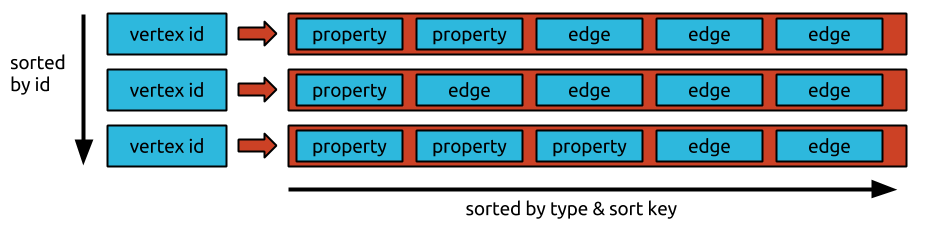
JanusGraph stores the graph in an adjacency list format, leveraging the Bigtable data model. Each node’s adjacency list is stored as a row, with the node ID as the row key. This allows for the compact storage of the node’s incident edges and properties which help to speed up traversals.
Key Features
JanusGraph’s modular architecture decouples storage and indexing so you can pair it with different backends depending on what you value. For example, HBase favors strong consistency and complete answers, even if that means more timeouts under stress. Cassandra favors staying available and returning responses, even if some data may be temporarily stale or incomplete. External indexing backends are optional, but using Elasticsearch or Solr unlocks geo search, numeric range queries, full-text search, and faster global lookups.
JanusGraph supports both OLTP and OLAP workloads by combining real-time traversals with optional big data analytics. On top of the core OLTP graph database, it can plug into a big data platform such as Spark, Giraph, or a Hadoop-based engine through TinkerPop’s GraphComputer API. OLTP traversals run directly against the storage backend via Gremlin, while OLAP traversals are translated into distributed graph compute jobs on the chosen big data platform that load the entire graph through an OLAP I/O layer and run large-scale algorithms like PageRank or connected components across the full dataset.
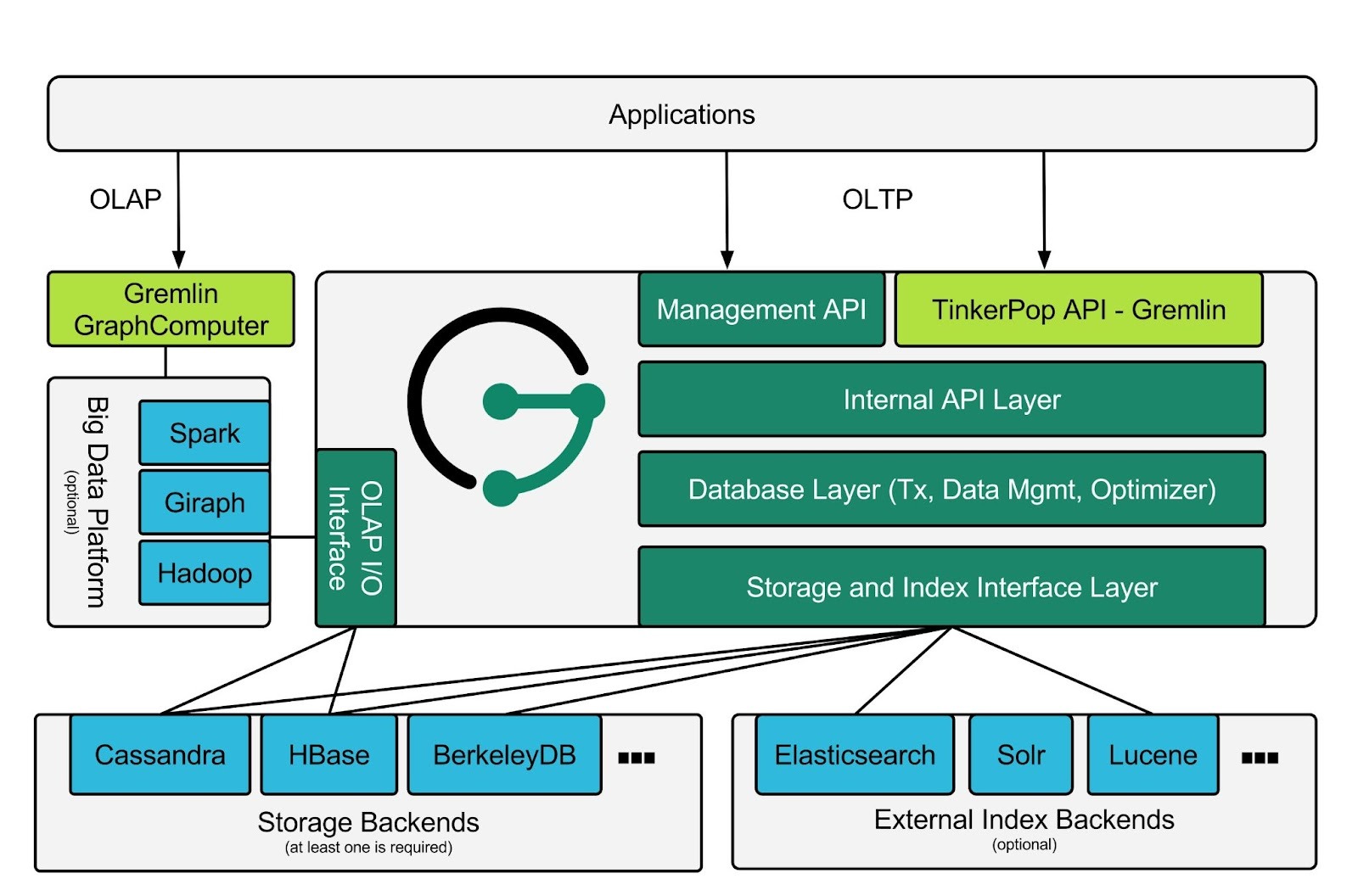
JanusGraph’s distributed design combines clustered storage backends with concurrent query processing. Its scalability and availability largely come from the underlying stores such as Cassandra, HBase, or Bigtable, which handle data sharding, replication, and fault tolerance. On top of that, you can run multiple JanusGraph instances against the same storage and index backends so many Gremlin traversals can execute concurrently across the cluster. Together with external index backends and support for multi-datacenter deployments, this lets JanusGraph support very large graphs and a growing user base while staying responsive.
What is Neptune?
Amazon Neptune is a fully managed graph database service from AWS that consists of two parts: Neptune Database for transactional graph workloads and Neptune Analytics for large-scale graph analysis.
AWS Neptune is highly available and uses a distributed, shared storage architecture that grows automatically as your data does. The cluster volume can scale up to 128 TiB in supported regions, without you having to manage disk provisioning or file layout.
Amazon Neptune supports both property graphs and RDF graphs. At the storage level, it represents graph data as an element consisting of four parts, also known as a “quad”:
- Subject (S)
- Predicate (P)
- Object (O)
- Graph (G)
These quads are used to encode information about the graph. A quad can assert a relationship between entities or attach a property to an entity or edge. In RDF graphs, the G position holds a named graph identifier. In property graphs, the G position stores an internal identifier that depends on the element type, such as the edge ID for an edge. A set of quads that share resource identifiers forms the graph that you query with Gremlin or openCypher for property graphs, or SPARQL for RDF.
Key Features
Amazon Neptune is a fully managed graph database service that offloads operational work to AWS. You do not manage servers, storage volumes, or backups directly. Neptune handles provisioning, patching, replication, automatic failover, continuous backups to S3, and point-in-time recovery, so your team can focus on data modeling and queries instead of running the database.
Amazon Neptune seamlessly integrates with the broader AWS ecosystem so graphs can sit close to your existing data and workloads. It runs inside your VPC and works with services like IAM, KMS, CloudWatch, Lambda, Glue, and SageMaker. That makes it straightforward to build pipelines that load data from S3 or relational stores, trigger graph updates from events, and feed graph results into downstream analytics or ML systems.
Amazon Neptune supports both RDF and property graphs, giving you flexibility in how you model connected data. When you create a cluster you choose the graph model, which also fixes the supported query languages: Gremlin or openCypher for property graphs, and SPARQL for RDF graphs. While you cannot mix both models in a single cluster, you can run separate RDF and property graph clusters on the same AWS platform, which lets you standardize on Neptune while using the right model for each use case.
JanusGraph vs Neptune: Feature Comparison
When to Choose JanusGraph vs Neptune?
When to Choose JanusGraph
JanusGraph makes the most sense if you care more about control and flexibility than having a managed service. It is a strong fit when you need to stay cloud agnostic or run on premises, or when vendor lock in is a concern. It is also a good choice for teams already familiar with storage systems like Cassandra, HBase, Bigtable, or ScyllaDB, since that experience makes getting started with JanusGraph much smoother.
Because JanusGraph is open source under Apache 2.0, you have the option to inspect, extend, or fork the code. This is useful if you want fine grained control over how data is stored, replicated, and indexed in the underlying storage engines, and if you have the in-house expertise to manage a multi-node graph stack.
When to Choose Amazon Neptune
Amazon Neptune is best when you are already committed to AWS or want to offload as much operational work as possible. If your applications, data pipelines, and security controls already live in AWS, Neptune fits naturally into that environment. You create a cluster in your VPC, choose instance sizes and read replicas, then let AWS handle provisioning, patching, backups, failover, and automatic storage growth. High availability features such as multi AZ replication and read replicas are built in, which is appealing if you prefer configuration over running databases yourself.
Neptune also stands out if you need both property graphs and RDF on the same platform. You can query property graphs with Gremlin and openCypher, and RDF graphs with SPARQL. With Neptune Database handling high availability and scalability, and Neptune Analytics covering large scale graph analysis, Neptune offers a straightforward path to get graph workloads running without building and operating a custom graph stack.
Which One is Right for You?
There is no one-size-fits-all solution, and the right graph solution depends on your workload and what teams can accommodate:
Ecosystem
If you prefer an open source stack that can run in any environment, JanusGraph is the more natural fit, since it works with tools like Cassandra, HBase, Bigtable, ScyllaDB, Elasticsearch, Solr, Spark, and Hadoop, and can be deployed on premises or in any cloud under an Apache 2.0 license that keeps your options open.
If your world already revolves around AWS, Amazon Neptune slots neatly into that ecosystem, with first party integrations to S3, Glue, DMS, Lambda, CloudWatch, IAM, KMS, SageMaker, Neptune Analytics, and VPC networking, at the cost of being tied to AWS regions and services.
Operational Costs
With JanusGraph there is no license fee, so you pay for the infrastructure you run and the time your team spends managing it. That can be cost effective if you already have shared platforms like Cassandra or HBase and a central team that maintains them for multiple workloads, but the long term cost is dominated by people and operational complexity.
With Neptune you follow a pay as you go model, paying AWS for database instances, storage, I/O, backups, and Neptune Analytics. The bill can grow with usage, but you are trading those costs for not having to build and operate your own graph database stack.
Engineering Bandwidth
JanusGraph fits best in organizations with a strong platform or SRE teams, where engineers are already comfortable running distributed systems like Cassandra, HBase, Spark, or Kubernetes and are willing to take on responsibility for designing, monitoring, and evolving a multi node graph stack with fine grained control over storage, replication, and indexing.
Neptune suits teams that want to keep database operations lighter, where most engineers focus on application code and data modeling and the team would rather not hire specialists to run and debug large storage clusters, while still being able to work with graph models and query languages like Gremlin, openCypher, and SPARQL.
Why Consider PuppyGraph as an Alternative
JanusGraph’s modular architecture gives you a lot of control, but it also means many moving parts to deploy and maintain. You are responsible for storage backends like Cassandra or HBase, index clusters like Elasticsearch or Solr, JanusGraph servers, and any big data platform you use for OLAP.
Amazon Neptune sits at the other end of the spectrum. It is easier to get started with, but it can get expensive quickly as usage grows and it locks you into the AWS ecosystem for both infrastructure and integrations.
That’s where PuppyGraph comes in.

PuppyGraph is the first and only real time, zero-ETL graph query engine in the market, empowering data teams to query existing relational data stores as a unified graph model that can be deployed in under 10 minutes, bypassing traditional graph databases' cost, latency, and maintenance hurdles.
It seamlessly integrates with data lakes like Apache Iceberg, Apache Hudi, and Delta Lake, as well as databases including MySQL, PostgreSQL, and DuckDB, so you can query across multiple sources simultaneously.

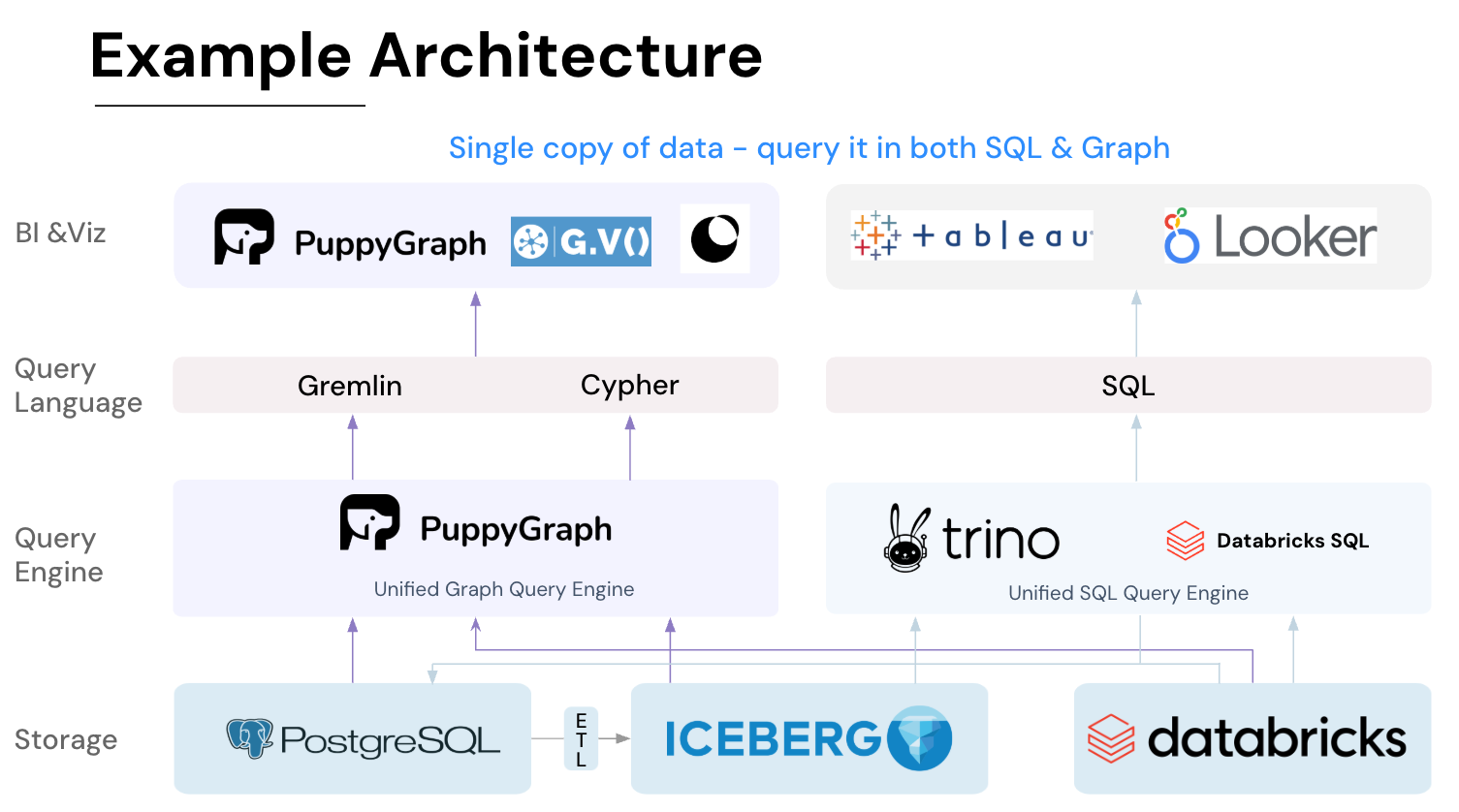
Key PuppyGraph capabilities include:
- Zero ETL: PuppyGraph runs as a query engine on your existing relational databases and lakes. Skip pipeline builds, reduce fragility, and start querying as a graph in minutes.
- No Data Duplication: Query your data in place, eliminating the need to copy large datasets into a separate graph database. This ensures data consistency and leverages existing data access controls.
- Real Time Analysis: By querying live source data, analyses reflect the current state of the environment, mitigating the problem of relying on static, potentially outdated graph snapshots. PuppyGraph users report 6-hop queries across billions of edges in less than 3 seconds.
- Scalable Performance: PuppyGraph’s distributed compute engine scales with your cluster size. Run petabyte-scale workloads and deep traversals like 10-hop neighbors, and get answers back in seconds. This exceptional query performance is achieved through the use of parallel processing and vectorized evaluation technology.
- Best of SQL and Graph: Because PuppyGraph queries your data in place, teams can use their existing SQL engines for tabular workloads and PuppyGraph for relationship-heavy analysis, all on the same source tables. No need to force every use case through a graph database or retrain teams on a new query language.
- Lower Total Cost of Ownership: Graph databases make you pay twice — once for pipelines, duplicated storage, and parallel governance, and again for the high-memory hardware needed to make them fast. PuppyGraph removes both costs by querying your lake directly with zero ETL and no second system to maintain. No massive RAM bills, no duplicated ACLs, and no extra infrastructure to secure.
- Flexible and Iterative Modeling: Using metadata driven schemas allows creating multiple graph views from the same underlying data. Models can be iterated upon quickly without rebuilding data pipelines, supporting agile analysis workflows.
- Standard Querying and Visualization: Support for standard graph query languages (openCypher, Gremlin) and integrated visualization tools helps analysts explore relationships intuitively and effectively.
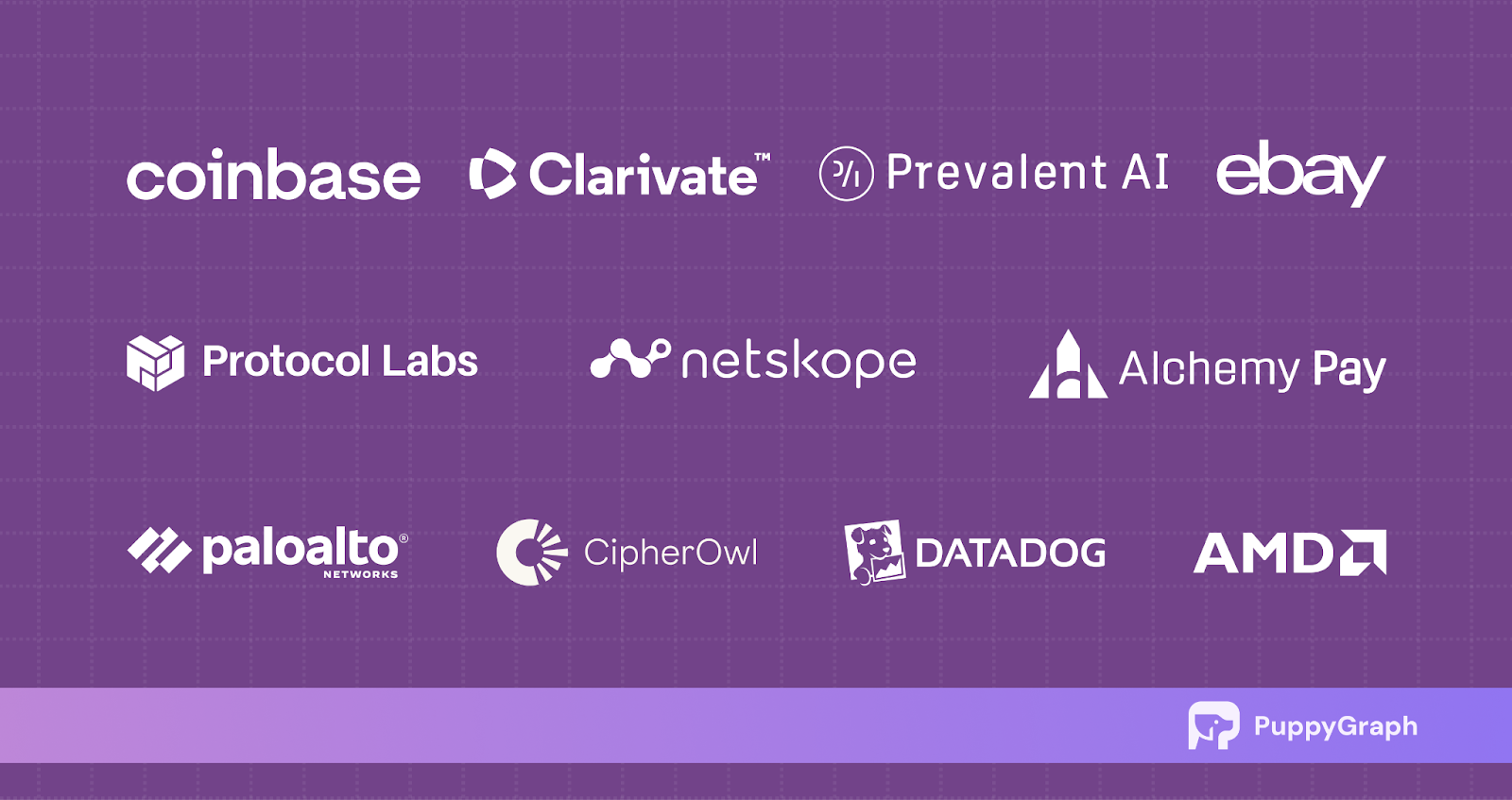
- Proven at Enterprise Scale: PuppyGraph is already used by half of the top 20 cybersecurity companies, as well as engineering-driven enterprises like AMD and Coinbase. Whether it’s multi-hop security reasoning, asset intelligence, or deep relationship queries across massive datasets, these teams trust PuppyGraph to replace slow ETL pipelines and complex graph stacks with a simpler, faster architecture.
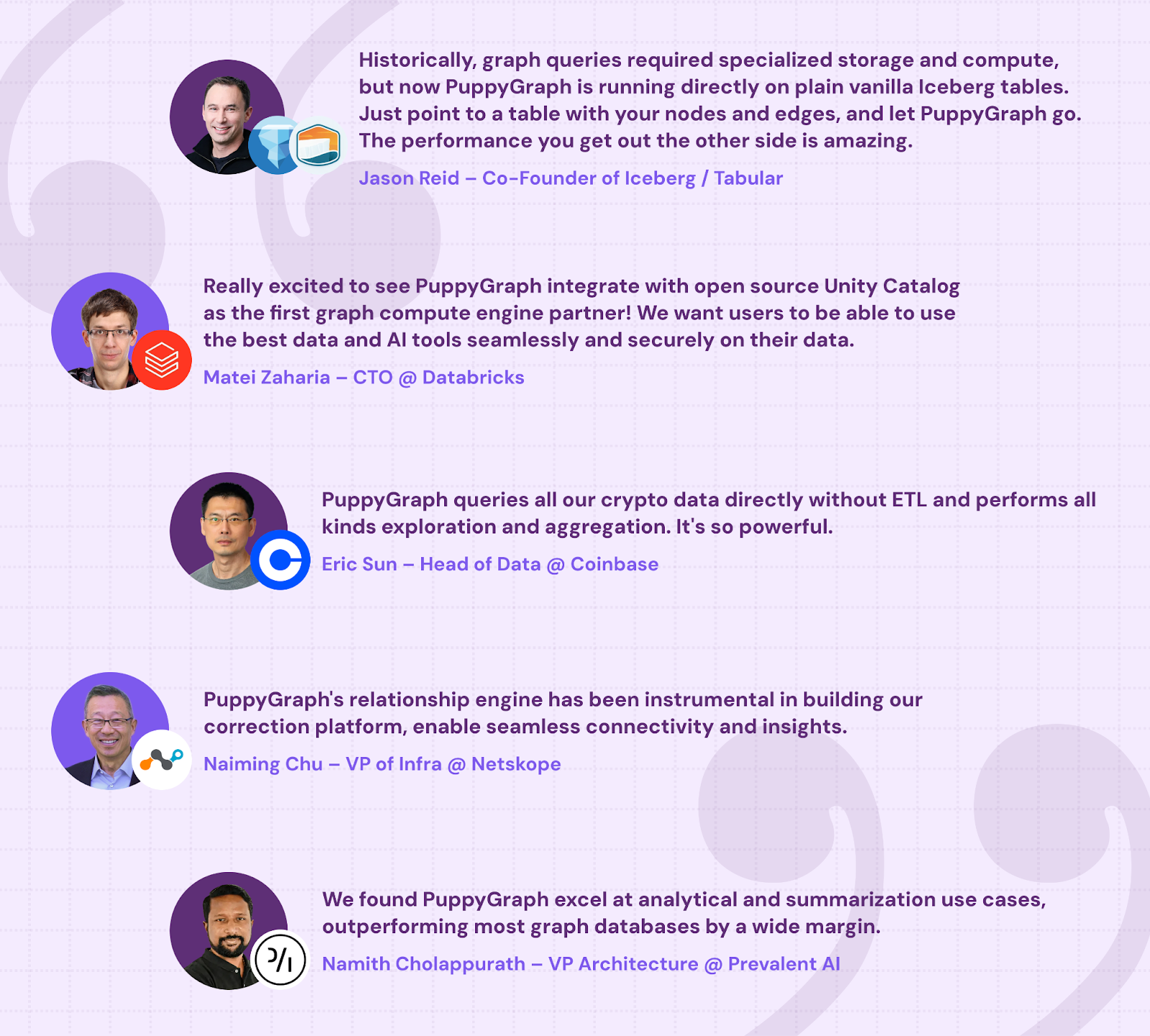
As data grows more complex, the most valuable insights often lie in how entities relate. PuppyGraph brings those insights to the surface, whether you’re modeling organizational networks, social introductions, fraud and cybersecurity graphs, or GraphRAG pipelines that trace knowledge provenance.
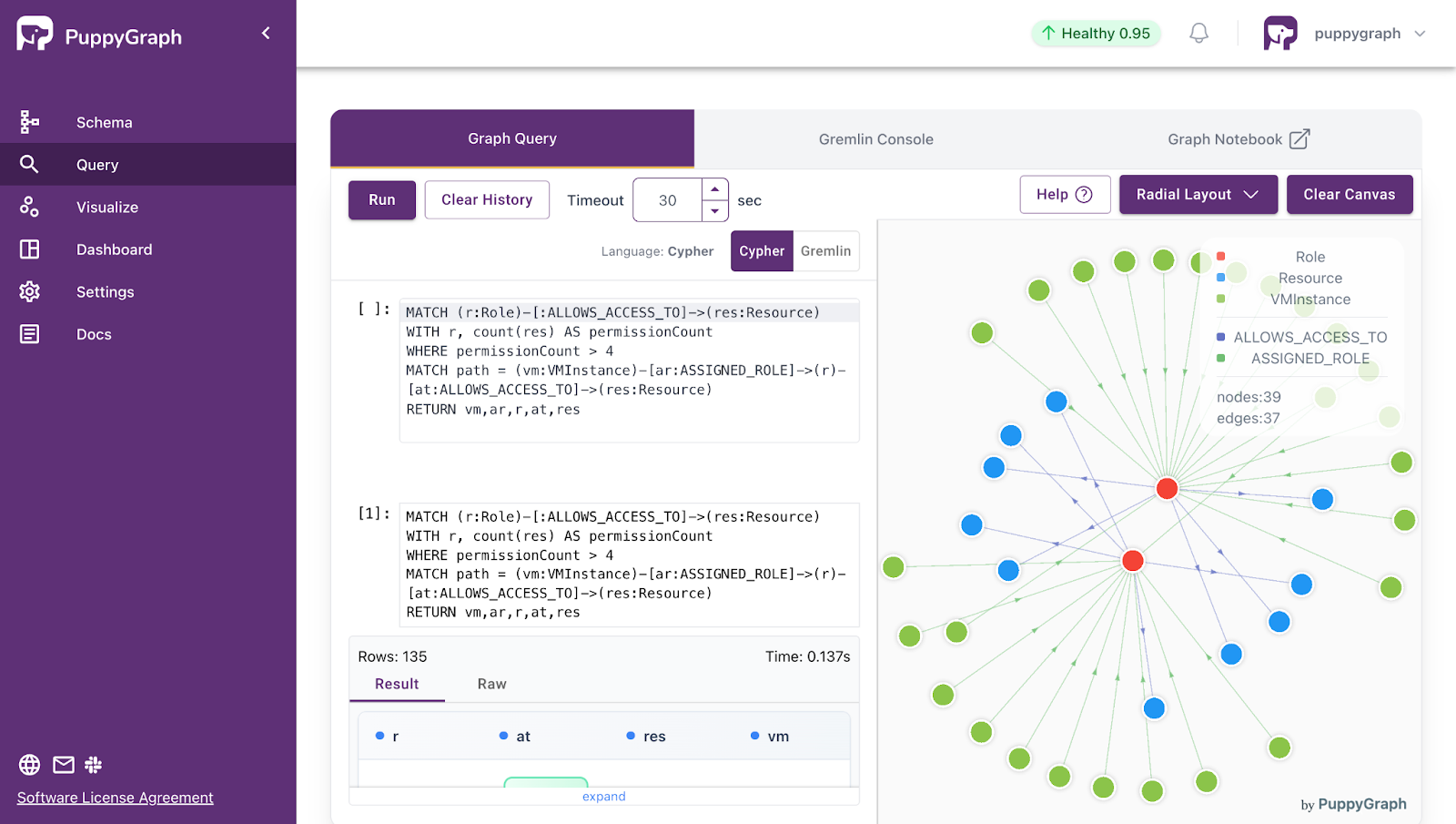
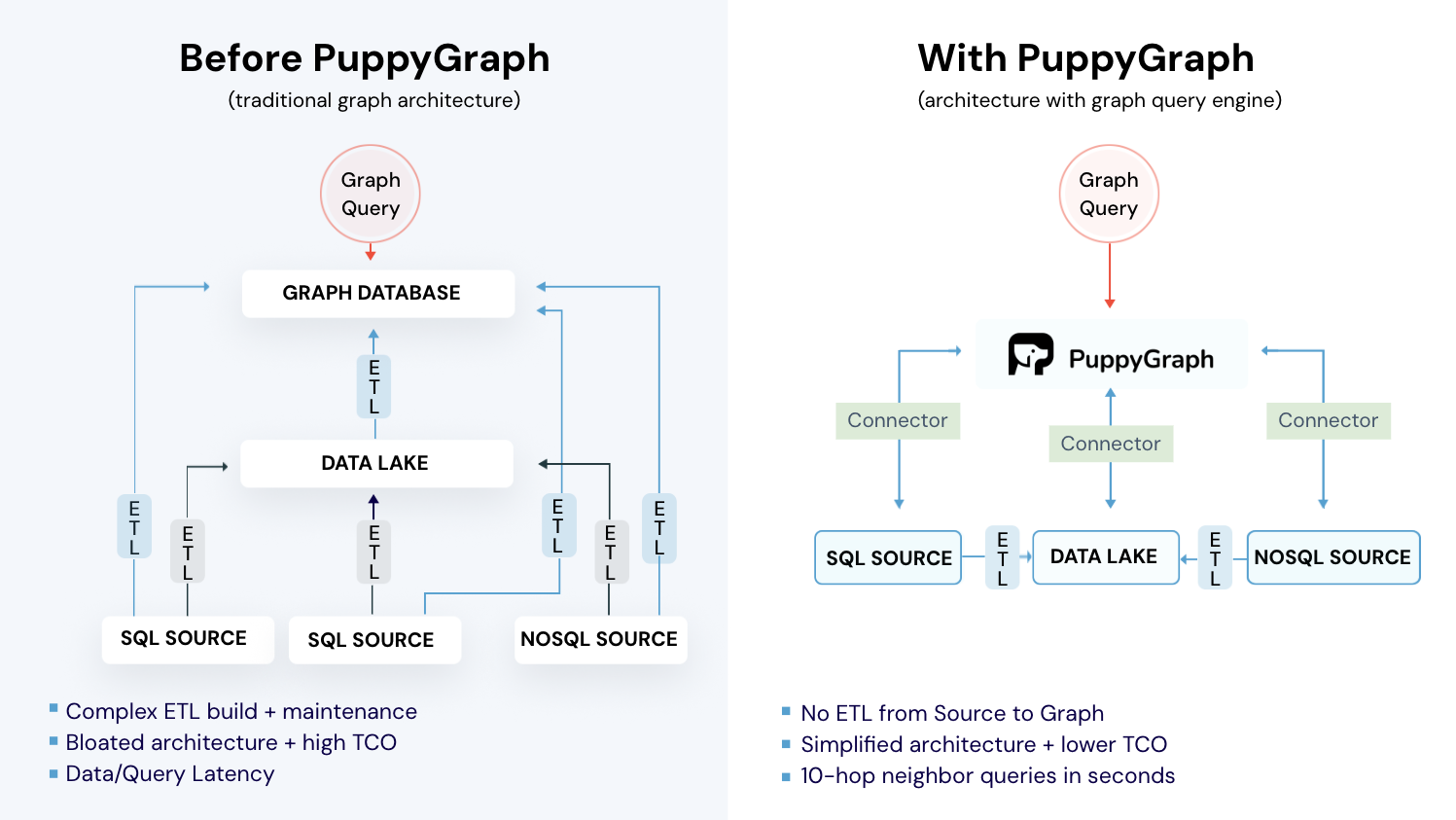
Deployment is simple: download the free Docker image, connect PuppyGraph to your existing data stores, define graph schemas, and start querying. PuppyGraph can be deployed via Docker, AWS AMI, GCP Marketplace, or within a VPC or data center for full data control.
Conclusion
Choosing between JanusGraph and Amazon Neptune is really a question of fit, not of which one “wins.” JanusGraph gives you an open source graph engine with a modular architecture that plugs into storage systems like Cassandra or HBase and indexing systems like Elasticsearch or Solr, which is powerful if you want control, cloud flexibility, and are comfortable running multi-node infrastructure.
Neptune sits at the other end of the spectrum as a fully managed AWS service that supports both property graphs and RDF, wraps in high availability and automatic storage growth, and plugs cleanly into services like S3, Glue, Lambda, and SageMaker, at the cost of tying your graph workloads to AWS and a pay as you go managed pricing model.
PuppyGraph takes a different path altogether. Instead of asking you to stand up a new graph database or commit to a single cloud, it treats your existing relational databases and lakehouse tables as the source of truth and lets you query them as a graph with zero ETL, no data duplication, and a distributed engine built for multi hop analysis over large datasets. That can reduce both architectural complexity and total cost of ownership, while still giving you openCypher and Gremlin support, visualization, and flexibility to model many graph views over the same data.
If you want to see how this could simplify your own graph workloads, try PuppyGraph’s forever free Developer edition or book a free demo with our graph experts to walk through your use cases and see how PuppyGraph fits.

Jaz Ku is a Solution Architect with a background in Computer Science and an interest in technical writing. She earned her Bachelor's degree from the University of San Francisco, where she did research involving Rust’s compiler infrastructure. Jaz enjoys the challenge of explaining complex ideas in a clear and straightforward way.

Get started with PuppyGraph!


Developer Edition
- Forever free
- Single noded
- Designed for proving your ideas
- Available via Docker install
Enterprise Edition
- 30-day free trial with full features
- Everything in developer edition & enterprise features
- Designed for production
- Available via AWS AMI & Docker install