


Snowflake Data Lake Security: Complete Guide

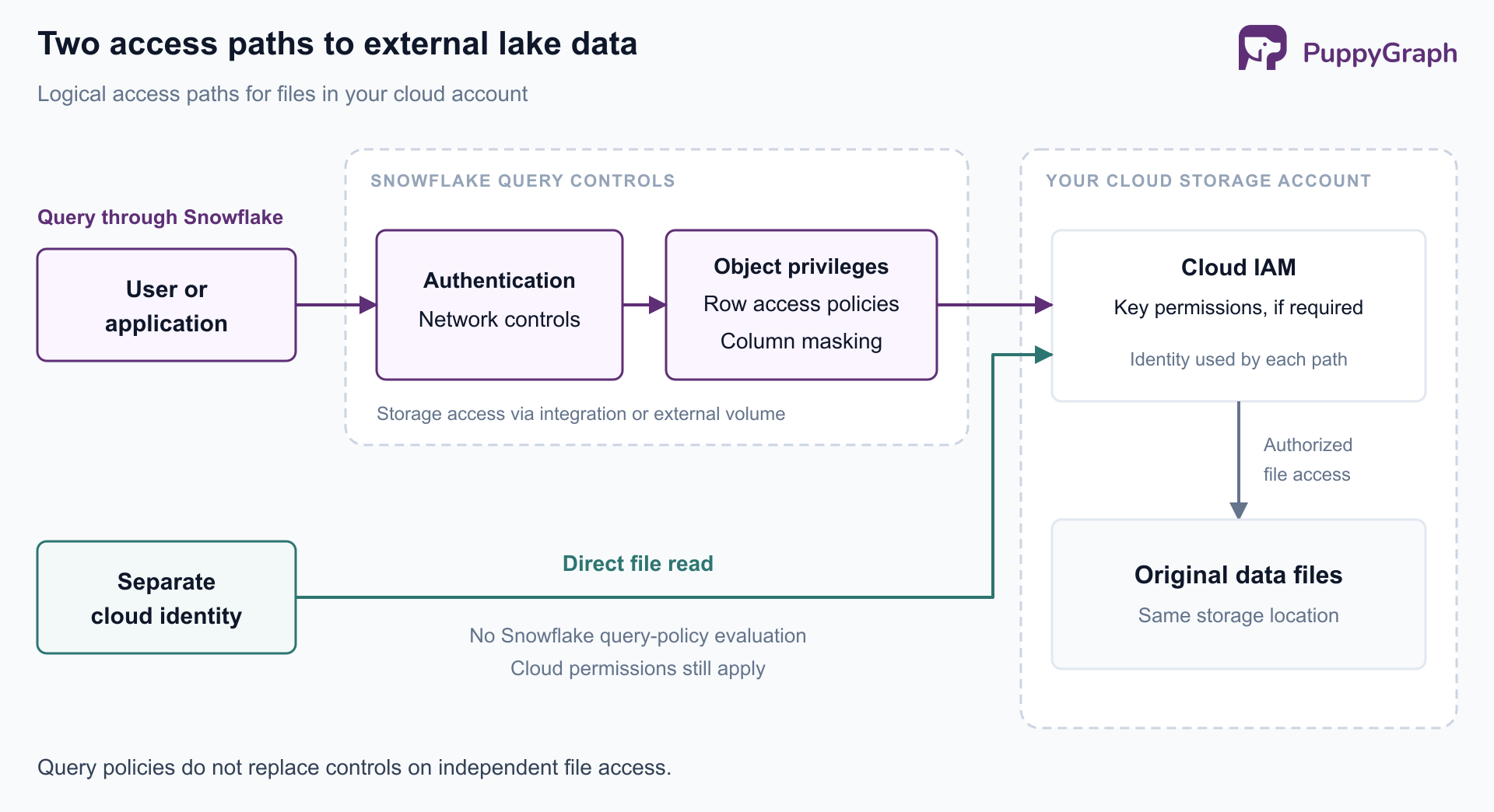
Securing a data lake with Snowflake requires control over every route to the data. A query can pass through Snowflake's roles, row filters, and masking policies while a separate cloud identity can still read the underlying external files. The security design has to account for both paths.
This guide explains how Snowflake's access controls, encryption, and governance features work together, where responsibility extends into cloud storage, and how to review the relationships between identities and sensitive datasets.
What is Snowflake data lake security?
Snowflake data lake security is the combination of identity controls, permissions, data protection policies, encryption, and monitoring used to protect lake data accessed through Snowflake. Its scope includes data loaded into native Snowflake tables, files accessed through external stages or external tables, and Apache Iceberg tables.
These arrangements have different security boundaries. For native tables, Snowflake manages storage and mediates database access. For files in your cloud account, you also administer cloud identities, storage permissions, and encryption settings. Iceberg introduces a further question: which catalog and query engine govern each read?
Start with an inventory of datasets and their access paths. A policy attached to a table establishes protection for that table's governed queries; it does not establish that every route to the same information is protected.
How Snowflake secures data lakes
Authentication establishes identity. Use centralized sign-on and MFA for people, and dedicated service identities with an appropriate non-password authentication method for applications. Snowflake's authentication policies control permitted authentication methods and MFA requirements. Give each workload an accountable owner and a credential rotation process.
Network controls restrict connection origins. Network policies use network rules to allow or block inbound requests. Apply them to the intended account, user, or supported security integration, then test legitimate clients and rejected origins. Creating a rule alone does not activate protection.
RBAC governs object access. In Snowflake's role-based access control model, privileges can be assigned to roles, and roles can inherit other roles' privileges. Separate ingestion, transformation, analysis, and policy administration. Review inherited permissions as well as direct grants, because a narrow-looking role can inherit broad access.
Governance connects policy with evidence. Classify sensitive columns, assign policy owners, and record why access is needed. Access History provides object and column access information and records referenced masking and row access policies for supported operations. It requires Enterprise Edition or higher and has reporting latency, so use it alongside query, authentication, and cloud audit records.
Together, these controls distinguish connecting to the account, receiving permission to query an object, and seeing particular records. Each decision needs its own configuration and verification.
Row-level security with row access policies
Row access policies evaluate a Boolean expression to determine which rows a query can return. They require Enterprise Edition or higher. A regional analyst might receive access to a shared customer-events table while seeing only records assigned to their region.
The following example assumes the roles, databases, schemas, and table already exist, and that the administrator has privileges to create and apply policies. The region column is VARCHAR:
CREATE ROW ACCESS POLICY governance.policies.region_filter
AS (row_region VARCHAR) RETURNS BOOLEAN ->
  IS_ROLE_IN_SESSION('GLOBAL_ANALYST')
  OR (IS_ROLE_IN_SESSION('EU_ANALYST') AND row_region = 'EU');

ALTER TABLE lake.curated.customer_events
  ADD ROW ACCESS POLICY governance.policies.region_filter
  ON (region);
For ordinary queries in the same account, IS_ROLE_IN_SESSION checks the active role hierarchy, including inherited roles. A session with GLOBAL_ANALYST can see all rows; one with only EU_ANALYST sees EU rows. Other sessions receive no rows through this policy. Users still need the underlying privileges to query the table.
For larger entitlement models, use a governed mapping table instead of expanding hard-coded conditions. Snowflake evaluates policy dependencies with the policy owner's rights, so analysts need not receive direct access to the entitlement table.
Test allowed and denied identities, role inheritance, null regions, and revoked entitlements. Row access policies filter visibility; write privileges still require separate control. They do not prevent inserts or prevent changes to rows already visible to an authorized writer.
Column-level security and dynamic data masking
Dynamic Data Masking controls which values a query can see in a protected column. A support analyst might need a customer's region and event history while the email address remains masked. The stored value stays intact, and the policy determines the value exposed during query execution.
Dynamic Data Masking also requires Enterprise Edition or higher. Assuming the same setup and an existing VARCHAR email column, a masking policy can separate permission to read a row from permission to see its email address:
CREATE MASKING POLICY governance.policies.email_mask
AS (email_value VARCHAR) RETURNS VARCHAR ->
  CASE
    WHEN IS_ROLE_IN_SESSION('PII_READER') THEN email_value
    ELSE '***MASKED***'
  END;

ALTER TABLE lake.curated.customer_events
  MODIFY COLUMN email
  SET MASKING POLICY governance.policies.email_mask;
The row policy and masking policy now answer different questions. An EU analyst can receive EU records while still seeing masked email addresses. Activating PII_READER permits email visibility within the rows otherwise available to that session.
Masking affects column references throughout a query, including joins and predicates. Test application behavior as well as display output, especially when masked values serve as join keys.
For broader coverage, tag-based masking associates policies with tags and protects matching column types. Review classification and tag changes as security changes. A sensitivity label provides protection only when it is connected to the intended enforcement policy.
Data encryption at rest and in transit
Snowflake encrypts customer data at rest and uses TLS for traffic to and from its service. Its key management system uses hierarchical AES encryption keys and automatic key rotation. These mechanisms protect stored data and network transport while Snowflake decrypts data as needed for processing.
Organizations that require customer participation in key control can use Tri-Secret Secure, available in Business Critical Edition or higher. It combines a customer-managed key with a Snowflake-maintained key in the encryption hierarchy. Plan key administration and recovery carefully, because loss of required key access can interrupt data access.
For customer-owned external storage, configure the cloud provider's encryption and key permissions separately. Confirm that the identity used by Snowflake can decrypt the intended objects, and that unrelated identities cannot. Include exports, staging areas, and downstream copies in that review.
Encryption protects bytes against unauthorized reading at the storage or transport layer. An identity authorized to query plaintext still needs appropriately scoped roles, row filters, and masking. This is why encryption and access policies must be designed together.
Securing external cloud storage and external stages
An external stage names a cloud storage location and provides Snowflake with a way to access its files. A storage integration connects that stage to a cloud identity without embedding cloud access keys in each stage definition. It can also constrain the locations stages may reference.
Limit locations and operations. Use STORAGE_ALLOWED_LOCATIONS to identify approved buckets and prefixes. Scope the cloud identity's permissions to the corresponding paths and required operations. A loading workflow should not receive unrelated write or delete permissions simply because another workflow needs them.
Validate the trust relationship. For Amazon S3, follow Snowflake's storage integration setup, including the IAM principal and external ID used by the role's trust policy. Recheck the relationship when recreating integrations or changing cloud roles.
Separate stage access from table access. Review who can create stages, use existing stages, and unload query results. A user who reads a masked table should not also have an unintended route to its unmasked source files. Storage integration restrictions constrain Snowflake's configured access; they do not revoke another cloud principal's independent bucket permissions.
Govern exported data. Once results are written to an external destination, destination permissions and retention determine who can use them. Inventory approved export paths, configure their encryption, and retain cloud audit evidence alongside Snowflake activity.
The practical test is to attempt access through each permitted route. Confirm that a denied table query cannot be replaced by an allowed stage or object-storage read of the same sensitive records.
Security for Snowflake Iceberg tables
Iceberg separates table metadata and data files from the engines that query them. A security review therefore needs to identify the catalog, storage location, and query path, rather than treating the table name as the entire boundary.
Snowflake supports Snowflake-provided storage and external volume storage for Iceberg tables. With external volume storage, you configure access to files in your cloud account. An external volume serves Iceberg storage access; an external stage serves file-oriented loading and unloading workflows. Keep their permissions and purposes distinct.
Queries through Snowflake can use row access and masking policies. Supported external query paths can enforce those policies too. Snowflake documents two mechanisms through Horizon Catalog: the Snowflake Connector for Spark routes work through Snowflake, while the Iceberg REST Catalog Scan Plan API supplies a temporary, policy-filtered dataset to compatible engines. The Scan Plan API is listed as a preview feature; validate availability and compatibility for the intended deployment.
This protection depends on using the supported integration. Independent credentials that read original files directly need their own authorization boundary. Inventory external readers and verify the policy behavior of each configured path.
For customer-owned storage, review both data and metadata access, encryption keys, and lifecycle rules. Coordinate deletion and retention with Iceberg table maintenance so storage cleanup does not remove files still needed by retained snapshots.
Common Snowflake data lake security risks
Privilege accumulation. Inherited roles, broad grants, and forgotten service identities can expand access beyond a team's current responsibilities. Review effective access after role changes and offboarding, with particular attention to policy administration and export capabilities.
Policies that exist but miss data. A masking policy attached to one email column does not establish coverage for every copy of that field. Check new tables, derived datasets, and schema changes. Include expected denials in regression checks, not just successful queries.
Shared identities that erase user context. A BI tool or application may connect through a service account. If policies see only that identity, different end users can receive the same data access. Verify how the application conveys user context and how Snowflake's policies consume it.
Direct storage access and uncontrolled exports. Query policies lose relevance when another permitted path exposes the same records without those policies. Review cloud IAM grants, stage permissions, and export destinations together with database privileges.
Incomplete investigation evidence. Snowflake and cloud logs describe different parts of an access event. Account for reporting latency and retain enough evidence to connect authentication, query execution, role changes, and file reads. Assign an owner to investigate exceptions.
Turn these risks into a recurring review: choose a sensitive dataset, enumerate its readers and export paths, test the expected access, and document the result. Repeat after changes to identity mappings, integrations, or table structure.
Advantages of Snowflake data lake security
Snowflake brings object permissions, row filtering, column masking, and access evidence into the database environment where teams already query data. Reusable policies let administrators express common rules across datasets while giving different readers appropriate views of shared information.
Separating policy administration from routine analysis supports clearer responsibility. Managed encryption reduces key-management work for the default configuration, while external storage integrations provide explicit connections to cloud permissions. These advantages are strongest when teams maintain an inventory of covered objects and test every access path. When security metadata and access evidence are available in tables, teams can also analyze relationships across those controls.
PuppyGraph is the first and only zero-ETL graph query engine that lets teams query existing relational data as a graph without building a separate graph ingestion pipeline. For Snowflake data lake security, this offers a way to analyze relationships across security metadata already stored in tables. Teams define a graph schema that maps identities, roles, grants, and datasets into nodes and edges, then query those relationships with openCypher or Gremlin. The default direct-query path requires no persistent duplicate dataset for graph analysis.
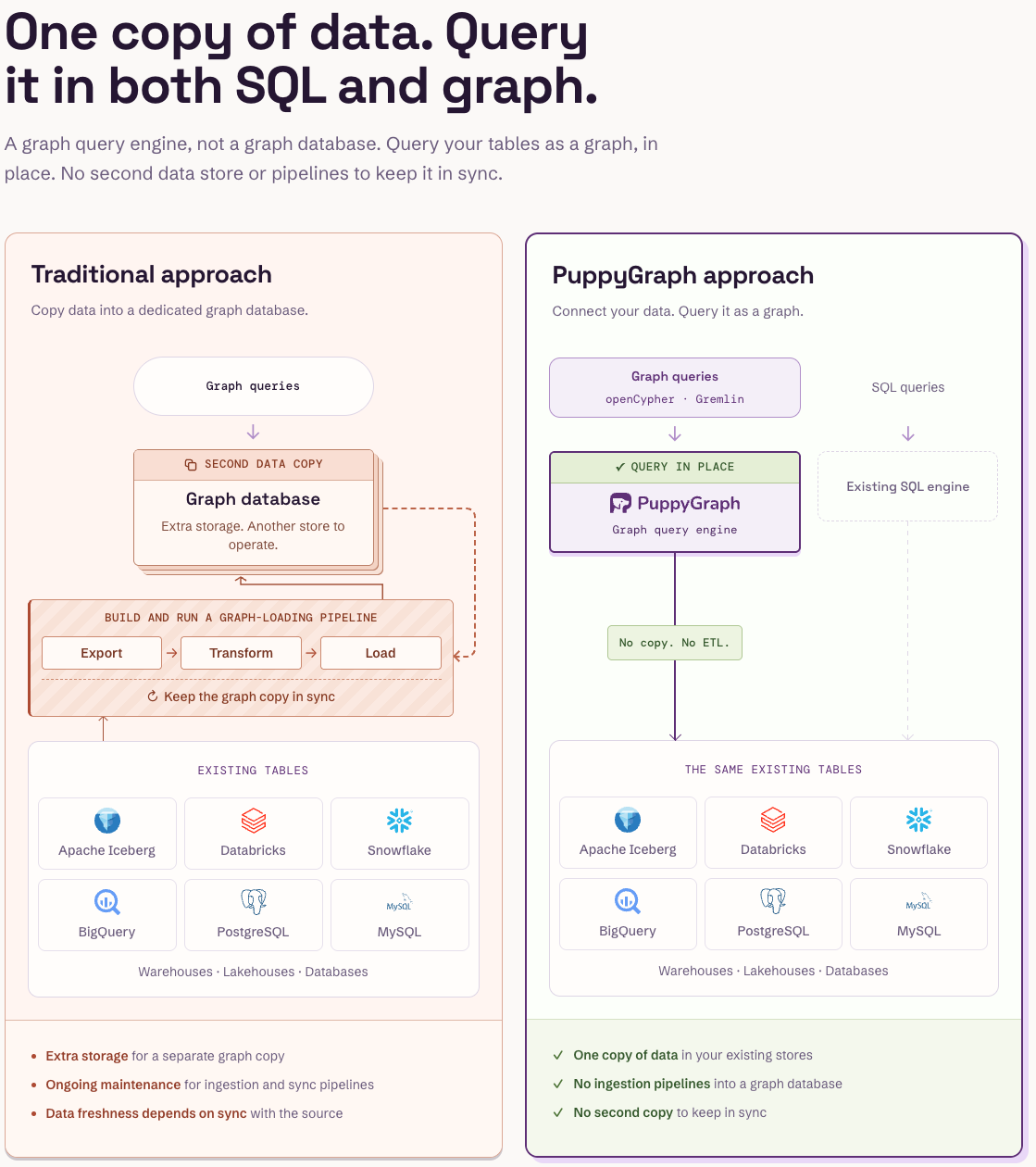
For example, once role memberships, object grants, and sensitivity classifications are available in supported source tables, an investigation can trace an application's role through inherited roles to sensitive datasets. Connecting those paths to access events helps reviewers distinguish granted access from observed use. Teams supply and maintain the mappings; the graph supports investigation, while Snowflake and cloud controls continue to make authorization decisions.
The connection itself also needs the right identity boundary. PuppyGraph's Snowflake connector supports a scoped service account and configurable user-identity propagation. For user-specific results, teams configure a stored procedure and Snowflake access controls that consume the propagated identity or claims. This lets graph analysis work with the intended source policies, provided the integration is configured and tested. Simply connecting a shared service account does not establish per-user isolation.
Conclusion
Snowflake data lake security depends on aligning identity, object permissions, row and column policies, encryption, and storage access. Start with the routes to sensitive data, apply controls at each boundary, and test both permitted and denied access. For Iceberg and external storage, include every engine and cloud identity that can reach the files.
Try the forever-free PuppyGraph Developer Edition and book a demo with the team to see how openCypher and Gremlin queries trace access relationships across warehouse and lakehouse tables, with no graph-specific ETL, helping security teams investigate how identities connect to sensitive data.

Hao Wu is a Software Engineer with a strong foundation in computer science and algorithms. He earned his Bachelor’s degree in Computer Science from Fudan University and a Master’s degree from George Washington University, where he focused on graph databases.

Get started with PuppyGraph!


Developer Edition
- Forever free
- Single noded
- Designed for proving your ideas
- Available via Docker install
Enterprise Edition
- 30-day free trial with full features
- Everything in developer edition & enterprise features
- Designed for production
- Available via AWS AMI & Docker install