


7 Unity Catalog Best Practices
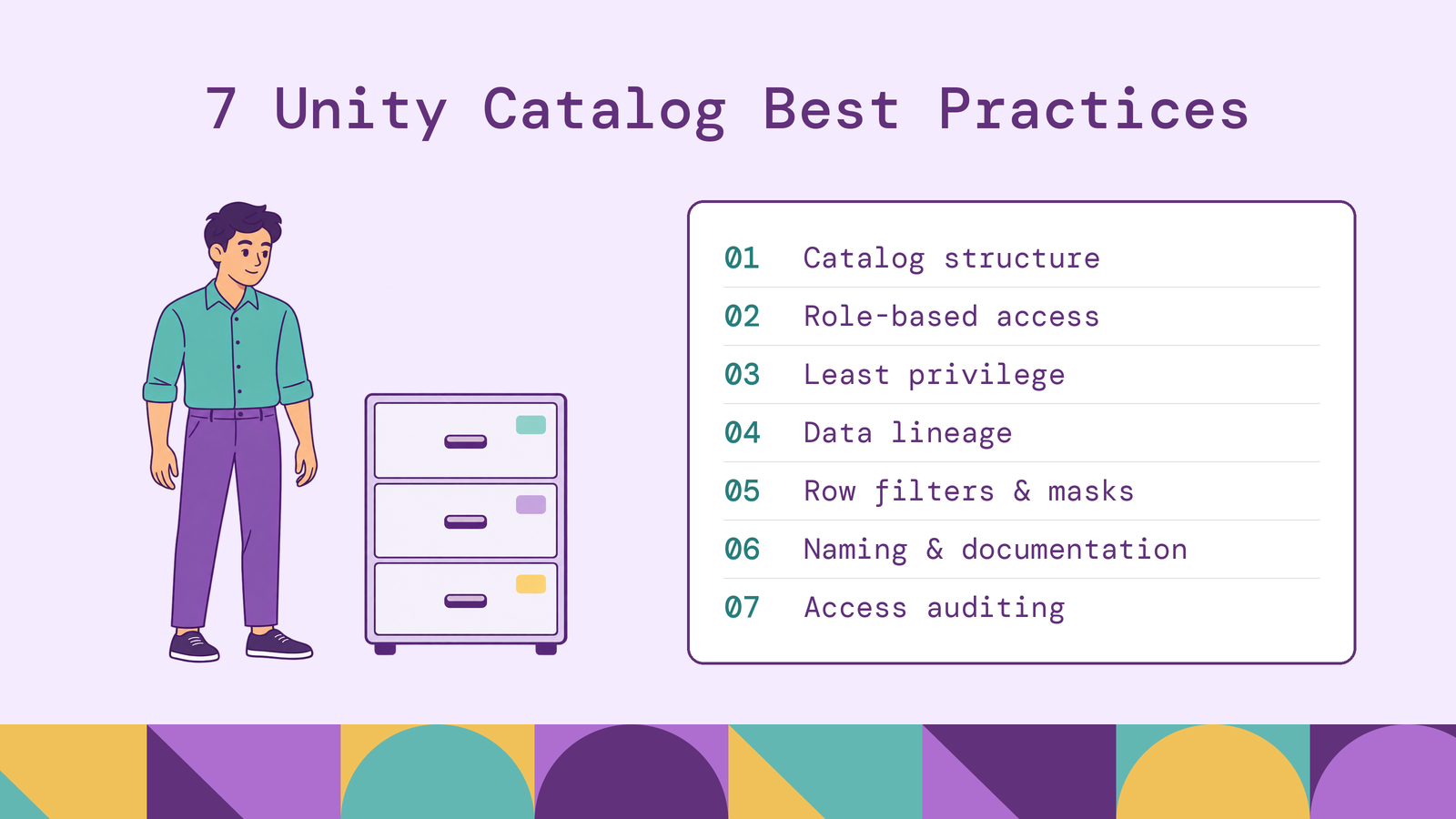
Unity Catalog best practices turn governance decisions into repeatable controls: where data belongs, who can use it, and how access is reviewed. Those decisions become harder to change once production jobs, dashboards, and external applications depend on the same tables. A useful design makes ownership and access boundaries explicit before those dependencies accumulate.
This guide covers seven practices for organizing catalogs, assigning permissions, protecting sensitive records, and monitoring activity. It also explains how graph queries can extend analysis over existing lakehouse tables while keeping the integration's access requirements clear.
What is Unity Catalog in Databricks?
Unity Catalog is Databricks' governance layer for data and AI assets. It provides access control, discovery, lineage, and auditing for registered objects, including tables, views, volumes, functions, and models. These objects use a three-level namespace: catalog.schema.object.
For example, finance_prod.reporting.invoice_summary identifies a table inside a reporting schema and a production finance catalog. Catalogs and schemas provide containers for organizing assets and assigning permissions. A metastore holds their metadata and governance configuration across attached workspaces.
Unity Catalog also distinguishes managed and external tables. For managed tables, it manages governance and the underlying storage lifecycle. External tables retain a storage lifecycle managed outside Databricks. In both cases, governance design must account for how consumers reach the data. A table name, a workspace assignment, and a cloud-storage credential each describe a different part of that access path.
Why are Unity Catalog best practices important?
Governance decisions affect both security and everyday engineering. If a reporting group receives broad access today, a newly created sensitive table may fall within that grant tomorrow. If a dataset's owner leaves, access requests and schema changes still need someone accountable for them. If analysts cannot distinguish approved reporting data from an experimental copy, discovery alone will not produce reliable analysis.
Consistent practices make these situations easier to manage. Catalog boundaries clarify responsibility, group-based permissions simplify personnel changes, and lineage helps teams assess downstream dependencies before changing a dataset. Monitoring provides evidence for revisiting those decisions as workloads evolve.
Performance deserves attention within this process. Filtering and masking policies add query-time work, so their implementation should be measured against representative workloads. The objective is a governance model that teams can operate, test, and maintain as data usage grows.
7 Unity Catalog best practices
Treat these practices as connected decisions. Catalog design determines where privileges can be inherited; identity design determines who receives them; monitoring tests whether the resulting access still matches the intended use.
1. Design a scalable catalog and schema structure
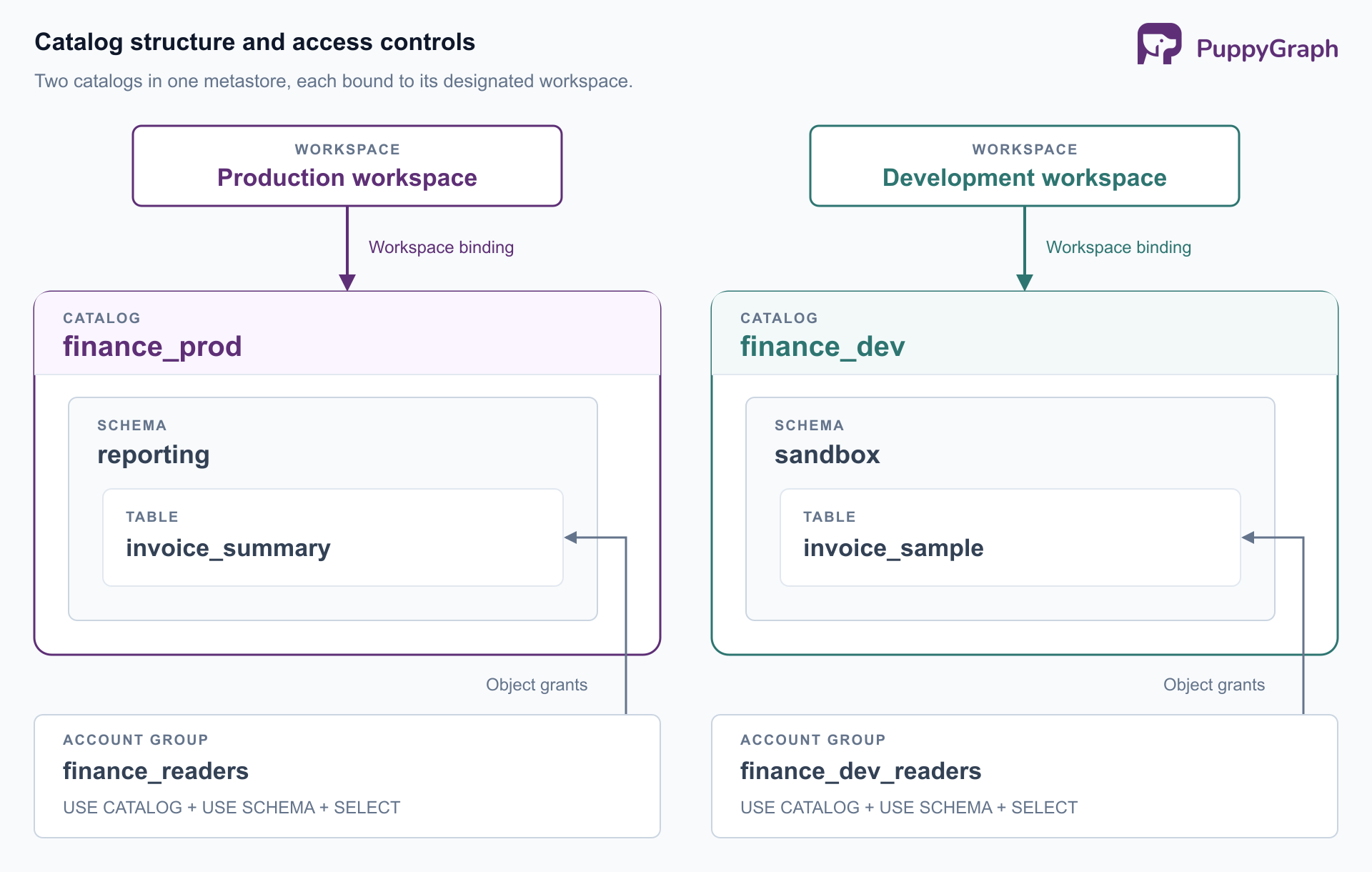
Choose catalog boundaries around meaningful differences in ownership, environment, or access requirements. Databricks' architecture guidance describes environment-based, domain-based, and combined patterns. Select one that matches how your organization delegates responsibility.
A finance team could use this structure:
Keep experimental work in a separate development catalog or appropriately restricted sandbox schema. Decide where new datasets belong before creating them, and document who can approve exceptions. A catalog for every short-lived project creates an administrative burden without necessarily improving isolation.
Use workspace-catalog bindings when access must be restricted to designated workspaces. A binding can deny access from an unassigned workspace even when the user has object privileges. Naming a catalog finance_prod communicates intent; the binding implements the workspace restriction.
2. Implement role-based access control
Represent responsibilities through account-level groups, such as finance_readers and finance_data_owners. Grant privileges to those groups, then manage membership through your identity provider. Databricks' identity guidance recommends account-level provisioning, group ownership, and service principals for automated jobs. Workspace-local groups cannot receive Unity Catalog grants.
For an existing table and account group, an authorized administrator can use these GRANT statements:
GRANT USE CATALOG ON CATALOG finance_prod TO `finance_readers`;
GRANT USE SCHEMA ON SCHEMA finance_prod.reporting TO `finance_readers`;
GRANT SELECT ON TABLE finance_prod.reporting.invoice_summary
TO `finance_readers`;
Reading the table requires the parent usage privileges as well as SELECT. These grants provide that access without adding write or ownership privileges.
Separate data consumers, production writers, and owners according to their responsibilities. Give production jobs dedicated service principals and assign durable ownership to accountable groups. When an employee changes roles, review their group memberships and any exceptional direct grants. The access model should remain understandable without reconstructing years of individual permissions.
3. Apply the principle of least privilege
Choose the narrowest grant scope that matches a sustained business need. In Unity Catalog's privilege inheritance model, privileges granted on catalogs and schemas apply to current and future child objects. A schema-level SELECT grant therefore represents an ongoing decision about datasets added later.
Use broad grants only where the container's contents share an access policy. Otherwise, grant access to selected tables or views. During reviews, inspect parent grants and group memberships alongside direct table grants so that the effective permission is clear. Treat ownership and MANAGE as administrative authority that needs its own justification.
Separate discovery from reading data. The BROWSE privilege lets users discover catalog objects and their metadata without granting access to the underlying records. Where metadata visibility is appropriate, this gives analysts a way to find useful datasets before requesting the permissions needed to query them.
Apply the same discipline below the catalog. Databricks' cloud-storage guidance warns that independent access to managed-table storage can bypass Unity Catalog controls and monitoring. Review cloud permissions alongside catalog grants, particularly for external consumers.
Test access with representative consumer identities. Confirm that an analyst can read the approved reporting table and cannot read a restricted payroll table. A successful administrator query says little about whether consumer permissions are correctly scoped.
4. Use data lineage for governance and auditing
Make lineage review part of changes to shared datasets. Unity Catalog captures lineage for supported Databricks queries, including table and column relationships. This supports impact analysis, upstream investigation, and tracing how sensitive data reaches downstream assets.
Before changing invoice_summary, inspect its downstream tables, jobs, and dashboards. Identify their owners, agree on a migration plan, and verify affected workloads after deployment. For an unexpected revenue figure, follow upstream dependencies to identify the transformation or source that needs investigation.
Use lineage as evidence with a known scope. Coverage depends on execution patterns. External assets are represented through external metadata objects and lineage relationships. Lakeflow Connect managed ingestion pipelines can record source lineage automatically. Check that a representative production pipeline appears as expected before relying on its lineage during a change review.
Also distinguish dependencies from authorization and access history. A relationship between two tables describes a data flow; determining who accessed the data requires audit evidence. Combining the two gives reviewers context about both the datasets involved and the activity under investigation.
5. Secure sensitive data with row filters and column masks
Use row filters when users should see different records within the same table, such as invoices for their assigned region. Use column masks when users may access a record but should receive a redacted value for a sensitive field. Databricks implements table-level filters and masks through functions evaluated at query time.
For table-specific requirements, assign the relevant functions directly. When the same rule applies across many datasets, consider attribute-based access control (ABAC), which applies policies using governed tags. Establish responsibility for both the policy and the classifications that determine its coverage.
Test permitted and restricted identities, missing entitlement mappings, null inputs, and overlapping group memberships. Confirm that a user sees exactly the intended rows and masked values.
Measure policy performance too. Databricks recommends simple functions with few arguments because policy expressions can constrain query optimization. Benchmark representative joins and aggregations after policy changes. Simplify the implementation while preserving the access rule, and include policy tests in the same deployment process as table changes.
6. Standardize data naming and documentation
Choose predictable names and document what the data means. A convention such as lowercase names with underscores makes objects easier to reference consistently. Fully qualified names in production SQL also make the intended catalog and schema explicit.
Names alone cannot explain a table's grain, freshness expectations, or business meaning. Use catalog, schema, table, and column comments to record those details. For invoice_summary, state whether one row represents an invoice, an invoice line, or a monthly customer total. Document how refunds and canceled invoices are represented before consumers calculate revenue.
Use governed tags for classifications that need controlled keys, values, and assignment permissions. Labels such as a sensitivity category should have consistent definitions across teams. Keep personal information and secrets out of tag metadata.
Make documentation part of dataset acceptance. Require an accountable owner, a useful description, and any necessary classification before a table enters a shared reporting schema. Review these fields when its meaning or ownership changes.
7. Monitor and audit data access regularly
Assign responsibility for reviewing access activity and following up on findings. Databricks exposes audit events through system.access.audit. After an administrator grants the monitoring team the necessary system-table access, this query provides a starting view of recent Unity Catalog events:
SELECT
  event_time,
  user_identity.email AS actor,
  action_name,
  response
FROM system.access.audit
WHERE event_date >= date_sub(current_date(), 7)
  AND service_name = 'unityCatalog'
ORDER BY event_time DESC
LIMIT 100;
This is an event sample. Build targeted monitoring around permission changes, ownership changes, denied requests, and activity by privileged identities. Interpret each action using the audit event reference: getTable, for example, requests table details and does not establish that someone read its rows.
Set a review cadence based on dataset sensitivity and operational risk. Investigate unexpected changes promptly and record an owner for remediation. Check regional coverage and retention against your evidence requirements, and protect the audit data itself. Monitoring becomes useful when a finding produces an access review, a configuration change, or a documented explanation.
For example, an unexpected ownership transfer should lead to a review of the change request, the responsible identity, and any subsequent grants. Record the resolution so the next reviewer can distinguish approved administration from unresolved drift.
Common Unity Catalog implementation mistakes
Several implementation shortcuts undermine otherwise reasonable designs.
Copying the workspace layout into the catalog hierarchy. Separate workspaces do not necessarily imply different data ownership. Define the data boundary first, then use workspace bindings where processing environments require isolation. Avoid duplicating a shared dataset simply to make each workspace look self-contained.
Granting broad permissions to resolve deployment errors. Identify the missing usage, creation, or data privilege. A production job that cannot create a table needs a specific correction; giving its identity ownership over an entire catalog can introduce unrelated authority.
Treating a policy definition as proof of enforcement. Test the actual reader, compute, and connector. Databricks supports cross-engine enforcement of filters and masks through a serverless filtering path with specific prerequisites. A successful connection to catalog metadata does not establish that every external access path supports those policies.
Reviewing configuration only at rollout. New tables, group memberships, and integrations change effective access. Revisit the design after organizational changes and major releases. Include the new dataset and its consumers in the review, rather than checking only that deployment succeeded.
How PuppyGraph works with Unity Catalog
PuppyGraph is the first and only zero-ETL graph query engine that queries existing relational data as a graph without requiring a separate graph database. Its Delta Lake connector supports Unity Catalog, allowing teams to define nodes and edges over existing lakehouse tables and query them with openCypher and Gremlin. The tables remain in the lakehouse. For teams following these Unity Catalog best practices, this adds relationship analysis without requiring a persistent graph copy that needs its own synchronization and lifecycle management.
The benefit becomes concrete when a question spans several relationships. A finance investigation might follow customers to accounts, invoices, and payment destinations to identify accounts connected through a shared beneficiary. Define those entities, identifiers, and relationships in a graph schema over the relevant tables. That schema provides a reusable semantic model for investigators, while PuppyGraph compiles graph queries into node and edge operators executed in its own distributed engine. Because the execution plan represents graph operations, the engine can optimize specifically for multi-hop traversals.
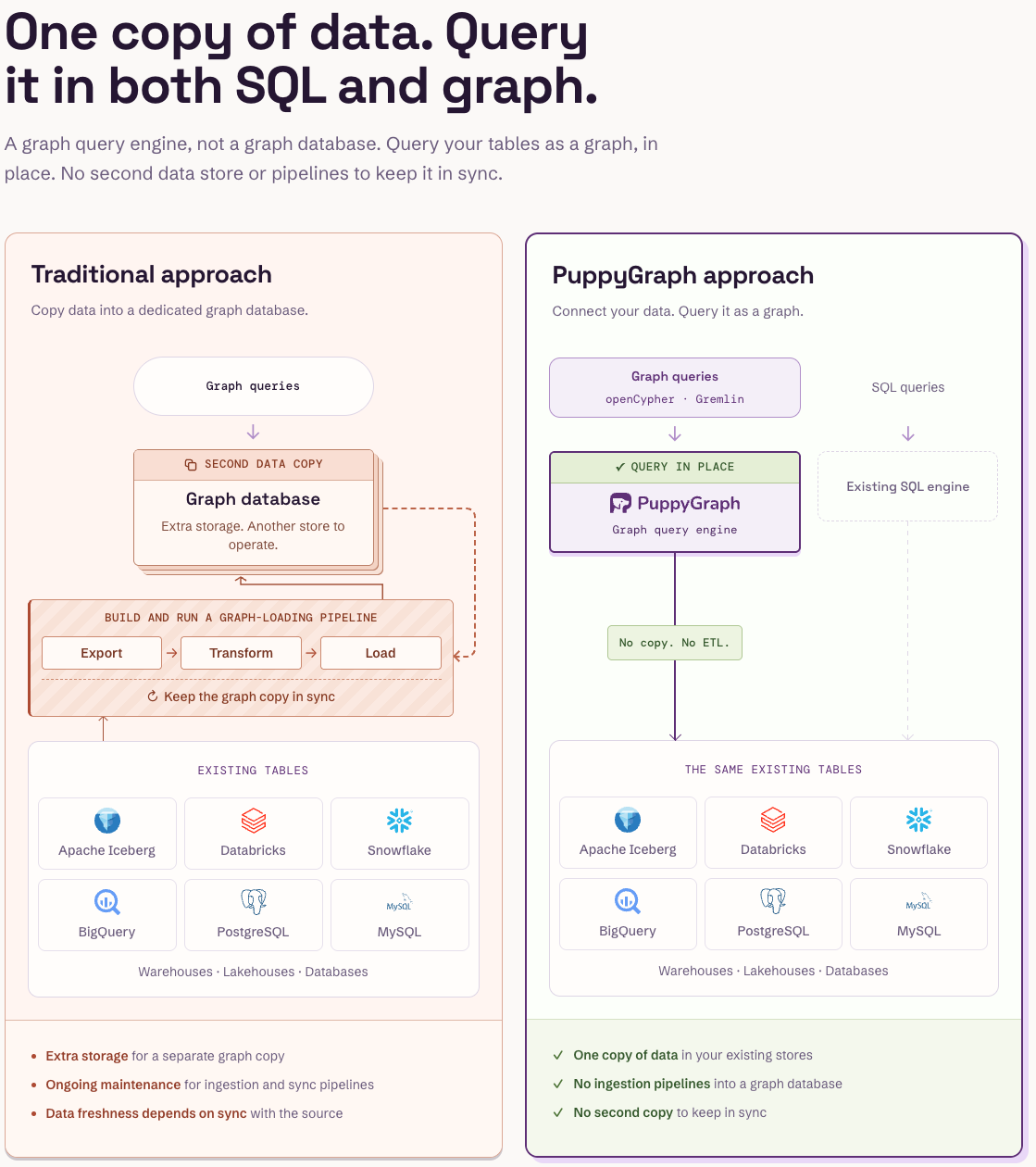
Carry the same access discipline into this integration. Scope the connector identity to the required datasets and verify the configured storage-access path. The connector documentation describes Unity Catalog configuration and credential vending; it does not establish automatic propagation of each graph user's row filters or column masks. Validate those requirements for the deployment before exposing sensitive data. This keeps the graph model aligned with the catalog's ownership, classification, and access decisions as analytical use expands.
Conclusion
Effective Unity Catalog governance connects dataset organization, accountable ownership, scoped permissions, and observable activity. Start with one production domain, test its access paths under real consumer identities, and use that experience to refine a repeatable model for other teams. Review the model whenever new datasets or query engines extend how the data is used.
Try the forever-free PuppyGraph Developer Edition and book a demo with the team to see how openCypher and Gremlin queries connect entities across warehouse and lakehouse tables, with no graph-specific ETL, for relationship analysis over your Unity Catalog datasets.

Hao Wu is a Software Engineer with a strong foundation in computer science and algorithms. He earned his Bachelor’s degree in Computer Science from Fudan University and a Master’s degree from George Washington University, where he focused on graph databases.

Get started with PuppyGraph!


Developer Edition
- Forever free
- Single noded
- Designed for proving your ideas
- Available via Docker install
Enterprise Edition
- 30-day free trial with full features
- Everything in developer edition & enterprise features
- Designed for production
- Available via AWS AMI & Docker install