


Unity Catalog Lineage: Complete Guide & Best Practices
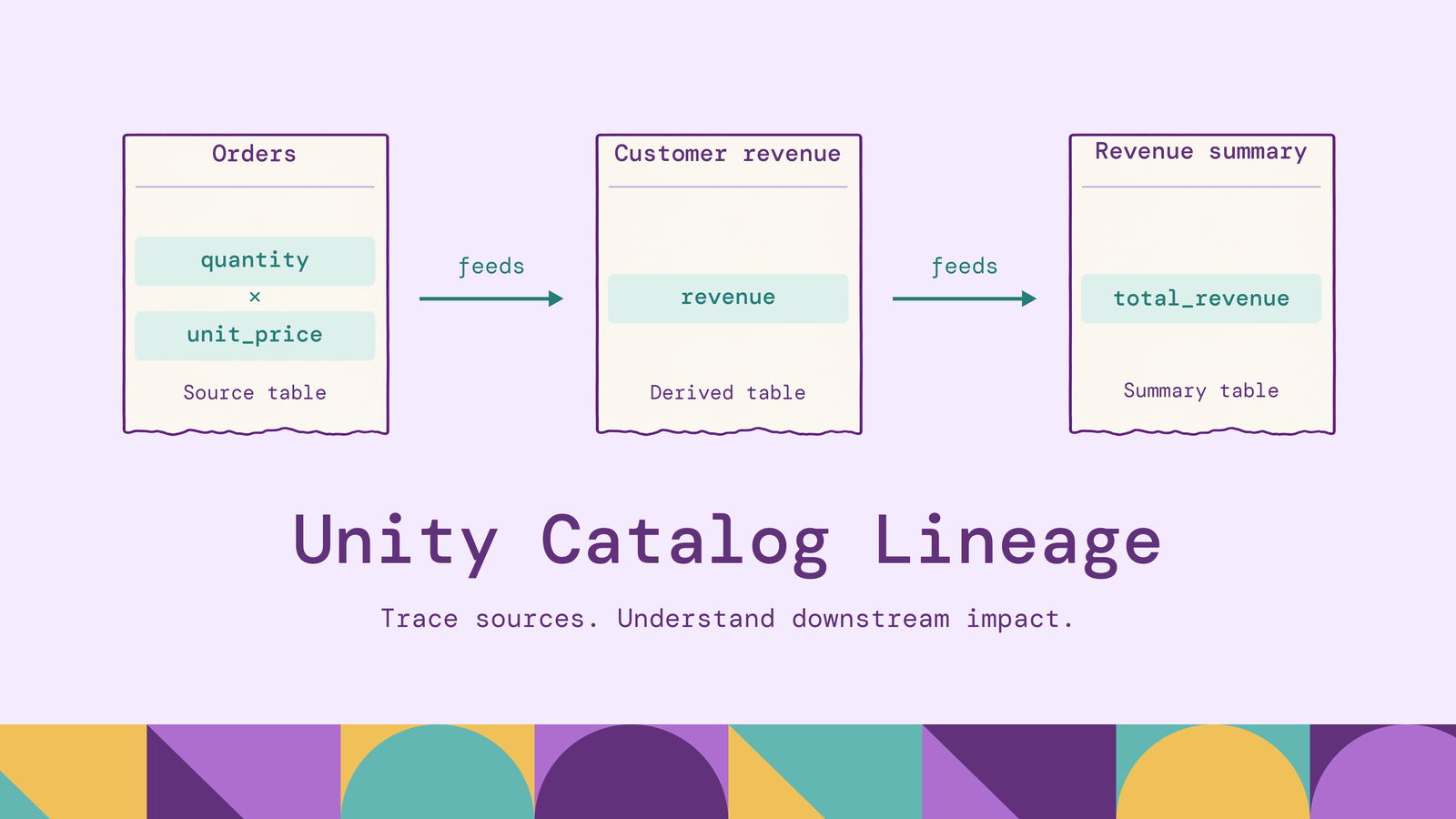
A change to a source column can affect a revenue calculation several transformations downstream. Unity Catalog lineage helps engineers investigate those dependencies before changing a schema or troubleshooting a report. Its usefulness depends on understanding what was captured, what the viewer can access, and which interface exposes the evidence.
This guide explains how lineage works in Databricks, how to configure and inspect it, and how to query table and column relationships. It also covers practical examples, coverage limits, and ways to extend analysis across collected metadata.
What is Unity Catalog lineage?
Unity Catalog lineage records dependencies between data assets in Databricks. It connects upstream inputs to downstream outputs and the workloads associated with their use. Databricks describes this as runtime lineage: evidence collected from queries running on the platform.
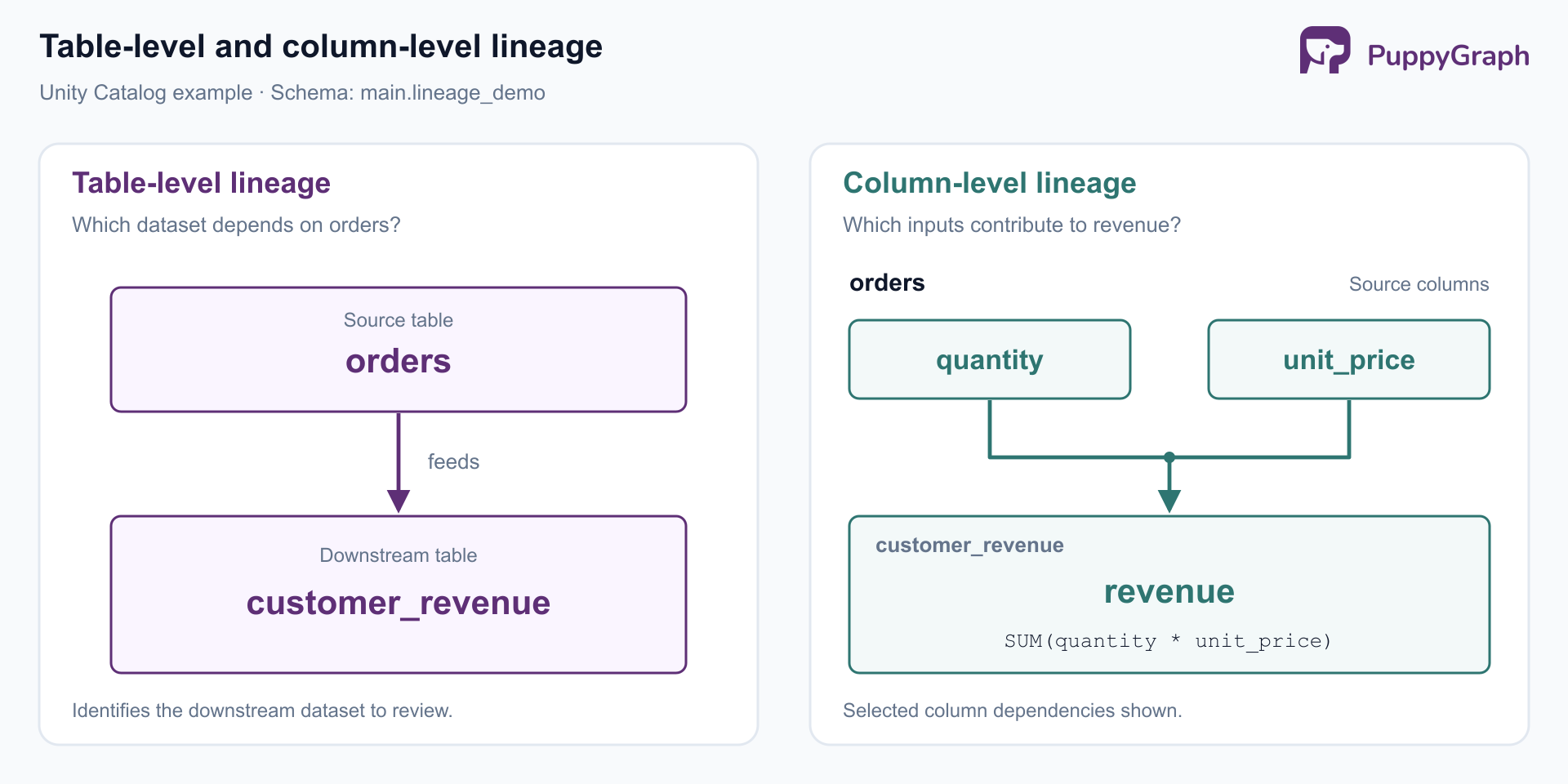
Consider an orders table feeding a customer revenue table. Table-level lineage establishes that dependency. Column-level lineage provides more detail: the revenue field derives from quantity and unit price. Those views answer different questions. The table relationship identifies a consumer to investigate; the column relationship narrows which part of that consumer may need revision.
Treat the graph as a dependency map. Following a relationship tells you where to inspect transformation logic and data. It does not, by itself, explain why a particular customer's revenue is wrong. That investigation still needs the relevant query, input records, and business definition.
How does Unity Catalog lineage work?
Automatic capture applies to registered Unity Catalog tables queried through supported Spark DataFrame or Databricks SQL interfaces. The capture requirements concern the execution path, not simply the language used to write a notebook.
For example, a SQL statement that creates a revenue table from orders supplies a source, a target, and expressions connecting their columns. A subsequent transformation adds another relationship. Following the chain upstream supports diagnosis; following it downstream supports impact analysis.
The resulting metadata needs an interpretation rule. For a change review, ask which dependencies appeared during a representative operating period. For an incident, start with the affected run and its inputs. A quarterly reporting job may matter even when it has no activity in the last week, while an experimental query may be irrelevant to the production change under review.
Make that time scope explicit in reports. A list labeled "downstream consumers observed in the last 30 days" communicates more than an unqualified list of dependents. It tells reviewers what the evidence covers and which less frequent workloads may need a separate check.
Key features of Unity Catalog data lineage
Table and column relationships. Unity Catalog supports lineage for tables, views, and columns. Use the dataset view to find affected outputs, then inspect columns when a change concerns a particular field. This keeps an initial impact assessment broad without treating every column in every downstream table as equally affected.
Workload context. Lineage can associate data with notebooks, jobs, and dashboards. These connections help turn a dataset name into an actionable investigation: which transformation should be inspected, and which consumer needs review? Databricks' governance guidance describes this context alongside runtime capture.
Visibility across workspaces. Lineage aggregates across workspaces sharing a metastore, subject to permissions. Details of workspace objects in other workspaces are masked. A shared graph therefore does not imply unrestricted visibility into every team's notebooks or dashboards. See the lineage permission model.
External relationships. External lineage represents assets outside Unity Catalog using external metadata objects and relationships. Teams can maintain these through Catalog Explorer or APIs. Lakeflow Connect managed ingestion pipelines can also populate source relationships automatically. Coverage depends on the integration, so include the ingestion boundary in validation.
How to enable data lineage in Unity Catalog
Automatic capture follows supported query execution. Setup should establish the catalog, compute, and permissions needed for that execution, then verify a representative transformation.
- Confirm the workspace's catalog setup. A Unity Catalog workspace is assigned to a metastore; many workspaces already have this configuration. Check the existing assignment before following the workspace enablement procedure. Use registered objects with explicit
catalog.schema.tablenames in the validation workload. - Validate the production execution path. Run the validation using the same compute type and pipeline configuration as the production workload. Include batch and streaming paths separately when both are used, and compare the observed relationships against the transformation's known inputs and outputs.
- Separate discovery from data access. The
BROWSEprivilege permits metadata discovery without granting access to table contents. Grant it on the relevant catalog for lineage discovery. Running the SQL example also requires appropriate usage, creation, and data permissions. Give reviewers the workspace-object permissions needed to inspect related jobs or notebooks. - Configure analytical access separately. For SQL-based lineage reporting, make the
system.accessschema available and grant the reporting identityUSE CATALOGonsystem,USE SCHEMAonsystem.access, andSELECTon the required lineage tables. Follow the system table access guidance and scope grants to the intended readers.
Validate with a known input and output, then repeat with a production pattern such as a scheduled transformation. Check that the expected table relationship and derived-column inputs appear. A successful data job and successful lineage capture are separate observations. For example, Lakeflow Connect can continue ingestion after a lineage-metadata failure, recording the failure for investigation.
How to view data lineage in Databricks
For interactive inspection, open Catalog, select the table, and choose Lineage. Select See Lineage Graph, expand neighboring nodes, and select the icon on a connecting edge for details. Select a column to inspect its relationships. Databricks documents this Catalog Explorer workflow.
For repeatable analysis, query system.access.table_lineage and system.access.column_lineage. These expose source and target identifiers, event times, and workload metadata. They contain captured events, so a recurring transformation can produce repeated relationships. The lineage system table reference documents the fields and their meanings.
Choose the interface around the task:
For application access, the SQL Statement Execution API accepts POST /api/2.0/sql/statements with a warehouse_id and statement. Submit one of the queries below using an authenticated identity with warehouse and table access. Handle pending execution through the returned statement ID and retrieve all result chunks when necessary.
The External Lineage API serves a separate purpose: managing external relationships. Reading captured events and supplying additional relationships are different integration tasks, even when both contribute to the same investigation.
Unity Catalog lineage examples
Use a disposable schema in a Unity Catalog catalog where you have creation privileges. The example assumes main is available; substitute an authorized catalog if necessary. These statements create or replace the named demonstration tables.
First, create a small orders dataset and aggregate revenue by customer. The example uses Databricks' documented CREATE TABLE AS SELECT syntax.
CREATE SCHEMA IF NOT EXISTS main.lineage_demo;

CREATE OR REPLACE TABLE main.lineage_demo.orders
USING DELTA AS
SELECT * FROM VALUES
  (1, 101, 2, CAST(25.00 AS DECIMAL(10, 2))),
  (2, 101, 1, CAST(40.00 AS DECIMAL(10, 2))),
  (3, 102, 3, CAST(10.00 AS DECIMAL(10, 2)))
AS v(order_id, customer_id, quantity, unit_price);

CREATE OR REPLACE TABLE main.lineage_demo.customer_revenue
USING DELTA AS
SELECT
  customer_id,
  SUM(quantity * unit_price) AS revenue
FROM main.lineage_demo.orders
GROUP BY customer_id;
Customer 101 has revenue of 90.00; customer 102 has 30.00. Those values provide a simple correctness check independent of the lineage graph. In Catalog Explorer, inspect customer_revenue and look for the upstream orders table.
To retrieve the observed table relationship, query the lineage records after they become available:
SELECT
  source_table_full_name,
  target_table_full_name,
  MAX(event_time) AS last_observed
FROM system.access.table_lineage
WHERE event_date >= date_sub(current_date(), 30)
  AND source_table_full_name = 'main.lineage_demo.orders'
  AND target_table_full_name = 'main.lineage_demo.customer_revenue'
GROUP BY source_table_full_name, target_table_full_name;
Grouping produces one row per observed source-target pair in the selected period. Keeping last_observed makes the time scope visible. To investigate other downstream tables, remove the target filter and retain rows with a non-null target table name. Read-only events can have no target; the system table reference distinguishes these from read-and-write events.
Next, inspect the inputs to the derived revenue column:
SELECT DISTINCT
  source_table_full_name,
  source_column_name,
  target_column_name
FROM system.access.column_lineage
WHERE event_date >= date_sub(current_date(), 30)
  AND target_table_full_name = 'main.lineage_demo.customer_revenue'
  AND target_column_name = 'revenue'
ORDER BY source_table_full_name, source_column_name;
Look for quantity and unit_price among the source columns. If the business changes unit prices from tax-inclusive to tax-exclusive values, these dependencies identify the revenue calculation as a review candidate even though its SQL still executes successfully.
This distinction is useful during migrations. A renamed field can cause a query failure; a changed field meaning can produce a plausible but incorrect result. Lineage identifies where to investigate both cases. The business definition determines which changes are required.
To extend the example, create another output from the customer-level results:
CREATE OR REPLACE TABLE main.lineage_demo.revenue_summary
USING DELTA AS
SELECT SUM(revenue) AS total_revenue
FROM main.lineage_demo.customer_revenue;
The resulting total is 120.00. Now the impact question spans two transformations: orders feed customer revenue, which feeds the summary. Once both relationships are available, a self-join can follow that path:
WITH edges AS (
  SELECT DISTINCT source_table_full_name, target_table_full_name
  FROM system.access.table_lineage
  WHERE event_date >= date_sub(current_date(), 30)
    AND source_table_full_name IS NOT NULL
    AND target_table_full_name IS NOT NULL
)
SELECT DISTINCT
  first.target_table_full_name AS intermediate_table,
  second.target_table_full_name AS downstream_table
FROM edges AS first
JOIN edges AS second
  ON first.target_table_full_name = second.source_table_full_name
WHERE first.source_table_full_name = 'main.lineage_demo.orders';
This query finds two-edge paths in the selected event window. It does not prove that both transformations ran together or used the same version of the intermediate data. For incident reconstruction, inspect the relevant execution records as well. For impact assessment, the path identifies an additional output whose owner should review the proposed source change.
Benefits of Unity Catalog lineage
More focused change reviews. Attach the observed downstream dependencies to a schema-change proposal. Ask owners of affected outputs to review both SQL compatibility and business meaning. For an infrequently refreshed finance report, extend the observation period to include its operating cycle before deciding it has no dependencies.
Structured incident investigation. Start from the incorrect output and trace its inputs. Compare the relevant transformation and data at each step, recording where the result first diverges from expectations. In the revenue example, that means checking quantities, prices, and aggregation logic before changing the dashboard. The graph supplies the investigation order; tests establish the cause.
Reviewable data provenance. Combine dependency evidence with dataset descriptions, ownership, and access records. Reviewers can then connect a reported metric to its inputs and responsible teams. Databricks' governance recommendations connect lineage with impact assessment, diagnostics, and metadata context.
These benefits depend on repeatable use. Make lineage inspection part of change review and incident response, and maintain a small set of representative pipelines whose expected dependencies are checked after platform or pipeline changes. That gives teams a practical signal when coverage changes.
Unity Catalog lineage limitations
Capture gaps. RDD workloads and Spark SQL dataset checkpointing are not captured. UDFs can obscure column derivations. Renaming catalogs, schemas, tables, views, or columns does not preserve lineage. These documented limitations make coverage validation essential before treating an empty result as evidence of no dependencies.
Different retention scopes. Lineage system tables have a documented default rolling one-year window; Catalog Explorer and the lineage API retain lineage captured after September 1, 2024 indefinitely. See the retention reference. Accounts using configurable system table retention, currently in Beta, can have different windows. Check the account setting before designing a historical report or archive.
Unequal interface coverage. External lineage is absent from the lineage system tables. A SQL report over those tables therefore cannot be assumed to reproduce every external relationship shown in Catalog Explorer. Inventory the sources needed for the report before calling it an end-to-end dependency map.
Naming also affects retrieval. When an external table is queried by storage path, its system-table lineage records use path fields. A filter on source_table_full_name alone can miss those reads. Prefer consistent table-name references in workloads and account for path-based records when building a broader inventory.
Dependency evidence needs context. An observed relationship does not establish that a consumer remains active or that a transformation is correct. Preserve timestamps and source provenance in derived reports. For cross-system analysis, reconcile identifiers so that the same dataset does not become multiple disconnected nodes merely because different collectors name it differently.
PuppyGraph is the first and only zero-ETL graph query engine that queries existing relational data as a graph without requiring a separate graph database. Its Delta Lake connector supports Unity Catalog. For lineage analysis, teams can collect dependency metadata into supported warehouse or lakehouse tables, then define a graph schema over those records. The zero-ETL path removes the need for an additional graph-specific ingestion pipeline; metadata collection and preparation remain part of the design.
Model datasets and columns as nodes, derivations as directed edges, and ownership as additional relationships. With those records available, openCypher and Gremlin queries can follow a changed column through successive transformations to affected reports and their owners. PuppyGraph compiles graph queries into node and edge operators that execute in its own distributed engine, allowing it to optimize specifically for multi-hop traversals. This makes repeated dependency investigations expressible against a shared relationship model.
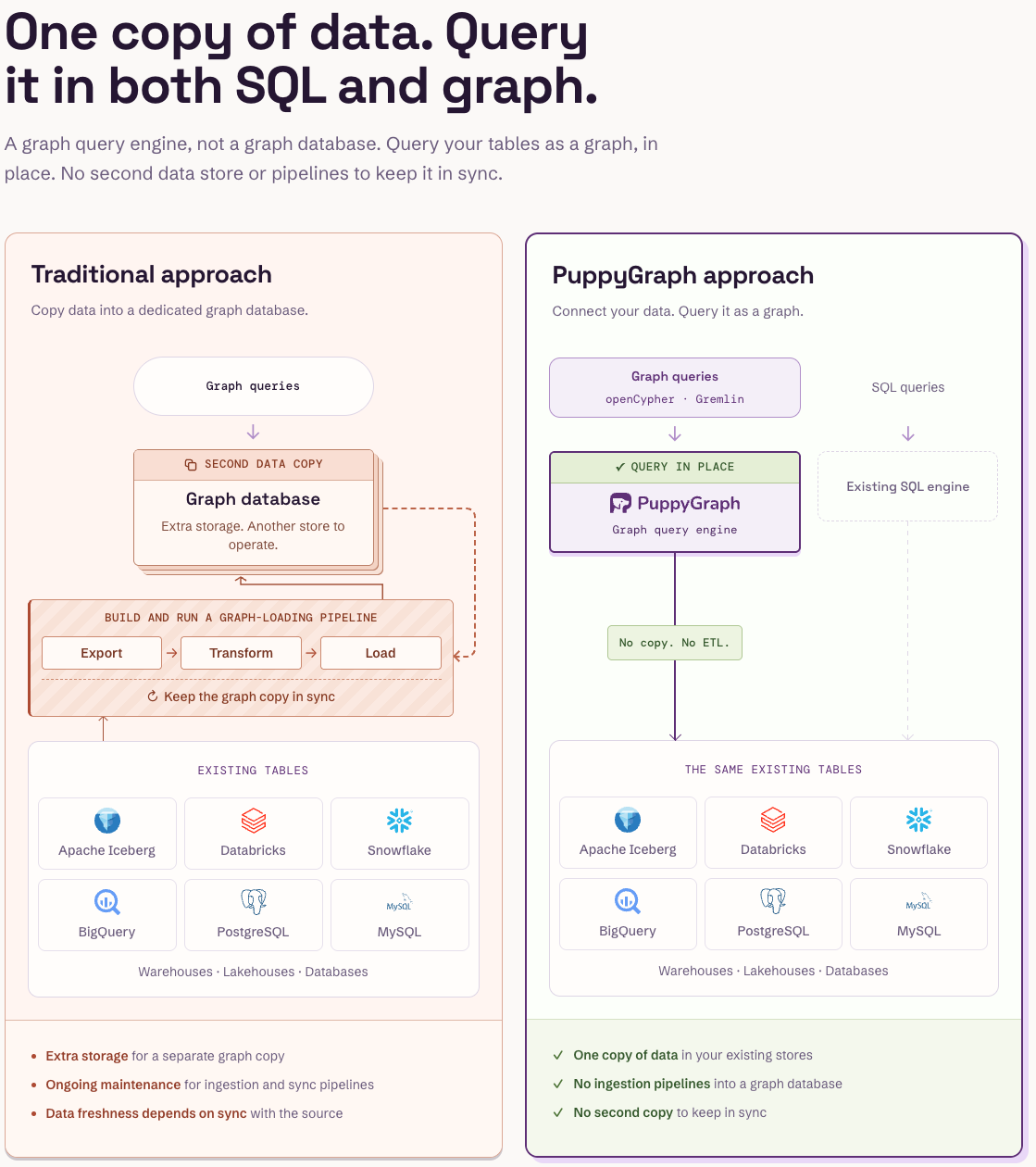
Keep collection coverage explicit in that model. Unity Catalog supplies captured dependencies, while external integrations supply additional relationships. PuppyGraph provides the query layer over the prepared metadata; it does not automatically recover missing lineage. Retaining observation times and collector identities lets analysts scope a traversal to the evidence relevant to a change review or incident.
Conclusion
Unity Catalog lineage becomes useful operational evidence when teams validate capture, choose an appropriate observation period, and inspect dependencies alongside transformation logic. Start with a known pipeline, confirm its table and column relationships, and build those checks into routine changes. Extend cross-system analysis from a clearly defined collection of metadata.
Try the forever-free PuppyGraph Developer Edition and book a demo with the team to see how openCypher and Gremlin queries trace dependencies across metadata stored in warehouse and lakehouse tables, with no graph-specific ETL, for multi-hop lineage and impact analysis.

Hao Wu is a Software Engineer with a strong foundation in computer science and algorithms. He earned his Bachelor’s degree in Computer Science from Fudan University and a Master’s degree from George Washington University, where he focused on graph databases.

Get started with PuppyGraph!


Developer Edition
- Forever free
- Single noded
- Designed for proving your ideas
- Available via Docker install
Enterprise Edition
- 30-day free trial with full features
- Everything in developer edition & enterprise features
- Designed for production
- Available via AWS AMI & Docker install