

Parquet Files Explained: Format, Examples
Open the object storage bucket behind almost any data platform and most of the bytes in it will be Parquet files. Parquet is the format underneath Spark and Flink pipelines, the import and export target of cloud warehouses, the data layer of lakehouse table formats like Apache Iceberg and Delta Lake, and the file a data scientist most likely receives after asking for the raw data. It earned that position through one design decision and its consequences: Parquet stores data column by column rather than row by row, which matches how analytical queries actually read data, and that single choice cascades into smaller files, less I/O, and faster scans.
This article explains what Parquet files are, why the format was created, and how it works internally, from row groups and pages down to the encoding and compression techniques that make it compact. It then compares Parquet with CSV, JSON, Avro, and ORC, and closes with hands-on examples of writing, reading, and inspecting Parquet files.
What are Parquet files?
A Parquet file is a binary file that stores tabular data in the open, columnar Apache Parquet format. Where a CSV or JSON file writes records one after another, a Parquet file groups values by column: all the values of user_id are stored together, then all the values of country, and so on. A query that needs two columns out of forty reads only those two, and each column compresses far better than a mix of fields ever could, because its values share a type and a distribution.
Several properties follow from the format's design and are worth naming up front:
Self-describing. Every Parquet file carries its own schema, column statistics, and layout information in a footer at the end of the file. Any tool can open the file and know exactly what is inside without a sidecar schema file or a registry lookup.
Typed. Columns have real types: 64-bit integers, timestamps, decimals, booleans, strings, and nested structures such as lists and maps. A timestamp written to Parquet is read back as a timestamp, not re-parsed from text and re-guessed on every load, which removes an entire class of type-drift bugs that CSV pipelines accumulate.
Compressed and encoded by default. Values are first encoded with type-aware techniques (dictionary, run-length, delta), then compressed with a general-purpose codec, so files are typically a fraction of their text-format equivalents.
Immutable. A Parquet file is written once and never updated in place. Changing data means writing new files, a trade-off that suits object storage well and that table formats like Iceberg build on.
A file format, not a database. There is no server and no service. A Parquet file is just bytes on a disk or in a bucket; whatever engine you point at it supplies the compute.
The ecosystem is the other half of the definition. Parquet is read and written natively by Spark, Flink, Hive, Trino, and DuckDB; by pandas and Polars through Apache Arrow; and by the major cloud warehouses for both loading and exporting. Independent implementations exist in Java, C++, Rust, Go, and Python, all reading the same specification. In practice Parquet functions as the shared storage and interchange standard for analytical data, and the rest of this article is about why it holds that role.
Why Apache Parquet was created
Parquet is a product of the Hadoop era. In the early 2010s, data in Hadoop clusters lived mostly in row-oriented formats: delimited text files, SequenceFiles, and Avro records. Every analytical query paid the full price of that layout. Counting yesterday's signups by country meant reading and deserializing every field of every record, even though the query touched two of them. Columnar storage was already proven inside analytical databases, but it was locked inside those systems; the Hadoop ecosystem, with many engines sharing one file system, needed a columnar format that was not the private property of any single engine.
Parquet began in 2013 as a joint open-source effort between engineers at Twitter and Cloudera, and its stated goal has not changed since: in the project's own words, "to make the advantages of compressed, efficient columnar data representation available to any project in the Hadoop ecosystem".
Two design decisions defined the project. The first was engine and language neutrality: Parquet is a specification with a language-independent metadata definition, so any engine in any language can implement it, and none owns it. The second was treating nested data as a first-class citizen. Rather than flattening structs and lists or serializing them into strings, Parquet adopted the record shredding and assembly algorithm from Google's Dremel paper (VLDB 2010), which stores nested fields as flat columns alongside small amounts of structural metadata, so even deeply nested data gets the full benefit of columnar layout.
Adoption followed quickly. Parquet graduated to an Apache Software Foundation top-level project in April 2015, and in the same announcement Netflix reported that more than 7 petabytes of its 10-plus-petabyte warehouse was already stored as Parquet. In the years since, it became the default output format in Spark and the standard data file format beneath the lakehouse table formats.
The neutrality is the reason it won. Formats tied to one engine rise and fall with that engine; Parquet was designed to be the format every engine could agree on, and that is exactly what happened.
How the Parquet file format works
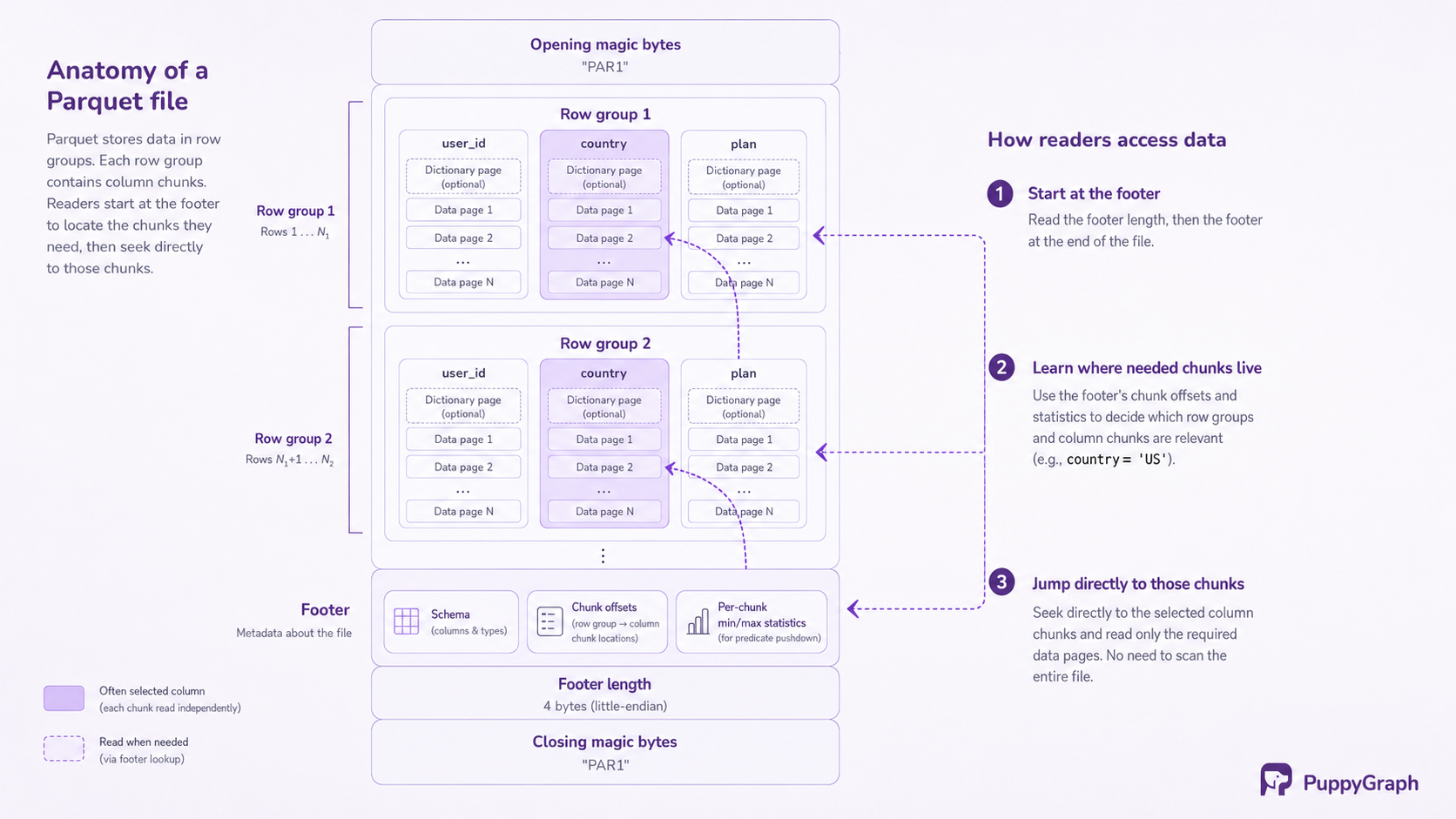
At the highest level, a Parquet file has three parts: a 4-byte magic number (PAR1) at the start, a sequence of row groups holding the data, and a footer holding the file metadata, followed by the footer's length and a closing PAR1. The format documentation notes that the metadata is written after the data precisely so that a file can be produced in a single pass; the writer streams data out, then appends everything a reader needs to know.
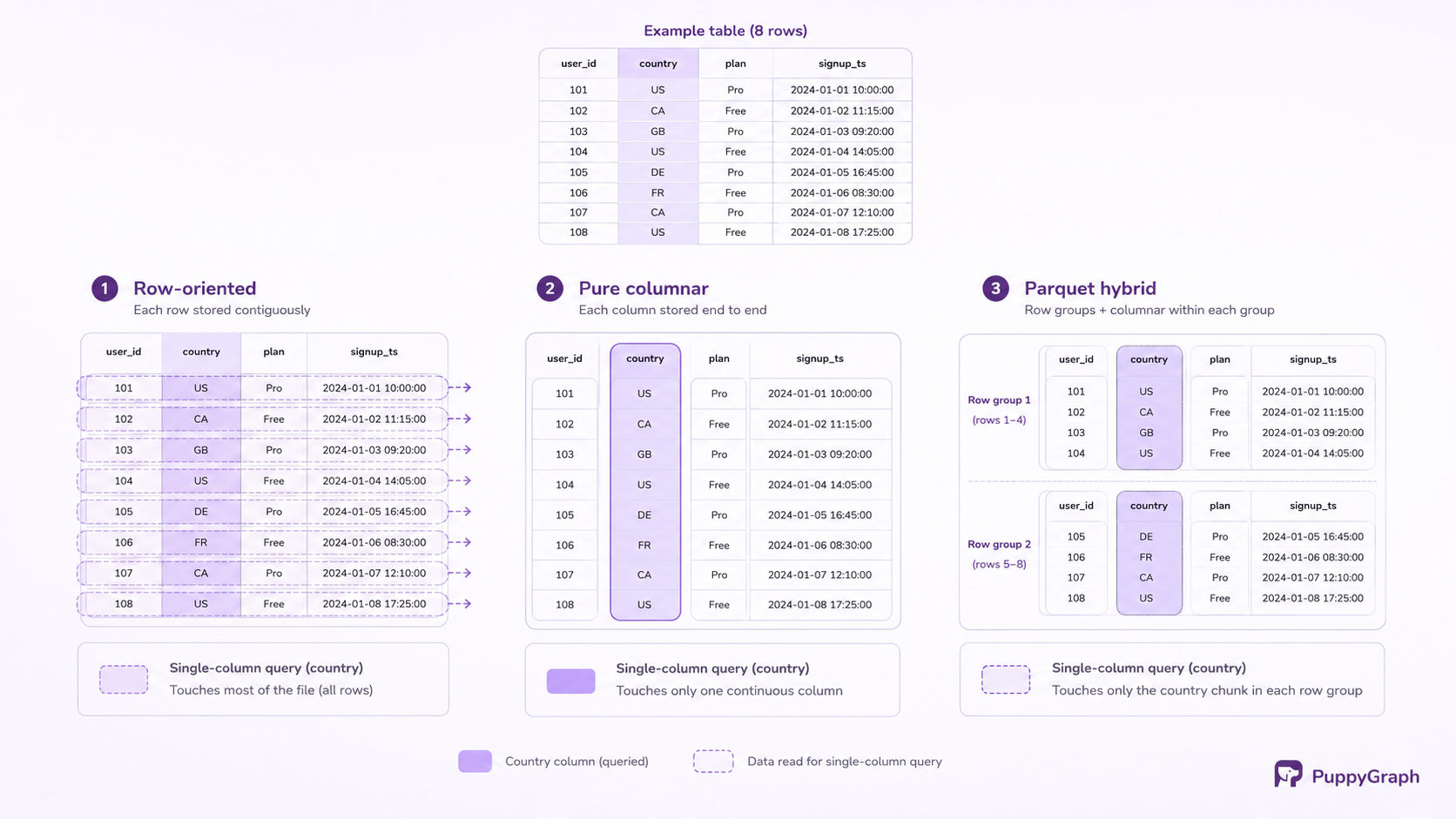
The layout is a hybrid of horizontal and vertical partitioning. A purely columnar file (each column stored end to end across the whole dataset) would be painful to write and to parallelize. Parquet instead slices the table horizontally into row groups, and within each row group stores each column's values contiguously as a column chunk. Distributed engines schedule work at the row group level, and within a row group each reader touches only the columns its query needs. The next two sections take the two halves of that idea in turn: why columnar layout matters, and what the physical hierarchy looks like.
The write path follows directly from the layout. A writer buffers incoming rows in memory; when the buffer reaches the configured row group size, it pivots those rows into columns, encodes and compresses each column page by page, and appends the result to the file. When the data is exhausted, it writes the footer with the schema, the location of every column chunk, and per-column statistics. One consequence is worth internalizing: there is no way to update or append to a Parquet file in place. Modifying data means rewriting files, which is why systems that need inserts, updates, and deletes layer a table format over Parquet rather than patching the files themselves.
The read path runs in reverse and explains most of Parquet's performance. A reader starts at the end of the file: it reads the footer, learns the schema and where every column chunk lives, and plans the entire scan before touching any data. Columns the query does not reference are never read (projection pushdown). Row groups whose min/max statistics prove they cannot contain matching rows are skipped whole (predicate pushdown). Only the surviving pages are decompressed and decoded, typically straight into the columnar in-memory batches that vectorized engines and Apache Arrow work with.
Everything Parquet is praised for (speed, small files, cheap scans) falls out of these two ingredients: a layout that groups similar values together, and a metadata footer that lets readers avoid work before doing any.
Understanding columnar storage
The difference between row and column orientation is easiest to see with a concrete table: an events table with forty columns, of which a typical dashboard query touches two.
In a row-oriented layout, all fields of a record are stored contiguously: the first event's forty values, then the second event's forty values, and so on. This is the right layout for transactional work. Fetching order 4711, updating one customer's address, inserting one new record: each operation lands on one contiguous slice of the file or page, touches it once, and is done.
In a column-oriented layout, all values of a field are stored contiguously: every event's country, then every event's event_type, and so on. Now the analytical query reads exactly the two columns it needs and skips the other thirty-eight entirely. For a table where each row is, say, a kilobyte across its forty columns, that is the difference between scanning the whole table and scanning a twentieth of it, before any compression enters the picture.
Compression is the second, quieter win. A column is a homogeneous stream: one type, similar magnitudes, often heavily repeated values (country codes, status enums) or steadily increasing ones (timestamps, IDs). Homogeneity is exactly what encodings and compressors exploit, which is why a columnar file compresses dramatically better than the same data interleaved row by row, even under the same codec. The compression section below makes this concrete.
The trade-offs run the other way for transactional access. Reassembling one complete record from a columnar file means visiting every column's storage, and writes have to be buffered and pivoted before they can land. This is why OLTP databases remain row-oriented and analytical systems have converged on columns; neither choice is wrong, they serve different access patterns.
Parquet's specific position is the hybrid described above, sometimes called a PAX-style layout: horizontal row groups so that files split cleanly across parallel workers, columnar storage inside each row group so that scans get the full column-pruning and compression benefits. It is a columnar format engineered to live on distributed file systems and object storage.
Inside a Parquet file: row groups, columns, and pages
The physical structure is a three-level hierarchy, with a metadata footer tying it together.
Row groups. A row group is a horizontal slice of the table and the file's unit of parallelism: a distributed engine assigns different row groups to different workers, and predicate pushdown skips data one row group at a time. The official configuration guidance recommends large row groups, 512 MB to 1 GB, so that each one supports a large sequential read and fits within a single HDFS block. Writer libraries expose the size as a setting, and defaults in the wild are often smaller; the trade-off is that larger groups favor scan throughput while costing more writer memory, since a full row group is buffered before it can be flushed.
Column chunks. Within a row group, the values of one column are stored contiguously as a column chunk. The chunk is the unit of projection: a reader seeking two columns reads two chunks per row group and ignores the rest. Each chunk records its own comgenpression codec, its encodings, and its statistics in the footer, so different columns can be stored differently within the same file.
Pages. A column chunk is subdivided into pages, the smallest indivisible unit in the format; the official guidance suggests around 8 KB. Encoding and compression operate page by page: data pages hold the encoded values, and a dictionary page at the start of a chunk holds that column's dictionary when dictionary encoding is in use. Smaller pages allow finer-grained reads; larger pages spend less space and CPU on per-page headers.
The footer. The file ends with the metadata that makes the rest usable: the full schema, the byte offsets of every row group and column chunk, per-chunk statistics such as minimum, maximum, and null count, the identity of the writing library, and optional application-defined key-value pairs (pandas, for example, stashes extra type information there). A reader plans its whole scan from the footer alone, which is why Parquet readers start at the end of the file. Later revisions of the format add page-level column indexes and optional bloom filters, which extend the same skip-what-you-can idea from row groups down to individual pages and to point lookups on unsorted columns.
Nested data fits into the same structure through the Dremel model mentioned earlier. A nested field such as address.city or a list of tags is shredded into its own flat column of leaf values, stored alongside two small streams of integers (definition and repetition levels) that record where nulls occur and where lists begin and end. The practical consequence: nested fields are pruned, encoded, and compressed exactly like top-level columns, and a query that reads one field of a struct does not pay for its siblings.
Row groups, column chunks, pages, and the footer are four nested units in service of one idea: keep values of a kind together, and record enough metadata that a reader can decide what to skip before it reads anything at all.
Compression and encoding techniques in Parquet
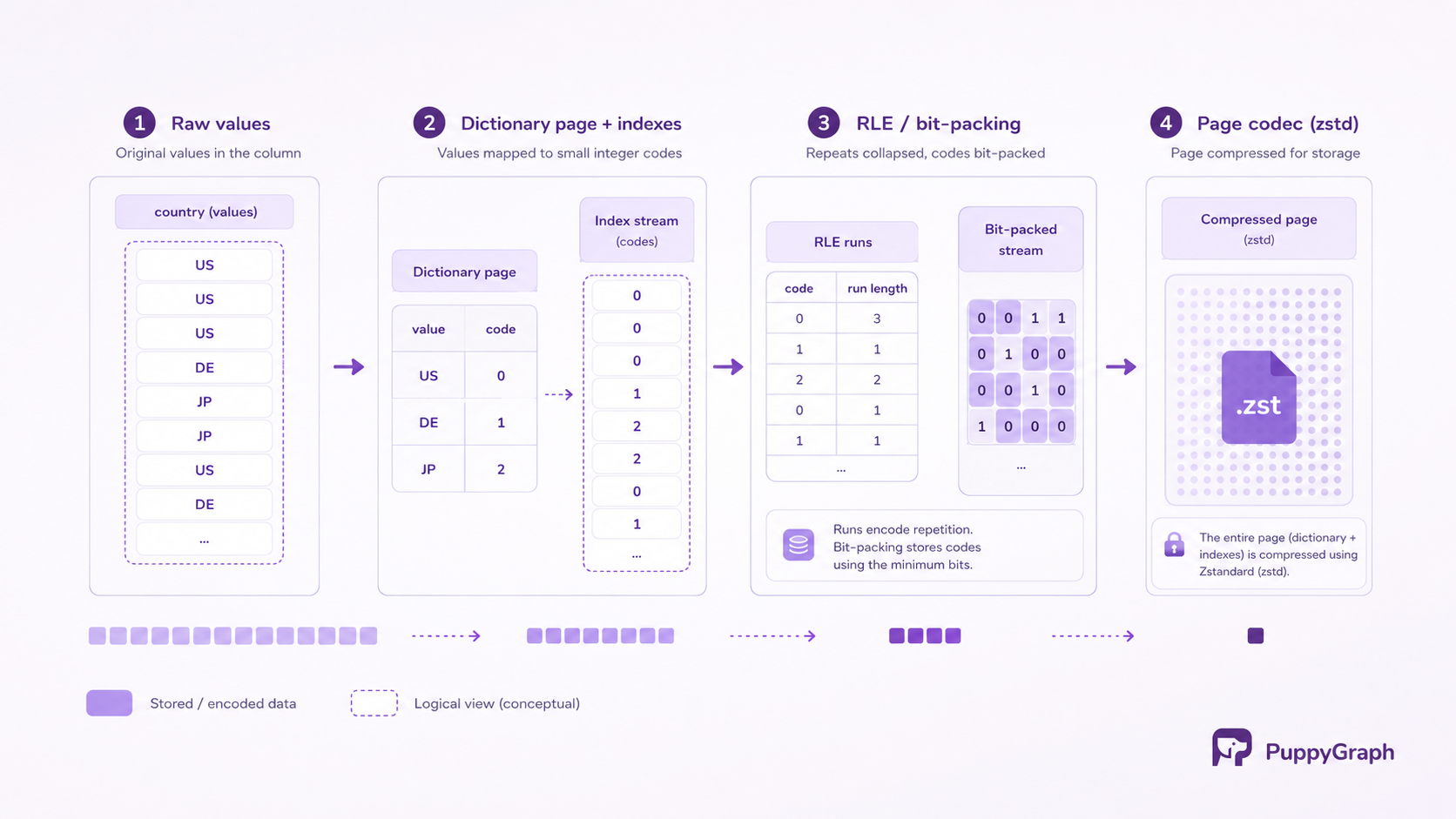
Parquet shrinks data in two distinct layers, and keeping them separate clarifies a lot of tuning discussions. Encodings are type-aware transformations that exploit patterns in the values themselves. Compression codecs are general-purpose byte compressors applied afterwards, page by page, to whatever the encodings produced.
The format's encodings do the pattern-aware work:
Dictionary encoding. The workhorse for low-cardinality columns. The distinct values of a column chunk are written once to a dictionary page, and the data pages store only small integer indexes into it. A country column with two hundred distinct values stores each occurrence as roughly one byte's worth of index rather than a repeated string. If the dictionary grows too large to be worth it, the writer falls back to plain encoding for the remaining pages.
Run-length encoding with bit-packing. A hybrid that collapses runs of repeated values into a value-and-count pair and packs small integers into the minimum number of bits they need. It compounds with dictionary encoding, since dictionary indexes are exactly the kind of small, repetitive integers it handles best, and it also encodes the definition and repetition levels of the nested-data model.
Delta encodings. For values that change by small amounts, storing differences beats storing values. DELTA_BINARY_PACKED handles steadily increasing integers and timestamps; DELTA_BYTE_ARRAY applies front compression to strings that share prefixes, such as URLs or file paths, storing only each value's divergence from its predecessor.
Byte stream split. For floats and doubles, which rarely repeat exactly, this encoding scatters the bytes of each value into separate streams by position. It does not shrink anything by itself, but it groups the high-entropy and low-entropy bytes together so the compression codec behind it gets far more traction.
After encoding, each page is compressed with one of the codecs the format defines: Snappy, gzip, Zstandard (zstd), Brotli, LZO, LZ4_RAW, or none. (The spec deprecates an older, ambiguously framed LZ4 codec in favor of LZ4_RAW; both names still appear in tooling.) The codec is recorded per column chunk, so a file can compress a text-heavy column aggressively while leaving an already-dense column lightly compressed, and readers simply follow the metadata.
The practical guidance is qualitative and stable. Snappy, Spark's default, prioritizes speed with moderate compression, a sensible default for data that is read constantly. Gzip compresses harder but costs more CPU on both ends, which suits cold or archival data. Zstd has become the common modern choice because it approaches gzip's ratios at much closer to Snappy's speeds, and many platforms now default to it. The honest answer for any specific workload is to measure, since the ratio depends on the data's own redundancy.
The layering also explains a fact that surprises people coming from text formats: gzipping a CSV and snappy-compressing a Parquet file are not doing the same work. The codec is the smaller half of Parquet's size advantage; the encodings, which need the homogeneous value streams only a columnar layout provides, are where most of the reduction happens.
Why Parquet is faster than CSV and JSON
The speed difference on analytical scans is not one mechanism but several compounding ones:
Column pruning. A CSV or JSON reader must read and parse every byte of every record to extract any field, because records are variable-length text with no index. A Parquet reader consults the footer and reads only the column chunks the query references. For wide tables and narrow queries, this alone is an order-of-magnitude difference in bytes touched, and it is the reason wide event tables are stored columnar almost everywhere.
Statistics-based skipping. Min/max statistics let the reader discard entire row groups, and with page indexes even individual pages, before reading them. A filter on event_date = '2026-07-01' over date-sorted data skips nearly everything. Text formats have no equivalent; the only way to know what a CSV row contains is to parse it.
No parsing or type inference. Reading text data means scanning for delimiters, handling quoting and escaping, and converting digit strings into numbers, for every value, on every read. JSON adds repeated key names to parse past. Parquet values are stored in typed binary form with the schema in the footer, so reading is decoding, not parsing, and the schema question is answered once at write time instead of guessed on every load.
Fewer bytes moved. Encoding plus compression routinely makes Parquet files a small fraction of the equivalent CSV or JSON. On object storage, where scan time is often dominated by bytes transferred, and in services that charge per byte scanned, the size reduction translates directly into latency and cost.
Vectorized decoding. Columnar pages decode into contiguous, uniformly typed batches, which is exactly the memory shape vectorized query engines and Apache Arrow operate on. Text rows, by contrast, must be transposed value by value into that shape before an engine can use it.
The honest boundaries of the claim matter just as much. Parquet is not the fast choice for fetching one complete record by key; that access pattern reassembles a row from many column chunks, and a row-oriented store or an actual database serves it better. It is not built for appending records as they arrive, since files are immutable and writers buffer full row groups; streaming pipelines typically land data in a row format or a queue and compact into Parquet in batches. It is opaque to humans and to text tooling (grep, spreadsheets, code diffs), and for a few thousand rows the footer and library overhead can make it slower than just parsing the text. The speedup is a property of the workload matching the layout, and for analytical scans it reliably does.
Parquet vs CSV: which should you use?
For data that will be stored and queried, the default answer is Parquet; for data that must cross a boundary into human hands or unknown tools, CSV endures for good reasons. It can be opened in a spreadsheet, inspected with head, edited by hand, appended to line by line, produced by any system ever written, and debugged by looking at it. None of that is true of a binary columnar format. That is why the common pipeline shape is both: land inbound data as CSV or JSON at the edge, validate it, and convert to Parquet for everything downstream.
The decision becomes clearer with the two other formats that show up in the same conversations, Avro and ORC:
The table sorts itself along one axis: row formats serve the write side and columnar formats serve the read side. Avro is therefore Parquet's complement rather than its competitor; a pipeline that streams Avro through Kafka and compacts it into Parquet for the lake is using each format exactly where it is strong. ORC is the close cousin: also columnar, with a similar design and comparable performance, and the choice between them usually follows the ecosystem (ORC grew up around Hive and is the format Hive's full ACID tables require; Parquet has the broader reach across engines, libraries, and table formats). CSV and JSON are best understood as interfaces rather than storage: the formats data arrives and leaves in, not the formats it should live in.
So the answer to the section's question is usually both, in different places: CSV at the edges where humans and heterogeneous systems meet the data, Parquet in the middle where it is stored, scanned, and paid for.
Examples of Parquet files
The fastest way to make the preceding sections concrete is to create a file and look inside it.
Writing and reading with pandas. Any DataFrame can be written to Parquet in one call (pandas uses PyArrow underneath):
import pandas as pd
df = pd.DataFrame({
    "user_id": range(1, 1_000_001),
    "country": ["DE", "US", "JP", "US", "BR"] * 200_000,
    "plan": ["free", "pro"] * 500_000,
    "signup_ts": pd.date_range("2024-01-01", periods=1_000_000, freq="min"),
})
df.to_parquet("signups.parquet")
# Read back only two of the four columns:
subset = pd.read_parquet("signups.parquet", columns=["country", "plan"])
The columns argument is projection pushdown in action: the reader fetches the country and plan column chunks and never touches the other two. The country and plan columns are also exactly the low-cardinality shape that dictionary encoding collapses to almost nothing.
Inspecting the structure. PyArrow exposes the file's internals, and every concept from the format sections is visible in them:
import pyarrow.parquet as pq
pf = pq.ParquetFile("signups.parquet")
print(pf.metadata)
# num_columns: 4, num_rows: 1000000, num_row_groups: 1, ...
print(pf.schema_arrow)
# user_id: int64, country: string, plan: string, signup_ts: timestamp[ns]
stats = pf.metadata.row_group(0).column(0).statistics
print(stats.min, stats.max, stats.null_count)
# 1 1000000 0
That last line is the min/max metadata predicate pushdown runs on: a filter like user_id > 2_000_000 can be answered from the footer alone, with zero data pages read.
Querying files directly with SQL. DuckDB treats Parquet files as tables, including globs over directories of them:
SELECT country, count(*) AS signups
FROM 'signups.parquet'
GROUP BY country
ORDER BY signups DESC;

-- The same footer metadata PyArrow showed, as a queryable table:
SELECT * FROM parquet_metadata('signups.parquet');
The same pattern scales up: Spark, Trino, and the cloud warehouses all read directories of Parquet files in place, pruning columns and row groups exactly as described above.
Beyond files you create yourself, Parquet is most often met through the systems built on it. The lakehouse table formats, Apache Iceberg, Delta Lake, and Apache Hudi, are metadata layers over directories of Parquet data files; they add the transactions, schema evolution, and snapshot history that immutable files cannot provide alone, while the bytes a query eventually reads remain Parquet pages. Warehouses import and export Parquet as their interchange format, and ML pipelines standardize on it for training data, where reading a subset of feature columns from a wide dataset is the everyday access pattern.
Those Parquet-backed tables increasingly serve graph workloads too. PuppyGraph is a graph query engine that connects to existing warehouse and lakehouse tables, including Iceberg over Parquet, and lets you define a graph schema on top of them, then run openCypher and Gremlin queries in place, with no ETL into a separate graph database. Its execution engine is columnar and vectorized, and it leans on the same mechanics this post covered: a multi-hop traversal reads only the columns it touches and uses min/max statistics and predicate pushdown to skip row groups. Customers include AMD, which is building a graph layer over Apache Iceberg tables spanning tickets, code, logs, and telemetry; at the storage layer, that graph is Parquet files.
Conclusion
Parquet reduces to two ideas: store values column by column so that queries read only what they ask for and compression gets homogeneous data to work with, and carry the schema, layout, and statistics in a footer so that readers can skip most of the work before starting it. Row groups, pages, dictionary and delta encodings, per-page codecs, and pushdown are all elaborations of those two ideas, and knowing them is enough to reason about the practical knobs: row group size, sort order within files, and codec choice.
The comparisons resolve the same way. CSV and JSON remain the right formats for crossing system and human boundaries; Avro remains the right shape for write-heavy streams; Parquet (with ORC as its closest relative) is where analytical data should live, usually under a table format that adds transactions on top. If your data is scanned, aggregated, filtered, or fed to models, and it is not already in Parquet, the conversion is one of the cheapest performance improvements available.
Try the forever-free PuppyGraph Developer Edition and book a demo with the team to see how openCypher and Gremlin queries run over warehouse and lakehouse tables, with no graph-specific ETL, directly against the Parquet-backed tables this post described.

Hao Wu is a Software Engineer with a strong foundation in computer science and algorithms. He earned his Bachelor’s degree in Computer Science from Fudan University and a Master’s degree from George Washington University, where he focused on graph databases.


