


SIEM Threat Hunting: Techniques, Tools & Best Practices
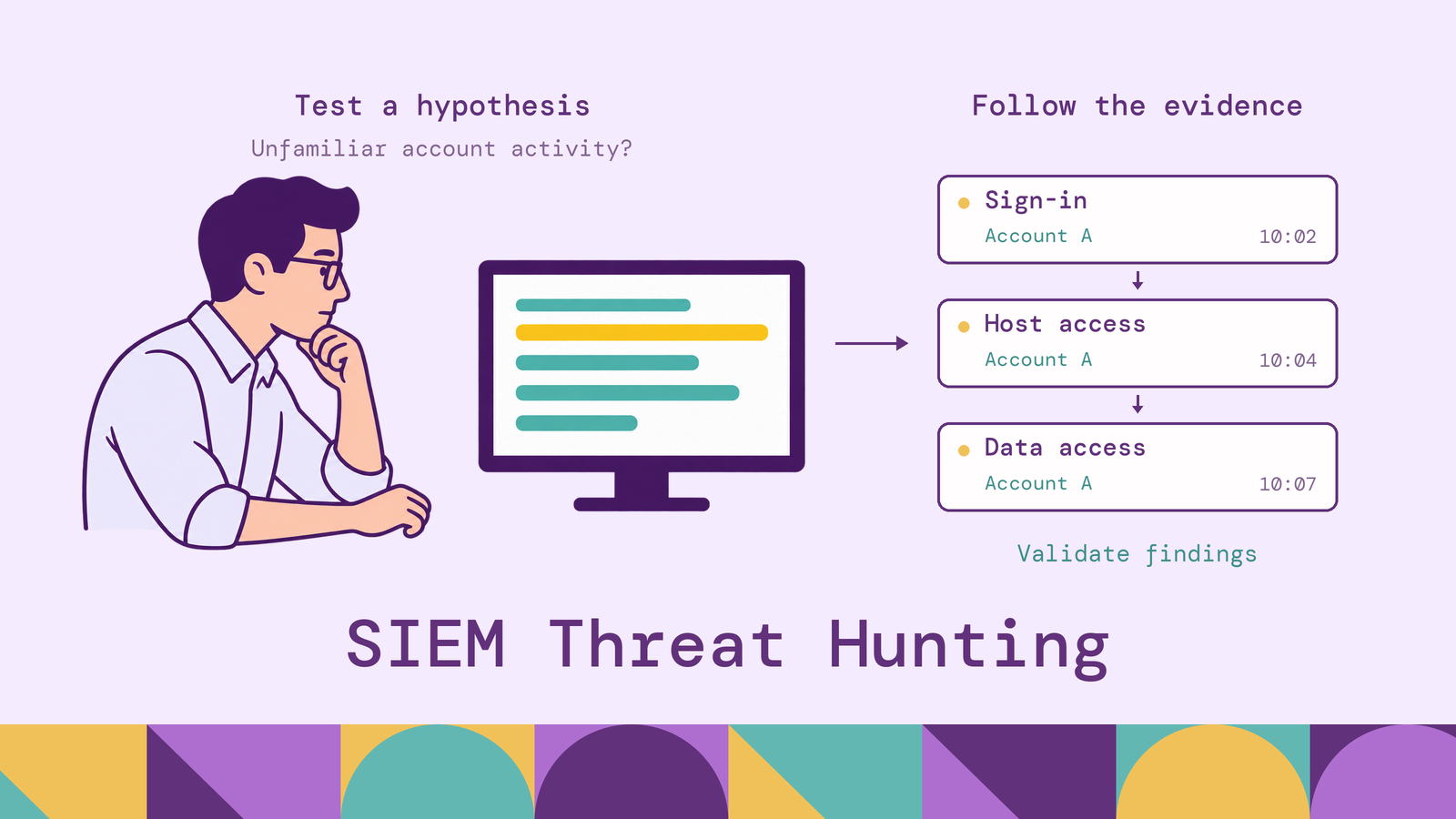
An attacker using a valid account can leave successful sign-ins and ordinary administrative activity in the logs without triggering a rule that recognizes the compromise. SIEM threat hunting investigates that possibility by testing specific questions against recorded behavior. The challenge is deciding which events belong together and whether their context supports a malicious explanation.
This article explains how SIEM threat hunting works, the architecture and data it needs, and the techniques analysts use to turn an initial suspicion into evidence. It also covers practical workflows, query tools, and use cases where looking beyond individual alerts matters.
What is SIEM threat hunting?
SIEM threat hunting is the proactive investigation of security telemetry through a security information and event management platform to find threats that existing detections may have missed. Analysts form hypotheses, search relevant records, and revise their questions as evidence emerges. A hunt can begin without an alert, although an alert or incident finding can also motivate a broader search.
Routine alert triage asks whether a particular detection represents a problem. A hunt asks whether a behavior or compromise exists within a defined environment, including activity that generated no alert. Teams handle confirmed or sufficiently credible threats through their incident response process.
For example, MITRE ATT&CK's Valid Accounts technique, T1078, describes adversaries abusing legitimate credentials, sometimes without accompanying malware. A hunter might investigate whether a privileged account has begun accessing unfamiliar systems, then examine the associated sessions and actions. Successful authentication alone cannot establish who controlled the account.
A useful hunt produces a supported conclusion, an incident escalation, or a concrete visibility improvement. Finding no matching activity is meaningful only within the sources, systems, and time window actually examined.
How does threat hunting work in SIEM?
The SIEM gives analysts a place to search collected events, compare activity across sources, and preserve findings. The analyst supplies the investigation logic: which behavior would support the hypothesis, which benign explanations are plausible, and what additional evidence would distinguish them.
Consider a hypothesis that a compromised administrator account accessed systems outside its normal responsibilities. Start with authentication records for the account, identify unfamiliar destinations, and pivot to endpoint activity on those hosts. Check asset ownership and approved maintenance before treating the sequence as suspicious. Each result should narrow the next search rather than simply expand the volume of logs under review.
Different tools support different parts of this work. Microsoft Sentinel's hunting capabilities provide queries and bookmarks for investigating and retaining findings. Splunk analysts can search with SPL and use its Common Information Model to work with normalized fields across sources. Elastic's Event Query Language supports searches for ordered event sequences with shared keys and bounded time spans.
Evaluate these capabilities using an actual investigation question. Can an analyst reach the required history, correlate the relevant identifiers, inspect original events, and hand the evidence to responders? Those requirements matter more than the number of searches included in a content library.
Key components of SIEM threat hunting
Effective hunting depends on several components working together.
A testable hypothesis. Name the behavior, affected population, and evidence you expect. A hypothesis that an administrator account is being used from an unfamiliar workstation is testable. A broad instruction to look for advanced threats gives the analyst little basis for choosing data or deciding when to stop.
Searchable telemetry and reliable identifiers. The necessary events must exist and retain the fields needed to connect them. Preserve account IDs, tenant boundaries, device identifiers, session information, timestamps, and original record references. A display name or shared public IP address is often insufficient to establish that two events involve the same entity.
Environmental context. Asset criticality, account ownership, administrative practices, and change records help explain what a query returns. A backup service and a human administrator can both access many hosts, but their expected behavior differs. Threat intelligence adds external context; local knowledge determines whether that behavior makes sense here.
A shared behavioral vocabulary. MITRE ATT&CK organizes adversary tactics and techniques based on observed activity. Use it to specify the behavior under investigation and identify relevant evidence. Mapping a hunt to a technique does not demonstrate coverage: the team still needs to show that its telemetry and query can observe the behavior in its own environment.
An evidence and improvement workflow. Save queries, investigation windows, source records, and the reasoning behind the disposition. Assign ownership for incident escalation, missing telemetry, and detection improvements. Otherwise, useful discoveries remain in an analyst's session instead of improving the next investigation.
SIEM threat hunting architecture
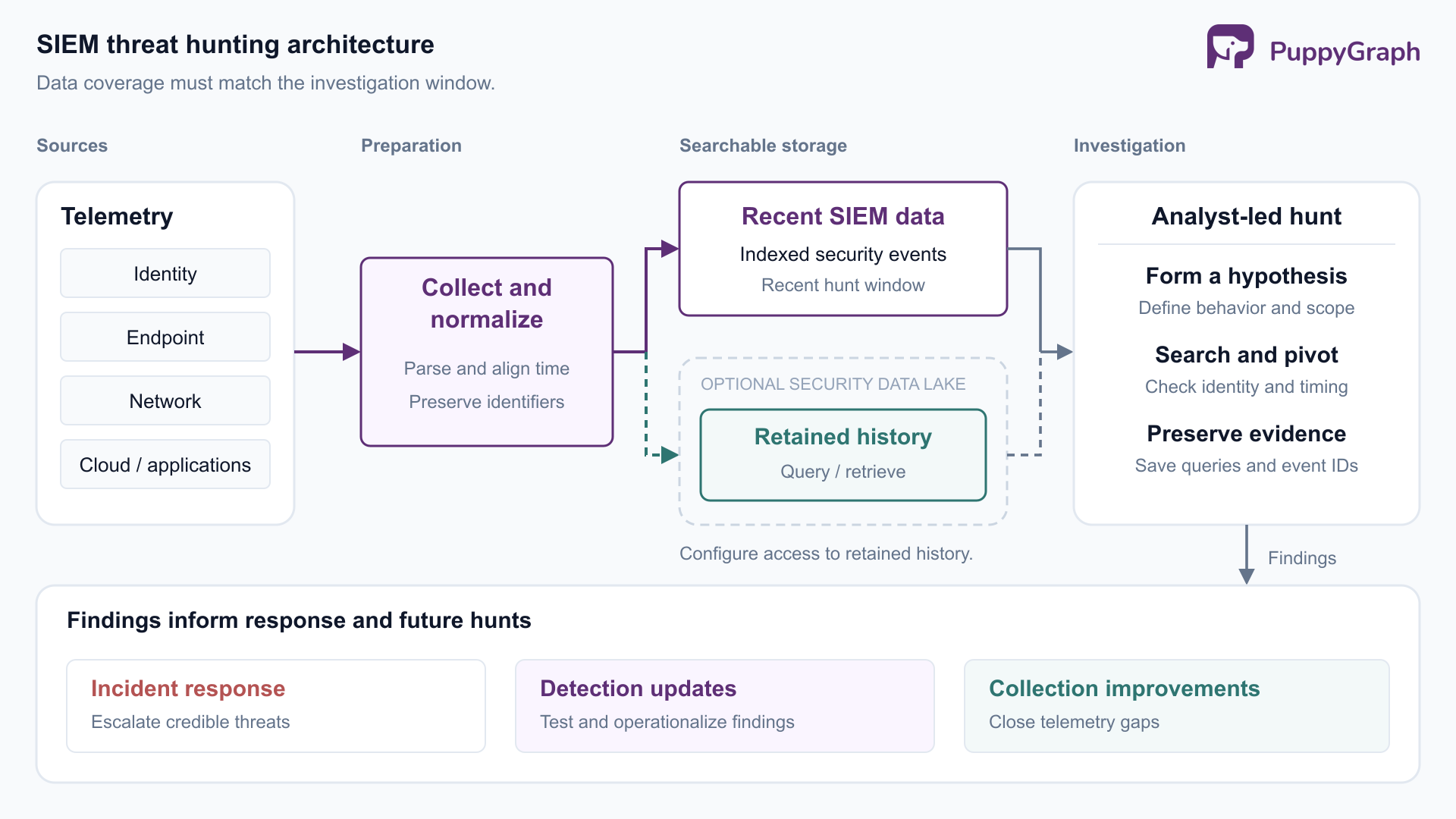
A practical architecture connects collection, preparation, storage, analysis, and response. Endpoint, identity, network, and application systems produce events. Collectors deliver them to a pipeline that parses records, standardizes timestamps and fields, and preserves access to the original evidence. Searchable storage then serves both scheduled detections and exploratory queries.
Design retention around the questions hunters need to answer. Recent indexed data supports frequent investigation, while longer history can live in other supported storage tiers or a security data lake. Where a separate lake is used, define how hunters query it or retrieve records into their investigation workflow. Test that access before an incident requires it. The relationship between a security data lake and a SIEM is an architectural choice, not a guarantee that every source is available through one search interface.
The architecture also needs operational controls: access to sensitive logs, monitoring for failed collection, and a way to preserve query results and source references. Track event time separately from delivery time so late records do not silently distort a sequence or disappear outside a search window.
Relationship analysis becomes useful when a hunt follows an account through several sessions, hosts, and resources. Repeatedly reconstructing those connections requires consistent identifiers and an explicit distinction between observed activity and permissions that merely allow activity.
PuppyGraph is the first and only zero-ETL graph query engine that lets teams query existing relational data as a graph without loading it into a separate graph database. For SIEM threat hunting, teams define a graph schema over security tables already held in supported SQL databases, data warehouses, and data lakes or lakehouses. That schema maps accounts, sessions, hosts, and resources into entities and relationships that analysts can query with openCypher and Gremlin.
For a suspected account compromise, a hunter can start from an identity, follow its recorded sessions to accessed hosts, and identify related resource-access events within the hunt window. The graph model makes these relationships reusable across investigations. Teams define the identity mappings and time constraints, and retain event references so a returned path can be checked against the underlying records. An observed access path and a possible path through permissions answer different questions and should remain distinct in the model.
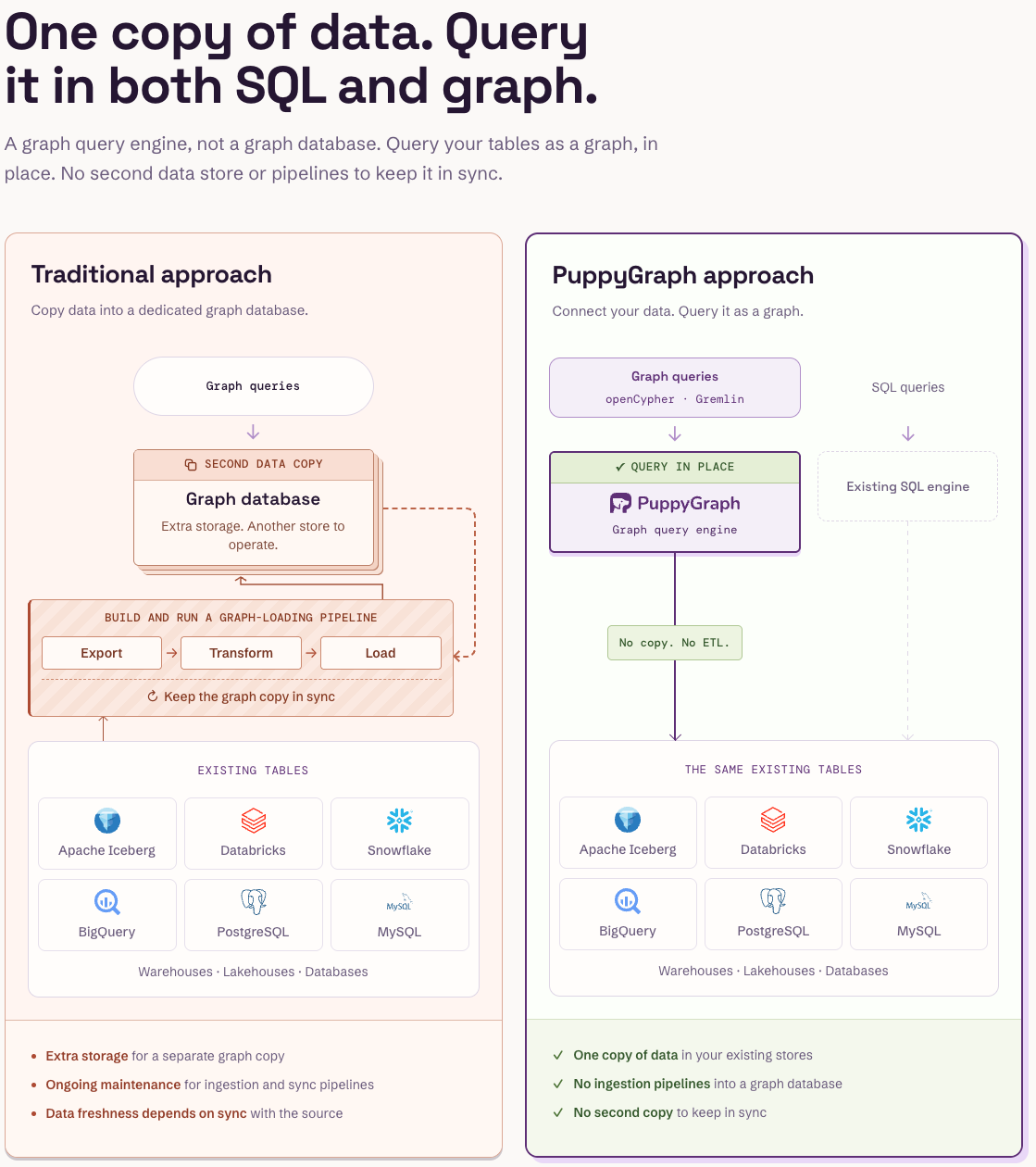
PuppyGraph complements the SIEM's detection and investigation workflow with this relationship analysis. Its default direct-query architecture requires no persistent duplicate graph dataset. The security pipeline still collects and prepares telemetry, and PuppyGraph connects to the supported storage holding those records. For a hunt spanning identity, endpoint, and cloud activity, this provides a graph view of the collected evidence while the SIEM continues to manage detections and cases.
Types of SIEM threat hunting
Hunts can be grouped by their starting point. These approaches overlap; a team may move between them during the same investigation.
Hypothesis-led hunting. Start with a specific proposition about adversary behavior. For example, an account with broad server access may be using remote administration outside its approved host group. Define supporting evidence and plausible alternatives before writing the query. This makes the hunt's conclusion easier to defend.
Intelligence-led hunting. Start with an external report, an indicator, or a documented technique relevant to the environment. Translate the intelligence into local observables. A report about credential abuse should prompt questions about authentication and subsequent activity, even if the reported domains or file hashes never appear in your network.
Anomaly-led hunting. Start with an outlier, such as a first-seen account-to-host relationship or an unusual pattern of data access. Compare it with the entity's history and an appropriate peer group. New infrastructure, changed duties, and scheduled work can all create legitimate anomalies.
Exploratory hunting. Inspect a bounded dataset to discover patterns worth investigating, particularly when onboarding a new source. Keep the scope explicit, such as privileged sign-ins in one tenant. Once a promising pattern emerges, turn it into a testable hypothesis rather than continuing an open-ended search.
The starting point changes how a hunt is prioritized. It does not change the requirement to validate the evidence and document the limits of the conclusion.
SIEM threat hunting techniques
Indicator matching and expansion. Search for known domains, IP addresses, or file hashes from a relevant intelligence source. Treat a match as an investigative lead, then inspect the process, user, destination, and timing around it. Preserve the indicator's source and observation dates; shared infrastructure and changing ownership can affect its meaning.
Baselining and first-seen analysis. Compare recent activity with prior behavior. Useful dimensions include destinations accessed by an account, applications used by a role, and processes executed on a host group. Choose baselines that reflect the entity's function and operating schedule. A newly onboarded source may lack enough representative history for a trustworthy baseline.
The following illustrative Microsoft Sentinel KQL query returns successful sign-in events from the most recent day for user/IP combinations absent from successful sign-ins in the preceding 14 days. The comparison includes the tenant ID. The query requires Microsoft Entra sign-in data in the documented SigninLogs table and an effective query time range covering the full 15-day interval. Adjust the example windows to fit the environment.
let HuntEnd = now();
let HuntStart = HuntEnd - 1d;
let BaselineStart = HuntStart - 14d;
let Baseline =
    SigninLogs
    | where TimeGenerated >= BaselineStart and TimeGenerated < HuntStart
    | where ResultType == "0"
    | where isnotempty(AADTenantId) and isnotempty(UserId)
        and isnotempty(IPAddress)
    | distinct AADTenantId, UserId, IPAddress;
SigninLogs
| where TimeGenerated >= HuntStart and TimeGenerated < HuntEnd
| where ResultType == "0"
| where isnotempty(AADTenantId) and isnotempty(UserId)
    and isnotempty(IPAddress)
| join kind=leftanti (Baseline) on AADTenantId, UserId, IPAddress
| project TimeGenerated, AADTenantId, UserId, UserPrincipalName,
          IPAddress, AppDisplayName, Id
| order by TimeGenerated desc
The leftanti join keeps recent records without a matching successful baseline combination. This yields candidate events for review, not confirmed account compromise. New users, changed VPN egress, and incomplete history can all produce matches. Review device and authentication context, then investigate subsequent activity for the same identity. Activity using a combination already present in successful baseline sign-ins is excluded even if it is malicious.
Temporal correlation. Look for meaningful event sequences, such as a role assignment followed by access to a sensitive resource. Require the relevant identity or session relationship and a justified time window. Events occurring near each other are not necessarily causally connected, especially on shared hosts or behind shared network infrastructure.
Relationship traversal. Follow connected entities to expand the investigation: which sessions involved this account, which hosts those sessions reached, and which resources were accessed next? Bound the traversal by relationship type and time. Retain the supporting records for each connection so the graph remains an evidence view rather than a diagram of assumptions.
Use these techniques together. A first-seen result identifies something to inspect; sequence and relationship analysis help establish what happened around it. The conclusion comes from the combined evidence and its context.
SIEM threat hunting process
A repeatable process gives a hunt a clear scope and turns its findings into operational improvements.
- Prioritize and define the hypothesis. Choose a threat relevant to exposed systems, important assets, or recent intelligence. Record the question, expected behavior, affected population, and stopping condition. Assign an owner and time budget so exploratory work remains bounded.
- Verify visibility before interpreting results. Check that the required sources cover the investigation and baseline windows. Inspect sample records for identifiers, event outcomes, timestamp meaning, and parsing quality. Confirm that the query's effective time range includes the baseline. Missing telemetry should become an explicit limitation or collection task.
- Search and pivot. Begin with selective filters, examine representative records, and expand through identities, sessions, and hosts. Save intermediate queries and the reason for each pivot. For the sign-in example, inspect unfamiliar IP combinations before correlating selected identities with application or administrative activity.
- Test alternative explanations. Compare results with maintenance records, account ownership, device changes, and expected service behavior. Look for evidence that would contradict the hypothesis. Repeated events can reflect duplicated ingestion, while apparently separate users can be aliases of one identity.
- Escalate and preserve evidence. Move credible malicious activity into incident response under the team's existing criteria. Preserve original record references, relevant exports, queries, and exact investigation boundaries. A promising anomaly should remain distinguishable from a confirmed finding in the case record.
- Close the hunt and improve coverage. Record the outcome and remaining uncertainty. Convert stable, actionable behavior into a tested detection; assign owners for telemetry gaps and follow-up work. Before scheduling a query, test benign activity, expected malicious patterns, late data, and duplicate results. Configure an appropriate evaluation cadence and look-back window.
Measure the program through validated detection improvements, resolved visibility gaps, and findings that responders can act on. Raw match counts reward broad searches without showing whether the team learned anything useful. A hunt that exposes a missing audit source can be valuable even when it identifies no attacker.
Key data sources for SIEM threat hunting
Choose sources by the behavior the hunt must establish. Collecting more logs does not automatically provide the missing evidence.
Cloud logging illustrates why source names are insufficient. AWS documents that CloudTrail trails and event data stores do not log data events by default. S3 object operations such as GetObject fall into that category. A hunt for unusual object access needs the relevant logging configured for the resources in scope; finding management events does not establish that access history is available.
Preserve enough historical context to interpret events correctly. If an address was reassigned or an account changed ownership, today's inventory can create a false connection. Monitor collection health and required-field completeness alongside search results so a quiet dataset does not masquerade as a clean environment.
SIEM threat hunting use cases
Common hunt questions concern credential abuse, lateral movement, persistence, and access to sensitive data. Each requires evidence that distinguishes malicious behavior from legitimate work.
Credential abuse that resembles administration. In its 2023 Volt Typhoon investigation, Microsoft described an actor relying on stolen valid credentials and living-off-the-land activity. A relevant hunt examines administrative accounts accessing unfamiliar systems, then checks associated process activity and network connections. Compare the sequence with the account owner's responsibilities and approved work. A legitimate tool name alone does not settle whether its use was authorized.
Lateral movement over remote desktop. MITRE ATT&CK's Remote Desktop Protocol sub-technique, T1021.001, describes adversaries using valid accounts to access remote systems. Hunt for new source-host, account, and destination-host combinations involving sensitive systems. Correlate authentication with endpoint evidence and subsequent activity. Approved jump hosts and support sessions are important benign explanations; an RDP connection by itself is not evidence of lateral movement by an attacker.
Persistence through account changes. Account Manipulation, T1098, includes modifying accounts to preserve or expand access. A hunt can examine credential additions or privilege changes involving sensitive identities, then look for subsequent use. Establish who made the change, which identity received access, and whether a matching approval exists. The initiating administrator and the beneficiary account may differ, so joining every event on one username can miss the relationship.
Suspicious access to sensitive cloud data. Start with unexpected object reads by a principal that does not normally access the dataset. Connect those reads to the relevant role session, credential use, and available network or application evidence. Check scheduled exports, backup jobs, and new business workflows. Successful reads establish access; a conclusion about exfiltration requires evidence supporting unauthorized transfer, not merely an unusual read count.
These use cases share a practical requirement: the hunt must connect an action to the right identity, resource, time, and business context. That is what turns a broad behavioral idea into an investigation a responder can reproduce.
Conclusion
SIEM threat hunting works best when a specific hypothesis meets sufficient telemetry and a disciplined investigation process. Use ATT&CK to describe the behavior, baseline activity against an appropriate population, and follow relationships with explicit time and identity constraints. Preserve what supports the conclusion, including the limits imposed by missing data.
Start with one important behavior your team can observe end to end. Use the findings to improve detections or close a visibility gap, then carry that knowledge into the next hunt.
Try the forever-free PuppyGraph Developer Edition and book a demo to explore connected identities, sessions, hosts, and resources in your existing security tables during a threat hunt.

Hao Wu is a Software Engineer with a strong foundation in computer science and algorithms. He earned his Bachelor’s degree in Computer Science from Fudan University and a Master’s degree from George Washington University, where he focused on graph databases.

Get started with PuppyGraph!


Developer Edition
- Forever free
- Single noded
- Designed for proving your ideas
- Available via Docker install
Enterprise Edition
- 30-day free trial with full features
- Everything in developer edition & enterprise features
- Designed for production
- Available via AWS AMI & Docker install