


How Baker Hughes Turned Four Years of Fragmented Plant Data Into Root-Cause Answers
Engineers at Baker Hughes built a knowledge graph on PuppyGraph and a team of AI agents to diagnose the equipment failures dragging down Overall Equipment Efficiency across four industrial plants. They asked questions in plain language. The agents wrote the graph queries.
At a glance
- Organization: Baker Hughes (Houston, Texas)
- Sector: Energy and industrial equipment
- Use case: OEE improvement, equipment reliability, automated root-cause analysis
- Data platform: Databricks (Delta Lake)
- Graph layer: PuppyGraph (virtual, zero-ETL)
- Query languages: openCypher and Gremlin
- Agent LLM: databricks-claude-sonnet-4
- Source: SPE-228135-MS
About this case study: PuppyGraph prepared this summary from a technical paper published by the Baker Hughes team. Every figure and technical detail below is drawn from that public paper. To read the full methodology and results, see the original paper: SPE-228135-MS.
The challenge: the answers existed, but no one could reach them fast
Overall Equipment Efficiency (OEE) measures how well a manufacturing operation runs against its full potential, combining three factors: availability (the share of scheduled time equipment is ready to run), performance (how fast it runs versus its designed capacity), and quality (the proportion of good output). A single OEE score points to where productivity is being lost.
The hard part is not the metric. It is finding out why the score is low. As the Baker Hughes team describes it, diagnosing poor OEE means pulling together predictive maintenance records, work orders, timesheets, root cause analyses (RCAs), and event logs. That data is fragmented and siloed across departments and systems. Much of it is unstructured, sitting in free-text maintenance notes and incident reports. It is undermined by sensor errors and manual entry mistakes, and locked inside legacy systems never built for modern analytics.
Working through those large, unstructured datasets by hand is slow, complicated, and error-prone, which delays both identifying and resolving OEE issues. And because multiple factors interact, the real underlying cause is often obscured.
Why the team chose PuppyGraph
The team needed a graph to connect these scattered records, but without standing up and maintaining a separate graph database.
"Although Neo4j is a popular knowledge graph solution, we used PuppyGraph due to its open-source flexibility and seamless integration capabilities."
In the paper's description, PuppyGraph functions as a zero-ETL graph analytics engine that queries data directly from sources like Databricks, without requiring data movement, which reduces onboarding costs and improves performance. It supports openCypher and Gremlin and is compatible with major cloud providers including AWS, Azure, and GCP.
The architectural difference that mattered here: the graph is not stored in a static format. PuppyGraph builds it virtually on top of existing data, such as the Delta tables already in Databricks. Data stays where it lives. PuppyGraph connects to Databricks, maps the tables to nodes and edges, and the schema can be defined either interactively in the UI or by uploading a JSON file.
How they built it
Five datasets were combined across four plants and four years of operations (2019–2022): incident logs, RCA reports, bad actor analysis, work order history, and functional location details. Each one carries a distinct view of plant health:
- Incident logs capture unplanned downtime events, time-stamped and categorized by loss type, annotated with production loss (in metric tons), financial loss (in USD), and a text description of what happened.
- RCA reports add root-cause context for high-priority incidents, with reasons, severity ratings, and corrective or preventive actions.
- Bad actor records flag equipment that fails repeatedly and drives high production loss and maintenance cost, with the cost of unreliability and resolution status.
- Work orders document maintenance activity, including execution time, hours worked, and functional location.
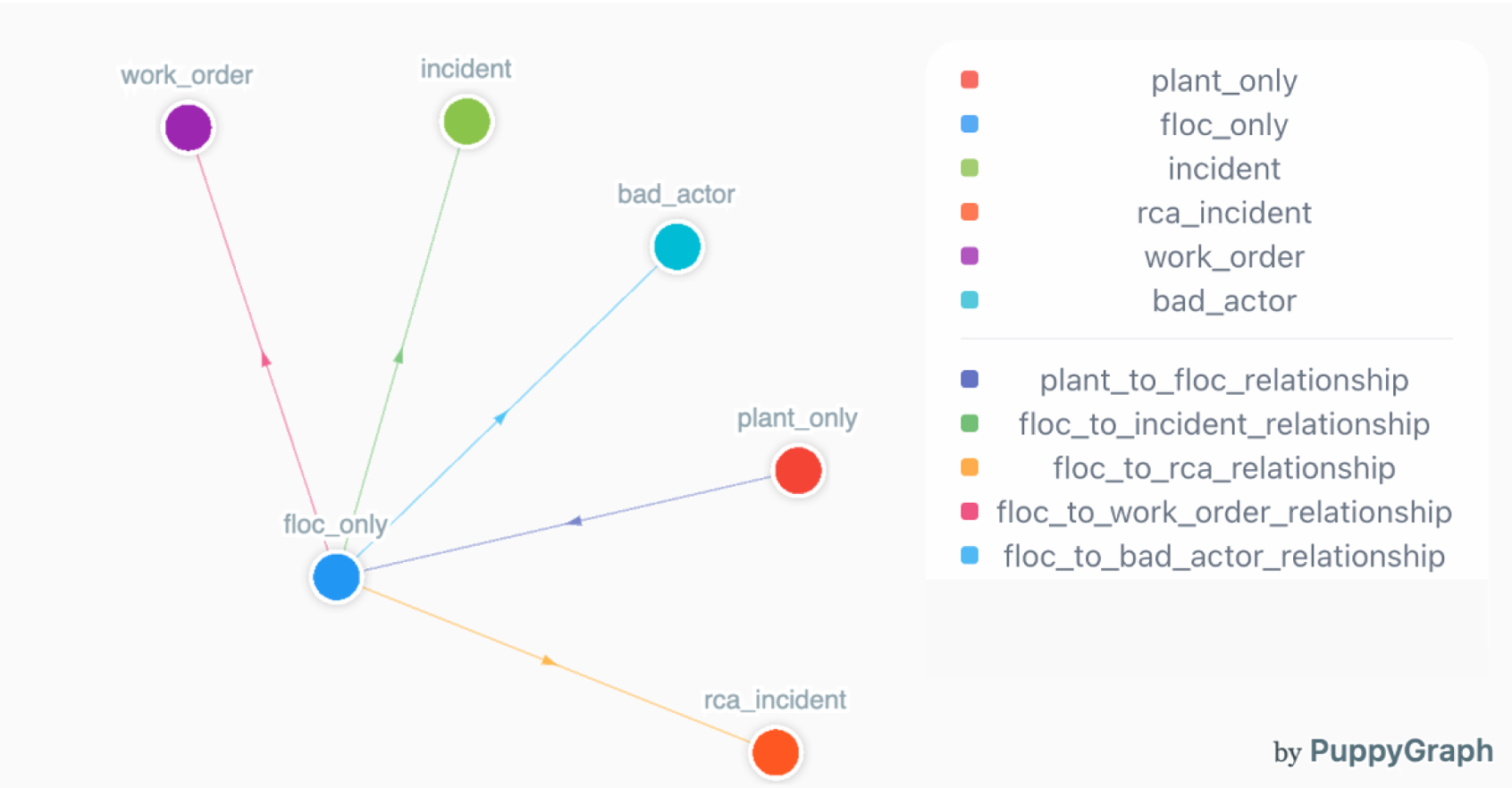
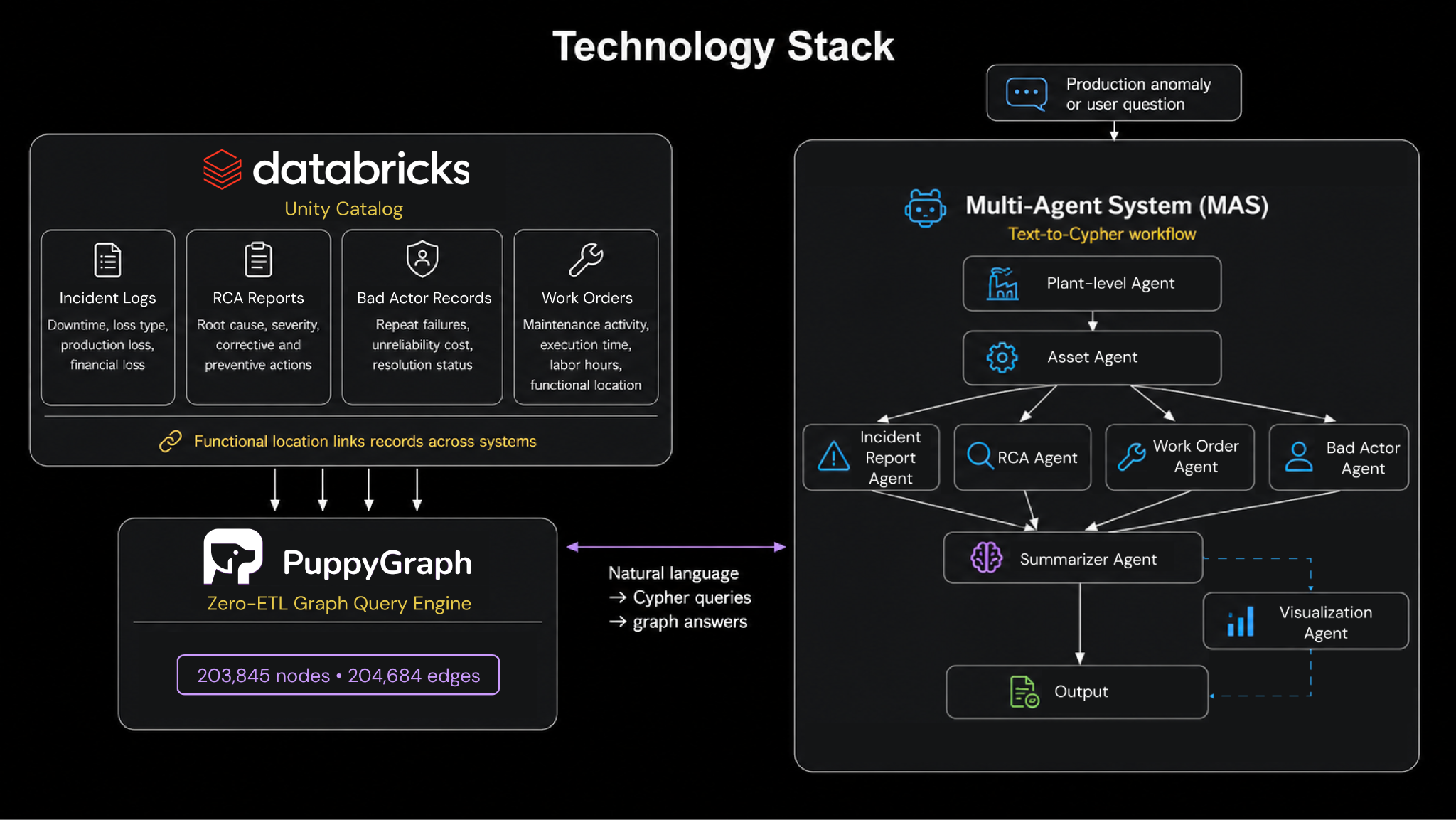
The connective tissue is the functional location field, a common identifier that links a failure in the incident log to its RCA entry, its related work orders, and any repeat appearances on the bad actor list. Modeled as a hub-and-spoke graph with functional location at the center, the result is a single connected knowledge graph of 203,845 nodes and 204,684 edges, in effect a digital twin of the plants spanning equipment specifications, performance history, failure records, and work order details.
On top of that graph, the team deployed a multi-agent AI workflow. The central capability is text-to-Cypher: each agent converts a natural-language question into a Cypher query, runs it against the graph, and returns an answer. The agents are specialized, including plant-level, asset-level, incident, RCA, work order, and bad actor agents, plus a summarizer agent that condenses the findings and a visualization agent that writes and runs Python to generate plots. Each agent is guided by a structured prompt and returns its reasoning in THINKING, PLAN, and CONCLUSION sections, so the path from question to answer is auditable. In production, the workflow can be triggered automatically whenever an anomaly (such as a significant drop in production quantity) is logged to the graph.
What the agents found
Each figure below is a reliability loss the agents surfaced and quantified on their own, from a single plain-language question, across records that previously had to be read by hand.
Availability, from a single question. Asked about production losses between July and September 2021, the work order agent analyzed the work orders from that window and returned the most problematic equipment, the most affected functional locations, and the common maintenance types (most were external visual inspections), along with recommended next steps for each.
High-loss equipment, ranked by plant. From a single natural-language instruction:
"For each plant, can you give me the top 3 categories of equipment types that led to highest RCA losses? Break down these losses by their corresponding incident ratings."
the RCA agent aggregated across the RCA, incident, and asset datasets and ranked the results. Plant C surfaced as the highest-risk site, with over USD 71 million in RCA-related losses, led by compressors, fired pressure vessels, and unfired heat exchangers. Across all four plants, compressors and pressure vessels were consistently the most significant contributors.
Bad actors, by cost of unreliability. A second prompt:
"For each plant, can you provide the number of bad actors categorized by equipment type along with their associated cost of unreliability?"
Plant C again stood out with 18 recurring underperforming assets and roughly USD 532 million in cost of unreliability. Ranked across plants, compressors (USD 351 million) and fired equipment (USD 272 million) dominated the total.
The throughline: a few asset classes, compressors and pressure vessels chief among them, drive a disproportionate share of unplanned downtime and reliability cost. That is exactly the kind of prioritization an OEE program needs, and the agents produced it from plain questions rather than weeks of manual analysis.
What's next
The Baker Hughes team frames this as a foundation. Their stated next steps include extending the system toward prescriptive analytics, integrating additional data modalities such as images, and strengthening security and access controls. The broader thesis: pairing agentic AI with a robust, extensible knowledge graph makes root-cause analysis scalable, explainable, and fast enough to keep pace with how plants actually run.
Read the full research
This case study summarizes work published by the Baker Hughes team (N. Sengar, A. Jain, R. Elsinga, P. Rai, and A. Anand) as SPE-228135-MS, presented at the SPE Annual Technical Conference and Exhibition, Houston, 2025. All figures and technical details above are drawn from the public paper.
Read it here: https://doi.org/10.2118/228135-MS
Try it yourself
Download the forever-free PuppyGraph Developer Edition, or book a demo with our graph experts today.

Get started with PuppyGraph!


Developer Edition
- Forever free
- Single noded
- Designed for proving your ideas
- Available via Docker install
Enterprise Edition
- 30-day free trial with full features
- Everything in developer edition & enterprise features
- Designed for production
- Available via AWS AMI & Docker install