


GraphRAG Architecture: Components, Workflow & Implementation Guide
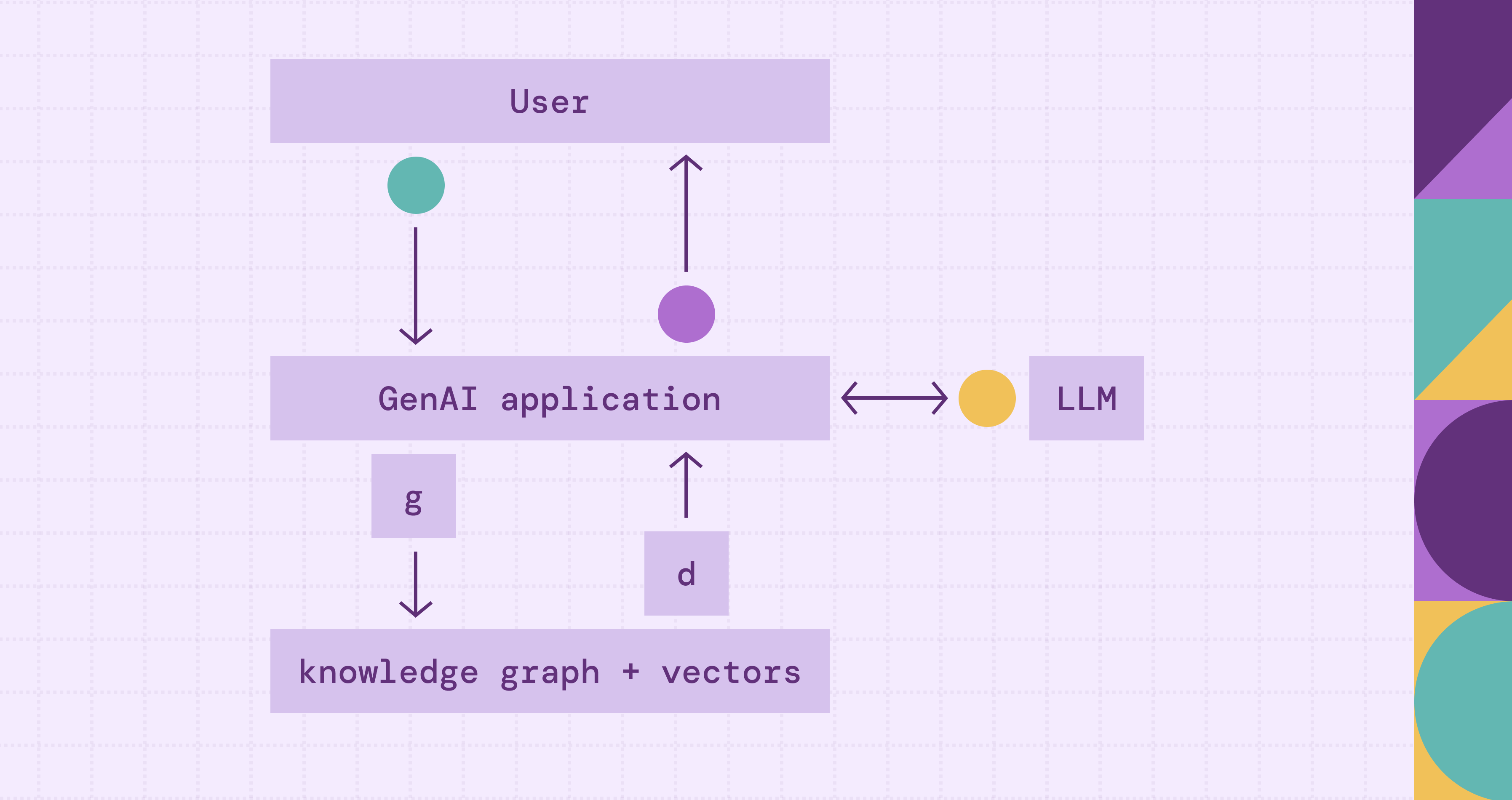
Standard retrieval augmented generation (RAG) systems retrieve text chunks based on vector similarity. This works for simple factual questions. But when user queries require connecting dots across multiple documents or reasoning over complex relationships between entities, vector search fails. The retrieved chunks lack the relational context needed for accurate answers.
GraphRAG architecture adds a knowledge graph layer to the retrieval pipeline. Instead of relying on keyword search or semantic search alone, it translates natural language questions into structured graph queries, retrieves relevant entities, relationships, and subgraphs from the knowledge graph, and then feeds that context to large language models (LLMs). The result: a generated response that is accurate, explainable, and grounded in explicit relationships from your data.
This guide covers the graph RAG architecture end-to-end: the key architectural patterns (local vs. global retrieval), the core components, how the retrieval workflow operates, a comparison with traditional RAG, implementation steps, and the trade-offs when building a production system.
What Is GraphRAG Architecture?
GraphRAG augments traditional RAG with graph-structured retrieval. Traditional RAG converts documents to vector embeddings and retrieves similar text passages. GraphRAG adds a new retrieval channel: it translates natural-language questions into graph queries (Cypher, Gremlin, or similar), executes them against a knowledge graph to retrieve relevant entities, semantic relationships, and multi-hop paths, and then feeds the structured context into the LLM for generation.
The key idea: graph-native retrieval. When you ask a question, the system analyzes it for key entities and intent, translates it into a structured graph query, and retrieves the relevant context directly. Instead of hoping the right text chunk exists in embedding space, you query explicit relationships in the graph. The graph returns structured facts: connected nodes, edges, paths, and subgraphs that capture how data points relate to each other.
Here's what that looks like in practice. Consider: "Which components are affected if the authentication service fails?" A traditional RAG system searches text chunks for mentions of "authentication service" and "failure," returning passages that happen to contain those terms. GraphRAG instead queries the knowledge graph to find the authentication service node, traverses dependency edges to discover downstream services, and returns a structured subgraph showing the full impact. The LLM grounds its generated answer in the explicit dependency map, not scattered paragraphs.
There are several approaches. Query-based GraphRAG translates the question into graph queries (e.g., Cypher or Gremlin), runs them against the graph, and passes the results to the LLM. Content-based GraphRAG retrieves different layers of graph content (nodes, triples, paths, subgraphs) and feeds them as context. Agentic GraphRAG gives the LLM control over retrieval. The LLM becomes intelligent about retrieval: it plans which queries to run, executes them, evaluates results, and re-plans if needed. The retrieval process shifts from a static pipeline to a dynamic reasoning process where the agent refines its graph RAG approach based on findings.
This architecture matters because many real-world questions are inherently relational. Fraud detection requires tracing transaction chains across accounts. Clinical decision support needs to connect symptoms, diagnoses, medications, and contraindications. Supply chain risk analysis demands multi-hop traversal from a disrupted supplier through tiers of dependencies. In these problems, connections between things matter as much as the things themselves. Graph-based retrieval can outperform text search when questions depend on relationships between entities.
Local vs Global GraphRAG
Not all GraphRAG systems retrieve context the same way. Two common retrieval strategies, local and global retrieval, solve different types of questions and carry different trade-offs.
Local GraphRAG starts from specific entities mentioned in the query and expands outward through connected nodes. It performs entity linking to identify relevant nodes, then uses graph traversal algorithms, including depth-first search and breadth-first search, to traverse their neighborhoods, follow multi-hop paths, and extract compact subgraphs. The retrieved context is tightly scoped to the query's relevant entities and their direct relationships. This approach works for specific questions like "what services depend on the authentication module?" or "which suppliers provide components for product X?" Most production systems use local retrieval because it's fast, predictable, and aligns with graph query languages like Cypher and Gremlin.
Global GraphRAG takes a broader view. Instead of starting from specific entities, it preprocesses the entire knowledge graph into hierarchical community structures using algorithms such as Leiden community detection. Each community gets a summary that captures its key themes and relationships. When a query arrives, the system searches across these community summaries to find relevant clusters, then drills into the underlying entities and relationships. This query-focused summarization approach handles open-ended questions that don't map to specific entities, such as "what are the main risk factors across our supply chain?" or "summarize the key themes in this dataset." Microsoft's GraphRAG research popularized this pattern.
Which to use? Local retrieval is the default for most implementations. It's simpler to build, faster to execute, and produces focused context. Global retrieval adds value when you need corpus-wide summarization or when queries lack anchor entities. Some systems combine both: local retrieval for specific questions, global retrieval for exploratory ones. Different RAG techniques, from naïve to agentic, offer additional patterns for choosing and combining retrieval strategies.
Core Components of GraphRAG Architecture
A practical GraphRAG architecture typically includes components like the following. Each one handles a different piece of the flow, from ingesting raw data into the graph all the way through generating the final response.
Knowledge Graph Storage is the structured backbone. Entities (people, systems, products, events) and their relationships (depends_on, reports_to, supplies, treats) live as nodes and edges. You can back this with a dedicated graph database like Neo4j or Amazon Neptune. Or use a graph query engine like PuppyGraph to run Cypher and Gremlin queries directly over your warehouse tables, no data copying required.
Entity Extraction and Ingestion fills the knowledge graph through a natural language processing pipeline. Named Entity Recognition (NER) is used to extract key entities from raw text, identifying people, organizations, systems, and products. Relation extraction then identifies how entities connect, pulling triples like (Service A, depends_on, Service B). Coreference resolution links different mentions of the same entity, so "J. Smith," "John Smith," and "Dr. Smith" map to one node. Entity canonicalization deduplicates and normalizes everything into a clean data representation before writing to the graph. The pipeline runs continuously, keeping the graph current. See the knowledge graph building guide for a detailed walkthrough.
Graph Reasoning and Retrieval is what differentiates GraphRAG from traditional RAG. The system translates incoming questions into structured graph queries. Query-based GraphRAG converts questions directly to Cypher or Gremlin. Agentic setups let the LLM plan which queries to run based on question intent. Either way, execution against the knowledge graph retrieves structured results: neighbor lookups, multi-hop paths, shortest paths, subgraphs, or community summaries. Retrieved data (nodes, edges, paths, triples) becomes the primary generation context, providing the retrieved information the LLM needs.
Context Fusion and Prompt Construction assemble retrieved graph data into a prompt, turning structured entity information into contextual information that the LLM can reason over. Most teams underinvest in this prompt engineering step, yet it has a high impact. Three main serialization strategies: Triple serialization converts graph edges to natural language "(Service A) depends_on (Service B), (Service B) runs_on (Server C)." Subgraph summarization uses a smaller LLM to condense extracted subgraphs into paragraphs. Structured blocks use labeled sections or XML tags, helping the LLM distinguish graph facts from other context. Manage token budgets carefully. Large subgraphs consume prompt space. Production systems allocate tokens dynamically based on query type and retrieved context size.
LLM Generation takes the assembled prompt and produces the final generated response. Large language models (LLMs) get structured graph data (entities, relationships, paths) as context, which provides factual grounding far more precise than text chunks. With explicit relational constraints in the prompt, the model can generate accurate answers that are far less likely to hallucinate or contradict known facts. In agentic setups, the LLM also plays an active role during retrieval, planning, and executing multiple graph queries before generating the final answer.
An optional seventh component, the Feedback and Update Loop, captures corrections and new data from user interactions and routes them back to update the knowledge graph. This supports handling dynamic knowledge, keeping the system improving over time without requiring full re-ingestion.
GraphRAG vs Traditional RAG Architecture
The split between traditional RAG and GraphRAG comes down to how you retrieve context. Traditional RAG flattens everything to text chunks and retrieves by similarity. GraphRAG keeps graph structures intact, and the relationships between entities come along for the ride.
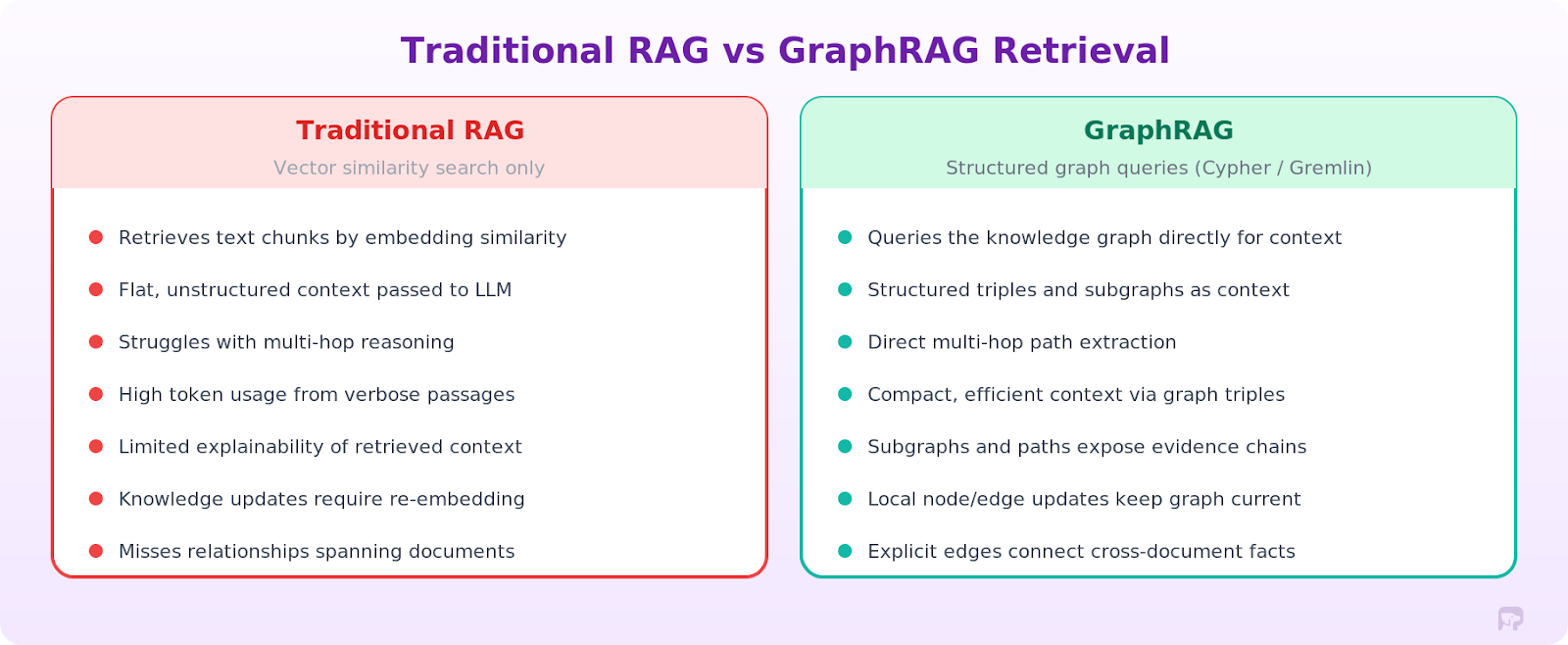
What traditional RAG can't do. Look at what AMD faced before switching to GraphRAG. Their teams had specific data points spread across ServiceNow, Jira, GitHub, telemetry systems, and infrastructure logs, all siloed. Complex queries like "which commits introduced the most recurring incidents for this component?" require analyzing relationships across everything. Vector search alone couldn't trace those dependency chains.
By implementing GraphRAG with PuppyGraph querying directly over Apache Iceberg tables, AMD connected tickets, commits, configurations, and telemetry into a single knowledge graph. Graph traversal queries returned results in sub-second response times, compared to queries that previously required minutes. The system could automatically correlate new issues with historical incidents and previous fixes.
When to stick with traditional RAG. For straightforward factual questions answered in one chunk ("What's the default timeout for this API?"), traditional RAG is the better choice. It's simpler, faster, and costs less. GraphRAG is heavier to operate, so only reach for it when you actually need relational reasoning.
Real-World Use Cases of GraphRAG Architecture
GraphRAG shines in domains with domain-specific data where relationships between things matter, and you need to traverse those connections to get actionable insights.
IT Operations and Infrastructure Diagnostics. When production goes down, engineers need to trace what broke across all the interconnected systems. AMD's GraphRAG implementation demonstrates this directly: when engineers encounter a "black screen" issue on a node, the system queries the knowledge graph to correlate the new incident with historical tickets, related components, previous fixes, and dependent services. The graph acts as persistent memory for reasoning agents, connecting systems, tickets, and commits through contextual relationships so that agents can recommend probable causes and remediation steps automatically.
Fraud Detection and Financial Compliance. Fraud graphs map transactions, accounts, devices, and entities into a network where suspicious patterns emerge from the relationships themselves. A graph-augmented retrieval system can answer questions like "show me all accounts within two hops of this flagged transaction that were created in the last 30 days," combining the graph traversal result with relevant compliance documentation for the LLM to assess risk. Financial institutions use graph analytics to detect money laundering rings, identify synthetic identities, and trace complex transaction chains that text retrieval cannot surface.
Healthcare and Clinical Decision Support. Patient data spans electronic health records, lab results, medication histories, clinical guidelines, and research literature, mixing structured and unstructured data. A healthcare knowledge graph connects symptoms to diagnoses, diagnoses to treatments, treatments to contraindications, and medications to drug interactions. GraphRAG enables clinical assistants to answer multi-hop questions, like "given this patient's current medications and kidney function, which antibiotics are contraindicated?" Text search alone cannot answer this. You need to traverse actual medical relationships in the graph to surface deeper insights.
Supply Chain Risk Analysis. Supply chain graphs model dependencies between suppliers, components, manufacturers, and logistics routes. When a natural disaster disrupts a supplier, GraphRAG can traverse the dependency graph to identify every downstream product and manufacturer affected, retrieve relevant risk documentation, and generate an impact assessment. The graph provides structural reasoning; the LLM provides natural language synthesis.
Cybersecurity Threat Intelligence. Security knowledge graphs connect assets, vulnerabilities, attack techniques, and threat actors into a queryable network. GraphRAG allows security analysts to ask questions like "Which critical assets are reachable from this newly disclosed vulnerability through our network topology?" The graph traverses the attack surface; the retrieval layer pulls in CVE descriptions and mitigation documentation.
Tools and Frameworks for Building GraphRAG
You'll need to piece together three layers to build a GraphRAG system: the knowledge graph, orchestration framework, and LLM. What you pick depends on your existing data infrastructure, scale requirements, data science team capabilities, and whether you're building from scratch or extending an existing RAG setup.
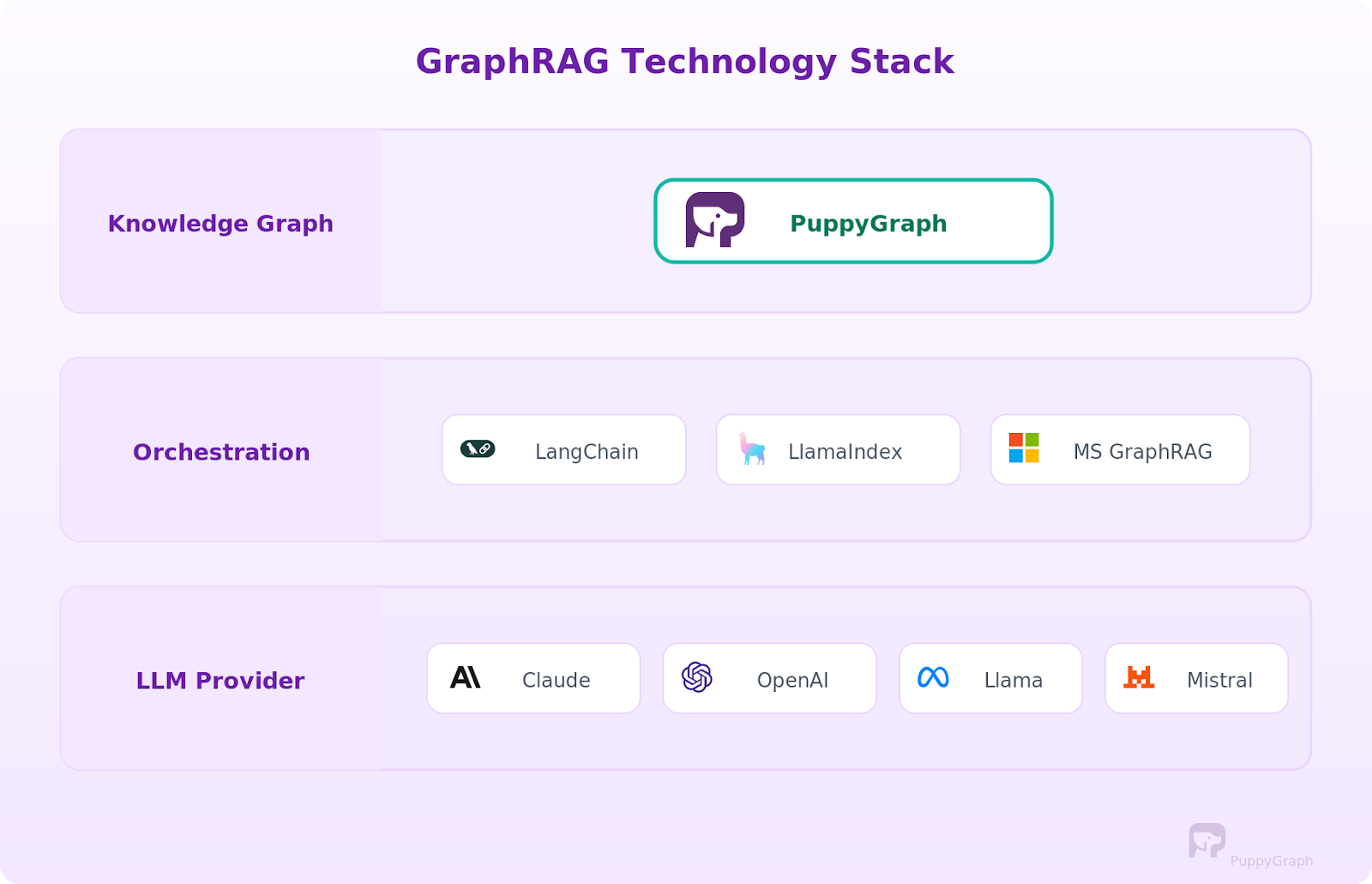
Knowledge Graph Layer. The graph storage layer is the most consequential decision because it determines how you build, query, and maintain the knowledge graph.
Traditional graph databases like Neo4j, Amazon Neptune, and TigerGraph provide native graph storage and query execution. Unlike traditional databases that store data in rows and columns, these systems store graph representations natively. But they require ETLing data into a dedicated store and maintaining sync, which means managing another database, another data processing pipeline, and another potential point of synchronization failure.
An alternative approach is using a graph query engine like PuppyGraph that queries your existing relational data as a graph without moving data. PuppyGraph connects directly to data sources like Apache Iceberg, Delta Lake, Databricks, BigQuery, PostgreSQL, and MySQL and executes Cypher and Gremlin queries in place. The graph always reflects the current state of your source systems. For teams already running data warehouses or lakehouses, this eliminates the cost and complexity of maintaining a separate graph database. A free Developer Edition is available for testing.
Orchestration Frameworks. LangChain and LlamaIndex are the two dominant frameworks for building RAG pipelines, and both support graph-based retrieval. Graph retrieval chains translate questions into Cypher or Gremlin queries, execute them, and pass results into the LLM context. Knowledge graph index modules handle graph construction and querying. Microsoft's GraphRAG library uses community detection and hierarchical summarization as its core strategy.
LLM Providers. Any capable LLM works as the generation layer. Claude, OpenAI, Llama, and Mistral models are all commonly used. The choice depends on your accuracy requirements, latency constraints, and whether you need the model to handle structured graph data well in its context window.
How to Implement GraphRAG
Building a GraphRAG system involves wiring together the components we covered above.
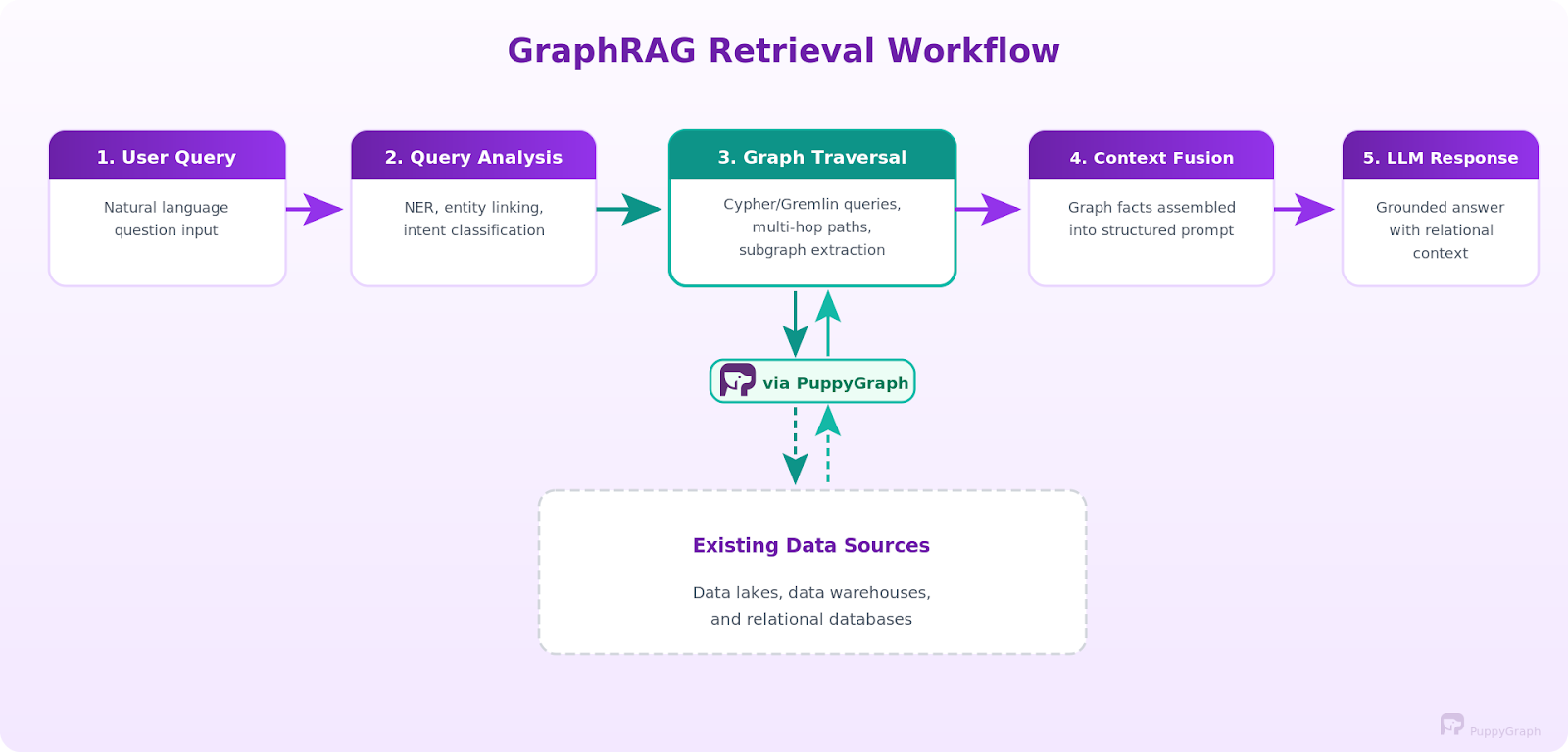
Here's the high-level sequence, from zero to a working pipeline.
Step 1: Model your data as a graph. Start with graph modeling: identify the entities and relationships that matter for your use case and define a data model that maps your source data to nodes (entities) and edges (relationships). If you're using PuppyGraph, this means writing a JSON schema that maps your existing warehouse or database tables to graph vertices and edges. No data copying required. If you're using a traditional graph database, you'll need to design an ETL pipeline to extract, transform, and load your data into the graph store. Either way, start with a focused schema that covers your core use case, and expand from there.
Step 2: Set up entity extraction (if you have unstructured data). If your source data includes documents, logs, or other unstructured text, build an ingestion pipeline that runs NER, relation extraction, and entity resolution to extract entities and populate the graph. For existing structured data that's already in tables with clear foreign keys, this step is much simpler since the relationships are already explicit in your schema.
Step 3: Build the retrieval layer. This is the core of GraphRAG. Wire up the graph query channel that translates natural language questions into Cypher or Gremlin and runs them against your knowledge graph. You'll need query templates, a few-shot examples, and schema context in the LLM prompt to get accurate query generation. For agentic setups, give the LLM graph query tools and let it plan its own retrieval strategy.
Step 4: Implement context fusion. Design your prompt template to accept graph context effectively. Test different serialization strategies (triples, summaries, structured blocks) to find what produces the best results for your use case.
Step 5: Connect the LLM and iterate. Wire the fused context into your LLM of choice and start testing with real queries. Evaluate whether the system can generate accurate responses, tune retrieval parameters (number of hops, number of text passages, relevance thresholds), and iterate. The goal is accurate retrieval that provides the LLM with enough contextual relevance to produce high-quality AI outputs.
For a hands-on code walkthrough that covers these steps with PuppyGraph, LangChain, and a real dataset, see GraphRAG Explained: Enhancing RAG with Knowledge Graphs. That tutorial walks through the full pipeline from PostgreSQL data to a working agentic GraphRAG agent with PuppyGraph.
Challenges and Limitations
GraphRAG isn't a magic upgrade. It adds complexity everywhere, so you need to understand the trade-offs before going all-in.
Knowledge graph construction is the hardest part. Entity extraction, relation identification, coreference resolution, and canonicalization all introduce noise. NER misses entities, relation extractors hallucinate connections, and entity linking picks wrong matches. Data quality in your knowledge graph directly determines retrieval quality, and building a good graph across large datasets takes sustained effort. A bad graph makes answers worse than plain RAG.
Maintaining dynamic knowledge over time adds an operational burden. New data arrives, entities appear, relationships evolve, and facts become stale. Without an update strategy, the graph stops reflecting the current truth. Graph infrastructure choice matters here. Graph query engines that read directly from live data sources, like PuppyGraph querying Apache Iceberg tables, eliminate synchronization problems because the graph always reflects current data. Traditional graph databases require building and maintaining ETL pipelines to keep the graph updated.
Deep queries get slow. One-hop queries execute quickly, but multi-hop traversals across large graphs grow expensive. You need query optimization, graph indexing, and schema design to maintain acceptable response times. Production systems also need timeout handling and fallback strategies for slow queries.
Query translation is error-prone. Converting natural language to accurate Cypher or Gremlin queries is hard. The LLM might generate syntactically valid but semantically wrong graph queries or miss entities during the linking step. You need robust query validation, error handling, and often a few-shot examples in the prompt to guide accurate translation.
Not every use case justifies the overhead. If your questions are mostly straightforward lookups with no relational reasoning involved, traditional RAG is simpler, cheaper, and probably good enough. Use GraphRAG when multi-hop reasoning, entity relationships, or dependency traversal are core to what you're building.
GraphRAG with Zero ETL
Most GraphRAG projects encounter bottlenecks at the knowledge graph layer. Traditional graph databases require ETLing data into a separate store, maintaining sync pipelines, and managing additional infrastructure. If your data already lives in a warehouse or lakehouse, building a graph database involves weeks of engineering work before testing GraphRAG's effectiveness.
PuppyGraph takes a different approach. As a graph query engine, it connects directly to your existing data sources and lets you run Cypher and Gremlin queries over that data in place. No data copying, no separate graph store, no ETL pipeline. Your Iceberg tables, Delta Lake datasets, PostgreSQL databases, or BigQuery tables become queryable as a graph without moving a single row.

This query-in-place architecture, effectively integrating knowledge graphs with your existing data infrastructure, solves two major GraphRAG challenges. First, it eliminates the graph construction bottleneck. Instead of building a separate knowledge graph, you define a graph representation over existing tables and start querying. Second, it removes the maintenance burden. PuppyGraph reads directly from source systems, so the graph always reflects current data. This prevents data drift, staleness, and synchronization failures.
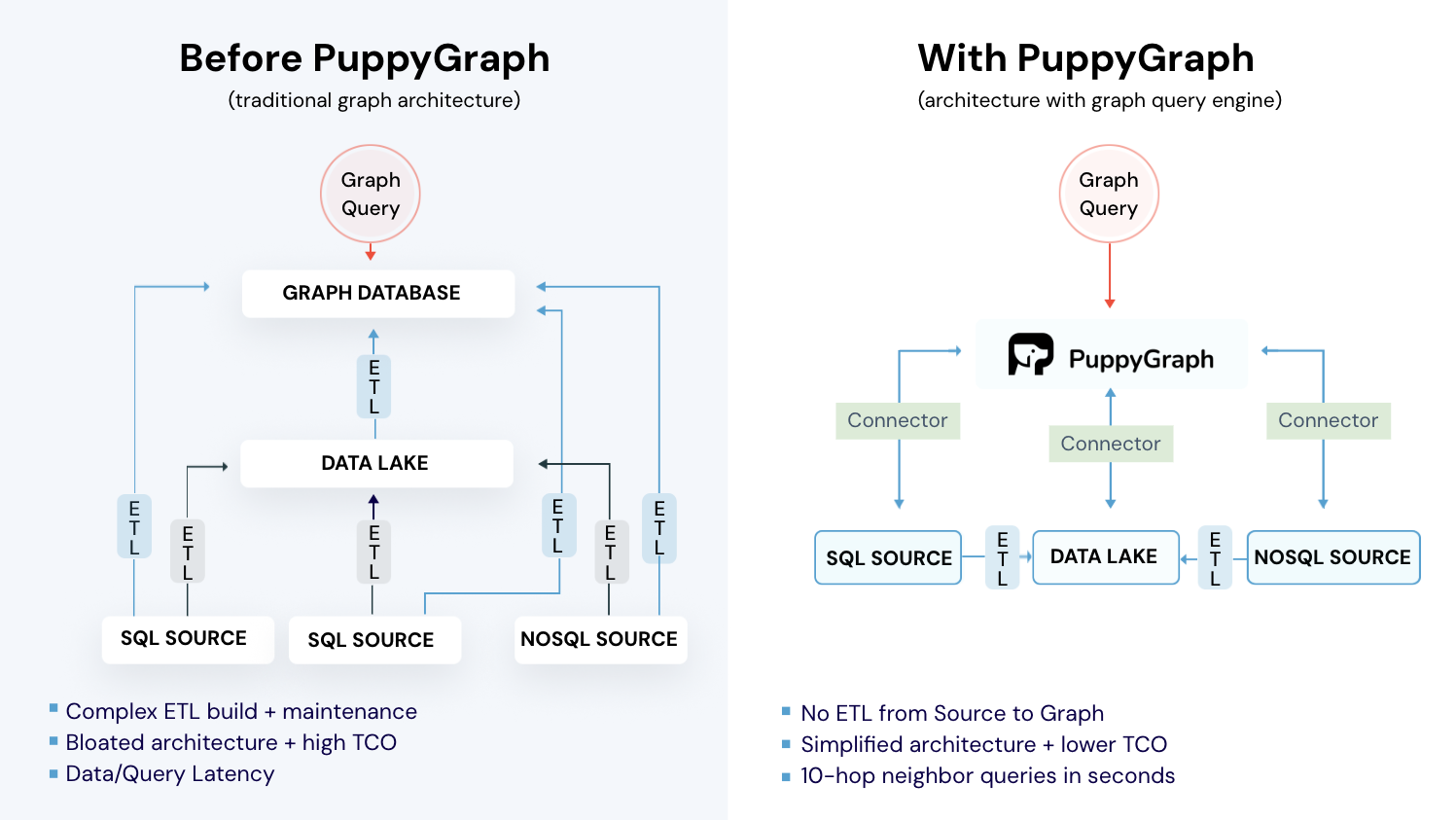
Without ETL overhead, you can use the agentic traversal approach described earlier. AI agents treat PuppyGraph's graph layer as a tool in a broader reasoning workflow, deciding at each step how to traverse the graph based on the question's needs. To see a step-by-step walkthrough, you can check out the GraphRAG guide we shared earlier in this blog!
Choose the right infrastructure and everything else gets easier. A graph query engine that works with your existing data stack means you can prototype a GraphRAG pipeline in hours rather than weeks, test against real production data, and scale without the operational overhead of a separate graph database.
Conclusion
GraphRAG augments traditional RAG with structured graph retrieval, giving large language models the relational context needed for multi-hop questions. Whether using local retrieval for entity-specific questions or global retrieval for corpus-wide summarization, the core components form a pipeline that preserves explicit relationships and exposes them as contextual information for reasoning.
The practical impact is clearest in domains with rich relational data: infrastructure diagnostics where issues chain across systems, fraud detection where transaction networks reveal patterns, and supply chain analysis where disruptions propagate through dependency graphs. Structured graph reasoning excels in these domains.
If you're testing GraphRAG with your data, choose the infrastructure carefully. PuppyGraph lets you query your warehouse or lakehouse as a graph with no ETL and no data duplication. Explore the forever-free PuppyGraph Developer Edition, or book a demo to see it in action.

Matt is a developer at heart with a passion for data, software architecture, and writing technical content. In the past, Matt worked at some of the largest finance and insurance companies in Canada before pivoting to working for fast-growing startups.

Get started with PuppyGraph!


Developer Edition
- Forever free
- Single noded
- Designed for proving your ideas
- Available via Docker install
Enterprise Edition
- 30-day free trial with full features
- Everything in developer edition & enterprise features
- Designed for production
- Available via AWS AMI & Docker install