


PuppyGraph on MongoDB: Native Graph Queries Without ETL

Structured data across a wide range of workloads—from product catalogs to telemetry streams to user activity logs. Its schema-less structure and distributed architecture make it a natural fit for applications that demand both agility and scale.
But in many real-world scenarios, data points aren’t just valuable on their own—they’re more powerful when understood in context. Connections between entities often reveal the patterns that matter most: how users interact, how systems behave, and how events unfold over time. While MongoDB provides expressive tools for working with nested documents and join operations across collections, some types of relationship analysis are more naturally expressed as graph queries.
That’s where PuppyGraph comes in. It adds a real-time graph layer on top of your existing MongoDB deployment—no ETL, no data duplication. You can define a graph model across your collections and run queries using openCypher or Gremlin, all without modifying your source data.
In this tutorial, we’ll walk through how PuppyGraph connects to MongoDB, how it complements document-based architectures with graph capabilities, and how you can get started running graph queries with minimal setup.
What is MongoDB?
MongoDB is a document-oriented NoSQL database designed to store and manage data in a flexible, JSON-like format. Unlike traditional relational databases that use tables and rows, MongoDB employs collections and documents, allowing for dynamic schemas that can evolve with application requirements. This flexibility makes it particularly well-suited for handling semi-structured and unstructured data, accommodating use cases such as content management systems, real-time analytics, AI vector search, and Internet of Things (IoT) applications.
In MongoDB, data is organized into collections of documents, each containing key-value pairs. This structure enables developers to represent complex hierarchical relationships within a single document, reducing the need for expensive join operations. For example, a document representing a blog post can encapsulate not only the post content but also metadata like author information and comments, all within the same document.
The database offers a rich set of features, including a powerful query API that supports field searches, range queries, and regular expressions. Indexing capabilities enhance query performance, allowing developers to create indexes on any field. Additionally, MongoDB’s aggregation framework facilitates data transformation and analysis directly within the database, streamlining the development of analytics applications.
MongoDB Atlas: Managed Cloud Database Service
Recognizing the operational challenges associated with managing databases, MongoDB introduced MongoDB Atlas, a fully managed cloud database service. MongoDB Atlas simplifies the deployment, scaling, and management of MongoDB databases, allowing developers to focus on building applications rather than handling database administration tasks.
MongoDB Atlas provides automated deployment across major cloud providers, including AWS, Google Cloud Platform, and Microsoft Azure, offering flexibility and global reach. It features automated backups, ensuring data durability and facilitating disaster recovery. Built-in monitoring tools provide real-time insights into database performance, enabling proactive optimization and maintenance.
Security is a core component of MongoDB Atlas, with features such as end-to-end encryption, network isolation, and fine-grained access controls to protect sensitive data. The platform also supports compliance with various industry standards, making it suitable for applications with stringent security requirements.
By combining the flexibility of MongoDB’s document model with the operational simplicity of a managed service, MongoDB Atlas empowers organizations to build and scale applications with greater agility and confidence.
Graph Analytics for MongoDB using PuppyGraph
For teams working with MongoDB, many valuable insights come from understanding how entities relate across collections—whether it’s tracing user journeys, mapping operational dependencies, or detecting linked anomalies. In many cases, understanding those relationships across documents and collections can unlock deeper insights, especially when the goal is to trace connections, analyze paths, or detect patterns that span multiple entities.
PuppyGraph adds a real-time graph layer to MongoDB, allowing teams to query those relationships using graph-specific languages like Gremlin or openCypher. Without migrating or duplicating data, you can define how collections map to nodes and edges, then run graph queries directly against MongoDB Atlas or self-hosted deployments. Under the hood, PuppyGraph connects via the MongoDB Atlas SQL JDBC driver, querying live data and returning results with no ETL or transformation required.
This integration offers several key benefits:
- Query Live Data, Not Snapshots: MongoDB often powers applications with dynamic, operational data – user interactions, catalogs, IoT streams, or content updates. PuppyGraph allows the execution of graph queries directly on this live data. This means you can immediately analyze emerging relationships, detect anomalies like fraud patterns as they happen, or power real-time recommendation engines without waiting for slow batch processes or dealing with data staleness.
- Traverse Relationships with Purpose-Built Queries: Go beyond simple document retrieval. Graph query languages like Gremlin and openCypher, supported by PuppyGraph, are purpose-built for traversing connections, finding paths, analyzing influence, and understanding network structures. This facilitates the application of graph algorithms for tasks like PageRank (identifying importance), community detection (finding clusters), pathfinding, and more, uncovering insights hidden within the relationships scattered across your MongoDB documents – insights that might be difficult or inefficient to obtain using standard document queries alone.
- No ETL, No New Stack: Instead of building a separate graph system and maintaining sync jobs, PuppyGraph works directly with MongoDB. This means lower operational overhead, fewer moving parts, and analytics that always reflect current application state—all from your existing data platform. It ensures your analytics always reflect the current state of your operational data, providing a unified source of truth for both document-based and graph-based analysis.
Integration Architecture: PuppyGraph and MongoDB
Integrating PuppyGraph with MongoDB Atlas involves a series of components working together to enable seamless graph analytics capabilities.
Architectural Components
- MongoDB Atlas: A fully managed cloud database service that stores data in a flexible, document-oriented format.
- MongoDB Atlas SQL JDBC Driver: Provides SQL-based access to MongoDB Atlas databases, facilitating connections with SQL-compatible tools and applications.
- PuppyGraph: Connects to MongoDB Atlas via the JDBC driver, allowing users to define graph schemas over existing collections and execute graph queries using languages like Gremlin or openCypher.
Integration Steps
- Prepare data in the MongoDB Atlas cluster: Create or import the necessary collections into your MongoDB Atlas cluster.
- Configure Connection Settings: Set up the connection in PuppyGraph using the JDBC connection string.
- Define the Graph Schema: Map MongoDB collections to graph elements such as vertices and edges within PuppyGraph.
- Execute Graph Queries and Algorithms: Perform complex graph traversals and run graph algorithms directly on MongoDB data using Gremlin or openCypher.
This architecture allows organizations to leverage their existing MongoDB infrastructure to perform sophisticated graph analyses, enhancing their data analysis capabilities without the need for additional data processing steps.

Step-by-Step: Running Graph Queries on MongoDB Atlas with PuppyGraph
We will go through a simple demo and see how MongoDB is integrated with PuppyGraph exactly. It is also recommended to read the getting-started document. What we will do here is essentially the same.
Prerequisites
Create a MongoDB Atlas Cluster
See the documentation to get started with MongoDB Atlas. You can use the MongoDB Atlas CLI or MongoDB Atlas UI to deploy a free cluster easily. Follow the detailed instructions in the document up to step 4, Manage the IP access list.
- Create a MongoDB Atlas cluster.
- Deploy a Free cluster.
- Manage database users for your cluster.
- Manage the IP access list.
Data Preparation
See the documentation to connect your cluster via MongoDB Shell. You need to get your connection string. After connecting successfully, run the following commands to create collections and insert data. Documents within a collection are flexible; they don’t have to adhere to the same schema. However, to mitigate potential errors, we create collections with schema validators.
First selecting the database, which will be automatically created after collections are created.
use modernThen create collections with schema validators and insert data.
db.createCollection("person", {
   validator: {
      $jsonSchema: {
         bsonType: "object",
         required: [ "id", "name", "age" ],
         properties: {
            id: { bsonType: "string" },
            name: { bsonType: "string" },
            age: { bsonType: "int"}
         }
      }
   }
})
db.person.insertMany([
  {id: 'v1', name: 'marko', age: 29},
  {id: 'v2', name: 'vadas', age: 27},
  {id: 'v4', name: 'josh', age: 32},
  {id: 'v6', name: 'peter', age: 35}
])
db.createCollection("software", {
   validator: {
      $jsonSchema: {
         bsonType: "object",
         required: [ "id", "name", "lang" ],
         properties: {
            id: { bsonType: "string" },
            name: { bsonType: "string" },
            lang: { bsonType: "string" }
         }
      }
   }
})
db.software.insertMany([
  {id: 'v3', name: 'lop', lang: 'java'},
  {id: 'v5', name: 'ripple', lang: 'java'}
])
db.createCollection("created", {
   validator: {
      $jsonSchema: {
         bsonType: "object",
         required: [ "id", "from_id", "to_id", "weight" ],
         properties: {
            id: { bsonType: "string" },
            from_id: { bsonType: "string" },
            to_id: { bsonType: "string" },
            weight: { bsonType: "double" }
         }
      }
   }
})
db.created.insertMany([
  {id: 'e9', from_id: 'v1', to_id: 'v3', weight: 0.4},
  {id: 'e10', from_id: 'v4', to_id: 'v5', weight: Double(1.1)},
  {id: 'e11', from_id: 'v4', to_id: 'v3', weight: 0.4},
  {id: 'e12', from_id: 'v6', to_id: 'v3', weight: 0.2}
])
db.createCollection("knows", {
   validator: {
      $jsonSchema: {
         bsonType: "object",
         required: [ "id", "from_id", "to_id", "weight" ],
         properties: {
            id: { bsonType: "string" },
            from_id: { bsonType: "string" },
            to_id: { bsonType: "string" },
            weight: { bsonType: "double" }
         }
      }
   }
})
db.knows.insertMany([
  {id: 'e7', from_id: 'v1', to_id: 'v2', weight: 0.5},
  {id: 'e8', from_id: 'v1', to_id: 'v4', weight: Double(1.1)}
])
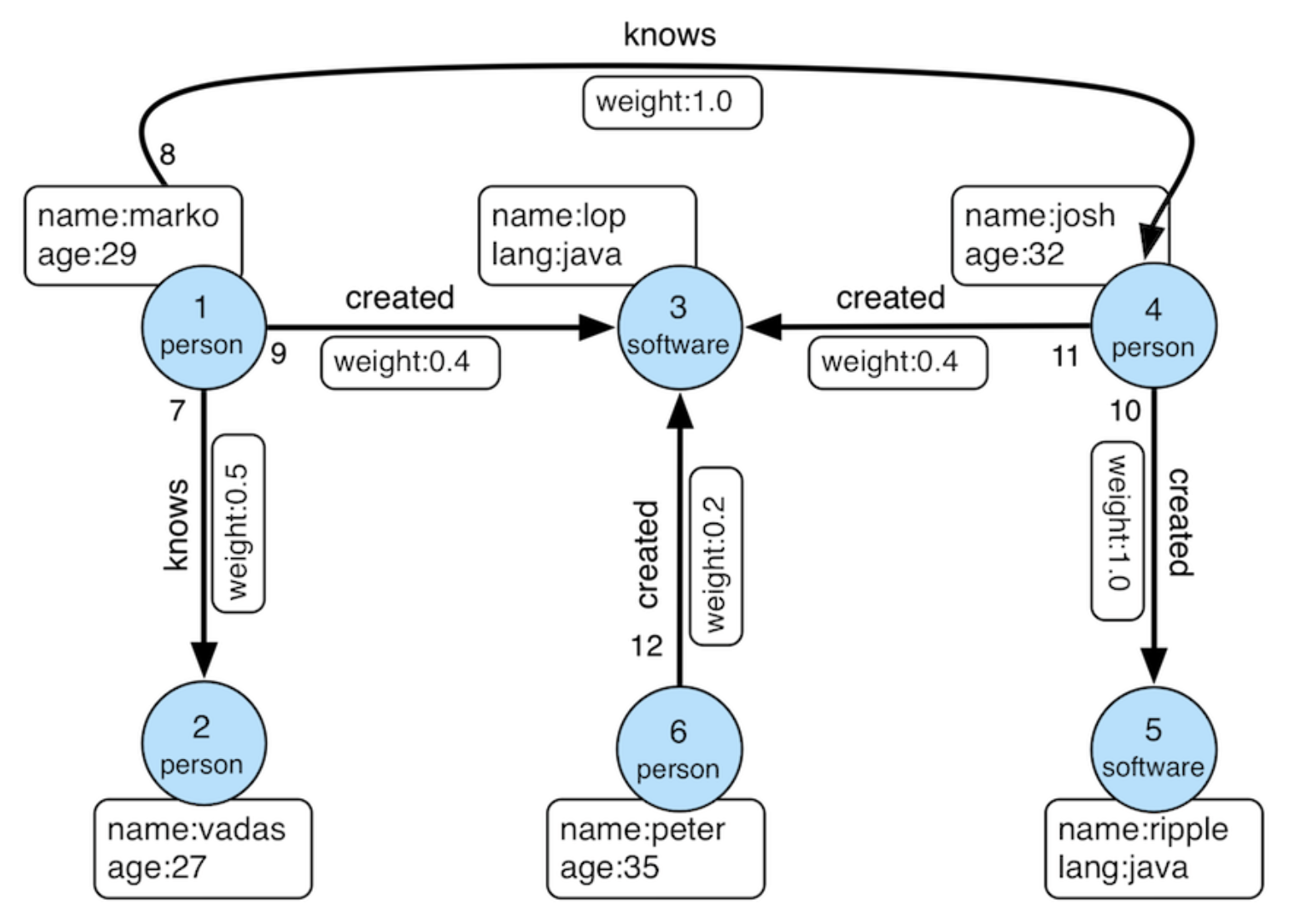
The data for this demo comes from the "modern" graph defined by Apache TinkerPop.
Deployment
Run the following command to start the PuppyGraph container. The PUPPYGRAPH_PASSWORD environment variable sets the password for the default user puppygraph to puppygraph123. You can change it to your desired password. The --rm flag ensures that the container is removed after it stops.
docker run -p 8081:8081 -p 8182:8182 -p 7687:7687 -e PUPPYGRAPH_PASSWORD=puppygraph123 -d --name puppy --rm --pull=always puppygraph/puppygraph:stableModeling the Graph
Log into the PuppyGraph Web UI at http://localhost:8081 with the following credentials:
- Username: puppygraph
- Password: puppygraph123
There are two methods to model the graph:
- Use the Graph Schema Builder to create the schema manually.
- Upload the schema JSON file. We have prepared a template for you and you need to fill some fields about connection. You can upload the schema in two ways:
- In Web UI, select the file schema.json under Upload Graph Schema JSON, then click on Upload.
- Run the following command in the terminal:
curl -XPOST -H "content-type: application/json" --data-binary @./schema.json --user "puppygraph:puppygraph123" localhost:8081/schema{
"catalogs": [
{
"name": "mongodb_data",
"type": "mongodb",
"jdbc": {
"username": "[username]",
"password": "[password]",
"jdbcUri": "[jdbcUri]",
"driverClass": "com.mongodb.jdbc.MongoDriver"
}
}
],
"graph": {
"vertices": [
{
"label": "person",
"oneToOne": {
"tableSource": {
"catalog": "mongodb_data",
"schema": "modern",
"table": "person"
},
"id": {
"fields": [
{
"type": "String",
"field": "id",
"alias": "id"
}
]
},
"attributes": [
{
"type": "Long",
"field": "age",
"alias": "age"
},
{
"type": "String",
"field": "name",
"alias": "name"
}
]
}
},
{
"label": "software",
"oneToOne": {
"tableSource": {
"catalog": "mongodb_data",
"schema": "modern",
"table": "software"
},
"id": {
"fields": [
{
"type": "String",
"field": "id",
"alias": "id"
}
]
},
"attributes": [
{
"type": "String",
"field": "lang",
"alias": "lang"
},
{
"type": "String",
"field": "name",
"alias": "name"
}
]
}
}
],
"edges": [
{
"label": "knows",
"fromVertex": "person",
"toVertex": "person",
"tableSource": {
"catalog": "mongodb_data",
"schema": "modern",
"table": "knows"
},
"id": {
"fields": [
{
"type": "String",
"field": "id",
"alias": "id"
}
]
},
"fromId": {
"fields": [
{
"type": "String",
"field": "from_id",
"alias": "from_id"
}
]
},
"toId": {
"fields": [
{
"type": "String",
"field": "to_id",
"alias": "to_id"
}
]
},
"attributes": [
{
"type": "Double",
"field": "weight",
"alias": "weight"
}
]
},
{
"label": "created",
"fromVertex": "person",
"toVertex": "software",
"tableSource": {
"catalog": "mongodb_data",
"schema": "modern",
"table": "created"
},
"id": {
"fields": [
{
"type": "String",
"field": "id",
"alias": "id"
}
]
},
"fromId": {
"fields": [
{
"type": "String",
"field": "from_id",
"alias": "from_id"
}
]
},
"toId": {
"fields": [
{
"type": "String",
"field": "to_id",
"alias": "to_id"
}
]
},
"attributes": [
{
"type": "Double",
"field": "weight",
"alias": "weight"
}
]
}
]
}
}When using the graph schema builder or the schema.json file, you need to fill in either the JDBC Connection String or jdbcUri – they are the same thing. The JDBC Connection String is used to connect to the MongoDB Atlas database.To find it, follow the instructions as:
- In the MongoDB Atlas UI, go to the Data Federation page and click Connect for the federated database instance that you want to connect to.
- Under Access your data through tools, select Atlas SQL.
- Under Select your driver, select JDBC Driver from the dropdown.
- Under Get Connection String, select the database that you want to connect to and copy the connection string. In this demo, the database is modern.

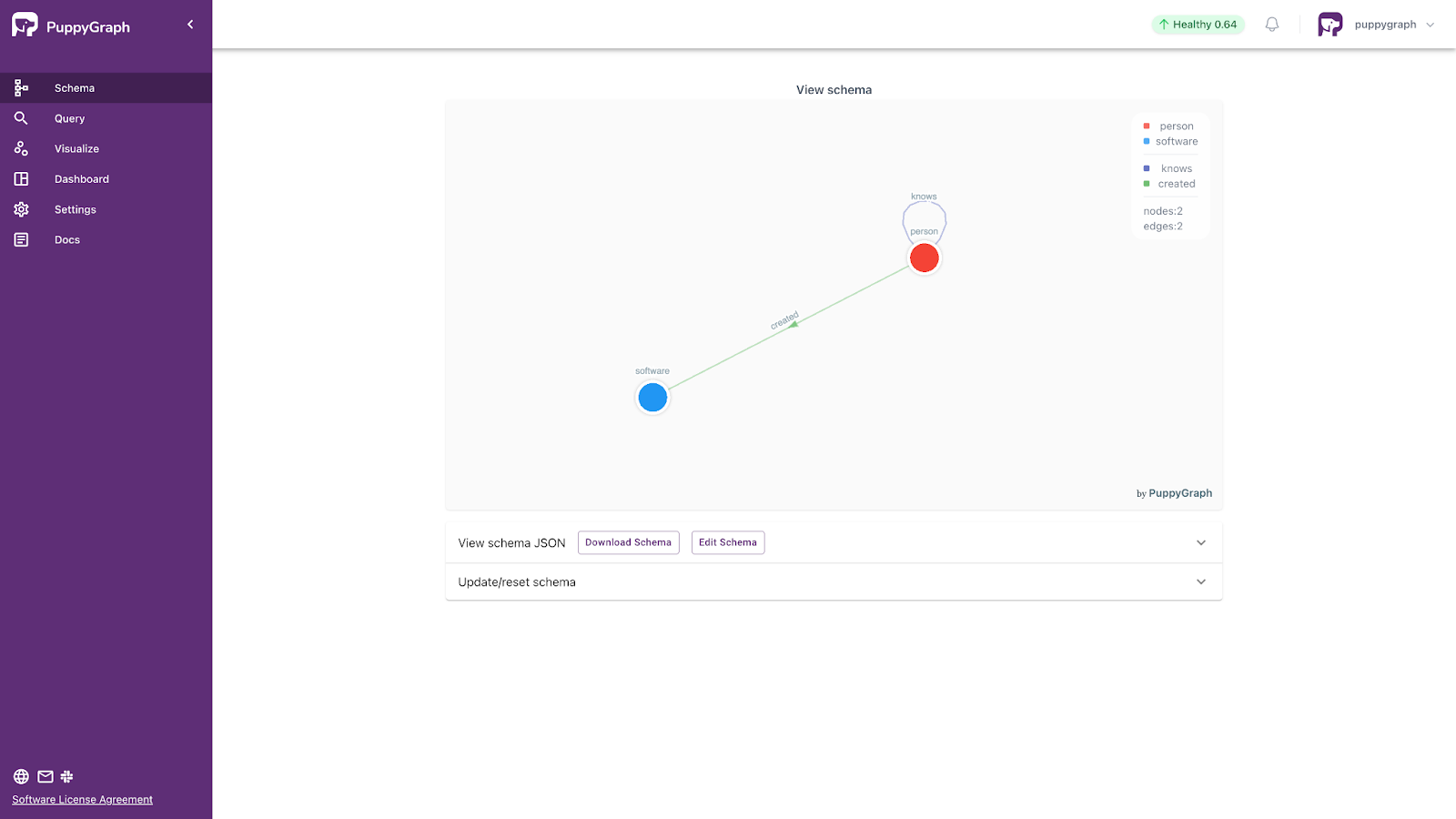
You also need to fill the user and password fields according to your setting. Once complete, you would see the schema graph.
Querying the Graph
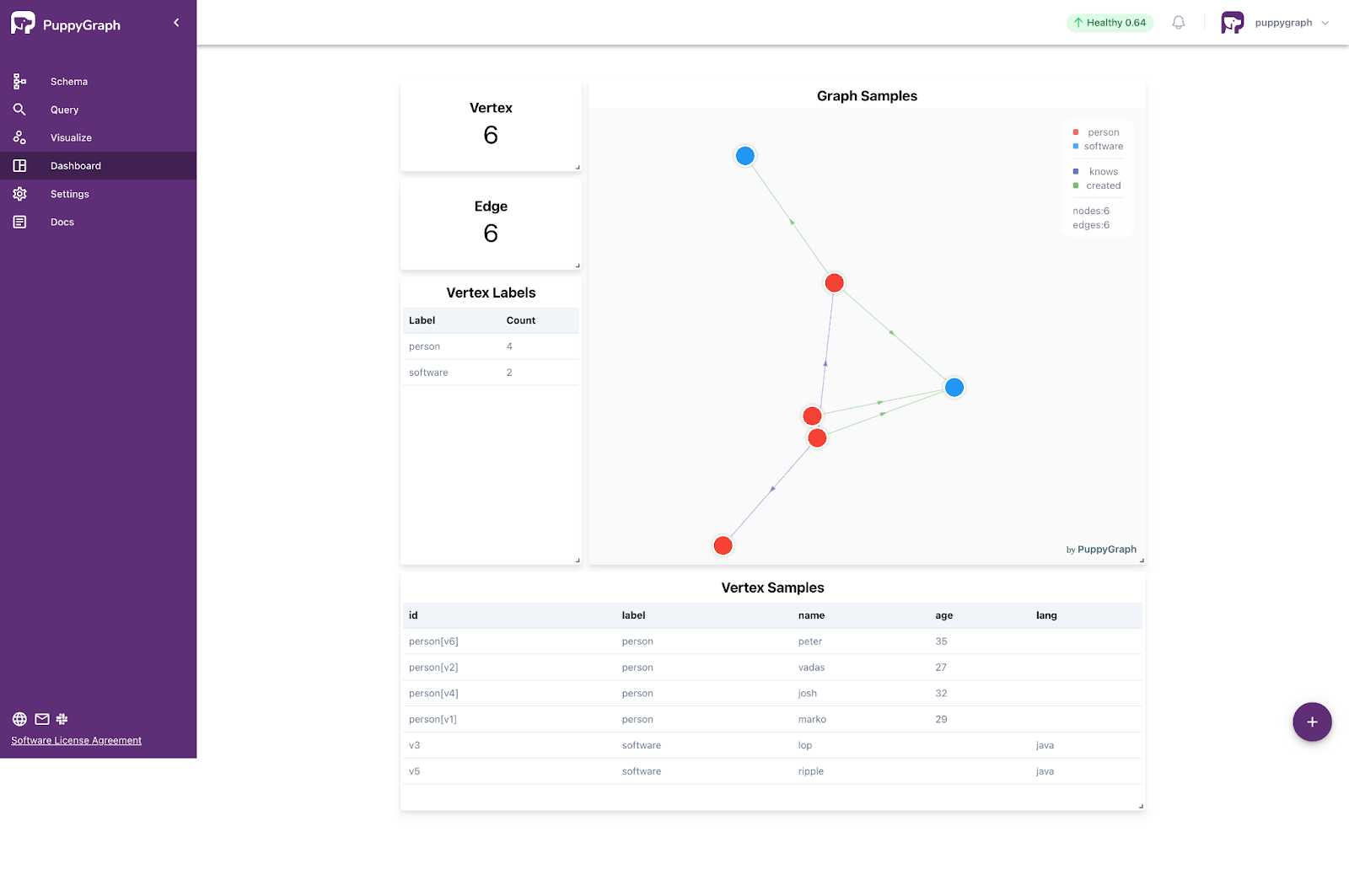
Go to Dashboard in the Web UI, you can see dashboard like the picture below. Each tab represents a query, and you can click on them to view the details. To add a new tab, click the plus (+) symbol located at the bottom right corner.
Navigate to Query in the Web UI, then you can use Graph Query for Gremlin/openCypher queries with visualization.

Here are some example queries:
- Retrieve an vertex named “marko”.
Gremlin:
g.V().has("name", "marko").valueMap()openCypher:
MATCH (v {name: 'marko'}) RETURN v- Retrieve the paths from “marko” to the software created by those whom “marko” knows.
Gremlin:
g.V().has("name", "marko")
.out("knows").out("created").path()
openCypher:
MATCH p=(v {name: 'marko'})-[:knows]->()-[:created]->()
RETURN p
Conclusion
MongoDB’s flexible document model and robust query engine make it a strong foundation for modern applications, whether you’re powering transactional systems or real-time analytics. For use cases where understanding relationships between entities is key, adding graph capabilities can unlock a new class of insights.
With PuppyGraph, teams can introduce real-time graph analytics into their MongoDB Atlas environment without modifying schemas, exporting data, or managing additional infrastructure. By connecting through the MongoDB Atlas SQL Interface, PuppyGraph lets you define graph models directly over your collections and query them using Gremlin or openCypher—while the data stays exactly where it is.
If you're working with connected data and want to explore graph queries on MongoDB Atlas, try PuppyGraph’s free Developer Edition and experience what’s possible—no ETL required.
.jpeg)
Weimo Liu is the CEO and co-founder of PuppyGraph, bringing his profound expertise in databases and query engines from his time at Google, where he worked on the F1 team developing the unified SQL analytic engine that supports most data formats/sources and serves billions of queries per day. Before his tenure at Google, he excelled as a research scientist at TigerGraph, creating a query language for parallel distributed graph databases and a compiler to translate queries into executable C++ code. With a PhD in Computer Science from George Washington University and a role as a program committee member and reviewer for top conferences and journals in the database area, Weimo is recognized as a distinguished expert in his field.

Get started with PuppyGraph!


Developer Edition
- Forever free
- Single noded
- Designed for proving your ideas
- Available via Docker install
Enterprise Edition
- 30-day free trial with full features
- Everything in developer edition & enterprise features
- Designed for production
- Available via AWS AMI & Docker install