


Snowflake Iceberg Tables: Setup, Features & Best Practices
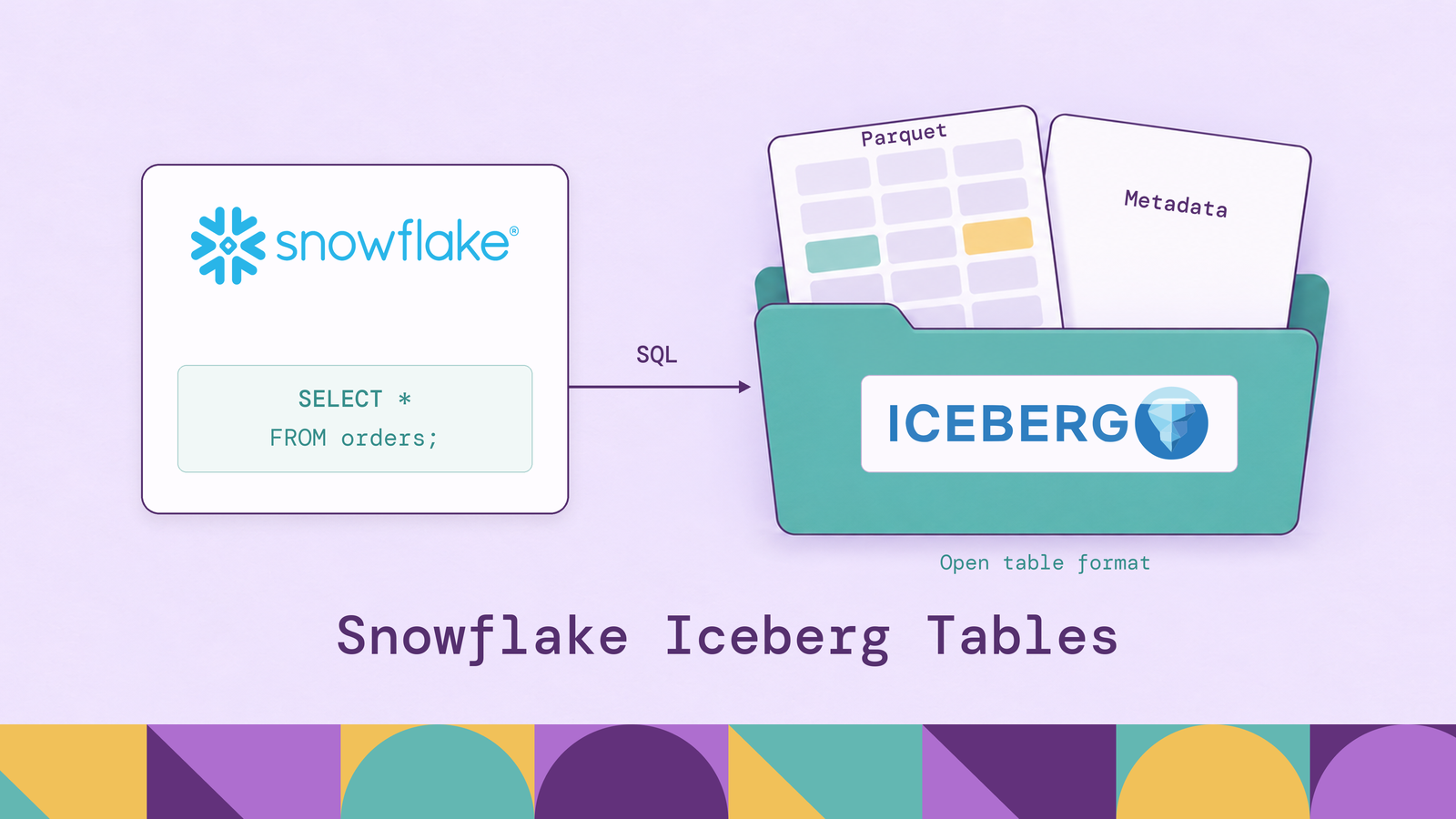
Most of what you can and cannot do with a Snowflake Iceberg table follows from a single choice made at creation: which system acts as the table's Iceberg catalog. With Snowflake as the catalog, the table behaves almost like a native one, and other engines read the same files through Snowflake. With an external catalog such as AWS Glue, Snowflake becomes one engine among several.
This guide covers how Snowflake Iceberg tables work, their architecture, features, and two types, then walks through setup, loading, querying, catalog integration, and schema evolution, with performance notes, limitations, and best practices along the way.
What are Snowflake Iceberg tables?
Apache Iceberg tables in Snowflake are tables that store data as Parquet files and describe them with Iceberg metadata that records which data files make up each version of the table. Snowflake reads and writes them with the same SQL as its native tables. If the format itself is new to you, our Apache Iceberg tutorial covers it from the ground up.
The difference from a native Snowflake table is ownership of the files. A native table stores data in Snowflake's internal format, readable only through Snowflake. An Iceberg table's files follow a public specification, and they live either in cloud storage you control and pay for (Amazon S3, Google Cloud Storage, or Azure Storage, connected through an external volume) or in Snowflake storage, which Snowflake manages and bills for. Either way, Spark, Trino, Flink, or any other Iceberg-capable engine can read the table. Unlike Snowflake's older external tables, which are read-only, Iceberg tables can be written to, with ACID transactions and snapshots from the Iceberg format.
Teams choose them when an existing data lake should not be copied into Snowflake, when several engines must share one copy of the data, or when the storage layer should stay portable if the compute platform changes.
How do Snowflake Iceberg tables work?
Every Iceberg table depends on a catalog: a service that stores the location of the table's current metadata file and swaps that pointer atomically when a write commits. Whoever holds the pointer decides who may commit and who maintains the table.
When Snowflake is the catalog, Snowflake writes new Parquet data files to the table's storage and commits the change itself. Snowflake generates Iceberg metadata files periodically and writes them next to the data. Snowflake also handles maintenance such as compaction, and removes metadata for expired snapshots after the retention period.
When an external catalog owns the table, Snowflake reads the table's metadata from that catalog through a catalog integration. Snowflake still plans and runs queries on its warehouses, but it learns about new snapshots only when it refreshes the table, either manually or by polling the catalog on an interval. Writes from Snowflake are supported for tables in Iceberg REST catalogs.
Snowflake Iceberg tables architecture
Storage. Parquet data files and Iceberg metadata files sit in object storage. On an external volume, that storage is a bucket or container in your cloud account, and Snowflake reaches it through an IAM role or service principal that you grant. With Snowflake storage, Snowflake owns the bucket.
Table format. Iceberg metadata defines the table: its schema, partitioning, snapshots, and the data files each snapshot contains.
Catalog. Either Snowflake (through Horizon Catalog, Snowflake's built-in catalog and governance layer) or an external catalog registered through a catalog integration: an Iceberg REST catalog such as AWS Glue or Snowflake Open Catalog, or plain metadata files in object storage.
Compute. Snowflake virtual warehouses run Snowflake's queries. Other engines bring their own compute and reach the tables through whichever catalog owns them. For Snowflake-managed tables, Horizon Catalog exposes an Iceberg REST endpoint for that purpose.
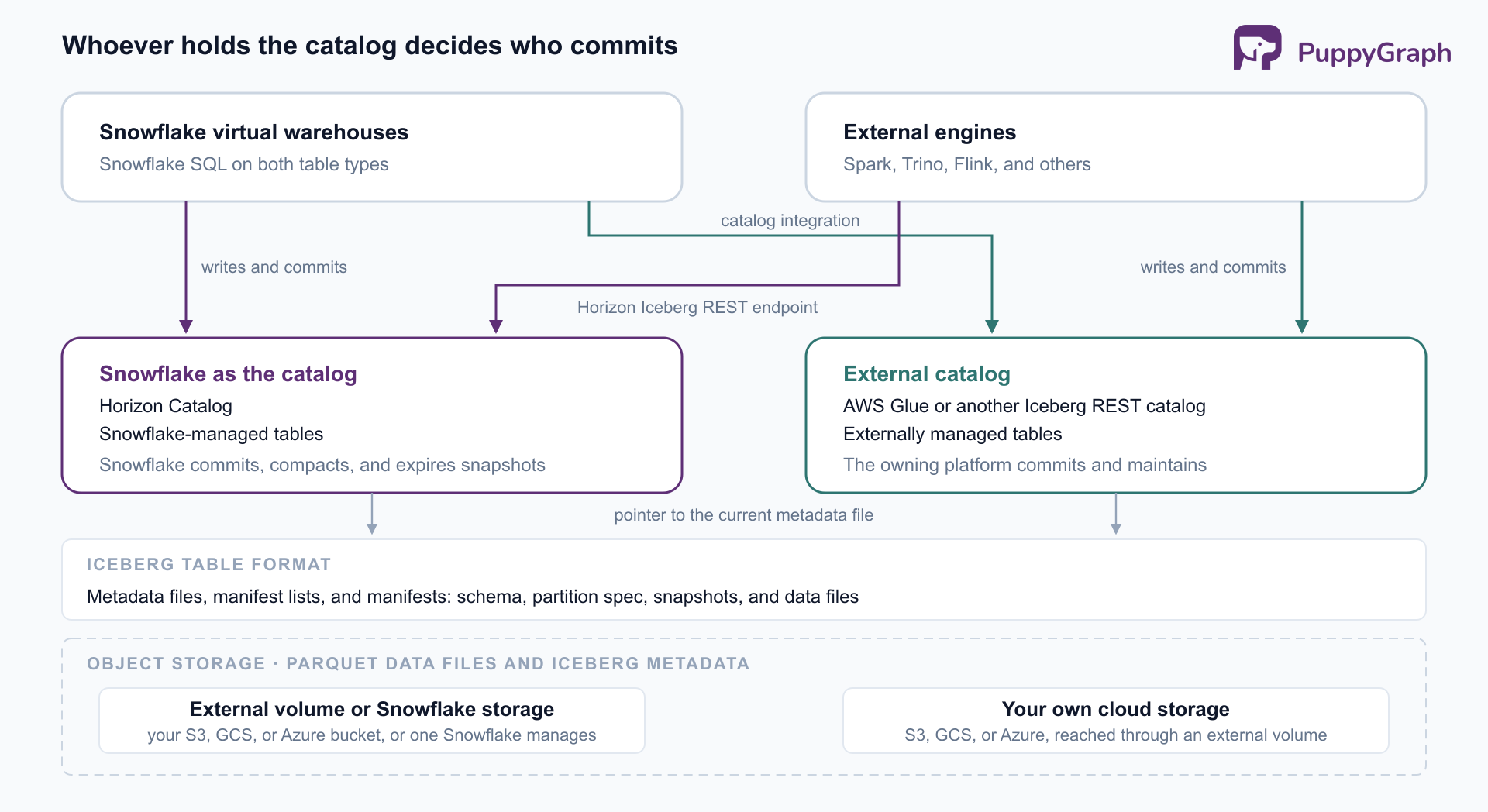
A native Snowflake table bundles all four layers. Here storage and format are open and shared, compute is per engine, and the catalog is the one piece that grants write authority, which is why choosing it shapes everything that follows.
Key features of Snowflake Iceberg tables
ACID transactions and snapshots. Each committed write produces a new Iceberg snapshot, and readers always see a consistent one.
Time Travel. For Snowflake-managed tables, any snapshot committed within the table's DATA_RETENTION_TIME_IN_DAYS window can be queried with Snowflake Time Travel.
Partitioning and partition evolution. Snowflake-managed tables accept a PARTITION BY clause using Iceberg's partition transforms. The partition spec can also be changed after creation, with new data written under the new spec and existing files left in place.
Governance. Snowflake's role-based access control, masking policies, and row access policies can be applied to Iceberg tables.
Interoperability. External engines read and write Snowflake-managed tables through Horizon Catalog's Iceberg REST API, and Snowflake reads and writes tables in external Iceberg REST catalogs.
Performance: clustering, compaction, and file size
Snowflake-managed tables support clustering keys, which organize data files around frequently filtered columns, and automatic compaction, which merges the small files frequent writes produce. Compaction is on by default and can be turned off for a table whose files another system already compacts.
One setting deserves care at creation: the storage serialization policy, which cannot be changed later, trades Snowflake-side performance against compatibility with other engines. If external engines will read the table, test them against it before loading production data.
Snowflake does not cluster or compact externally managed tables, so their performance depends on the writer's file sizes and Parquet column statistics. Snowflake's best practices recommend making sure the engine that writes the table, such as Spark or Trino, records complete column statistics.
Types of Iceberg tables in Snowflake
Snowflake classifies Iceberg tables by catalog: Snowflake-managed tables use Snowflake as the catalog, and externally managed tables use a catalog integration. Externally managed tables can come from an Iceberg REST catalog (including AWS Glue and Snowflake Open Catalog), from Iceberg metadata files in object storage, or from Delta Lake files read directly. A catalog-linked database is a convenience layer over an Iceberg REST catalog integration: it discovers the remote catalog's namespaces and tables automatically and keeps them in sync.
Choose Snowflake-managed when Snowflake is the main writer, since it then handles maintenance and other engines still have a standard way in. Choose externally managed when another platform, such as a Spark pipeline writing to Glue, is already the system of record and Snowflake is one of its consumers. An externally managed table can be converted to Snowflake-managed later with ALTER ICEBERG TABLE ... CONVERT TO MANAGED.
Limitations by table type
Externally managed tables get only a subset of Snowflake's platform features, and Snowflake neither maintains them nor cleans up their snapshots in your storage.
Snowflake-managed tables on an external volume leave data protection to you: Fail-safe does not apply, and detecting and cleaning up orphaned files is your responsibility.
Prerequisites for creating Snowflake Iceberg tables
A catalog decision. Snowflake-managed or externally managed, using the comparison above.
Storage. Nothing to provision for Snowflake storage. For an external volume, a bucket or container in Amazon S3, Google Cloud Storage, or Azure Storage, plus an IAM role or service principal that grants Snowflake access to it. Cross-region volumes work but add data transfer costs, so keep the bucket in the account's region when you can.
Privileges. An administrator role to create the external volume and any catalog integration, both account-level objects, and a role that can create Iceberg tables in the target schema and use the volume.
For externally managed tables, the external catalog itself, such as a Glue Data Catalog with existing Iceberg tables, and an IAM role Snowflake can use to call it. Any virtual warehouse can run the DDL and queries.
How to create Iceberg tables in Snowflake
The example below creates a Snowflake-managed table on Amazon S3. First, create the external volume that points at the bucket and names the IAM role Snowflake will assume.
CREATE EXTERNAL VOLUME lake_vol
  STORAGE_LOCATIONS = (
    (
      NAME = 'lake-us-east-1'
      STORAGE_PROVIDER = 'S3'
      STORAGE_BASE_URL = 's3://acme-lake/iceberg/'
      STORAGE_AWS_ROLE_ARN = 'arn:aws:iam::123456789012:role/snowflake-iceberg'
      STORAGE_AWS_EXTERNAL_ID = 'acme_iceberg_ext_id'
    )
  )
  ALLOW_WRITES = TRUE;
Next, run DESC EXTERNAL VOLUME lake_vol and add the IAM user ARN it returns, with the external ID, to the role's trust policy so Snowflake can assume the role.
With the volume in place, create the table. BASE_LOCATION is a path relative to the volume and cannot be changed afterward, so give each table its own.
CREATE ICEBERG TABLE analytics.sales.orders (
  order_id         NUMBER(19,0),
  customer_id      NUMBER(19,0),
  order_ts         TIMESTAMP_NTZ(6),
  status           VARCHAR,
  amount           NUMBER(12,2),
  payment_card_id  NUMBER(19,0),
  ship_address_id  NUMBER(19,0)
)
  EXTERNAL_VOLUME = 'lake_vol'
  CATALOG = 'SNOWFLAKE'
  BASE_LOCATION = 'sales/orders';
The later examples also use a customers table, created the same way, along with payment_cards and addresses tables that the last two columns of orders reference:
CREATE ICEBERG TABLE analytics.sales.customers (
  customer_id  NUMBER(19,0),
  name         VARCHAR,
  segment      VARCHAR
)
  EXTERNAL_VOLUME = 'lake_vol'
  CATALOG = 'SNOWFLAKE'
  BASE_LOCATION = 'sales/customers';
To use Snowflake storage instead, skip the volume and set EXTERNAL_VOLUME = SNOWFLAKE_MANAGED. Both parameters can also be set as database or schema defaults, and CREATE ICEBERG TABLE ... AS SELECT creates and populates a table in one step.
An externally managed table needs a catalog integration first, which points Snowflake at the external catalog, such as Glue's Iceberg REST endpoint, and names an IAM role it can assume (the catalog integration section below covers it). Assuming an integration named glue_int that sets a Glue database as its default namespace, the table itself is short:
CREATE ICEBERG TABLE analytics.sales.shipments
  EXTERNAL_VOLUME = 'lake_vol'
  CATALOG = 'glue_int'
  CATALOG_TABLE_NAME = 'shipments'
  AUTO_REFRESH = TRUE;
It has no column list, because the schema comes from the catalog.
How to load data into Snowflake Iceberg tables
Snowflake-managed tables support several loading paths, including INSERT, COPY INTO, and Snowpipe.
COPY INTO loads staged files into a table:
COPY INTO analytics.sales.orders
  FROM @raw_orders_stage
  FILE_FORMAT = (TYPE = PARQUET)
  MATCH_BY_COLUMN_NAME = CASE_SENSITIVE;
By default it rewrites the source files as new Parquet files; for Parquet sources, a load mode can also copy the files into the table's location as they are.
Externally managed tables are loaded by whichever engine owns them, or by Snowflake INSERT and MERGE statements committed through the Iceberg REST catalog.
Loading best practices
Keep compaction on for streaming writes. Snowpipe Streaming and frequent micro-batches produce many small files, which compaction merges on Snowflake-managed tables.
Refresh externally managed tables after maintenance. When the owning engine compacts files or expires snapshots, refresh the table in Snowflake or enable AUTO_REFRESH. Frequent refreshes also stay short, since refresh time depends on the snapshots and files to catch up on.
Separate volumes by access level. A read-only volume for externally managed tables and a read-write one for Snowflake-managed tables keeps Snowflake's write permissions scoped to the data it owns.
How to query Snowflake Iceberg tables
Inside Snowflake, Iceberg tables are queried and joined with the same SQL as native tables:
SELECT c.segment, SUM(o.amount) AS revenue
FROM analytics.sales.orders o
JOIN analytics.sales.customers c ON c.customer_id = o.customer_id
WHERE o.order_ts >= DATEADD(day, -30, CURRENT_TIMESTAMP())
GROUP BY c.segment;
For a Snowflake-managed table, Time Travel reads an earlier snapshot:
SELECT COUNT(*)
FROM analytics.sales.orders AT(OFFSET => -3600);
Other engines reach the same snapshots with their own syntax, as our Iceberg time travel guide explains.
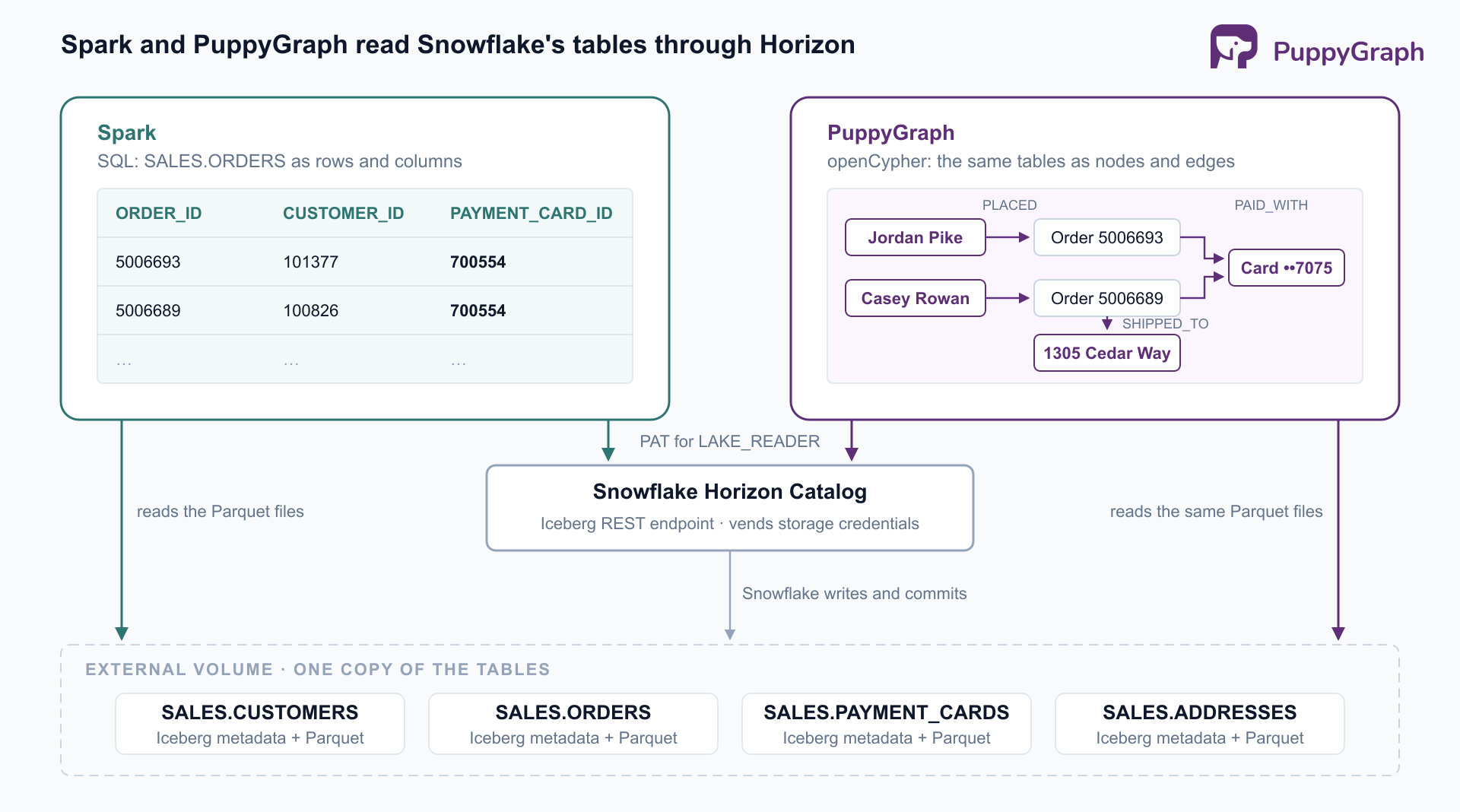
Outside Snowflake, engines query Snowflake-managed Iceberg tables through Horizon Catalog's Iceberg REST endpoint, and Snowflake can vend storage credentials so the engine needs no bucket access of its own. In Spark, that means pointing an Iceberg REST catalog at the endpoint, with a Snowflake database such as ANALYTICS as its warehouse, a programmatic access token, and a role such as LAKE_READER. Snowflake's Horizon guide lists the exact properties. From there, SALES.ORDERS reads like any other Iceberg table.
Reading requires SELECT on the table and USAGE on its database and schema. Native Snowflake tables are not reachable through Horizon's Iceberg endpoint.
Querying the same tables as a graph
Spark reads these tables as rows. A fraud question asks how the rows connect: when an account files a chargeback on a promotional first order, which other accounts share its payment cards or shipping addresses, or share them with those accounts, a few links out? In SQL that takes a recursive query over both kinds of link; as a graph it is one variable-length pattern. PuppyGraph can run that pattern on the same tables by connecting to the Horizon endpoint as one more Iceberg engine.
PuppyGraph is a distributed graph query engine that queries tables where they already live, in SQL databases, data warehouses, and data lakes and lakehouses, including direct reads of open table formats like Iceberg and Delta Lake. You connect the existing sources, define a graph schema that maps tables to nodes and edges, and query with openCypher and Gremlin. There is no ETL into a separate graph database, and the same tables stay queryable with SQL from Snowflake. A built-in AI assistant builds the graph schema from the connected tables and answers questions in plain language by writing and running the graph queries itself. PuppyGraph deploys in your own environment, and native Snowflake tables can join the same graph through its Snowflake connector.
To connect, add an Iceberg catalog in PuppyGraph with the Snowflake Horizon (Iceberg REST) option, using the same endpoint, database, and LAKE_READER role as the Spark settings above and a programmatic access token for that role; Horizon vends the storage credentials. PuppyGraph's Snowflake Horizon tutorial walks through the fields. Then, on the AI page, ask the AI assistant, which needs an LLM API key, to build a graph of customers, orders, payment cards, and shipping addresses. It inspects the tables, tests each join against the data, and proposes the model as a plan to approve:
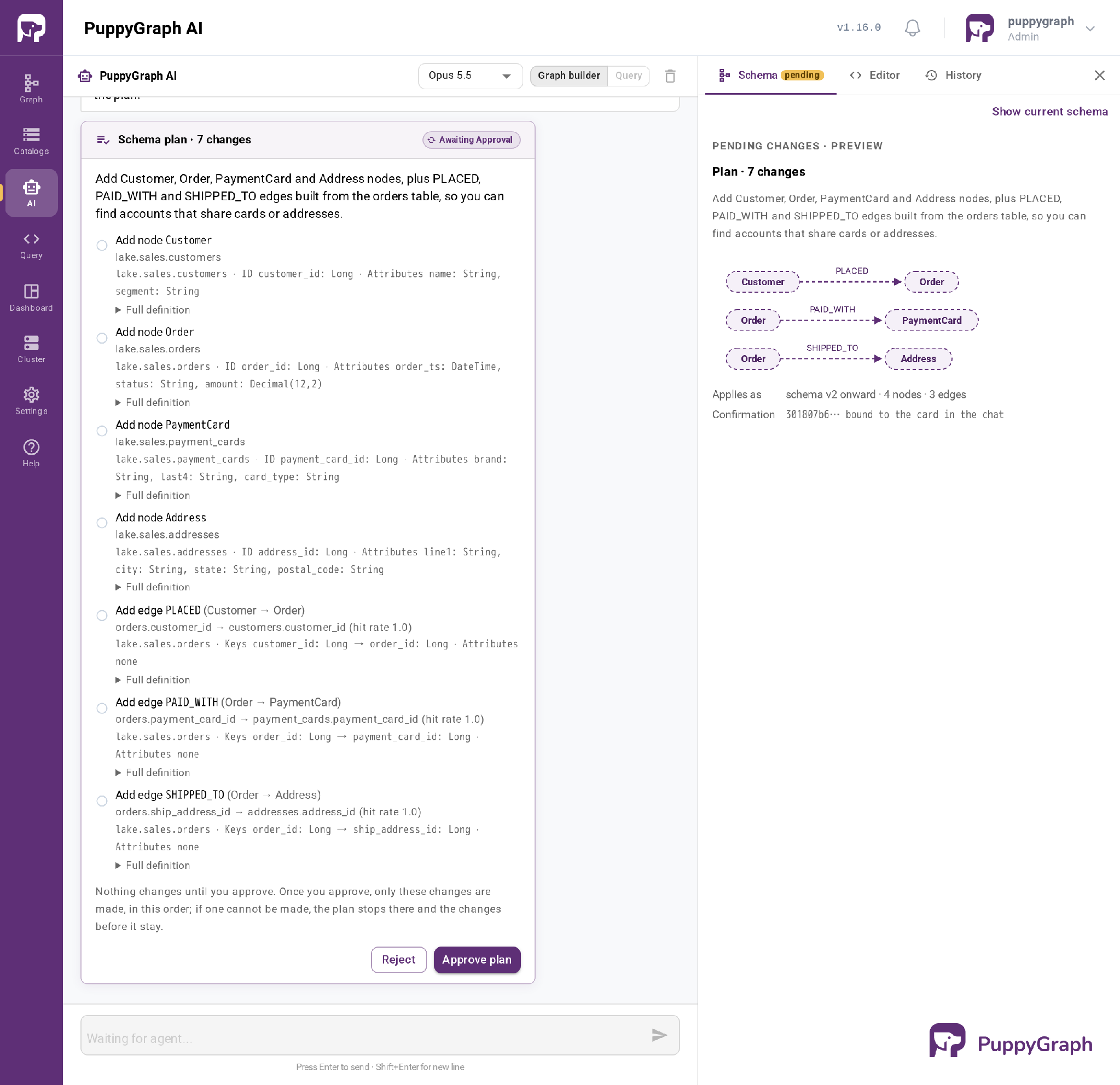
Approving it creates Customer, Order, PaymentCard, and Address nodes with PLACED, PAID_WITH, and SHIPPED_TO edges. Two accounts are one link apart when their orders share a card or an address, which is four hops in this graph, so the query follows up to 16 hops from the chargeback account and divides the shortest path by four:
MATCH p = (a:Customer {name: 'Casey Rowan'})
          -[:PLACED|PAID_WITH|SHIPPED_TO*1..16]-(b:Customer)
WHERE b <> a
RETURN b.name AS account, min(length(p)) / 4 AS links
ORDER BY links, account
customer chain amounts
CUS-1182 ["ACC-40117","ACC-73518","ACC-28406","ACC-52930"] [248500,121000,118600]
CUS-1182 ["ACC-40117","ACC-73518","ACC-91142","ACC-56083","ACC-52930"] [248500,124000,123200,121500]Five accounts, the farthest four links away. An account that shares Taylor Brandt's card sits a fifth link out, past the bound.
Asked the same question in Query mode, the assistant returned the same five accounts and the card or address behind each link:
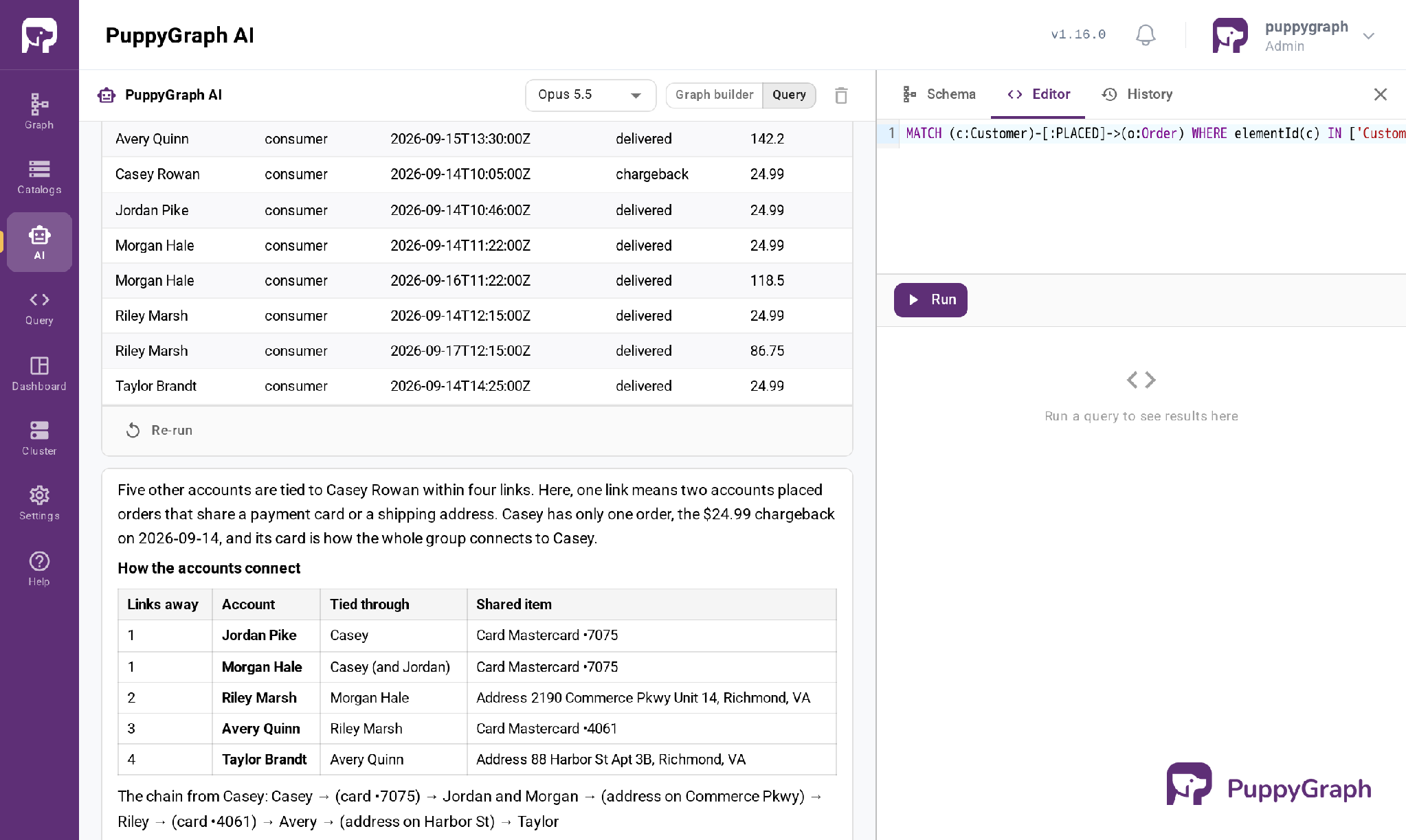
One chargeback card leads, through two shared addresses and a second card, to five accounts: the group a fraud review would look at together, found without copying the tables anywhere.
Snowflake Iceberg tables catalog integration
A catalog integration is an account-level object that tells Snowflake where an external catalog lives and how to authenticate to it. One integration serves every table in that catalog. Snowflake supports integrations for Iceberg REST catalogs (including AWS Glue's REST endpoint and Snowflake Open Catalog), for Iceberg metadata files in object storage, and for Delta Lake files and Delta Sharing.
Refresh. Tables from external catalogs, including Iceberg REST catalogs and AWS Glue, can set AUTO_REFRESH = TRUE, after which Snowflake polls the catalog on the integration's refresh interval. Without it, ALTER ICEBERG TABLE ... REFRESH brings the table up to date manually.
Catalog-linked databases. A catalog-linked database points at a REST catalog integration and mirrors it: remote namespaces become schemas, tables appear automatically, and drops and renames in the remote catalog propagate to Snowflake. Unlike a standard database, it can also create tables in the remote catalog, and Snowflake's best practices recommend it for remote REST catalogs.
The other direction. To expose Snowflake-managed tables to other engines, the current path is Horizon Catalog's Iceberg REST endpoint.
Schema evolution in Snowflake Iceberg tables
Iceberg tracks columns by ID, so schema changes are metadata operations that rewrite no data files. Snowflake exposes this through ALTER ICEBERG TABLE on Snowflake-managed tables:
ALTER ICEBERG TABLE analytics.sales.orders ADD COLUMN channel VARCHAR;
ALTER ICEBERG TABLE analytics.sales.orders RENAME COLUMN status TO order_status;
ALTER ICEBERG TABLE analytics.sales.orders DROP COLUMN channel;
Dropping a column frees no storage until the files holding it are rewritten.
Schema evolution during loads. With ENABLE_SCHEMA_EVOLUTION = TRUE on the table, a COPY INTO that uses MATCH_BY_COLUMN_NAME can add new top-level columns found in incoming files.
Partition evolution. The partition spec evolves with ADD, DROP, or REPLACE PARTITION BY. Existing files keep their original layout, and new writes follow the new spec:
ALTER ICEBERG TABLE analytics.sales.orders
  ADD PARTITION BY (DAY(order_ts));
Externally managed tables evolve in the engine that owns them. A schema change made in Spark against a Glue table reaches Snowflake when the table refreshes.
Conclusion
Snowflake Iceberg tables put Snowflake's SQL, warehouses, and governance on top of open Parquet and Iceberg files, and the catalog decides how much of Snowflake comes with them. Snowflake-managed tables get clustering, compaction, Time Travel, and partition evolution, and other engines reach them through Horizon Catalog's Iceberg REST endpoint. Externally managed tables keep another platform as the system of record, with refresh and maintenance left to you. Pick the catalog first, keep storage close to compute, and choose the serialization policy with external readers in mind; the rest of the setup follows.
Try the forever-free PuppyGraph Developer Edition and book a demo with the team to see how openCypher and Gremlin queries traverse warehouse and lakehouse tables, with no graph-specific ETL, including the Snowflake-managed Iceberg tables Horizon Catalog already exposes.

Sa Wang is a Software Engineer with exceptional mathematical ability and strong coding skills. He holds a Bachelor's degree in Computer Science and a Master's degree in Philosophy from Fudan University, where he specialized in Mathematical Logic.

Get started with PuppyGraph!


Developer Edition
- Forever free
- Single noded
- Designed for proving your ideas
- Available via Docker install
Enterprise Edition
- 30-day free trial with full features
- Everything in developer edition & enterprise features
- Designed for production
- Available via AWS AMI & Docker install