Apache Iceberg Tutorial: Guide for Beginners
- Sa WangSoftware Engineer
The guide

Query your table as a graph.Petabytes. Subsecond. No data movement.
Nearly every Apache Iceberg feature, from atomic commits to time travel, follows from one design decision: the format keeps an exact record of which files make up a table, and leaves storing the data and running the queries to other systems. That division of labor is worth understanding before typing any SQL, because it explains both what Iceberg gives you and what you still have to bring.
This tutorial covers the concepts first, then builds a working lakehouse in Docker with Apache Spark 4.1, Iceberg 1.12.0, a REST catalog, and S3-compatible storage. The running example is a bakery supply chain: you create its tables, change rows, evolve the schema, query current and past versions, and finally trace a recalled lot by querying the same tables as a graph. Every statement below was run against that setup.
What is Apache Iceberg?
Apache Iceberg is an open table format for large analytic datasets, defined by a public specification. The data lives in ordinary columnar files (Parquet by default, or ORC and Avro) on object storage or HDFS. Iceberg adds metadata that records the table's schema, its partitioning, and the exact list of files in each version of the table, so any engine that implements the spec can treat those files as one consistent table. The project began at Netflix to improve on the Hive table layout, according to its incubator proposal, and has been a top-level Apache project since 2020.
The format gives you atomic commits with serializable isolation, schema changes that never rewrite data files, partitioning that queries do not have to know about, time travel, and tables that many engines can share. It has no query engine of its own: you bring an engine (Spark, in this tutorial) and a catalog that tracks table names. Delta Lake and Apache Hudi sit at the same layer, and our Iceberg vs Delta Lake comparison covers how they differ.
How does Apache Iceberg work?
A Hive table is a directory: its contents are whatever files are in it, so planning a query means listing directories, and a change to the table's contents cannot be atomic, as the Iceberg reliability docs describe. Iceberg replaces the directory listing with a file list kept in metadata.
Reading a table starts at the catalog, which returns the table's current metadata file. That file names the current snapshot, which leads through a manifest list and manifests to the data files, along with their partition values and column statistics. The engine skips files that cannot match the query's filters before opening any data.
Writing to a table builds the same tree from the bottom up: new data files, new manifests, a new metadata file, and finally an atomic swap of the catalog's pointer to that file. Readers see nothing new until the swap and the whole new version after it. If another writer committed first, the swap fails and the writer retries against the new state.
Row-level changes use copy-on-write by default, rewriting the data files that contain affected rows. Merge-on-read instead writes small delete files that readers apply at query time; the write.delete.mode, write.update.mode, and write.merge.mode table properties choose between them.
Table state, then, is an immutable tree of files plus one pointer that moves. Atomic commits, rollback, and time travel all follow from keeping old trees around.
Apache Iceberg architecture
An Iceberg deployment has three layers.
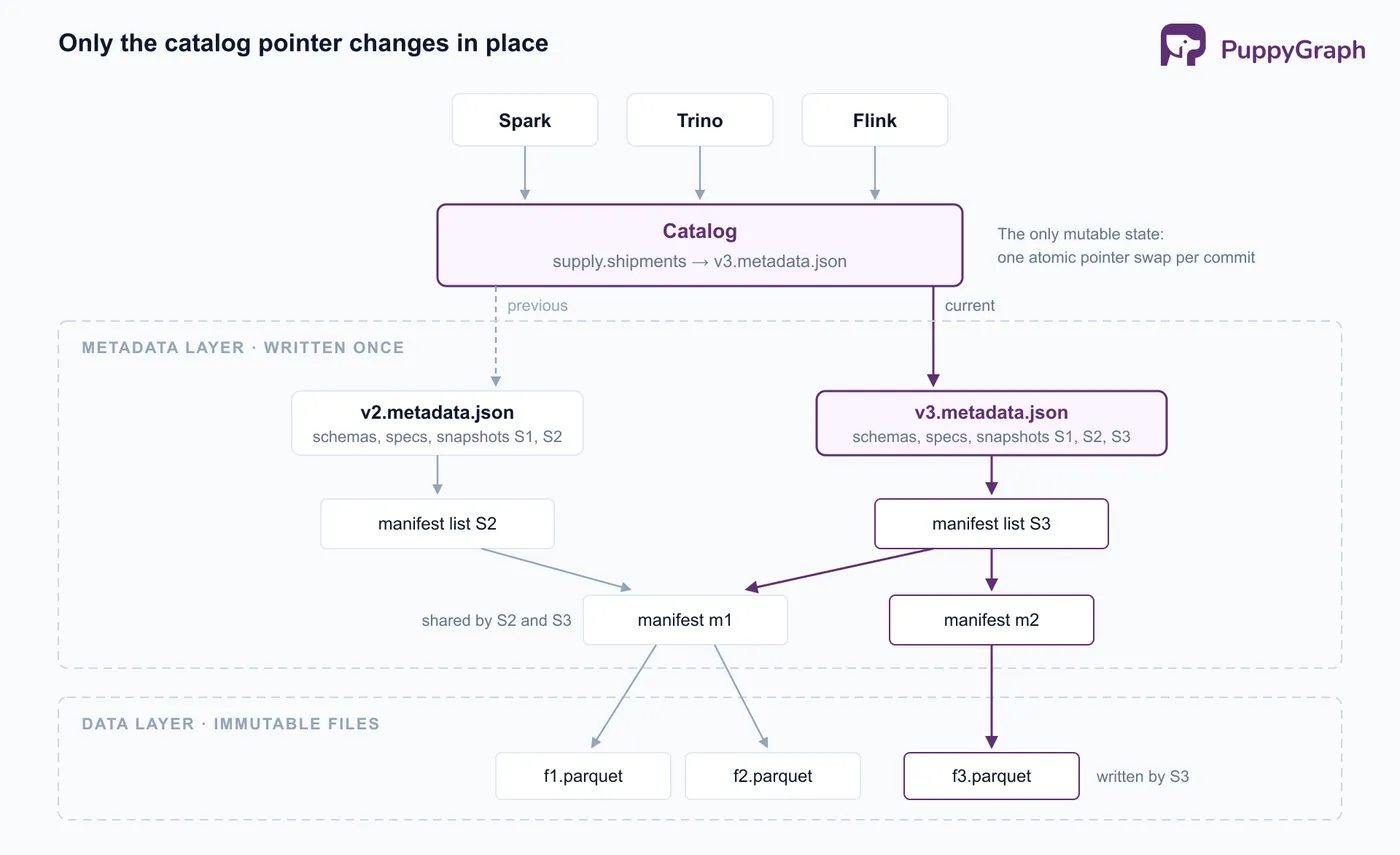
The catalog layer maps table names to each table's current metadata file and performs the atomic swap that makes a commit visible. Options include the REST catalog (an OpenAPI specification that any server can implement, and the one this tutorial uses), Hive Metastore, AWS Glue, JDBC, and Nessie.
The metadata layer is a tree of files. The table metadata file holds the schemas (with a unique ID for every column), partition specs, snapshots, and branches and tags; each snapshot's manifest list and manifests record which data files belong to it. Manifests are shared between snapshots, so a small commit adds little metadata.
The data layer holds Parquet, ORC, or Avro data files, plus delete files on merge-on-read tables. Files are written once and removed only by maintenance, after no retained snapshot references them.
Prerequisites for this Apache Iceberg tutorial
Everything runs on one machine with Docker and Docker Compose, internet access on the first run (to pull the images and the Iceberg jars), and basic SQL. The graph step at the end uses an AI assistant that needs an API key for an LLM.
The stack pins Spark 4.1.3, the Iceberg 1.12.0 Spark runtime iceberg-spark-runtime-4.1_2.13, RustFS 1.0.3 for S3-compatible storage, and PuppyGraph 1.16.0. The runtime name encodes the Spark version (4.1) and the Scala version (2.13), and both must match the Spark build; the Iceberg releases page lists the runtimes each release ships. The REST catalog is the Iceberg project's test fixture image at 1.10.1, which the 1.12.0 client in Spark talks to over the standard REST API.
How to set up Apache Iceberg with Spark
Create a directory with two files. docker-compose.yaml starts Spark, the REST catalog, RustFS, a one-shot job that creates the warehouse bucket, and PuppyGraph, all on one network:
services:
  spark:
    image: apache/spark:4.1.3-java17
    container_name: spark
    command: ["tail", "-f", "/dev/null"]
    volumes:
      - ./spark-defaults.conf:/opt/spark/conf/spark-defaults.conf:ro
    environment: [AWS_ACCESS_KEY_ID=admin, AWS_SECRET_ACCESS_KEY=password, AWS_REGION=us-east-1]
    networks: [lakehouse]
  iceberg-rest:
    image: apache/iceberg-rest-fixture:1.10.1
    container_name: iceberg-rest
    environment:
      - AWS_ACCESS_KEY_ID=admin
      - AWS_SECRET_ACCESS_KEY=password
      - AWS_REGION=us-east-1
      - CATALOG_WAREHOUSE=s3://warehouse/
      - CATALOG_IO__IMPL=org.apache.iceberg.aws.s3.S3FileIO
      - CATALOG_S3_ENDPOINT=http://rustfs:9000
      - CATALOG_S3_PATH__STYLE__ACCESS=true
    depends_on:
      create-bucket: {condition: service_completed_successfully}
    networks: [lakehouse]
  rustfs:
    image: rustfs/rustfs:1.0.3
    container_name: rustfs
    environment: [RUSTFS_ACCESS_KEY=admin, RUSTFS_SECRET_KEY=password]
    healthcheck:
      test: ["CMD", "curl", "-fsS", "http://localhost:9000/health"]
      interval: 2s
      retries: 30
    networks: [lakehouse]
  create-bucket:
    image: rustfs/rustfs:1.0.3
    depends_on:
      rustfs: {condition: service_healthy}
    entrypoint: ["sh", "-c", "curl -fsS --aws-sigv4 aws:amz:us-east-1:s3 --user admin:password -X PUT http://rustfs:9000/warehouse"]
    networks: [lakehouse]
  puppygraph:
    image: puppygraph/puppygraph:1.16.0
    container_name: puppygraph
    environment: [PUPPYGRAPH_USERNAME=puppygraph, PUPPYGRAPH_PASSWORD=puppygraph123]
    ports: ["8081:8081", "7687:7687"]
    networks: [lakehouse]
networks:
  lakehouse: {}
spark-defaults.conf configures Iceberg in Spark:
spark.jars.packages                      org.apache.iceberg:iceberg-spark-runtime-4.1_2.13:1.12.0,org.apache.iceberg:iceberg-aws-bundle:1.12.0
spark.jars.ivy                           /tmp/.ivy2
spark.sql.extensions                     org.apache.iceberg.spark.extensions.IcebergSparkSessionExtensions
spark.sql.catalog.lake                   org.apache.iceberg.spark.SparkCatalog
spark.sql.catalog.lake.type              rest
spark.sql.catalog.lake.uri               http://iceberg-rest:8181
spark.sql.catalog.lake.io-impl           org.apache.iceberg.aws.s3.S3FileIO
spark.sql.catalog.lake.s3.endpoint       http://rustfs:9000
spark.sql.catalog.lake.s3.path-style-access  true
spark.sql.defaultCatalog                 lake
spark.jars.packages pulls the Iceberg runtime and the iceberg-aws-bundle jar that provides the S3 client, and spark.jars.ivy gives the download cache a writable path, because the image's spark user has no home directory. spark.sql.extensions adds Iceberg-specific SQL such as partition evolution and branch and tag DDL. The spark.sql.catalog.lake lines define a REST catalog named lake that stores files in RustFS, as described in the Spark configuration docs, and the last line makes it the default.
Start the stack and open a Spark SQL shell:
docker compose up -d
docker exec -it spark /opt/spark/bin/spark-sql
SELECT system.iceberg_version(); should return 1.12.0. The REST fixture is a test server, fine for learning; production deployments run a catalog service, Glue, or Hive Metastore instead.
How to create your first Apache Iceberg table
The example tracks a bakery supply chain well enough to trace a recall. Mills produce flour, a blender turns flour into muffin premix, bakeries make bread, buns, and muffins, a co-packer turns bread into croutons, and distribution centers (DCs) send finished goods to stores. Every batch is a lot. Four tables record the chain: facilities, lots, lot_inputs (which lots went into which), and shipments (every movement of a lot between facilities).
CREATE NAMESPACE IF NOT EXISTS lake.supply;

CREATE TABLE lake.supply.facilities (
  facility_id string,
  kind        string,
  city        string
) USING iceberg;

CREATE TABLE lake.supply.lots (
  lot_id      string,
  product     string,
  facility_id string,
  produced_ts timestamp
) USING iceberg;

CREATE TABLE lake.supply.lot_inputs (
  lot_id       string,
  input_lot_id string,
  quantity_kg  decimal(10, 2)
) USING iceberg;

CREATE TABLE lake.supply.shipments (
  shipment_id   bigint,
  lot_id        string,
  from_facility string,
  to_facility   string,
  cases         int,
  status        string,
  ship_ts       timestamp
)
USING iceberg
PARTITIONED BY (day(ship_ts));
day(ship_ts) is hidden partitioning: Iceberg derives the day from the timestamp, so queries filter on ship_ts itself and are pruned to the matching days automatically. The Spark DDL docs list the transforms Spark supports: year, month, day, hour, bucket, and truncate.
The examples below run on a month of generated sample data: 60 facilities, 460 lots, the records of which lots went into which, and about 1,800 shipments that follow from production, a few of them marked cancelled. One lot is added by hand: flour lot FL-1003-M2 from MILL-02, which bakery BAK-04 used in its bread and buns and the blender used in muffin premix. This is the lot the tutorial traces later. The outputs shown below come from the full data set. With only the rows printed here, every statement still runs, but most queries return fewer rows or none.
INSERT INTO lake.supply.lots VALUES
  ('FL-1003-M2', 'flour', 'MILL-02', TIMESTAMP '2026-10-03 06:00:00');

INSERT INTO lake.supply.lot_inputs VALUES
  ('BR-1004-B4', 'FL-1003-M2', 300.00),
  ('BN-1004-B4', 'FL-1003-M2', 150.00),
  ('MX-1004-X1', 'FL-1003-M2', 250.00);
Now change some rows. UPDATE, DELETE, and MERGE INTO work as described in the Spark writes docs. Shipments before October 29 are marked delivered, cancelled shipments are removed, and a carrier's feed corrects one destination and reports a shipment the table was missing. Before applying the feed, tag the current version so it can be read later by name:
UPDATE lake.supply.shipments SET status = 'delivered'
WHERE status = 'in_transit' AND ship_ts < TIMESTAMP '2026-10-29 00:00:00';

DELETE FROM lake.supply.shipments WHERE status = 'cancelled';

ALTER TABLE lake.supply.shipments CREATE TAG `before-carrier-feed`;

CREATE TEMPORARY VIEW carrier_feed AS SELECT * FROM VALUES
  (100197L, 'BN-1004-B4', 'DC-03', 'STR-019', 23, 'delivered', TIMESTAMP '2026-10-05 08:00:00'),
  (101769L, 'CR-1005-C1', 'DC-03', 'STR-021', 14, 'delivered', TIMESTAMP '2026-10-06 09:00:00')
  AS t(shipment_id, lot_id, from_facility, to_facility, cases, status, ship_ts);

MERGE INTO lake.supply.shipments t
USING carrier_feed u
ON t.shipment_id = u.shipment_id
WHEN MATCHED THEN UPDATE SET t.to_facility = u.to_facility, t.status = u.status
WHEN NOT MATCHED THEN INSERT *;
Each data change is a commit, and each commit is a snapshot, which the snapshots metadata table lists:
SELECT operation,
       summary['added-records']   AS added_rows,
       summary['deleted-records'] AS removed_rows,
       summary['added-data-files']   AS added_files,
       summary['deleted-data-files'] AS removed_files
FROM lake.supply.shipments.snapshots
ORDER BY committed_at;
append 1768 NULL 30 NULL
overwrite 1724 1724 28 28
overwrite 1178 1209 19 19
overwrite 65 64 2 1In the example run, the load appended 30 files, one per day of shipments. The three row-level changes show as overwrite because copy-on-write replaced the data files that held affected rows. The old files stay in the bucket, still referenced by the older snapshots.
Evolving the schema and partitioning
Suppose refrigerated carriers now report a temperature reading, cases becomes case_count with a wider type, and queries increasingly filter by lot:
ALTER TABLE lake.supply.shipments ADD COLUMN temp_c decimal(4, 1) AFTER status;
ALTER TABLE lake.supply.shipments RENAME COLUMN cases TO case_count;
ALTER TABLE lake.supply.shipments ALTER COLUMN case_count TYPE bigint;
ALTER TABLE lake.supply.shipments ADD PARTITION FIELD bucket(8, lot_id);

INSERT INTO lake.supply.shipments VALUES
  (101770, 'MF-1029-B6', 'DC-02', 'STR-031', 20, 'in_transit', 3.5, TIMESTAMP '2026-10-31 06:00:00'),
  (101771, 'MF-1029-B6', 'DC-02', 'STR-038', 18, 'in_transit', 4.0, TIMESTAMP '2026-10-31 07:00:00'),
  (101772, 'MF-1029-B6', 'DC-02', 'STR-045', 22, 'in_transit', 3.8, TIMESTAMP '2026-10-31 08:00:00');
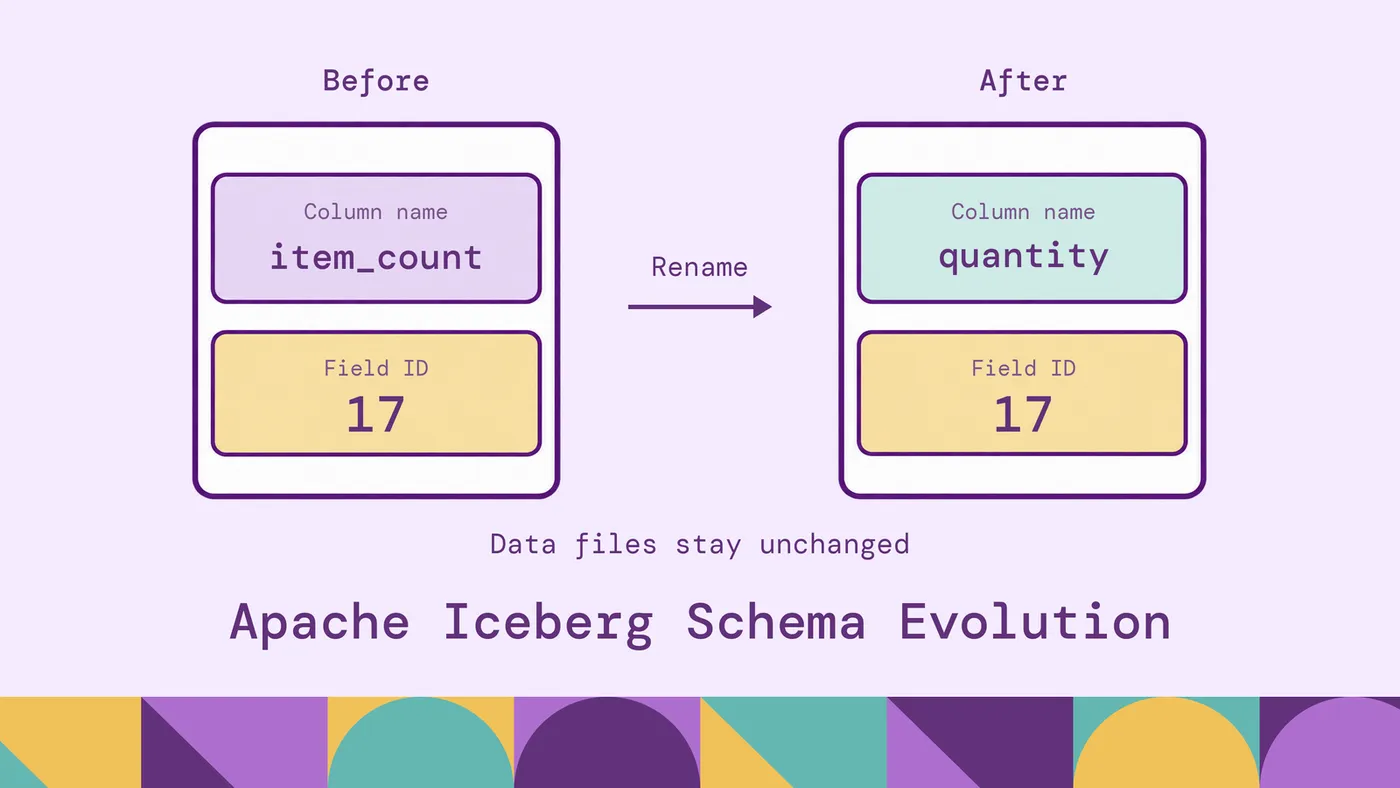
None of the ALTER TABLE statements rewrote a data file; each is a metadata change. Old rows read temp_c as NULL, and the renamed column keeps its values, because Iceberg tracks columns by ID, a guarantee the evolution docs spell out. Type changes are limited to safe widenings, such as int to bigint. The new bucket field applies only to data written afterward, older files keep their layout, and queries need no changes.
How to query Apache Iceberg tables
Querying an Iceberg table is ordinary SQL against its catalog name:
SELECT shipment_id, lot_id, to_facility, status
FROM lake.supply.shipments
WHERE ship_ts >= TIMESTAMP '2026-10-31 00:00:00'
  AND ship_ts <  TIMESTAMP '2026-11-01 00:00:00';
101770 MF-1029-B6 STR-031 in_transit
101771 MF-1029-B6 STR-038 in_transit
101772 MF-1029-B6 STR-045 in_transitThe filter names no partition column, yet Iceberg reads only the files whose day(ship_ts) partition can match. Joins work as in any SQL engine. This one starts the recall of FL-1003-M2: the stores that received a lot made directly from it.
SELECT DISTINCT s.to_facility AS store, l.product
FROM lake.supply.lot_inputs i
JOIN lake.supply.lots l       ON l.lot_id = i.lot_id
JOIN lake.supply.shipments s  ON s.lot_id = i.lot_id
JOIN lake.supply.facilities f ON f.facility_id = s.to_facility
WHERE i.input_lot_id = 'FL-1003-M2'
  AND f.kind = 'store'
ORDER BY store;
STR-002 burger buns
STR-005 sandwich bread
STR-019 burger buns
STR-036 sandwich bread
STR-043 sandwich breadIceberg also exposes its metadata as tables, such as history, snapshots, files, partitions, and refs, queried by appending the name to the table identifier, as the Spark queries docs show.
Time travel and rollback
Old versions stay queryable until they are expired. VERSION AS OF takes a snapshot ID from the history table, or a tag or branch name; TIMESTAMP AS OF takes a point in time. The tag set before the carrier feed shows the buns lot's shipments as they were:
SELECT * FROM lake.supply.shipments VERSION AS OF 'before-carrier-feed'
WHERE lot_id = 'BN-1004-B4'
ORDER BY shipment_id;
100156 BN-1004-B4 BAK-04 DC-03 107 delivered 2026-10-04 18:00:00
100170 BN-1004-B4 DC-03 STR-002 16 delivered 2026-10-05 06:00:00
100197 BN-1004-B4 DC-03 STR-016 23 delivered 2026-10-05 08:00:00The tagged version reads under its own schema, with cases and no temp_c, following the schema selection rules, and still shows shipment 100197 going to STR-016, before the carrier's correction.
A tag also keeps its snapshot through normal expiration, which suits a recall record. Tag the state when the recall is issued. Then suppose the refrigerated carrier's feed job runs a second time by mistake and duplicates three shipments. set_current_snapshot moves the table's pointer back to the tag:
ALTER TABLE lake.supply.shipments CREATE TAG `recall-fl-1003-m2`;

INSERT INTO lake.supply.shipments VALUES
  (101770, 'MF-1029-B6', 'DC-02', 'STR-031', 20, 'in_transit', 3.5, TIMESTAMP '2026-10-31 06:00:00'),
  (101771, 'MF-1029-B6', 'DC-02', 'STR-038', 18, 'in_transit', 4.0, TIMESTAMP '2026-10-31 07:00:00'),
  (101772, 'MF-1029-B6', 'DC-02', 'STR-045', 22, 'in_transit', 3.8, TIMESTAMP '2026-10-31 08:00:00');

CALL lake.system.set_current_snapshot(table => 'supply.shipments', ref => 'recall-fl-1003-m2');
Rollback is metadata-only: the replayed snapshot stays in the table's metadata until it is expired, and the schema changes stay in place. rollback_to_snapshot does the same with a snapshot ID. Our Apache Iceberg time travel guide covers the mechanism in more depth.
Querying the tables as a graph
The join above stops one processing step down. It finds the stores that received bread and buns made from FL-1003-M2, but not the muffins made from premix that contained the flour, or the croutons made from the bread. A recall has to follow every product made from the lot, however many steps down. In SQL that takes a recursive common table expression over lot_inputs, which Spark 4.1 supports; as a graph it is one variable-length pattern. PuppyGraph runs that pattern on these Iceberg tables in place, as one more engine on the shared catalog.
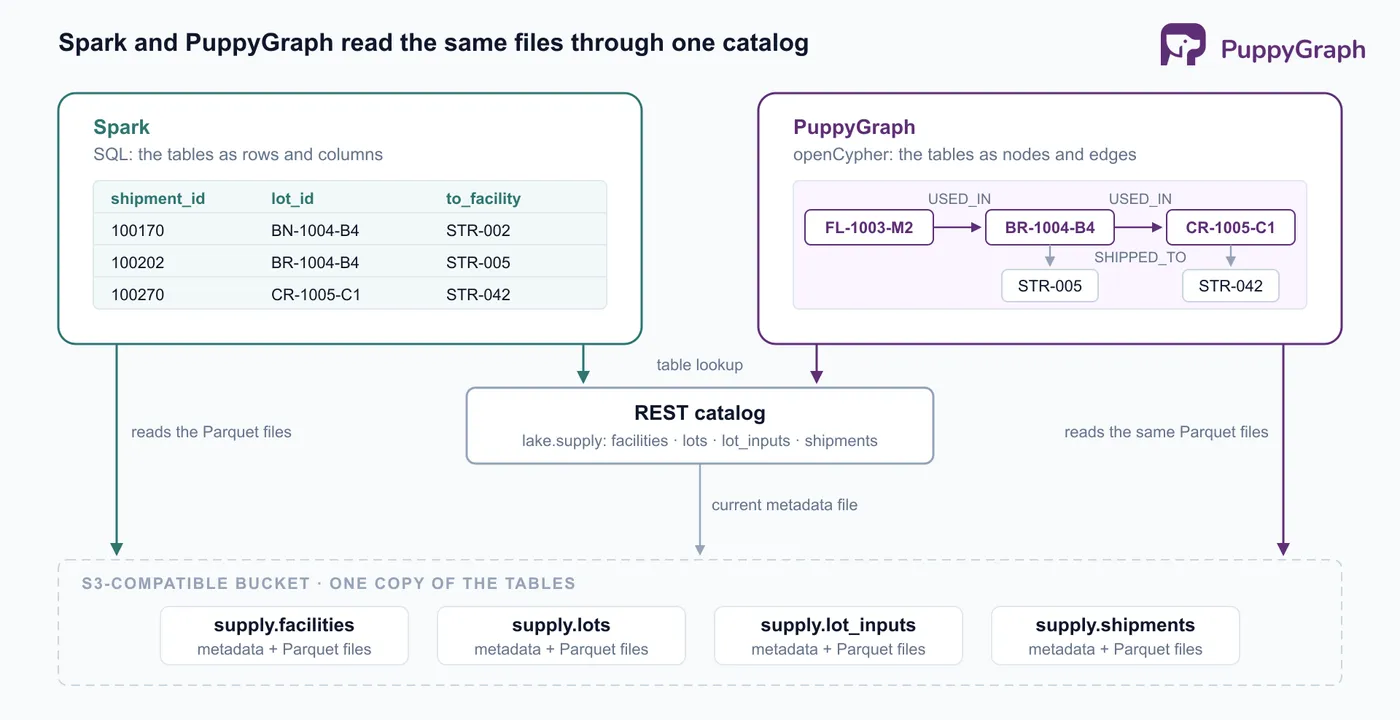
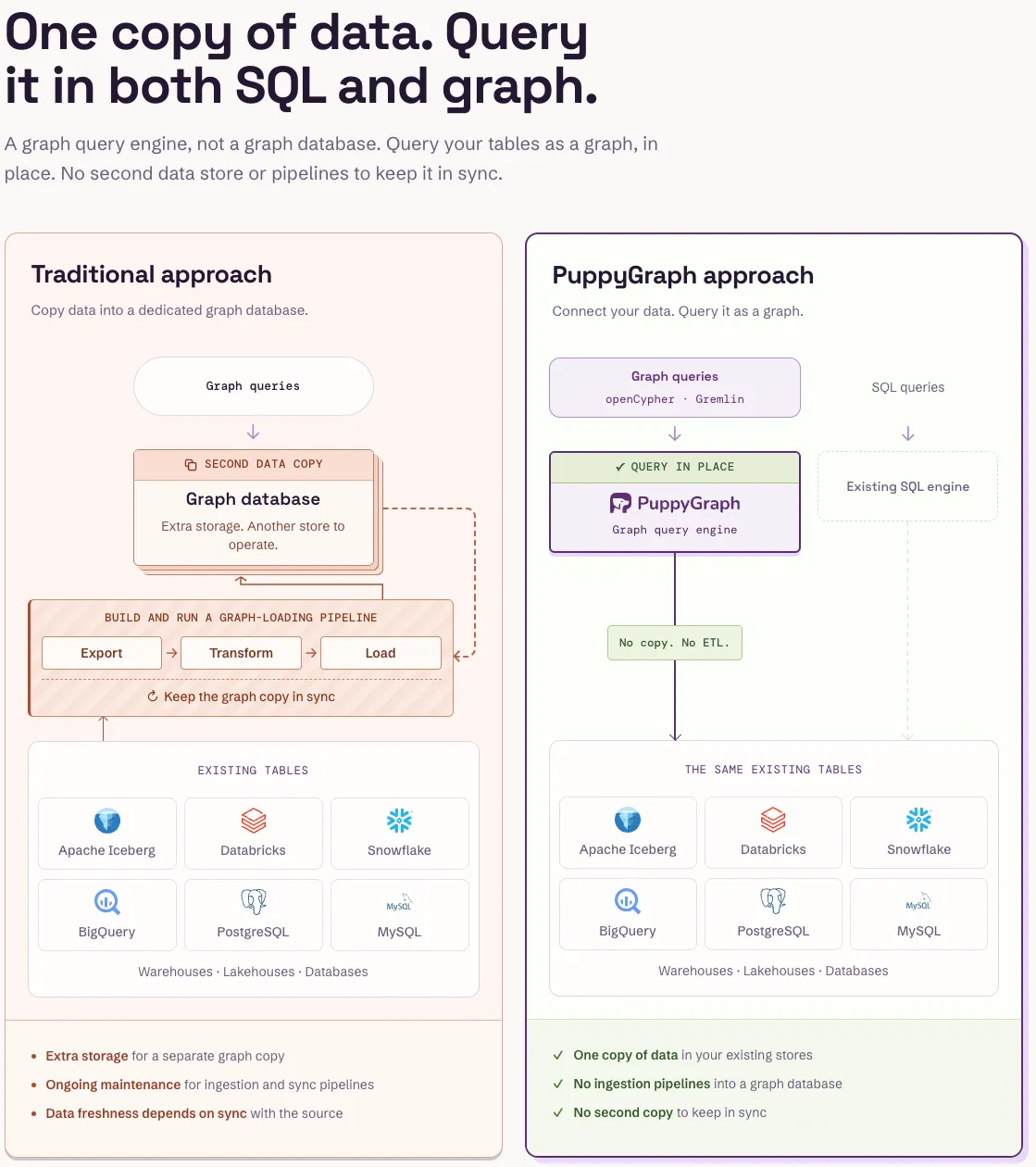
PuppyGraph is a distributed graph query engine that queries tables where they already live, in SQL databases, data warehouses, and data lakes and lakehouses, including direct reads of open table formats like Iceberg and Delta Lake. On Iceberg it needs only the catalog and storage access: it reads the tables' data files directly from object storage, with predicate pushdown and min/max statistics to reduce the data it scans. You connect the existing sources, define a graph schema that maps tables to nodes and edges, and query with openCypher and Gremlin. There is no ETL into a separate graph database, and the same tables stay queryable with SQL from Spark or other engines on the same catalog. A built-in AI assistant builds the graph schema from the connected tables and answers questions in plain language by writing and running the graph queries itself.
In the Web UI of the puppygraph container from the compose file, add the lake catalog on the Catalogs page with the same REST catalog, endpoint, and keys as Spark (PuppyGraph's Iceberg connection guide covers the fields). Then, on the AI page in Graph builder mode, ask the AI assistant, which needs an LLM API key, to build a graph of facilities, lots, the lots made from them, and shipments. It inspects the tables, tests each candidate join against the data, and proposes the model as a plan to approve:
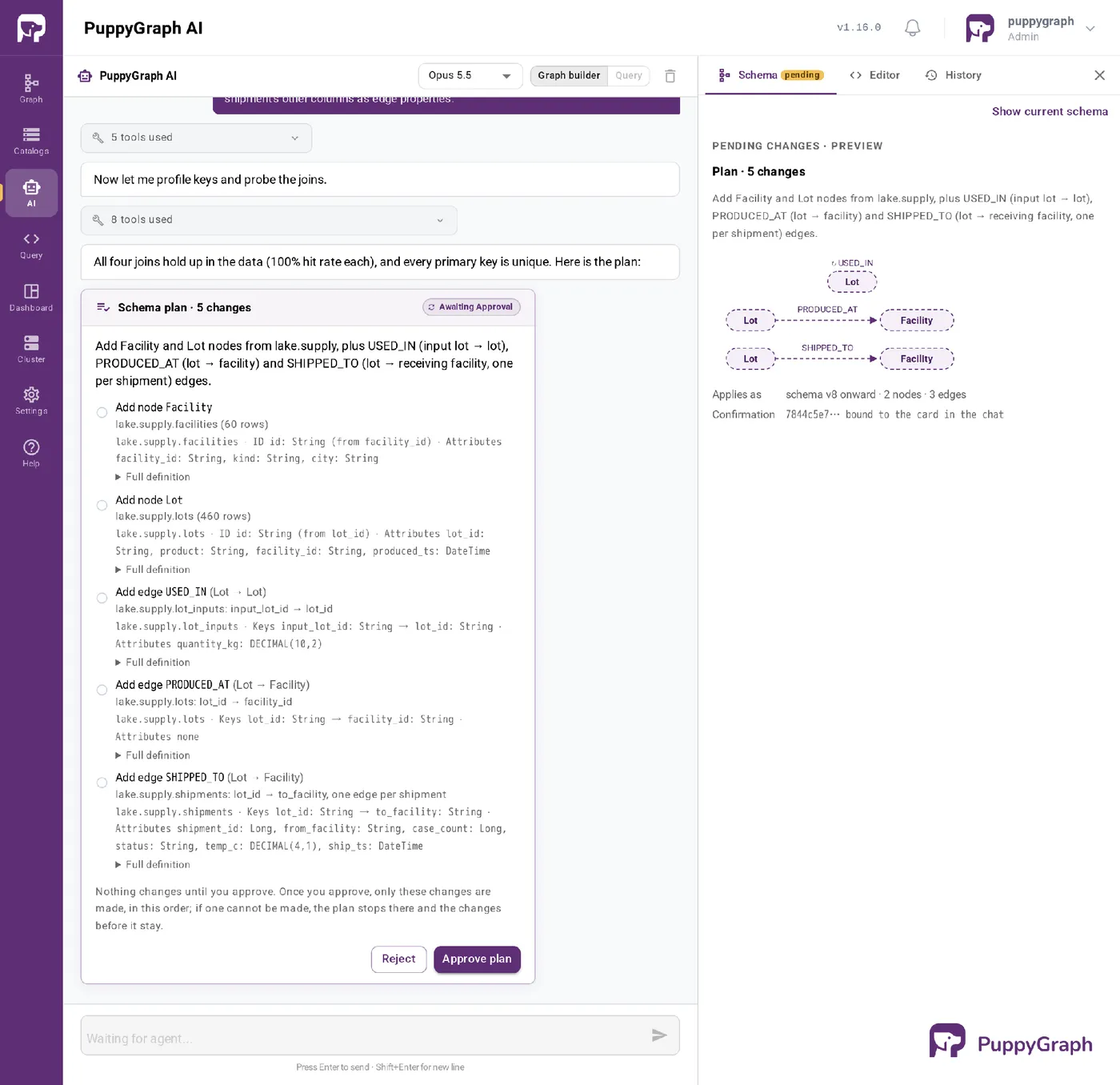
Approving it creates Lot and Facility nodes, USED_IN edges from each input lot to the lot made from it, PRODUCED_AT edges to the producing facility, and one SHIPPED_TO edge per shipment. The recall is one pattern: from the lot, follow USED_IN one to three steps to anything made from it, then SHIPPED_TO to a store.
MATCH p = (:Lot {lot_id: 'FL-1003-M2'})-[:USED_IN*1..3]->(l:Lot)
MATCH (l)-[:SHIPPED_TO]->(s:Facility {kind: 'store'})
RETURN s.facility_id AS store, s.city AS city, l.lot_id AS lot, l.product AS product,
       length(p) AS steps
ORDER BY store, lot;
store city lot product steps
STR-002 Cincinnati BN-1004-B4 burger buns 1
STR-005 Toledo BR-1004-B4 sandwich bread 1
STR-019 Akron BN-1004-B4 burger buns 1
STR-021 Akron CR-1005-C1 croutons 2
STR-028 Akron CR-1005-C1 croutons 2
STR-028 Akron MF-1005-B6 muffins 2
STR-035 Dayton CR-1005-C1 croutons 2
STR-035 Dayton MF-1005-B6 muffins 2
STR-036 Cincinnati BR-1004-B4 sandwich bread 1
STR-042 Columbus CR-1005-C1 croutons 2
STR-043 Akron BR-1004-B4 sandwich bread 1Nine stores, four more than the join found, because muffins and croutons are two steps from the flour.
The question also works in plain language. Asked in Query mode which stores received anything made from FL-1003-M2, the assistant wrote its own variable-length query, returned the same nine stores, and listed the distribution centers and sites that handled the affected lots. It also flagged shipment 101769 as out of sequence, which is the late shipment the carrier feed's MERGE inserted.
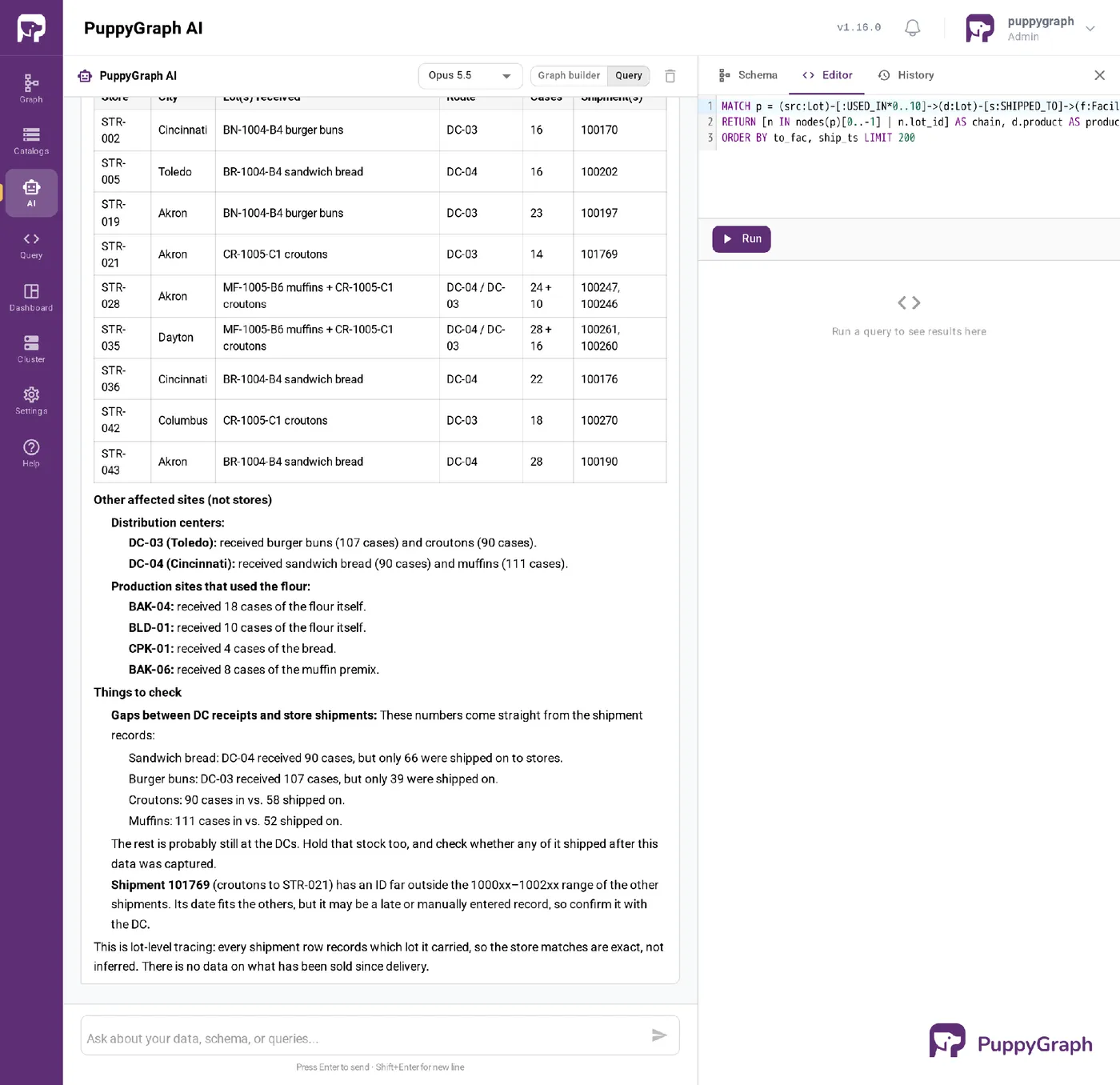
The answer reflects the earlier steps, because PuppyGraph queries each table's current snapshot through the catalog: STR-009 is missing because its buns shipment was cancelled and deleted, the carrier's correction moves shipment 100197's 23 cases of buns from STR-016 to STR-019, and the feed's late-reported shipment adds STR-021. After the rollback, that snapshot is the one tagged recall-fl-1003-m2, so the graph answer is computed on the recall record's own table state, which Spark can still read by name after later commits. Nothing was exported or loaded, although a new Spark commit can take a short while to show up in graph queries.
Apache Iceberg errors and troubleshooting
Most Iceberg problems show up far from their cause, and the cause usually sits in one of the layers described above.
Iceberg fails to load, or some SQL does not parse. Cannot find catalog plugin class means the runtime jar never reached the classpath; check spark.jars.packages and that the first launch could reach Maven Central. NoClassDefFoundError or NoSuchMethodError usually means a runtime built for a different Spark or Scala version, or a missing iceberg-aws-bundle jar, which S3 access requires. A parse error on partition-evolution, branch, or tag DDL means the Iceberg extensions are not loaded. On Spark 4.1, UPDATE, DELETE, MERGE INTO, and CALL parse without the extensions, so a session can appear to work until the first such command.
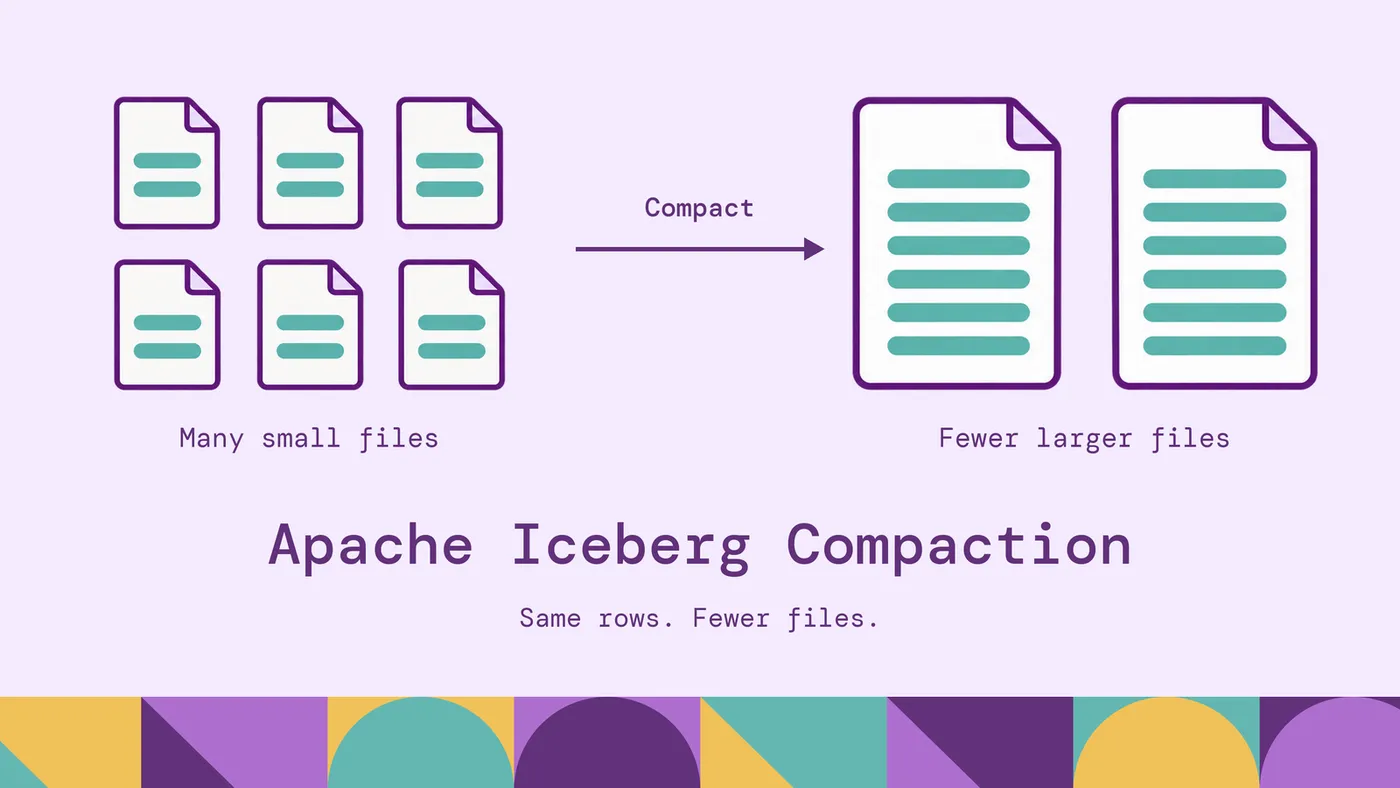
Queries get slower over time. Streaming writes and frequent small batches leave many small files, and merge-on-read tables accumulate delete files. The files metadata table shows file counts and sizes per partition, and rewrite_data_files compacts them.
Concurrent writes fail. Optimistic concurrency retries automatically. CommitFailedException usually means the retries ran out, and the commit.retry.* table properties control how many are attempted. A ValidationException means another commit changed files the operation depended on; schedule conflicting jobs on separate partitions or at different times rather than suppressing the check.
Old versions are gone, or storage keeps growing. Both come from snapshot retention. A time travel query that fails with Cannot find snapshot with ID is asking for an expired snapshot, and a table that never expires snapshots keeps every replaced data file. expire_snapshots sets the trade-off and by default removes snapshots older than five days. Snapshots referenced by a tag are kept for as long as the tag is retained, which by default is indefinitely.
An engine cannot see the table or read its files. Every engine needs the same catalog and its own object-store settings with an address it can reach. Inside a container, localhost is the container itself, which is why this tutorial uses service names such as rustfs and iceberg-rest.
Best practices for Iceberg tables
Most of these problems are prevented by a few habits, run as Spark procedures; the maintenance guide explains what each job does:
- Match the runtime jar to the Spark build and set the SQL extensions in every session.
- Use a shared catalog from the start for any table more than one job or engine touches.
- Run
expire_snapshotson a schedule, with a retention window chosen as your time travel window, and tag versions that must outlive it. - Run
rewrite_data_fileson tables fed by streaming or frequent small writes. - Run
remove_orphan_files, which deletes files no snapshot references, withdry_run => truefirst, and keep its default three-day threshold so it does not delete files from writes still in progress.
Conclusion
Everything in this tutorial came from one design: data files are written once, metadata records which files make up each version, and a catalog pointer moves atomically between versions. Schema changes are cheap because they only touch metadata, time travel and rollback work because old metadata is kept, and maintenance matters because old files accumulate until something expires them. The same design makes an Iceberg table a shared asset that any engine with access to its catalog can read, whether that engine speaks SQL or a graph query language.
Try the forever-free PuppyGraph Developer Edition and book a demo with the team to see how openCypher and Gremlin queries run over warehouse and lakehouse tables, with no graph-specific ETL, starting from the Iceberg tables in this tutorial.

Keep learning
Data Lakehouse
Apache Iceberg Compaction: Strategies & Best Practices
Learn how Apache Iceberg compaction works, including file compaction strategies, Spark SQL examples, performance optimization, and best practices.
Data Lakehouse
Apache Iceberg Schema Evolution: Complete Guide
Learn how Apache Iceberg schema evolution works, including column changes, schema compatibility, SQL examples, limitations, and best practices.
Data Lakehouse
Unity Catalog vs Hive Metastore: Key Differences
Compare Unity Catalog vs Hive Metastore across architecture, governance, access control, lineage, security, Delta Lake support, and migration.
Start free. Pay when it goes to production.
Contact us for any questions about capabilities, sizing and support.
* No payment required to start either one.
$ docker run -p 8081:8081 \
  -p 8182:8182 -p 7687:7687 \
  puppygraph/puppygraph:latestPulling puppygraph/puppygraph:latestStarting PuppyGraphWeb console listening on 0.0.0.0:8081Gremlin endpoint listening on 0.0.0.0:8182PuppyGraph is running# no pipelines · no second database · no data movement