


Text-to-SQL LLM: A Practical Guide

Business teams often know exactly what they want to learn from their data. The problem is that getting answers still depends on someone who can write SQL. That creates a bottleneck. Questions pile up, analysts and engineers become the gateway to the data, and time to insight slows down.
Text-to-SQL promises a simpler model: users ask for the data they want in natural language, and the system generates the query. At first glance, that sounds like a language problem. In practice, it is also a database reasoning problem.
LLM-based text-to-SQL has made that goal more practical than earlier approaches. In this blog, we’ll look at how it works, what a typical architecture looks like, and what to consider when evaluating it for your use case.
What Is Text-to-SQL LLM
To produce a useful query, a text-to-SQL system has to do more than translate words into SQL syntax. It has to map a user’s request onto the actual structure of a database, including the relevant tables, relationships, and query logic needed to return the right answer.
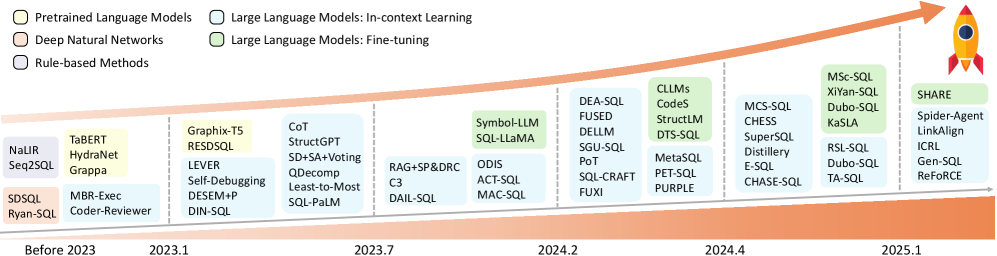
This is not a new research area. Early text-to-SQL systems relied on hand-written rules and templates, followed by neural models such as semantic parsers and encoder-decoder architectures. What changed with LLMs was not the goal, but how flexibly these systems could handle varied phrasing, broader schema context, and more realistic user questions.
What Is an LLM SQL Agent
LLMs and agents are often discussed together, but they are not the same thing. The LLM is the model that interprets the question and generates output. An agent is a system built around that model, giving it access to tools, intermediate state, and decision logic that let it take multiple steps before returning an answer.
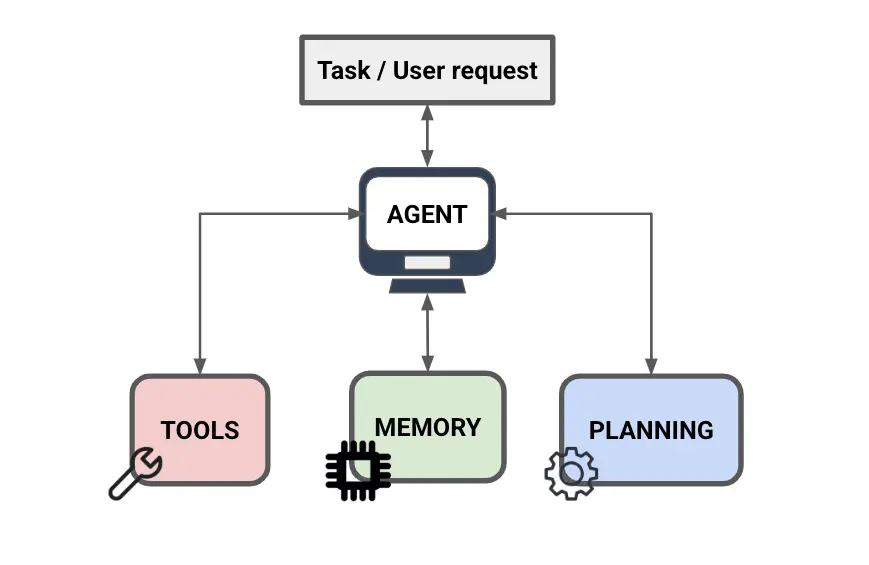
In text-to-SQL, a basic LLM pipeline usually follows a fixed sequence: take the question, pass in the available schema context, and generate a query. An LLM SQL agent adds dynamic decision-making to that process. Using tool calling, the agent can invoke external functions such as schema lookup or query execution to retrieve schema details on demand, run the generated SQL, inspect the result or error, revise the query, and decide whether to continue or return an answer. Critically, it can loop. If the first query is wrong, the agent can retry instead of failing silently.
That added flexibility is what makes agentic text-to-SQL different. Rather than treating query generation as a single prediction step, the system treats it as a workflow with feedback loops, which is better suited to the ambiguity and complexity of real-world questions.
The core stages of text-to-SQL still remain the same. What changes in agentic systems is how those stages are carried out: instead of moving through them once in a fixed order, the system can revisit them as needed.
How LLM Text-to-SQL Works
At a high level, most text-to-SQL systems still revolve around the following stages.
Step 1: Natural Language Understanding
The system interprets the user’s question and identifies the key concepts it needs to answer, such as the entities involved, the conditions being applied, and the type of result being requested. When faced with ambiguity, some systems also seek clarification at this step.
Step 2: Schema Linking
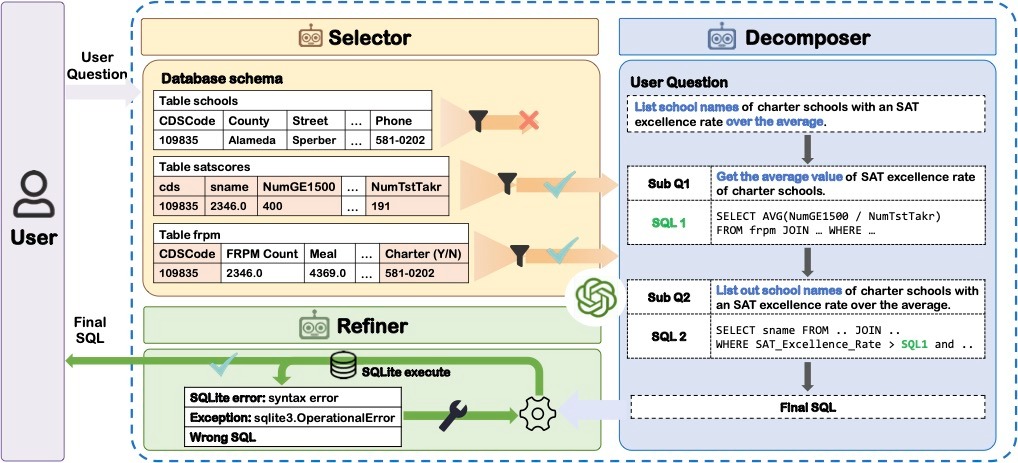
The system maps the concepts in the question to the underlying database schema, identifying the relevant tables, columns, and joins. In enterprise environments, this often involves metadata retrieval, business definitions, or an ontology layer to connect user language to how the data is structured. For large schemas, selecting the right subset of schema context is critical for accurate SQL generation.
Step 3: SQL Generation
The model generates a SQL query that reflects the user’s intent and the structure of the database. This includes choosing the right joins, filters, aggregations, sorting logic, and query structure needed to answer the question correctly. In LLM-based systems, the prompt may include the original question, schema context, and a few examples to improve output quality.
Step 4: SQL Validation and Execution
At this stage, the system can check for execution errors, invalid column references, empty or implausible results, or other signs that the SQL does not match the user’s intent. Some systems stop after a successful execution, while others use execution feedback to revise the query before moving on. The generated query is then executed against the database.
Step 5: Output and Response
Once the query succeeds, the result is returned to the user. In some systems, that means showing raw rows and columns. In others, the output is further formatted or summarized in natural language to make the answer easier to interpret. That summarization step is non-trivial: even when the SQL is correct, the summary still has to stay faithful to the returned data rather than introduce a new layer of error.

In practice, many systems do not execute these stages strictly once or in isolation. More advanced pipelines may retrieve schema context dynamically, revise SQL after execution feedback, or revisit earlier steps before returning a final answer.
Schema and Metadata in Text-to-SQL LLM
Schema defines the structure of a database: its tables, columns, keys, and relationships. Metadata adds context, such as descriptions, business definitions, sample values, and lineage. In more complex systems, an ontology adds a semantic layer by defining business entities and relationships that span multiple tables. Together, these layers help ground the model in how the data is organized and what it means.
That grounding matters because SQL quality depends not just on the model, but on the context it receives. Without schema and metadata, the model has to guess how tables relate, what columns represent, and where relevant business logic lives. This becomes especially important in enterprise settings, where users ask questions in business terms that may not map cleanly to raw table and column names.
For large enterprise datasets, passing the full schema into the prompt is often counterproductive. It can exceed context limits, raise token costs, and introduce irrelevant schema elements that distract the model from what actually matters. This is where ontology becomes especially valuable: it provides a more compact semantic representation of how business entities connect across many tables, giving the text-to-SQL system a clearer view than raw schema alone. For relationship-heavy questions, ontology-enforced graph querying can then use that graph structure directly, making multi-hop reasoning easier to express than increasingly complex SQL joins.
LLM, RAG, and Agentic Architectures in Text-to-SQL
As LLM-based text-to-SQL systems continue to evolve, choosing the right approach depends on understanding the strengths and trade-offs of each architecture.
Single-Pass Prompting
The simplest LLM-based setup is single-pass prompting: provide the question together with schema context, then generate SQL in one shot. This can be done in zero-shot or few-shot form with static examples in the prompt. It is simple and fast, but it tends to be brittle on ambiguous questions, large schemas, or cases where the first query is wrong and there is no feedback loop to recover.
Retrieval-Augmented Generation (RAG)
As databases and metadata grew more complex, RAG became a common way to narrow the prompt to the most relevant context. Instead of passing the full schema every time, systems can retrieve relevant tables, columns, definitions, values, or relationship context based on the question. In text-to-SQL, retrieval is also often used to fetch similar question-SQL pairs as dynamic few-shot examples, rather than relying on a fixed set baked into the prompt. This improves prompt efficiency and often improves generalization without retraining.
Execution-Guided Self-Correction
A stronger pipeline executes the generated SQL and uses the result as feedback. Errors, empty outputs, or implausible results can trigger a revision step instead of ending the workflow immediately. This introduces a limited feedback loop: the model can retry, but the overall control flow is still usually predefined rather than fully dynamic.
Agentic Architectures
Agentic systems go further by letting the model decide which tools to call, when to retrieve more context, when to execute SQL, and whether to revise or re-plan before returning an answer. This makes multi-step reasoning, decomposition of complex questions, and multi-agent collaboration possible.
Text to SQL LLM Examples
To illustrate how text-to-SQL LLMs handle different levels of complexity, here are four examples ranging from simple retrieval to agentic self-correction.
Basic Single-Table Query
The simplest case: mapping a natural language question to a filter on a single table.
- User question: "Show the names of all students with a GPA above 3.5."
- Model reasoning: The system identifies "names" as the name column, "GPA" as the gpa column, and "above" as a > comparison operator.
SELECT name FROM students WHERE gpa > 3.5;Multi-Table Join
Real databases normalize data across tables. The model must infer the correct join path from schema metadata.
- User question: "Find the names of teachers who teach more than three courses taken by students with a GPA above 3.0."
- Model reasoning: The system links three tables, teachers, courses, and students, via foreign keys, filters on student GPA, and applies a HAVING count on the teacher level.
SELECT t.name
FROM teachers t
JOIN courses c ON t.teacher_id = c.teacher_id
JOIN enrollments e ON c.course_id = e.course_id
JOIN students s ON e.student_id = s.student_id
WHERE s.gpa > 3.0
GROUP BY t.teacher_id, t.name
HAVING COUNT(DISTINCT c.course_id) > 3;
Knowledge-Intensive Reasoning
Some questions require logic or domain knowledge not explicitly stored in the schema.
- User question: "Which students are failing based on their average exam score?"
- The challenge: The database has no "failing" column. The model must apply an external threshold (below 60) and derive the average from an exam scores table.
- Reasoning process:
- Derive average score per student from the exam_scores table
- Apply domain knowledge that a score below 60 constitutes failing
SELECT s.name, AVG(e.score) AS avg_score
FROM students s
JOIN exam_scores e ON s.student_id = e.student_id
GROUP BY s.student_id, s.name
HAVING AVG(e.score) < 60;
Agentic Self-Correction
Modern agentic systems use execution feedback to detect and fix errors rather than returning a failed query to the user.
- User question: "What is the average salary of teachers?"
- Initial attempt: The model generates AVG(salary) but the column is named monthly_pay in the schema.
- Feedback: ERROR: column "salary" does not exist
- Correction: The agent re-examines the schema, identifies the correct column, and retries.
-- Corrected query
SELECT AVG(monthly_pay) AS avg_teacher_pay FROM teachers;
Best Text-to-SQL LLM
The best text-to-SQL LLM depends on what you need it to do. Model choice, context quality, and evaluation criteria all shape how well the system performs in practice.
Model Tradeoffs
There is no single best model for every part of a text-to-SQL system. Frontier models often provide stronger general reasoning, but they also tend to cost more and respond more slowly. They are not automatically the best choice for every stage. In practice, the right model depends on what each step of the pipeline actually needs most.
SQL generation is a good example of how this tradeoff plays out. In some cases, specialized models can outperform larger general-purpose models on structured SQL tasks, which suggests that output reliability may matter more than broad reasoning for this stage. The same principle applies across the pipeline: the best model is the one that meets the needs of a given step without adding unnecessary cost or latency.
Components of a Well-Built System
Beyond the latest models, improvements in SQL generation quality can also come from the architecture itself.
Schema Context
The model should see only the schema elements relevant to the question. Large prompts add noise and cost, though overly aggressive pruning can also hurt when the full schema already fits in context. Selective retrieval and schema-linking methods help manage this tradeoff.
Metadata Enrichment
Raw column names are rarely enough in production databases. Business definitions, relationship context, sample values, and representative rows help the model connect user language to the actual structure of the data. This is often one of the fastest ways to improve SQL accuracy without changing the model.
Prompting and Examples
A well-built system does more than pass in schema. It also gives the model the right instructions and, in many cases, relevant question-SQL pairs. These examples may be static, or retrieved dynamically at query time, which often works better for domain-specific logic and larger schema spaces. Dialect awareness matters here too, since SQL syntax varies across systems like PostgreSQL, Snowflake, and BigQuery.
Validation and Retry
Generated SQL should be executed and checked before it is returned. Syntax errors and invalid references are easy to catch. The harder failure is a query that runs successfully but returns a plausible yet incorrect result. Catching that often requires result-level validation, plausibility checks, or a critic model that reviews the SQL or output and decides whether another revision is needed.
Agentic Loops
Single-pass prompting often breaks down on questions that require multiple reasoning steps, dynamic schema retrieval, or iterative refinement. More advanced systems address this by treating SQL generation as a workflow rather than a single prediction. That added flexibility can improve difficult queries, but it also increases latency, cost, and system complexity.
How to Evaluate a Text-to-SQL System
Benchmarks are useful, but they are not enough on their own. Spider is a classic cross-domain benchmark with 200 databases across 138 domains. BIRD is designed to be closer to real-world analysis, including larger databases and external-knowledge scenarios. LiveSQLBench is a newer contamination-free, continuously updated benchmark aimed at real-world text-to-SQL tasks.
For practical evaluation, build a small golden set from your own database, with representative questions with verified answers. Measure execution accuracy rather than exact SQL match, since multiple queries can return the same correct result. Focus especially on joins, filtered aggregations, and questions that rely on business logic not stated directly in the schema.
Common Failure Modes
Even well-built systems still break in familiar ways:
- Schema hallucination: the model references tables or columns that do not exist
- Missing filters: the SQL runs, but drops an important condition
- Incorrect joins: the join path is wrong, leading to missing or duplicated rows
- Multi-hop reasoning: questions that require traversing several relationships are often hard to express and validate in SQL
AI Agents for Data Querying
AI agents for data querying are not limited to text-to-SQL alone. They abstract away the underlying query language, so users can ask for the data they need in plain language while the system chooses the best way to answer it. SQL excels at set-based operations, but for relationship-heavy, multi-hop questions, graph queries are often a better fit than increasingly complex joins.
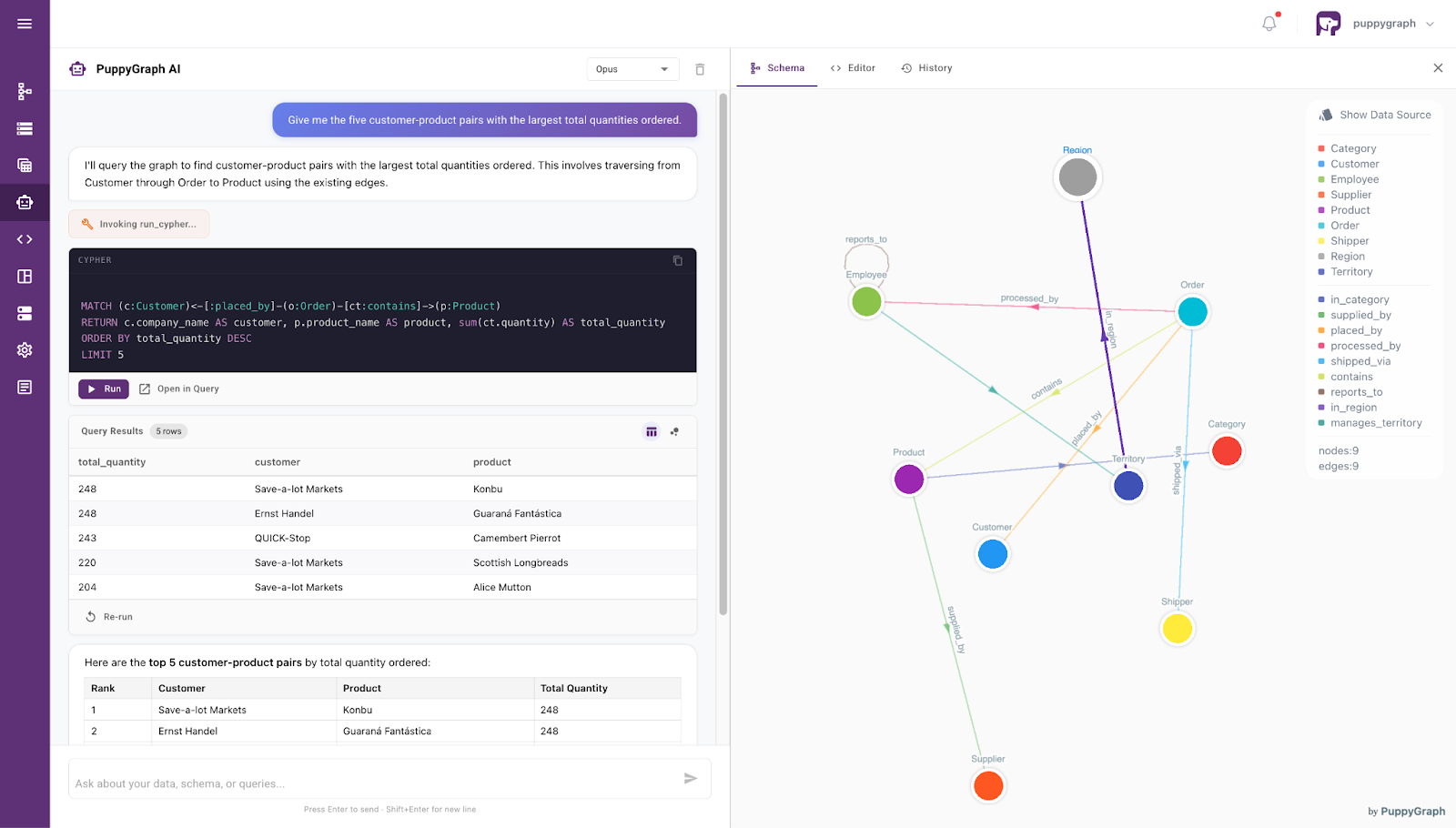
This is where PuppyGraph stands out. Its graph schema can act as the ontology itself, giving the model a clearer view of how business entities relate across the data. Instead of inferring those relationships from raw schema and metadata alone, the model can work directly against ontology-enforced graph queries.
PuppyGraph builds on this with a zero-ETL approach, so LLMs can work over the same underlying data using either SQL or graph queries. Through AI assistants, teams can use SQL for straightforward retrieval and aggregation, then switch to graph querying when the question is really about relationships across entities. It also makes the workflow easier to inspect: instead of silent failures, the system can return readable error messages that help the model refine the next query.
Conclusion
Modern text-to-SQL has moved well beyond simple prompting. In practice, success depends less on the model alone and more on the system around it: how well it manages schema context, incorporates metadata, and uses execution feedback to catch queries that look valid but still return the wrong answer.
Although, even with better prompting, retrieval, and validation, text-to-SQL still has limits. PuppyGraph helps close that gap by giving teams a more flexible way to query connected data, without moving it into a separate graph database. That makes it easier to handle relationship-heavy questions while keeping the workflow grounded, explainable, and practical in production.
Ready to explore your own data this way? Download PuppyGraph’s forever-free Developer Edition, or book a demo with our team to get started.

Jaz Ku is a Solution Architect with a background in Computer Science and an interest in technical writing. She earned her Bachelor's degree from the University of San Francisco, where she did research involving Rust’s compiler infrastructure. Jaz enjoys the challenge of explaining complex ideas in a clear and straightforward way.

Get started with PuppyGraph!


Developer Edition
- Forever free
- Single noded
- Designed for proving your ideas
- Available via Docker install
Enterprise Edition
- 30-day free trial with full features
- Everything in developer edition & enterprise features
- Designed for production
- Available via AWS AMI & Docker install