How Traceforce Connects AI Agent Activity on Apache Iceberg
The case study
Summary
Traceforce builds TraceGraph on Apache Iceberg to connect AI activity with the people, devices and agents involved. The connected records support AI usage analysis and session investigation for enterprise IT and security teams. PuppyGraph helps Traceforce speed up processing as the underlying prompt data grows.
The Challenge: Correlating and Querying AI Activity
Traceforce sells AI visibility and security software to enterprise IT teams. Its customers need to understand how employees use tools such as Claude Code and Codex, what they spend, and whether agents expose sensitive information or take risky actions.
Telemetry collected through individual tools and scripts leaves AI activity scattered across sources. To understand usage, IT needs to associate that activity with the people doing the work. When a security finding needs investigation, the team also needs to reconstruct what happened: the prompt that started the session, the tools the agent called, the files it accessed or changed, and the outcome.
Traceforce built TraceGraph to bring those records and relationships together. Its AI activity graph links people, devices and agents to the activity within a session, supporting both usage analysis and investigation of the underlying actions.
Building this connected view requires Traceforce to correlate activity across AI tools and link actions to the agents, people and devices involved. As prompt data grows, the team also faces query latency and cost concerns. Traceforce notes that Athena and Snowflake work for basic use cases but become costly as the data grows.
The Solution: Connecting Agent Activity on Iceberg
Traceforce built TraceGraph to bring that information together. It collects telemetry across AI tools and correlates activity with the people, devices and agents involved.
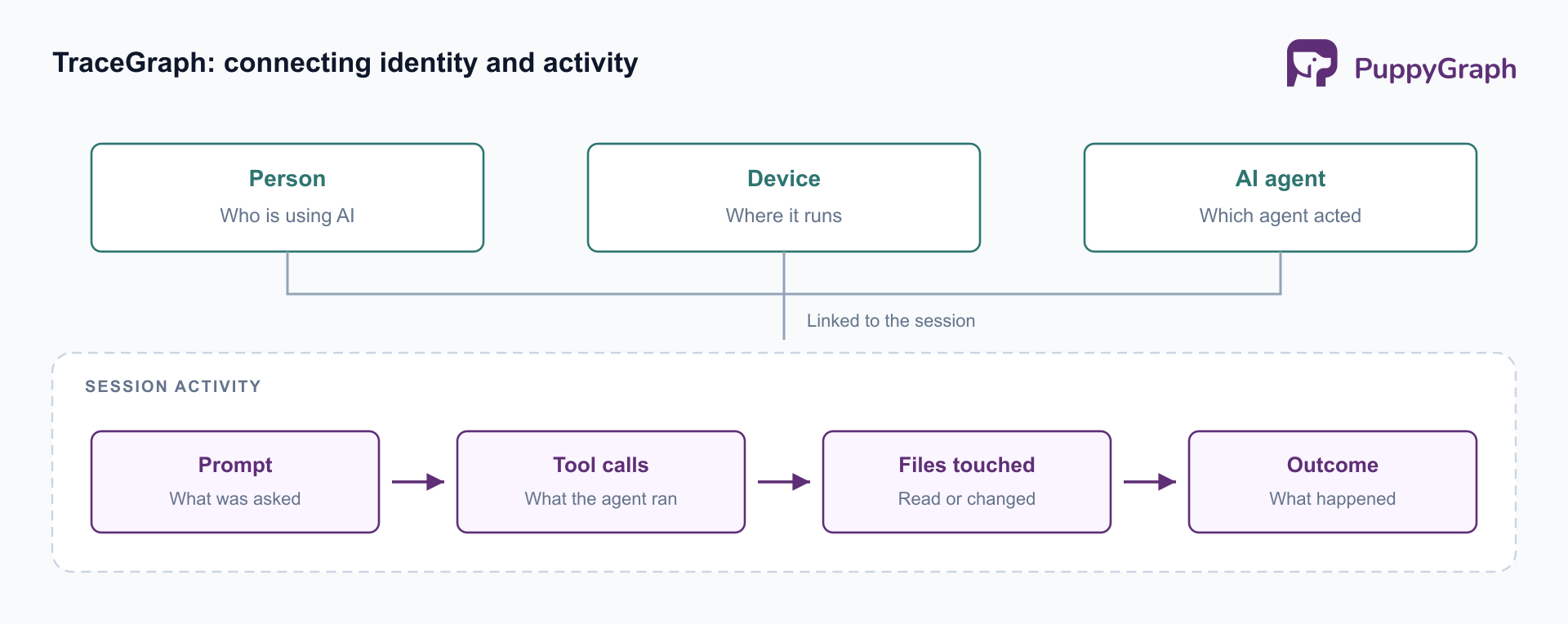
Traceforce stores its connected activity records in Apache Iceberg tables on S3. Collectors running alongside agents on laptops or in sandboxes capture telemetry, including prompts and tool calls, and stream it into this data layer.
Traceforce matches activity to agent identities and connects those identities to people and devices. Those relationships associate an action with the agent that performed it and the person and device involved.
Sensitive data handling is part of that processing. Traceforce redacts credentials and personal information from the activity records, keeping context about what occurred, where and when. Sensitive portions are stored separately for incident investigation, with references connecting them back to the relevant activity.
Iceberg provides the storage foundation for dashboards, audits and investigations. Traceforce uses PuppyGraph to speed up processing over its growing activity data.
The Result: Usage Analysis and Session Investigation
Using activity from its own device fleet, Traceforce demonstrated how TraceGraph supports AI usage analysis and sensitive-data investigation. Through Claude, equipped with a Traceforce skill to interpret the data, users can ask for token usage by person and day, then follow up to understand the activities behind that usage.
For security investigations, users can review possible sensitive-data incidents and drill into a specific finding. The associated conversation context helps explain how flagged content entered the session, connecting the finding to the activity behind it.
Resources
Start free. Pay when it goes to production.
Contact us for any questions about capabilities, sizing and support.
* No payment required to start either one.
$ docker run -p 8081:8081 \
  -p 8182:8182 -p 7687:7687 \
  puppygraph/puppygraph:latestPulling puppygraph/puppygraph:latestStarting PuppyGraphWeb console listening on 0.0.0.0:8081Gremlin endpoint listening on 0.0.0.0:8182PuppyGraph is running# no pipelines · no second database · no data movement