The article

Query your table as a graph.Petabytes. Subsecond. No data movement.
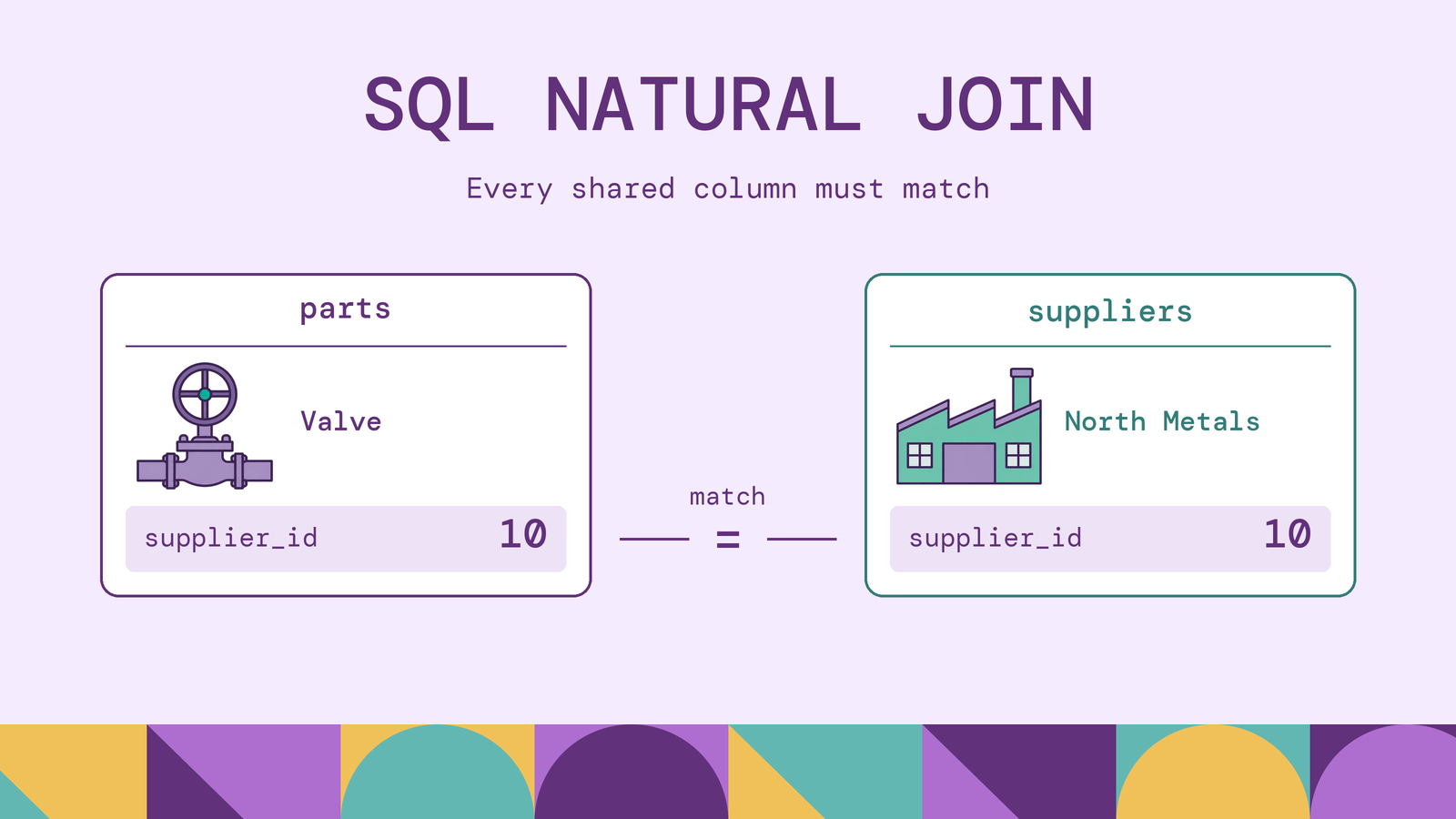
SQL NATURAL JOIN saves you from writing a join condition, but it makes column naming part of the query's logic. That trade-off matters when a schema changes: adding an unrelated column can change which rows an unchanged query returns.
This guide explains the matching rules, works through a parts-and-suppliers example, and compares NATURAL JOIN with explicit join conditions. The worked examples and displayed results were verified in PostgreSQL 16.
What is NATURAL JOIN in SQL?
NATURAL JOIN joins two inputs by comparing every column name they share for equality. Written without an outer-join modifier, it returns matching row pairs, with each common column appearing once in the joined output. PostgreSQL describes it as shorthand for a USING list containing all shared column names in its table-expression documentation.
For example, if parts and suppliers share only supplier_id, that column determines the matches. If both also have status, the join compares both columns. It does not discover the intended relationship from a foreign key or decide that an identifier matters more than a status field.
The useful question is whether every shared column belongs in the relationship you intend to query. A familiar-looking column name is not enough.
How does NATURAL JOIN work?
Consider parts(part_id, part_name, supplier_id) and suppliers(supplier_id, supplier_name). The logical process is:
- Identify the shared column names: here, just
supplier_id. - Compare values in those columns for each candidate row pair.
- Keep pairs whose comparisons are true.
- Expose one common
supplier_idcolumn alongside the other columns.
In this schema, the matching condition is equivalent to parts.supplier_id = suppliers.supplier_id. The query text leaves that condition implicit.
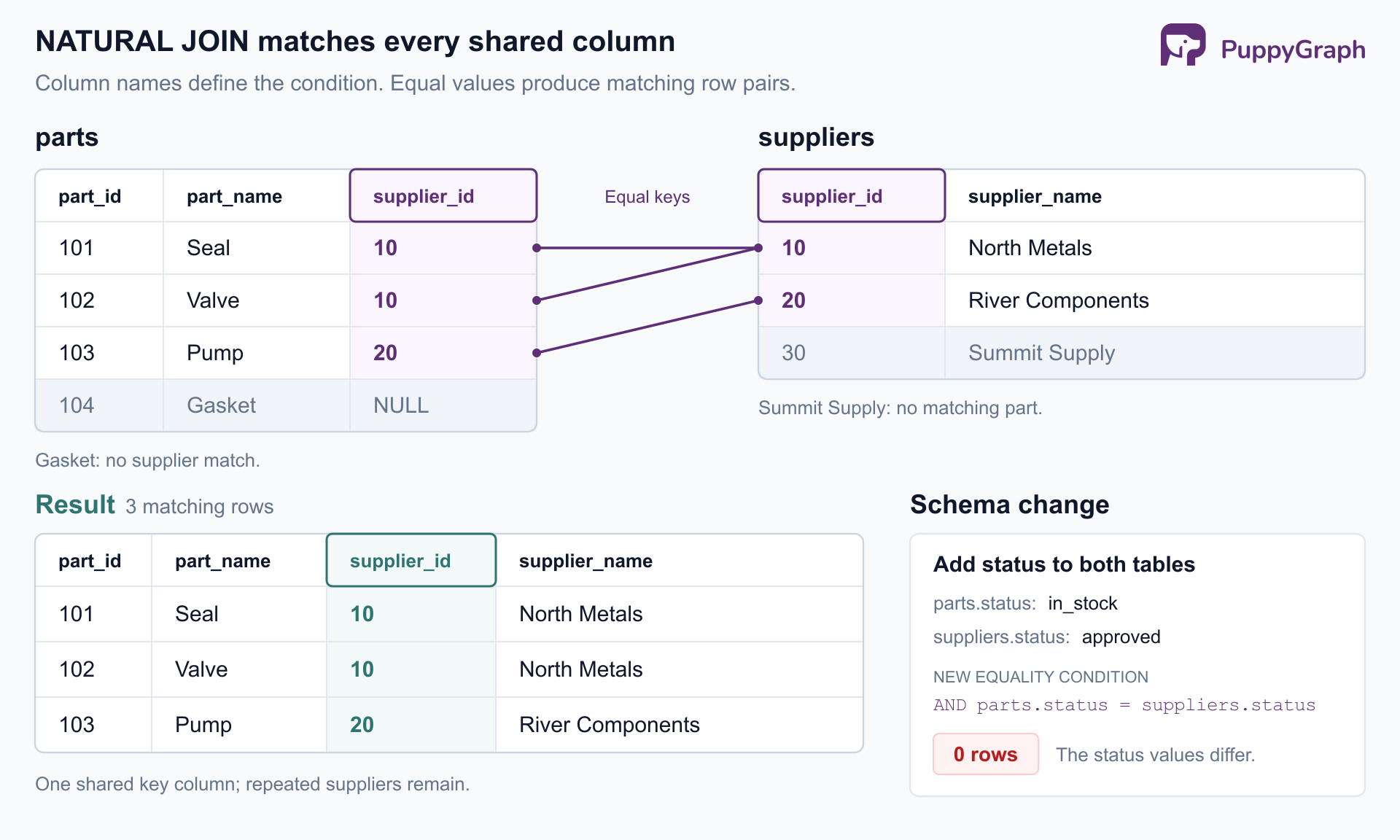
Figure: NATURAL JOIN matches every shared column. Adding status to both tables changes this example from three matches to zero because the status values differ.
These steps describe the result, not a required scanning algorithm. The database chooses a physical execution plan. PostgreSQL's EXPLAIN documentation shows how to inspect that plan when performance matters.
SQL NATURAL JOIN syntax
The basic form is:
SELECT *
FROM table_a NATURAL JOIN table_b;
NATURAL INNER JOIN makes the default inner behavior explicit. To preserve unmatched rows from the left input, use:
SELECT *
FROM table_a NATURAL LEFT JOIN table_b;
Do not append ON or USING to a natural join. The column names already supply its condition. Filtering with WHERE and ordering with ORDER BY remain available. The Snowflake JOIN reference documents the same distinction between natural matching and inner or outer row preservation.
The table names above are placeholders. The following examples create the tables used throughout the rest of the article.
SQL NATURAL JOIN examples
Matching parts to suppliers. Create a small catalog. Three parts have suppliers; one part is unassigned. A third supplier has no parts in this dataset.
CREATE TABLE suppliers (
    supplier_id INTEGER PRIMARY KEY,
    supplier_name TEXT NOT NULL
);

CREATE TABLE parts (
    part_id INTEGER PRIMARY KEY,
    part_name TEXT NOT NULL,
    supplier_id INTEGER REFERENCES suppliers (supplier_id)
);

INSERT INTO suppliers VALUES
    (10, 'North Metals'),
    (20, 'River Components'),
    (30, 'Summit Supply');

INSERT INTO parts VALUES
    (101, 'Seal', 10),
    (102, 'Valve', 10),
    (103, 'Pump', 20),
    (104, 'Gasket', NULL);
Both tables contain supplier_id, and no other column name overlaps:
SELECT part_id, part_name, supplier_id, supplier_name
FROM parts NATURAL JOIN suppliers
ORDER BY part_id;| part_id | part_name | supplier_id | supplier_name |
|---|---|---|---|
| 101 | Seal | 10 | North Metals |
| 102 | Valve | 10 | North Metals |
| 103 | Pump | 20 | River Components |
Gasket has no matching supplier, so it is absent. Summit Supply has no matching part and is absent too. North Metals appears twice because it supplies two different parts.
Matching on more than one column. A part inspection belongs to a particular revision. The following self-contained query uses common table expressions to provide sample rows without changing the catalog tables:
WITH part_revisions (part_id, revision, part_name) AS (
    VALUES (101, 1, 'Seal'), (101, 2, 'Seal'), (102, 1, 'Valve')
), inspections (part_id, revision, inspection_result) AS (
    VALUES (101, 1, 'passed'), (101, 2, 'pending'), (102, 2, 'passed')
)
SELECT part_id, revision, part_name, inspection_result
FROM part_revisions NATURAL JOIN inspections
ORDER BY part_id, revision;| part_id | revision | part_name | inspection_result |
|---|---|---|---|
| 101 | 1 | Seal | passed |
| 101 | 2 | Seal | pending |
Both part_id and revision must match. Valve revision 1 does not join to the inspection for Valve revision 2. Here, the two shared names express exactly the relationship we want.
How NATURAL JOIN handles common columns
With an unqualified SELECT *, shared columns appear once, followed by the columns unique to each input. The MySQL JOIN documentation explains this common-column merging and output ordering. For our original catalog, run:
SELECT *
FROM parts NATURAL JOIN suppliers
ORDER BY part_id;
The output columns are supplier_id, part_id, part_name, and supplier_name. This removes the second output copy of supplier_id; it does not remove repeated rows or change the underlying tables. An explicit select list, as in the earlier example, controls the displayed column order.
The more consequential behavior is that every shared name affects matching. Suppose a migration adds status to each table, with different meanings. Run this transaction in the same session; ROLLBACK removes its schema changes afterward:
BEGIN;

ALTER TABLE parts ADD COLUMN status TEXT DEFAULT 'in_stock';
ALTER TABLE suppliers ADD COLUMN status TEXT DEFAULT 'approved';

SELECT part_id, part_name, supplier_name
FROM parts NATURAL JOIN suppliers
ORDER BY part_id;

ROLLBACK;
The SELECT returns zero rows. Its inferred condition now requires both matching supplier IDs and matching statuses. Every supplied part has in_stock, while its supplier has approved.
Selecting only part_id, part_name, and supplier_name does not prevent this problem: the select list controls output, not the join condition. PostgreSQL explicitly warns about new matching column names changing a natural join. Choosing columns explicitly with USING or ON prevents this particular dependency on unrelated schema additions.
NATURAL JOIN vs INNER JOIN
An ordinary NATURAL JOIN is an inner join. The useful comparison is between its inferred condition and an INNER JOIN ... ON condition you write explicitly.
For the original tables, the explicit form is:
SELECT p.part_id, p.part_name, p.supplier_id, s.supplier_name
FROM parts AS p
INNER JOIN suppliers AS s ON p.supplier_id = s.supplier_id
ORDER BY p.part_id;
It returns the same three rows as the first natural-join query.
| Question | NATURAL JOIN | INNER JOIN ... ON |
|---|---|---|
| How is matching specified? | Equality on every shared column name | An explicit Boolean condition |
| Which unmatched rows survive? | None | None |
What does unqualified SELECT * expose? | One output column per shared name | Columns from both inputs, including both join keys |
What happens if both tables gain status? | It becomes another matching condition | The written condition remains unchanged |
| What must a reviewer inspect? | The query and both input schemas | The query's condition, plus the meaning of its referenced columns |
The explicit query makes the intended supplier relationship visible. It can also match differently named columns or use conditions other than equality. Its matching logic is more stable under unrelated schema additions, although using SELECT * can still change the output shape when columns are added.
NATURAL JOIN vs LEFT JOIN
These terms describe different choices. NATURAL selects the matching columns; LEFT preserves unmatched rows from the left input. They can be used together.
To keep Gasket in the report, change the original query to:
SELECT part_id, part_name, supplier_id, supplier_name
FROM parts NATURAL LEFT JOIN suppliers
ORDER BY part_id;| part_id | part_name | supplier_id | supplier_name |
|---|---|---|---|
| 101 | Seal | 10 | North Metals |
| 102 | Valve | 10 | North Metals |
| 103 | Pump | 20 | River Components |
| 104 | Gasket | NULL | NULL |
The left join preserves the part without a supplier and fills the missing supplier data with NULL. It does not add Summit Supply, which is on the right and has no matching part.
For a maintained report, LEFT JOIN suppliers USING (supplier_id) preserves the same rows while naming the intended key. Also check subsequent filters: adding WHERE supplier_name = 'North Metals' would discard the Gasket row because its supplier name is null. An outer join's preservation rule does not override a later filter.
NATURAL JOIN vs EQUI JOIN
An equijoin describes a join whose matching condition uses equality. It is a category of condition, not an EQUI JOIN keyword to put into the examples above. Oracle's join documentation defines equijoins in terms of the equality operator.
The explicit supplier query is an equijoin because it uses p.supplier_id = s.supplier_id. The natural join also uses equality, but derives the compared columns from their names. An explicit equijoin could compare parts.supplier_id with a differently named vendors.vendor_id.
An inner join need not be an equijoin: its condition can instead compare ranges or use another Boolean expression. Likewise, an equality condition can be used in a left join. Keep the condition and row-preservation choices separate when describing a query.
NATURAL JOIN vs USING clause
USING names the same-name columns that participate in a join. It retains the convenient single output column for each listed key while leaving other shared names out of the condition:
SELECT part_id, part_name, supplier_id, supplier_name
FROM parts
JOIN suppliers USING (supplier_id)
ORDER BY part_id;
This returns the original three matched rows. If both tables later gain status, the query still matches only on supplier_id. The two statuses remain separate input columns; select and alias them explicitly if you need both.
For the revision example, USING (part_id, revision) expresses the intended composite match. Each listed name must exist in both inputs. Use ON when corresponding keys have different names or the condition needs expressions.
In a long-lived query, the short key list is usually worth writing. It documents the relationship at the place where it is used.
Advantages and disadvantages of NATURAL JOIN
Concise queries. Natural joins remove repeated equality expressions when all shared names are intentional keys. The part-revision example shows a reasonable use: the inputs were deliberately shaped around the same identifiers.
Compact output. Shared keys appear once in SELECT *, making a quick inspection easier to read. USING offers the same convenience with an explicit list, so output tidiness alone is a weak reason to choose natural matching.
Hidden schema dependencies. The query omits information a reviewer needs to understand its condition. Generic names such as status, name, or created_at deserve particular scrutiny. A migration can introduce a valid comparison that has no business meaning, as the status example demonstrates.
No inherent speed advantage. A shorter query does not establish a cheaper plan. In the PostgreSQL run for this article, the equivalent natural and explicit supplier queries both used a hash join on supplier_id, followed by a sort. That observation explains these examples; use EXPLAIN on your own query and data before making a performance comparison.
The main trade-off is maintainability. Natural matching saves a few words while moving part of the query's meaning into the schemas of its inputs.
Common NATURAL JOIN errors and limitations
Some failures return plausible results rather than syntax errors. Start by inspecting the column names of the actual inputs, including any subqueries.
No shared names produce a Cartesian product. This query projects away the common key from one side:
SELECT COUNT(*) AS row_count
FROM (SELECT part_id FROM parts) AS p
NATURAL JOIN (SELECT supplier_id FROM suppliers) AS s;
It returns 12: four parts paired with three suppliers. Neither input now shares a column name with the other. If you intend all combinations, write CROSS JOIN explicitly; if you intend a supplier lookup, retain and name the key.
NULL does not match NULL through ordinary equality. A null in a matching column prevents that pair from satisfying an equality condition. This follows SQL's null comparison rules. Use an explicit condition when your business rule requires null-safe matching; PostgreSQL provides IS NOT DISTINCT FROM for that purpose. Do not automatically equate two missing supplier IDs with one known supplier.
Repeated keys can multiply rows. If two rows on the left and three on the right share the same matching values, the join returns six pairs. Natural joins do not require unique keys or apply DISTINCT. Check the expected relationship cardinality before treating additional rows as duplicates to remove.
Column types must support comparison. Identical names do not ensure compatible values. PostgreSQL can compare some different types, including INTEGER and BIGINT, but incompatible types can prevent the join. Inspect the actual types and meanings; adding a cast cannot repair a mistaken relationship.
Syntax support varies. PostgreSQL and MySQL support natural joins. SQL Server's T-SQL join syntax supports neither NATURAL JOIN nor JOIN ... USING. Write an explicit JOIN ... ON there. When porting a query, preserve both its matching condition and its selected columns.
When should you use NATURAL JOIN?
Use natural joins for small exploratory queries or deliberately shaped inputs when you have inspected every shared name. The part-revision query is a stronger candidate than joining two independently maintained application tables: its input columns are visible together in the same statement.
For reports, application queries, and data transformations that must survive schema evolution, prefer USING for same-name keys and ON for other conditions. Review the expected row count and unmatched rows, and select the output columns explicitly. These choices make the relationship easier to inspect when the schema changes.
A parts catalog can also raise questions about paths. If it records which part supersedes another, finding the current replacement may require following several replacement links before looking up its supplier. PostgreSQL can express that traversal with a recursive CTE; a graph model gives those recorded relationships explicit node and edge types.
PuppyGraph is the first and only zero-ETL graph query engine that queries existing tables as a graph, allowing recorded relationships such as part supersessions to be explored as paths. Its distributed engine reads tables in place in SQL databases, data warehouses, and data lakes or lakehouses, including direct reads of Iceberg and Delta Lake. Connect the sources, define a graph schema mapping tables to nodes and edges, and query with openCypher and Gremlin, without ETL into a separate graph database; the same tables remain queryable with SQL.
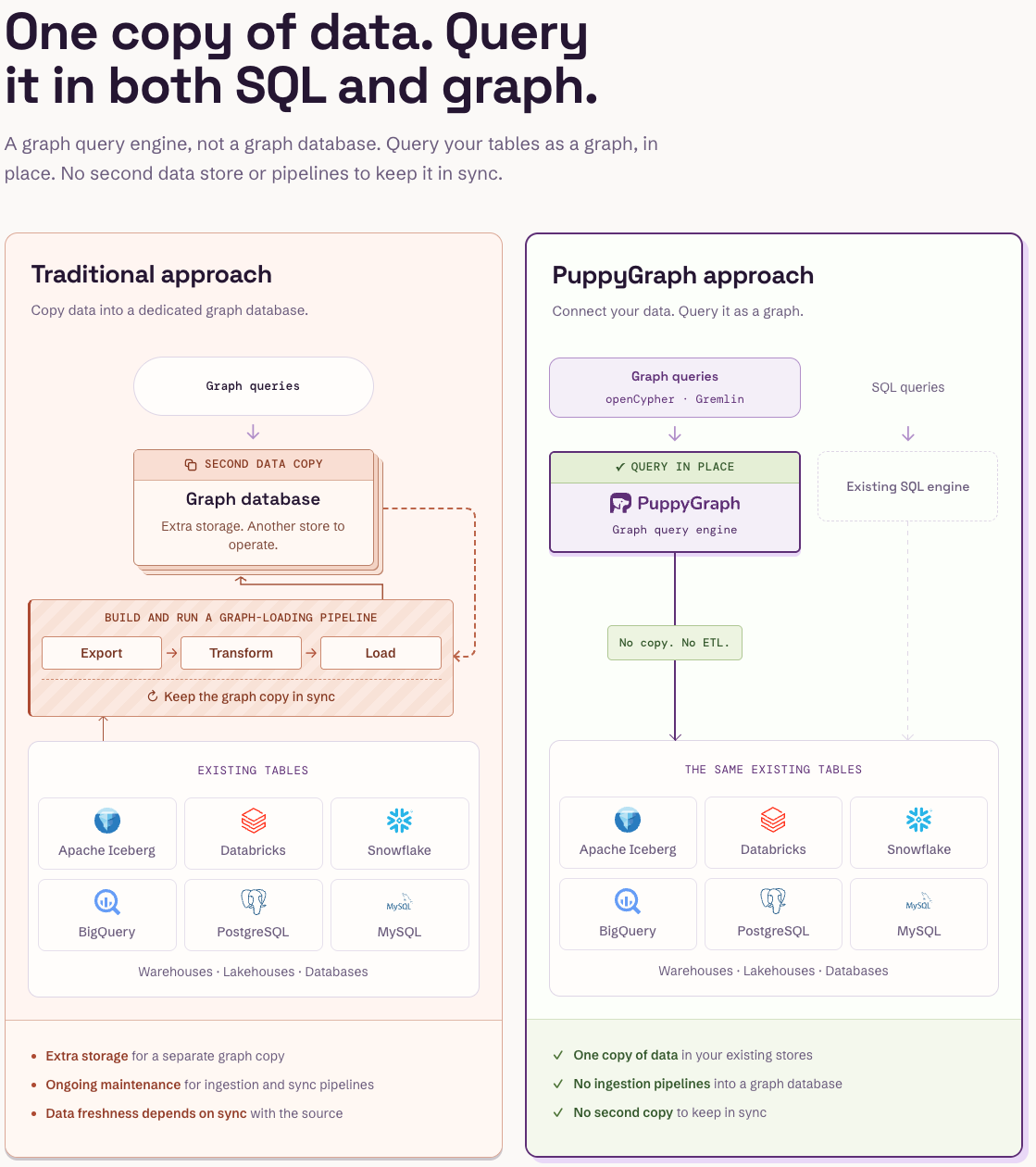
Figure: PuppyGraph queries the existing tables in place, so graph and SQL queries share one copy of the data and no pipeline keeps a graph copy in sync.

Figure: Companies that use PuppyGraph.

Figure: Engineering teams at PuppyGraph customers on what they use it for.
Conclusion
NATURAL JOIN is useful when shared column names express the complete intended match. Its risk is that the match can change without an edit to the query. Use USING to name same-name keys, ON to express other conditions, and LEFT JOIN when unmatched left rows must survive.
Try the forever-free PuppyGraph Developer Edition and book a demo with the team to see how openCypher and Gremlin queries follow relationships across warehouse and lakehouse tables, with no graph-specific ETL, when your questions extend from matching rows to tracing paths.