The article

Query your table as a graph.Petabytes. Subsecond. No data movement.
A Snowflake join can return valid SQL results while answering the wrong business question. An inner join can hide an unassigned maintenance ticket. A repeated key can multiply rows and inflate a total. A filter in the wrong clause can remove the records an outer join was meant to preserve.
This guide explains Snowflake join types through a small maintenance-ticket dataset, then covers timestamp matching, multiple table joins, and practical optimization. The starting point is deciding what one output row should represent and which unmatched records must remain visible.
What is JOIN in Snowflake?
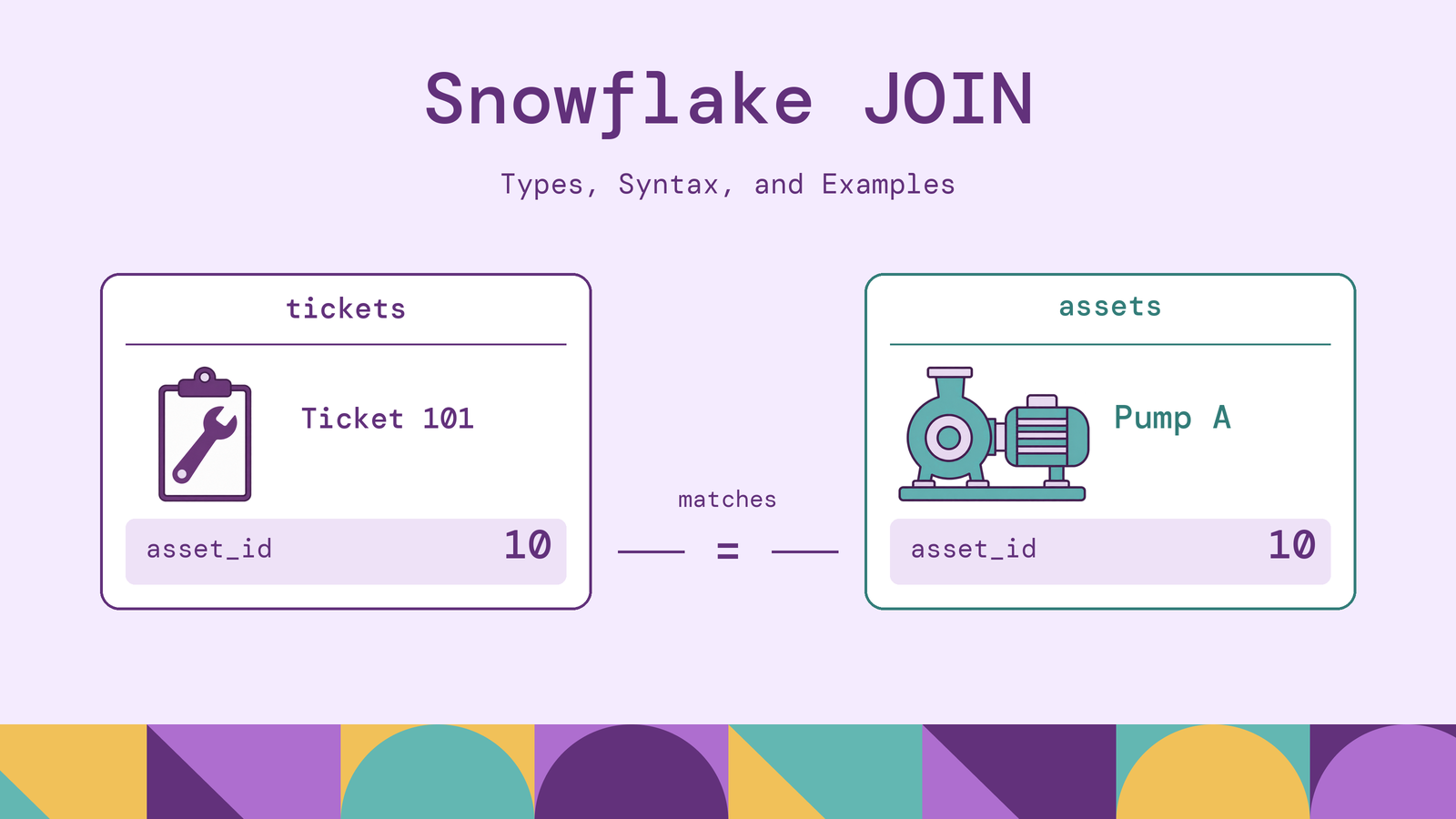
A JOIN combines rows from two table-like inputs according to a matching rule. Inputs can be tables, views, or subqueries. For example, joining maintenance tickets to an asset inventory adds an equipment name to each ticket without storing that name repeatedly in the ticket table. Snowflake documents these inputs in its guide to working with joins.
A join combines information across columns. A UNION appends compatible result sets vertically. Neither operation changes the underlying tables when used in an ordinary SELECT query.
You do not need a declared foreign key to join two columns. The query supplies the relationship. For Snowflake standard tables, PRIMARY KEY, UNIQUE, and FOREIGN KEY constraints are not enforced. Validate uniqueness and referential integrity in the data rather than assuming a declared relationship guarantees them.
How do joins work in Snowflake?
The examples use an asset inventory and maintenance tickets. In a scratch schema, select a warehouse and run this setup. Keep subsequent examples in the same session because these are temporary tables.
CREATE TEMPORARY TABLE assets (
  asset_id INT, asset_name VARCHAR, site_id INT
);
INSERT INTO assets VALUES
  (10, 'Pump A', 1),
  (20, 'Pump B', 1),
  (30, 'Compressor', 2);

CREATE TEMPORARY TABLE tickets (
  ticket_id INT, asset_id INT, opened_at TIMESTAMP_NTZ,
  status VARCHAR, parent_ticket_id INT
);
INSERT INTO tickets VALUES
  (101, 10, '2026-10-01 09:05:00', 'open', NULL),
  (102, 10, '2026-10-01 09:20:00', 'closed', 101),
  (103, 20, '2026-10-01 09:10:00', 'open', NULL),
  (104, 99, '2026-10-01 09:15:00', 'open', 103),
  (105, NULL, '2026-10-01 09:25:00', 'open', NULL);
Each asset row represents one piece of equipment; each ticket row represents one maintenance case. parent_ticket_id records the earlier ticket from which a case was escalated. All sample timestamps use the same time basis.
For a match on tickets.asset_id = assets.asset_id, tickets 101 and 102 both match Pump A. Ticket 104 references an unknown asset, ticket 105 has no assigned asset, and Compressor has no ticket. These differences make the preservation rules observable.
Think of a join logically as finding qualifying row pairs, then retaining unmatched rows according to the join type. Snowflake chooses the physical execution plan; this explanation does not imply that it compares every possible pair during execution.
An ordinary matching join returns every qualifying pair. If one key occurs twice on one side and three times on the other, that key contributes six matched rows. A join does not automatically remove duplicates or select a preferred match.
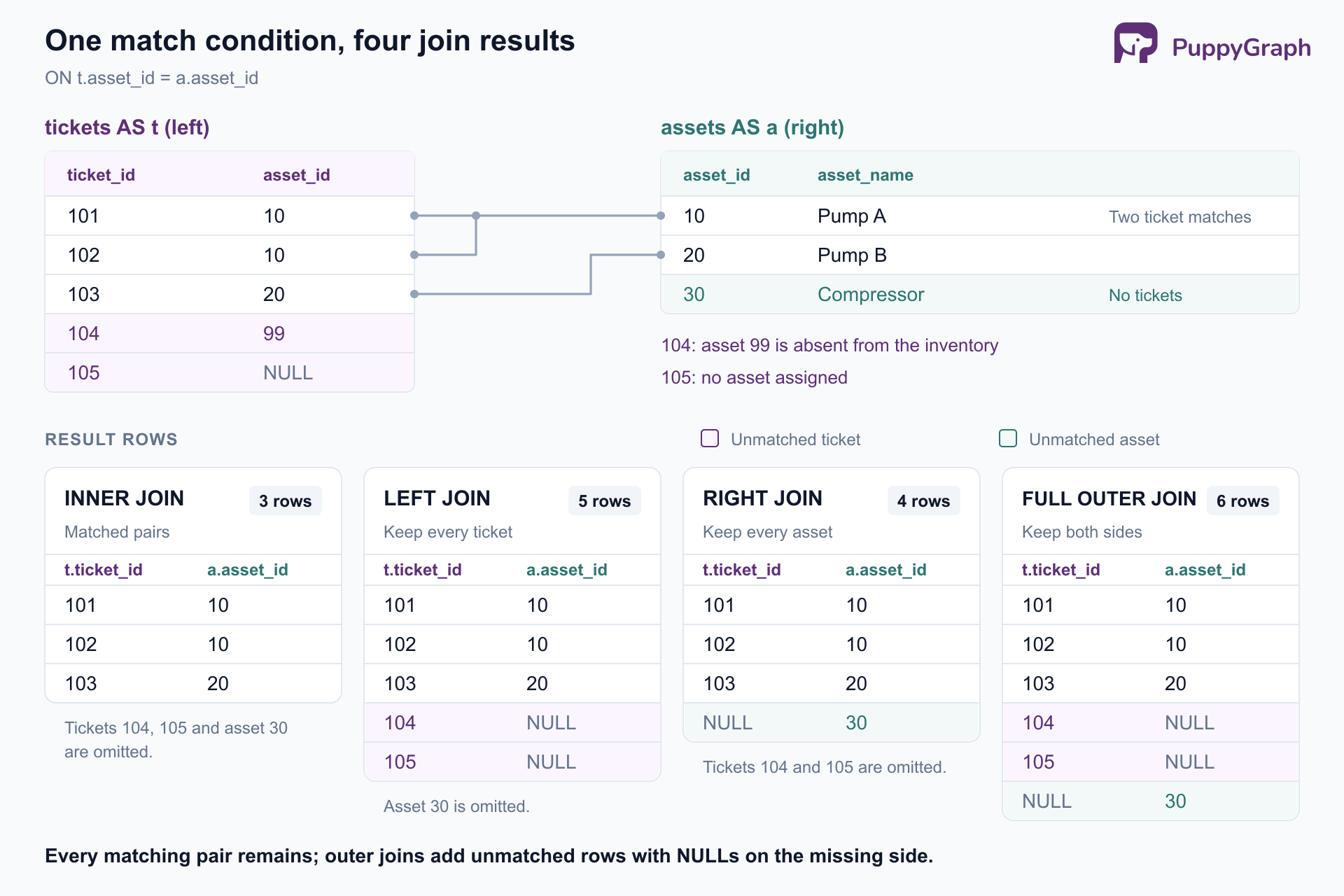
Figure: Two tickets matching Pump A remain two rows in every result. Outer joins add unmatched tickets or assets, filling the missing side with NULL.
Types of joins in Snowflake
The following forms answer different questions:
| Form | Matching and preservation | Example purpose |
|---|---|---|
| INNER JOIN | Matching pairs only | Attach known asset details |
| LEFT JOIN | Matches plus unmatched left rows | Keep every ticket |
| RIGHT JOIN | Matches plus unmatched right rows | Keep every asset |
| FULL OUTER JOIN | Matches plus unmatched rows from both sides | Reconcile tickets and inventory |
| CROSS JOIN | Every possible pair | Build an inspection grid |
| SELF JOIN | One table referenced in different roles | Attach parent-ticket details |
| NATURAL JOIN | Equality on all shared column names | Match controlled, aligned schemas |
| ASOF JOIN | One nearest qualifying right row per left row | Attach an earlier sensor reading |
SELF JOIN describes how you use a table, not a separate SQL keyword. NATURAL determines the matching columns and can accompany an outer join. These labels therefore describe different dimensions of a query. Snowflake's JOIN reference defines the supported combinations.
INNER JOIN in Snowflake
INNER JOIN keeps rows with a match on both sides:
SELECT t.ticket_id, a.asset_name
FROM tickets AS t
INNER JOIN assets AS a ON t.asset_id = a.asset_id
ORDER BY t.ticket_id;| ticket_id | asset_name |
|---|---|
| 101 | Pump A |
| 102 | Pump A |
| 103 | Pump B |
The output has three rows. Pump A appears twice because it has two tickets. Tickets 104 and 105 disappear because neither has a matching asset record.
Use this form when the report deliberately includes only linked records. For a data-quality report, losing the unknown and unassigned assets would hide useful information. Writing JOIN without INNER selects the same join type; spelling out INNER can make a teaching example easier to scan.
LEFT JOIN in Snowflake
LEFT JOIN preserves every left-side row, filling right-side columns with NULL when nothing matches:
SELECT t.ticket_id, t.asset_id, a.asset_name
FROM tickets AS t
LEFT JOIN assets AS a ON t.asset_id = a.asset_id
ORDER BY t.ticket_id;
All five tickets remain. Ticket 104 retains asset ID 99 but has a NULL asset name. Ticket 105 has NULL in both fields. Keeping the source identifier lets an analyst distinguish a missing inventory record from an unassigned ticket.
Filter placement matters. To show every asset with any open tickets, put the ticket-status condition in ON:
SELECT a.asset_id, t.ticket_id
FROM assets AS a
LEFT JOIN tickets AS t
  ON a.asset_id = t.asset_id
 AND t.status = 'open'
ORDER BY a.asset_id, t.ticket_id;
This returns assets 10 and 20 with their open tickets, plus asset 30 with a NULL ticket. Moving the condition to WHERE t.status = 'open' removes the NULL-filled row. Snowflake's outer-join filtering guidance explains why these placements are not interchangeable.
RIGHT JOIN in Snowflake
RIGHT JOIN preserves every row from the table written on the right:
SELECT a.asset_id, a.asset_name, t.ticket_id
FROM tickets AS t
RIGHT JOIN assets AS a ON t.asset_id = a.asset_id
ORDER BY a.asset_id, t.ticket_id;
The four output rows include two for Pump A, one for Pump B, and one for Compressor with a NULL ticket ID. Tickets referencing asset 99 or NULL are absent because the asset inventory is the preserved side.
This query can also be written as assets LEFT JOIN tickets, with the same matching condition and selected columns. Choose the direction that makes the report's subject easiest to follow. Consistent left-to-right reading becomes especially helpful when additional tables enter the query.
FULL OUTER JOIN in Snowflake
FULL OUTER JOIN retains matches and unmatched records from either input:
SELECT t.ticket_id,
       t.asset_id AS ticket_asset_id,
       a.asset_id AS inventory_asset_id,
       a.asset_name
FROM tickets AS t
FULL OUTER JOIN assets AS a ON t.asset_id = a.asset_id
ORDER BY t.ticket_id NULLS LAST, a.asset_id;
This produces six rows: three matched tickets, two tickets without inventory matches, and Compressor without a ticket. The separate asset-ID columns expose which side supplied a value.
This form suits reconciliation between independently maintained datasets. An unmatched row identifies a discrepancy to investigate; it does not explain whether the cause is a delayed load, a deleted record, or an incorrect identifier. Preserve enough source information to make that investigation possible.
CROSS JOIN in Snowflake
CROSS JOIN creates every pair of input rows. Here it generates two inspection tasks for each asset:
WITH inspection_types AS (
  SELECT column1 AS inspection_type
  FROM VALUES ('visual'), ('vibration')
)
SELECT a.asset_id, i.inspection_type
FROM assets AS a
CROSS JOIN inspection_types AS i
ORDER BY a.asset_id, i.inspection_type;
Three assets multiplied by two inspection types produces six rows. This is useful for planning grids, combinations, and reporting scaffolds where absent observations still need a place.
Check the input sizes before using this pattern on warehouse tables. A Cartesian product grows with the product of those sizes. When every combination is intentional, CROSS JOIN makes that intent explicit to the next reader.
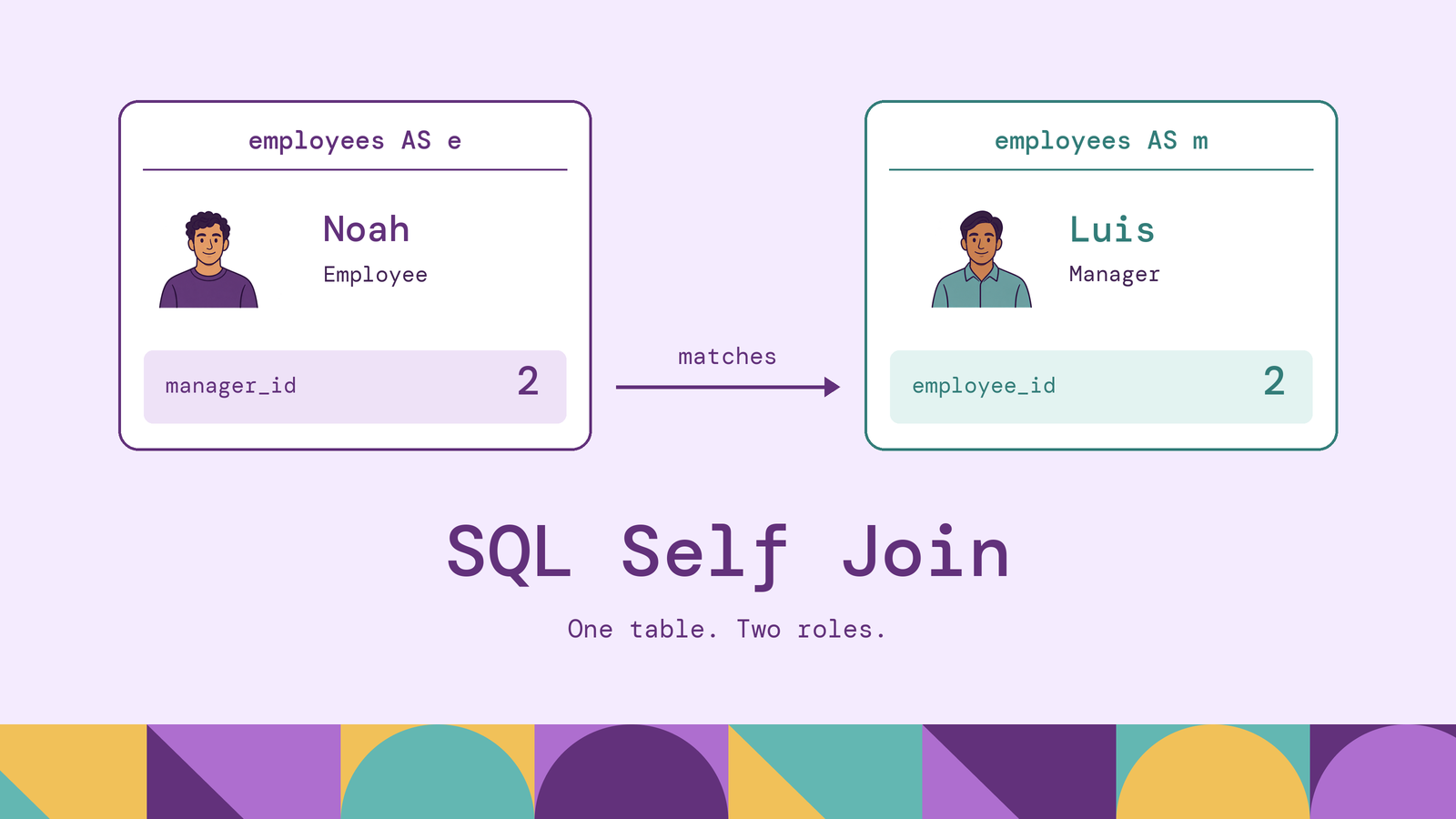
SELF JOIN in Snowflake
A self-join gives one table two aliases so its rows can play different roles:
SELECT child.ticket_id,
       parent.ticket_id AS parent_id,
       parent.status AS parent_status
FROM tickets AS child
LEFT JOIN tickets AS parent
  ON child.parent_ticket_id = parent.ticket_id
ORDER BY child.ticket_id;
Ticket 102 links to parent 101; ticket 104 links to parent 103. The other tickets remain with NULL parent details. The aliases distinguish the ticket being reported from its recorded parent.
This query follows one escalation step. Adding another self-join follows another known level. When the number of levels is unknown, Snowflake supports recursive CTEs and CONNECT BY. Decide whether the question asks for one relationship, a fixed chain, or a path of variable depth before choosing the query shape.
NATURAL JOIN in Snowflake
NATURAL JOIN derives equality conditions from every column name shared by its inputs:
SELECT ticket_id, asset_id, asset_name
FROM tickets NATURAL JOIN assets
ORDER BY ticket_id;
The sample tables share only asset_id, so this returns the same three ticket-to-asset matches as the inner join. A natural join emits one copy of each shared column when selecting all columns.
The risk is an implicit dependency on schema design. If assets later acquires a column named status, it becomes another matching condition. A ticket status such as open and an equipment status such as active describe different concepts, despite sharing a name. Previously matching rows could disappear without any query edit.
For maintained queries, use ON or an explicit USING list so reviewers can see the intended keys. NATURAL JOIN offers brevity when common-column matching is deliberate; its shorter syntax does not establish a performance advantage.
ASOF JOIN in Snowflake
ASOF JOIN finds one nearest qualifying right-side timestamp for each left-side row. It is useful when observations occur at different times. For maintenance tickets, the question might be which temperature reading was last recorded when each ticket opened.
Add a small readings table:
CREATE TEMPORARY TABLE readings (
  asset_id INT, observed_at TIMESTAMP_NTZ,
  temperature_c NUMBER(5, 1)
);
INSERT INTO readings VALUES
  (10, '2026-10-01 09:00:00', 40.0),
  (10, '2026-10-01 09:15:00', 55.0),
  (20, '2026-10-01 09:12:00', 60.0);

SELECT t.ticket_id, r.observed_at, r.temperature_c
FROM tickets AS t
ASOF JOIN readings AS r
  MATCH_CONDITION (t.opened_at >= r.observed_at)
  ON t.asset_id = r.asset_id
ORDER BY t.ticket_id;
Ticket 101 matches the 09:00 reading of 40.0; ticket 102 matches the 09:15 reading of 55.0. Ticket 103 has no qualifying reading because its 09:10 opening precedes Pump B's first observation. Tickets 104 and 105 also receive NULL reading values.
The equality in ON groups candidates by asset. MATCH_CONDITION chooses the time direction: >= includes the closest earlier or equal timestamp; <= searches forward. Strict > and < exclude exact timestamp matches. An unmatched left row remains in the output.
Snowflake's ASOF reference warns that ties on the right can return different qualifying rows across executions. Resolve duplicate asset-and-timestamp readings with a business-defined preference before joining. Also decide how old a reading may be: a preceding observation is not automatically a recent or relevant one.
Snowflake JOIN syntax and examples
ON supports explicit expressions, including comparisons between differently named columns. USING lists same-named equality keys:
SELECT ticket_id, asset_name
FROM tickets
INNER JOIN assets USING (asset_id)
ORDER BY ticket_id;
Unlike NATURAL JOIN, this condition stays focused on asset_id if another shared column appears later. For a composite identifier, list every component, such as USING (site_id, asset_id), when both inputs contain those columns and together they identify the entity.
To find tickets whose assigned asset is absent, combine a left join with an unmatched-side check:
SELECT t.ticket_id, t.asset_id
FROM tickets AS t
LEFT JOIN assets AS a ON t.asset_id = a.asset_id
WHERE a.asset_id IS NULL
  AND t.asset_id IS NOT NULL
ORDER BY t.ticket_id;
Only ticket 104 qualifies. The second predicate excludes unassigned ticket 105, making this an inventory-reference check rather than a general missing-assignment report.
Ordinary equality does not match NULL to NULL. Snowflake provides IS NOT DISTINCT FROM for NULL-safe equality, but use it only when two missing values should count as a match. Treating every unknown asset as the same asset would manufacture relationships.
Use aliases and explicit output columns to keep similarly named identifiers distinguishable. Compatible key types and consistent identifier formats also make the matching rule easier to validate.
Multiple table joins in Snowflake
Add site information without changing the intended output grain of one row per ticket:
CREATE TEMPORARY TABLE sites (
  site_id INT, site_name VARCHAR
);
INSERT INTO sites VALUES
  (1, 'North workshop'), (2, 'South workshop');

SELECT t.ticket_id, a.asset_name, s.site_name
FROM tickets AS t
LEFT JOIN assets AS a ON t.asset_id = a.asset_id
LEFT JOIN sites AS s ON a.site_id = s.site_id
ORDER BY t.ticket_id;
This retains all five tickets. Tickets 101–103 resolve to North workshop; tickets 104 and 105 have NULL asset and site names. Both joins preserve the ticket rows. Changing the second join to INNER would remove rows without a matching site, including the tickets the first join preserved.
Check the grain at every step. This example stays at one row per ticket because each matched asset and site has one row. Joining ticket comments or work logs can multiply that grain. If the report needs total labor per ticket, aggregate work logs to ticket level before attaching them. A final DISTINCT may hide repetition without repairing an inflated SUM.
Inspect the actual bottleneck. Snowflake's Query Profile exposes operator row counts and spilling. A join producing unexpectedly many rows calls for checking keys and conditions. Spilling means intermediate work exceeded available memory. Resolve unintended expansion and unnecessary input before deciding whether more warehouse capacity is appropriate.
Reduce the work the answer needs. Restrict ticket dates when the report covers a specific period, project the needed columns, and aggregate detail at the required grain. Preserve outer-join semantics when placing filters. For selective equality joins, Snowflake's search optimization service can help when the build side contains few distinct lookup values. It requires Enterprise Edition or higher; evaluate its maintenance costs against the measured workload.
A further maintenance question follows the parent-ticket links: which cases belong to the same escalation chain, and which assets and sites appear along it? The number of escalation steps can vary. Recursive SQL can answer this; a graph model makes the ticket-to-ticket paths explicit alongside the asset and site relationships.
PuppyGraph is the first and only zero-ETL graph query engine that lets teams query existing tables as a graph without loading them into a separate graph database. Its distributed engine queries tables in place in SQL databases, data warehouses, and data lakes or lakehouses, including direct reads of Iceberg and Delta Lake. Connect the sources, including Snowflake, define a graph schema mapping tables to nodes and edges, and query those relationships with openCypher or Gremlin while the same tables remain available to SQL.
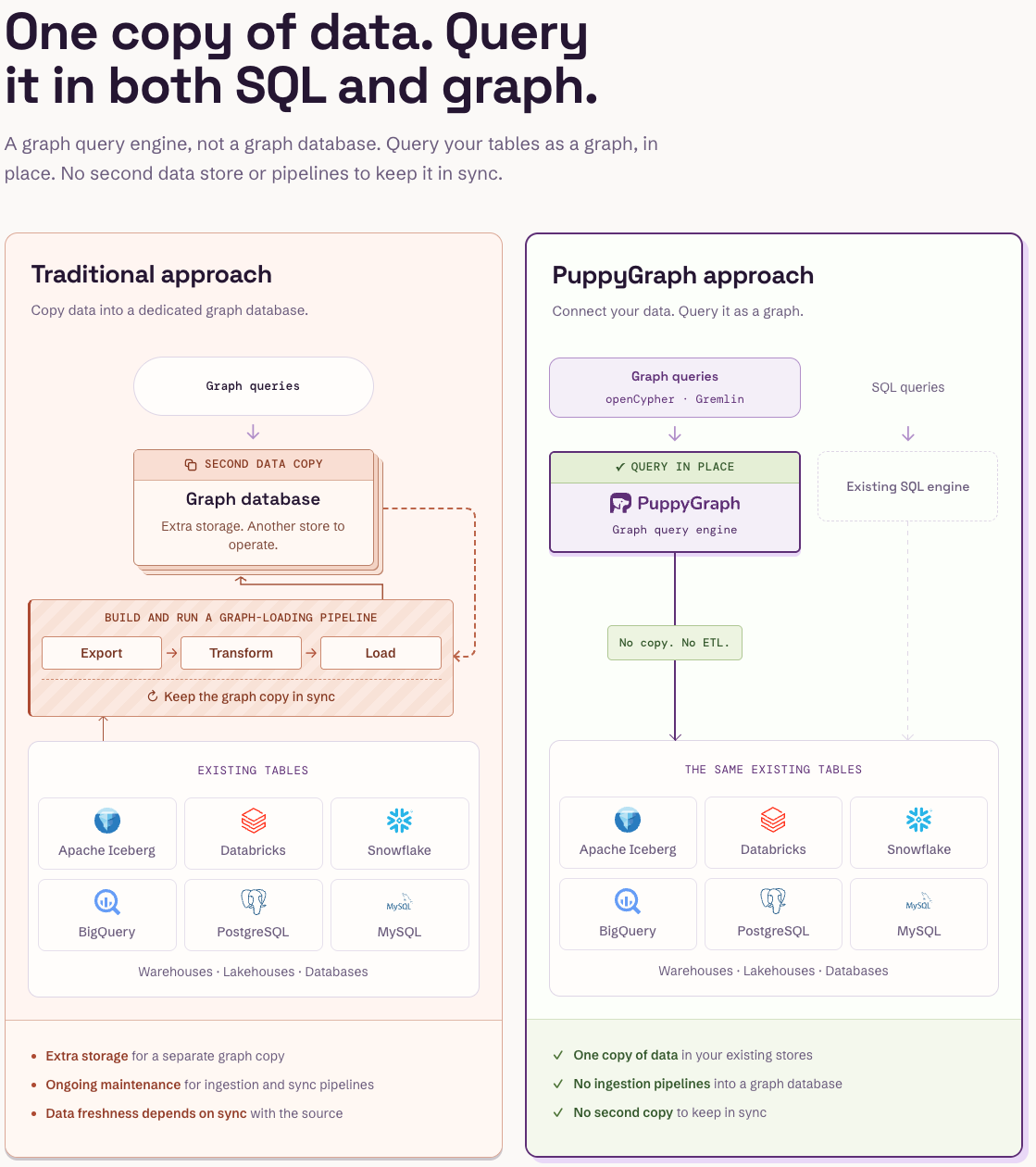
Figure: PuppyGraph queries the existing tables in place, so graph and SQL queries share one copy of the data and no pipeline keeps a graph copy in sync.

Figure: Companies that use PuppyGraph.

Figure: Engineering teams at PuppyGraph customers on what they use it for.
Conclusion
Choose a Snowflake join by the rows the answer must preserve, the keys that define a match, and the intended output grain. Check repeated keys, NULLs, and filter placement before tuning execution. For timestamp matching, define both the direction and a policy for tied observations. Those decisions make results explainable as tables and queries grow.
Try the forever-free PuppyGraph Developer Edition and book a demo with the team to see how openCypher and Gremlin queries trace relationships across warehouse and lakehouse tables, with no graph-specific ETL, when an investigation needs the paths connecting its records.