


Unity Catalog Architecture: Components & How It Works
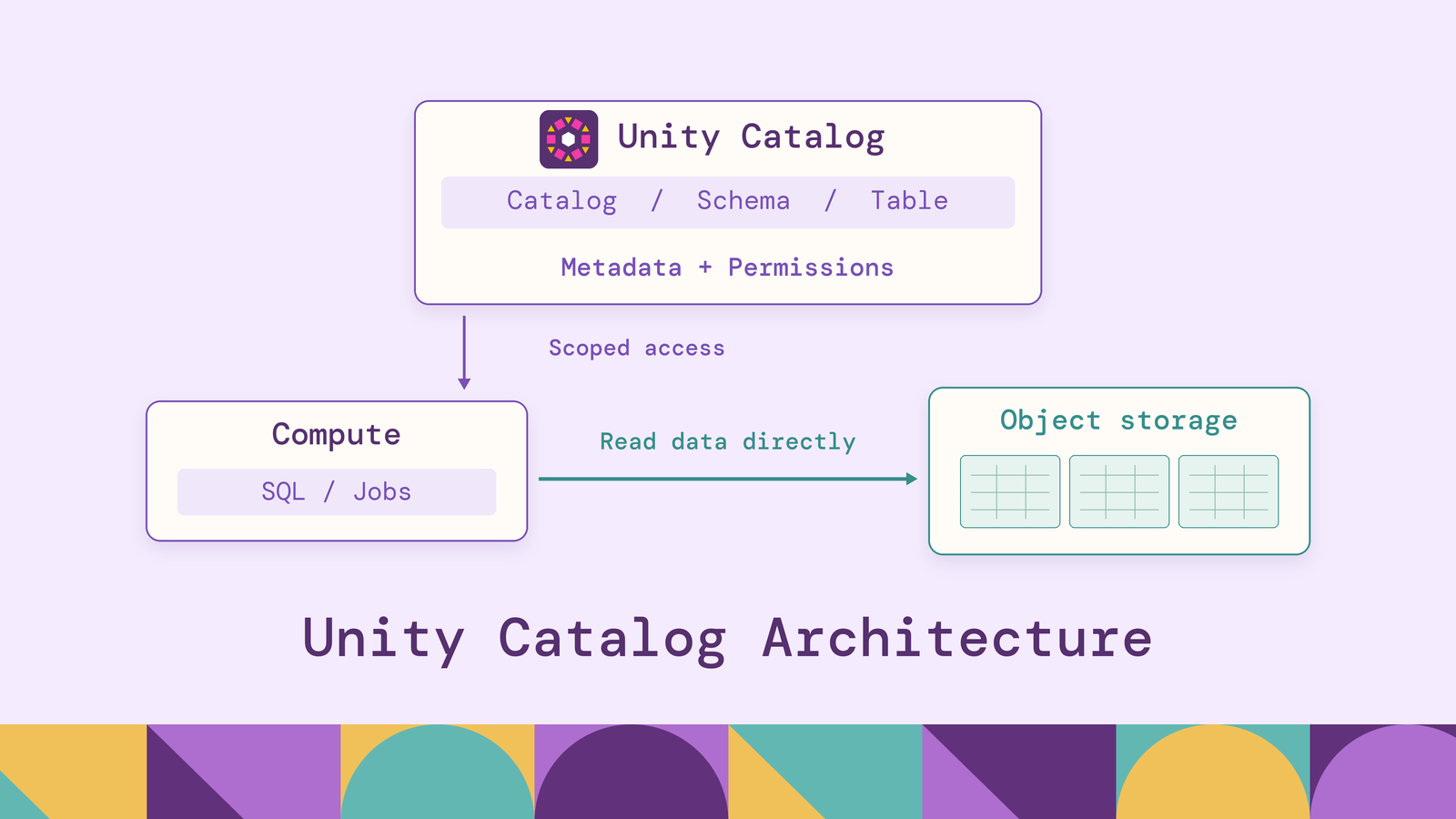
Unity Catalog governs data by standing between compute and storage. Because the catalog holds both the metadata that defines each table and the keys to the storage behind it, one set of grants, policies, audit records, and lineage applies across every workspace attached to it, instead of being reassembled per workspace or per cluster.
This guide covers what the architecture consists of and how a query moves through it, then its components, access, security, and lineage designs, and the best practices and limitations to plan around.
What is Unity Catalog architecture?
Unity Catalog is what Databricks calls "the unified governance layer for data and AI built into Databricks." Its architecture is the arrangement of pieces that lets one service govern data across many workspaces: a regional metastore that holds the object model, a three-level namespace for data and AI assets, securable objects that connect the catalog to cloud storage, account-level identities that receive grants, compute that enforces the catalog's decisions, and system tables that record what happened.
Like any data catalog in the technical sense, it maps table names to schemas and storage locations. What distinguishes it is that the same service also owns access control, so the place where a table is defined is the place where its permissions are decided and enforced. Before Unity Catalog, each Databricks workspace kept its own Hive metastore, and the same table could carry different permissions in different workspaces. Unity Catalog moves the metastore up to the account level, where multiple workspaces attach to one metastore and share its definitions and grants.
The managed service runs inside Databricks, which now enables it automatically on new workspaces. Databricks also open-sourced Unity Catalog in June 2024 under the Apache 2.0 license; the open-source project, hosted by the LF AI & Data Foundation, shares the open APIs that Databricks' own deployments implement. This article describes the Databricks implementation.
How does Unity Catalog architecture work?
Unity Catalog separates the control of data from the data itself. The catalog service holds metadata, grants, and policies; the data stays in object storage in the customer's own cloud account; and the compute that reads it works with temporary credentials the catalog issues rather than standing access to that storage.
A read on Databricks follows the four steps below, condensed from the "life of a query with Unity Catalog" diagram in a Comcast session at Data + AI Summit 2024:
- Resolve. A user runs a query such as
SELECT * FROM prod.payments.transferson a compute resource attached to the workspace. The compute asks Unity Catalog for the table's metadata. - Authorize. Unity Catalog checks the caller's identity against the grants on the catalog, the schema, and the table, and against any workspace binding on the catalog.
- Vend. If the read is allowed, Unity Catalog returns the table's storage location together with temporary credentials scoped to it. Databricks calls this credential vending: "time-limited, downscoped storage credentials generated on demand", restricted "to the specific storage needed for a higher-level object, like a table."
- Read and record. The compute reads the files directly from object storage, applies any row filters, column masks, or attribute-based policies that govern the table, and returns the result. The access is written to the audit log, and Unity Catalog captures lineage from the query.
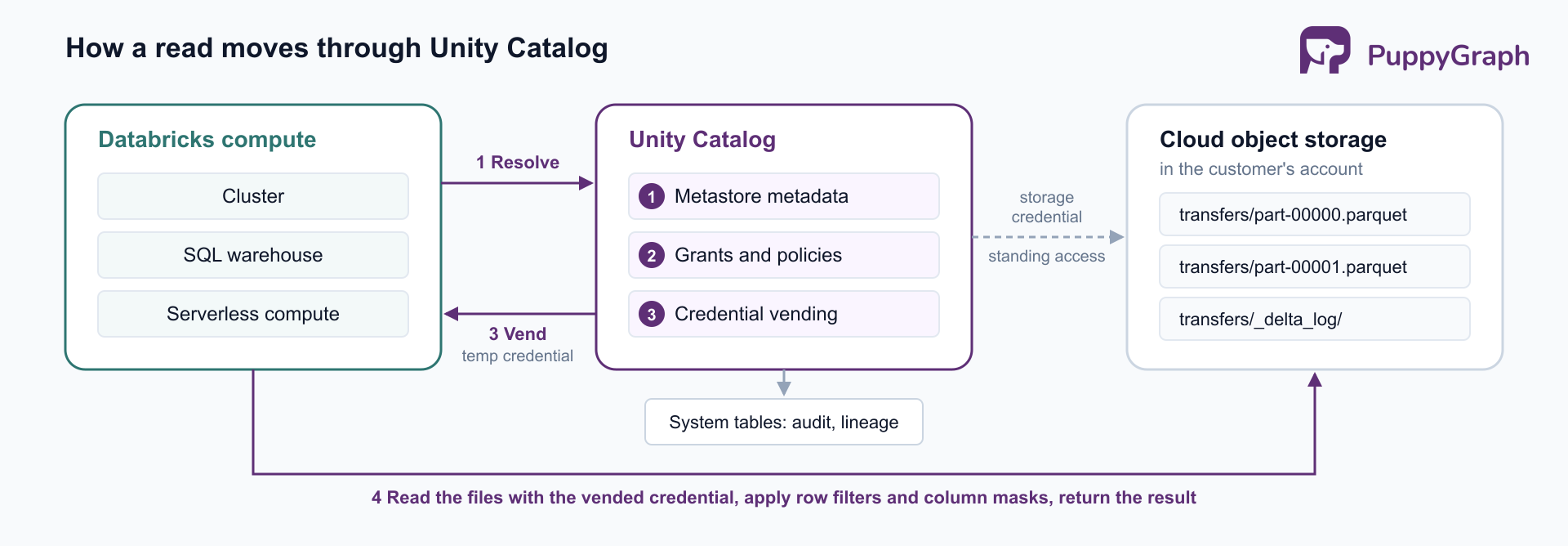
The design works only if the catalog is the sole path to the files. Databricks' own guidance is blunt on this point: "The only identity that should have access to data managed by Unity Catalog is the identity used by Unity Catalog" (cloud storage documentation). A user or job with direct bucket credentials reads around every grant, filter, and audit record. Most of the architecture that follows, from storage credentials to compute access modes, exists to keep that bypass closed.
Key components of Unity Catalog architecture
Unity Catalog's components fall into four groups: the namespace that organizes assets, the assets themselves, the objects that connect the catalog to storage, and the objects that connect it to systems outside the metastore. Each of them is registered in the metastore as a securable object.
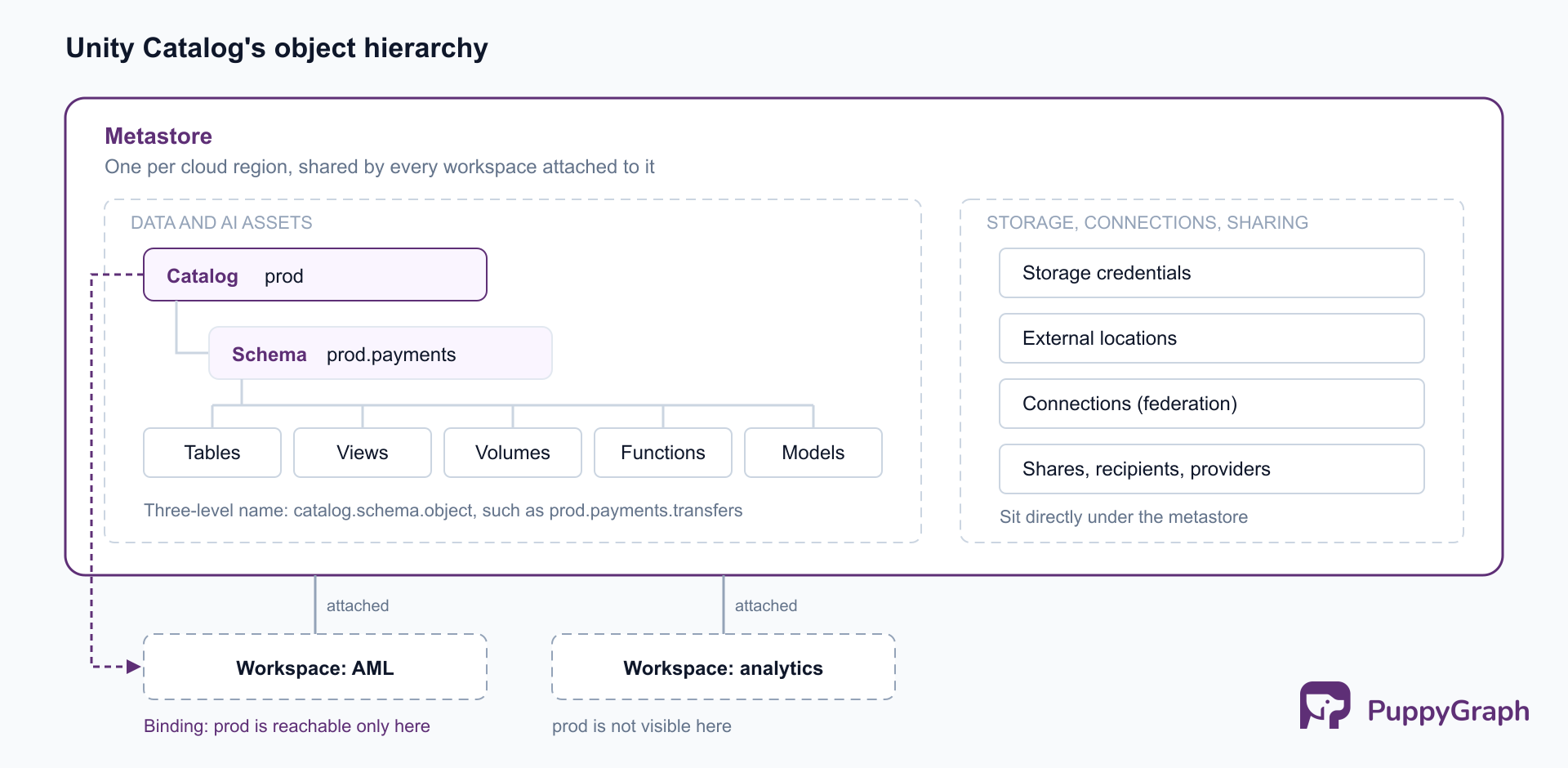
The namespace: metastore, catalogs, and schemas. The metastore is the top-level container; in the words of the securable objects reference, it "contains all securable objects registered in Unity Catalog in a single cloud region." An organization needs one metastore per region in which it operates, and multiple workspaces in that region attach to it. Below the metastore, data assets use a three-level namespace, catalog.schema.object. A catalog usually maps to an environment, a business unit, or a team, such as prod, dev, or finance, and a schema (also called a database) groups related assets within it.
Data and AI assets. Schemas hold tables (managed, external, and foreign), views, volumes for unstructured files, functions, and registered AI models. Tables and volumes are either managed or external, which is the most consequential choice in the object model. For a managed table, Unity Catalog chooses the storage location within the customer's cloud account and handles the files' optimization, organization, and deletion; managed tables use Delta Lake or Apache Iceberg. For an external table, the team sets the path and owns the file lifecycle, and the table can use formats beyond Delta and Iceberg. Dropping a managed table eventually deletes its files; dropping an external table removes only its metadata.
Storage access: storage credentials, external locations, and managed storage. A storage credential wraps a long-lived cloud identity, such as an AWS IAM role, that Unity Catalog uses to reach a bucket. An external location "combines a cloud storage path with a storage credential", and privileges on the external location decide who may create tables or volumes under that path. Managed storage locations, configurable at the metastore, catalog, or schema level, tell Unity Catalog where to place managed tables.
External connectivity: connections and sharing objects. A connection stores the credentials for an external system, and Lakehouse Federation builds foreign catalogs on it that mirror an external database, such as PostgreSQL or Snowflake, or an external metastore, such as a legacy Hive metastore or AWS Glue. Foreign tables are then granted like any other table. Shares, recipients, and providers are the securable objects behind OpenSharing, which shares live data with other organizations and which Databricks presents as "the next evolution of the open source Delta Sharing protocol".
Assets describe what the data is, storage objects describe where it lives and which identity can reach it, and connectivity objects describe how data crosses the metastore's boundary. Keeping all of them in one securable hierarchy is what lets a single grant model cover them.
How Unity Catalog manages data access
Access in Unity Catalog starts with identities. Users, groups, and service principals are defined at the Databricks account level and assigned to workspaces, typically synchronized from the identity provider. Because grants attach to account-level principals, the same group means the same thing in every workspace on the metastore.
Privileges follow the hierarchy. Reading a table takes three grants: USE CATALOG on its catalog, USE SCHEMA on its schema, and SELECT on the table or one of its parents. Privileges inherit downward, so SELECT granted on a schema applies to all current and future tables and views in it. Take a bank that keeps accounts and transfers in prod.payments and its customers' personal identifiers apart in prod.kyc.identities. Giving its anti-money-laundering (AML) analysts read access to the payments data takes three statements:
GRANT USE CATALOG ON CATALOG prod TO `aml-analysts`;
GRANT USE SCHEMA ON SCHEMA prod.payments TO `aml-analysts`;
GRANT SELECT ON SCHEMA prod.payments TO `aml-analysts`;
The usage privileges act as gates: without USE CATALOG, a grant on a table inside the catalog gives no access. A separate BROWSE privilege lets users discover objects and read their metadata without access to the data.
Workspace bindings restrict where. By default, a catalog is visible from every workspace attached to the metastore. A workspace binding limits a catalog to specific workspaces, optionally read-only, and it overrides grants: a user with SELECT cannot read a production catalog from a workspace it is not bound to.
Access from outside Databricks. Unity Catalog also serves engines that are not Databricks compute. Through the Unity REST API and an Apache Iceberg REST catalog endpoint, an external engine asks for a table and receives vended, table-scoped credentials that, per the credential vending documentation, "inherit the privileges of the Databricks principal" it connects as. The path is closed by default: an administrator has to enable external data access on the metastore and grant the principal a separate EXTERNAL USE SCHEMA privilege. Tables with row filters or column masks, views, and shared tables are not available this way, since a storage credential would hand over the unfiltered files.
The bank's AML team thinks about this data in its own terms: customers, the accounts they hold, the transfers between accounts, and the alerts raised on them. Alert AL-2291 flagged account ACC-40117 for a large outbound wire, and an investigator wants to know whether any of the money came back to another account held by the same customer within four transfers. A semantic model, or ontology, of those entities and relationships, laid over the governed tables, lets that question be asked as written, and a graph is a direct way to implement one: customers, accounts, and alerts become nodes, holdings, transfers, and flags become edges, and the round trip becomes a single pattern that leaves a customer and returns to the same customer. PuppyGraph adds that model over the tables in place. It connects to Unity Catalog like any other external engine and reads the tables with the credentials the catalog vends, which carry the privileges of the principal it connects as. The vending rules above draw the line in a useful place: the prod.payments tables, which carry no row filters or masks, are served; prod.kyc.identities, which the next section protects with a filter and a mask, is not, and stays with Databricks compute.
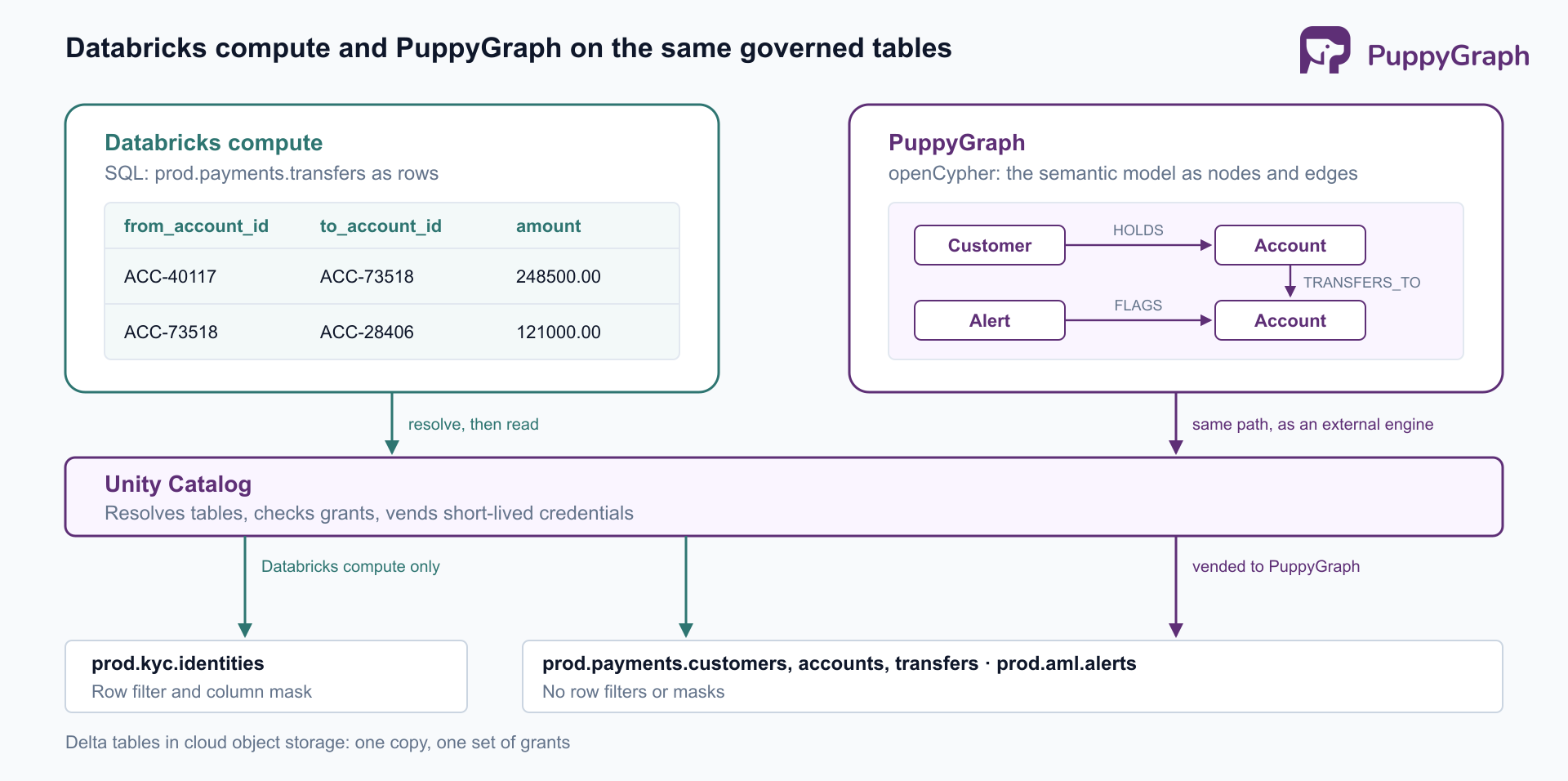
PuppyGraph is a distributed graph query engine that queries tables where they already live, in SQL databases, data warehouses, and data lakes and lakehouses, including direct reads of open table formats like Iceberg and Delta Lake. A team connects its sources, defines a graph schema that maps tables to nodes and edges, and queries with openCypher and Gremlin; the graph schema is the semantic model the questions are asked against. There is no ETL into a separate graph database, so the Delta tables governed by Unity Catalog remain the system of record and stay queryable with SQL in Databricks. Queries compile into a plan of node and edge operators that runs in parallel across PuppyGraph's compute nodes, so graph compute scales independently of the storage the catalog governs. A built-in AI assistant builds the graph schema from the connected tables and answers questions in plain language by writing and running graph queries itself.
With the catalog connected, the assistant, which needs an LLM API key, builds that model from a plain description of the domain: customers hold accounts, accounts send transfers to other accounts, and alerts flag accounts. It inspects the tables, tests candidate joins against the data, and proposes the model as a plan to approve:
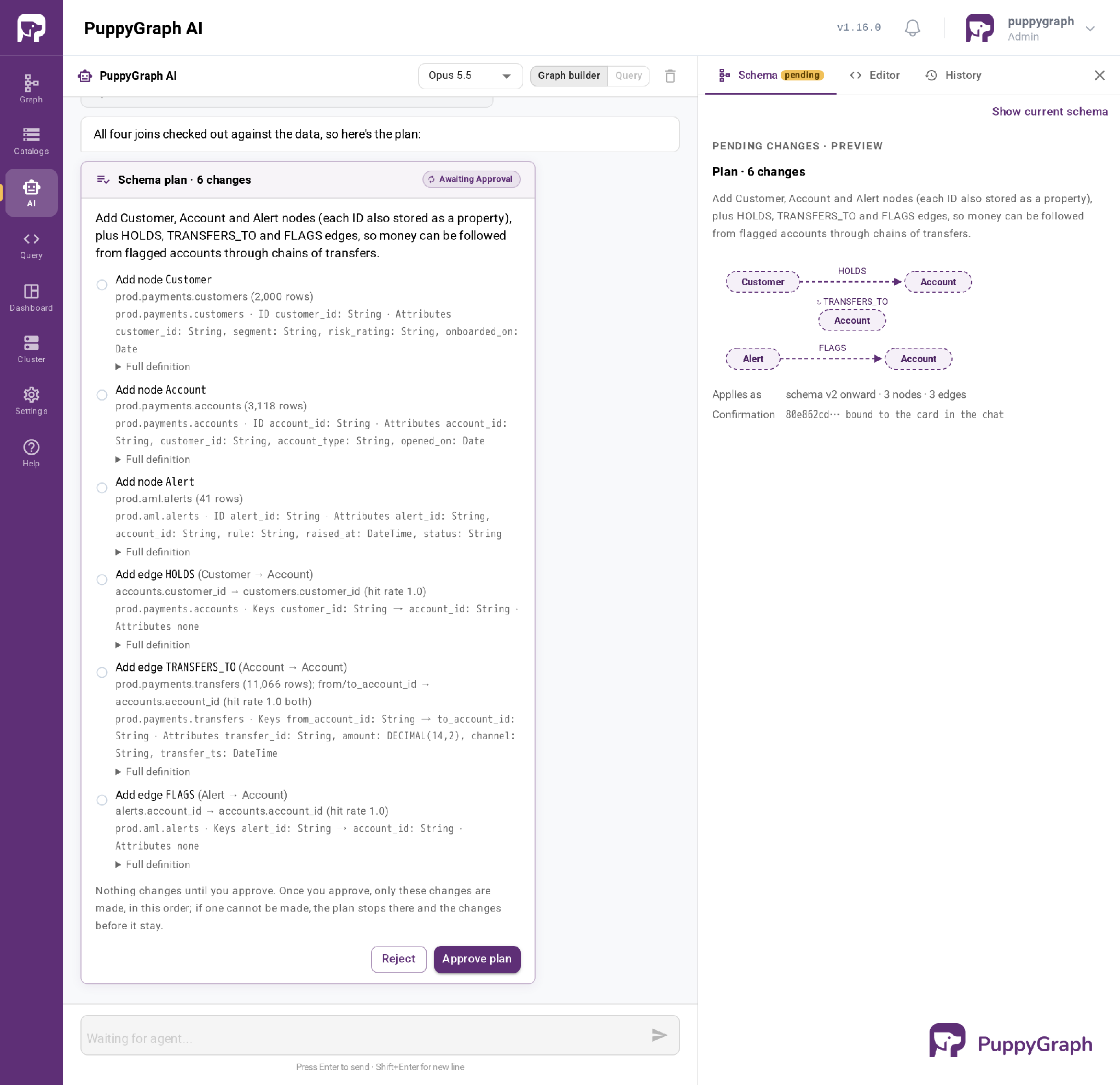
Approving it creates Customer, Account, and Alert nodes with HOLDS, TRANSFERS_TO, and FLAGS edges. The round trip is then one pattern: from the alert to the flagged account and its holder, along two to four transfers, and back to another account of the same holder.
MATCH (:Alert {alert_id: 'AL-2291'})-[:FLAGS]->(src:Account)<-[:HOLDS]-(c:Customer)
MATCH p = (src)-[t:TRANSFERS_TO*2..4]->(dst:Account)
WHERE dst <> src AND (dst)<-[:HOLDS]-(c)
RETURN c.customer_id AS customer,
       [a IN nodes(p) | a.account_id] AS chain,
       [x IN t | x.amount] AS amounts
ORDER BY size(chain)
customer  chain                                                          amounts
CUS-1182  ["ACC-40117","ACC-73518","ACC-28406","ACC-52930"]              [248500,121000,118600]
CUS-1182  ["ACC-40117","ACC-73518","ACC-91142","ACC-56083","ACC-52930"]  [248500,124000,123200,121500]
Two chains start with the flagged wire and end in ACC-52930, the customer's other account, three and four transfers out. A transfer between the customer's two accounts and a chain that lands with a different customer do not match the pattern.
Asked the same question in Query mode, the assistant found the same two chains, laid out each transfer with its amount and time, and noted what an investigator would look at next: the wire splits at the first intermediary account, about 97% of it returns, and all four accounts in the middle were opened in the three weeks before the wire.
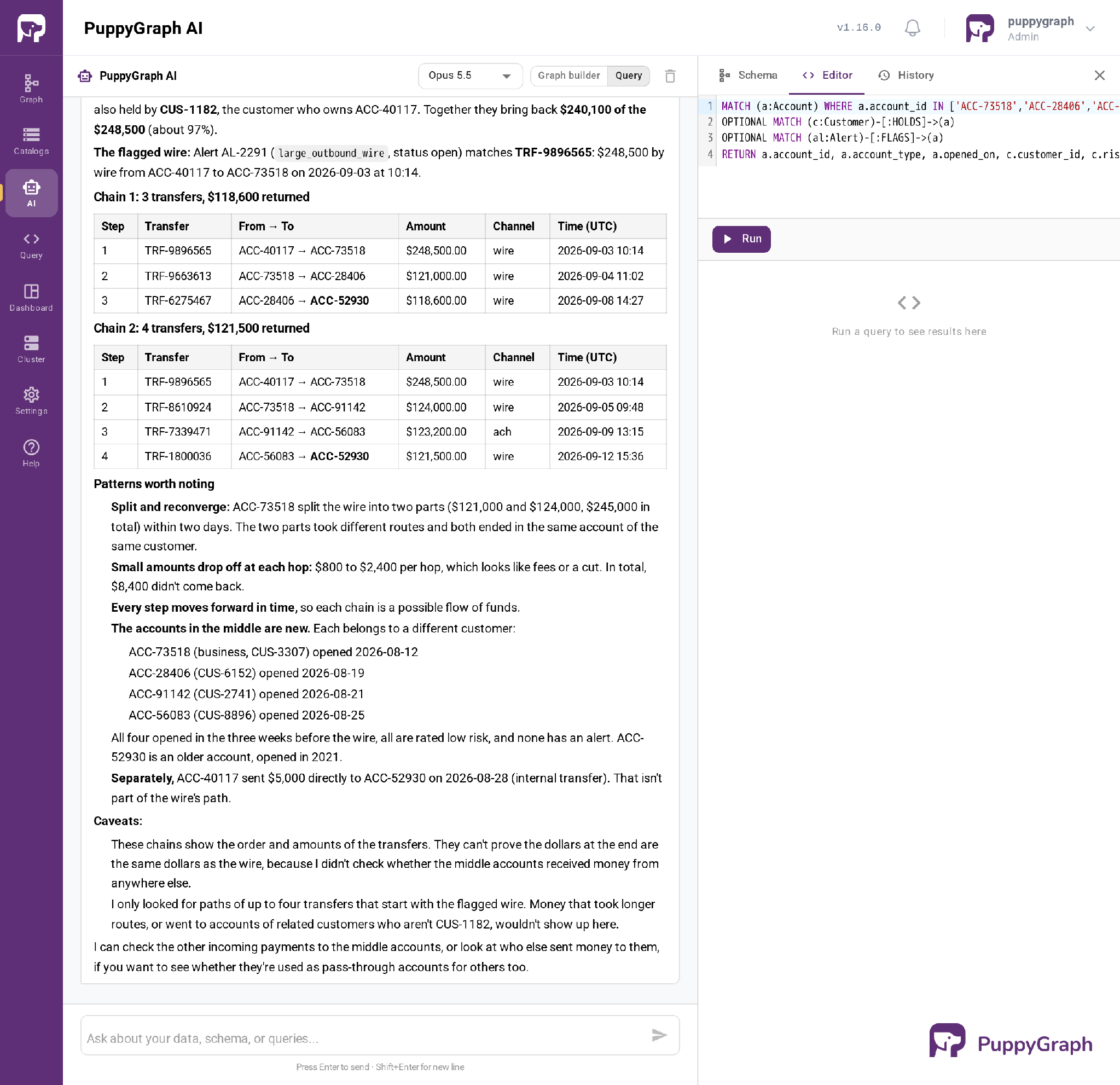
The answer names accounts and customer IDs, which is what an investigator needs to open a case. Names and national ID numbers stay in prod.kyc.identities, behind the row filter and mask that Databricks compute enforces.
Unity Catalog security architecture
Unity Catalog's security model works in layers, each closing a different path to the data.
Storage isolation. The catalog's identity is the only one that should hold standing access to governed storage. Storage credentials keep the long-lived cloud identity inside Unity Catalog, and every engine, internal or external, works with short-lived credentials scoped to the table it was authorized to read. Databricks' best practices add that managed storage should never use a bucket that can be accessed from outside Unity Catalog.
Compute isolation. Compute can only enforce a row filter if the user's code cannot see the unfiltered data the engine read. Unity Catalog therefore requires compute in standard or dedicated access mode; other modes cannot access Unity Catalog data. Standard compute, which Databricks recommends by default, relies on Lakeguard to isolate each user's code from the Spark engine and from other users. Dedicated compute, assigned to one user or group, lacks that separation, so it hands filtering of protected tables to serverless compute.
Fine-grained access control. Within a table, row filters and column masks are SQL user-defined functions evaluated at query time. A filter returns a boolean per row; a mask returns either the original value or a redacted one. On the bank's prod.kyc.identities, a filter limits most readers to one region's customers and a mask hides national ID numbers from everyone outside the investigations group:
CREATE FUNCTION prod.gov.emea_only(region STRING)
RETURN is_account_group_member('aml-investigators') OR region = 'EMEA';

ALTER TABLE prod.kyc.identities SET ROW FILTER prod.gov.emea_only ON (region);

CREATE FUNCTION prod.gov.mask_national_id(national_id STRING)
RETURN CASE WHEN is_account_group_member('aml-investigators') THEN national_id ELSE '***' END;

ALTER TABLE prod.kyc.identities ALTER COLUMN national_id SET MASK prod.gov.mask_national_id;
Per-table functions are hard to keep consistent across hundreds of tables. Attribute-based access control (ABAC) uses governed tags instead: a policy at the catalog or schema level applies a filter or mask to every table or column carrying a matching tag, such as one marking personal data.
Audit. Unity Catalog actions are recorded in the audit log system table, system.access.audit, with the identity behind each request, the action, its parameters, and the response, so security teams query access history with SQL.
Each layer depends on the one below it. Row filters mean nothing on compute where user code can read the unfiltered files, and compute isolation means nothing if someone holds a key to the bucket.
Unity Catalog data lineage architecture
Lineage in Unity Catalog is captured at runtime. When a query runs on Databricks through Spark DataFrames or Databricks SQL, the compute reports which tables and columns it read and which it wrote, and Unity Catalog records the relationship "down to the column level." Capture is automatic, and lineage spans every workspace attached to the metastore.
The result is a graph. Its nodes are tables, views, file paths, and model versions, with notebooks, jobs, pipelines, queries, and dashboards as the entities that produced or consumed them. Users explore it in Catalog Explorer, under Unity Catalog's own permissions: seeing a table's lineage requires at least BROWSE on its catalog.
For programmatic use, the same graph is stored as rows in the lineage system tables, system.access.table_lineage and system.access.column_lineage. Each row is one edge: a source, a target, the entity that moved data between them, and when it happened. Finding everything directly downstream of a table is a single query:
SELECT DISTINCT target_table_full_name, entity_type, entity_id
FROM system.access.table_lineage
WHERE source_table_full_name = 'prod.payments.transfers'
  AND target_table_full_name IS NOT NULL
  AND event_date >= date_sub(current_date(), 30);
Each query returns one hop. A full impact analysis, everything that would break if prod.payments.transfers changed shape, follows those edges repeatedly until no new targets appear, the same upstream and downstream walk that data lineage tracking relies on generally.
Lineage is a by-product of governance: every governed query already passes through the catalog, so recording what it read and wrote asks nothing of the pipeline that ran it.
Unity Catalog architecture best practices
The Databricks best practices with the most architectural weight group into five areas.
Design catalogs as the isolation boundary. With one metastore per region, catalogs carry most of the organizational structure. Map them to environments, business units, or teams, prefer catalog-level managed storage as the main unit of data isolation, and bind production catalogs to the workspaces that should reach them.
Grant to groups, not users. Provision principals from the identity provider, grant privileges to groups, and assign ownership of production objects to groups, so access survives people changing roles. Leave direct write access to production tables to service principals.
Prefer managed tables and volumes. Databricks recommends managed tables for new data, since the catalog then handles file placement and maintenance. Keep external tables for the cases managed ones do not cover, such as other file formats or tables carried over from a Hive metastore.
Lock down storage paths. Limit who can create external locations to administrators and trusted data engineers, avoid broad file-level grants on them, and use volumes for path-based file access.
Standardize compute and scale policy with tags. Use compute policies so that only Unity Catalog-capable access modes can be created, defaulting to standard access mode. For rules that span many tables, Databricks recommends ABAC with governed tags to centralize and scale access control.
Each practice protects the same property, that the catalog stays the path to the data. Group grants keep that path manageable as teams change, managed tables and locked-down locations keep the files behind it, and standard compute keeps its decisions enforced.
Unity Catalog architecture limitations
Unity Catalog's limits mostly follow from its design: a regional control plane that enforces policy through compute it can trust.
Metastores are regional. One metastore serves one region, and lineage and access control do not cross metastore boundaries. Cross-region and cross-cloud access goes through sharing, with privileges granted again on the receiving side.
Compute must fit the enforcement model. Clusters outside standard and dedicated access modes cannot read Unity Catalog data. Standard compute, in exchange for isolation, does not support some Spark APIs and languages. Workloads that depend on them move to dedicated compute.
External engines get a narrower path. Vended credentials exclude views and filtered or masked tables, and they carry one principal's privileges, so per-user policy inside an external engine is that engine's responsibility.
Lineage has gaps. Lineage does not survive renames, some Spark constructs and user-defined functions escape full capture, and the lineage system tables keep only a rolling window of history. Work done outside Databricks appears only if it is registered as external lineage.
The surface is still moving. Access modes were renamed (shared to standard, single user to dedicated), so older guides use names the current documentation does not. Smaller constraints are listed on the requirements and limitations page.
Conclusion
Unity Catalog's architecture rests on one arrangement: a regional metastore that holds both the definition of every data and AI asset and the standing access to the storage behind it. The three-level namespace organizes assets, account-level identities and inherited privileges decide access, isolated compute enforces filters and masks, and audit and lineage are recorded as a by-product of queries running through the catalog. Its limits, regional boundaries, compute requirements, and a narrower path for external engines, follow from the same design, and planning around them is most of the work of adopting it well.
Try the forever-free PuppyGraph Developer Edition and book a demo with the team to see how openCypher and Gremlin queries run over warehouse and lakehouse tables, with no graph-specific ETL, including Delta tables that Unity Catalog already governs.

Sa Wang is a Software Engineer with exceptional mathematical ability and strong coding skills. He holds a Bachelor's degree in Computer Science and a Master's degree in Philosophy from Fudan University, where he specialized in Mathematical Logic.

Get started with PuppyGraph!


Developer Edition
- Forever free
- Single noded
- Designed for proving your ideas
- Available via Docker install
Enterprise Edition
- 30-day free trial with full features
- Everything in developer edition & enterprise features
- Designed for production
- Available via AWS AMI & Docker install