

9 Best Intelligent Document Processing Tools in 2026
%20(1).png)
IDP tools differ most in the work around extraction: packet classification, business-rule validation, reviewer queues, model changes, and downstream integrations. A strong extraction model is still a poor fit when its operating shape leaves a team building or maintaining the wrong parts of that workflow.
The nine tools in this guide approach that job from different directions. Some are complete document operations platforms with work queues and review interfaces. Some extend an existing automation suite. Others are cloud APIs that give developers strong extraction primitives while leaving orchestration and review to the surrounding application. The best choice depends on which of those layers your team wants to buy and which it is prepared to build.
What is intelligent document processing (IDP)?
Intelligent document processing (IDP) is the use of optical character recognition, machine learning, language models, rules, and human review to convert documents into validated, structured data. An IDP system can accept a scanned PDF, determine that it contains three invoices and a delivery note, extract fields and line items, check the totals against business rules, and route only questionable values to an operator.
That is broader than OCR. OCR identifies characters and their locations. IDP interprets them in context, distinguishing an invoice date from a delivery date, associating table cells with rows and columns, and emitting a schema that a downstream system can consume.
Most production IDP workflows have six stages:
- Ingestion receives PDFs, images, office files, email attachments, or mobile captures.
- Preprocessing corrects rotation, skew, image quality, and page boundaries.
- Classification and splitting identifies document types and separates combined packets.
- Extraction returns text, key-value pairs, tables, checkboxes, signatures, and domain-specific fields.
- Validation and review applies confidence thresholds and business rules, then routes exceptions to people.
- Export and monitoring writes approved data to operational systems and tracks quality, throughput, and exceptions.
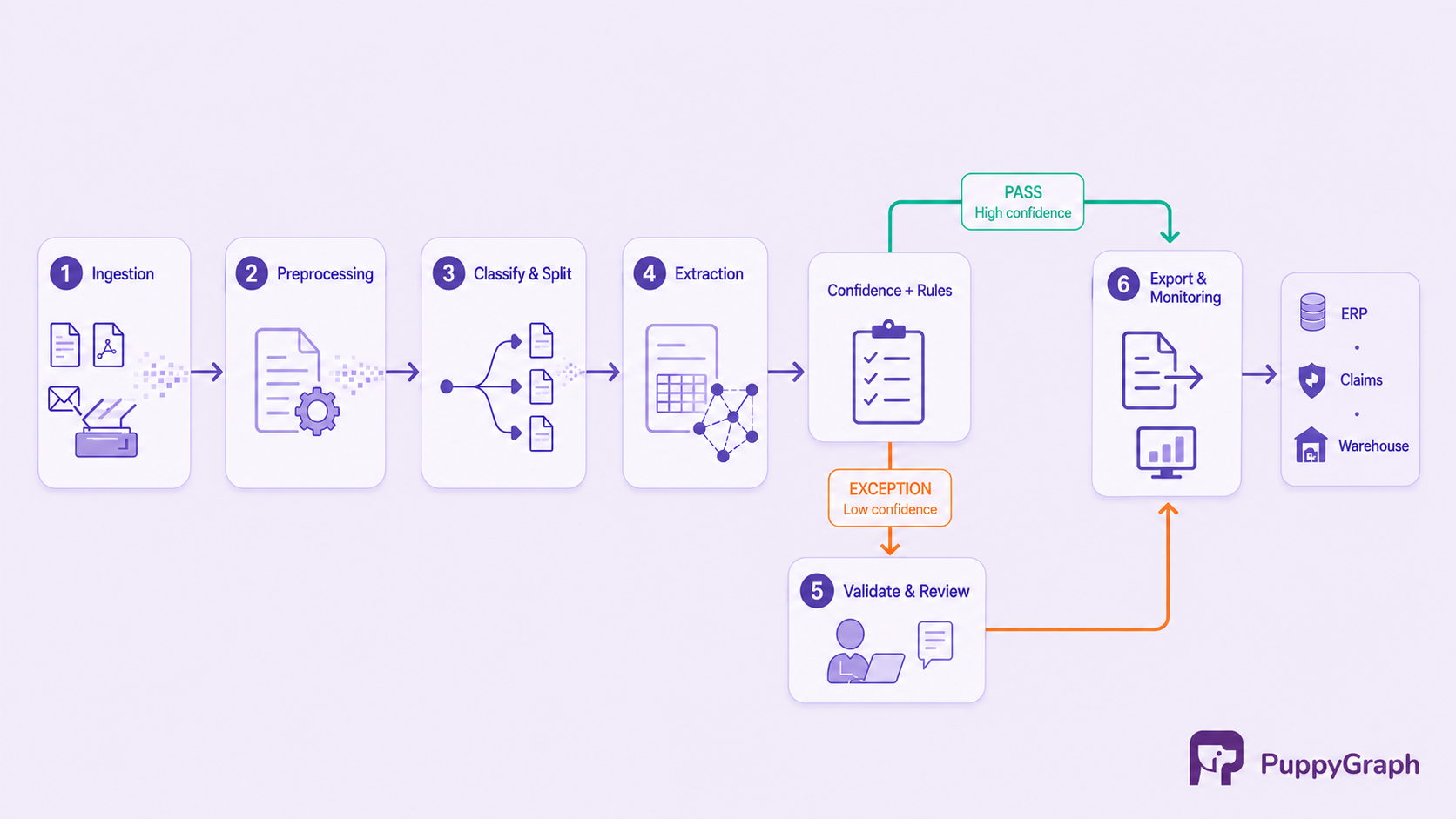
Generative models have expanded what extraction systems can handle, especially when layouts vary. They have not removed the need for deterministic controls. A payable amount and a patient identifier have different error costs, so each needs its own acceptance threshold, validation rules, and escalation path. Aggregate accuracy can hide failures on the few fields that determine whether a transaction is safe to automate.
The useful unit of evaluation is therefore the complete workflow, not a model demonstrated on one clean document. A production IDP system has to remain observable when suppliers change templates, scans degrade, new document classes arrive, and human corrections reveal a systematic failure.
Intelligent document processing software comparison
The table compares the nine products at the level that most affects implementation. Platform entries include more of the operational workflow. Automation-integrated products are strongest when document processing is one step in a larger automation estate. Cloud service entries provide APIs and models that a development team composes with storage, queues, review, and monitoring.
The main dividing line is ownership. Google Document AI and Azure Document Intelligence center on managed analysis APIs, so buyers assemble most of the operational queue, review, routing, and export application around them. Amazon Textract can integrate with Amazon A2I for human review, although A2I is configured separately and is no longer open to new customers. ABBYY, UiPath, Hyperscience, Rossum, Nanonets, and Docsumo bundle broader workflow and reviewer surfaces, although their exact breadth varies. That broader surface can shorten implementation, but it also makes workflow fit and operator usability more important parts of the purchase.
No table can predict extraction quality on a buyer's documents. Test low-quality scans, uncommon layouts, multilingual content, handwritten additions, long tables, and the document combinations that cause exceptions today.
How to choose an intelligent document processing software
Start with the operational outcome rather than a generic feature checklist. Processing supplier invoices into an ERP, extracting clauses for legal review, and preparing documents for retrieval all use document AI, but they require different schemas, controls, and definitions of success.
First test the fit between the product's models and the documents it will receive.
Define the document population. Inventory classes, formats, languages, capture channels, and layout variability. Separate stable forms from semi-structured invoices and narrative contracts. Performance on fixed templates does not predict performance on variable, text-heavy documents.
Evaluate critical fields separately. Build a labeled set from production documents, including known failures. Measure precision and recall by field and class. Weight blocking fields such as account number, total amount, or policy ID more heavily than descriptive fields.
Design the exception path before automation. Decide which values can pass, which require external validation, and which must be reviewed. Test whether operators can see the source region, understand the routing reason, and correct a value quickly. Measure straight-through processing alongside false accepts and time per exception.
Separate model capability from workflow coverage. With a cloud API, your team may still need to build ingestion, state management, review, retries, audit history, and export. A platform includes more of that surface but may fit an existing orchestrator less cleanly. Price both the service and the missing engineering work.
Then test how the system will operate inside the wider technical and governance environment.
Test packet handling. Submissions often contain several document types, missing pages, duplicates, and irrelevant attachments. Evaluate splitting, classification, ordering, and unknown-document handling before individual fields.
Inspect integration contracts. Confirm input methods, asynchronous processing, webhooks, output schemas, idempotency, retries, and model promotion. Check whether corrected data can be exported and traced to source coordinates.
Treat governance as a gate. Establish where content may be processed, what the service retains, which regions or private modes are available, and how reviewers authenticate. Test access controls, audit logs, deletion, and regulatory requirements during the proof of concept.
Model the full cost. Vendors charge by page, feature, capacity, automation consumption, or contract. Add storage, reviewer seats, implementation, maintenance, and exception labor. Include seasonal peaks and multipage packets.
Finally, test change. Add a supplier layout, revise the schema, alter an approval rule, and promote a model version. The winning product is the one operators can adapt without losing control of output quality.
9 best intelligent document processing tools
The tools below are not a strict ranking. They represent nine strong options across enterprise platforms, automation suites, and cloud services. Each one is best for a different operating model.
1. ABBYY Vantage
ABBYY Vantage is a cloud-hosted IDP platform built around reusable skills. Document skills extract fields, classification skills identify document types, and process skills connect import, OCR, classification, extraction, conditions, review, and export. Teams can start with common business-document skills or train custom ones.
The process skill designer can route each class to a different extractor and send documents that fail specified rules to manual review. ABBYY also documents a private-cloud option. The trade-off is platform weight: skill design, compatibility, deployment, and review operations require ownership beyond calling an API. Vantage fits enterprises with diverse document types, established operations teams, and firm deployment requirements.
2. UiPath Document Understanding
UiPath Document Understanding combines digitization, classification, extraction, validation, and workflow automation within UiPath. It supports regex-based and form extraction alongside specialized and generative models, then lets a workflow act on the validated result.
Modern projects cover building, measuring, publishing, and monitoring models. Published versions run through Studio workflows or cloud APIs, with configurable human validation when confidence thresholds or business rules require review. The advantage narrows outside a UiPath standard. Feature availability depends on cloud, project, and deployment configuration, and modern projects have hybrid and on-premises limitations. It fits organizations already using UiPath robots, Orchestrator, and Action Center.
3. Hyperscience
Hyperscience focuses on high-volume operations in which automation and human supervision share one flow. Flow Builder and the Flows SDK support configurable stages for classification, extraction, validation, and output. This supervision model suits organizations that already run formal exception queues.
Its transcription model documentation describes evaluating each value for automatic acceptance or review, with corrections collected through quality-assurance tasks. Acceptance behavior and review workload therefore belong to the model lifecycle. The platform may be excessive for a narrow API feature, but it fits operations with enough volume and process discipline to justify a dedicated deployment and reviewer workforce.
4. Google Cloud Document AI
Google Cloud Document AI organizes analysis around processors for OCR, layout parsing, forms, extraction, classification, and splitting. Google provides pretrained processors for selected documents plus custom extractors, classifiers, and splitters. The service returns a structured Document object through REST or RPC and includes tools for datasets, schemas, labeling, training, evaluation, and prediction review.
Document AI is a service layer, not a complete back-office product. Google deprecated its Human-in-the-Loop feature, including the reviewDocument API, and stated that it would no longer be available after January 16, 2025. Teams therefore need another review queue and reviewer UI, built internally or sourced from a partner; business validation and transaction logic remain part of the surrounding application. Buyers with residency requirements should inspect the regional capability matrix. It fits engineering teams that want a broad processor catalog and will compose the workflow in Google Cloud.
5. Azure Document Intelligence
Azure Document Intelligence in Foundry Tools provides Read and Layout models, prebuilt models for common documents, and custom extraction and classification. Document Intelligence Studio supports visual testing, labeling, training, and integration alongside REST APIs and SDKs. Depending on the model, the response can preserve fields, tables, sections, figures, coordinates, and confidence.
Microsoft offers containers for selected capabilities, but they do not cover every cloud model. Standard connected containers report usage to Azure for billing; approved commitment-tier disconnected containers can run offline. Human review and workflow orchestration remain application concerns. The service fits Microsoft-centric teams that want managed APIs, a no-code model workbench, and selective container deployment.
6. Amazon Textract
Amazon Textract detects printed and handwritten text, forms, tables, signatures, and query answers. Separate APIs handle expenses, U.S. government identity documents, and mortgage packages. Synchronous operations process single-page documents for latency-sensitive applications, while asynchronous operations handle multipage documents. Output blocks and relationships preserve more structure than plain text.
Textract fits applications built with S3, Lambda, Step Functions, and queues. Custom Queries adapters tune query responses with labeled examples. Teams still own upstream ingestion, general classification outside Analyze Lending, downstream business-rule validation, review-workflow design, and export or application integration. Analyze Lending classifies and validates mortgage packages. Amazon A2I provides a separately configured Textract human-review integration for existing customers, but is no longer open to new customers. Pricing varies by analysis feature. Textract fits AWS teams that prefer specialized managed APIs to a full IDP platform.
7. Rossum
Rossum centers on transactional document flows. Documents enter queues, pass through extraction and validation, move to review when needed, and leave through connectors or APIs. Its annotation lifecycle has explicit states for import, review, workflow processing, export, and failure. Confidence thresholds and rules can pass eligible documents automatically, while approval steps separate data correction from business authorization.
That focus suits invoices, orders, and logistics forms, but is less compelling for a team that only needs layout extraction. Buyers should test line items, multi-document transactions, and supplier variation. Rossum fits finance and operations teams that want a managed validation workspace around transactional documents.
8. Nanonets
Nanonets combines extraction with workflow automation for invoices, receipts, purchase orders, claims, forms, and other documents. Configured rules can route low-confidence results to review, while workflows send extracted fields and tables to downstream applications. Its workflow layer supports approval, rejection, reviewer assignment, and integrations.
Nanonets now frames its platform around agents and context graphs that represent business rules in machine-readable form. Buyers should still require source traceability, explicit validation, and predictable escalation for fields that move money or affect eligibility. Test hard layouts, threshold tuning, reviewer ergonomics, and the exact export integration. Nanonets fits operations teams that value rapid workflow setup across several document classes.
9. Docsumo
Docsumo provides extraction, validation, review, analytics, and APIs. Developers can upload documents, receive JSON results, monitor processing, and integrate corrections into an application. It sits between a ready-to-use operations product and an embeddable service.
The API covers upload, extraction, review, and validation. During file upload, setting review_token to true returns a temporary signed review URL, allowing a team to expose Docsumo's review screen inside its own portal. Buyers should test table reconstruction, handwriting, confidence calibration, schema changes, and access controls for shared reviews. Docsumo fits teams that need packaged extraction with an embeddable review experience.
Conclusion
The best intelligent document processing tool is the one that matches both the documents and the operating model. ABBYY, Hyperscience, Rossum, Nanonets, and Docsumo provide broad document workflow surfaces. UiPath is strongest when document handling belongs inside an existing automation program. Google Document AI, Azure Document Intelligence, and Amazon Textract give development teams flexible cloud primitives, with more responsibility for the surrounding application.
Shortlist by deployment constraints and workflow ownership first. Then run the same representative documents through every candidate, score critical fields separately, measure exception work, and test how the system changes after launch. A high extraction score on clean samples is useful. A controlled path from uncertain input to traceable, validated output is what makes IDP dependable in production.
Once an IDP system has extracted and validated documents, analysis may need to connect a claimant, address, provider, policy, payment account, and prior case across submissions and existing warehouse tables. PuppyGraph lets teams define those records and relationships as a graph schema over tables already stored in SQL databases, data warehouses, and data lakes or lakehouses, including direct reads of Iceberg and Delta Lake. openCypher and Gremlin queries traverse the connected records without a graph-specific ETL pipeline or a separate graph store. This graph layer can sit downstream once extracted fields and provenance relationships have landed in supported tables, supporting multi-hop analysis across the IDP output and related enterprise data.
Try the forever-free PuppyGraph Developer Edition and book a demo with the team to see how openCypher and Gremlin queries connect document-derived entities across warehouse and lakehouse tables, with no graph-specific ETL, so validated records can support multi-hop analysis alongside existing enterprise data.

Hao Wu is a Software Engineer with a strong foundation in computer science and algorithms. He earned his Bachelor’s degree in Computer Science from Fudan University and a Master’s degree from George Washington University, where he focused on graph databases.


