What Is Azure Data Lake? Architecture, Features & Uses
- Hao WuSoftware Engineer
The guide

Query your table as a graph.Petabytes. Subsecond. No data movement.
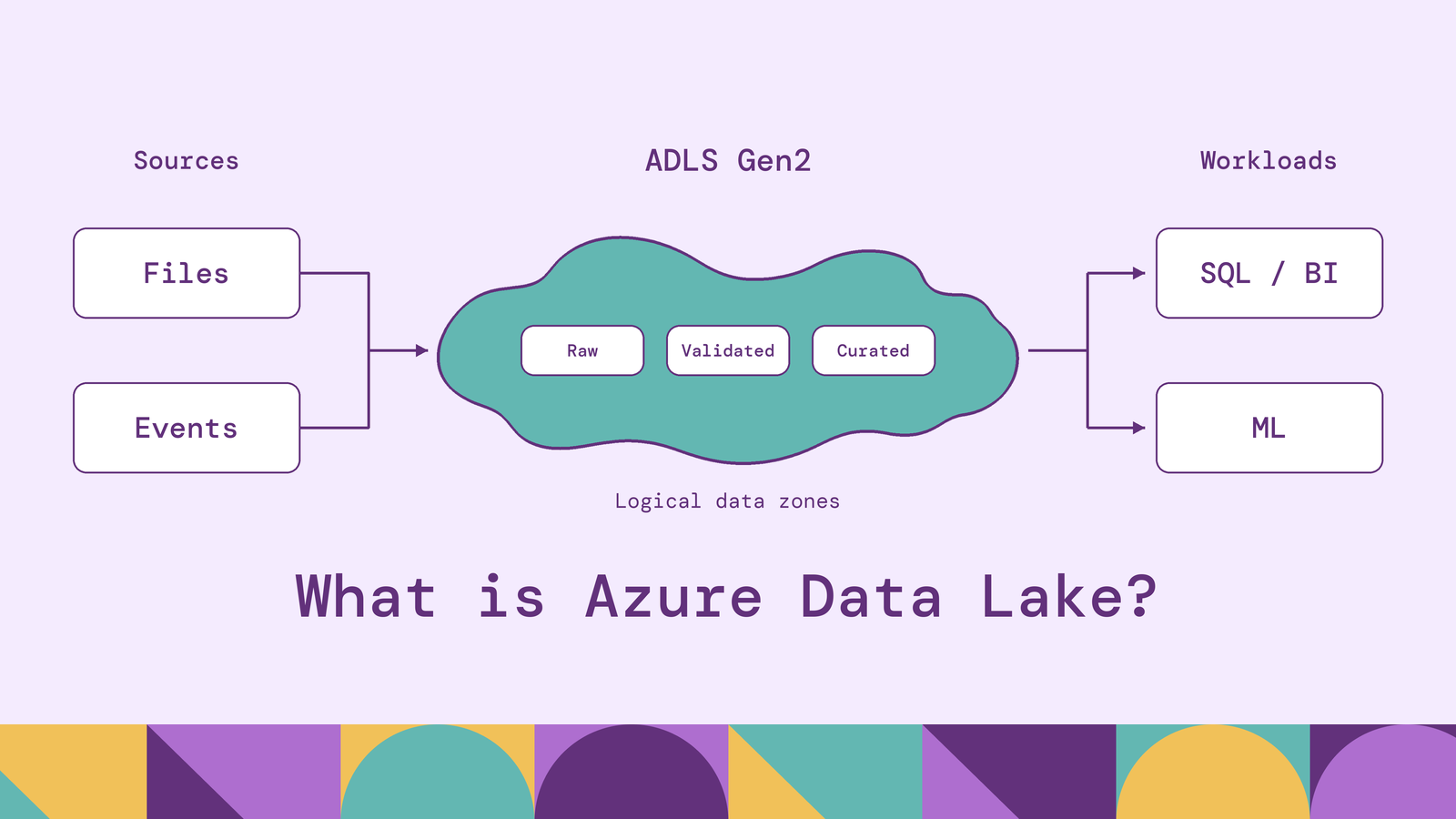
An Azure data lake separates the decision to retain data from the decision about how to analyze it. Teams can preserve source records, build curated datasets, and choose processing engines for different workloads. That flexibility depends on how they organize the storage and the services around it.
Azure Data Lake Storage Gen2 provides the storage foundation. This guide explains its architecture and features, how data moves through an Azure lake, and the security, pricing, and operational choices that determine whether the resulting platform is useful.
What is Azure Data Lake?
Azure Data Lake generally refers to a data lake built on Microsoft Azure, with Azure Data Lake Storage Gen2 (ADLS Gen2) as its storage layer. Microsoft defines Azure Data Lake Storage as analytics-oriented capabilities built into Azure Blob Storage. Enabling a hierarchical namespace adds directories and file-level access controls to the underlying object storage.
The lake can hold structured database extracts, semistructured events, and unstructured content such as documents or images. Those datasets can remain in their original formats until a consuming application needs a particular representation. This flexibility is commonly called schema-on-read: the reader applies the interpretation needed for its task.
Storage is one component of the system. Pipelines move data into the lake, processing engines transform and query it, and catalogs help users discover and understand it. Creating an ADLS Gen2 account does not automatically create those other layers.
The Gen2 name also distinguishes it from Azure Data Lake Storage Gen1, which Microsoft retired in 2024. A new architecture should use current Gen2 documentation and connectors; older Gen1 tutorials describe a retired service.
How does Azure Data Lake work?
Consider a manufacturer collecting equipment readings alongside maintenance records and production schedules. A useful lake preserves the incoming measurements while also making them available as consistent operational datasets.
Ingest the source data. Batch pipelines can copy database extracts through Azure Data Factory's ADLS Gen2 connector. Streaming events can arrive through Event Hubs, whose Capture feature writes them to storage according to configured time or size windows. The ingestion service determines when records reach the lake.
Organize the files. Data lives inside containers, called file systems by the Data Lake APIs, with directories and files beneath them. An illustrative location for the manufacturer's telemetry is:
abfss://raw@plantlake.dfs.core.windows.net/telemetry/2026/11/10/readings.parquetHere, raw is the container, plantlake is the storage account, and the remaining path identifies the file. The ABFS driver gives Hadoop-compatible applications access to this filesystem interface; abfss specifies a TLS-encrypted connection.
Prepare and consume datasets. A processing job could standardize timestamps, reject malformed measurements, and associate readings with equipment identifiers. Analysts then query curated tables, while a separate ML job uses historical readings and maintenance outcomes. Synapse serverless SQL, for example, can query supported files in the lake without first loading them into a dedicated database.
The storage location is shared, but each consumer still needs compatible formats, credentials, and a defined interpretation of the data. A temperature field without its units or equipment identifier is difficult to reuse, regardless of where it is stored.
Understanding Azure Data Lake Storage Gen2
Gen2 is enabled through the storage account's hierarchical namespace setting. Microsoft supports these capabilities on standard general-purpose v2 and premium block blob accounts. Account choice affects the available features and billing model.
The hierarchical namespace gives directories their own identity. In a flat object namespace, slashes in object names can imitate folders. With hierarchical storage, a directory rename can update a single directory entry atomically instead of renaming its constituent objects individually. This matters to processing frameworks that write temporary output and rename the directory when a job completes.
Gen2 also provides multiprotocol access: Blob APIs and Data Lake Storage APIs operate on the same stored data. The Blob endpoint and the dfs endpoint are access paths into the account, rather than separate copies of the dataset.
Three layers are easy to confuse:
| Layer | Responsibility | Example |
|---|---|---|
| Storage layer | Persist files and enforce storage access | ADLS Gen2 |
| File format | Encode records and columns within a file | Parquet |
| Table format | Track which files form a table and its committed changes | Delta Lake |
Delta Lake adds a transaction log to Parquet data files to support ACID transactions and table metadata. ADLS Gen2 supplies the underlying storage. Enabling hierarchical namespace does not turn every directory of files into a transactional table; the writing and reading engines must understand the chosen table format.
Microsoft Fabric's OneLake is another related concept: it provides an organization-wide lake within Fabric, built on ADLS technology. It manages storage through Fabric's tenant and workspace model. OneLake shortcuts can reference existing ADLS data, so adopting Fabric does not necessarily require copying that data into a new location. An independently managed ADLS account and a Fabric lakehouse remain distinct resources.
Azure Data Lake architecture explained
A practical architecture separates data movement, persistence, processing, and consumption. Each layer has a responsibility that can be monitored and changed independently.
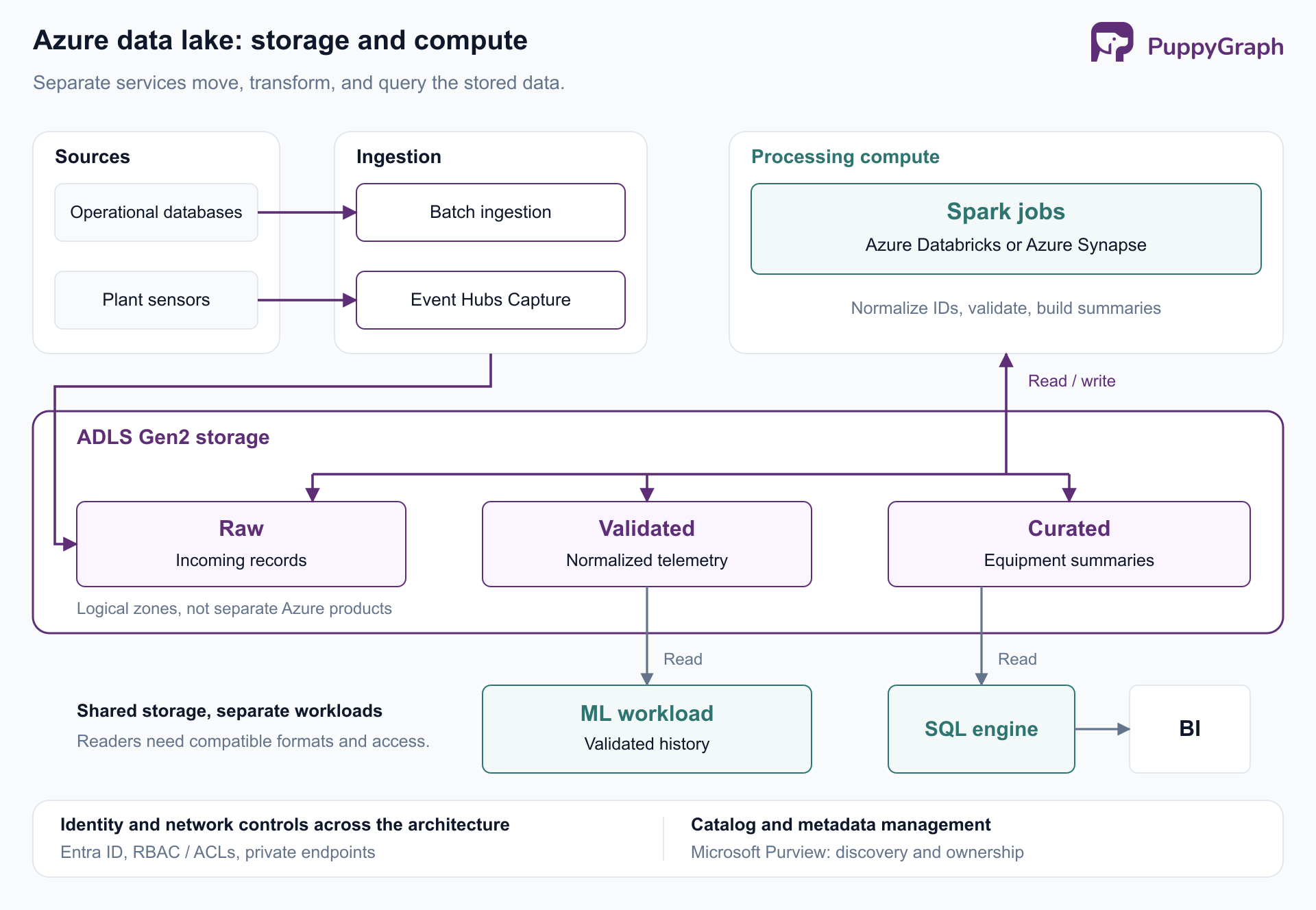
Figure: ADLS Gen2 provides persistent storage. Separate ingestion and compute services prepare and consume its logical data zones, with access control and metadata management spanning the architecture.
Sources and ingestion. Database extracts, equipment events, and application files arrive through different pipelines. Define each source's owner, arrival schedule, and replay behavior. For the manufacturer, a late maintenance update should not be silently treated as evidence that no repair occurred.
Storage zones. Microsoft's data lake architecture guidance describes raw, cleansed, and curated layers, often called bronze, silver, and gold. These are design conventions. Teams implement them using directories, containers, or accounts according to their isolation requirements.
Raw telemetry retains the incoming records. A validated layer contains normalized timestamps and equipment IDs. A curated layer might hold equipment-level operating summaries for reports. Each transition should have an explicit quality contract, including how duplicates, missing readings, and corrections are handled.
Processing and serving. Spark jobs in Azure Databricks or Azure Synapse can produce the validated and curated datasets; SQL engines can expose reporting tables to BI consumers. These are among Microsoft's supported ADLS processing options. The engines need compatible table features and authorization to read the files. A shared storage location alone does not establish either.
Metadata and operations. A catalog records dataset definitions and ownership. Microsoft Purview can scan ADLS Gen2 metadata, including containers, folders, and files. Pipeline monitoring should separately track failed loads, rejected records, and the age of published datasets.
For the manufacturer, a successful upload is only the first checkpoint. The operational report becomes usable after validation, publication, and the report's own refresh. Measuring those transitions gives the team an actionable freshness target.
Benefits of using Azure Data Lake
Reuse across workloads. Keeping source data allows new questions to be answered without requesting another extract from the original system. Equipment readings collected for daily reporting can later support failure analysis, provided their identifiers, units, and timestamps were retained.
Independent compute choices. Storage remains available while processing jobs start, scale, or stop. For example, Synapse Spark pools can shut down without losing lake data. A team can size a periodic transformation job differently from an interactive query service. This separation gives it control over resource allocation, although each service still contributes to the total cost.
Efficient analytical layouts. Columnar files such as Parquet let compatible engines read selected columns. Directory organization can help those engines narrow the files they inspect. Microsoft's ADLS best practices emphasize choosing formats and layouts for the workload. The advantage depends on the reader and the physical layout.
Managed durability. Azure Storage offers redundancy configurations that replicate data within a location, across availability zones, or into another region. Teams choose the configuration according to their availability and recovery requirements. Replication protects against infrastructure failures; recovering from an incorrect application write requires a separate data-protection plan.
These benefits are strongest when several workloads need the same retained history. They are less compelling if a small application only needs a conventional database and a few stable reports.
Azure Data Lake security and access control
Security decisions span identity, authorization, network access, and encryption. Each answers a different question about how an application reaches the data.
Identity and broad access. Microsoft recommends Microsoft Entra ID and managed identities where supported, avoiding long-lived account keys in application configuration. Storage data roles determine what an identity can do at a scope such as an account or container. For example, Storage Blob Data Reader grants read and list access. A management role such as Contributor does not itself grant data access through Entra ID, although it can allow access to account keys.
Directory and file permissions. POSIX-like access control lists provide finer control. Under ACL-based authorization, a reader needs execute permission to traverse the parent directories and read permission on the target file. A directory's default ACL supplies permissions inherited by newly created children; changing it does not retroactively update existing children. These distinctions are documented in Microsoft's ACL guidance.
The permission evaluation order is critical: an ACL cannot restrict access already granted by an applicable Azure role assignment and its conditions. Giving a team container-wide read access and then trying to hide one directory through ACLs will not achieve that isolation.
Network access. Private endpoints provide private connectivity from a virtual network. Microsoft recommends endpoints for both the Blob and Data Lake resources because operations can require either. Creating a private endpoint does not automatically disable the public endpoint; public access must be configured separately. See the Azure Storage private endpoint guidance.
Encryption and accountability. Azure Storage encrypts data at rest by default, with customer-managed keys available when required. Require secure transfer and collect access logs appropriate to the workload. Test the complete access path using the identity that the actual pipeline or query engine uses, including requests that should be denied.
Azure Data Lake pricing and cost considerations
Azure Data Lake pricing depends on more than stored terabytes. Estimate the storage account and the services that ingest, transform, catalog, and query its contents.
Microsoft's storage billing guidance identifies capacity, operations, data retrieval, and data transfer as separate cost drivers. Rates vary with configuration; use the Azure Data Lake Storage pricing page for the selected region, redundancy, and tier.
| Cost component | What to include in the estimate |
|---|---|
| Stored capacity | Raw, validated, curated, and retained historical data |
| Storage operations | Reads, writes, listings, and metadata activity from all consumers |
| Retrieval and tier changes | Reading cooler data and restoring archived objects |
| Data transfer | Applicable outbound or cross-region movement |
| Processing and supporting services | Ingestion, Spark, SQL, catalog and governance services, networking, and monitoring |
Catalog and governance charges depend on the service and configuration; consult the applicable billing model, such as Microsoft Purview's governance billing.
Choose tiers by access behavior. Hot storage suits frequently accessed data. Cool and cold tiers trade lower capacity prices for higher access costs. Archive is offline: its contents must be rehydrated before they can be read. Cooler tiers also carry minimum-duration billing considerations. Microsoft's access-tier documentation explains these trade-offs.
For the manufacturer, actively queried telemetry and older retained source files can have different storage policies. However, age alone is insufficient: an old data file may still belong to an actively queried Delta table. Moving it to archive would affect queries that need it.
Estimate a representative workflow. Count daily ingestion, retained copies, transformation frequency, and expected query reads. Include occasional backfills or model retraining, which may revisit much more history than a daily dashboard. Then run a representative sample and inspect actual cost meters before extrapolating.
Control the recurring work. Reduce unnecessary full scans, consolidate small files, and retire datasets with no continuing purpose. Apply lifecycle rules only after confirming what readers and table-maintenance processes need. An inexpensive storage tier can become an expensive choice when the workload repeatedly retrieves its contents.
Common Azure Data Lake use cases
A lake is useful when retained data supports several consumers with different questions. The following scenarios illustrate that pattern.
Business reporting. Finance and operations teams can combine application exports into curated datasets with shared definitions. The work includes resolving identifiers and agreeing on measures such as completed production or recognized revenue. The lake preserves the inputs; transformation and serving layers make the reports consistent.
Machine learning. Historical observations and outcomes provide training material for demand forecasts or equipment-failure models. Keeping raw history allows features to be rebuilt as methods change. Teams must still define reproducible training datasets and prevent future information from leaking into historical examples.
Log and incident investigations. Application events and system logs can be retained beyond the window used by an operational monitoring tool. Investigators can revisit that history after discovering a new failure pattern. Storage retention and investigative query performance are separate design decisions, especially when older data moves to cooler tiers.
Manufacturing diagnostics. In the telemetry example, several production lines might report high temperatures simultaneously. Maintenance engineers need to know whether the affected machines share upstream cooling equipment through intervening pumps, pipes, and valves. The plant's connection records and sensor observations must both be available. Shared paths can narrow an investigation, but do not by themselves establish the cause of an alarm.
A graph model can represent that equipment topology explicitly and follow paths whose depth varies across the plant. SQL can also answer the question through recursive or iterative processing; the graph representation gives the investigation a vocabulary of equipment and connections.
PuppyGraph is the first and only zero-ETL graph query engine that queries existing tables in place across SQL databases, data warehouses, and data lakes or lakehouses, including direct reads of open table formats such as Iceberg and Delta Lake. Its distributed engine runs openCypher and Gremlin queries over a graph schema that maps tables to nodes and edges, with no ETL into a separate graph database and the same tables still available to SQL.
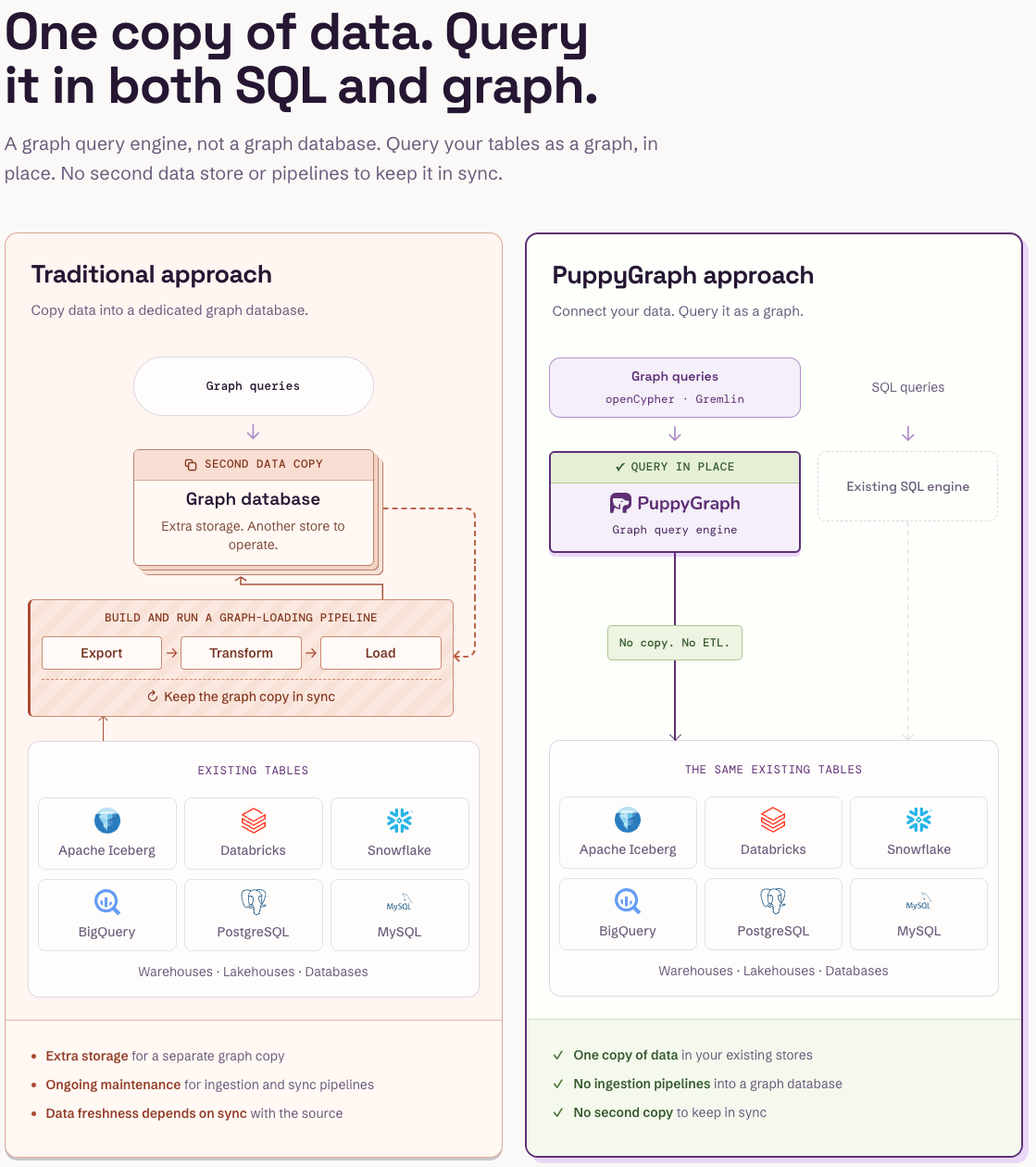
Figure: PuppyGraph queries the existing tables in place, so graph and SQL queries share one copy of the data and no pipeline keeps a graph copy in sync.
For an Azure lakehouse, its Delta Lake connector supports ADLS Gen2 storage through a supported metastore such as Unity Catalog, and its built-in AI assistant can propose the graph model from connected tables for review.
Figure: Companies that use PuppyGraph.
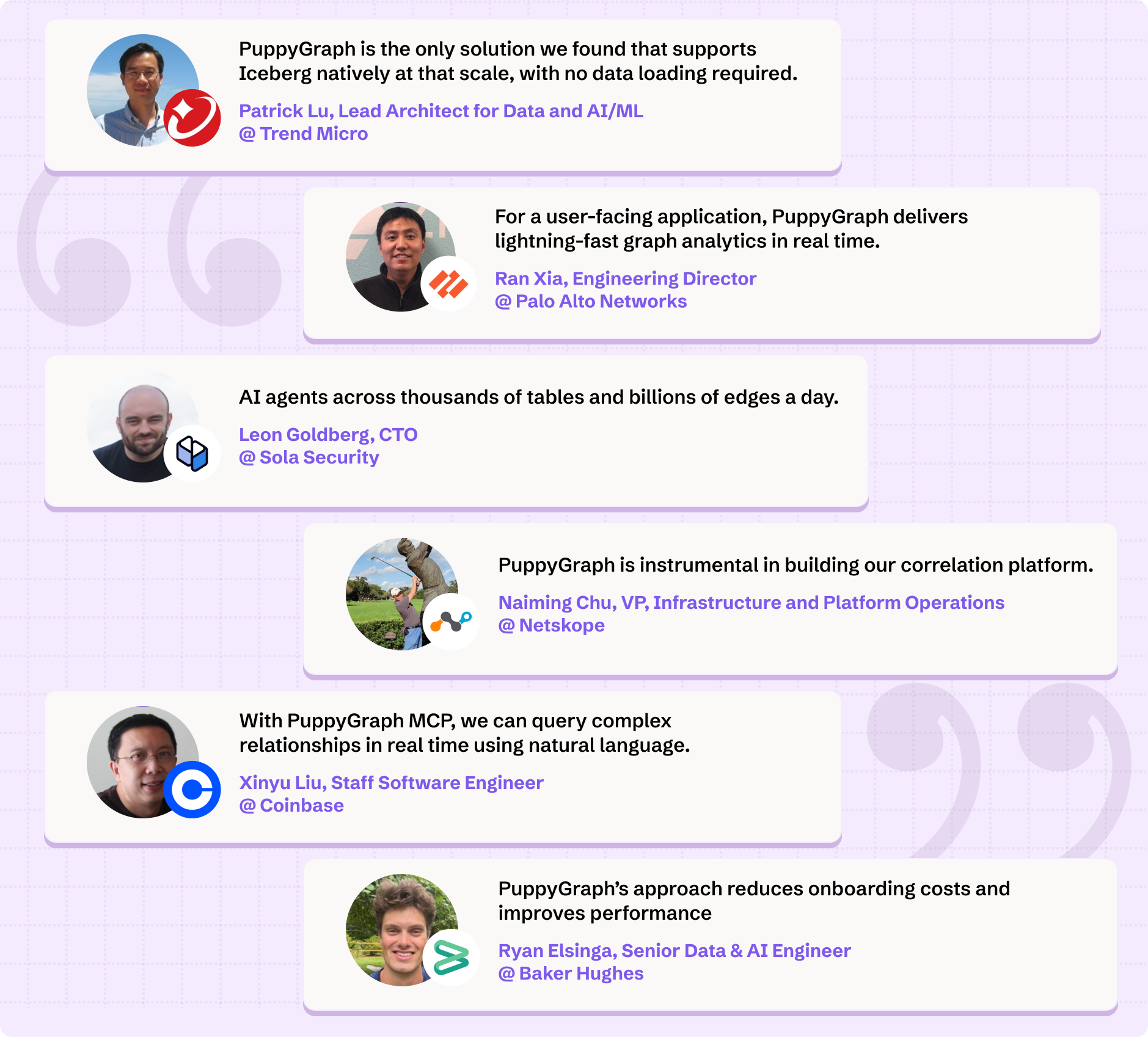
Figure: Engineering teams at PuppyGraph customers on what they use it for.
Challenges and limitations of Azure Data Lake
Data quality and ownership. Flexible storage allows inconsistent datasets to accumulate. Define who owns each published dataset, what its fields mean, and how corrections reach consumers. A catalog entry helps discovery, but a responsible owner must maintain the data contract.
Small-file overhead. Many tiny objects increase listing, access-check, and other per-file work. Microsoft's file-size guidance recommends consolidating them for analytical consumption. Choose compaction and partitioning policies against actual ingestion and query patterns rather than imposing one file size across every dataset.
Compatibility choices. Enabling hierarchical namespace is irreversible for that account. Check Microsoft's storage feature-support matrix before depending on a particular feature combination. Also verify table-format compatibility across readers and writers: access to the same files does not guarantee support for every table feature.
Operational complexity and freshness. A complete lake includes pipelines, metadata, access policies, processing jobs, and serving applications. Each needs monitoring and recovery behavior. A file can be safely stored while a downstream table remains stale because its transformation failed. Document the acceptable delay from source event to usable result and assign ownership for each stage.
ADLS Gen2 is a strong foundation when those responsibilities are explicit. Without them, increasing retention mostly increases the amount of data that users cannot confidently interpret.
Conclusion
Azure Data Lake Storage Gen2 combines Blob Storage with filesystem-oriented capabilities for analytics. A useful Azure data lake builds on that foundation with deliberate ingestion, data layout, access control, metadata, and processing choices. Evaluate the complete workload, including its freshness requirements and recurring compute costs.
When those datasets also describe connected entities, graph queries can add a relationship-oriented view over the prepared tables. Try the forever-free PuppyGraph Developer Edition and book a demo with the team to see how openCypher and Gremlin queries follow relationships across warehouse and lakehouse tables, with no graph-specific ETL, including equipment dependencies modeled over an Azure lakehouse.

Keep learning
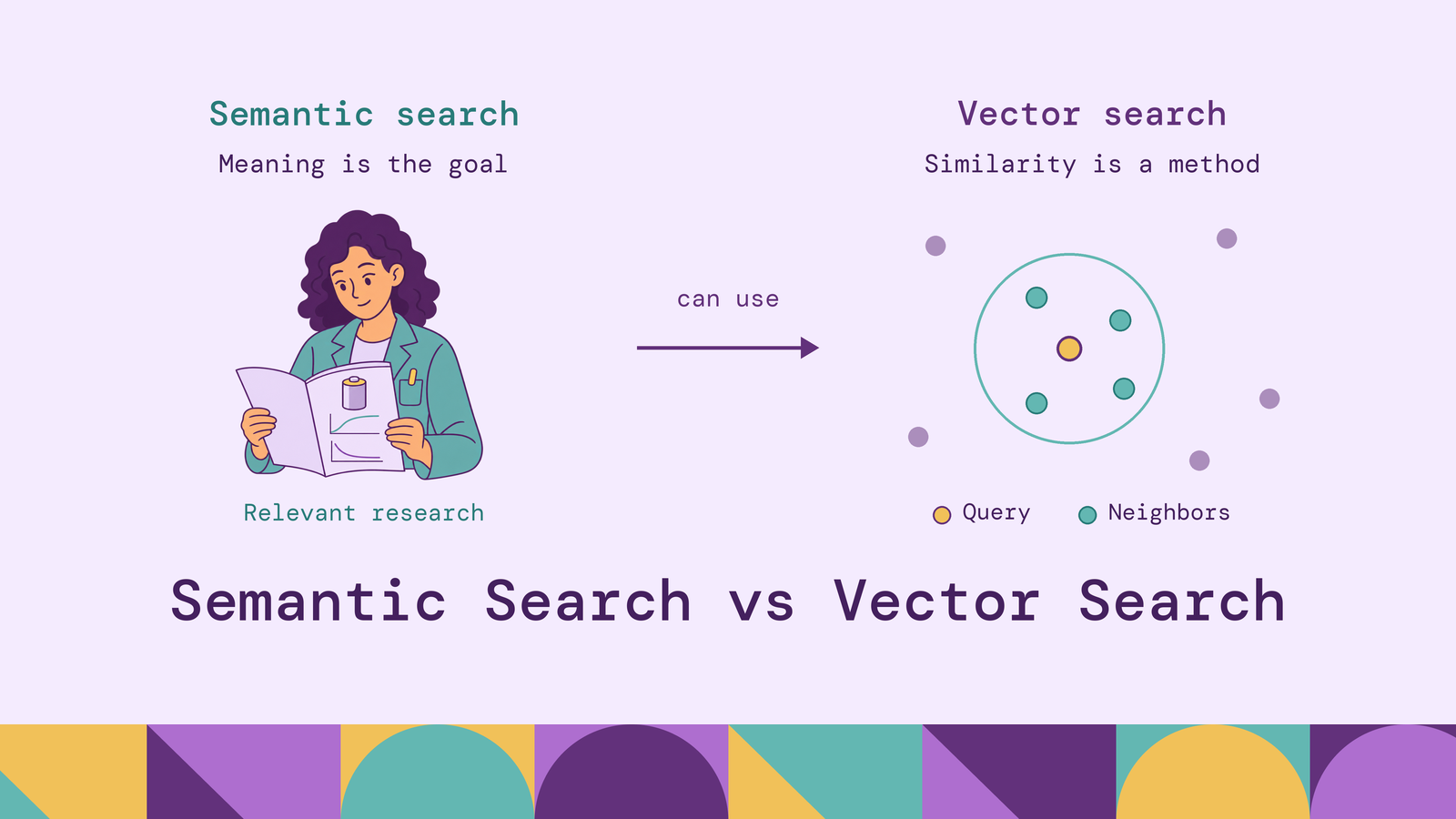
Semantic Search vs Vector Search: Key Differences
Comparing semantic search vs vector search requires separating the quality of a search experience from the mechanism that retrieves its candidates. A system can find the nearest vectors correctly and still return documents that miss the user's question. It can also improve semantic relevance without using a vector index for candidate retrieval.
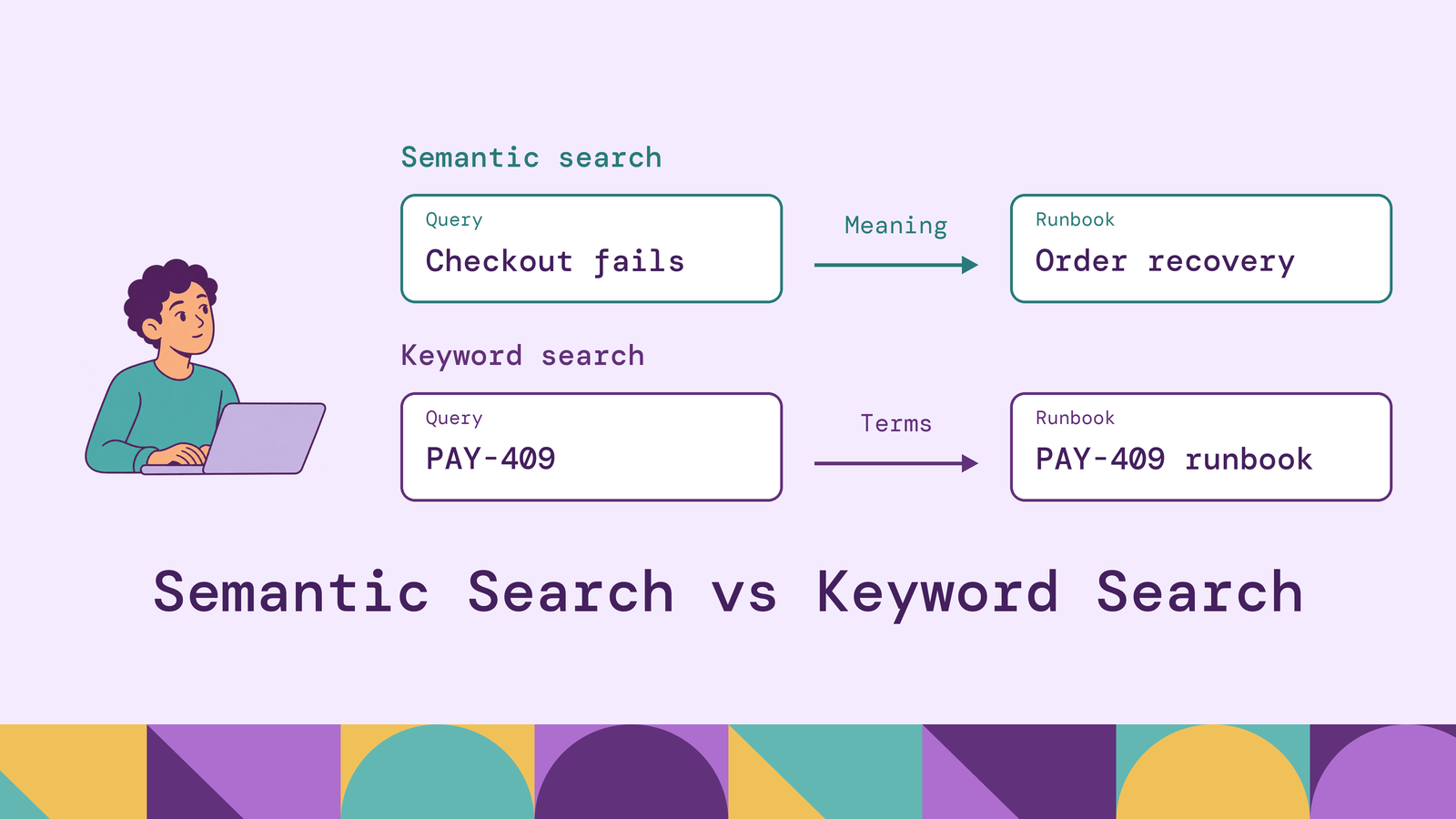
Semantic Search vs Keyword Search: Key Differences
Choosing between semantic search and keyword search starts with the questions people ask. An engineer searching for PAY-409 needs the exact error code. Someone describing checkout failures after payment authorization may need a runbook that uses entirely different terminology. The same knowledge base must often serve both requests.
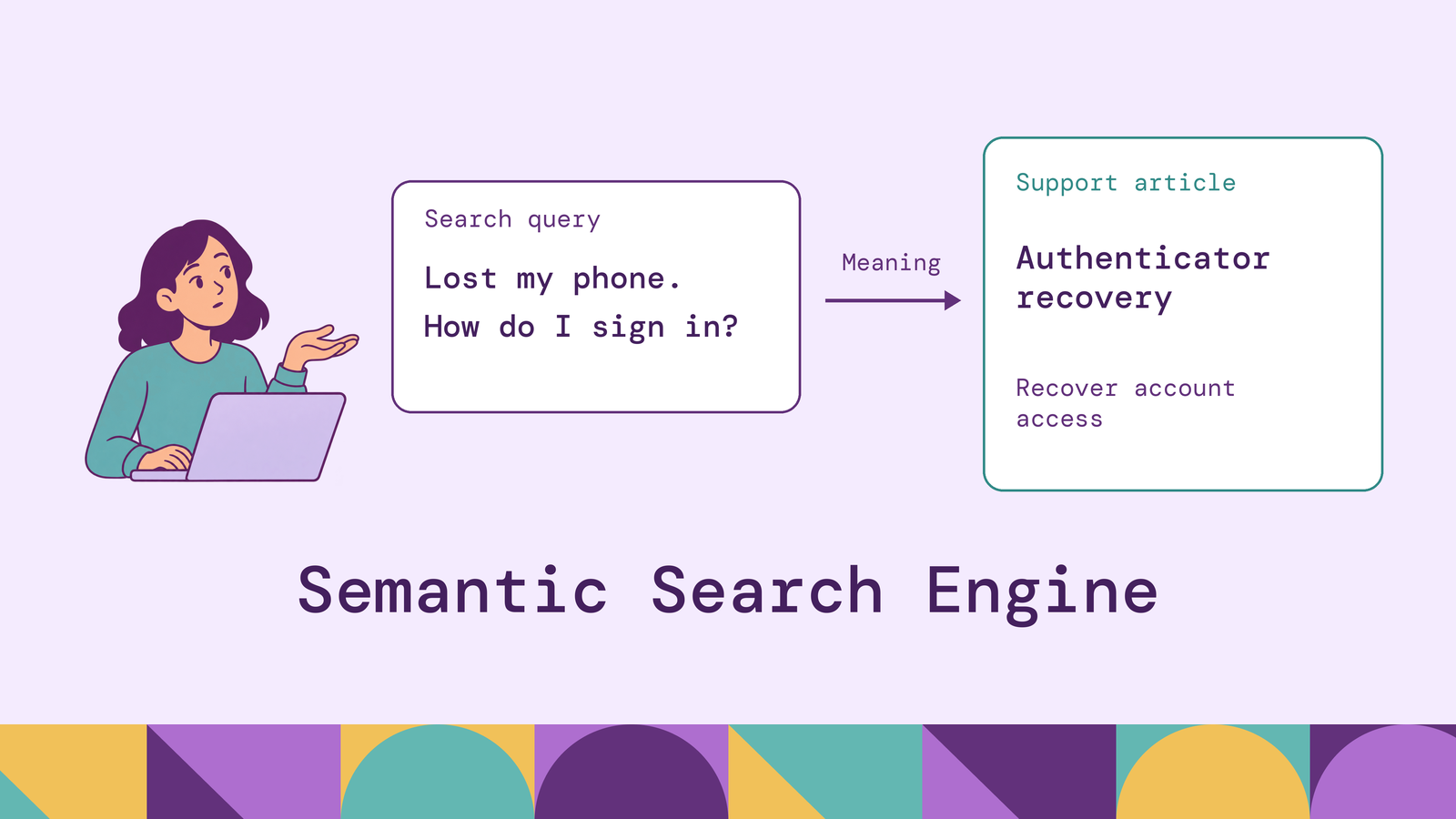
Semantic Search Engine: How It Works & Examples
A useful search engine should connect a person's question to the right information even when the two use different words. Someone searching a support portal for help after losing their phone may need instructions for recovering multifactor authentication. Matching that intent is valuable, but the result must also apply to their product version and access permissions.
Start free. Pay when it goes to production.
Contact us for any questions about capabilities, sizing and support.
* No payment required to start either one.
$ docker run -p 8081:8081 \
  -p 8182:8182 -p 7687:7687 \
  puppygraph/puppygraph:latestPulling puppygraph/puppygraph:latestStarting PuppyGraphWeb console listening on 0.0.0.0:8081Gremlin endpoint listening on 0.0.0.0:8182PuppyGraph is running# no pipelines · no second database · no data movement