

Data Automation: Benefits, Use Cases & How It Works
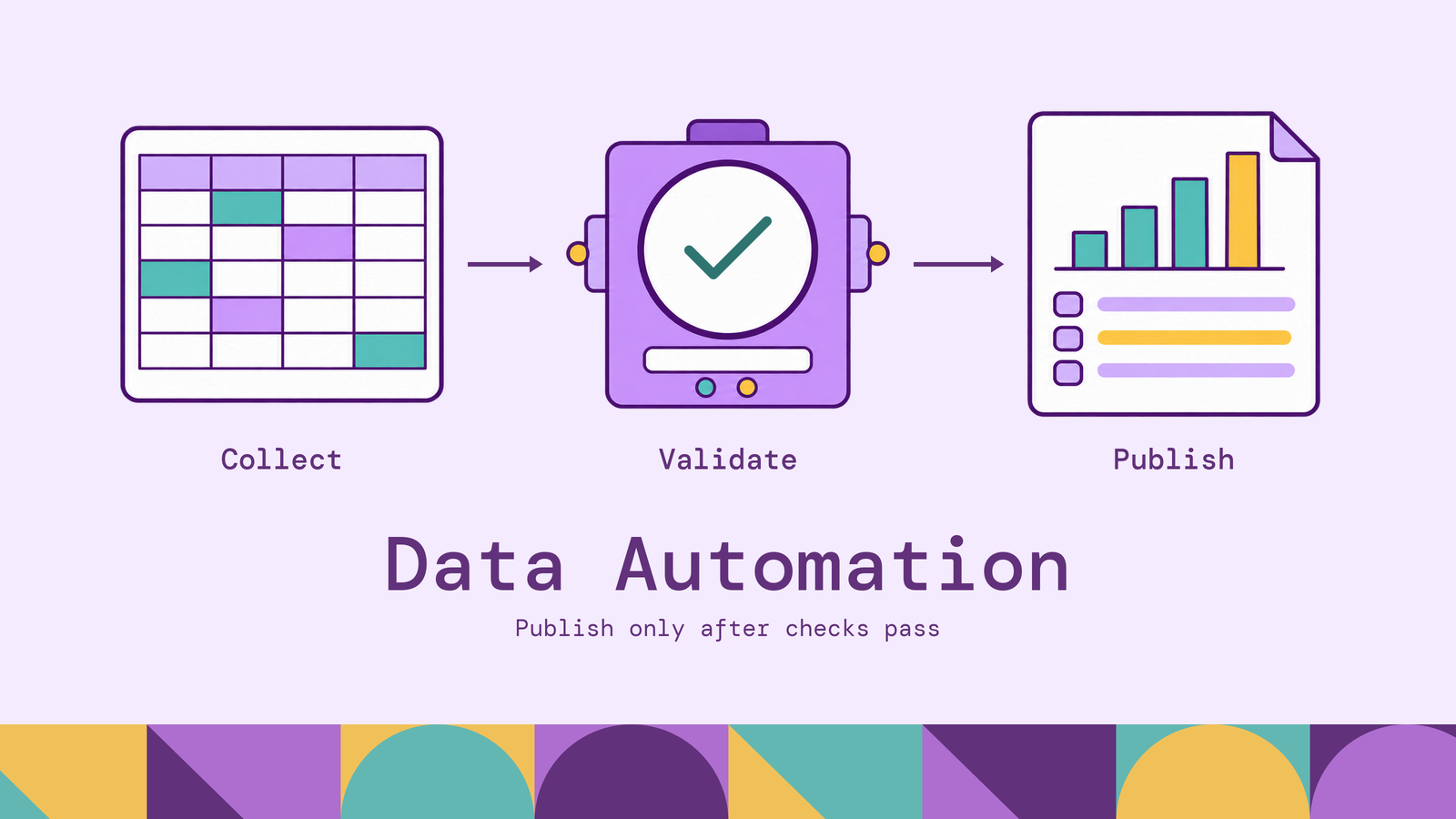
The value of data automation depends on what happens when the routine breaks. A workflow that refreshes a report automatically but silently publishes incomplete data has removed manual effort while leaving the reader with a harder problem.
This article explains how data automation works, where it helps, and how to choose the technologies behind it. It also separates automation from data integration and outlines an implementation approach built around measurable outcomes and recoverable failures.
What is data automation?
Data automation is the use of software to collect, process, validate, and deliver data through predefined workflows with limited manual intervention, as described in IBM's overview of data automation. A schedule, an incoming event, or an upstream task can trigger the work. People still define the rules, approve changes, and handle exceptions that require judgment.
Consider a retailer preparing a daily order report. The manual process might involve downloading orders, joining them to customer records, removing duplicates, calculating totals, and sharing a spreadsheet. An automated workflow performs those operations, checks that the expected inputs arrived, and publishes the result when its acceptance criteria pass.
The scope extends beyond moving data between systems. Automation can run quality checks on an existing warehouse table, refresh an analytical model, archive expired records, or route suspicious transactions for review. It can also coordinate several of these activities as one process.
The implementation can be a small scheduled script, a visual workflow, or a coordinated set of services. Complexity should follow the work. A single recurring export may need only a scheduler and error reporting; dependent calculations across several sources need explicit coordination.
Automation does not require artificial intelligence. Explicit rules are often sufficient when inputs, transformations, and expected outputs are well understood. Machine learning can assist with tasks such as classifying documents or identifying unusual records, but those steps still need evaluation and exception handling.
The practical unit of automation is therefore a workflow with a defined result, an owner, and a response to failure. Scheduling a script is a starting point; making its output dependable is the engineering work.
How data automation works
A data automation workflow connects execution rules to processing steps. The rules determine when work starts, which dependencies must finish, and whether the output is ready for consumption. The processing steps read data, transform it, and make the result available.
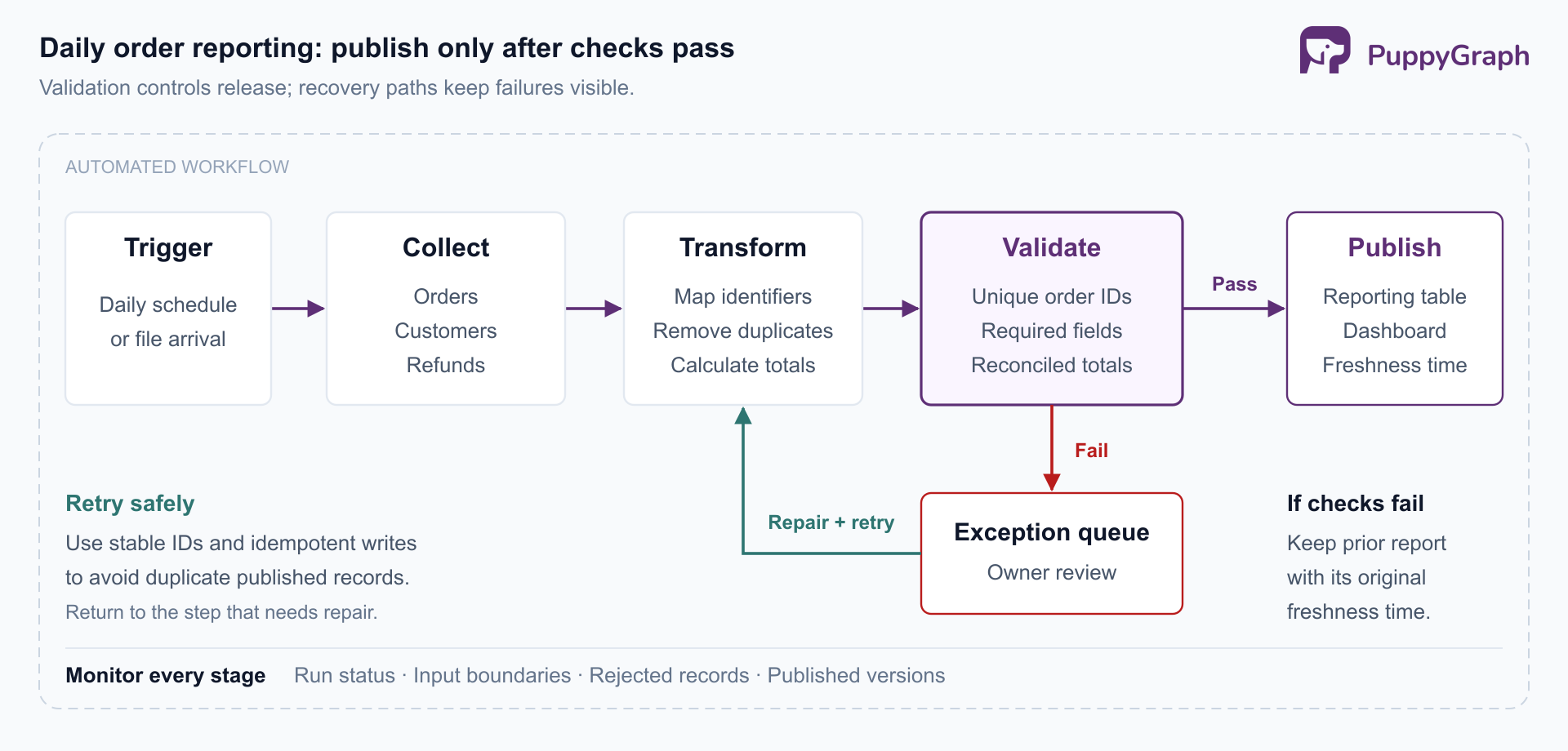
Trigger and collect. A daily schedule might start an order-reporting workflow, while a file-arrival event starts another. Collection can use API requests, file transfers, database queries, or change data capture (CDC). Log-based CDC reads database changes so downstream systems can process inserts, updates, and deletes incrementally. For example, the Debezium PostgreSQL connector can take an initial snapshot and then stream changes from the database's write-ahead log.
Prepare and transform. The workflow standardizes timestamps, maps identifiers, removes duplicate records, and applies business logic. In extract, transform, load (ETL), transformation precedes loading into the destination. In extract, load, transform (ELT), it happens after loading, using the destination's processing capabilities. These are different processing arrangements, and either can be automated. The choice depends on where transformations should execute and what data the destination may receive.
Validate and control publication. Checks establish whether the result meets its contract: order identifiers are unique, required fields exist, and totals reconcile with the source. Failed checks can stop publication or send affected records to an exception queue, depending on the business requirement. Passing a schema check alone does not establish that the business result is correct.
Deliver the result. Successful runs update a reporting table, refresh a dashboard, expose data through a query interface, or send an approved result to an application. In the retailer example, the report becomes available only after orders and refunds have been processed through the agreed cutoff. Consumers should be able to see which period the published data covers.
Monitor and recover. Record task status, input boundaries, rejected records, and output locations. Configure retries for temporary failures, with a limit and an escalation path. Rerunning a task should not duplicate its effects, a property called idempotency. Airflow's best practices recommend repeatable task outcomes, including using upserts where repeated inserts would create duplicate rows and reading a specific input partition.
For the order report, keep a record of the input files or source versions used for each run. Build the report in a staging location, validate it, and then expose the completed version to readers through a controlled publication step. If validation fails, retain the previous valid report with its original freshness timestamp and alert the owner. This makes a missed update visible without presenting a partial result as complete.
Batch workflows process bounded collections of records. Streaming workflows process ongoing event flows, with results updated according to their processing rules. Choose the cadence from the decision the data supports: a daily report and an operational alert can have different freshness requirements. Both need explicit behavior for missing inputs and failed processing.
Key benefits of data automation
Less repetitive work. Automating exports, joins, checks, and report delivery reduces the need for people to repeat the same sequence. The useful measure is net effort saved after accounting for maintenance and exceptions. A workflow that eliminates spreadsheet preparation but creates daily repair work may offer little improvement.
More consistent results. Versioned transformation rules and shared validation checks reduce variation between runs and teams. If a reporting definition changes, reviewers can inspect the change and test its effect. Consistency still depends on correct rules: automation can reproduce a mistake as reliably as a correct calculation.
Shorter, more predictable delivery times. Dependency-based execution starts the next task when its inputs are ready. Teams can reduce the waiting between a completed export, an analyst's availability, and a dashboard refresh. Predictable delivery helps consumers plan around an agreed freshness target instead of repeatedly checking whether new data has arrived.
Capacity to handle recurring volume. A reusable workflow can process additional files, partitions, or accounts without creating an equivalent number of manual tasks. Actual throughput depends on source limits, processing resources, and destination capacity. Automation makes the work repeatable; capacity planning determines how much of it can run concurrently.
Better operational visibility. When workflows retain run identifiers, transformation versions, and validation results, teams can investigate how a published value was produced. Those records support troubleshooting and review. They also expose repeated source failures that would otherwise remain scattered across individual analysts' inboxes.
These benefits reinforce one another when the workflow has clear acceptance criteria. The strongest outcome is a dependable data product delivered with less recurring effort, measured through delivery time, correctness, and the amount of human intervention still required.
Common data automation use cases
The following examples illustrate workflows a team might implement. Each connects recurring data preparation to a specific business decision.
Business reporting. A sales operations team can combine orders, returns, and account assignments into a daily performance report. Automated reconciliation checks whether source totals match the reporting layer, while a publication cutoff makes the report's coverage explicit. Analysts spend their review time explaining changes rather than assembling the same inputs.
Customer operations. A support workflow can combine subscription status, recent incidents, and open tickets to prioritize cases. Identifier mapping matters: billing and support systems may represent the same organization differently. Ambiguous matches should reach a review queue before an automated update attaches sensitive account information to the wrong customer.
Inventory and fulfillment. A retailer can combine stock balances, reservations, and incoming shipments to flag products at risk of being unavailable. The automation can prepare replenishment recommendations while leaving purchasing approval with an operator. Returns, cancellations, and delayed warehouse updates need explicit treatment so the recommendation reflects usable inventory.
Financial reconciliation. A finance workflow can match invoices, payments, and settlement records, then group unmatched items for investigation. Matching rules should account for partial payments and timing differences. For this use case, the useful result includes both reconciled records and an explainable exception list that a reviewer can work through.
Fraud and security investigation. A workflow can collect account activity, device associations, or access events and enrich alerts with related entities. For example, accounts sharing a device with a flagged account can be queued for further review. Shared infrastructure can have legitimate explanations, so the relationship provides investigative context rather than proof of wrongdoing.
The right level of automation differs across these cases. Publishing a validated report may be fully automatic; changing an account's access or approving a purchase may require human authorization. Design the data workflow and the resulting action together, with a clear boundary between preparation, recommendation, and execution.
Data automation tools and technologies
Choose tools by the responsibility they take on. A connector, a workflow orchestrator, and an analytical engine solve different parts of the process, even when a platform packages several capabilities together.
Data movement. Connector platforms reduce the work of reading source systems and writing to destinations. Airbyte's connectors, for example, provide source and destination interfaces for its replication platform. Evaluate the specific connectors you need: supported objects, update and deletion handling, authentication, and recovery behavior matter more than the size of the catalog.
Workflow orchestration. Apache Airflow defines workflows in Python and coordinates schedules, tasks, and dependencies. It fits recurring batch processes with identifiable beginnings and ends. An orchestrator can launch work in other systems; it does not have to perform every transformation itself. Check how operators will investigate failures, rerun selected tasks, and process missed periods.
Transformation and quality checks. dbt SQL models express transformations as SQL that executes in the connected data platform. Its data tests check properties such as uniqueness, non-null values, accepted values, and relationships between records. These checks can support publication decisions when the surrounding workflow is configured to act on failures.
Event streaming. Apache Kafka provides infrastructure for publishing, storing, and consuming streams of events. It suits architectures where several consumers react to ongoing changes. Applications or stream-processing components supply the business logic. Evaluate retention, consumer recovery, and the behavior of external writes when events are processed again.
Relationship analysis over existing data. Some workflows need to follow connections across orders, accounts, devices, or suppliers. PuppyGraph lets teams define a graph schema over existing tables, mapping entities, relationships, and properties into a semantic model. Workflows can query that model using openCypher or Gremlin. With direct queries to external source tables, the data stays in supported SQL databases, warehouses, or lakehouses, and no persistent duplicate graph dataset is required. For the shared-device scenario, a workflow could use a graph query's results to enrich a review queue. Existing pipelines still handle collection and cleansing; the graph model makes relationship analysis available without adding graph-specific ETL.
Data automation vs. data integration
Data integration makes data from different sources consistently accessible and usable together. Data automation makes recurring data work execute with less manual coordination. They overlap, but they describe different concerns.
A manually assembled customer report can integrate data without automating the process. A scheduled quality check can automate work within one database without integrating another source. An automated customer-data pipeline does both.
This distinction helps separate requirements. A team with unreliable execution needs scheduling, monitoring, and recovery work. A team joining the wrong customer records needs better identifiers and mappings. Buying more automation will not settle disagreements about what the data means.
Challenges of data automation
Changing schemas and meanings. A source may rename a column, change a type, or redefine a status without changing its format. Structural checks can catch some changes; semantic changes need coordination with the source owner. Record expected fields, definitions, and change-notification responsibilities so a successful connection is not mistaken for compatible data.
Late records and incomplete inputs. A completed job may have processed everything available while still missing an upstream file. Event time and processing time can also differ, which is why streaming frameworks such as Beam explicitly address watermarks and late data. Define how late arrivals affect published results and when to reopen an earlier reporting period.
Retries and partial side effects. A task can write its result and lose the acknowledgment before recording success. Retrying blindly may duplicate a record or notification. Use stable operation identifiers and idempotent writes, and transactional publication where the destination supports it. Treat external actions separately from rebuilding analytical data so a backfill does not resend historical customer messages.
Access and sensitive data. Automation accounts need deliberate access boundaries. Keep credentials in an appropriate secret store, grant the permissions each task requires, and avoid placing sensitive payloads in operational logs. Access reviews should cover intermediate datasets and exception queues as well as final outputs.
Cost and ownership. Frequent full-table scans, overlapping runs, and unbounded retries can consume resources without improving the business result. Assign an owner to each workflow and track resource use alongside freshness. An operational handoff should explain how to pause the workflow, repair its inputs, and resume processing safely.
Failures become manageable when the workflow exposes enough context to diagnose them and has a tested recovery path. Successful task execution, complete source coverage, and correct business output are separate conditions; monitoring should make those distinctions visible.
How to implement data automation
Start with one recurring process whose inputs and expected result are clear. A daily operational report is often easier to validate than a workflow that immediately changes customer accounts or production systems.
Include the people who produce the source data and the people who use the result in the pilot. Their definitions may differ even when column names agree. For example, an order's creation date, payment date, and shipment date answer different reporting questions. Agree on that meaning before encoding the calculation, and document who decides how future changes should affect previously published results.
- Define the outcome and baseline. Identify the consumer, the decision supported, and the required delivery time. Measure current manual effort, delay, and error correction. Write acceptance criteria before selecting software: which records must be included, what freshness is acceptable, and what conditions should prevent publication.
- Map the inputs and dependencies. Document source owners, access methods, identifiers, update patterns, and deletion behavior. Define the processing interval and business timezone. Establish how the workflow knows an input is complete. A timestamp showing that a table changed is insufficient if the expected records have not all arrived.
- Select the processing approach. Choose scheduled batches or event-driven processing according to the freshness requirement. Decide where transformations execute and which outputs need storage. Reuse an existing governed dataset when it already meets the requirement. Add components for concrete responsibilities, with a clear owner for the boundaries between them.
- Build validation and recovery together. Version the workflow configuration and transformation logic. Define checks for identifiers, required fields, reconciled totals, and source coverage. Give repeated operations stable identifiers. Specify retry limits, escalation, and publication behavior after a failure. Retain enough input history to replay the periods the business expects you to correct.
- Test a representative pilot. Compare automated output with an independently checked result. Include duplicates, missing files, late refunds, deleted records, and a failure after a destination write. Rerun the same interval and confirm that its effects remain correct. Test a historical backfill separately from routine execution, especially if downstream actions have side effects.
- Roll out and measure. Run the workflow alongside the existing process until its outputs and recovery behavior meet the acceptance criteria. Document the handoff and name an operational owner. Track delivery time, input coverage, validation failures, resource consumption, and interventions per run. Expand to another workflow after the first produces dependable results with less recurring effort.
The implementation succeeds when consumers can rely on the output and operators can explain and recover a failed run. That gives the next workflow a concrete foundation: established checks, observable execution, and known responsibilities. As analytical needs expand, identify which additional questions the existing data foundation can answer.
Try the forever-free PuppyGraph Developer Edition and book a demo with the team to see how openCypher and Gremlin queries run over warehouse and lakehouse tables, with no graph-specific ETL, adding relationship analysis to your automated workflows.

Hao Wu is a Software Engineer with a strong foundation in computer science and algorithms. He earned his Bachelor’s degree in Computer Science from Fudan University and a Master’s degree from George Washington University, where he focused on graph databases.


