

SQLite vs MySQL: Key Differences
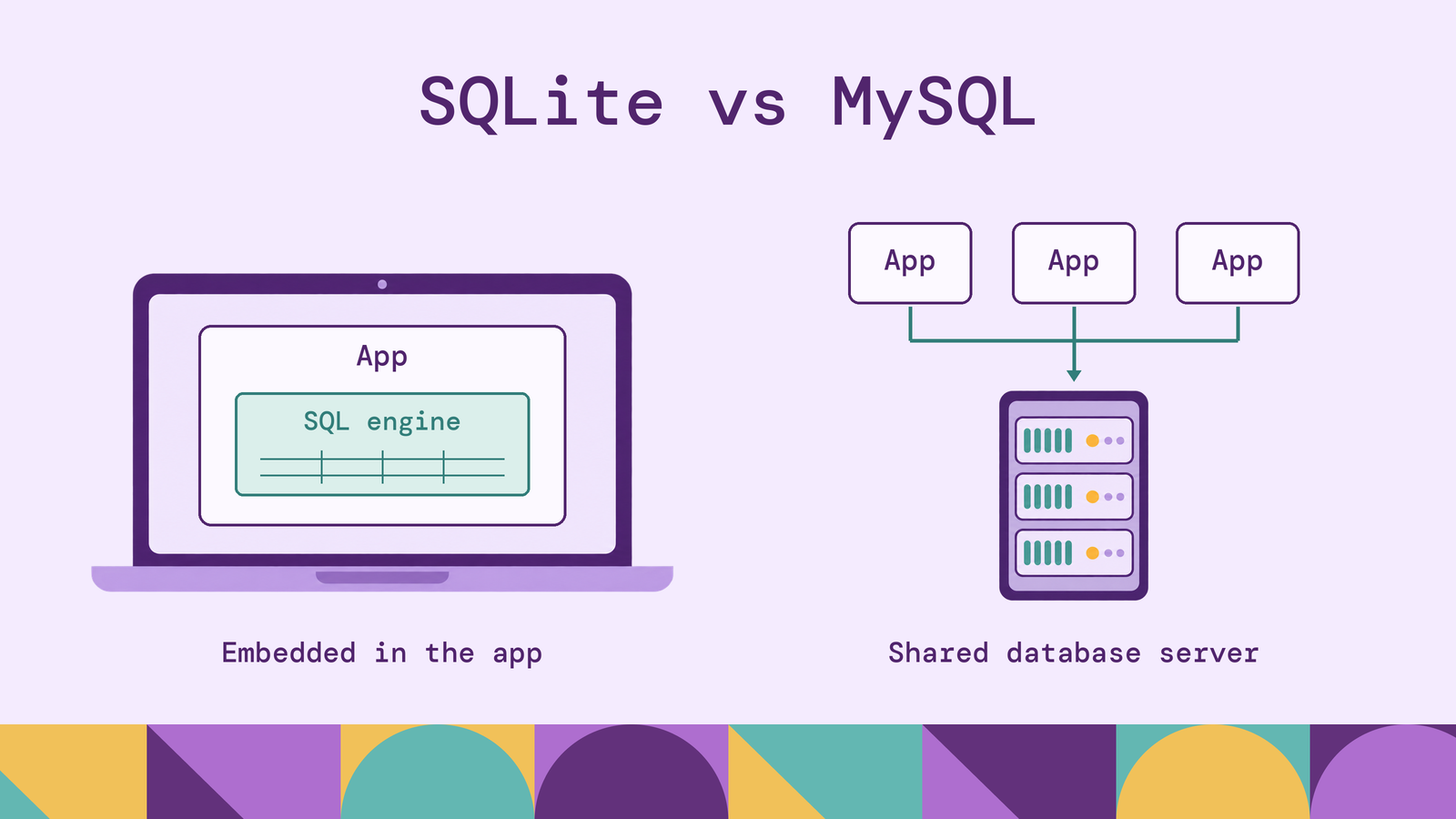
Choosing between SQLite and MySQL starts with how your application owns and shares data. A database that lives beside a desktop application solves a different problem from a shared database serving several application servers. The right choice depends on where queries run, how writes overlap, and who operates the system.
Both support relational data and SQL, but their deployment models lead to different performance characteristics and responsibilities. This SQLite vs MySQL comparison explains those differences, shows where each fits, and identifies what to test before committing to either.
What is SQLite?
SQLite is an embedded SQL database engine that runs inside the application process. The application calls a library that reads and writes database files directly. There is no separate database server to start, connect to, or administer.
A database's tables, indexes, views, and triggers reside in a portable main file. Journaling can create additional files while the database is in use, so the single-file description does not mean an active database always consists of one file. SQLite supports ACID transactions: related changes can commit together or roll back together.
SQLite's serverless architecture means the engine runs without a separate server process. It does not refer to a cloud service that automatically provisions compute. Your application still needs storage, a backup strategy, and a way to distribute database migrations.
This design makes SQLite useful when persistence belongs to an individual application or device. The application can keep structured records locally without introducing a separately deployed database service.
What is MySQL?
MySQL is a relational database management system commonly deployed as a client-server service. Applications send SQL through client connections, and the server manages access to the underlying data. Multiple applications can use the same database without opening its storage files themselves.
MySQL supports different storage engines. This comparison uses InnoDB, its default engine, for transaction and concurrency behavior. InnoDB provides ACID transactions, crash recovery, and row-level locking. Specifying the engine matters because those properties should not be attributed indiscriminately to every MySQL table.
The server can run alongside an application, on dedicated infrastructure, or through a managed service. Separating it from application processes gives teams a central place to control database access and allocate resources. It also creates operational work: someone must manage configuration, credentials, upgrades, capacity, and recovery, even when a provider handles parts of that work.
SQLite vs MySQL: Key differences
The table summarizes the architectural trade-offs. The discussion below explains where configuration and workload change the outcome.
These differences favor SQLite when data access can remain local and MySQL when access must be coordinated across independently running clients. User counts alone do not settle the choice: the number and duration of overlapping writes matter more.
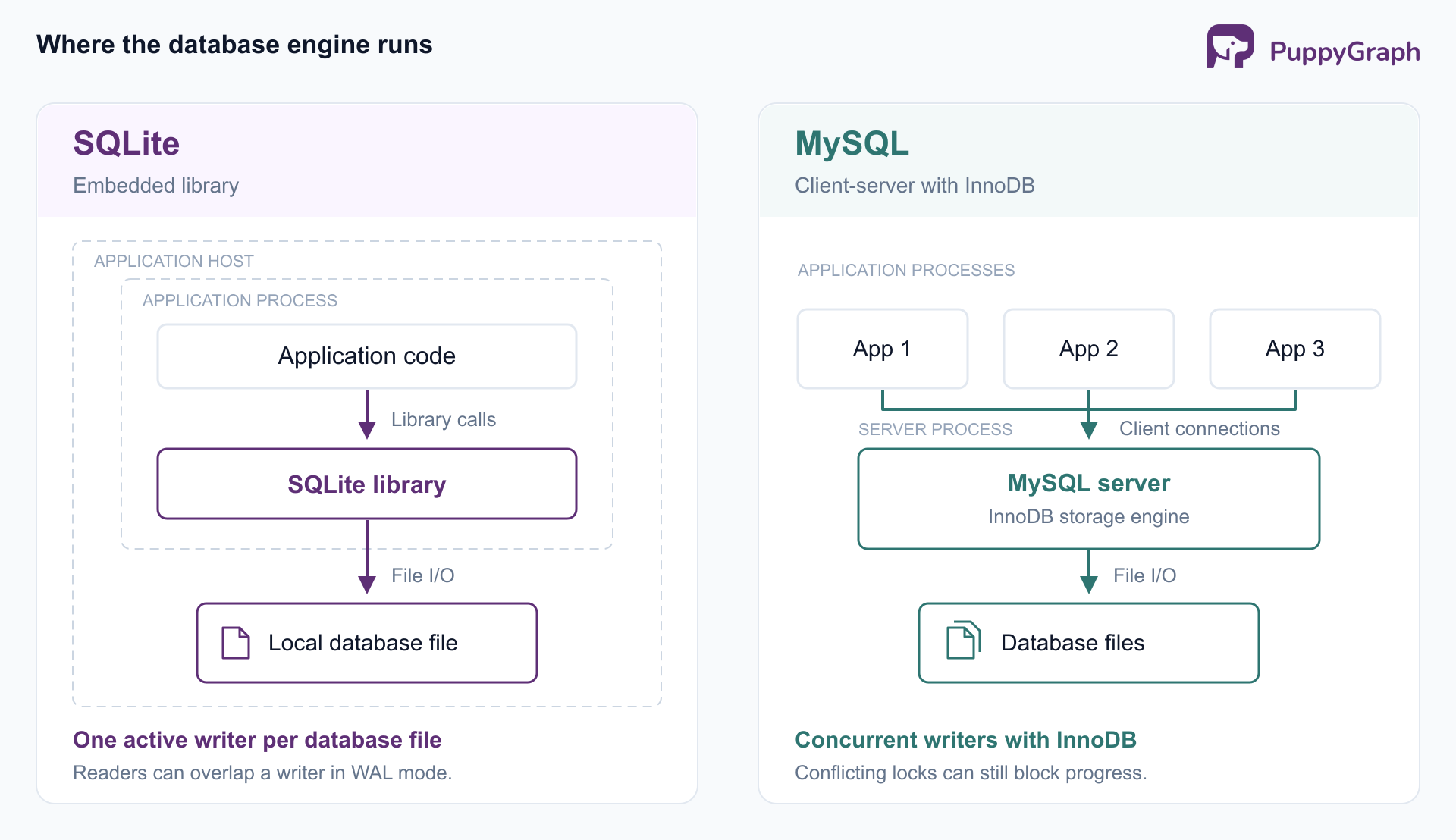
Architecture and performance. SQLite calls execute inside the application, avoiding a separate database process and network round trips. Its documentation on many small queries explains why repeated local SQL calls have a different overhead profile from calls to a remote database. This can benefit applications that repeatedly fetch small pieces of local state.
MySQL introduces a client-server boundary, but it also lets database resources be managed separately from application resources. The database can receive memory and CPU independently of the application tier. Connection reuse, query design, and the network path all belong in performance testing.
There is no useful universal answer to which database is faster. Benchmark the expected queries with representative indexes, data, transaction sizes, and concurrency. Compare equivalent durability settings; a test that relaxes persistence guarantees in one engine measures a different contract. Measure tail latency and failed requests alongside average throughput.
Concurrency and transactions. SQLite permits multiple readers but serializes writes to each database file. In write-ahead logging, or WAL, mode, readers and a writer can proceed concurrently. WAL does not enable multiple simultaneous writers, and participating processes must run on the same host rather than share the WAL database across a network filesystem.
That distinction matters in a service with background jobs. A long write transaction can delay an unrelated write even when the two operations touch different tables. Keep transactions short and handle contention explicitly. A busy timeout can allow waiting, but the application must still handle operations that cannot obtain a lock.
InnoDB's transaction model combines row-level locking with multiversion reads. Transactions updating different records can often progress together, although overlapping records and ranges can conflict. Applications must also handle deadlocks, including retrying a transaction selected for rollback. MySQL provides greater write concurrency, with transaction design still determining how much concurrency a workload achieves.
Scalability and availability. SQLite's deployment guidance recommends a client-server engine when many computers need direct access to the same database. Increasing application replicas does not automatically turn a shared SQLite file into a distributed database. Separate SQLite databases can suit independent users or devices, but synchronization between them becomes another system to design.
MySQL replication copies changes from a source to replicas. Routing suitable queries to replicas can distribute read load. Standard asynchronous replication allows replicas to lag, so a read immediately after a write may need to go to the source when freshness matters.
Read replicas do not automatically spread a primary server's write workload. MySQL's replication scaling guide makes that distinction explicit. Recovery and failover also require deliberate configuration and testing; creating a replica alone does not establish an application's availability guarantees.
Data types and SQL features. SQLite ordinarily uses flexible typing: a column's declared type guides conversion without always restricting the stored value to that type. For example, an ordinary integer-affinity column can hold text that cannot be converted to an integer. STRICT tables provide stronger type enforcement when the schema needs it.
MySQL offers declared column types, including exact decimal and temporal types. Its SQL mode affects how invalid or out-of-range input is handled. Avoid assuming every MySQL deployment rejects the same inputs in the same way.
Both SQLite and MySQL support joins, grouping, and aggregate queries. A local catalog can therefore answer questions that combine several tables or summarize records by category. An embedded deployment does not restrict the application to simple key lookups; the choice should reflect execution and sharing requirements as well as query complexity.
Shared SQL syntax does not establish identical behavior. With SQLite, explicitly enable and verify foreign key enforcement for each connection that requires it. During migration, test constraints, type conversions, date handling, and application queries against the destination engine. An ORM can reduce syntax differences without proving semantic equivalence.
Security and operations. SQLite has no server account system or SQL GRANT and REVOKE commands. Its access boundary relies on operating-system file permissions and the surrounding application. An application that exposes SQLite-backed data to remote users must implement their authorization rules.
MySQL provides accounts and roles for database privileges and supports TLS-protected connections. Those controls support centrally managed access, but they require appropriate configuration. Database permissions also do not replace application rules about which customer's records a logged-in user may view.
Both systems need recoverable backups. SQLite's online backup API can create a consistent copy of a live database. Avoid treating an arbitrary copy of an active main file as a complete backup, particularly when committed changes may still reside in a WAL file. For either database, test restoration and define who owns recovery before an outage makes those decisions urgent.
When should you use SQLite?
SQLite is a strong candidate when local persistence is part of the application's design. The following examples apply its embedded architecture to common workloads.
Desktop and mobile applications. An offline inspection application could store forms, local search indexes, and pending submissions in SQLite. Reading and updating those records would not depend on reaching a database server. Uploading completed work still requires an application synchronization protocol, including a policy for conflicting changes.
Embedded devices and command-line tools. A device collecting measurements or a tool maintaining a local catalog can benefit from SQL queries and transactions without requiring users to operate a database service. Consider storage endurance, interrupted writes, and upgrade behavior as part of the device or application design.
Small services with controlled writes. A web application can serve multiple users while keeping its SQLite database on the application host. SQLite's appropriate-use guidance includes website backends. Evaluate the actual write workload rather than rejecting SQLite simply because the application is online. A mostly read-only reference service presents different demands from a queue whose workers continuously update shared state.
SQLite also makes local experiments convenient, but testing deserves a boundary. If production uses MySQL, run database integration tests against MySQL as well. Otherwise, differences in constraints, conversions, and locking can remain invisible until deployment. Choose SQLite because its operating model fits the application, with a clear plan for the behavior that local storage does not provide.
When should you use MySQL?
MySQL is a strong candidate when several application instances need a shared transactional database. Its server boundary gives those instances a common place to coordinate access while allowing database operations to be managed independently.
Shared transactional applications. Consider an ordering service where checkout requests, inventory updates, and fulfillment jobs run concurrently. InnoDB can support overlapping transactions across different records. Updates to the same inventory item still require careful locking and transaction boundaries; selecting MySQL does not remove contention around popular products.
Services deployed across multiple hosts. Application instances can connect to a central MySQL endpoint without sharing database files. This fits deployments where the application tier grows or restarts independently of the database tier. Test connection handling during restarts and failover, since a database connection is another resource the application must manage.
Centrally administered data access. Separate service accounts and database roles help distinguish an application's write privileges from an analyst's read access. Teams can organize database changes, backups, and access reviews around a shared service with an explicit owner.
These are reasons to accept the operational responsibilities of a database server. Budget for monitoring, backup storage, upgrades, and recovery work alongside compute. A managed service can take over selected tasks, but the application team still needs to understand the service's durability, availability, and access settings. MySQL's value is strongest when that coordination is a requirement of the workload.
SQLite vs MySQL: Which database should you choose?
Start with deployment and write behavior. Choose SQLite when the database belongs on a device or application host, writes can take turns, and local operation simplifies delivery. Choose MySQL when independently deployed clients need shared data, overlapping writes are substantial, or database access needs central administration.
Validate that decision with an application-shaped test. Include background jobs, migrations, long-running requests, and peak write bursts. Record response-time percentiles, contention errors, recovery time, and the work required to restore a backup. Test the failure your deployment must survive: a lost device, a restarted application host, or an unavailable database server.
If you expect to move from SQLite to MySQL, keep migrations explicit and test the destination early. Do not assume that changing a connection string converts stored values or preserves every query's behavior. Document the expected representation of dates, identifiers, and exact quantities before data accumulates around implicit assumptions.
The two engines can also serve different parts of one product. An inspection application might keep each technician's unfinished work in SQLite while a central MySQL database holds accepted submissions. That design needs explicit rules for submission identifiers, retries, and conflicts. Decide which system owns each record and when a local change becomes authoritative. Using both can meet offline and shared-access requirements, provided synchronization is treated as application behavior with its own tests and recovery procedures.
Relationship analysis introduces a separate requirement. For example, identifying accounts linked through shared devices and payment methods calls for a model of entities and relationships spanning several tables. That analytical need can be evaluated alongside the transactional database choice.
PuppyGraph lets you define a graph schema over existing tables and query their relationships using openCypher and Gremlin. Its documented MySQL connection supports querying MySQL data directly, without graph-specific ETL or a required persistent duplicate dataset. MySQL continues to hold the application records; the graph schema adds a semantic model for relationship questions.
PuppyGraph compiles a graph query into a plan of node and edge operators that runs in its own distributed engine. When reading SQL sources, it issues simple projection and filter SQL. Because the query is represented as graph operators end to end, the engine optimizes specifically for multi-hop traversals. This provides an additional query path when connected-data analysis becomes part of the application or analytical workload.
Conclusion
SQLite fits applications that benefit from local, embedded storage and manageable write contention. MySQL fits shared services that need concurrent access, database privileges, and independently operated infrastructure. Both choices require sound schemas, deliberate transaction boundaries, and tested recovery.
Choose from the workload's deployment and failure requirements, then verify the choice with representative tests. If relationship analysis becomes a requirement, evaluate that query layer separately from the database that owns the transactions.
Try the forever-free PuppyGraph Developer Edition and book a demo with the team to see how openCypher and Gremlin queries traverse relationships across warehouse and lakehouse tables, with no graph-specific ETL, for questions that connect application records across multiple hops.

Hao Wu is a Software Engineer with a strong foundation in computer science and algorithms. He earned his Bachelor’s degree in Computer Science from Fudan University and a Master’s degree from George Washington University, where he focused on graph databases.


