

What Is MLflow? Features, Components & Guide
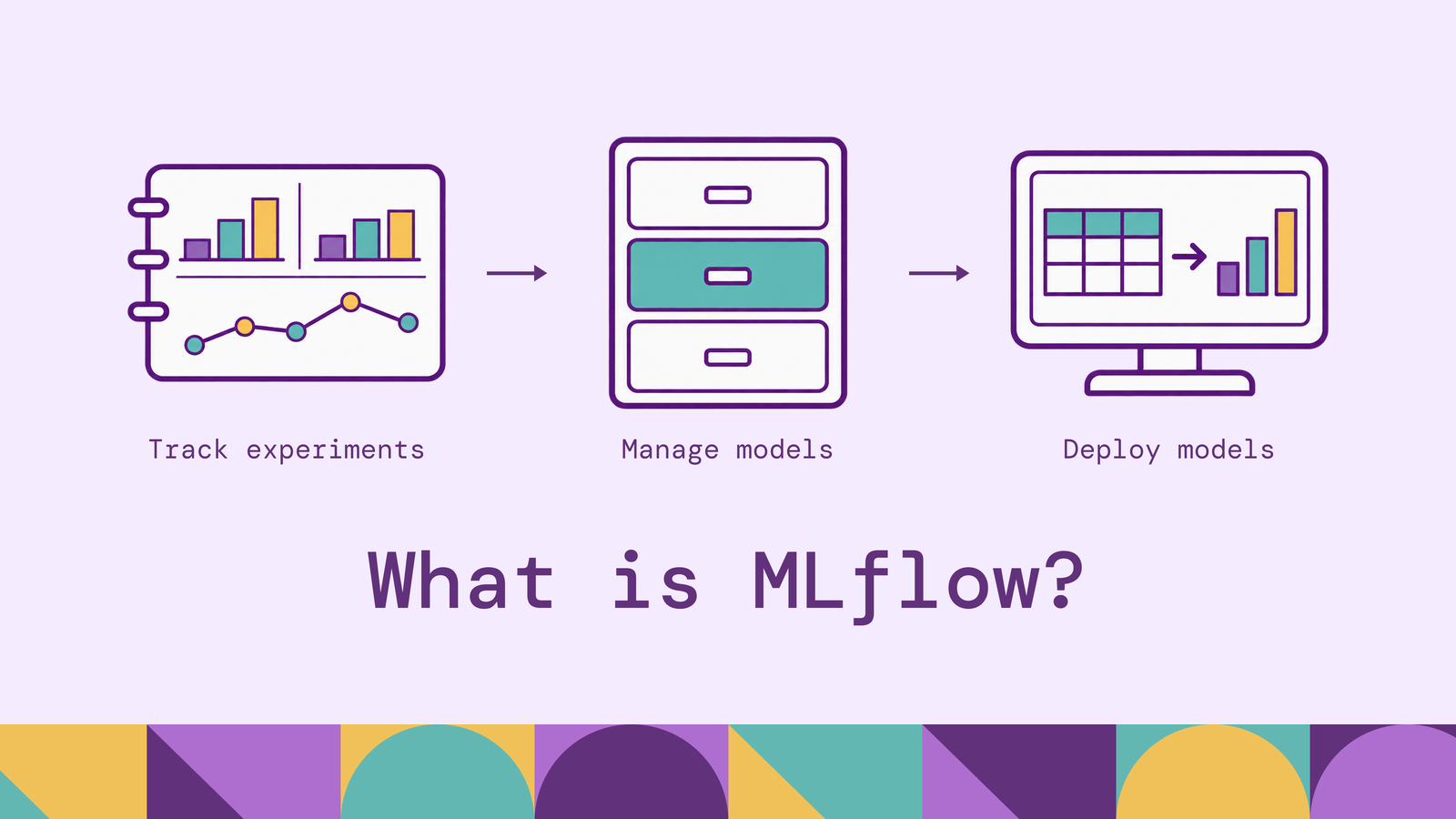
A model's validation score means little without the experiment behind it. Engineers need to know which data, code, parameters, and evaluation procedure produced the result before they can reproduce it or decide to deploy it. MLflow connects those records to the model artifacts that teams compare, share, and release.
This guide explains where MLflow fits in MLOps, how its components work together, and how to track and register a model locally. It also covers the architecture behind a shared deployment and MLflow's role in evaluating LLM applications and agents.
What is MLflow?
MLflow is an open-source platform for managing machine learning and AI application lifecycles. For traditional ML, its capabilities include experiment tracking, model packaging, model registration, and deployment tools. For LLM applications and agents, it provides tracing, evaluation, and prompt management.
Consider a team building a demand forecast. Each training attempt uses a particular dataset, feature definition, and parameter configuration. MLflow can record the experiment's results and retain the resulting model package. Another engineer can inspect that record, load the saved model, and understand the evidence behind its selection.
MLflow works alongside the libraries that train models. Your scikit-learn or PyTorch code still performs the computation; MLflow provides interfaces for recording and managing its outputs. Its framework integrations can automate parts of that recording, with coverage depending on the library.
This makes MLflow one part of an MLOps system. Data preparation, execution infrastructure, release policies, and application operations remain responsibilities that the surrounding stack must address.
Why is MLflow used?
MLflow is useful when experiments need to survive beyond the person or notebook that created them. Engineers need the selection rationale and a record linking each score to the model artifact that achieved it.
Three recurring problems motivate adoption.
Comparing experiments consistently. Suppose two churn models report different recall scores. The difference could come from a better algorithm, a changed holdout population, or a different decision threshold. Recording the configuration and evaluation context makes those explanations inspectable. Teams still need a consistent comparison protocol; storing scores alone cannot establish one.
Handing models between teams. A data scientist needs to communicate more than a serialized estimator. The receiving engineer also needs dependencies, expected inputs, and a stable reference to the selected model. MLflow's model packaging and registry address these handoff requirements.
Reconstructing decisions. When a deployment regresses, engineers need to connect it to the experiment and validation evidence used to approve it. Establish a convention for recording the source commit, dataset reference, and evaluation artifacts with each candidate. Missing context becomes harder to reconstruct after the original environment disappears.
The practical reason to adopt MLflow is continuity: experiment evidence remains accessible as work moves from exploration into a maintained application.
A useful adoption test is to hand a candidate to someone who did not train it. Can they identify its inputs, repeat its evaluation, and explain why it was chosen? If answering those questions requires searching private notebooks or messaging the author, there is a concrete tracking and handoff problem to solve.
How does MLflow work?
MLflow records information that your code sends through its APIs or supported integrations. A typical training workflow proceeds through five steps:
- Select an experiment. An experiment groups related runs and models, such as candidates for a demand-forecasting task.
- Start a run. A run identifies one execution and records its status and timing.
- Log the evidence. Record parameters, metrics, tags, dataset metadata, and output files. Parameters describe configuration; metrics report measured results; tags provide searchable context.
- Log the model. Save the trained object in MLflow's model format, including the information needed to load it.
- Register and consume a candidate. Add a selected model to the registry, then load a specific version from application code or a deployment workflow.
The Tracking documentation defines the experiment, run, and logged-model concepts. The Tracking APIs expose explicit logging functions, while autologging can capture supported information during training.
These steps represent distinct actions. Logging a model saves it and records its metadata. Registering it creates a version under a named registry entry. Deploying it makes it available to an application, for example through a batch job or inference endpoint. A successful registration does not by itself start a serving process.
For iterative training, a metric can be logged repeatedly with a step value, such as the epoch number. That preserves a learning curve instead of only a final score. Keep training and validation metrics under distinct names, and attach evaluation reports when a scalar would hide the behavior that matters. A release decision may depend on error patterns that one average cannot express.
Dataset recording also needs a clear boundary. MLflow's dataset tracking records metadata such as a name, digest, source, and schema. Logging this metadata does not automatically preserve a complete copy of the training data. Keep the underlying dataset available through a versioned storage system and record a reference that can retrieve the intended version.
Key components of MLflow
MLflow's capabilities cover both conventional model development and AI application engineering. The components below address different objects: an execution, a package of code, a trained model, a named model version, or an application request.
MLflow Tracking. Tracking stores experiment records and provides a UI for inspecting results. A parameter might be max_depth=5; a metric might be validation accuracy; an artifact might be a confusion-matrix image. Runs can be searched and filtered by recorded information, making it possible to find candidates that meet an evaluation criterion without opening each run manually.
MLflow Projects. Projects define a format for packaging executable data science code. An MLproject file can describe entry points, parameters, and an environment, so another engineer can invoke a defined command with known inputs. Projects concern executing code; Models concern packaging the model that execution produces. You can adopt Tracking without converting every training script into a Project.
MLflow Models. The model format combines model files with an MLmodel description. A flavor tells a compatible tool how to load or use the package. For example, a scikit-learn model can expose a native scikit-learn representation and a Python-function interface for inference. This common packaging convention reduces custom loading code across tools, but the target environment still needs compatible dependencies.
A model signature describes expected inputs and outputs. An input example makes that interface concrete. Together, they help consumers understand what to send and support input validation. A signature can describe a numeric column; it cannot establish that the column was computed using the correct business definition.
Model Registry. The registry organizes model versions under a name, with descriptions, tags, and aliases. A named entry such as demand-forecast can hold several versions. An alias such as champion points to a chosen version and can be reassigned. Release automation should record the resolved version so engineers can reconstruct what actually ran.
Alias reassignment changes which version a subsequent lookup resolves. A process that has already loaded a model needs an explicit reload or redeployment to use the replacement. Define that behavior in the application or release workflow; otherwise the registry's selected version and the running application's version can diverge.
Tracing, evaluation, and prompt management. For an LLM application, inspecting the final answer often leaves the cause of a failure unclear. MLflow Tracing records instrumented intermediate steps, including their inputs, outputs, and timing. Its evaluation tools support testing applications against datasets with scorers and human feedback. The Prompt Registry versions prompt templates, helping teams relate application changes to evaluation results.
Start with the component that addresses the immediate problem. A team comparing classifiers may need Tracking and Models first; a team debugging an agent may begin with traces and evaluation datasets.
MLflow use cases
Demand forecasting experiments. A retail team can compare forecasting candidates across stores, product categories, and evaluation periods. Log aggregate error alongside segment-level results so a better overall score does not conceal a regression for low-volume products. Record the forecast horizon and data cutoff as part of the evaluation context.
Scheduled retraining and release review. A training job can log a candidate model and its validation results, while a separate release workflow applies acceptance criteria. For example, the candidate may need to preserve performance on a critical customer segment before being selected. MLflow's registry workflows provide tags and aliases that such a process can use to identify validated versions.
Retrieval and agent evaluation. A support assistant may produce an incorrect answer because retrieval missed a relevant document, a tool returned incomplete data, or the model misread the evidence. Instrumenting those steps makes their outputs inspectable. Build an evaluation set containing the difficult questions, then compare changes to retrieval settings or prompts against the same cases. The evaluation criteria should reflect the application's task, including whether answers cite the right evidence.
Relationship-based fraud features. A fraud model may use counts of accounts sharing devices or payment instruments, alongside transaction-level attributes. A useful experiment compares a baseline against a candidate with those relationship features, using the same evaluation split and recording how the features were computed. Prevent future information from entering historical training examples by enforcing the relevant event-time cutoff during feature preparation.
PuppyGraph lets teams define a graph schema over existing tables and query their relationships with openCypher or Gremlin. Data remains in supported SQL databases, data warehouses, and data lakes or lakehouses, including direct reads of open table formats. The schema maps tables to nodes and edges, so teams can investigate shared identifiers without first building a separate graph dataset. In this workflow, application code passes the query results into feature preparation, and MLflow records the ensuing model experiments. The team owns that connection and the time-consistent training extract.
Benefits of MLflow
More useful experiment history. A shared record lets engineers investigate a result without depending on its author's memory. This works best when teams agree on metric names, evaluation datasets, and required tags. Inconsistent logging conventions can make a populated tracking server difficult to use.
Clearer model handoffs. A model package carries loading information and can include dependencies and an input signature. A registry reference identifies the selected version. Together, these reduce ambiguity between the model that was evaluated and the model another engineer loads.
Incremental adoption. Teams can add logging to an existing training script, then introduce shared storage and registry workflows as collaboration grows. That allows the first implementation to solve a specific problem, such as comparing weekly retraining runs, without requiring a simultaneous redesign of the whole platform.
Better release evidence. Recorded evaluations, descriptions, and model references make technical review more concrete. Reviewers can inspect the candidate and the criteria used to select it. The team must still define approval rules and enforce them in the release process.
These benefits depend on the quality of the recorded evidence. MLflow cannot recover an unrecorded data cutoff or an overwritten source dataset. Treat logging conventions and data retention as part of the implementation, then verify that another engineer can load and evaluate a saved candidate.
Portability also needs testing. MLflow's dependency management records software requirements with model packages, but a model may additionally depend on native libraries, hardware, or external services. Load the package in its intended deployment environment and exercise representative inputs before assuming that a successful local prediction establishes deployment readiness.
MLflow architecture
The training and serving setup used here separates the client code, tracking service, metadata storage, and artifact storage. Training runs in a Python script, and application predictions run in a separate model-serving process.
The tracking server exposes HTTP APIs that clients use to record and retrieve information. A notebook and a scheduled training job can send records to the same endpoint even when they run on different machines.
The backend store holds structured metadata such as run IDs, parameters, metrics, and tags. SQLite works for a local setup; a shared deployment can use a database such as PostgreSQL. The self-hosted Model Registry requires a database-backed store.
The artifact store holds files such as saved models and evaluation images. It can use local storage or supported object storage. Artifact access can pass through the tracking server, or clients can access the storage directly when configured to do so. That choice determines where storage credentials are needed and which service handles artifact traffic.
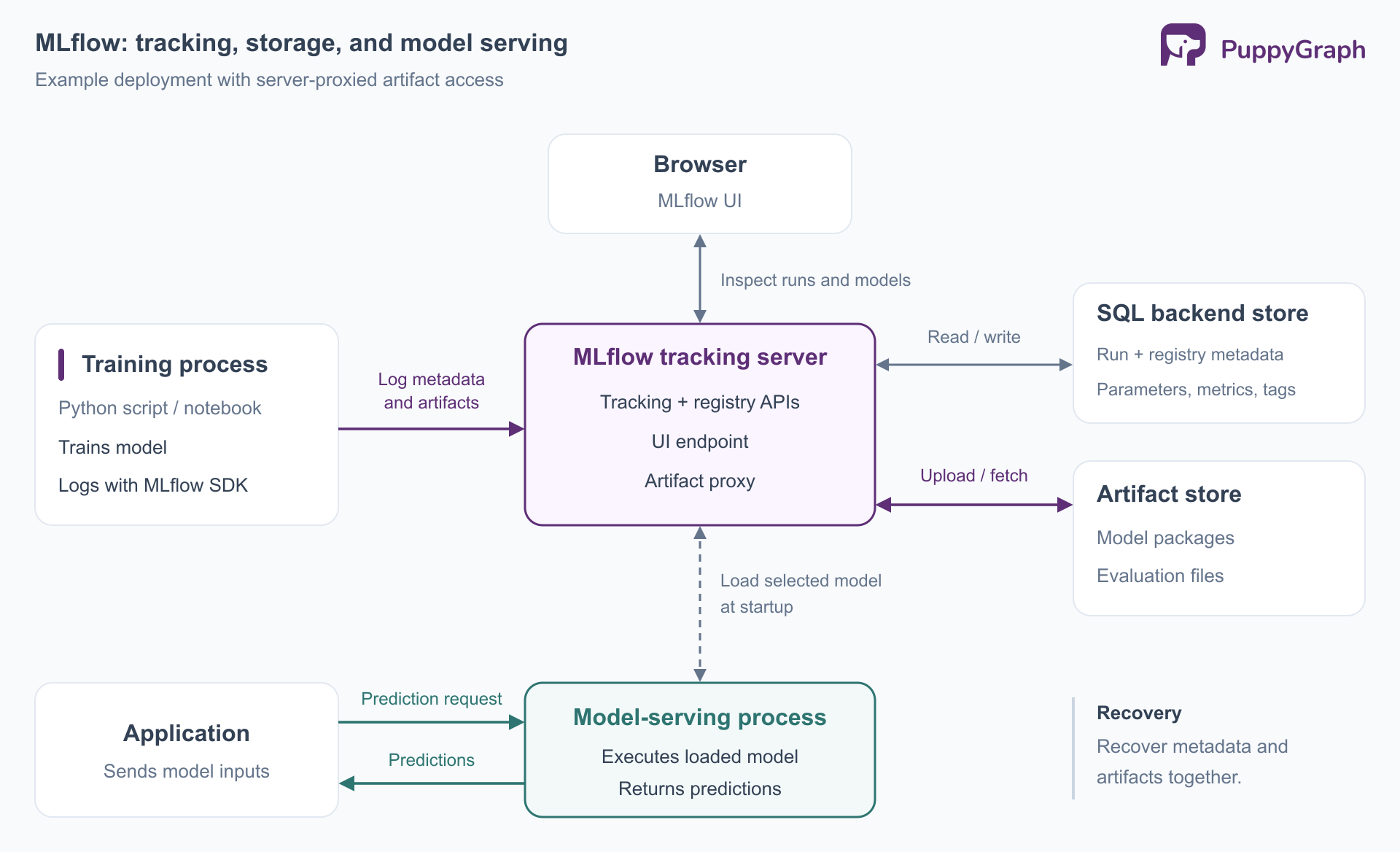
The storage split matters for recovery. Restoring the metadata database while losing the referenced model files leaves an incomplete experiment history. Back up both stores and test model retrieval after restoration. Before sharing a server, configure authentication, TLS/HTTPS encryption, and artifact-store access.
Separate operational ownership accordingly. The platform team may maintain the tracking service and its stores, while a model team owns training jobs and an application team owns serving. Document how logging failures affect a training job and how deployments retrieve approved artifacts. Those decisions become especially relevant when a shared service is unavailable during an otherwise successful training run.
How to get started with MLflow
Begin with a local training script and an explicit storage configuration. The example below uses MLflow 3 and scikit-learn to train an Iris classifier, log its results, register it, and load it back. It demonstrates the mechanics; the small dataset and single split are not a model-selection protocol for a production application.
1. Create an environment. Use Python 3.12 for this example, and make sure the python command invokes that interpreter. In a new directory, run these commands on Linux or macOS:
python -m venv .venv
source .venv/bin/activate
python -m pip install 'mlflow>=3,<4' scikit-learn pandas
2. Start a local tracking server. Keep this terminal running:
mlflow server \
  --host 127.0.0.1 \
  --port 5000 \
  --backend-store-uri sqlite:///mlflow.db \
  --artifacts-destination ./mlartifacts
This places metadata in SQLite and artifacts in a separate local directory. Open http://127.0.0.1:5000 in your browser. In a second terminal, enter the same directory and activate the environment again.
3. Train, log, and register a model. Save the following as train.py. The example uses the documented scikit-learn logging API, with explicit logging so each recorded item is visible:
import mlflow
import mlflow.sklearn
from mlflow.models import infer_signature
from sklearn.datasets import load_iris
from sklearn.linear_model import LogisticRegression
from sklearn.metrics import accuracy_score
from sklearn.model_selection import train_test_split


mlflow.set_tracking_uri("http://127.0.0.1:5000")
mlflow.set_experiment("iris-classification")


X, y = load_iris(return_X_y=True, as_frame=True)
X_train, X_test, y_train, y_test = train_test_split(
    X, y, test_size=0.25, random_state=42, stratify=y
)
params = {"C": 1.0, "max_iter": 300}


with mlflow.start_run(run_name="logistic-regression-baseline"):
    model = LogisticRegression(**params).fit(X_train, y_train)
    predictions = model.predict(X_test)


    mlflow.log_params(params)
    mlflow.log_params({"test_size": 0.25, "split_random_state": 42})
    mlflow.log_metric("test_accuracy", accuracy_score(y_test, predictions))
    mlflow.set_tag("dataset", "sklearn.datasets.load_iris")


    model_info = mlflow.sklearn.log_model(
        sk_model=model,
        name="classifier",
        signature=infer_signature(X_train, model.predict(X_train)),
        input_example=X_train.head(3),
    )


version = mlflow.register_model(model_info.model_uri, "iris-classifier")
model_uri = f"models:/iris-classifier/{version.version}"
loaded = mlflow.pyfunc.load_model(model_uri)
print("Registered model:", model_uri)
print("Predictions:", loaded.predict(X_test.head(3)))
Run python train.py. In the UI, inspect the iris-classification experiment and its run, then inspect the registered model. The registry tutorial explains the corresponding UI and API operations. Repeating the script adds another run and another registered version.
When extending the example to compare parameters, introduce a validation set or cross-validation within the training data. Reserve the test set for the final assessment. Repeatedly selecting settings against the same test results can bias that assessment, as scikit-learn's cross-validation guide explains. MLflow records the measurements; you choose the experimental design that makes them meaningful.
4. Test local serving. Use the version printed by the script. For the first registration in a fresh registry, the URI ends in /1:
export MLFLOW_TRACKING_URI=http://127.0.0.1:5000
mlflow models serve \
  -m 'models:/iris-classifier/1' \
  --host 127.0.0.1 \
  --port 5001 \
  --env-manager local
The serving command starts a separate inference server. Here, --env-manager local uses the active environment, which already contains the training dependencies. In another terminal, send a sample request:
curl http://127.0.0.1:5001/invocations \
  -H 'Content-Type: application/json' \
  -d '{"dataframe_split":{"columns":["sepal length (cm)","sepal width (cm)","petal length (cm)","petal width (cm)"],"data":[[5.1,3.5,1.4,0.2]]}}'
The response contains the predicted class. Stop the servers with Ctrl+C when finished. For a real project, preserve the code revision and dependency versions, record retrievable dataset references, and define evaluation requirements before automating registration or deployment.
Frequently asked questions about MLflow
Is MLflow free and open source?
Yes. The MLflow repository uses the Apache 2.0 license. Running it still involves infrastructure, storage, and maintenance costs. Managed offerings have their own terms and charges.
Can you use MLflow without Databricks?
Yes. You can install the open-source package and run it locally or host a tracking server on your own infrastructure. Databricks provides a managed implementation with additional platform integrations; it is not required for the local workflow shown here.
Does MLflow replace Airflow?
They address different responsibilities. Airflow schedules and orchestrates workflows. A training task in such a workflow can use MLflow to record experiments and models. Choose the orchestration system around execution dependencies and scheduling requirements, and use MLflow where experiment and model records are needed.
What is the difference between MLflow and MLOps?
MLOps is the practice of developing, releasing, and operating machine learning systems. MLflow is a tool that supports parts of that practice. A working MLOps process also specifies who owns data quality, how releases are approved, how application performance is monitored, and what triggers rollback or retraining. Installing MLflow does not define those responsibilities for a team.
Does MLflow guarantee reproducible models?
No. It helps preserve the evidence and packages needed for reproduction. Engineers must also retain the relevant data, code, dependencies, and configuration. Logging a dataset's name or a model's score is insufficient if the original inputs can no longer be retrieved.
Can MLflow track LLM applications as well as trained models?
Yes. Its tracing and evaluation capabilities apply to instrumented LLM applications and agents, including applications that call hosted models. Teams can examine intermediate steps and compare outputs against an evaluation dataset without training the underlying language model themselves.
Try the forever-free PuppyGraph Developer Edition and book a demo with the team to see how openCypher and Gremlin queries explore relationships across warehouse and lakehouse tables, with no graph-specific ETL, for feature experiments you can evaluate and track in MLflow.

Hao Wu is a Software Engineer with a strong foundation in computer science and algorithms. He earned his Bachelor’s degree in Computer Science from Fudan University and a Master’s degree from George Washington University, where he focused on graph databases.


