

Cloud Data Warehouse: Complete Guide
The cloud data warehouse has displaced the on-premises appliance as the default home for enterprise analytics, and the reason is architectural rather than fashionable: separating storage from compute turned capacity planning from a multi-year hardware bet into a per-query decision. The market reflects the shift. Mordor Intelligence’s 2026 forecast puts the data-warehouse-as-a-service market at USD 7.42 billion in 2026, growing at 21.85% annually toward USD 19.94 billion by 2031, driven by cloud-native analytics demand and rising AI workloads.
This guide covers what a cloud data warehouse is, the business problems it solves, the capabilities that separate a serious platform from a hosted database, the architecture underneath, how the leading platforms differ, the workloads they serve, and how AI is changing both the warehouse’s features and its role in the stack.
What is a cloud data warehouse
A cloud data warehouse is a managed analytical database delivered as a cloud service: it stores integrated data from many source systems and serves large-scale analytical queries, while the vendor operates the hardware, software, tuning, and upgrades. The defining contrast is with the on-premises generation it replaced, where a warehouse was a physical appliance sized years in advance, and running out of capacity meant a procurement cycle rather than an API call.
Three properties make the category distinct from “a database running on a cloud VM.” First, storage and compute scale independently: data volume and query concurrency are separate bills and separate knobs. Second, elasticity is native, so compute can grow for a month-end close and shrink to zero overnight. Third, the operational surface is small; there are no indexes to rebuild, vacuum jobs to schedule, or storage arrays to expand, because the service layer handles them.
A cloud data warehouse is also distinct from the systems on either side of it. Operational databases handle OLTP workloads: many small concurrent reads and writes against current data. The warehouse handles the opposite shape, scanning years of history to aggregate a metric, which is why the two are kept separate. On the other side sits the data lake, which stores raw files cheaply but without warehouse-grade query performance or transactions; the data lakehouse architecture has been closing that gap by putting warehouse semantics over open storage, and most of the platforms covered below now straddle the line.
The business problems a cloud data warehouse solves
The category earns its adoption from a handful of concrete failures in the setup it replaced, and each maps to an architectural property rather than a feature checkbox.
Capacity planning as a bet. An on-premises warehouse is sized for projected peak load years out. Undersize it and the quarter-end close saturates the cluster; oversize it and capital sits idle. Elastic compute converts that bet into a running adjustment: scale up for the close, back down after, and pay for the hours used.
Workload contention. On a fixed-size system, the nightly transformation jobs, the executive dashboards, and the data science team’s exploratory queries all compete for the same cycles, and the loudest workload degrades the rest. Cloud platforms isolate workloads onto separate compute (independent clusters or serverless pools reading the same storage), so an expensive ad-hoc query no longer slows the CEO’s dashboard.
Data silos and extract sprawl. When central capacity is scarce, departments build their own marts and spreadsheet extracts, and the organization ends up with five versions of revenue. Cheap, centrally governed storage removes the capacity excuse for silos: the warehouse can hold everything, and access control rather than physical separation decides who sees what.
Capital expense and operational drag. The appliance model front-loads cost into hardware and licenses, then adds a standing DBA burden for patching, tuning, and capacity management. The service model moves spend to usage-based operating expense and hands the undifferentiated operations to the vendor, which matters most to teams too small to staff a warehouse operations function at all.
Slow time-to-data. Onboarding a new source into a capacity-constrained warehouse is a negotiation. With elastic platforms and ELT tooling, loading raw data first and transforming it in-warehouse became the norm, cutting the path from “we have this data” to “analysts can query it” from months to days.
None of these is about raw speed. The common thread is that a cloud data warehouse removes a fixed constraint (hardware capacity) that used to force organizational workarounds, and most of the business value comes from retiring the workarounds rather than from any single query running faster.
Capabilities every cloud data warehouse should have
The label is applied loosely, so it is worth an explicit checklist. The capabilities group into three concerns: how the platform scales, what data it can serve, and whether it can be trusted and operated.
On scale and performance, four capabilities are table stakes. Separation of storage and compute, so data volume and query capacity are priced and scaled independently. Elastic, workload-isolated compute, so concurrent teams get independent resources over the same tables rather than a queue. Columnar storage with a massively parallel (MPP) engine, because analytical queries read a few columns across billions of rows, and column layout plus parallel scan is what makes that affordable. Automatic optimization, including partition or micro-partition pruning and caching, so performance does not depend on a resident tuning expert.
On data, the shape of what a warehouse must serve has widened. Semi-structured data support (JSON, Avro, Parquet) as queryable first-class types, not blobs, because event and API data arrives nested. Streaming and incremental ingestion, so freshness is minutes rather than a nightly batch window. Open table format support is the newest entrant: reading and increasingly writing Apache Iceberg or Delta Lake tables in object storage, so the warehouse engine is a choice rather than a place data is locked into.
On trust and operations: governance and security (role-based access control, encryption, column masking, row-level policies, audit logs) strong enough to centralize sensitive data safely; data sharing that grants live access to a dataset across accounts or organizations without copying it; and cost observability, since usage-based pricing makes spend a daily engineering concern rather than an annual procurement one.
The checklist doubles as an evaluation filter. A platform can be a competent SQL engine and still miss the point of the category: if compute cannot be isolated per workload, if JSON is a second-class citizen, or if sharing data means exporting CSVs, the architectural advantages that justify the migration quietly disappear.
Cloud data warehouse architecture
Most cloud data warehouses, despite different branding, resolve to the same three-layer architecture, and understanding it explains both the pricing models and the performance characteristics.
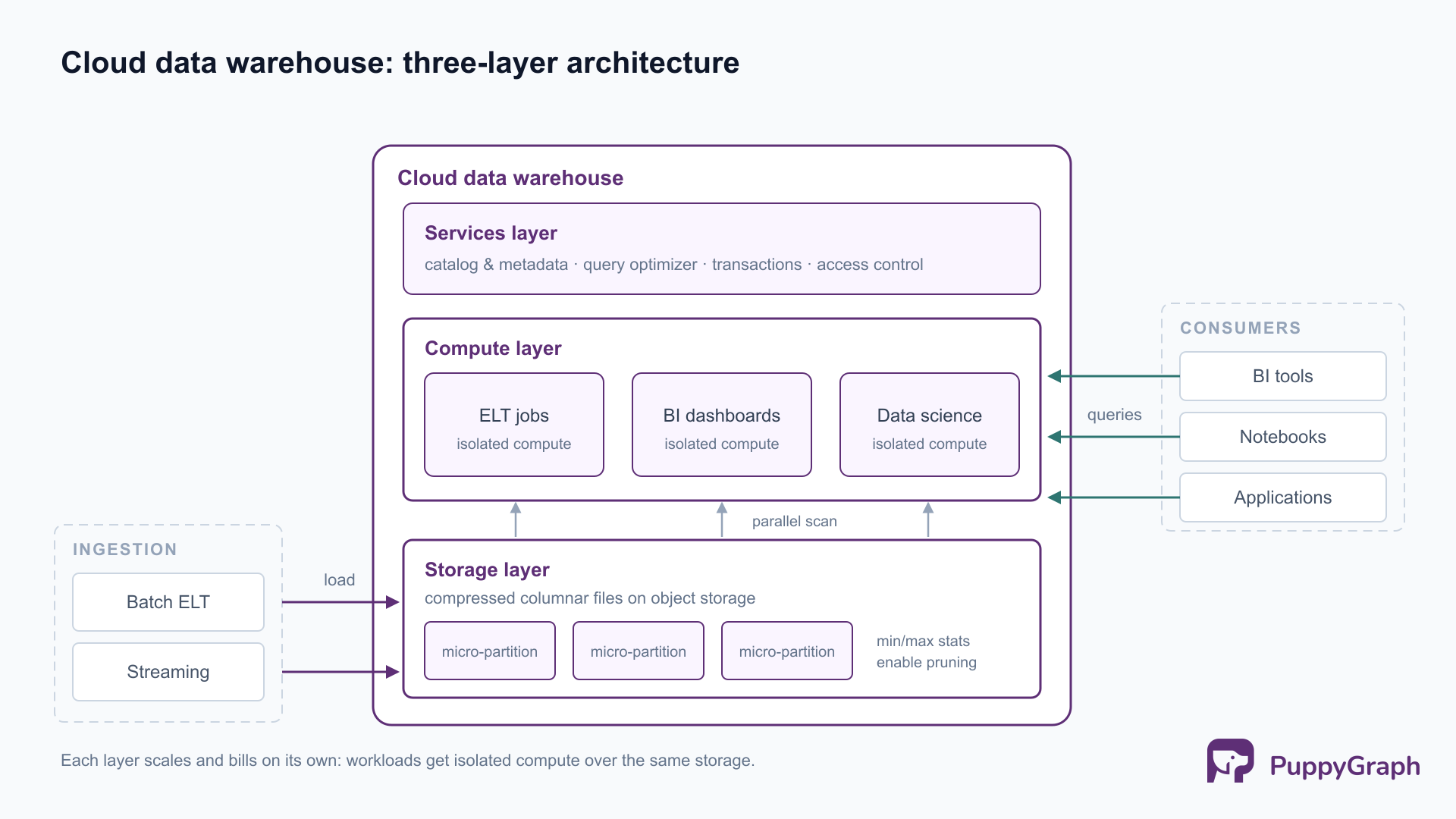
The storage layer holds table data in compressed columnar format on cloud object storage, partitioned into files or micro-partitions that each carry metadata such as min/max values per column. That metadata is what makes scans cheap: a query filtered to one month touches only the partitions whose ranges overlap it, a technique called pruning. Storage is billed near object-storage rates, which is why keeping years of history became economically unremarkable.
The compute layer is where queries execute: pools of nodes (provisioned clusters in some platforms, serverless slot pools in others) that scan the shared storage in parallel, each node handling a slice of the data. Because compute holds no permanent state, clusters can be created, resized, and dropped freely, which is the mechanism behind both elasticity and workload isolation. Two teams run on two clusters against the same tables and never contend.
The services layer coordinates the other two: the catalog and metadata store, the query optimizer, transaction management, and access control. It is the layer that makes the storage-compute split usable, since something has to know which files constitute a table at a point in time and which user may see which column.
Data flows in through batch and streaming ingestion into staging tables, is transformed in-warehouse (the ELT pattern, using the warehouse’s own engine for transformation), and lands in modeled tables that dashboards and applications query. The modeling disciplines that shape those tables, facts, dimensions, and the layering between raw and presentation data, are their own topic, covered in our guide to data warehouse design.
The three layers are also the map of what you pay for: storage at commodity rates, compute by size and duration, and the services layer typically bundled. Nearly every pricing difference between platforms is a difference in how the compute layer is packaged.
Which cloud data warehouse is right for your business?
Five platforms dominate the shortlist, and they differ less in SQL capability than in compute packaging, pricing shape, and ecosystem gravity.
The differences that decide real evaluations are mostly structural. Snowflake runs the same architecture across AWS, Azure, and Google Cloud, which makes it the neutral choice when cloud strategy is unsettled, and its per-second billing rewards intermittent workloads. BigQuery removes cluster management entirely; on-demand pricing bills by data scanned, which is forgiving for spiky exploration and punishing for careless full-table scans, so heavy users typically move to capacity pricing. Redshift rewards commitment: for a steady, well-utilized workload inside an AWS stack, provisioned capacity tends to cost less than elastic pricing elsewhere, at the cost of more capacity management. Databricks approaches the category from the lakehouse side, with the warehouse as a SQL surface over Delta Lake tables governed by Unity Catalog, which is compelling when the same tables feed Spark pipelines and ML training. Fabric bundles warehousing into a single capacity shared with the rest of the Microsoft analytics estate, storing everything as Delta tables in OneLake, a fit that is hard to beat where Power BI is already the reporting standard and harder to justify where it is not.
A useful way to choose: start from constraints rather than benchmarks. Which cloud already holds the data, since egress and latency penalize distance; whether the workload is steady (favoring provisioned pricing) or bursty (favoring serverless); whether open table formats are a requirement or a nice-to-have; and what the team already operates well. Published benchmark wars between these vendors mostly measure configurations rather than destinies, while a pricing model mismatched to workload shape will show up on every monthly bill.
Workloads supported by cloud data warehouses
A modern warehouse is a multi-workload platform, and knowing the workload categories clarifies both platform choice and capacity planning.
Business intelligence and reporting. The founding workload: dashboards, scheduled reports, and OLAP-style slicing and drill-down over modeled tables. It is high-concurrency and latency-sensitive, which is why workload isolation matters; BI traffic is the workload everything else must not degrade.
Ad-hoc analytics. Analysts interrogating data directly in SQL, with unpredictable query shapes and volumes. Elasticity carries this one: exploration spikes get absorbed by scaling compute rather than by queueing behind the dashboards.
In-warehouse transformation (ELT). The warehouse engine as the transformation runtime, turning raw loaded data into modeled tables on a schedule. It is compute-heavy and deadline-driven, typically isolated onto its own compute so the nightly build and the morning dashboards never meet.
Data science and machine learning. Feature extraction, training-set construction, and increasingly in-warehouse model scoring and vector operations. The draw is locality: features computed where the data lives skip an export pipeline and inherit warehouse governance.
Real-time analytics. Streaming ingestion feeding dashboards and operational decisions at minutes-old freshness, a workload that used to require a separate specialized stack and increasingly runs on warehouse streaming features.
Those five all play to the warehouse’s strengths. A sixth shape shows up in the same organizations and fits it poorly: questions that traverse relationships, such as which accounts sit within four transfers of a flagged one, which services depend transitively on a failing database, or which entities share devices, addresses, or payment methods with a known-bad actor. In SQL, each of these becomes a chain of self-joins, where the join depth must be guessed in advance and cost climbs steeply per hop. The data is relational; the question is a graph traversal expressed against SQL tables.
The historical answer was standing up a separate graph database and an ETL pipeline to feed it, which reintroduces the silo the warehouse was meant to end. PuppyGraph removes that step: it is a graph query engine that connects directly to the warehouse or lakehouse (Snowflake, Databricks, PostgreSQL, MySQL, and open formats like Apache Iceberg) and lets you define a graph schema over existing tables, then query them as a graph in openCypher and Gremlin, with no ETL and no second copy of the data. The four-hop transfer question becomes a two-line pattern match executed by an engine built for traversal, rather than a stack of self-joins pushed through the warehouse’s relational planner. Customers include Coinbase, eBay, and AMD; AMD, for example, uses it to build a graph layer over Apache Iceberg across tickets, code, logs, and telemetry.
Each of these workloads leans on a different part of the platform, which is why both capacity planning and platform evaluation start from the same question: which of these workloads the organization actually runs.
How AI is changing cloud data warehousing
AI is reshaping the warehouse from two directions at once: as a feature set inside the platform, and as a new class of consumer sitting on top of it.
Natural-language interfaces are now standard equipment. Every major platform ships an assistant that turns questions into SQL: Amazon Q generative SQL reached general availability for Redshift in September 2024, Gemini in BigQuery rolled out to general availability starting August 2024, and Databricks AI/BI Genie, renamed Genie One in June 2026, is generally available for conversational analytics over lakehouse tables. The pattern is consistent: the assistant reads schema metadata and query history to ground its SQL generation in the actual warehouse rather than in the model’s guesses.
LLM functions are moving into SQL itself. Snowflake Cortex AISQL exposes functions like AI_CLASSIFY, AI_FILTER, and AI_EXTRACT as SQL primitives, and BigQuery ships comparable AI functions backed by Gemini. Classification, extraction, and embedding become set operations over columns, which pulls a class of unstructured-data processing into the warehouse that previously required an external pipeline. Vector storage and similarity search are following the same path into the core engine.
AI also changes the operational profile. Agent and assistant traffic is machine-generated: higher query volume, less predictable shapes, and no human in the loop noticing a runaway query. That raises the stakes on capabilities the previous sections covered, workload isolation to keep machine traffic away from human-facing dashboards, and cost observability to catch an agent that has learned an expensive habit.
The warehouse is becoming the grounding layer for AI agents. The more consequential shift is on the consumer side. As organizations point LLM-based agents at enterprise data, the warehouse is the natural source of truth for them to query, and the failure mode is well known: an agent’s SQL can be syntactically perfect and semantically wrong, joining tables that should not join or referencing entities it hallucinated. The emerging response is a semantic layer, an ontology over the warehouse’s tables that defines the entities and relationships an agent may reference, validates queries against those definitions, and returns machine-readable feedback when a query violates them. The graph layer from the previous section does double duty here: the graph schema PuppyGraph defines over existing tables functions as an enforced ontology, every query an agent sends is validated against it before execution, and an invalid entity or relationship reference comes back as structured, domain-level feedback the agent can use to correct itself rather than as a confidently wrong result set. Warehouses hold the data; the semantic layer holds the meaning, and agent reliability depends on both.
The near-term picture is not a new kind of warehouse but a heavier set of demands on the existing one: more unstructured data in, more machine-driven queries out, and a semantic layer in between as the contract that keeps automated consumers honest.
Conclusion
The cloud data warehouse won by turning fixed constraints into elastic ones: storage priced like object storage, compute sized per workload per hour, and operations absorbed by the service. Choosing one is mostly a matter of matching pricing shape and ecosystem to the workloads you actually run, and the workload list keeps widening, from BI and ELT through streaming, machine learning, relationship analytics, and now AI agents that query the warehouse without a human in the loop. The platforms will keep converging on features; the durable decisions are the ones about architecture, open formats, governance, and the layers you place over the warehouse to serve the questions its relational engine handles least well.
Try the forever-free PuppyGraph Developer Edition and book a demo with the team to see how openCypher and Gremlin queries run over warehouse and lakehouse tables, with no graph-specific ETL, adding relationship traversal alongside the aggregation workloads your warehouse already serves.

Sa Wang is a Software Engineer with exceptional mathematical ability and strong coding skills. He holds a Bachelor's degree in Computer Science and a Master's degree in Philosophy from Fudan University, where he specialized in Mathematical Logic.


